
Issues with AMD Adrenalin software versions 26.1.1 and 26.5.2: how to fix them?


Local time
7:04 AM
Posts
2
OS
Windows 11 23H2 Build 22631.2861
Greetings

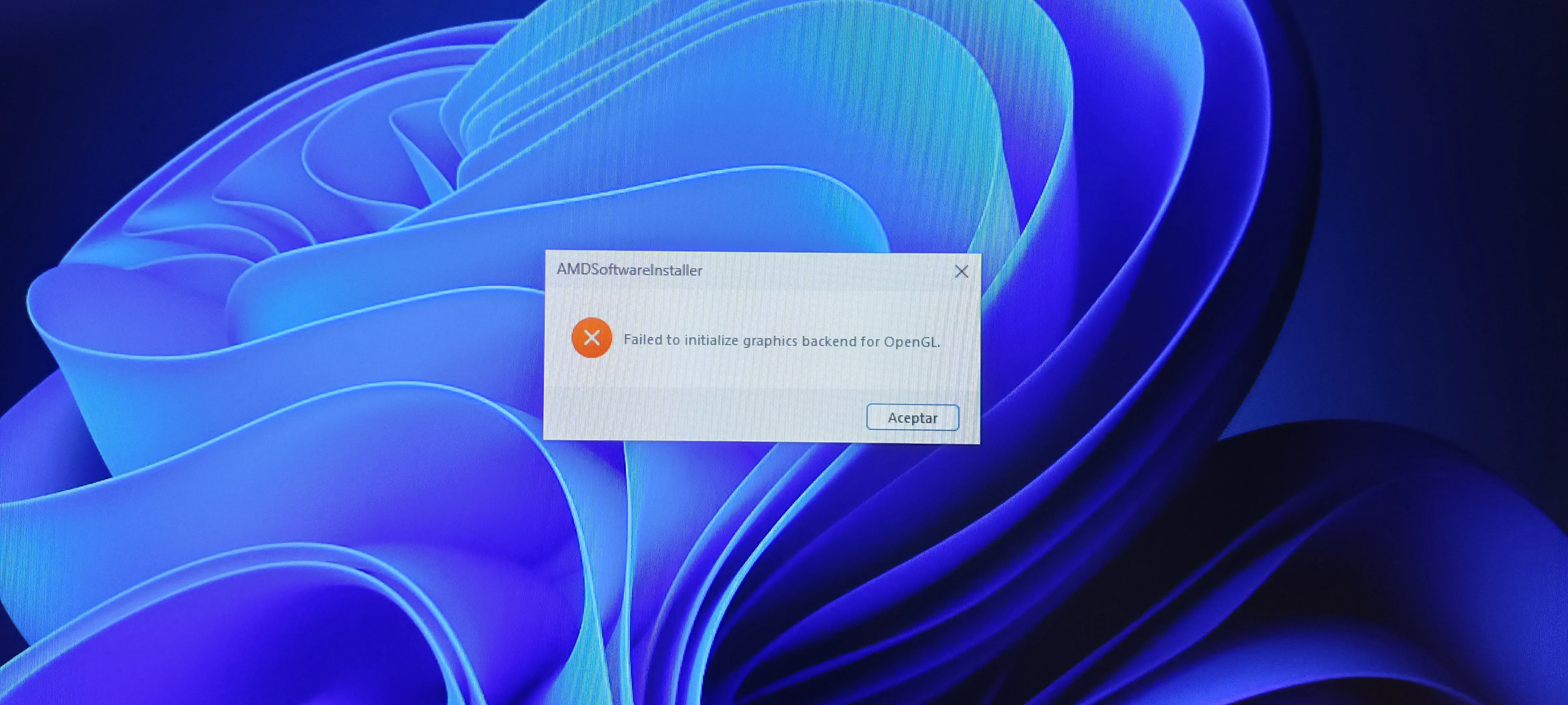
I am having trouble with the latest video driver updates for my RX 590 GPU; the issue is that when I try to install the AMD software, I get the error "Failed to initialize graphics backend for OpenGL," and it won't let me proceed with the installation.

Before this, I was using version 24.9.1, which was very stable on my system, but eventually, it started throwing a specific error. I tried reinstalling it—first using DDU for a clean uninstall—but that didn't fix the issue, so I decided to try the only two versions released this year (2026) for my specific card model, and that’s when the problem occurs 😔,
But right now, what I need most is to figure out how to fix that OpenGL issue, and I hope AMD improves compatibility for these GPUs; after all, if they are still supported, these kinds of conflicts shouldn't exist.
I'll leave a screenshot of the error, and I would really appreciate the help.
IMG_20261011_145559.webp
 
Windows Build/Version
Windows 11 23H2 Build 22631.2861

My Computer My Computer

At a glance

Windows 11 23H2 Build 22631.2861i7 12700kCorsair Vengeance 16GB DDR4 3000mhzRX 590 Sapphire Pulse 8GB GDDR5
OS
Windows 11 23H2 Build 22631.2861
Computer type
PC/Desktop
Manufacturer/Model
MSI
CPU
i7 12700k
Motherboard
MSI Z790-P Pro Wifi DDR4
Memory
Corsair Vengeance 16GB DDR4 3000mhz
Graphics Card(s)
RX 590 Sapphire Pulse 8GB GDDR5
PSU
Cooler Master Silent Pro Gold 1200W
Cooling
DeepCool Assassin III
Greetings

I am having trouble with the latest video driver updates for my RX 590 GPU; the issue is that when I try to install the AMD software, I get the error "Failed to initialize graphics backend for OpenGL," and it won't let me proceed with the installation.

Before this, I was using version 24.9.1, which was very stable on my system, but eventually, it started throwing a specific error. I tried reinstalling it—first using DDU for a clean uninstall—but that didn't fix the issue, so I decided to try the only two versions released this year (2026) for my specific card model, and that’s when the problem occurs 😔,
But right now, what I need most is to figure out how to fix that OpenGL issue, and I hope AMD improves compatibility for these GPUs; after all, if they are still supported, these kinds of conflicts shouldn't exist.
I'll leave a screenshot of the error, and I would really appreciate the help.
An Open GL error in 2026? Haven't seen that in a while.
What is that CPU 850 va you have listed in your specs?

Your OS 23H2 Build 22631.2861 needs an update as well.
Start there with the windows updates, DDU the GPU driver & software again and let windows choose the driver for you.
 

My Computers My Computers

  • At a glance

    All Branches but StableAMD Ryzen 7 7735HS 3200-4500 Mhz 8 cores x 232 GB DDR5Radeon Graphic / NVIDIA GeForce RTX 4060 8 GB...
    OS
    All Branches but Stable
    Computer type
    Laptop
    Manufacturer/Model
    Acer Nitro ANV15-51
    CPU
    AMD Ryzen 7 7735HS 3200-4500 Mhz 8 cores x 2
    Motherboard
    Sportage_RBH
    Memory
    32 GB DDR5
    Graphics Card(s)
    Radeon Graphic / NVIDIA GeForce RTX 4060 8 GB GDDR6
    Sound Card
    AMD/Realtek(R) Audio
    Monitor(s) Displays
    Integrated Monitor (15.3"vis)
    Screen Resolution
    FHD 1920X1080 16:9 144Hz
    Hard Drives
    KINGSTON OM8SEP4512Q-AA 1TB
    Western Digital 256GB
    PSU
    19V DC 6.32 A 120 W
    Cooling
    Dual Fans
    Mouse
    MS Bluetooth
    Internet Speed
    Fiber 1GB Cox -us & 1GB Orange-fr
    Browser
    Edge Canary- Firefox Nightly-Chrome Dev-Chrome Dev
    Antivirus
    Windows Defender
  • At a glance

    Windows 11 BetaAMD A9-94208 GB of DDR4AMD Radeon R5
    Operating System
    Windows 11 Beta
    Computer type
    Laptop
    Manufacturer/Model
    Asus X751BP
    CPU
    AMD A9-9420
    Memory
    8 GB of DDR4
    Graphics card(s)
    AMD Radeon R5
    Screen Resolution
    1600x900
    Hard Drives
    Seagate 1 TB
¿Un error de OpenGL en 2026? Hace tiempo que no veía algo así.
¿Qué procesador 850 va tienes listado en tus especificaciones?

Tu sistema operativo OS 23H2 Build 22631.2861 también necesita una actualización.
Empieza por ahí con las actualizaciones de Windows, desinstala de nuevo el controlador y el software de la GPU con DDU y deja que Windows elija el controlador por ti.
Hi, I'm correcting the processor info: it's an i7-12700K.
For now, I need a solution that doesn't involve updating Windows or reinstalling it; my internet connection is terrible for doing all that.
 

My Computer My Computer

At a glance

Windows 11 23H2 Build 22631.2861i7 12700kCorsair Vengeance 16GB DDR4 3000mhzRX 590 Sapphire Pulse 8GB GDDR5
OS
Windows 11 23H2 Build 22631.2861
Computer type
PC/Desktop
Manufacturer/Model
MSI
CPU
i7 12700k
Motherboard
MSI Z790-P Pro Wifi DDR4
Memory
Corsair Vengeance 16GB DDR4 3000mhz
Graphics Card(s)
RX 590 Sapphire Pulse 8GB GDDR5
PSU
Cooler Master Silent Pro Gold 1200W
Cooling
DeepCool Assassin III
The RX 590's require a different version of the AMD Radeon Adrenalin drivers'/software package than the later model GPU's.

Were the drivers you tried these or the 26.1.1 Polaris-Vega variant?


EDIT: There is this thread about the issue you're having over on the AMD forums.


Please post a screenshot like the one below showing the Display Adapters listed in the Device Manager.

1791833030550.webp
 
Last edited:

My Computers My Computers

  • At a glance

    Windows 11 Pro 26H2Intel Core i9 13900KCorsair Dominator Platinum 64gb 5600MT/s DDR5...Sapphire NITRO+ AMD Radeon RX 7900 XTX Vapor-...
    OS
    Windows 11 Pro 26H2
    Computer type
    PC/Desktop
    Manufacturer/Model
    Homebuilt
    CPU
    Intel Core i9 13900K
    Motherboard
    Asus ProArt Z790 Creator WiFi - Bios 3202
    Memory
    Corsair Dominator Platinum 64gb 5600MT/s DDR5 Dual Channel
    Graphics Card(s)
    Sapphire NITRO+ AMD Radeon RX 7900 XTX Vapor-X 24GB
    Sound Card
    External DAC: Cambridge Audio DACMagic200M - Headphone Amps: Topping L70 & SMSL H400
    Monitor(s) Displays
    Samsung S95F OLED 55" TV
    Screen Resolution
    3840 x 2160 120hz
    Hard Drives
    Samsung 980 Pro 2TB (OS)
    Samsung 980 Pro 1TB (Files)
    Lexar NZ790 4TB
    LaCie d2 Professional 6TB external - USB 3.1
    Seagate Expansion 16TB external - USB 3.2
    Seagate One Touch 18TB external HD - USB 3.0
    PSU
    Corsair RM1200x Shift
    Case
    Corsair RGB Smart Case 5000x (white)
    Cooling
    NAUTILUS 360 RS Liquid CPU Cooler
    Keyboard
    Incase Ergonomic USB (Microsoft clone)
    Mouse
    Logitech MX Master 3S
    Internet Speed
    Fibre 900/500 Mbps
    Browser
    Microsoft Edge Chromium
    Antivirus
    Bitdefender Total Security
    Other Info
    AMD Radeon Software & Drivers
    Hasleo Backup Suite
    Dashlane password manager
    Kensington Verimark fingerprint reader
    Logitech Brio 4K webcam
    Orico 10-port powered USB 3.0 hub
  • At a glance

    Windows 11 Pro 25H2Intel® Core™ i9-13900H32GB DDR4-3200 Dual channel*Intel Iris Xᵉ Graphics G7
    Operating System
    Windows 11 Pro 25H2
    Computer type
    Laptop
    Manufacturer/Model
    Asus Vivobook X1605VA
    CPU
    Intel® Core™ i9-13900H
    Motherboard
    Asus X1605VA bios 309
    Memory
    32GB DDR4-3200 Dual channel
    Graphics card(s)
    *Intel Iris Xᵉ Graphics G7
    Sound Card
    Realtek | Intel SST Bluetooth & USB
    Monitor(s) Displays
    16.0-inch, WUXGA 16:10 aspect ratio, IPS-level Panel
    Screen Resolution
    1920 x 1200 60hz
    Hard Drives
    512GB M.2 NVMe™ PCIe® 3.0 SSD
    Mouse
    Logitech MX Ergo Trackball
    Antivirus
    Bitdefender Total Security
    Other Info
    720p Webcam
    WiFi & USB to ethernet

My Computers My Computers

  • At a glance

    Windows 11 Pro 23H2 (7584), 26H2 (9711)Mobile DualCore Intel Core 2 Duo T7250, 2000 MHz4GBMobile Intel(R) GMA 4500M (Mobile 4 series)
    OS
    Windows 11 Pro 23H2 (7584), 26H2 (9711)
    Computer type
    Laptop
    Manufacturer/Model
    Acer Extensa 5630EZ
    CPU
    Mobile DualCore Intel Core 2 Duo T7250, 2000 MHz
    Motherboard
    Acer Extensa 5630
    Memory
    4GB
    Graphics Card(s)
    Mobile Intel(R) GMA 4500M (Mobile 4 series)
    Sound Card
    Realtek ALC268 @ Intel 82801IB ICH9 - High Definition Audio Controller
    Monitor(s) Displays
    1
    Screen Resolution
    1280x800
    Hard Drives
    Samsung SSD 850 EVO 250GB SATA Device (250 GB, SATA-III)
    Internet Speed
    802.11g wireless 54 Mbps
    Browser
    MICROSOFT EDGE
    Antivirus
    WINDOWS DEFENDER
    Other Info
    Legacy MBR installation, no TPM, no Secure Boot, no WDDM 2.0 graphics drivers, no SSE4.2, cannot get more unsupported ;) This is only my test laptop. I had installed Windows 11 here before upgrading my main PC. For my main PC I use everyday see my 2nd system specs.
  • At a glance

    Windows 11 Pro 26H2 (build 26300.9711)Intel Core-i7 3770 3.40GHz s1155 (3rd generat...2x Kingston Hyper-X Blu 8GB DDR3-1600GIGABYTE GeForce RTX 3050 WINDFORCE OC V2 6GB...
    Operating System
    Windows 11 Pro 26H2 (build 26300.9711)
    Computer type
    PC/Desktop
    Manufacturer/Model
    Custom-built PC
    CPU
    Intel Core-i7 3770 3.40GHz s1155 (3rd generation)
    Motherboard
    Asus P8H61 s1155 ATX
    Memory
    2x Kingston Hyper-X Blu 8GB DDR3-1600
    Graphics card(s)
    GIGABYTE GeForce RTX 3050 WINDFORCE OC V2 6GB (GV-N3050WF2OCV2-6GD)
    Sound Card
    Realtek HD audio (ALC887)
    Monitor(s) Displays
    Sony Bravia KDL-19L4000 19" LCD TV via VGA
    Screen Resolution
    1440x900 32-bit 60Hz
    Hard Drives
    WD Blue SA510 2.5 1000GB SSD as system disk, Western Digital Caviar Purple 4TB SATA III (WD40PURZ) as second
    PSU
    Thermaltake Litepower RGB 550W Full Wired
    Case
    SUPERCASE MIDI-TOWER
    Cooling
    Deepcool Gamma Archer CPU cooler, 1x 8cm fan at the back
    Keyboard
    Mitsumi 101-key PS/2
    Mouse
    Microsoft Compact Optical Mouse
    Internet Speed
    802.11ac 5GHz wireless 260Mpbs
    Browser
    Microsoft Edge, Mozilla Firefox
    Antivirus
    Microsoft Windows Defender
    Other Info
    Legacy BIOS (MBR) installation, no TPM, no Secure Boot, WDDM 3.0 graphics drivers, WEI score 7.4

Latest Tutorials

Back
Top Bottom




