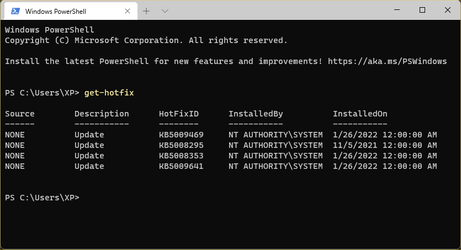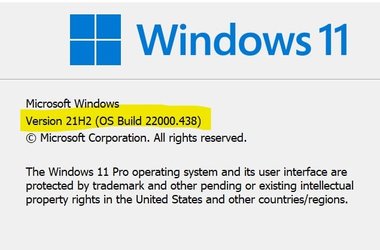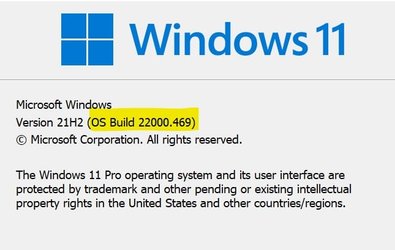
Win Update KB5008353 Cumulative Update Preview for Windows 11 Build 22000.469 - Jan. 25


UPDATE 2/8:

KB5008353 Build 22000.469 also released to Windows Insiders in the Beta and Release Preview channels.


January 25, 2022—KB5008353 (OS Build 22000.469) Preview​


For information about Windows update terminology, see the article about the types of Windows updates and the monthly quality update types. For an overview of Windows 11 (original release), see its update history page.

Note Follow @WindowsUpdate to find out when new content is published to the Windows release health dashboard.

Highlights​

  • Updates an issue that causes the audio service to stop responding on some devices that support hardware-accelerated Bluetooth audio.
  • Updates an issue that affects icons for apps when the apps are not running. On the taskbar, these icons might display as active as if the apps are running.
  • Adds a new Your Microsoft Account page to the Accounts category in Windows Settings for Home and Professional editions.
  • Updates an issue that incorrectly shows the volume icon in the taskbar as muted.
  • Updates an issue that causes a device to stop working when it’s connected to multiple displays.
  • Updates an issue that affects the auto-hide feature of the taskbar. The taskbar might not reliably appear when you hover over the primary or secondary display.
  • Updates an issue that might prevent icons from appearing on the taskbar of a secondary display.
  • Improves auto brightness to provide a better response under low light conditions on all the supported systems.
  • Updates daylight savings time to start in February 2022 instead of March 2022 in Jordan.
  • Adds the HelpWith feature, which uses Microsoft Bing technologies to suggest Help topics that are relevant for each Settings page.
  • Updates an issue that displays outdated battery percentages for connected Bluetooth devices on the Bluetooth and other devices page in Settings.
  • Updates a known issue that might prevent some image editing programs from rendering colors correctly on certain high dynamic range (HDR) displays. This frequently affects white colors that might display in bright yellow or other colors.

Improvements and fixes​

This non-security update includes quality improvements. Key changes include:
  • Improves the reliability of application installations on ARM64 devices.
  • Updates daylight savings time to start in February 2022 instead of March 2022 in Jordan.
  • Addresses an issue that causes ARM64 devices to stop responding when they hibernate or resume from hibernation.
  • Addresses an issue that affects predictive pre-rendering in Microsoft Edge Internet Explorer mode.
  • Addresses an issue that sometime prevents you from entering strings in the Input Method Editor (IME).
  • Addresses an issue that causes the audio service to stop responding on some devices that support hardware-accelerated Bluetooth audio.
  • Addresses an issue in which the text that informs a customer about the Windows update progress is incorrect for Japanese.
  • Addresses an issue that affects icons for apps when the apps are not running. On the taskbar, these icons might display as active as if the apps are running.
  • Addresses an issue that might cause VPN profiles to disappear. This issue occurs when you use Microsoft Intune or a third-party mobile device management (MDM) tool to deploy VPN profiles on Windows 11 (original release).
  • Addresses an issue that affects applications that are written to only integrate with Azure Active Directory (AAD). These applications will not work on machines that are joined to Active Directory Federation Services (ADFS).
  • Addresses an issue that might cause the Get-TPM PowerShell command to fail when it attempts to report Trusted Platform Module (TPM) information. The command fails with the error, “0x80090011 Microsoft.Tpm.Commands.TpmWmiException,Microsoft.Tpm.Commands.GetTpmCommand”.
  • Addresses an issue that causes a remote desktop protocol (RDP) session to disconnect or the screen to be blank for Server Core. This issue occurs when you install the AppCompat feature.
  • Addresses an issue that affects windows.system.profile.retailinfo.dll.
  • Addresses some issues that affect File Explorer’s performance when you browse for files and select files.
  • Adds a new Your Microsoft Account page to the Accounts category in Windows Settings for Home and Professional editions.
  • Addresses an issue that incorrectly shows the volume icon in the taskbar as muted.
  • Addresses a reliability issue that causes File Explorer and desktop context menus to stop working.
  • Addresses an issue that fails to pass the Shift KeyUpevent to an application when you use the Korean IME.
  • Adds the HelpWith feature, which uses Microsoft Bing technologies to suggest Help topics that are relevant for each Settings page.
  • Addresses an issue that prevents the touch keyboard from appearing on the lock screen when a device has a Microsoft account (MSA).
  • Addresses an issue that affects the loading of badging information on the taskbar, which sometimes causes a device to stop working.
  • Addresses an issue that prevents some options from appearing on the Win+X menu.
  • Addresses an issue that causes a device to stop working when it’s connected to multiple displays.
  • Addresses an issue that affects the auto-hide feature of the taskbar. The taskbar might not reliably appear when you hover over the primary or secondary display.
  • Addresses an issue that sometimes prevents you from using the Chinese Simplified IME.
  • Addresses an issue that might prevent icons from appearing on the taskbar of a secondary display.
  • Addresses an issue that fails to install certain printer companion applications when the printer device driver is installing.
  • Addresses an issue that displays outdated battery percentages for connected Bluetooth devices on the Bluetooth and other devices page in Settings.
  • Addresses an issue that prevents IP cameras from connecting and streaming to certain DirectShow (DShow) applications.
  • Improves the auto brightness algorithm to provide a better response under low light conditions on all the supported systems.
  • Addresses an issue that causes lsass.exe to stop working and the device restarts. This issue occurs when you query Windows NT Directory Services (NTDS) counters after the NTDS service has stopped.
  • Addresses an issue that causes a deadlock in the WebDav redirector. This issue occurs when you attempt to read a file from the local TfsStore, which causes the system to stop responding.
  • Addresses a performance regression issue that occurs when you enable the update sequence number (USN) journal.
  • Addresses an issue that fails to apply the Group Policy Object (GPO) “Do not allow compression on all NTFS Volume” in some cases.
  • Addresses an issue that prevents Robocopy from retrying the file copy process.
  • Addresses a known issue that might prevent some image editing programs from rendering colors correctly on certain high dynamic range (HDR) displays. This frequently affects white colors that might display in bright yellow or other colors.
  • Addresses an issue that causes Windows to stop working and generates the error, “IRQL_NOT_LESS_OR_EQUAL”.
  • Addresses a memory leak that occurs when you call WinVerifyTrust(). This issue occurs if verification fails for the first signature of a file that has multiple signatures.
  • Adds an audit event to Active Directory domain controllers that identifies clients that are not compliant with RFC 4456. For more information, see KB5005408: Smart card authentication might cause print and scan failures.
If you installed earlier updates, only the new fixes contained in this package will be downloaded and installed on your device.

Windows 11 servicing stack update - 22000.469​

This update makes quality improvements to the servicing stack, which is the component that installs Windows updates. Servicing stack updates (SSU) ensure that you have a robust and reliable servicing stack so that your devices can receive and install Microsoft updates. Key changes include:
  • Addresses multiple Features on Demand package failures that you typically encounter when you attempt to set up or install Windows Mixed Reality.

Known issues in this update​

Applies toSymptomWorkaround
All usersRecent emails might not appear in the search results of the Microsoft Outlook desktop app. This issue is related to emails that have been stored locally in a PST or OST files. It might affect POP and IMAP accounts, as well as accounts hosted on Microsoft Exchange and Microsoft 365. If the default search in the Microsoft Outlook app is set to server search, the issue will only affect the advanced search.To mitigate the issue, you can disable Windows Desktop Search, which will cause Microsoft Outlook to use its built-in search. For instructions, see Outlook Search not showing recent emails after Windows update KB5008212.

We are working on a resolution and will provide an update in an upcoming release.

How to get this update​

Before installing this update

Microsoft combines the latest servicing stack update (SSU) for your operating system with the latest cumulative update (LCU). For general information about SSUs, see Servicing stack updates and Servicing Stack Updates (SSU): Frequently Asked Questions.

Install this update

Release ChannelAvailableNext Step
Windows Update or Microsoft UpdateYesGo to Settings > Update & Security > Windows Update. In the Optional updates available area, you’ll find the link to download and install the update.
Windows Update for BusinessNoNone. These changes will be included in the next security update to this channel.
Microsoft Update CatalogYesTo get the standalone package for this update, go to the Microsoft Update Catalog website.
Windows Server Update Services (WSUS)NoYou can import this update into WSUS manually. See the Microsoft Update Catalog for instructions.

If you want to remove the LCU

To remove the LCU after installing the combined SSU and LCU package, use the DISM/Remove-Package command line option with the LCU package name as the argument. You can find the package name by using this command: DISM /online /get-packages.

Running Windows Update Standalone Installer (wusa.exe) with the /uninstall switch on the combined package will not work because the combined package contains the SSU. You cannot remove the SSU from the system after installation.

File information

For a list of the files that are provided in this update, download the file information for cumulative update 5008353.

For a list of the files that are provided in the servicing stack update, download the file information for the SSU - version 22000.469.


Source:


Direct download links for KB5008353 MSU file from Microsoft Update Catalog:

[fa]fas fa-download[/fa] Download KB5008353 MSU for Windows 11 64-bit (x64) - 226.7 MB

[fa]fas fa-download[/fa] Download KB5008353 MSU for Windows 11 ARM64 - 280.5 MB


UUP Dump:

64-bit ISO download:
Select language for Cumulative Update for Windows 11 (22000.469) amd64

ARM64 ISO download: Select language for Cumulative Update for Windows 11 (22000.469) arm64

 
Last edited:

As of today, I'm officially one of you...a couple of hours ago I was offered the upgrade to W11.
I also updated to the latest 2200.469.

Boy, there is a lot of tweaking to be redone!!! Well... one step at a time. :)

View attachment 19882


My Computers My Computers

  • At a glance

    Win 11 Home ♦♦♦26200.8875 ♦♦♦♦♦♦♦25H2AMD Ryzen 7 3700XG.Skill (F4-3200C14D-16GTZKW)EVGA RTX 2070 (08G-P4-2171-KR)
    OS
    Win 11 Home ♦♦♦26200.8875 ♦♦♦♦♦♦♦25H2
    Computer type
    PC/Desktop
    Manufacturer/Model
    Built by Ghot® [May 2020]
    CPU
    AMD Ryzen 7 3700X
    Motherboard
    Asus Pro WS X570-ACE (BIOS 5302)
    Memory
    G.Skill (F4-3200C14D-16GTZKW)
    Graphics Card(s)
    EVGA RTX 2070 (08G-P4-2171-KR)
    Sound Card
    Realtek ALC1220P / ALC S1220A
    Monitor(s) Displays
    Dell U3011 30"
    Screen Resolution
    2560 x 1600
    Hard Drives
    2x Samsung 860 EVO 500GB,
    WD 4TB Black FZBX - SATA III,
    WD 8TB Black FZBX - SATA III,
    DRW-24B1ST CD/DVD Burner
    PSU
    PC Power & Cooling 750W Quad EPS12V
    Case
    Cooler Master ATCS 840 Tower
    Cooling
    CM Hyper 212 EVO (push/pull)
    Keyboard
    Ducky DK9008 Shine II Blue LED
    Mouse
    Logitech Optical M-100
    Internet Speed
    300/300
    Browser
    Firefox (latest)
    Antivirus
    Bitdefender Total Security
    Other Info
    Speakers: Klipsch Pro Media 2.1
  • At a glance

    Windows XP Pro 32bit w/SP3AMD Athlon 64 X2 5000+ (OC'd @ 3.2Ghz)TWIN2X2048-6400C4DHX (2 x 1GB, DDR2 800)EVGA 256-P2-N758-TR GeForce 8600GT SSC
    Operating System
    Windows XP Pro 32bit w/SP3
    Computer type
    PC/Desktop
    Manufacturer/Model
    Built by Ghot® (not in use)
    CPU
    AMD Athlon 64 X2 5000+ (OC'd @ 3.2Ghz)
    Motherboard
    ASUS M2N32-SLI Deluxe Wireless Edition
    Memory
    TWIN2X2048-6400C4DHX (2 x 1GB, DDR2 800)
    Graphics card(s)
    EVGA 256-P2-N758-TR GeForce 8600GT SSC
    Sound Card
    Onboard
    Monitor(s) Displays
    ViewSonic G90FB Black 19" Professional (CRT)
    Screen Resolution
    up to 2048 x 1536
    Hard Drives
    WD 36GB 10,000rpm Raptor SATA
    Seagate 80GB 7200rpm SATA
    Lite-On LTR-52246S CD/RW
    Lite-On LH-18A1P CD/DVD Burner
    PSU
    PC Power & Cooling Silencer 750 Quad EPS12V
    Case
    Generic Beige case, 80mm fans
    Cooling
    ZALMAN 9500A 92mm CPU Cooler
    Keyboard
    Logitech Classic Keybooard 200
    Mouse
    Logitech Optical M-BT96a
    Internet Speed
    300/300
    Browser
    Firefox 3.x ??
    Antivirus
    Symantec (Norton)
    Other Info
    Still assembled, still runs. Haven't turned it on for 15 years?
Hi there
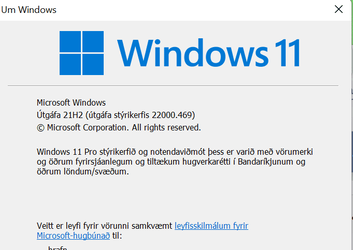
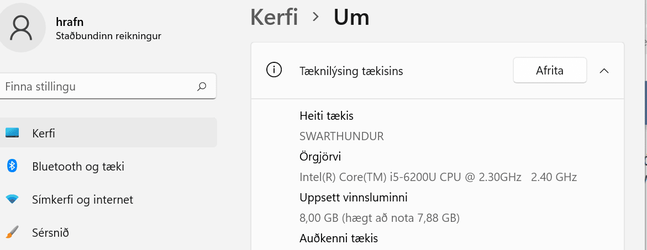
Updated fine from previous build -- I'm not an insider and this machine is an old HP envy laptop several years old which can't even officially run W11 (CPU -- gen 6 Intel i5) . Was offered update and it installed in around 6 mins.

Skjámynd 2022-01-26 130609.png

Skjámynd 2022-01-26 130735.png

cheers
jimbo
 

Attachments

  • Skjámynd 2022-01-26 123637.png
    Skjámynd 2022-01-26 123637.png
    9.7 KB · Views: 1

My Computer My Computer

At a glance

Windows XP,11 Linux Fedora Rawhide pre-releas...2 X Intel i7
OS
Windows XP,11 Linux Fedora Rawhide pre-release 45
Computer type
PC/Desktop
CPU
2 X Intel i7
Screen Resolution
4KUHD X 2
Hi there
Updated fine from previous build -- I'm not an insider and this machine is an old HP envy laptop several years old which can't even officially run W11 (CPU -- gen 6 Intel i5) . Was offered update and it installed in around 6 mins.

View attachment 19884

View attachment 19885

cheers
jimbo


Microsoft probably wanted at least one person in Iceland, running Windows 11, so they waived the requirements. :)
 

My Computers My Computers

  • At a glance

    Win 11 Home ♦♦♦26200.8875 ♦♦♦♦♦♦♦25H2AMD Ryzen 7 3700XG.Skill (F4-3200C14D-16GTZKW)EVGA RTX 2070 (08G-P4-2171-KR)
    OS
    Win 11 Home ♦♦♦26200.8875 ♦♦♦♦♦♦♦25H2
    Computer type
    PC/Desktop
    Manufacturer/Model
    Built by Ghot® [May 2020]
    CPU
    AMD Ryzen 7 3700X
    Motherboard
    Asus Pro WS X570-ACE (BIOS 5302)
    Memory
    G.Skill (F4-3200C14D-16GTZKW)
    Graphics Card(s)
    EVGA RTX 2070 (08G-P4-2171-KR)
    Sound Card
    Realtek ALC1220P / ALC S1220A
    Monitor(s) Displays
    Dell U3011 30"
    Screen Resolution
    2560 x 1600
    Hard Drives
    2x Samsung 860 EVO 500GB,
    WD 4TB Black FZBX - SATA III,
    WD 8TB Black FZBX - SATA III,
    DRW-24B1ST CD/DVD Burner
    PSU
    PC Power & Cooling 750W Quad EPS12V
    Case
    Cooler Master ATCS 840 Tower
    Cooling
    CM Hyper 212 EVO (push/pull)
    Keyboard
    Ducky DK9008 Shine II Blue LED
    Mouse
    Logitech Optical M-100
    Internet Speed
    300/300
    Browser
    Firefox (latest)
    Antivirus
    Bitdefender Total Security
    Other Info
    Speakers: Klipsch Pro Media 2.1
  • At a glance

    Windows XP Pro 32bit w/SP3AMD Athlon 64 X2 5000+ (OC'd @ 3.2Ghz)TWIN2X2048-6400C4DHX (2 x 1GB, DDR2 800)EVGA 256-P2-N758-TR GeForce 8600GT SSC
    Operating System
    Windows XP Pro 32bit w/SP3
    Computer type
    PC/Desktop
    Manufacturer/Model
    Built by Ghot® (not in use)
    CPU
    AMD Athlon 64 X2 5000+ (OC'd @ 3.2Ghz)
    Motherboard
    ASUS M2N32-SLI Deluxe Wireless Edition
    Memory
    TWIN2X2048-6400C4DHX (2 x 1GB, DDR2 800)
    Graphics card(s)
    EVGA 256-P2-N758-TR GeForce 8600GT SSC
    Sound Card
    Onboard
    Monitor(s) Displays
    ViewSonic G90FB Black 19" Professional (CRT)
    Screen Resolution
    up to 2048 x 1536
    Hard Drives
    WD 36GB 10,000rpm Raptor SATA
    Seagate 80GB 7200rpm SATA
    Lite-On LTR-52246S CD/RW
    Lite-On LH-18A1P CD/DVD Burner
    PSU
    PC Power & Cooling Silencer 750 Quad EPS12V
    Case
    Generic Beige case, 80mm fans
    Cooling
    ZALMAN 9500A 92mm CPU Cooler
    Keyboard
    Logitech Classic Keybooard 200
    Mouse
    Logitech Optical M-BT96a
    Internet Speed
    300/300
    Browser
    Firefox 3.x ??
    Antivirus
    Symantec (Norton)
    Other Info
    Still assembled, still runs. Haven't turned it on for 15 years?
Done. Seemed to get stuck at 69% install for 5 mins. Fixed my problem of audio icon randomly appearing muted when it wasnt.
 

My Computers My Computers

  • At a glance

    Solus PlasmaIntel Core i5 9400FCorsair 32 gb VengeanceNvidia GT1030
    OS
    Solus Plasma
    Computer type
    PC/Desktop
    Manufacturer/Model
    Novatech BB90014
    CPU
    Intel Core i5 9400F
    Motherboard
    Gigabyte H310M S2H 2
    Memory
    Corsair 32 gb Vengeance
    Graphics Card(s)
    Nvidia GT1030
    Sound Card
    On board Realtek
    Monitor(s) Displays
    Dell 2412M Sharpscreen
    Screen Resolution
    1920x1080
    Hard Drives
    Corsair MP510 NvME 1tb
    Crucial MX500 500gb
    WD 2.5Tb
    Hitachi Deskstar 500
    PSU
    Novatech 800W
    Case
    Novatech
    Cooling
    3 x front fans, 1 rear
    Keyboard
    Logitech G11
    Mouse
    Logitech G203
    Internet Speed
    1000/110 Mbps
    Browser
    Vivaldi
    Antivirus
    ClamTK
  • At a glance

    win 11 ProIntel i58gb HynixIntel
    Operating System
    win 11 Pro
    Computer type
    Laptop
    Manufacturer/Model
    HP
    CPU
    Intel i5
    Motherboard
    HP Intel
    Memory
    8gb Hynix
    Graphics card(s)
    Intel
    Sound Card
    Realtek
    Monitor(s) Displays
    HP
    Screen Resolution
    1920x1081
    Hard Drives
    Samsung 256
    PSU
    HP
    Case
    HP
    Cooling
    Single fan
    Keyboard
    HP
    Internet Speed
    80/20
    Browser
    Firefox
    Antivirus
    Win Defender
After the update KB5008353 on W11 when I go to open Windows Terminal (Admin) I get this message:

Wt.exe - Application Error "The application could not be started correctly (0xc0000022)"

If I uninstall KB5008353 everything works fine.

Has anyone else encountered the same problem as me?
 

My Computer My Computer

At a glance

Windows 11
OS
Windows 11
After the update KB5008353 on W11 when I go to open Windows Terminal (Admin) I get this message:

Wt.exe - Application Error "The application could not be started correctly (0xc0000022)"

If I uninstall KB5008353 everything works fine.

Has anyone else encountered the same problem as me?


Have you tried re-installing KB5008353?
 

My Computers My Computers

  • At a glance

    Win 11 Home ♦♦♦26200.8875 ♦♦♦♦♦♦♦25H2AMD Ryzen 7 3700XG.Skill (F4-3200C14D-16GTZKW)EVGA RTX 2070 (08G-P4-2171-KR)
    OS
    Win 11 Home ♦♦♦26200.8875 ♦♦♦♦♦♦♦25H2
    Computer type
    PC/Desktop
    Manufacturer/Model
    Built by Ghot® [May 2020]
    CPU
    AMD Ryzen 7 3700X
    Motherboard
    Asus Pro WS X570-ACE (BIOS 5302)
    Memory
    G.Skill (F4-3200C14D-16GTZKW)
    Graphics Card(s)
    EVGA RTX 2070 (08G-P4-2171-KR)
    Sound Card
    Realtek ALC1220P / ALC S1220A
    Monitor(s) Displays
    Dell U3011 30"
    Screen Resolution
    2560 x 1600
    Hard Drives
    2x Samsung 860 EVO 500GB,
    WD 4TB Black FZBX - SATA III,
    WD 8TB Black FZBX - SATA III,
    DRW-24B1ST CD/DVD Burner
    PSU
    PC Power & Cooling 750W Quad EPS12V
    Case
    Cooler Master ATCS 840 Tower
    Cooling
    CM Hyper 212 EVO (push/pull)
    Keyboard
    Ducky DK9008 Shine II Blue LED
    Mouse
    Logitech Optical M-100
    Internet Speed
    300/300
    Browser
    Firefox (latest)
    Antivirus
    Bitdefender Total Security
    Other Info
    Speakers: Klipsch Pro Media 2.1
  • At a glance

    Windows XP Pro 32bit w/SP3AMD Athlon 64 X2 5000+ (OC'd @ 3.2Ghz)TWIN2X2048-6400C4DHX (2 x 1GB, DDR2 800)EVGA 256-P2-N758-TR GeForce 8600GT SSC
    Operating System
    Windows XP Pro 32bit w/SP3
    Computer type
    PC/Desktop
    Manufacturer/Model
    Built by Ghot® (not in use)
    CPU
    AMD Athlon 64 X2 5000+ (OC'd @ 3.2Ghz)
    Motherboard
    ASUS M2N32-SLI Deluxe Wireless Edition
    Memory
    TWIN2X2048-6400C4DHX (2 x 1GB, DDR2 800)
    Graphics card(s)
    EVGA 256-P2-N758-TR GeForce 8600GT SSC
    Sound Card
    Onboard
    Monitor(s) Displays
    ViewSonic G90FB Black 19" Professional (CRT)
    Screen Resolution
    up to 2048 x 1536
    Hard Drives
    WD 36GB 10,000rpm Raptor SATA
    Seagate 80GB 7200rpm SATA
    Lite-On LTR-52246S CD/RW
    Lite-On LH-18A1P CD/DVD Burner
    PSU
    PC Power & Cooling Silencer 750 Quad EPS12V
    Case
    Generic Beige case, 80mm fans
    Cooling
    ZALMAN 9500A 92mm CPU Cooler
    Keyboard
    Logitech Classic Keybooard 200
    Mouse
    Logitech Optical M-BT96a
    Internet Speed
    300/300
    Browser
    Firefox 3.x ??
    Antivirus
    Symantec (Norton)
    Other Info
    Still assembled, still runs. Haven't turned it on for 15 years?
Have you tried re-installing KB5008353?
Hi Ghot,

Thank you for replying.

I have installed and uninstalled KB5008353 three times but Windows Terminal (Admin) only works if I uninstall KB5008353.

Even if you haven't written it down, I have to assume that to you Windows Terminal (Admin) instead works with the update of KB5008353?
 

My Computer My Computer

At a glance

Windows 11
OS
Windows 11
Hmm windows terminal did not open when right clicking on windowsicon in system tray.
Untitled.png

Did open if I went to settings.
 

My Computers My Computers

  • At a glance

    Windows11intel 8250 I58gbintel uhd 620
    OS
    Windows11
    Computer type
    Laptop
    Manufacturer/Model
    Huawei Matebook X Pro
    CPU
    intel 8250 I5
    Memory
    8gb
    Graphics Card(s)
    intel uhd 620
    Monitor(s) Displays
    built in laptop display
    Screen Resolution
    1920x1280
    Hard Drives
    Samsung 970 Evo 500gb M2
    Browser
    Edge
    Antivirus
    Defender
  • At a glance

    Windows 10AMD Ryzen 7300U16 GB DDR4AMD Raedon RX Vega graphics onboard
    Operating System
    Windows 10
    Computer type
    Laptop
    Manufacturer/Model
    Acer A515-43-R6DE
    CPU
    AMD Ryzen 7300U
    Memory
    16 GB DDR4
    Graphics card(s)
    AMD Raedon RX Vega graphics onboard
    Monitor(s) Displays
    15"6 FHD IPS Slim Bezel
    Hard Drives
    512cb PCie NVME SSD
    Case
    Pure Silver
    Keyboard
    Inbuilt
    Mouse
    Touchpad and Logitech external mouse
    Browser
    Edge
    Antivirus
    Defender
Hi Ghot,

Thank you for replying.

I have installed and uninstalled KB5008353 three times but Windows Terminal (Admin) only works if I uninstall KB5008353.

Even if you haven't written it down, I have to assume that to you Windows Terminal (Admin) instead works with the update of KB5008353?


I haven't got a clue. Never even tried to run WT.
I'm on Windows 10 at the moment so I can't check.

Well I could, but I'd have to shut the computer off, and switch SSDs.


Wth... brb. :)
 

My Computers My Computers

  • At a glance

    Win 11 Home ♦♦♦26200.8875 ♦♦♦♦♦♦♦25H2AMD Ryzen 7 3700XG.Skill (F4-3200C14D-16GTZKW)EVGA RTX 2070 (08G-P4-2171-KR)
    OS
    Win 11 Home ♦♦♦26200.8875 ♦♦♦♦♦♦♦25H2
    Computer type
    PC/Desktop
    Manufacturer/Model
    Built by Ghot® [May 2020]
    CPU
    AMD Ryzen 7 3700X
    Motherboard
    Asus Pro WS X570-ACE (BIOS 5302)
    Memory
    G.Skill (F4-3200C14D-16GTZKW)
    Graphics Card(s)
    EVGA RTX 2070 (08G-P4-2171-KR)
    Sound Card
    Realtek ALC1220P / ALC S1220A
    Monitor(s) Displays
    Dell U3011 30"
    Screen Resolution
    2560 x 1600
    Hard Drives
    2x Samsung 860 EVO 500GB,
    WD 4TB Black FZBX - SATA III,
    WD 8TB Black FZBX - SATA III,
    DRW-24B1ST CD/DVD Burner
    PSU
    PC Power & Cooling 750W Quad EPS12V
    Case
    Cooler Master ATCS 840 Tower
    Cooling
    CM Hyper 212 EVO (push/pull)
    Keyboard
    Ducky DK9008 Shine II Blue LED
    Mouse
    Logitech Optical M-100
    Internet Speed
    300/300
    Browser
    Firefox (latest)
    Antivirus
    Bitdefender Total Security
    Other Info
    Speakers: Klipsch Pro Media 2.1
  • At a glance

    Windows XP Pro 32bit w/SP3AMD Athlon 64 X2 5000+ (OC'd @ 3.2Ghz)TWIN2X2048-6400C4DHX (2 x 1GB, DDR2 800)EVGA 256-P2-N758-TR GeForce 8600GT SSC
    Operating System
    Windows XP Pro 32bit w/SP3
    Computer type
    PC/Desktop
    Manufacturer/Model
    Built by Ghot® (not in use)
    CPU
    AMD Athlon 64 X2 5000+ (OC'd @ 3.2Ghz)
    Motherboard
    ASUS M2N32-SLI Deluxe Wireless Edition
    Memory
    TWIN2X2048-6400C4DHX (2 x 1GB, DDR2 800)
    Graphics card(s)
    EVGA 256-P2-N758-TR GeForce 8600GT SSC
    Sound Card
    Onboard
    Monitor(s) Displays
    ViewSonic G90FB Black 19" Professional (CRT)
    Screen Resolution
    up to 2048 x 1536
    Hard Drives
    WD 36GB 10,000rpm Raptor SATA
    Seagate 80GB 7200rpm SATA
    Lite-On LTR-52246S CD/RW
    Lite-On LH-18A1P CD/DVD Burner
    PSU
    PC Power & Cooling Silencer 750 Quad EPS12V
    Case
    Generic Beige case, 80mm fans
    Cooling
    ZALMAN 9500A 92mm CPU Cooler
    Keyboard
    Logitech Classic Keybooard 200
    Mouse
    Logitech Optical M-BT96a
    Internet Speed
    300/300
    Browser
    Firefox 3.x ??
    Antivirus
    Symantec (Norton)
    Other Info
    Still assembled, still runs. Haven't turned it on for 15 years?
After the update KB5008353 on W11 when I go to open Windows Terminal (Admin) I get this message:

Wt.exe - Application Error "The application could not be started correctly (0xc0000022)"

If I uninstall KB5008353 everything works fine.

Has anyone else encountered the same problem as me?

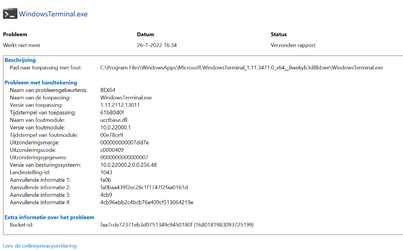
Yes, I have the same problem:

1643211451317.png
 
Last edited:

My Computers My Computers

  • At a glance

    Windows 11 ProIntel® Core™ i9-10940X - 14 CoresKingston HyperX Fury RGB 64GB DDR4-3200NVIDIA RTX 3060 Ti 8GB
    OS
    Windows 11 Pro
    Computer type
    PC/Desktop
    Manufacturer/Model
    Sharkoon SGC1 - RGB
    CPU
    Intel® Core™ i9-10940X - 14 Cores
    Motherboard
    Asus Prime X299-A II
    Memory
    Kingston HyperX Fury RGB 64GB DDR4-3200
    Graphics Card(s)
    NVIDIA RTX 3060 Ti 8GB
    Monitor(s) Displays
    LG Ultra HD
    Screen Resolution
    3840 x 2160
    Hard Drives
    SSD 4000GB Samsung 870 QVO SSD 500GB Crucial MX500 PSSD 2T Samsung T7 SCSI
    PSU
    850W Cooler Master
    Case
    Sharkoon SGC1 - RGB
    Cooling
    Cooler Master H412R
    Keyboard
    Corsair Vengeance-K70-RGB
    Mouse
    CONTUS Gaming Mouse
    Internet Speed
    1000/1000 (Mbps)
    Browser
    Chrome
    Antivirus
    Windows Defender
    Other Info
    CPU: Intel Core i9-10940X (Cascade Lake-X, L1)
    3300 MHz (33.00x100.0) @ 1183 MHz (12.00x98.6)
    Motherboard: ASUS PRIME X299-A II
    BIOS: 2001, 11/06/2024
    Chipset: Intel X299 (Kaby Lake)
    Memory: 65536 MBytes @ 1190 MHz, 17-17-17-39
    - 16384 MB PC25600 DDR4 SDRAM - Kingston KHX3200C16D4/16GX
    - 16384 MB PC25600 DDR4 SDRAM - Kingston KHX3200C16D4/16GX
    - 16384 MB PC25600 DDR4 SDRAM - Kingston KHX3200C16D4/16GX
    - 16384 MB PC25600 DDR4 SDRAM - Kingston KHX3200C16D4/16GX
    Graphics: NVIDIA GeForce RTX 3060 Ti
    NVIDIA GeForce RTX 3060 Ti, 8192 MB GDDR6 SDRAM
    Drive: CT500MX500SSD1, 488.4 GB, Serial ATA 6Gb/s @ 6Gb/s
    Drive: Samsung SSD 870 QVO 4TB, 3907.0 GB, Serial ATA 6Gb/s @ 6Gb/s
    Drive: Samsung SSD 860 QVO 4TB, 3907.0 GB, Serial ATA 6Gb/s @ 6Gb/s <-> USB
    Drive: Samsung SSD 860 EVO 4TB, 3907.0 GB, Serial ATA 6Gb/s @ 6Gb/s <-> USB
    Drive: Samsung Portable SSD T7, 1953.5 GB, NVMe
    Drive: Samsung Portable SSD T9, 3907.0 GB, NVMe
    Sound: Intel Kaby Lake - High Definition Audio / cAVS (Audio, Voice, Speech) [A0]
    Sound: NVIDIA GA104 - High Definition Audio Controller
    Network: Intel Ethernet Connection I219-V
    OS: Microsoft Windows 11 Professional (x64) Build 26200.8894 (25H2)
  • At a glance

    Windows 11 ProIntel® Core™ i5-12600KF - 10 CoresRAIDER GAMING 64GB DDR4-3200MSI GeForce RTX 4060 Ventus 2X Black 8G OC
    Operating System
    Windows 11 Pro
    Computer type
    PC/Desktop
    Manufacturer/Model
    MSI Intel
    CPU
    Intel® Core™ i5-12600KF - 10 Cores
    Motherboard
    MSI Pro B660M-G DDR4
    Memory
    RAIDER GAMING 64GB DDR4-3200
    Graphics card(s)
    MSI GeForce RTX 4060 Ventus 2X Black 8G OC
    Monitor(s) Displays
    Odyssey G70NC
    Screen Resolution
    3840 x 2160, 120 Hz - (HDR)
    Hard Drives
    MSI Spatium M371 500GB + 7x SSD 4TB
    PSU
    550 Watt MSI
    Case
    MSI MAG Forge 112R
    Cooling
    Watercooling MSI MAG CoreLiquid 240R V2 Black
    Internet Speed
    1000/1000 (Mbps)
    Browser
    Brave
    Antivirus
    Windows Defender
    Other Info
    Computer: MSI MS-7D45
    CPU: Intel Core i5-12600KF (Alder Lake-S 640, C0)
    3700 MHz (37.00x100.0) @ 798 MHz (8.00x99.8)
    Motherboard: MSI PRO B660M-G DDR4 (MS-7D45)
    BIOS: 1.O0, 08/07/2025
    Chipset: Intel B660 (Alder Lake-S PCH)
    Memory: 65536 MBytes @ 1596 MHz, 22-22-22-52
    - 32768 MB PC25600 DDR4 SDRAM - Crucial Technology CT32G4DFD832A.C16FF
    - 32768 MB PC25600 DDR4 SDRAM - Crucial Technology CT32G4DFD832A.C16FF
    Graphics: MSI RTX 4060 Ventus 2X Black OC
    NVIDIA GeForce RTX 4060, 8188 MB GDDR6 SDRAM
    Drive: MSI M371 500GB, 488.4 GB, NVMe
    Drive: Samsung SSD 870 QVO 8TB, 7814.0 GB, Serial ATA 6Gb/s @ 6Gb/s <-> USB
    Drive: Samsung SSD 870 QVO 8TB, 7814.0 GB, Serial ATA 6Gb/s @ 6Gb/s <-> USB
    Drive: Samsung Portable SSD T9, 3907.0 GB, NVMe
    Drive: Samsung Portable SSD T9, 3907.0 GB, NVMe
    Sound: Intel Alder Lake-S PCH - cAVS (Audio, Voice, Speech)
    Sound: NVIDIA AD106 - High Definition Audio Controller
    Network: RealTek Semiconductor RTL8125 Gaming 2.5GbE Family Ethernet Controller
    OS: Microsoft Windows 11 Professional (x64) Build 26200.8894 (25H2)
  • MY THIRD DESKTOP SYSTEM
    ===================
    Computer: PCSpecialist Amd Trx50
    CPU: AMD Ryzen Threadripper 9980X (Shimada Peak, SHP-C1)
    3200 MHz (32.00x100.0) @ 2481 MHz (24.86x99.8)
    Motherboard: ASUS Pro WS TRX50-SAGE WIFI
    BIOS: 1203, 07/18/2025
    Chipset: AMD TRX50 (Promontory PROM21L.1)
    Memory: 262144 MBytes @ 3200 MHz, 52-52-52-103
    - 65536 MB PC51200 DDR5 SDRAM - Kingston 9965844-002.A01G
    - 65536 MB PC51200 DDR5 SDRAM - Kingston 9965844-002.A01G
    - 65536 MB PC51200 DDR5 SDRAM - Kingston 9965844-002.A01G
    - 65536 MB PC51200 DDR5 SDRAM - Kingston 9965844-002.A01G
    Graphics: Palit GeForce RTX 5080
    NVIDIA GeForce RTX 5080, 16303 MB GDDR7 SDRAM
    Drive: Samsung SSD 9100 PRO 4TB, 3907.0 GB, NVMe
    Drive: Corsair MP600 PRO NH, 7814.0 GB, NVMe
    Drive: CT2000T705SSD3, 1953.5 GB, NVMe
    Sound: NVIDIA GB203 - High Definition Audio Controller
    Sound: AMD Stones/Breithorn - HD Audio Controller (AZ)
    Network: Aquantia/Marvell AQC113 FastLinQ Edge 10Gbit Network Adapter
    Network: Intel Ethernet Controller I226-LM
    OS: Microsoft Windows 11 Professional (x64) Build 26200.8894 (25H2)
Well, only three new items

1) MSA page in accounts - this is a cheat, as it just links you to the online MSA. I rather object to this page, as it autolinks with no security. If I let somebody use my pc, they can get access to information I would prefer them not to see. OK, I know one should not let people use pc unless with separate standard account, but there is no reason to make this data easier to access.

2) Fixed daylight saving time in Jordan. OK, important to people in Jordan.

3) Binghelp - I do all I can to stop crappy suggestions from "But It's Not Google" - so even more garbage now!

So, only one new item of any use (to Jordanians) - others are a just symptomatic of how far MS has lost the plot now in development!
 

My Computer My Computer

At a glance

Windows 11 Pro + Win11 Canary VM.I9 13th gen i9-13900H 2.60 GHZ16 GB solderedIntegrated Intel Iris XE
OS
Windows 11 Pro + Win11 Canary VM.
Computer type
Laptop
Manufacturer/Model
ASUS Zenbook 14
CPU
I9 13th gen i9-13900H 2.60 GHZ
Motherboard
Yep, Laptop has one.
Memory
16 GB soldered
Graphics Card(s)
Integrated Intel Iris XE
Sound Card
Realtek built in
Monitor(s) Displays
laptop OLED screen
Screen Resolution
2880x1800 touchscreen
Hard Drives
1 TB NVME SSD (only weakness is only one slot)
PSU
Internal + 65W thunderbolt USB4 charger
Case
Yep, got one
Cooling
Stella Artois (UK pint cans - 568 ml) - extra cost.
Keyboard
Built in UK keybd
Mouse
Bluetooth , wireless dongled, wired
Internet Speed
900 mbs (ethernet), wifi 6 typical 350-450 mb/s both up and down
Browser
Edge
Antivirus
Defender
Other Info
TPM 2.0, 2xUSB4 thunderbolt, 1xUsb3 (usb a), 1xUsb-c, hdmi out, 3.5 mm audio out/in combo, ASUS backlit trackpad (inc. switchable number pad)

Macrium Reflect Home V8
Office 365 Family (6 users each 1TB onedrive space)
Hyper-V (a vm runs almost as fast as my older laptop)
@robpol471


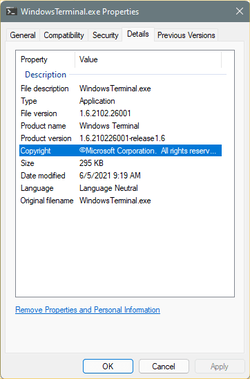
My Windows Terminal works fine... well, I guess it does. START > Programs > Windows Terminal


Image1.png


Windows 11 Home (regular) 22000.469
C:\Program Files\WindowsApps\Microsoft.WindowsTerminal_1.6.10571.0_x64__8wekyb3d8bbwe\WindowsTerminal.exe


Image1.png


Ok... back to Windows 10.
 
Last edited:

My Computers My Computers

  • At a glance

    Win 11 Home ♦♦♦26200.8875 ♦♦♦♦♦♦♦25H2AMD Ryzen 7 3700XG.Skill (F4-3200C14D-16GTZKW)EVGA RTX 2070 (08G-P4-2171-KR)
    OS
    Win 11 Home ♦♦♦26200.8875 ♦♦♦♦♦♦♦25H2
    Computer type
    PC/Desktop
    Manufacturer/Model
    Built by Ghot® [May 2020]
    CPU
    AMD Ryzen 7 3700X
    Motherboard
    Asus Pro WS X570-ACE (BIOS 5302)
    Memory
    G.Skill (F4-3200C14D-16GTZKW)
    Graphics Card(s)
    EVGA RTX 2070 (08G-P4-2171-KR)
    Sound Card
    Realtek ALC1220P / ALC S1220A
    Monitor(s) Displays
    Dell U3011 30"
    Screen Resolution
    2560 x 1600
    Hard Drives
    2x Samsung 860 EVO 500GB,
    WD 4TB Black FZBX - SATA III,
    WD 8TB Black FZBX - SATA III,
    DRW-24B1ST CD/DVD Burner
    PSU
    PC Power & Cooling 750W Quad EPS12V
    Case
    Cooler Master ATCS 840 Tower
    Cooling
    CM Hyper 212 EVO (push/pull)
    Keyboard
    Ducky DK9008 Shine II Blue LED
    Mouse
    Logitech Optical M-100
    Internet Speed
    300/300
    Browser
    Firefox (latest)
    Antivirus
    Bitdefender Total Security
    Other Info
    Speakers: Klipsch Pro Media 2.1
  • At a glance

    Windows XP Pro 32bit w/SP3AMD Athlon 64 X2 5000+ (OC'd @ 3.2Ghz)TWIN2X2048-6400C4DHX (2 x 1GB, DDR2 800)EVGA 256-P2-N758-TR GeForce 8600GT SSC
    Operating System
    Windows XP Pro 32bit w/SP3
    Computer type
    PC/Desktop
    Manufacturer/Model
    Built by Ghot® (not in use)
    CPU
    AMD Athlon 64 X2 5000+ (OC'd @ 3.2Ghz)
    Motherboard
    ASUS M2N32-SLI Deluxe Wireless Edition
    Memory
    TWIN2X2048-6400C4DHX (2 x 1GB, DDR2 800)
    Graphics card(s)
    EVGA 256-P2-N758-TR GeForce 8600GT SSC
    Sound Card
    Onboard
    Monitor(s) Displays
    ViewSonic G90FB Black 19" Professional (CRT)
    Screen Resolution
    up to 2048 x 1536
    Hard Drives
    WD 36GB 10,000rpm Raptor SATA
    Seagate 80GB 7200rpm SATA
    Lite-On LTR-52246S CD/RW
    Lite-On LH-18A1P CD/DVD Burner
    PSU
    PC Power & Cooling Silencer 750 Quad EPS12V
    Case
    Generic Beige case, 80mm fans
    Cooling
    ZALMAN 9500A 92mm CPU Cooler
    Keyboard
    Logitech Classic Keybooard 200
    Mouse
    Logitech Optical M-BT96a
    Internet Speed
    300/300
    Browser
    Firefox 3.x ??
    Antivirus
    Symantec (Norton)
    Other Info
    Still assembled, still runs. Haven't turned it on for 15 years?
Yes, I have excactly the same problem:

My second computer system does run WindowsTerminal just fine. I haven't a clue what is causing this discrepancy.
 

My Computers My Computers

  • At a glance

    Windows 11 ProIntel® Core™ i9-10940X - 14 CoresKingston HyperX Fury RGB 64GB DDR4-3200NVIDIA RTX 3060 Ti 8GB
    OS
    Windows 11 Pro
    Computer type
    PC/Desktop
    Manufacturer/Model
    Sharkoon SGC1 - RGB
    CPU
    Intel® Core™ i9-10940X - 14 Cores
    Motherboard
    Asus Prime X299-A II
    Memory
    Kingston HyperX Fury RGB 64GB DDR4-3200
    Graphics Card(s)
    NVIDIA RTX 3060 Ti 8GB
    Monitor(s) Displays
    LG Ultra HD
    Screen Resolution
    3840 x 2160
    Hard Drives
    SSD 4000GB Samsung 870 QVO SSD 500GB Crucial MX500 PSSD 2T Samsung T7 SCSI
    PSU
    850W Cooler Master
    Case
    Sharkoon SGC1 - RGB
    Cooling
    Cooler Master H412R
    Keyboard
    Corsair Vengeance-K70-RGB
    Mouse
    CONTUS Gaming Mouse
    Internet Speed
    1000/1000 (Mbps)
    Browser
    Chrome
    Antivirus
    Windows Defender
    Other Info
    CPU: Intel Core i9-10940X (Cascade Lake-X, L1)
    3300 MHz (33.00x100.0) @ 1183 MHz (12.00x98.6)
    Motherboard: ASUS PRIME X299-A II
    BIOS: 2001, 11/06/2024
    Chipset: Intel X299 (Kaby Lake)
    Memory: 65536 MBytes @ 1190 MHz, 17-17-17-39
    - 16384 MB PC25600 DDR4 SDRAM - Kingston KHX3200C16D4/16GX
    - 16384 MB PC25600 DDR4 SDRAM - Kingston KHX3200C16D4/16GX
    - 16384 MB PC25600 DDR4 SDRAM - Kingston KHX3200C16D4/16GX
    - 16384 MB PC25600 DDR4 SDRAM - Kingston KHX3200C16D4/16GX
    Graphics: NVIDIA GeForce RTX 3060 Ti
    NVIDIA GeForce RTX 3060 Ti, 8192 MB GDDR6 SDRAM
    Drive: CT500MX500SSD1, 488.4 GB, Serial ATA 6Gb/s @ 6Gb/s
    Drive: Samsung SSD 870 QVO 4TB, 3907.0 GB, Serial ATA 6Gb/s @ 6Gb/s
    Drive: Samsung SSD 860 QVO 4TB, 3907.0 GB, Serial ATA 6Gb/s @ 6Gb/s <-> USB
    Drive: Samsung SSD 860 EVO 4TB, 3907.0 GB, Serial ATA 6Gb/s @ 6Gb/s <-> USB
    Drive: Samsung Portable SSD T7, 1953.5 GB, NVMe
    Drive: Samsung Portable SSD T9, 3907.0 GB, NVMe
    Sound: Intel Kaby Lake - High Definition Audio / cAVS (Audio, Voice, Speech) [A0]
    Sound: NVIDIA GA104 - High Definition Audio Controller
    Network: Intel Ethernet Connection I219-V
    OS: Microsoft Windows 11 Professional (x64) Build 26200.8894 (25H2)
  • At a glance

    Windows 11 ProIntel® Core™ i5-12600KF - 10 CoresRAIDER GAMING 64GB DDR4-3200MSI GeForce RTX 4060 Ventus 2X Black 8G OC
    Operating System
    Windows 11 Pro
    Computer type
    PC/Desktop
    Manufacturer/Model
    MSI Intel
    CPU
    Intel® Core™ i5-12600KF - 10 Cores
    Motherboard
    MSI Pro B660M-G DDR4
    Memory
    RAIDER GAMING 64GB DDR4-3200
    Graphics card(s)
    MSI GeForce RTX 4060 Ventus 2X Black 8G OC
    Monitor(s) Displays
    Odyssey G70NC
    Screen Resolution
    3840 x 2160, 120 Hz - (HDR)
    Hard Drives
    MSI Spatium M371 500GB + 7x SSD 4TB
    PSU
    550 Watt MSI
    Case
    MSI MAG Forge 112R
    Cooling
    Watercooling MSI MAG CoreLiquid 240R V2 Black
    Internet Speed
    1000/1000 (Mbps)
    Browser
    Brave
    Antivirus
    Windows Defender
    Other Info
    Computer: MSI MS-7D45
    CPU: Intel Core i5-12600KF (Alder Lake-S 640, C0)
    3700 MHz (37.00x100.0) @ 798 MHz (8.00x99.8)
    Motherboard: MSI PRO B660M-G DDR4 (MS-7D45)
    BIOS: 1.O0, 08/07/2025
    Chipset: Intel B660 (Alder Lake-S PCH)
    Memory: 65536 MBytes @ 1596 MHz, 22-22-22-52
    - 32768 MB PC25600 DDR4 SDRAM - Crucial Technology CT32G4DFD832A.C16FF
    - 32768 MB PC25600 DDR4 SDRAM - Crucial Technology CT32G4DFD832A.C16FF
    Graphics: MSI RTX 4060 Ventus 2X Black OC
    NVIDIA GeForce RTX 4060, 8188 MB GDDR6 SDRAM
    Drive: MSI M371 500GB, 488.4 GB, NVMe
    Drive: Samsung SSD 870 QVO 8TB, 7814.0 GB, Serial ATA 6Gb/s @ 6Gb/s <-> USB
    Drive: Samsung SSD 870 QVO 8TB, 7814.0 GB, Serial ATA 6Gb/s @ 6Gb/s <-> USB
    Drive: Samsung Portable SSD T9, 3907.0 GB, NVMe
    Drive: Samsung Portable SSD T9, 3907.0 GB, NVMe
    Sound: Intel Alder Lake-S PCH - cAVS (Audio, Voice, Speech)
    Sound: NVIDIA AD106 - High Definition Audio Controller
    Network: RealTek Semiconductor RTL8125 Gaming 2.5GbE Family Ethernet Controller
    OS: Microsoft Windows 11 Professional (x64) Build 26200.8894 (25H2)
  • MY THIRD DESKTOP SYSTEM
    ===================
    Computer: PCSpecialist Amd Trx50
    CPU: AMD Ryzen Threadripper 9980X (Shimada Peak, SHP-C1)
    3200 MHz (32.00x100.0) @ 2481 MHz (24.86x99.8)
    Motherboard: ASUS Pro WS TRX50-SAGE WIFI
    BIOS: 1203, 07/18/2025
    Chipset: AMD TRX50 (Promontory PROM21L.1)
    Memory: 262144 MBytes @ 3200 MHz, 52-52-52-103
    - 65536 MB PC51200 DDR5 SDRAM - Kingston 9965844-002.A01G
    - 65536 MB PC51200 DDR5 SDRAM - Kingston 9965844-002.A01G
    - 65536 MB PC51200 DDR5 SDRAM - Kingston 9965844-002.A01G
    - 65536 MB PC51200 DDR5 SDRAM - Kingston 9965844-002.A01G
    Graphics: Palit GeForce RTX 5080
    NVIDIA GeForce RTX 5080, 16303 MB GDDR7 SDRAM
    Drive: Samsung SSD 9100 PRO 4TB, 3907.0 GB, NVMe
    Drive: Corsair MP600 PRO NH, 7814.0 GB, NVMe
    Drive: CT2000T705SSD3, 1953.5 GB, NVMe
    Sound: NVIDIA GB203 - High Definition Audio Controller
    Sound: AMD Stones/Breithorn - HD Audio Controller (AZ)
    Network: Aquantia/Marvell AQC113 FastLinQ Edge 10Gbit Network Adapter
    Network: Intel Ethernet Controller I226-LM
    OS: Microsoft Windows 11 Professional (x64) Build 26200.8894 (25H2)
Downloaded KB5008353 twice and both times failed to install and diverted back to present WIN11 build.
Ran the install Troubleshooter App and did some cleanup and rebooted and tried to update the second time with the same result that it ran into a problem installing but it said I shouldn't worry as it will go back to my previous version.
Never seen that screen before.
Anyway, I will wait and try again in a week or so.
 

Attachments

  • Screenshot 2022-01-26 084843.jpg
    Screenshot 2022-01-26 084843.jpg
    31.1 KB · Views: 1

My Computer My Computer

At a glance

Windows 11 Pro (x64) 24H2 build 26100.231411th Generation i5-1150016 GigIntel UHD 750
OS
Windows 11 Pro (x64) 24H2 build 26100.2314
Computer type
PC/Desktop
Manufacturer/Model
Self built - Dec 2021
CPU
11th Generation i5-11500
Motherboard
Gigabyte AORUS B560M Pro
Memory
16 Gig
Graphics Card(s)
Intel UHD 750
Sound Card
Chip on Motherboard
Monitor(s) Displays
32" UHD Samsung
Screen Resolution
3840 x 2160
Hard Drives
C: Drive Samsung 980 Pro NVMe 250GB
D: 1TB
E: 3TB
PSU
750 Watt
Case
Fractal Meshify 2 Compact
Cooling
Cooler Master Hyper 212 Black Edition
Keyboard
Logitech
Mouse
Squeaky one
Internet Speed
1G/1G
Browser
MS Edge
Antivirus
Got my 2 Shots plus my Booster Malwarebytes +
This seemed to fix Windows Spotlight on my main PC which haven't worked for months. (It's on Beta channel)
Your post gave me hope, unfortunately I wasn't that lucky and I still get the black screen :cry:
 

My Computer My Computer

At a glance

Windows 11 Proi7-8700K CPU @3.70GHz, 6 cores, 12 logical coresCorsair CMK32GX4M2B3200C16 Vengeance LPX 32GB...Asus ROG-STRIX-GTX1080TI-O11G-GAMING
OS
Windows 11 Pro
Computer type
PC/Desktop
Manufacturer/Model
Custom Build
CPU
i7-8700K CPU @3.70GHz, 6 cores, 12 logical cores
Motherboard
Asus ROG-STRIX Z370-E Gaming
Memory
Corsair CMK32GX4M2B3200C16 Vengeance LPX 32GB 3200MHz C16 DDR4
Graphics Card(s)
Asus ROG-STRIX-GTX1080TI-O11G-GAMING
Monitor(s) Displays
Asus TUF Gaming VG32VQ1BR
Screen Resolution
2560x1440 HDMI (144hz)
Hard Drives
- Primary(Boot) : Samsung SSD 960 EVO (250GB)
- Samsung SSD 970 EVO Plus (1TB)
- Seagate ST6000DM004 (6TB, SATA)
- External Seagate ST6000DM004 (6TB, USB 3.1)
PSU
Antec HCG-850M
Case
Cooler Master HAF XM RC-922XM-KKN1
Cooling
Noctua NH-D15
Keyboard
Logitech Compact Keyboard K300
Mouse
Logitech G203 Lightsync Gaming Mouse
Internet Speed
Fiber Optic 1000/1000 Mbps
Browser
Edge
Antivirus
Windows Defender - Malwarebytes
The Optional Update bug under Advanced Options seems to have been fixed.
 

My Computer My Computer

At a glance

Windows 11Ryzen 7 3700X16GBGeforce 1650
OS
Windows 11
Computer type
PC/Desktop
Manufacturer/Model
Asus Rog Strix B550-F
CPU
Ryzen 7 3700X
Motherboard
Asus
Memory
16GB
Graphics Card(s)
Geforce 1650
Sound Card
Realtek
Monitor(s) Displays
LG 23MP75
Screen Resolution
1920x1080
Hard Drives
Samsung 970 Pro
Case
Coolmaster
Keyboard
Logitech
Mouse
Logitech
Internet Speed
50
Browser
Edge
Antivirus
Microsoft
My second computer system does run WindowsTerminal just fine. I haven't a clue what is causing this discrepancy.

Update: I can run WindowsTerminal fine now, but ONLY when launching it from the MS Windows Store. When running it from the Start menu with right-mouseclick, it fails (except for my second computer where it runs fine from the Start Menu). I can run WindowsTerminal fine from the Startmenu when typing the name "WindowsTerminal". So the problem seems only right-click related on one of my two computers.
 

My Computers My Computers

  • At a glance

    Windows 11 ProIntel® Core™ i9-10940X - 14 CoresKingston HyperX Fury RGB 64GB DDR4-3200NVIDIA RTX 3060 Ti 8GB
    OS
    Windows 11 Pro
    Computer type
    PC/Desktop
    Manufacturer/Model
    Sharkoon SGC1 - RGB
    CPU
    Intel® Core™ i9-10940X - 14 Cores
    Motherboard
    Asus Prime X299-A II
    Memory
    Kingston HyperX Fury RGB 64GB DDR4-3200
    Graphics Card(s)
    NVIDIA RTX 3060 Ti 8GB
    Monitor(s) Displays
    LG Ultra HD
    Screen Resolution
    3840 x 2160
    Hard Drives
    SSD 4000GB Samsung 870 QVO SSD 500GB Crucial MX500 PSSD 2T Samsung T7 SCSI
    PSU
    850W Cooler Master
    Case
    Sharkoon SGC1 - RGB
    Cooling
    Cooler Master H412R
    Keyboard
    Corsair Vengeance-K70-RGB
    Mouse
    CONTUS Gaming Mouse
    Internet Speed
    1000/1000 (Mbps)
    Browser
    Chrome
    Antivirus
    Windows Defender
    Other Info
    CPU: Intel Core i9-10940X (Cascade Lake-X, L1)
    3300 MHz (33.00x100.0) @ 1183 MHz (12.00x98.6)
    Motherboard: ASUS PRIME X299-A II
    BIOS: 2001, 11/06/2024
    Chipset: Intel X299 (Kaby Lake)
    Memory: 65536 MBytes @ 1190 MHz, 17-17-17-39
    - 16384 MB PC25600 DDR4 SDRAM - Kingston KHX3200C16D4/16GX
    - 16384 MB PC25600 DDR4 SDRAM - Kingston KHX3200C16D4/16GX
    - 16384 MB PC25600 DDR4 SDRAM - Kingston KHX3200C16D4/16GX
    - 16384 MB PC25600 DDR4 SDRAM - Kingston KHX3200C16D4/16GX
    Graphics: NVIDIA GeForce RTX 3060 Ti
    NVIDIA GeForce RTX 3060 Ti, 8192 MB GDDR6 SDRAM
    Drive: CT500MX500SSD1, 488.4 GB, Serial ATA 6Gb/s @ 6Gb/s
    Drive: Samsung SSD 870 QVO 4TB, 3907.0 GB, Serial ATA 6Gb/s @ 6Gb/s
    Drive: Samsung SSD 860 QVO 4TB, 3907.0 GB, Serial ATA 6Gb/s @ 6Gb/s <-> USB
    Drive: Samsung SSD 860 EVO 4TB, 3907.0 GB, Serial ATA 6Gb/s @ 6Gb/s <-> USB
    Drive: Samsung Portable SSD T7, 1953.5 GB, NVMe
    Drive: Samsung Portable SSD T9, 3907.0 GB, NVMe
    Sound: Intel Kaby Lake - High Definition Audio / cAVS (Audio, Voice, Speech) [A0]
    Sound: NVIDIA GA104 - High Definition Audio Controller
    Network: Intel Ethernet Connection I219-V
    OS: Microsoft Windows 11 Professional (x64) Build 26200.8894 (25H2)
  • At a glance

    Windows 11 ProIntel® Core™ i5-12600KF - 10 CoresRAIDER GAMING 64GB DDR4-3200MSI GeForce RTX 4060 Ventus 2X Black 8G OC
    Operating System
    Windows 11 Pro
    Computer type
    PC/Desktop
    Manufacturer/Model
    MSI Intel
    CPU
    Intel® Core™ i5-12600KF - 10 Cores
    Motherboard
    MSI Pro B660M-G DDR4
    Memory
    RAIDER GAMING 64GB DDR4-3200
    Graphics card(s)
    MSI GeForce RTX 4060 Ventus 2X Black 8G OC
    Monitor(s) Displays
    Odyssey G70NC
    Screen Resolution
    3840 x 2160, 120 Hz - (HDR)
    Hard Drives
    MSI Spatium M371 500GB + 7x SSD 4TB
    PSU
    550 Watt MSI
    Case
    MSI MAG Forge 112R
    Cooling
    Watercooling MSI MAG CoreLiquid 240R V2 Black
    Internet Speed
    1000/1000 (Mbps)
    Browser
    Brave
    Antivirus
    Windows Defender
    Other Info
    Computer: MSI MS-7D45
    CPU: Intel Core i5-12600KF (Alder Lake-S 640, C0)
    3700 MHz (37.00x100.0) @ 798 MHz (8.00x99.8)
    Motherboard: MSI PRO B660M-G DDR4 (MS-7D45)
    BIOS: 1.O0, 08/07/2025
    Chipset: Intel B660 (Alder Lake-S PCH)
    Memory: 65536 MBytes @ 1596 MHz, 22-22-22-52
    - 32768 MB PC25600 DDR4 SDRAM - Crucial Technology CT32G4DFD832A.C16FF
    - 32768 MB PC25600 DDR4 SDRAM - Crucial Technology CT32G4DFD832A.C16FF
    Graphics: MSI RTX 4060 Ventus 2X Black OC
    NVIDIA GeForce RTX 4060, 8188 MB GDDR6 SDRAM
    Drive: MSI M371 500GB, 488.4 GB, NVMe
    Drive: Samsung SSD 870 QVO 8TB, 7814.0 GB, Serial ATA 6Gb/s @ 6Gb/s <-> USB
    Drive: Samsung SSD 870 QVO 8TB, 7814.0 GB, Serial ATA 6Gb/s @ 6Gb/s <-> USB
    Drive: Samsung Portable SSD T9, 3907.0 GB, NVMe
    Drive: Samsung Portable SSD T9, 3907.0 GB, NVMe
    Sound: Intel Alder Lake-S PCH - cAVS (Audio, Voice, Speech)
    Sound: NVIDIA AD106 - High Definition Audio Controller
    Network: RealTek Semiconductor RTL8125 Gaming 2.5GbE Family Ethernet Controller
    OS: Microsoft Windows 11 Professional (x64) Build 26200.8894 (25H2)
  • MY THIRD DESKTOP SYSTEM
    ===================
    Computer: PCSpecialist Amd Trx50
    CPU: AMD Ryzen Threadripper 9980X (Shimada Peak, SHP-C1)
    3200 MHz (32.00x100.0) @ 2481 MHz (24.86x99.8)
    Motherboard: ASUS Pro WS TRX50-SAGE WIFI
    BIOS: 1203, 07/18/2025
    Chipset: AMD TRX50 (Promontory PROM21L.1)
    Memory: 262144 MBytes @ 3200 MHz, 52-52-52-103
    - 65536 MB PC51200 DDR5 SDRAM - Kingston 9965844-002.A01G
    - 65536 MB PC51200 DDR5 SDRAM - Kingston 9965844-002.A01G
    - 65536 MB PC51200 DDR5 SDRAM - Kingston 9965844-002.A01G
    - 65536 MB PC51200 DDR5 SDRAM - Kingston 9965844-002.A01G
    Graphics: Palit GeForce RTX 5080
    NVIDIA GeForce RTX 5080, 16303 MB GDDR7 SDRAM
    Drive: Samsung SSD 9100 PRO 4TB, 3907.0 GB, NVMe
    Drive: Corsair MP600 PRO NH, 7814.0 GB, NVMe
    Drive: CT2000T705SSD3, 1953.5 GB, NVMe
    Sound: NVIDIA GB203 - High Definition Audio Controller
    Sound: AMD Stones/Breithorn - HD Audio Controller (AZ)
    Network: Aquantia/Marvell AQC113 FastLinQ Edge 10Gbit Network Adapter
    Network: Intel Ethernet Controller I226-LM
    OS: Microsoft Windows 11 Professional (x64) Build 26200.8894 (25H2)
After 2 failed installs the 3rd try installed properly.
Why? Who knows......?
 

Attachments

  • Updated.jpg
    Updated.jpg
    30.5 KB · Views: 2

My Computer My Computer

At a glance

Windows 11 Pro (x64) 24H2 build 26100.231411th Generation i5-1150016 GigIntel UHD 750
OS
Windows 11 Pro (x64) 24H2 build 26100.2314
Computer type
PC/Desktop
Manufacturer/Model
Self built - Dec 2021
CPU
11th Generation i5-11500
Motherboard
Gigabyte AORUS B560M Pro
Memory
16 Gig
Graphics Card(s)
Intel UHD 750
Sound Card
Chip on Motherboard
Monitor(s) Displays
32" UHD Samsung
Screen Resolution
3840 x 2160
Hard Drives
C: Drive Samsung 980 Pro NVMe 250GB
D: 1TB
E: 3TB
PSU
750 Watt
Case
Fractal Meshify 2 Compact
Cooling
Cooler Master Hyper 212 Black Edition
Keyboard
Logitech
Mouse
Squeaky one
Internet Speed
1G/1G
Browser
MS Edge
Antivirus
Got my 2 Shots plus my Booster Malwarebytes +
@robpol471


My Windows Terminal works fine... well, I guess it does. START > Programs > Windows Terminal


View attachment 19900


Windows 11 Home (regular) 22000.469
C:\Program Files\WindowsApps\Microsoft.WindowsTerminal_1.6.10571.0_x64__8wekyb3d8bbwe\WindowsTerminal.exe


View attachment 19898


Ok... back to Windows 10.
Terminal works fine if I start it from start menu. Will not work on right click menu on start. Worked fine till the update. Not a biggie and will report it on feedback just in case Microsoft reads these.
 

My Computers My Computers

  • At a glance

    Windows11intel 8250 I58gbintel uhd 620
    OS
    Windows11
    Computer type
    Laptop
    Manufacturer/Model
    Huawei Matebook X Pro
    CPU
    intel 8250 I5
    Memory
    8gb
    Graphics Card(s)
    intel uhd 620
    Monitor(s) Displays
    built in laptop display
    Screen Resolution
    1920x1280
    Hard Drives
    Samsung 970 Evo 500gb M2
    Browser
    Edge
    Antivirus
    Defender
  • At a glance

    Windows 10AMD Ryzen 7300U16 GB DDR4AMD Raedon RX Vega graphics onboard
    Operating System
    Windows 10
    Computer type
    Laptop
    Manufacturer/Model
    Acer A515-43-R6DE
    CPU
    AMD Ryzen 7300U
    Memory
    16 GB DDR4
    Graphics card(s)
    AMD Raedon RX Vega graphics onboard
    Monitor(s) Displays
    15"6 FHD IPS Slim Bezel
    Hard Drives
    512cb PCie NVME SSD
    Case
    Pure Silver
    Keyboard
    Inbuilt
    Mouse
    Touchpad and Logitech external mouse
    Browser
    Edge
    Antivirus
    Defender
I verified with update KB5008353 that Terminal Windows as Administrator is opened to me only with App Terminal Windows - right click - Run as administrator while it does not work if I use Start - Windows Terminal (Admin).
 

My Computer My Computer

At a glance

Windows 11
OS
Windows 11

Latest Support Threads

Back
Top Bottom