UPDATE 4/06:
 www.elevenforum.com
Source:

 blogs.windows.com
Check Windows Updates
UUP Dump:
64-bit ISO download: Select language for Windows 11, version 22H2 Insider Preview 10.0.22581.200 (ni_release) amd64
ARM64 ISO download: Select language for Windows 11, version 22H2 Insider Preview 10.0.22581.200 (ni_release) arm64
 www.elevenforum.com
Windows 11 22H2 Insider Dev and Beta Build 22593.1 (ni_release) - April 6
UPDATE 4/13: https://www.elevenforum.com/t/windows-11-22h2-insider-dev-and-beta-build-22598-1-ni_release-april-13.5833/ Hello Windows Insiders, today we are releasing Windows 11 Insider Preview Build 22593 to the Dev and Beta Channels. TL;DR We’ve received a lot of feedback from Windows...
www.elevenforum.com
UPDATE 3/29: We are starting to roll out Cumulative Update Build 22581.200 (KB5013296). This update does not include anything new and is designed to test our servicing pipeline for builds in the Dev and Beta Channels.
UPDATE 3/25: We are starting to roll out Cumulative Update Build 22581.100 (KB5013283). This update does not include anything new and is designed to test our servicing pipeline for builds in the Dev and Beta Channels.
Hello Windows Insiders, today we are releasing Windows 11 Insider Preview Build 22581 to the Dev and Beta Channels.
TL;DR
- Build 22581 is also being flighted to Windows Insiders in the Beta Channel. Now that the Dev and Beta Channels are receiving the same builds, the limited window has opened for Insiders to switch channels if desired. Please read the details below about the limited window to switch channels and what happens when the window closes. The time is now for you to make sure you’re in the channel you want to be going forward!

Change Windows Insider Program Channel in Windows 11
This tutorial will show you how to change your Windows Insider Program channel to the Beta, Experimental, or Release Preview channel to get Insider preview builds of Windows 11 on your PC. Flighting is the process of running Windows Insider Preview Builds on your device. When you run these...- We also have a handful of improvements and fixes to some issues, see below for more details.
- If you missed yesterday’s webcast, you can watch it on demand here. This month’s webcast featured guests from the team responsible for the new focus experiences and live captions.
Flighting new builds to the Beta Channel
Today we are also releasing Build 22581 to Windows Insiders in the Beta Channel. Insiders in the Beta Channel can now try out new features such as Live Captions, Start folders, the redesigned Task Manager, tablet optimized taskbar and much more.
Now that the Dev and Beta Channels are receiving the same builds, the limited window has opened for Insiders to switch channels if you wish to do so by following these simple steps:
- Open Settings > Windows Update > Windows Insider Program.
- Select Choose your Insider settings.
- Select Beta Channel.
- The next time you receive an update, it will be for your new channel.
Change Windows Insider Program Channel in Windows 11
This tutorial will show you how to change your Windows Insider Program channel to the Beta, Experimental, or Release Preview channel to get Insider preview builds of Windows 11 on your PC. Flighting is the process of running Windows Insider Preview Builds on your device. When you run these...
IMPORTANT: This window will close once we release builds with higher build numbers to the Dev Channel. If your device stays on the Dev Channel and receives a build that is a higher build number than what is in the Beta Channel, you will have to do a clean installation of the released version of Windows 11 on your device to switch to the Beta Channel.
We will also be kicking off email reminders to Insiders in the Dev Channel about the open window to switch channels as well so that Insiders in the Dev Channel have plenty of time and awareness to switch channels if desired while this window is open.
If your device is in the Beta Channel and you want to stay on the released version of Windows 11, you have 10 days or until we release a newer build to roll back. If you do decide to roll back, be sure to promptly change your channel to Release Preview.
No action is required if you want to continue receiving preview builds in the Dev Channel.
As a reminder, we are evolving the way we develop and release to Insiders with the Dev and Beta Channels now representing parallel development paths from our engineers. The Dev Channel will be a place where we will try out different concepts, incubate new ideas, and work on long lead items that may not get released to general customers. The Beta Channel will be the place we preview experiences that are closer to what we will ship to our general customers. However, this does not mean every feature we try out in the Beta Channel will ship. We encourage Insiders to read this blog post from last month that outlines the ways we’ll try things out with Insiders in the Dev and Beta Channels.
Changes and Improvements
[General]
[Taskbar]
- As described in our blog post here, Windows Insiders who use the Dev Channel may get to try out new ideas, longer lead features, and experiences that may never get released. In this build, a limited set of Insiders will see the first of these experimental features as we explore additional ways to help people discover and get quick access to content that they care about on the web with the Windows search box. If you see some of these concepts, be sure to let us know what you think via Feedback Hub (Win + F) and choose category Desktop Environment > Search.
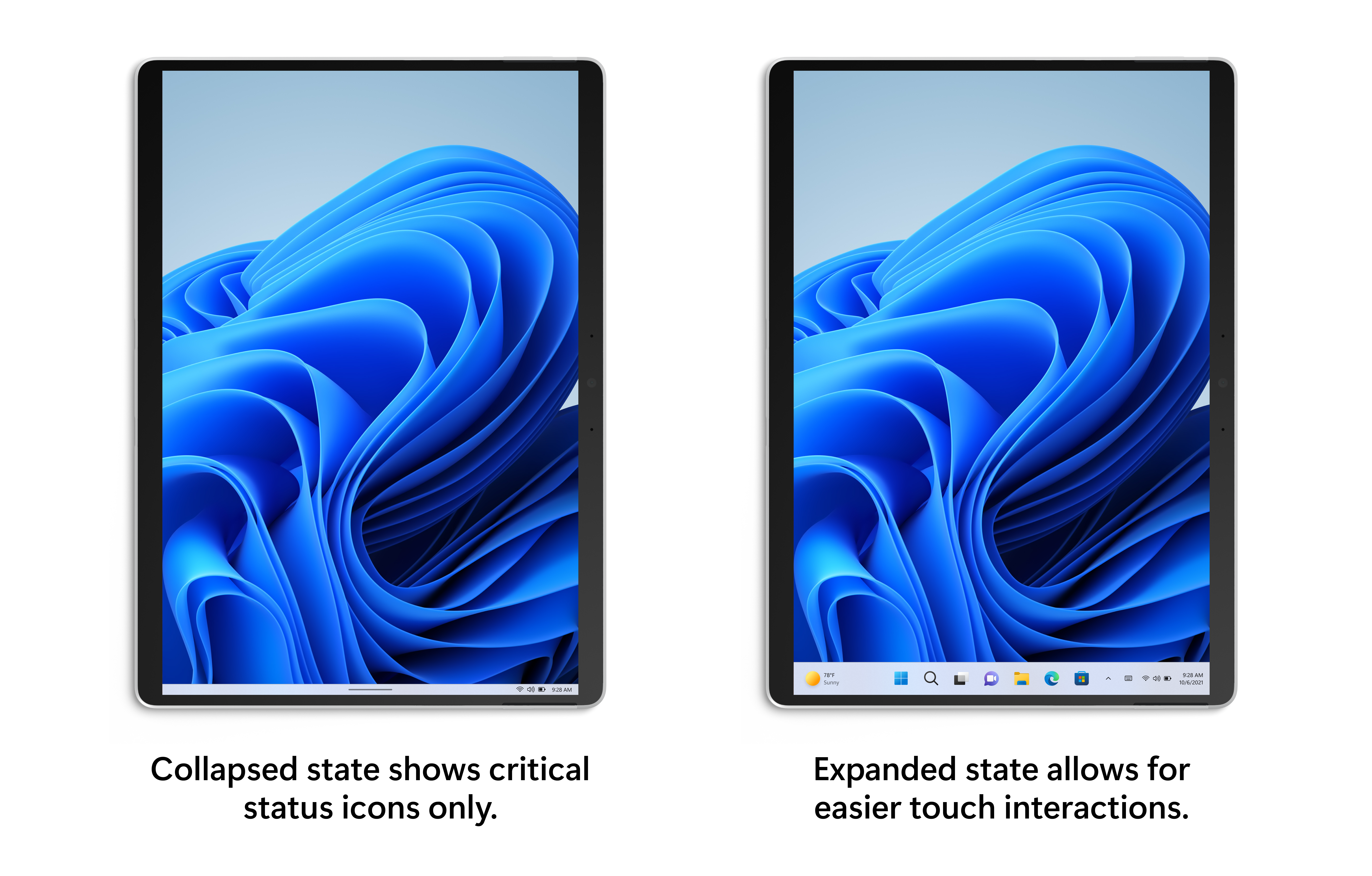
- The tablet-optimized taskbar feature which began rolling out with Build 22563 is now available to all Windows Insiders in the Dev and Beta Channels. As a reminder, this feature only works on devices that can be used as tablets. It does not work on laptops or desktop PCs.
Turn On or Off Tablet-optimized Taskbar in Windows 11
This tutorial will show you how to turn on or off tablet-optimized taskbar for your account in Windows 11. Starting with Windows 11 build 22621.1344, Microsoft introduced a touch-optimized taskbar for 2-in-1 devices that you can use as a tablet. There are two states of this taskbar: collapsed...
Tablet-optimized taskbar in both collapsed and expanded states.
[Settings]
- Several fixes to taskbar such as the top border line now extending across the entire taskbar will be seen for everyone regardless of device type.
- Keyboard focus and mouse hover for Win32 system tray icons and the “Show hidden icons” flyout have been updated to match the rest of the visual style of the taskbar. You may also notice that drag-and-drop is no longer supported to pin/unpin these items — you can show/hide these icons using by right clicking on the taskbar and choosing “Taskbar settings”. We also introduced an optional setting to hide the “show hidden icons” button completely, supporting users who want a simpler taskbar.
- In Build 22557, we introduced new links in Settings to help customers give their PC a second life or recycle it. These links will disappear when upgrading to the latest builds (Build 22581 and higher) and will come back later.
Fixes
[Taskbar]
[Start menu]
- Made a fix for another issue causing taskbar previews to use the wrong fonts for the window title in languages other than English.
- Drag and drop to taskbar should now work with auto-hidden taskbars.
- When dragging something to pin to the taskbar, the message on the dragged item (for example, displaying an X if it’s not supported) will now have rounded corners.
- Mitigated an issue where swiping to collapse the tablet-optimized taskbar might unexpectedly invoke the widgets board.
[Focus]
- Fixed an issue that was sometimes causing the search box in the top of Start to flicker.
- Mitigated an underlying issue where if you swiped to open the All apps list, sometimes it would think that you’d tapped one of the letter headers in the All apps list.
- Updated the context menu when right clicking a pinned app to say “Move to front” rather than “Move to top”, so it’s clearer what will happen.
[File Explorer]
- A Clock app update (version 11.2202.24.0 and higher) has rolled out that fixes the issue where the Clock app was unable to update the Windows Focus state when configuring focus sessions in the Clock app.
Start and End Focus Session in Windows 11
This tutorial will show you how to start, pause, resume, or end a focus session for your account in Windows 11. Focus is a Windows feature designed to help you stay on task by minimizing distractions. Whether you're working on an important project, studying for an exam, or simply need some...
[Input]
- Fixed a few cases where icons were missing next to entries in the context menu and command bar (for example, for the Next Desktop Background entry in the context menu if you right click the desktop while using a background slideshow).
- Made some small adjustments to some of the icons used in the context menu and command bar, including the copy icon.
- Folders whose only content is other folders will now show an icon with a slip of paper to indicate there is content inside the folder instead of an empty folder icon.
- Addressed an underlying issue that could cause File Explorer to crash when using the Group By option.
[Settings]
- Fixed an issue where the conversion option in the Korean IME context menu wasn’t working.
- Addressed an issue where the IME toolbar wasn’t showing/hiding correctly if you’d chosen to use the previous version of the Japanese IME.
- Improved reliability of showing the touch keyboard on the login screen after tapping the PIN or password field after rebooting or upgrade.
- Fixed an issue where some of the text in the touch keyboard was difficult to read when using the “Black and White” text input theme.
- Made another fix for the “size and theme” link under Settings > Time & Language > Typing > Touch Keyboard not working.
- Mitigated an issue where the touch keyboard was still showing the previous text candidates when you switched to voice typing.
- The “Press Enter” and “Press Tab” commands should be working when using voice typing for Chinese (Traditional) now.
- Fixed an issue where the 3 or 4 finger touchpad gesture for adjusting your audio volume level wasn’t working with certain paired Bluetooth audio devices.
[Windowing]
- Changes in Sounds to Program Events (for example, turning certain system sounds off) should persist on upgrade going forward.
- Improved visibility of the battery icon in the Bluetooth section of Quick Settings when a contrast mode was enabled.
[Voice access]
- If you set keyboard focus to Desktops in Task View, the border shown around the thumbnails will now have rounded corners.
- Fixed an issue where hovering over the Task View icon on secondary monitors wouldn’t bring up the Desktops flyout when using the Arabic or Hebrew display language.
- Fixed an issue where if you selected one of the Microsoft Edge tabs displayed in snap assist, the window would animate in from the wrong place.
- Snap layouts should now minimize properly if you drag a window through the corner of snap layouts.
- Fixed an issue where snap layouts would unexpectedly immediately display while dragging a window instead of just showing a hint for Insiders with an Arabic or Hebrew display language.
- Addressed an issue where rotating your tablet before the previous screen rotation animation had finished would cause the rotation animation to abruptly cut out.
- Mitigated an issue where using the 3-finger touch gesture to minimize all apps quickly could result in windows getting stuck in a shrunken state.
- Reduced the size of the area above a notification where clicks weren’t being passed through to the underlying window so it’s the same sized area as the side of the notification.
- Mitigated an issue leading to issues dragging the title bar of a maximized window with touch.
- Fixed an issue where if the Open or Save dialog was open in an app, and you used ALT + Tab to switch away from the app and then back, keyboard focus might get lost.
[Narrator]
- Fixed an issue that was causing voice access to crash when using commands to capitalize text in Office apps.
[Task Manager]
- Narrator will now correctly tell you if there is an image in table cells in Office apps.
- When Narrator is reading with scan mode in Microsoft Edge, it will no longer stop reading when getting to some embedded links and buttons in the middle of text, like on nytimes.com.
[Other]
- Fixed an issue where tooltips did not accurately display the preferred visual setting when Task Manager is configured for dark mode.
- Fixed an issue where Task Manager wasn’t populating the details of the Status column in the Startup Apps page.
NOTE: Some fixes noted here in Insider Preview builds from the active development branch may make their way into the servicing updates for the released version of Windows 11 that became generally available on October 5th, 2021.
- Fixed an issue that was causing the volume flyout that appears from using your hardware keys to be stuck on screen.
- Mitigated an issue that could result in explorer.exe getting stuck and not fully initializing during first login.
- Fixed a few more issues impacting explorer.exe reliability.
Known issues
[General]
[Taskbar]
- [BETA CHANNEL] We will not be offering new builds to Windows Insiders in China on Lenovo PCs in the Beta Channel for the time being.
- Windows Insiders running Windows 10 who join the Dev or Beta Channels to get the latest builds may encounter a download error code 0xc8000402 while trying to download the latest build. As a workaround, please join the Release Preview Channel first, install Windows 11 from there (Build 22000.xxxx), and then switch to the Dev or Beta Channel to receive the latest Insider Preview build. This issue is understood and will be fixed in an upcoming build.
[File Explorer]
- The taskbar doesn’t always automatically collapse after launching an app or tapping outside of the expanded taskbar on 2-in-1 devices.
- Some areas of the OS are not yet tracking the height of the expanded taskbar on 2-in-1 devices so you may see overlapping components, such as Widgets overlapping with the taskbar.
- [ADDED 3/24] We’re investigating reports of increased reliability issues when launching Notification Center.
[Input]
- Opening suggested results shown while entering search terms in File Explorer’s search box may not work.
- We’re working fixing issues regarding icon sizing, visual bugs, and text clipping in the flyout showing OneDrive storage.
[Widgets]
- [ADDED 3/24] We’re investigating reports of issues displaying input UI surfaces – including emoji panel, candidate windows, and clipboard history.
[Narrator]
- Sometimes when pinning from the Feed, the pinned widget is placed at the top instead of below other pinned widgets. If this happens this will autocorrect within 30 minutes, moving the recently pinned widget to the expected default location. Or you can sign out of your Widgets board and immediately signing back in should correct the problem.
- After rearranging widgets in the widgets board, some users experience problems with widgets in the pinned section rendering incorrectly. If this happens, signing out of your widgets board and immediately signing back in should correct the problem.
- The Widgets panel may not load as expected when using the swipe from left edge of screen touch motion. You may launch by clicking the Widgets icon or using the Win + W key combination.
[Live captions]
- Natural voices are breaking up sporadically in the latest build. Restart Narrator to resolve the issue.
- Certain apps in full screen (e.g., video players) prevent live captions from being visible.
- Certain apps positioned near the top of the screen and closed before live captions is run will re-launch behind the live captions window positioned at top. Use the system menu (ALT + Spacebar) while the app has focus to move the app’s window further down.
- The very top of maximized apps (e.g., title bar window management buttons) can’t be reached with touch while live captions is positioned at the top.
For developers
You can download the latest Windows Insider SDK at aka.ms/windowsinsidersdk.
SDK NuGet packages are now also flighting at NuGet Gallery | WindowsSDK which include:
These NuGet packages provide more granular access to the SDK and better integrate in CI/CD pipelines.
- .NET TFM packages for use in .NET apps as described at ms/windowsinsidersdk
- C++ packages for Win32 headers and libs per architecture
- BuildTools package when you just need tools like MakeAppx.exe, MakePri.exe, and SignTool.exe
About the Dev Channel [Updated!]
The Dev Channel receives builds that represent long lead work from our engineers with features and experiences that may never get released as we try out different concepts and get feedback. It is important to remember that the builds we release to the Dev Channel should not be seen as matched to any specific release of Windows and the features included may change over time, be removed, or replaced in Insider builds or may never be released beyond Windows Insiders to general customers. For more information, please read this blog post about how we plan to use the Dev Channel to incubate new ideas, work on long lead items, and control the states of individual features.
These aren’t always stable builds, and sometimes you will see issues that block key activities or require workarounds. It is important to make sure you read the known issues listed in our blog posts as we document many of these issues with each flight.
Build numbers are higher in the Dev Channel than the Windows 11 preview builds in the Beta and Release Preview Channels. You will not be able to switch from the Dev Channel to the Beta or Release Preview Channels without doing a clean install back to the released version of Windows 11 currently.
The desktop watermark you see at the lower right corner of your desktop is normal for these pre-release builds.
Important Insider Links
Thanks,
- Want to learn how we made Windows 11? Check out our Inside Windows 11 website to hear and meet our makers from Engineering, Design and Research to share their insights and unique perspectives throughout this journey.
- You can check out our Windows Insider Program documentation here.
- Check out Flight Hub for a complete look at what build is in which Insider channel.
Amanda & Brandon
Source:
Announcing Windows 11 Insider Preview Build 22581
UPDATE 3/29: We are starting to roll out Cumulative Update Build 22581.200 (KB5013296). This update does not include anything new and is designed to test our servicing pipeline for builds in the Dev and Beta Ch
blogs.windows.com
Check Windows Updates
UUP Dump:
64-bit ISO download: Select language for Windows 11, version 22H2 Insider Preview 10.0.22581.200 (ni_release) amd64
ARM64 ISO download: Select language for Windows 11, version 22H2 Insider Preview 10.0.22581.200 (ni_release) arm64
UUP Dump - Download Windows Insider ISO
UUP Dump is the most practical and easy way to get ISO images of any Insider Windows 10 or Windows 11 version, as soon as Microsoft has released a new build. UUP Dump creates a download configuration file according to your choices, downloads necessary files directly from Microsoft servers, and...
www.elevenforum.com
Last edited: