Win Update KB5027397 Enablement Package for Windows 11 version 23H2 Feature Update


UPDATE 7/18:


 Microsoft Support:

Summary​

Windows 11, versions 22H2 and 23H2 share a common core operating system with an identical set of system files. Therefore, the new features in Windows 11, version 23H2 are included in the latest monthly quality update for Windows 11, version 22H2 but are in an inactive and dormant state. These new features will remain dormant until they are turned on through the “enablement package,” a small, quick-to-install “master switch” that activates the Windows 11, version 23H2 features.

The enablement package is a great option for installing a scoped feature update like Windows 11, version 23H2 as it enables an update from version 22H2 to version 23H2 with a single restart, reducing update downtime. This enables devices to take advantage of new features now. For version 22H2 devices that receive updates directly from Windows Update, devices automatically get the enablement package by installing the feature update to Windows 11, version 23H2.


How to get this update​

Release ChannelAvailableNext Step
Windows Update and Microsoft UpdateYesNone. This update will be downloaded and installed automatically from Windows Update. The update is named Feature Update to Windows 11, version 23H2.
Microsoft Update CatalogNoThis update is only available through the other release channels.
Windows Server Update Services (WSUS)YesThis update will automatically synchronize with WSUS if you configure Products and Classifications as follows:

Product: Windows 11

Classification: Upgrades

The update is named Windows 11, version 23H2.

Prerequisites

Before updating to Windows 11, version 23H2 using an enablement package, you must be running Windows 11, version 22H2. You must have the following prerequisite installed before applying this update:
Restart information

You must restart your device after you apply this update.

Update replacement information

This update does not replace any previously released update.


 Source:


 Download:

For 64-bit Windows 11
windows11.0-kb5027397-x64.msu (ZIP)

Download


OR

For ARM64 Windows 11
windows11.0-kb5027397-arm64.msu (ZIP)

Download


Attachments

Last edited:
Fix it, thank you!
 

My Computer My Computer

At a glance

Windows11Ryzen 5800x3DCorsair Vengeance Pro (32GB) 3200MHzNvidia RTX 4080
OS
Windows11
Computer type
PC/Desktop
Manufacturer/Model
Asus
CPU
Ryzen 5800x3D
Motherboard
Asus ROG x570-F
Memory
Corsair Vengeance Pro (32GB) 3200MHz
Graphics Card(s)
Nvidia RTX 4080
Monitor(s) Displays
LG 34GP950\27GP850\LG OLED55C27LA
Screen Resolution
3440x1440
Hard Drives
Samsung M2 2x1TB\ Samsung SSD 1TB
PSU
Seasonic Vertex GX 850w
Case
Phanteks P600s
Cooling
Arctic Liquid Freezer II 360
Keyboard
Logitech G512
Mouse
Logitech XSuperlight\G604\G502 Wireless
Browser
Edge

My Computers My Computers

  • At a glance

    Win 11 Home ♦♦♦26200.8737 ♦♦♦♦♦♦♦25H2AMD Ryzen 7 3700XG.Skill (F4-3200C14D-16GTZKW)EVGA RTX 2070 (08G-P4-2171-KR)
    OS
    Win 11 Home ♦♦♦26200.8737 ♦♦♦♦♦♦♦25H2
    Computer type
    PC/Desktop
    Manufacturer/Model
    Built by Ghot® [May 2020]
    CPU
    AMD Ryzen 7 3700X
    Motherboard
    Asus Pro WS X570-ACE (BIOS 5302)
    Memory
    G.Skill (F4-3200C14D-16GTZKW)
    Graphics Card(s)
    EVGA RTX 2070 (08G-P4-2171-KR)
    Sound Card
    Realtek ALC1220P / ALC S1220A
    Monitor(s) Displays
    Dell U3011 30"
    Screen Resolution
    2560 x 1600
    Hard Drives
    2x Samsung 860 EVO 500GB,
    WD 4TB Black FZBX - SATA III,
    WD 8TB Black FZBX - SATA III,
    DRW-24B1ST CD/DVD Burner
    PSU
    PC Power & Cooling 750W Quad EPS12V
    Case
    Cooler Master ATCS 840 Tower
    Cooling
    CM Hyper 212 EVO (push/pull)
    Keyboard
    Ducky DK9008 Shine II Blue LED
    Mouse
    Logitech Optical M-100
    Internet Speed
    300/300
    Browser
    Firefox (latest)
    Antivirus
    Bitdefender Total Security
    Other Info
    Speakers: Klipsch Pro Media 2.1
  • At a glance

    Windows XP Pro 32bit w/SP3AMD Athlon 64 X2 5000+ (OC'd @ 3.2Ghz)TWIN2X2048-6400C4DHX (2 x 1GB, DDR2 800)EVGA 256-P2-N758-TR GeForce 8600GT SSC
    Operating System
    Windows XP Pro 32bit w/SP3
    Computer type
    PC/Desktop
    Manufacturer/Model
    Built by Ghot® (not in use)
    CPU
    AMD Athlon 64 X2 5000+ (OC'd @ 3.2Ghz)
    Motherboard
    ASUS M2N32-SLI Deluxe Wireless Edition
    Memory
    TWIN2X2048-6400C4DHX (2 x 1GB, DDR2 800)
    Graphics card(s)
    EVGA 256-P2-N758-TR GeForce 8600GT SSC
    Sound Card
    Onboard
    Monitor(s) Displays
    ViewSonic G90FB Black 19" Professional (CRT)
    Screen Resolution
    up to 2048 x 1536
    Hard Drives
    WD 36GB 10,000rpm Raptor SATA
    Seagate 80GB 7200rpm SATA
    Lite-On LTR-52246S CD/RW
    Lite-On LH-18A1P CD/DVD Burner
    PSU
    PC Power & Cooling Silencer 750 Quad EPS12V
    Case
    Generic Beige case, 80mm fans
    Cooling
    ZALMAN 9500A 92mm CPU Cooler
    Keyboard
    Logitech Classic Keybooard 200
    Mouse
    Logitech Optical M-BT96a
    Internet Speed
    300/300
    Browser
    Firefox 3.x ??
    Antivirus
    Symantec (Norton)
    Other Info
    Still assembled, still runs. Haven't turned it on for 15 years?
That's a "Microsoft statement" about the update is coming, that's nothing about how this file was obtained, The two are completely different. All due respect 👍🏻
It's worrying to see people are making backups after using this method. When we don't even know it's source, was it obtained in a beta build of windows, or was it obtained in a public release? It's a genuine question!
I know you're new here, but for those of us who's been around these forums (seven, eight, ten, and now eleven) for many years know Brink has long proven to be trustworthy and unquestioned. If he posts a link to something, you better darn well believe it's legit.

Also, as part of admin staff here, and being awarded multiple the MVP badges from Microsoft themselves, I'd doubt highly he'd want to damage his, or this site's reputation by posting highly questionable or nefarious links.

I myself have been downloading files and using (even relying) on links from him for years without hesitation. Did so again here. Zero issues with the file. Zero issue with my fully compatible Windows 11 PC, now running 23H2 as seen below my avatar.

My two cents.
 

My Computers My Computers

  • At a glance

    Windows 11 Pro 24H2 (Build 26100.4770)Intel Core 9 Ultra 285K64G (4x16) DDR5 Corsair RGB Dominator Platinu...Radeon (XFX Mercury) RX 9070XT OC (with Magne...
    OS
    Windows 11 Pro 24H2 (Build 26100.4770)
    Computer type
    PC/Desktop
    Manufacturer/Model
    Custom built
    CPU
    Intel Core 9 Ultra 285K
    Motherboard
    Gigabyte Aorus Z890 Xtreme AI Top
    Memory
    64G (4x16) DDR5 Corsair RGB Dominator Platinum (6400Mhz)
    Graphics Card(s)
    Radeon (XFX Mercury) RX 9070XT OC (with Magnetic Fans)
    Sound Card
    Onboard (DTS:X® Ultra Audio: ESS ES9280A DAC)
    Monitor(s) Displays
    27-inch Eizo Color Edge - CG2700X
    Screen Resolution
    3840 x 2160
    Hard Drives
    4 Samsung NVM 990 Pro drives: 1TB (OS), 2TB, 2 X 4TB.
    PSU
    Seasonic TX-1300 (1300 Watts)
    Case
    Cooler Master H500M
    Cooling
    Corsair Link Titan 280 RX RGB
    Keyboard
    Logitech Craft
    Mouse
    Logitech MX Master 3S
    Internet Speed
    1TB Download. 512mb Upload
    Browser
    Microsoft Edge Chromium
    Antivirus
    Windows Security
    Other Info
    System used for gaming, photography, music, school.
  • At a glance

    Windows 11 Pro 24H2 (Build 26100.4061)Intel Core i9-9900K32gig (4 x 8) Corsair Dominator Platinum DDR4...Radeon XFX Merc 7900XT (20gig)
    Operating System
    Windows 11 Pro 24H2 (Build 26100.4061)
    Computer type
    PC/Desktop
    Manufacturer/Model
    Custom built
    CPU
    Intel Core i9-9900K
    Motherboard
    Gigabyte Z390 Aorus Xtreme
    Memory
    32gig (4 x 8) Corsair Dominator Platinum DDR4 3600Mhz (B-Die)
    Graphics card(s)
    Radeon XFX Merc 7900XT (20gig)
    Sound Card
    Onboard
    Monitor(s) Displays
    24-Inch NEC PA242W
    Screen Resolution
    2880 x 1800
    Hard Drives
    2 X NVME, 1 X SATA SSD
    PSU
    EVGA Super Nova 1000 P2 (1000 Watt)
    Case
    Phantek Enthoo Luxe
    Cooling
    Corsair H115i Elite AIO Cooler
    Keyboard
    Logitech Keys
    Mouse
    Logitech MX Master 3
    Internet Speed
    1TB Download. 512mb Upload
    Browser
    Microsoft Edge Chromium
    Antivirus
    Windows Security
    Other Info
    Backup System
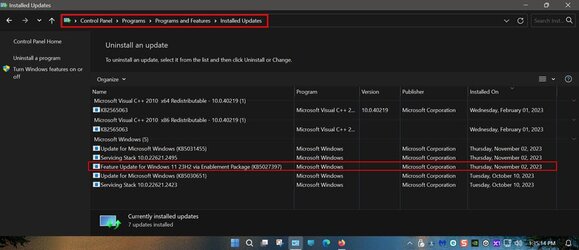
I don't have a What's New section, but the Enablement Package install doesn't say 22H2 or 23H2, on mine...


View attachment 76055


@Griff79... yep, I see that too on the Uninstall list. :-)

For anybody else that is having trouble navigating the newer settings panel your Windows Update history can also still be found in the "Classic Control Panel" that's where I veified if the Enablement Package was installed as I too forgot to check in the Uninstall List shown in Griff79,s quote above.

old control panel.jpg
 

My Computers My Computers

  • At a glance

    Windows 11 Pro x 2 + Insider DevIntel Core i9 12900K @ 5.2 GHz2 x Corsair Dominator Platinum RGB (4x16GB To...EVGA GeForce RTX 3080 XC3 ULTRA GAMING 10GB G...
    OS
    Windows 11 Pro x 2 + Insider Dev
    Computer type
    PC/Desktop
    Manufacturer/Model
    My first abomination, I call it the Money Pit One
    CPU
    Intel Core i9 12900K @ 5.2 GHz
    Motherboard
    ASUS ROG MAXIMUS Z690 HERO
    Memory
    2 x Corsair Dominator Platinum RGB (4x16GB Total) DDR5-6200 CL36 Dual Channel Kit
    Graphics Card(s)
    EVGA GeForce RTX 3080 XC3 ULTRA GAMING 10GB GDDR6X
    Sound Card
    ROG SupremeFX ALC4082 with ESS® ES9018Q2C DAC for pinpoint positioning and dynamics
    Monitor(s) Displays
    2 x Samsung 43" HDR Neo QLED Mini-LED Tizen Smart TV (QN43QN90DAFXZC) 2024
    Screen Resolution
    1920 x 1080 @ 150 DPI & 120Hz
    Hard Drives
    2 x Samsung 980 Series - 250GB PCIe Gen3. X4 NVMe 1.4 - M.2 Internal SSD (Windows 11 Pro Dual boot)
    PSU
    Corsair HX1000i 80+ Platinum Modular Power Supply 1000W
    Case
    Phanteks Enthoo Luxe Tempered Glass Full Tower Case - Black
    Cooling
    CORSAIR iCUE H150i RGB Elite 360mm Liquid CPU Cooler
    Keyboard
    Perixx PERIBOARD-732B Wireless Mini Backlit USB Keyboard with Low Profile Keys - US Layout
    Mouse
    Logitech MX Anywhere 2S Wireless Mouse
    Internet Speed
    1000 Mbps
    Browser
    Latest Version Of Firefox & Microsoft Edge Chromium Stable
    Antivirus
    ESET Internet Security
    Other Info
    LG Electronics 14x Sata Blu-ray Disk Rewriter - WH14NS4O
    2 x OREI 4K 4x2 HDMI Matrix Switch With ARC Audio Extraction, HDR & Downscaling (UHD-402D) so I can send the output of my Cable Box, Roku, or any of my 4 computers to either of my TV's separately or simultaneously.
  • At a glance

    Windows 11 Pro x 2Intel Core i9 12900K @ 5.2 GHz2 x Vengeance RGB 32GB DDR5 6400MHz CL32 Dual...ASUS TUF Gaming GeForce RTX 3070 Ti OC Editio...
    Operating System
    Windows 11 Pro x 2
    Computer type
    PC/Desktop
    Manufacturer/Model
    My second abomination, I call it the Money Pit Two
    CPU
    Intel Core i9 12900K @ 5.2 GHz
    Motherboard
    ASUS ROG STRIX Z690-F GAMING WIFI
    Memory
    2 x Vengeance RGB 32GB DDR5 6400MHz CL32 Dual Channel Kit (4x16GB Total) Black
    Graphics card(s)
    ASUS TUF Gaming GeForce RTX 3070 Ti OC Edition 8 GB GDDR6X
    Sound Card
    ROG SupremeFX ALC4082 with ESS® ES9018Q2C DAC for pinpoint positioning and dynamics
    Monitor(s) Displays
    2 x Samsung 43" HDR Neo QLED Mini-LED Tizen Smart TV (QN43QN90DAFXZC) 2024
    Screen Resolution
    1920 x 1080 @ 150 DPI & 120Hz
    Hard Drives
    2 x Samsung 980 Series - 250GB PCIe Gen3. X4 NVMe 1.4 - M.2 Internal SSD (Windows 11 Pro Dual boot)
    PSU
    Corsair AX860 - 860W Modular Power Supply
    Case
    Phanteks Enthoo Pro Tempered Glass Full Tower Case - Black
    Cooling
    CORSAIR iCUE H150i RGB Elite 360mm Liquid CPU Cooler
    Keyboard
    Perixx PERIBOARD-326 Wireless Mini Backlit USB Keyboard with Low Profile Keys - US Layout
    Mouse
    Logitech MX Anywhere 2S Wireless Mouse
    Internet Speed
    1000 Mbps
    Browser
    Latest Version Of Firefox & EDGE Chromium Stable
    Antivirus
    ESET Internet Security
    Other Info
    LG Electronics 14x Sata Blu-ray Disk Rewriter - WH14NS4O
    2 x OREI 4K 4x2 HDMI Matrix Switch With ARC Audio Extraction, HDR & Downscaling (UHD-402D) so I can send the output of my Cable Box, Roku, or any of my 4 computers to either of my TV's separately or simultaneously.
  • 2021 ASUS TUF Gaming A17 - FA706QM Gaming Laptop with a AMD Ryzen™ 7 5800H Mobile Processor, NVIDIA GeForce RTX 3060 Laptop GPU and AMD Graphics (512 MB), 17.3-inch, FHD (1920 x 1080) 16:9, Value IPS-level, Anti-glare display, 2 x 8GB DDR4 3200 SDRAM, Samsung 980 Series - 250GB PCIe Gen3. X4 NVMe 1.4 - M.2 Internal SSD running Windows 11 Pro , Backlit Chiclet Keyboard 1-Zone RGB, Touchpad, 720P HD camera, Wi-Fi 6(802.11ax) (Dual band) 2*2 + Bluetooth® 5.3 Wireless Card

    External Keyboard: Perixx PERIBOARD-326 Wireless Mini Backlit USB Keyboard with Low Profile Keys - US Layout

    External Mouse: Logitech MX Anywhere 2S Wireless Mouse

    External Monitor: Samsung 43" HDR Neo QLED Mini-LED Tizen Smart TV (QN43QN90DAFXZC) 2024
I guess it was my turn, it finally showed up in WU, went real quick. So far no issues, hopefully it will stay that way. SFC and DISM found no errors :wink:
 

My Computer My Computer

At a glance

Windows 11 25H2 Home11th Generation Intel Core i712GB
OS
Windows 11 25H2 Home
Computer type
Laptop
Manufacturer/Model
HP ENVY Laptop 17m-ch1xxx
CPU
11th Generation Intel Core i7
Memory
12GB
Monitor(s) Displays
17.3” FHD Display
So let me understand this - I manage a small office workgroup environment with a mix of Win 10 and have two Win 11 ENT workstations running.

Due to small footprint (a dozen endpoints) we do not allow wide open "Check for Updates" from each workstation and use PSWindowsUpdate via Powershell to manage the small updates overhead.

Each machine has a single registry key to turn off Auto Updates

[HKEY_LOCAL_MACHINE\SOFTWARE\Policies\Microsoft\Windows\WindowsUpdate\AU]
"NoAutoUpdate"=dword:00000001

And another to ensure no one can click "Check for Updates"

[HKEY_LOCAL_MACHINE\SOFTWARE\Policies\Microsoft\Windows\WindowsUpdate]
"SetDisableUXWUAccess"=dword:00000001

Leaving the machines in a perfect static state until each Patch Tuesday rolls around, and we apply the usual security and critical updates via a scheduled task via PSWindowsUpdate.

But as of this moment - if I run Get-WindowsUpdate from my machine against a Win 11 target - I do not get anything back of interest to 23H2:

2023-11-03_07-43-53.png

Is KB5027397 just not "out in the wild"? Or is it being staged or what else am I missing here?

EDIT: Just saw on NeoWin that I also might need KB5031455 on a Win 11 target as well?

Sonic
 

My Computer My Computer

At a glance

Windows 11 PRO 25H2Intel i5-10600KCorsair Vengeance LPX 64GB (2x32GB) (CMK64GX5...Intel UHD Graphics 630
OS
Windows 11 PRO 25H2
Computer type
PC/Desktop
Manufacturer/Model
ASUS
CPU
Intel i5-10600K
Motherboard
ProArt z490-Creator 10G
Memory
Corsair Vengeance LPX 64GB (2x32GB) (CMK64GX5M2B5600C40)
Graphics Card(s)
Intel UHD Graphics 630
Sound Card
RME ADI-2 FS DAC
Monitor(s) Displays
Dell U2415
Screen Resolution
1920x1080
Hard Drives
Samsung NMVE (990 Pro, 970 EVO)
PSU
Seasonic GX750
Case
Coolermaster CM-690II
Cooling
Noctua
Keyboard
Logitech MX Keys
Mouse
Logitech M510
Internet Speed
1 GBPS+
Browser
MS Edge
Antivirus
Windows Defender
Is KB5027397 just not "out in the wild"? Or is it being staged or what else am I missing here?

EDIT: Just saw on NeoWin that I also might need KB5031455 on a Win 11 target as well?


23H2 is being rolled out in... waves. It won't come to everyone at the same time.

Here's the short version...

Possibilities...

1. Windows Update will download KB5031455 and apply the enablement package (which just, turns features ON), giving you 23H2.

2. Windows Update will download KB5031455 and remain as 22H2. Then "you" need to apply the enablement package, to get 23H2.


Microsoft Upgrade path.png
 

My Computers My Computers

  • At a glance

    Win 11 Home ♦♦♦26200.8737 ♦♦♦♦♦♦♦25H2AMD Ryzen 7 3700XG.Skill (F4-3200C14D-16GTZKW)EVGA RTX 2070 (08G-P4-2171-KR)
    OS
    Win 11 Home ♦♦♦26200.8737 ♦♦♦♦♦♦♦25H2
    Computer type
    PC/Desktop
    Manufacturer/Model
    Built by Ghot® [May 2020]
    CPU
    AMD Ryzen 7 3700X
    Motherboard
    Asus Pro WS X570-ACE (BIOS 5302)
    Memory
    G.Skill (F4-3200C14D-16GTZKW)
    Graphics Card(s)
    EVGA RTX 2070 (08G-P4-2171-KR)
    Sound Card
    Realtek ALC1220P / ALC S1220A
    Monitor(s) Displays
    Dell U3011 30"
    Screen Resolution
    2560 x 1600
    Hard Drives
    2x Samsung 860 EVO 500GB,
    WD 4TB Black FZBX - SATA III,
    WD 8TB Black FZBX - SATA III,
    DRW-24B1ST CD/DVD Burner
    PSU
    PC Power & Cooling 750W Quad EPS12V
    Case
    Cooler Master ATCS 840 Tower
    Cooling
    CM Hyper 212 EVO (push/pull)
    Keyboard
    Ducky DK9008 Shine II Blue LED
    Mouse
    Logitech Optical M-100
    Internet Speed
    300/300
    Browser
    Firefox (latest)
    Antivirus
    Bitdefender Total Security
    Other Info
    Speakers: Klipsch Pro Media 2.1
  • At a glance

    Windows XP Pro 32bit w/SP3AMD Athlon 64 X2 5000+ (OC'd @ 3.2Ghz)TWIN2X2048-6400C4DHX (2 x 1GB, DDR2 800)EVGA 256-P2-N758-TR GeForce 8600GT SSC
    Operating System
    Windows XP Pro 32bit w/SP3
    Computer type
    PC/Desktop
    Manufacturer/Model
    Built by Ghot® (not in use)
    CPU
    AMD Athlon 64 X2 5000+ (OC'd @ 3.2Ghz)
    Motherboard
    ASUS M2N32-SLI Deluxe Wireless Edition
    Memory
    TWIN2X2048-6400C4DHX (2 x 1GB, DDR2 800)
    Graphics card(s)
    EVGA 256-P2-N758-TR GeForce 8600GT SSC
    Sound Card
    Onboard
    Monitor(s) Displays
    ViewSonic G90FB Black 19" Professional (CRT)
    Screen Resolution
    up to 2048 x 1536
    Hard Drives
    WD 36GB 10,000rpm Raptor SATA
    Seagate 80GB 7200rpm SATA
    Lite-On LTR-52246S CD/RW
    Lite-On LH-18A1P CD/DVD Burner
    PSU
    PC Power & Cooling Silencer 750 Quad EPS12V
    Case
    Generic Beige case, 80mm fans
    Cooling
    ZALMAN 9500A 92mm CPU Cooler
    Keyboard
    Logitech Classic Keybooard 200
    Mouse
    Logitech Optical M-BT96a
    Internet Speed
    300/300
    Browser
    Firefox 3.x ??
    Antivirus
    Symantec (Norton)
    Other Info
    Still assembled, still runs. Haven't turned it on for 15 years?
1. Windows Update will download KB5031455 and apply the enablement package (which just, turns features ON), giving you 23H2.

2. Windows Update will download KB5031455 and remain as 22H2. Then "you" need to apply the enablement package, to get 23H2.

Fair enough.

I just installed KB5031455 successfully - let the machine restart and settle down and then did an on demand Windows Update check via PSWindowsUpdate.

I do not see anything as of yet regarding enablement package AND my WIn 11 target remains as 22H2.

Guess I just need to wait it out.

S
 

My Computer My Computer

At a glance

Windows 11 PRO 25H2Intel i5-10600KCorsair Vengeance LPX 64GB (2x32GB) (CMK64GX5...Intel UHD Graphics 630
OS
Windows 11 PRO 25H2
Computer type
PC/Desktop
Manufacturer/Model
ASUS
CPU
Intel i5-10600K
Motherboard
ProArt z490-Creator 10G
Memory
Corsair Vengeance LPX 64GB (2x32GB) (CMK64GX5M2B5600C40)
Graphics Card(s)
Intel UHD Graphics 630
Sound Card
RME ADI-2 FS DAC
Monitor(s) Displays
Dell U2415
Screen Resolution
1920x1080
Hard Drives
Samsung NMVE (990 Pro, 970 EVO)
PSU
Seasonic GX750
Case
Coolermaster CM-690II
Cooling
Noctua
Keyboard
Logitech MX Keys
Mouse
Logitech M510
Internet Speed
1 GBPS+
Browser
MS Edge
Antivirus
Windows Defender
I have no idea why but everytime there is a build or Edge update, Edge irritatingly turns off extensions.
Worse, it always sets my favourite bar to never show rather than always. I can never remember where the setting is to change it.
This happens on all versions (RTM or Insiders).
 

My Computer My Computer

At a glance

Windows 11 Pro + Win11 Canary VM.I9 13th gen i9-13900H 2.60 GHZ16 GB solderedIntegrated Intel Iris XE
OS
Windows 11 Pro + Win11 Canary VM.
Computer type
Laptop
Manufacturer/Model
ASUS Zenbook 14
CPU
I9 13th gen i9-13900H 2.60 GHZ
Motherboard
Yep, Laptop has one.
Memory
16 GB soldered
Graphics Card(s)
Integrated Intel Iris XE
Sound Card
Realtek built in
Monitor(s) Displays
laptop OLED screen
Screen Resolution
2880x1800 touchscreen
Hard Drives
1 TB NVME SSD (only weakness is only one slot)
PSU
Internal + 65W thunderbolt USB4 charger
Case
Yep, got one
Cooling
Stella Artois (UK pint cans - 568 ml) - extra cost.
Keyboard
Built in UK keybd
Mouse
Bluetooth , wireless dongled, wired
Internet Speed
900 mbs (ethernet), wifi 6 typical 350-450 mb/s both up and down
Browser
Edge
Antivirus
Defender
Other Info
TPM 2.0, 2xUSB4 thunderbolt, 1xUsb3 (usb a), 1xUsb-c, hdmi out, 3.5 mm audio out/in combo, ASUS backlit trackpad (inc. switchable number pad)

Macrium Reflect Home V8
Office 365 Family (6 users each 1TB onedrive space)
Hyper-V (a vm runs almost as fast as my older laptop)
Edge will change settings after update...........have to check them after each update !! :unsure:
 

My Computers My Computers

  • At a glance

    Windows11 Pro 25H2i732GBnVidia
    OS
    Windows11 Pro 25H2
    Computer type
    PC/Desktop
    Manufacturer/Model
    Asus
    CPU
    i7
    Motherboard
    z97k
    Memory
    32GB
    Graphics Card(s)
    nVidia
    Sound Card
    Realtek
    Hard Drives
    3
    Cooling
    air
    Browser
    Edge
    Antivirus
    ESET
  • At a glance

    Windows11 ProIntel i516GBIntel
    Operating System
    Windows11 Pro
    Computer type
    PC/Desktop
    Manufacturer/Model
    ASUS
    CPU
    Intel i5
    Motherboard
    ASUS Basic
    Memory
    16GB
    Graphics card(s)
    Intel
    Sound Card
    Realtek
    Monitor(s) Displays
    Samsung
    Hard Drives
    one intern , 0ne extern, OS on SSD
    Cooling
    air
    Keyboard
    wireless Logitech
    Mouse
    wireless Logitech
    Internet Speed
    1GB
    Browser
    Edge
    Antivirus
    ESET
Fair enough.

I just installed KB5031455 successfully - let the machine restart and settle down and then did an on demand Windows Update check via PSWindowsUpdate.

I do not see anything as of yet regarding enablement package AND my WIn 11 target remains as 22H2.

Guess I just need to wait it out.

S


Then you just need to download the enablement package, at the bottom of the first post in this thread.
 

My Computers My Computers

  • At a glance

    Win 11 Home ♦♦♦26200.8737 ♦♦♦♦♦♦♦25H2AMD Ryzen 7 3700XG.Skill (F4-3200C14D-16GTZKW)EVGA RTX 2070 (08G-P4-2171-KR)
    OS
    Win 11 Home ♦♦♦26200.8737 ♦♦♦♦♦♦♦25H2
    Computer type
    PC/Desktop
    Manufacturer/Model
    Built by Ghot® [May 2020]
    CPU
    AMD Ryzen 7 3700X
    Motherboard
    Asus Pro WS X570-ACE (BIOS 5302)
    Memory
    G.Skill (F4-3200C14D-16GTZKW)
    Graphics Card(s)
    EVGA RTX 2070 (08G-P4-2171-KR)
    Sound Card
    Realtek ALC1220P / ALC S1220A
    Monitor(s) Displays
    Dell U3011 30"
    Screen Resolution
    2560 x 1600
    Hard Drives
    2x Samsung 860 EVO 500GB,
    WD 4TB Black FZBX - SATA III,
    WD 8TB Black FZBX - SATA III,
    DRW-24B1ST CD/DVD Burner
    PSU
    PC Power & Cooling 750W Quad EPS12V
    Case
    Cooler Master ATCS 840 Tower
    Cooling
    CM Hyper 212 EVO (push/pull)
    Keyboard
    Ducky DK9008 Shine II Blue LED
    Mouse
    Logitech Optical M-100
    Internet Speed
    300/300
    Browser
    Firefox (latest)
    Antivirus
    Bitdefender Total Security
    Other Info
    Speakers: Klipsch Pro Media 2.1
  • At a glance

    Windows XP Pro 32bit w/SP3AMD Athlon 64 X2 5000+ (OC'd @ 3.2Ghz)TWIN2X2048-6400C4DHX (2 x 1GB, DDR2 800)EVGA 256-P2-N758-TR GeForce 8600GT SSC
    Operating System
    Windows XP Pro 32bit w/SP3
    Computer type
    PC/Desktop
    Manufacturer/Model
    Built by Ghot® (not in use)
    CPU
    AMD Athlon 64 X2 5000+ (OC'd @ 3.2Ghz)
    Motherboard
    ASUS M2N32-SLI Deluxe Wireless Edition
    Memory
    TWIN2X2048-6400C4DHX (2 x 1GB, DDR2 800)
    Graphics card(s)
    EVGA 256-P2-N758-TR GeForce 8600GT SSC
    Sound Card
    Onboard
    Monitor(s) Displays
    ViewSonic G90FB Black 19" Professional (CRT)
    Screen Resolution
    up to 2048 x 1536
    Hard Drives
    WD 36GB 10,000rpm Raptor SATA
    Seagate 80GB 7200rpm SATA
    Lite-On LTR-52246S CD/RW
    Lite-On LH-18A1P CD/DVD Burner
    PSU
    PC Power & Cooling Silencer 750 Quad EPS12V
    Case
    Generic Beige case, 80mm fans
    Cooling
    ZALMAN 9500A 92mm CPU Cooler
    Keyboard
    Logitech Classic Keybooard 200
    Mouse
    Logitech Optical M-BT96a
    Internet Speed
    300/300
    Browser
    Firefox 3.x ??
    Antivirus
    Symantec (Norton)
    Other Info
    Still assembled, still runs. Haven't turned it on for 15 years?
I have no idea why but everytime there is a build or Edge update, Edge irritatingly turns off extensions.
Worse, it always sets my favourite bar to never show rather than always. I can never remember where the setting is to change it.
This happens on all versions (RTM or Insiders).
My Edge has never done any of that with any update. It remains solidly the same with no changes. Extensions don't turn off. My Favorites Bar always shows and doesn't turn off.

I don't beta test anything and am not an Insider.

I'm currently on Edge Version 119.0.2151.44 (Official build) (64-bit).
 

My Computers My Computers

  • At a glance

    Windows 11 ProIntel Series 3 Core Ultra X9 388H64GB LPDDR5x 9600 MT/sIntel Arc graphics B390 Panther Lake
    OS
    Windows 11 Pro
    Computer type
    Laptop
    Manufacturer/Model
    Dell XPS 16 DA16260
    CPU
    Intel Series 3 Core Ultra X9 388H
    Memory
    64GB LPDDR5x 9600 MT/s
    Graphics Card(s)
    Intel Arc graphics B390 Panther Lake
    Monitor(s) Displays
    16" 3.2K Tandem OLED Infinity Edge
    Screen Resolution
    3200 x 2000 16:10 236 PPI
    Hard Drives
    1 Terabyte M.2 PCIe NVMe SSD
    Case
    Black Anodized Aluminum
    Cooling
    Vapor Chamber Cooling
    Mouse
    None
    Internet Speed
    942 Mbps Netgear Mesh + 2 Satellites
    Browser
    Microsoft Edge (Chromium)
    Antivirus
    Windows Security (Defender)
    Other Info
    NPU delivering 67 TOPS
    Microsoft 365 subscription
    Microsoft Office 365
    Microsoft OneDrive 1TB Cloud
    Microsoft Visual Studio
    Microsoft Visual Studio Code
    Microsoft Sysinternals Suite
    Microsoft BitLocker
    Microsoft Copilot
    Dell Support Assist
    Dell Command | Update
    Macrium Reflect X subscription
    1Password Password Manager
    Amazon Kindle for PC
    Lightroom/Photoshop subscription
    Interactive Brokers Trader Workstation
  • At a glance

    Windows 11 ProSnapdragon® X Elite (12 Core) with Hexagon NP...32GB LPDDR5x 8448 MT/sIntegrated Adreno GPU
    Operating System
    Windows 11 Pro
    Computer type
    Laptop
    Manufacturer/Model
    Microsoft Surface Laptop 7
    CPU
    Snapdragon® X Elite (12 Core) with Hexagon NPU delivering 45 TOPS
    Memory
    32GB LPDDR5x 8448 MT/s
    Graphics card(s)
    Integrated Adreno GPU
    Sound Card
    Omnisonic speakers with Dolby Atmos spatial sound
    Monitor(s) Displays
    13.8″ PixelSense Flow touchscreen 120 Hz 600 NIT
    Screen Resolution
    2304 × 1536 (201 PPI), 3:2 aspect ratio
    Hard Drives
    1 TB PCIe NVMe Gen 4 SSD
    Case
    Black Anodized Aluminum
    Cooling
    Vapor Chamber Cooling
    Mouse
    None
    Internet Speed
    942 Mbps Netgear Mesh + 2 Satellites
    Browser
    Microsoft Edge (Chromium)
    Antivirus
    Windows Security (Defender)
    Other Info
    Microsoft 365 subscription (Office)
    Microsoft Office 365
    Microsoft OneDrive 1TB Cloud
    Microsoft Visual Studio 2026
    Microsoft Visual Studio Code
    Interactive Brokers Trader Workstation
    Lightroom/Photoshop subscription
    1Password Password Manager
    Microsoft Sysinternals
    Amazon Kindle for PC
    Microsoft BitLocker
    Microsoft Copilot
I have no idea why but everytime there is a build or Edge update, Edge irritatingly turns off extensions.
Have you tried to reset Edge?
Edge will change settings after update...........have to check them after each update !! :unsure:
Not just Edge, Windows as well, thus the reason I prefer to use policies, they will always stick. I setup Edge using policies (~95%).
Code:
rem =================================== Windows Policies ===================================
rem ------------------------------------ Microsoft Edge ------------------------------------

rem https://docs.microsoft.com/en-us/deployedge/microsoft-edge-relnote-stable-channel
rem https://docs.microsoft.com/en-us/DeployEdge/microsoft-edge-policies
rem https://www.microsoft.com/en-us/download/details.aspx?id=55319
rem rem https://admx.help/?Category=EdgeChromium
rem edge://policy

rem reg delete "HKCU\Software\Policies\Microsoft\Edge" /f
rem reg delete "HKLM\Software\Policies\Microsoft\Edge" /f

rem ________________________________________________________________________________________
rem 1 - Allow users to access the games menu
reg add "HKLM\Software\Policies\Microsoft\Edge" /v "AllowGamesMenu" /t REG_DWORD /d "0" /f

rem 1 - Allow the audio sandbox to run
reg add "HKLM\Software\Policies\Microsoft\Edge" /v "AudioSandboxEnabled" /t REG_DWORD /d "0" /f

rem 1 - Compose is enabled for writing on the web
reg add "HKLM\Software\Policies\Microsoft\Edge" /v "ComposeInlineEnabled" /t REG_DWORD /d "0" /f

rem 1 - Enables CryptoWallet feature
reg add "HKLM\Software\Policies\Microsoft\Edge" /v "CryptoWalletEnabled" /t REG_DWORD /d "0" /f

rem 1 - AllowJavaScriptJit / 2 - BlockJavaScriptJit (Do not allow any site to run JavaScript JIT)
reg add "HKLM\Software\Policies\Microsoft\Edge" /v "DefaultJavaScriptJitSetting" /t REG_DWORD /d "0" /f

rem 1 - Allow users to open files using the DirectInvoke protocol
reg add "HKLM\Software\Policies\Microsoft\Edge" /v "DirectInvokeEnabled" /t REG_DWORD /d "0" /f

rem 1 - Disable taking screenshots
reg add "HKLM\Software\Policies\Microsoft\Edge" /v "DisableScreenshots" /t REG_DWORD /d "1" /f

rem 1 - DNS interception checks enabled
reg add "HKLM\Software\Policies\Microsoft\Edge" /v "DNSInterceptionChecksEnabled" /t REG_DWORD /d "0" /f

rem 1 - Drop lets users send messages or files to themselves
reg add "HKLM\Software\Policies\Microsoft\Edge" /v "EdgeEDropEnabled" /t REG_DWORD /d "0" /f

rem 1 - Microsoft Edge can automatically enhance images to show you sharper images with better color, lighting, and contrast
reg add "HKLM\Software\Policies\Microsoft\Edge" /v "EdgeEnhanceImagesEnabled" /t REG_DWORD /d "0" /f

rem 1 - Allows the Microsoft Edge browser to enable Follow service and apply it to users
reg add "HKLM\Software\Policies\Microsoft\Edge" /v "EdgeFollowEnabled" /t REG_DWORD /d "0" /f

rem 1 - Microsoft Edge will attempt to connect to the Microsoft Edge management service to download and apply policy assigned to the Azure AD account of the user
reg add "HKLM\Software\Policies\Microsoft\Edge" /v "EdgeManagementEnabled" /t REG_DWORD /d "0" /f

rem 1 - If you enable this policy, users will be able to access the Microsoft Edge Workspaces feature
reg add "HKLM\Software\Policies\Microsoft\Edge" /v "EdgeWorkspacesEnabled" /t REG_DWORD /d "0" /f

rem 1 - Allow Google Cast to connect to Cast devices on all IP addresses (Multicast), Edge trying to connect to 239.255.255.250 via UDP port 1900
reg add "HKLM\Software\Policies\Microsoft\Edge" /v "EnableMediaRouter" /t REG_DWORD /d "0" /f

rem The Experimentation and Configuration Service is used to deploy Experimentation and Configuration payloads to the client / 0 - RestrictedMode / 1 - ConfigurationsOnlyMode / 2 - FullMode
reg add "HKLM\Software\Policies\Microsoft\Edge" /v "ExperimentationAndConfigurationServiceControl" /t REG_DWORD /d "0" /f

rem 1 - Allows Microsoft Edge to prompt the user to switch to the appropriate profile when Microsoft Edge detects that a link is a personal or work link
reg add "HKLM\Software\Policies\Microsoft\Edge" /v "GuidedSwitchEnabled" /t REG_DWORD /d "0" /f

rem 1 - Hide restore pages dialog after browser crash
reg add "HKLM\Software\Policies\Microsoft\Edge" /v "HideRestoreDialogEnabled" /t REG_DWORD /d "1" /f

rem 1 - Show Hubs Sidebar
reg add "HKLM\Software\Policies\Microsoft\Edge" /v "HubsSidebarEnabled" /t REG_DWORD /d "0" /f

rem 1 - Enable Grammar Tools feature within Immersive Reader
reg add "HKLM\Software\Policies\Microsoft\Edge" /v "ImmersiveReaderGrammarToolsEnabled" /t REG_DWORD /d "0" /f

rem 1 - Enable Picture Dictionary feature within Immersive Reader
reg add "HKLM\Software\Policies\Microsoft\Edge" /v "ImmersiveReaderPictureDictionaryEnabled" /t REG_DWORD /d "0" /f

rem 0 -InPrivate mode available / 1 - disabled / 2 - forced
reg add "HKLM\Software\Policies\Microsoft\Edge" /v "InPrivateModeAvailability" /t REG_DWORD /d "1" /f

rem 1 - Allow sites to be reloaded in Internet Explorer mode (IE mode)
reg add "HKLM\Software\Policies\Microsoft\Edge" /v "InternetExplorerIntegrationReloadInIEModeAllowed" /t REG_DWORD /d "0" /f

rem 1 - Shows content promoting the Microsoft Edge Insider channels on the About Microsoft Edge settings page
reg add "HKLM\Software\Policies\Microsoft\Edge" /v "MicrosoftEdgeInsiderPromotionEnabled" /t REG_DWORD /d "0" /f

rem 1 - Mouse Gesture Enabled
reg add "HKLM\Software\Policies\Microsoft\Edge" /v "MouseGestureEnabled" /t REG_DWORD /d "0" /f

rem 1 - Microsoft Edge built-in PDF reader powered by Adobe Acrobat enabled
reg add "HKLM\Software\Policies\Microsoft\Edge" /v "NewPDFReaderEnabled" /t REG_DWORD /d "0" /f

rem 1 - Hide the default top sites from the new tab page
reg add "HKLM\Software\Policies\Microsoft\Edge" /v "NewTabPageHideDefaultTopSites" /t REG_DWORD /d "1" /f

rem 1 - Allow QUIC protocol
reg add "HKLM\Software\Policies\Microsoft\Edge" /v "QuicAllowed" /t REG_DWORD /d "0" /f

rem 1 - Enable Read Aloud feature in Microsoft Edge
reg add "HKLM\Software\Policies\Microsoft\Edge" /v "ReadAloudEnabled" /t REG_DWORD /d "0" /f

rem 1 - Configure Related Matches in Find on Page, the results are processed in a cloud service
reg add "HKLM\Software\Policies\Microsoft\Edge" /v "RelatedMatchesCloudServiceEnabled" /t REG_DWORD /d "0" /f

rem 1 - Allow remote debugging
reg add "HKLM\Software\Policies\Microsoft\Edge" /v "RemoteDebuggingAllowed" /t REG_DWORD /d "0" /f

rem 1 - Launches Renderer processes into an App Container for additional security benefits
reg add "HKLM\Software\Policies\Microsoft\Edge" /v "RendererAppContainerEnabled" /t REG_DWORD /d "1" /f

rem 0 - Enable search in sidebar / 1 - DisableSearchInSidebarForKidsMode / 2 - DisableSearchInSidebar
reg add "HKLM\Software\Policies\Microsoft\Edge" /v "SearchInSidebarEnabled" /t REG_DWORD /d "2" /f

rem 1 - Search for image enabled
reg add "HKLM\Software\Policies\Microsoft\Edge" /v "SearchForImageEnabled" /t REG_DWORD /d "0" /f

rem 1 - Allow screen capture
reg add "HKLM\Software\Policies\Microsoft\Edge" /v "ScreenCaptureAllowed" /t REG_DWORD /d "0" /f

rem 1 - Allow notifications to set Microsoft Edge as default PDF reader
reg add "HKLM\Software\Policies\Microsoft\Edge" /v "ShowPDFDefaultRecommendationsEnabled" /t REG_DWORD /d "0" /f

rem 1 - The policy can be used to prevent users from opting out of the default behavior of isolating all sites
reg add "HKLM\Software\Policies\Microsoft\Edge" /v "SitePerProcess" /t REG_DWORD /d "1" /f

rem 1 - Allow Speech Recognition
reg add "HKLM\Software\Policies\Microsoft\Edge" /v "SpeechRecognitionEnabled" /t REG_DWORD /d "0" /f

rem 1 - Allow video capture
reg add "HKLM\Software\Policies\Microsoft\Edge" /v "VideoCaptureAllowed" /t REG_DWORD /d "0" /f

rem 1 - Allow Microsoft Edge Workspaces
reg add "HKLM\Software\Policies\Microsoft\Edge" /v "EdgeWorkspacesEnabled" /t REG_DWORD /d "0" /f

rem 1 - Wallet Donation Enabled
reg add "HKLM\Software\Policies\Microsoft\Edge" /v "WalletDonationEnabled" /t REG_DWORD /d "0" /f

rem 1 - DNS-based WPAD optimization (Web Proxy Auto-Discovery)
reg add "HKLM\Software\Policies\Microsoft\Edge" /v "WPADQuickCheckEnabled" /t REG_DWORD /d "0" /f

rem 0 - Prevent Desktop Shortcut creation upon install default
reg add "HKLM\Software\Policies\Microsoft\EdgeUpdate" /v "CreateDesktopShortcutDefault" /t REG_DWORD /d "0" /f
reg add "HKLM\Software\Policies\Microsoft\EdgeUpdate" /v "CreateDesktopShortcut{56EB18F8-B008-4CBD-B6D2-8C97FE7E9062}" /t REG_DWORD /d "0" /f
reg add "HKLM\Software\Policies\Microsoft\EdgeUpdate" /v "RemoveDesktopShortcutDefault" /t REG_DWORD /d "1" /f

rem ________________________________________________________________________________________
rem 1 - The Sidebar appears in a fixed position on the Microsoft Windows desktop, and is hidden from the browser application frame
reg add "HKLM\Software\Policies\Microsoft\Edge" /v "StandaloneHubsSidebarEnabled" /t REG_DWORD /d "0" /f


rem =================================== Windows Policies ===================================
rem ------------------------------------ Microsoft Edge ------------------------------------
rem ..................................... Appearances ......................................

rem 0 - Show share button
reg add "HKLM\Software\Policies\Microsoft\Edge" /v "ConfigureShare" /t REG_DWORD /d "1" /f

rem 1 - Show Collections button
reg add "HKLM\Software\Policies\Microsoft\Edge" /v "EdgeCollectionsEnabled" /t REG_DWORD /d "0" /f

rem 1 - Show favorites bar
reg add "HKLM\Software\Policies\Microsoft\Edge" /v "FavoritesBarEnabled" /t REG_DWORD /d "1" /f

rem 1 - Show Math Solver button
reg add "HKLM\Software\Policies\Microsoft\Edge" /v "MathSolverEnabled" /t REG_DWORD /d "0" /f

rem 1 - The performance detector detects tab performance issues and recommends actions to fix the performance issues
reg add "HKLM\Software\Policies\Microsoft\Edge" /v "PerformanceDetectorEnabled" /t REG_DWORD /d "0" /f

rem 1 - Pin browser essentials toolbar button
reg add "HKLM\Software\Policies\Microsoft\Edge" /v "PinBrowserEssentialsToolbarButton" /t REG_DWORD /d "0" /f

rem 1 - Show mini menu when selecting text
reg add "HKLM\Software\Policies\Microsoft\Edge" /v "QuickSearchShowMiniMenu" /t REG_DWORD /d "0" /f

rem 1 - Always show the Downloads button on the toolbar
reg add "HKLM\Software\Policies\Microsoft\Edge" /v "ShowDownloadsToolbarButton" /t REG_DWORD /d "1" /f

rem 1 - Show home button
reg add "HKLM\Software\Policies\Microsoft\Edge" /v "ShowHomeButton" /t REG_DWORD /d "0" /f

rem 1 - Show feedback button
reg add "HKLM\Software\Policies\Microsoft\Edge" /v "UserFeedbackAllowed" /t REG_DWORD /d "0" /f

rem 1 - Show tab actions menu (Show vertical tabs)
reg add "HKLM\Software\Policies\Microsoft\Edge" /v "VerticalTabsAllowed" /t REG_DWORD /d "0" /f

rem 1 - Show web capture button
reg add "HKLM\Software\Policies\Microsoft\Edge" /v "WebCaptureEnabled" /t REG_DWORD /d "0" /f

rem ________________________________________________________________________________________
rem 1 - Enables background updates to the list of available templates for Collections and other features that use templates
reg add "HKLM\Software\Policies\Microsoft\Edge" /v "BackgroundTemplateListUpdatesEnabled" /t REG_DWORD /d "0" /f

rem 1 - Enable the Search bar
reg add "HKLM\Software\Policies\Microsoft\Edge" /v "SearchbarAllowed" /t REG_DWORD /d "0" /f

rem 1 - Allow the Search bar at Windows startup
reg add "HKLM\Software\Policies\Microsoft\Edge" /v "SearchbarIsEnabledOnStartup" /t REG_DWORD /d "0" /f


rem =================================== Windows Policies ===================================
rem ------------------------------------ Microsoft Edge ------------------------------------
rem .............................. Cookies and site permissions ............................

rem PDF Documents
reg add "HKLM\Software\Policies\Microsoft\Edge" /v "AlwaysOpenPdfExternally" /t REG_DWORD /d "1" /f

rem Ads setting for sites with intrusive ads / 1 - Allow ads on all sites / 2 - Block ads on sites with intrusive ads. (Default value)
reg add "HKLM\Software\Policies\Microsoft\Edge" /v "AdsSettingForIntrusiveAdsSites" /t REG_DWORD /d "1" /f

rem Clipboard / 2 - BlockClipboard / 3 - AskClipboard
reg add "HKLM\Software\Policies\Microsoft\Edge" /v "DefaultClipboardSetting" /t REG_DWORD /d "2" /f

rem File Editing / 2 - BlockFileSystemRead / 3 - AskFileSystemRead
reg add "HKLM\Software\Policies\Microsoft\Edge" /v "DefaultFileSystemReadGuardSetting" /t REG_DWORD /d "2" /f

rem File Editing / 2 - BlockFileSystemWrite / 3 - AskFileSystemWrite
reg add "HKLM\Software\Policies\Microsoft\Edge" /v "DefaultFileSystemWriteGuardSetting" /t REG_DWORD /d "2" /f

rem Location / 1 - AllowGeolocation / 2 - BlockGeolocation / 3 - AskGeolocation
reg add "HKLM\Software\Policies\Microsoft\Edge" /v "DefaultGeolocationSetting" /t REG_DWORD /d "2" /f

rem Insecure Content / 2 - BlockInsecureContent / 3 - AllowExceptionsInsecureContent
reg add "HKLM\Software\Policies\Microsoft\Edge" /v "DefaultInsecureContentSetting" /t REG_DWORD /d "2" /f

rem Notifications / 1 - AllowNotifications / 2 - BlockNotifications / 3 - AskNotifications
reg add "HKLM\Software\Policies\Microsoft\Edge" /v "DefaultNotificationsSetting" /t REG_DWORD /d "2" /f

rem Motion or light sensors / 1 - AllowSensors / 2 - BlockSensors
reg add "HKLM\Software\Policies\Microsoft\Edge" /v "DefaultSensorsSetting" /t REG_DWORD /d "2" /f

rem Serial ports / 2 - BlockSerial / 3 - AskSerial
reg add "HKLM\Software\Policies\Microsoft\Edge" /v "DefaultSerialGuardSetting" /t REG_DWORD /d "2" /f

rem USB Devices / 2 - BlockWebUsb / 3 - AskWebUsb
reg add "HKLM\Software\Policies\Microsoft\Edge" /v "DefaultWebUsbGuardSetting" /t REG_DWORD /d "2" /f

rem ________________________________________________________________________________________
rem 1 - Allow audio capture
reg add "HKLM\Software\Policies\Microsoft\Edge" /v "AudioCaptureAllowed" /t REG_DWORD /d "0" /f

rem Bluetooth / 2 - BlockWebBluetooth / 3 - AskWebBluetooth
reg add "HKLM\Software\Policies\Microsoft\Edge" /v "DefaultWebBluetoothGuardSetting" /t REG_DWORD /d "2" /f

rem Access to HID devices via the WebHID API / 2 - BlockWebHid / 3 - AskWebHid
reg add "HKLM\Software\Policies\Microsoft\Edge" /v "DefaultWebHidGuardSetting" /t REG_DWORD /d "2" /f


rem =================================== Windows Policies ===================================
rem ------------------------------------ Microsoft Edge ------------------------------------
rem ...................................... Downloads .......................................

rem Set download directory
reg add "HKLM\Software\Policies\Microsoft\Edge" /v "DownloadDirectory" /t REG_SZ /d "Z:\Desktop" /f

rem 1 - Ask me what to do with each download (Ignored when download directory is set)
reg add "HKLM\Software\Policies\Microsoft\Edge" /v "PromptForDownloadLocation" /t REG_DWORD /d "1" /f

rem 1 - Open Office files in the browser
reg add "HKLM\Software\Policies\Microsoft\Edge" /v "QuickViewOfficeFilesEnabled" /t REG_DWORD /d "0" /f


rem =================================== Windows Policies ===================================
rem ------------------------------------ Microsoft Edge ------------------------------------
rem ..................................... Extensions .......................................

rem 1 - Allow extensions from other stores
reg add "HKLM\Software\Policies\Microsoft\Edge" /v "ControlDefaultStateOfAllowExtensionFromOtherStoresSettingEnabled" /t REG_DWORD /d "0" /f

rem 1 - DeveloperToolsAllowed / 2 - DeveloperToolsDisallowed (Don't allow using the developer tools)
reg add "HKLM\Software\Policies\Microsoft\Edge" /v "DeveloperToolsAvailability" /t REG_DWORD /d "2" /f

rem ________________________________________________________________________________________
rem 1 - Blocks external extensions from being installed
reg add "HKLM\Software\Policies\Microsoft\Edge" /v "BlockExternalExtensions" /t REG_DWORD /d "1" /f


rem =================================== Windows Policies ===================================
rem ------------------------------------ Microsoft Edge ------------------------------------
rem ...................................... Languages .......................................

rem 1 - Enable spellcheck
reg add "HKLM\Software\Policies\Microsoft\Edge" /v "SpellcheckEnabled" /t REG_DWORD /d "1" /f

rem 1 - Offer to translate pages that aren't in a language I read
reg add "HKLM\Software\Policies\Microsoft\Edge" /v "TranslateEnabled" /t REG_DWORD /d "0" /f

rem ________________________________________________________________________________________
rem 1 - The Microsoft Editor service provides enhanced spell and grammar checking for editable text fields on web pages
rem https://www.bleepingcomputer.com/news/security/google-microsoft-can-get-your-passwords-via-web-browsers-spellcheck
reg add "HKLM\Software\Policies\Microsoft\Edge" /v "MicrosoftEditorProofingEnabled" /t REG_DWORD /d "0" /f
reg add "HKLM\Software\Policies\Microsoft\Edge" /v "MicrosoftEditorSynonymsEnabled" /t REG_DWORD /d "0" /f

rem =================================== Windows Policies ===================================
rem ------------------------------------ Microsoft Edge ------------------------------------
rem ..................................... New tab page .....................................

rem Page Layout / 1 - DisableImageOfTheDay / 2 -  DisableCustomImage / 3 - DisableAll
reg add "HKLM\Software\Policies\Microsoft\Edge" /v "NewTabPageAllowedBackgroundTypes" /t REG_DWORD /d "1" /f

rem 1 - Allow Microsoft News content on the new tab page
reg add "HKLM\Software\Policies\Microsoft\Edge" /v "NewTabPageContentEnabled" /t REG_DWORD /d "0" /f

rem 1 - Preload the new tab page for a faster experience
reg add "HKLM\Software\Policies\Microsoft\Edge" /v "NewTabPagePrerenderEnabled" /t REG_DWORD /d "0" /f

rem ________________________________________________________________________________________
rem 1 - Hide the default top sites from the new tab page
reg add "HKLM\Software\Policies\Microsoft\Edge" /v "NewTabPageHideDefaultTopSites" /t REG_DWORD /d "1" /f

rem 1 - Allow quick links on the new tab page
reg add "HKLM\Software\Policies\Microsoft\Edge" /v "NewTabPageQuickLinksEnabled" /t REG_DWORD /d "0" /f


rem =================================== Windows Policies ===================================
rem ------------------------------------ Microsoft Edge ------------------------------------
rem ....................................... Personal .......................................

rem 1 - Add profile
reg add "HKLM\Software\Policies\Microsoft\Edge" /v "BrowserAddProfileEnabled" /t REG_DWORD /d "0" /f

rem 1 - Browse as guest
reg add "HKLM\Software\Policies\Microsoft\Edge" /v "BrowserGuestModeEnabled" /t REG_DWORD /d "0" /f

rem 1 - Allow users to configure Family safety and Kids Mode
reg add "HKLM\Software\Policies\Microsoft\Edge" /v "FamilySafetySettingsEnabled" /t REG_DWORD /d "0" /f


rem =================================== Windows Policies ===================================
rem ------------------------------------ Microsoft Edge ------------------------------------
rem ............................ Privacy, search, and services .............................

rem 1 - Suggest similar sites when a website can't be found
reg add "HKLM\Software\Policies\Microsoft\Edge" /v "AlternateErrorPagesEnabled" /t REG_DWORD /d "0" /f

rem Automatically switch to more secure connections with Automatic HTTPS / 0 - Disabled / 1 - Switch to supported domains / 2 - Always
reg add "HKLM\Software\Policies\Microsoft\Edge" /v "AutomaticHttpsDefault" /t REG_DWORD /d "2" /f

rem Diagnostic Data / 0 - Off / 1 - RequiredData / 2 - OptionalData
reg add "HKLM\Software\Policies\Microsoft\Edge" /v "DiagnosticData" /t REG_DWORD /d "0" /f

rem Enhance the security state in Microsoft Edge / 0 - Standard mode / 1 - Balanced mode / 2 - Strict mode
reg add "HKLM\Software\Policies\Microsoft\Edge" /v "EnhanceSecurityMode" /t REG_DWORD /d "2" /f

rem Search on new tabs uses search box or address bar / redirect - address bar / bing - search box
reg add "HKLM\Software\Policies\Microsoft\Edge" /v "NewTabPageSearchBox" /t REG_SZ /d "redirect" /f

rem 1 - Use a web service to help resolve navigation errors
reg add "HKLM\Software\Policies\Microsoft\Edge" /v "ResolveNavigationErrorsUseWebService" /t REG_DWORD /d "0" /f

rem 1 - Show me search and site suggestions using my typed characters
reg add "HKLM\Software\Policies\Microsoft\Edge" /v "SearchSuggestEnabled" /t REG_DWORD /d "0" /f

rem 1 - Turn on site safety services to get more info about the sites you visit
reg add "HKLM\Software\Policies\Microsoft\Edge" /v "SiteSafetyServicesEnabled" /t REG_DWORD /d "0" /f

rem 1 - Suggest group names when creating a new tab group
reg add "HKLM\Software\Policies\Microsoft\Edge" /v "TabServicesEnabled" /t REG_DWORD /d "0" /f

rem Tracking prevention / 0 - Off / 1 - Basic / 2 - Balanced / 3 - Strict
reg add "HKLM\Software\Policies\Microsoft\Edge" /v "TrackingPrevention" /t REG_DWORD /d "0" /f

rem 1 - Typosquatting Checker (just sending what you type to MS)
reg add "HKLM\Software\Policies\Microsoft\Edge" /v "TyposquattingCheckerEnabled" /t REG_DWORD /d "0" /f

rem 1 - Visual search (sending what you are looking at to MS)
reg add "HKLM\Software\Policies\Microsoft\Edge" /v "VisualSearchEnabled" /t REG_DWORD /d "0" /f

rem ________________________________________________________________________________________
rem Enable Microsoft Search in Bing suggestions in the address bar
reg add "HKLM\Software\Policies\Microsoft\Edge" /v "AddressBarMicrosoftSearchInBingProviderEnabled" /t REG_DWORD /d "0" /f

rem Allow personalization of ads, Microsoft Edge, search, news and other Microsoft services by sending browsing history, favorites and collections, usage and other browsing data to Microsoft
reg add "HKLM\Software\Policies\Microsoft\Edge" /v "PersonalizationReportingEnabled" /t REG_DWORD /d "0" /f

rem Enable full-tab promotional content
reg add "HKLM\Software\Policies\Microsoft\Edge" /v "PromotionalTabsEnabled" /t REG_DWORD /d "0" /f

rem Allow recommendations and promotional notifications from Microsoft Edge
reg add "HKLM\Software\Policies\Microsoft\Edge" /v "ShowRecommendationsEnabled" /t REG_DWORD /d "0" /f

rem Choose whether users can receive customized background images and text, suggestions, notifications, and tips for Microsoft services)
reg add "HKLM\Software\Policies\Microsoft\Edge" /v "SpotlightExperiencesAndRecommendationsEnabled" /t REG_DWORD /d "0" /f

rem Use secure DNS (DoH)
rem reg add "HKLM\Software\Policies\Microsoft\Edge" /v "BuiltInDnsClientEnabled" /t REG_DWORD /d "1" /f
rem reg add "HKLM\Software\Policies\Microsoft\Edge" /v "DnsOverHttpsMode" /t REG_SZ /d "secure" /f
rem reg add "HKLM\Software\Policies\Microsoft\Edge" /v "DnsOverHttpsTemplates" /t REG_SZ /d "https://security.cloudflare-dns.com/dns-query?" /f


rem =================================== Windows Policies ===================================
rem ------------------------------------ Microsoft Edge ------------------------------------
rem ...................................... Profiles ........................................

rem 1 - Save and fill personal info
reg add "HKLM\Software\Policies\Microsoft\Edge" /v "AutofillAddressEnabled" /t REG_DWORD /d "1" /f

rem 1 - Save and fill payment info
reg add "HKLM\Software\Policies\Microsoft\Edge" /v "AutofillCreditCardEnabled" /t REG_DWORD /d "1" /f

rem 1 - Let users compare the prices of a product they are looking at, get coupons or rebates from the website they're on
reg add "HKLM\Software\Policies\Microsoft\Edge" /v "EdgeShoppingAssistantEnabled" /t REG_DWORD /d "0" /f

rem 1 - Forces data synchronization in Microsoft Edge. This policy also prevents the user from turning sync off.
reg add "HKLM\Software\Policies\Microsoft\Edge" /v "ForceSync" /t REG_DWORD /d "1" /f

rem If you enable this policy all the specified data types will be included for synchronization
reg add "HKLM\Software\Policies\Microsoft\Edge\ForceSyncTypes" /v "1" /t REG_SZ /d "extensions" /f
reg add "HKLM\Software\Policies\Microsoft\Edge\ForceSyncTypes" /v "2" /t REG_SZ /d "favorites" /f
reg add "HKLM\Software\Policies\Microsoft\Edge\ForceSyncTypes" /v "3" /t REG_SZ /d "passwords" /f
reg add "HKLM\Software\Policies\Microsoft\Edge\ForceSyncTypes" /v "4" /t REG_SZ /d "settings" /f

rem If you enable this policy all the specified data types will be excluded from synchronization
reg add "HKLM\Software\Policies\Microsoft\Edge\SyncTypesListDisabled" /v "1" /t REG_SZ /d "addressesAndMore" /f
reg add "HKLM\Software\Policies\Microsoft\Edge\SyncTypesListDisabled" /v "2" /t REG_SZ /d "apps" /f
reg add "HKLM\Software\Policies\Microsoft\Edge\SyncTypesListDisabled" /v "3" /t REG_SZ /d "collections" /f
reg add "HKLM\Software\Policies\Microsoft\Edge\SyncTypesListDisabled" /v "4" /t REG_SZ /d "history" /f
reg add "HKLM\Software\Policies\Microsoft\Edge\SyncTypesListDisabled" /v "5" /t REG_SZ /d "openTabs" /f

rem 1 - Suggest strong passwords
reg add "HKLM\Software\Policies\Microsoft\Edge" /v "PasswordGeneratorEnabled" /t REG_DWORD /d "1" /f

rem 1 - Offer to save passwords
reg add "HKLM\Software\Policies\Microsoft\Edge" /v "PasswordManagerEnabled" /t REG_DWORD /d "1" /f

rem 1 - Show alerts when passwords are found in an online leak
reg add "HKLM\Software\Policies\Microsoft\Edge" /v "PasswordMonitorAllowed" /t REG_DWORD /d "0" /f

rem 1 - Show the "Reveal password" button in password fields
reg add "HKLM\Software\Policies\Microsoft\Edge" /v "PasswordRevealEnabled" /t REG_DWORD /d "0" /f

rem Sign in: / 0 - Automatically / 1 - With device password
reg add "HKLM\Software\Policies\Microsoft\Edge" /v "PrimaryPasswordSetting" /t REG_DWORD /d "1" /f

rem 1 - Show Microsoft Rewards experience and notifications
reg add "HKLM\Software\Policies\Microsoft\Edge" /v "ShowMicrosoftRewards" /t REG_DWORD /d "0" /f

rem ________________________________________________________________________________________
rem 1 - Single sign-on for work or school sites using this profile enabled
reg add "HKLM\Software\Policies\Microsoft\Edge" /v "AADWebSiteSSOUsingThisProfileEnabled" /t REG_DWORD /d "0" /f

rem 1 - Allow single sign-on for Microsoft personal sites using this profile
reg add "HKLM\Software\Policies\Microsoft\Edge" /v "MSAWebSiteSSOUsingThisProfileAllowed" /t REG_DWORD /d "0" /f

rem Configure the list of domains where Microsoft Edge should disable the password manager
reg add "HKLM\Software\Policies\Microsoft\Edge\PasswordManagerBlocklist" /v "1" /t REG_SZ /d "https://steamcommunity.com" /f
reg add "HKLM\Software\Policies\Microsoft\Edge\PasswordManagerBlocklist" /v "2" /t REG_SZ /d "https://store.steampowered.com" /f


rem =================================== Windows Policies ===================================
rem ------------------------------------ Microsoft Edge ------------------------------------
rem ................................ System and performance ................................

rem 1 - Continue running background apps when Microsoft Edge is closed
reg add "HKLM\Software\Policies\Microsoft\Edge" /v "BackgroundModeEnabled" /t REG_DWORD /d "0" /f

rem Efficiency Mode / 1 - Enables efficiency mode
reg add "HKLM\Software\Policies\Microsoft\Edge" /v "EfficiencyModeEnabled" /t REG_DWORD /d "0" /f

rem 1 - Use hardware acceleration when available
reg add "HKLM\Software\Policies\Microsoft\Edge" /v "HardwareAccelerationModeEnabled" /t REG_DWORD /d "0" /f

rem 1 - Save resources with sleeping tabs
reg add "HKLM\Software\Policies\Microsoft\Edge" /v "SleepingTabsEnabled" /t REG_DWORD /d "0" /f

rem 1 - Startup boost
reg add "HKLM\Software\Policies\Microsoft\Edge" /v "StartupBoostEnabled" /t REG_DWORD /d "0" /f

rem ________________________________________________________________________________________
rem 1 - If ECH is enabled, Microsoft Edge might or might not use ECH depending on server support, the availability of the HTTPS DNS record
rem Enable: DOH + #use-dns-https-svcb-alpn + the paramater: --enable-features="EncryptedClientHello" - https://www.cloudflare.com/ssl/encrypted-sni
reg add "HKLM\Software\Policies\Microsoft\Edge" /v "EncryptedClientHelloEnabled" /t REG_DWORD /d "1" /f

rem 1 - Enable Gamer Mode
reg add "HKLM\Software\Policies\Microsoft\Edge" /v "GamerModeEnabled" /t REG_DWORD /d "0" /f

rem NetworkPrediction / 0 - Always / 1 - WifiOnly / 2 - Never
reg add "HKLM\Software\Policies\Microsoft\Edge" /v "NetworkPredictionOptions" /t REG_DWORD /d "2" /f
 

My Computer My Computer

At a glance

Home26H2CanAMD Ryzen 5 8600G (07/24)2x32GB Kingston FURY DDR5 5600 MHz CL36 @5200...ASROCK Radeon RX 6600 Challenger D 8G @48FPS ...
OS
Home26H2Can
Computer type
PC/Desktop
CPU
AMD Ryzen 5 8600G (07/24)
Motherboard
ASROCK B650M-HDV/M.2 (07/24) BIOS 4.21 AGESA ComboAM5 1.3.0.1 (04/26)
Memory
2x32GB Kingston FURY DDR5 5600 MHz CL36 @5200 CL36 (07/24)
Graphics Card(s)
ASROCK Radeon RX 6600 Challenger D 8G @48FPS (08/24)
Sound Card
Creative Sound BlasterX AE-5 Plus (05/24)
Monitor(s) Displays
24" Philips 24M1N3200ZS/00 (05/24)
Screen Resolution
1920×1080@165Hz via DP1.4
Hard Drives
Kingston KC3000 NVMe 2TB (05/24)
ADATA XPG GAMMIX S11 Pro 512GB (07/19)
PSU
Seasonic Core GM 550 Gold (04/24)
Case
Fractal Design Define 7 Mini with 3x Noctua NF-P14s/12@555rpm (04/24)
Cooling
Noctua NH-U12S with Noctua NF-P12 (04/24)
Keyboard
HP Pavilion Wired Keyboard 300 (07/24) + Rabalux 76017 Parker (01/24)
Mouse
Logitech M330 Silent Plus (01/26)
Internet Speed
500/100 Mbps via RouterOS (05/21) & TCP Optimizer
Browser
Edge, Brave for YouTube, LibreWolf for FB
Antivirus
NextDNS blocking 1/3 Traffic
Other Info
Phone: Motorola Moto G86 (02/26)
Backup: Hasleo Backup Suite (PreOS)
Headphones: Sennheiser RS170 (09/10)
Chair: Huzaro Force 4.4 Grey Mesh (05/24)
Notifier: Xiaomi Mi Band 9 Milanese (10/24)
FlexCore USB-C 3.2 Gen 1 (M) to LAN (F) (08/25)
I am now at 23H2. Interesting how I got there. Every day I checked for updates and never got the enablement package. I checked history and discovered it was installed. 2023-10 Cumulative Update Preview for Windows 11 Version 22H2 for x64-based Systems (KB5031455) but I was still at 22H2. I tried toggling get the latest updates off and still no help. I updated Edge and cheched and I was still at 22H2. I then turned off get the latest updates and got the option to install 22H3
So it looks like you must have the latest Edge installed and get the latest updates turned off.... at least on my machine
 

My Computer My Computer

At a glance

Winsows 11 Pro11th Gen Intel(R) Core(TM) i7-1195G7 @ 2.90GHz16.00 GBIntel Tiger Lake-UP3 - GT2 Integrated Graphic...
OS
Winsows 11 Pro
Computer type
Laptop
Manufacturer/Model
HP HP Pavilion Laptop 15-eg1xxx
CPU
11th Gen Intel(R) Core(TM) i7-1195G7 @ 2.90GHz
Motherboard
HP 898C Intel Tiger Lake-UP3 PCH-LP
Memory
16.00 GB
Graphics Card(s)
Intel Tiger Lake-UP3 - GT2 Integrated Graphics [Hewlett-Packard
Sound Card
Intel Tiger Lake-U/Y PCH-LP - cAVS (Audio, Voice, Speech)
Monitor(s) Displays
L2251x Wide
Hard Drives
SAMSUNG MZVLQ1T0HBLB-00BH1
WDC WD20NMVW-11EDZS7
Except that after using Enablement Package the Windowss Update History still mentions 22H2 in the What's New section. See screenshot below.
View attachment 76049

Even when it is clearly 23H2.

View attachment 76052

No big deal, but slightly sloppy from MS.
What you have circled is an update from October of last year 2022. History is history.
 

My Computer My Computer

At a glance

Multi-boot Windows 11 & 10 - RTM, RP, Beta, D...11th Gen i9-11900KF @ 3.50GHz, 8 cores/16 log...32GBNVIDIA GeForce RTX 3080 w/10GB GDDR5X mem
OS
Multi-boot Windows 11 & 10 - RTM, RP, Beta, Dev and Canary
Computer type
PC/Desktop
Manufacturer/Model
Alienware R12
CPU
11th Gen i9-11900KF @ 3.50GHz, 8 cores/16 logical proc.
Motherboard
Alienware 07HV66 (U3E1)
Memory
32GB
Graphics Card(s)
NVIDIA GeForce RTX 3080 w/10GB GDDR5X mem
Sound Card
Realtek High Definition Audio
Monitor(s) Displays
Samsung 27" Curved C27F591
Screen Resolution
1920 x 1080 x 60 hertz
Hard Drives
1TB NVMe PM961 NVMe SSD SAMSUNG (Boot),
2TB Seagate ST2000DM001-1ER164 (SATA),
1TB Samsung SSD 850 EVO,
1TB Seagate ST1000DM003-1ER162,
1TB WD Elements 10A8 USB Device,
1TB BUFFALO HD-PNTU3 USB Device,
1TB x4 Seagate BUP Slim SCSI Disk Device
PSU
850W PSU Liquid Cooled Chassis - CyberPower 1500 UPS
Case
Alienware Mid-Tower (Dell)
Cooling
Liquid Cooled - 3 fan - Top exhaust
Keyboard
Logitech K800 Wireless
Mouse
Logitech MX Master Wireless
Internet Speed
1 Gigabit
Browser
FF, Chrome, Opera, Edge
Antivirus
Defender, MBAM, SuperAntiSpyware
Other Info
Blueray R/W Optical,
Canon MX410 series Printer/Fax/Scanner/Copier,
Altec 5.1 Speakers L-R, Mid Base Boom,

Macrium Home Premium, Revo Pro, Screenspresso Pro
As previously mentioned only the poster can answer where the files uploaded to :

Came from... It's not a trick question...

I wasn't expecting 3 replies from none of the users who can give me the information I'm seeking, as they didn't upload the files. was it a beta build / preview or a public release build of windows 11, that the files were obtained from? @Brink

please no one else respond, if it doesn't get answered it doesn't get answered.
I downloaded and installed this on my 2 compatible Windows 11 computers and now both are running 23H2. What I was not expecting is that it also updated my non compliant computers. 3 computers with AMD FX6300 cpu's, no secure boot or TMP...all now running 23H2. My Dell 1800X also updated to 23H2. Just wanted to say thanks for the download. Now I'm good for another year (fingers crossed).
 

My Computer My Computer

At a glance

Windows 11 HomeAMD Ryzen 7 3700X64GB Corsair VENGEANCE LPX DDR4 RAM 64GB (4x1...Radeon RX580 8GB
OS
Windows 11 Home
Computer type
PC/Desktop
Manufacturer/Model
Home Built
CPU
AMD Ryzen 7 3700X
Motherboard
Gigabyte B450M DS3H Wifi
Memory
64GB Corsair VENGEANCE LPX DDR4 RAM 64GB (4x16GB) 3600MHz CL18
Graphics Card(s)
Radeon RX580 8GB
Sound Card
Realtek
Monitor(s) Displays
Dell
Screen Resolution
3840x2160
Hard Drives
SAMSUNG 980 SSD 1TB PCle 3.0x4 NVMe M.2 2280, ADATA SU800, SAMSUNG 870 EVO 2TB SSD, Crucial 4TB 4000MX SSD
PSU
Enermax 500w
Case
Thermaltake
Cooling
AMD Wraith Prism
Keyboard
Logitech
Mouse
Logitech
Internet Speed
200
Browser
Firefox
Antivirus
Defender
Other Info
Used for photo processing.
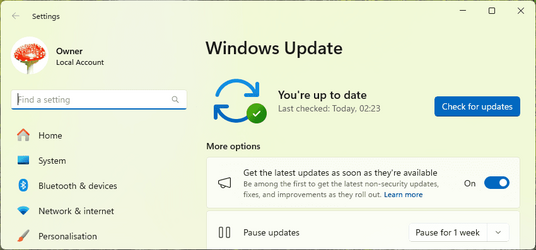
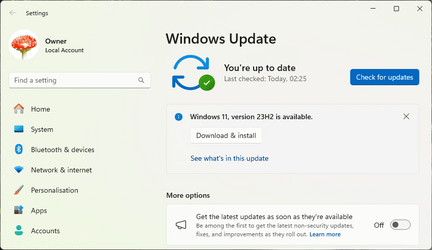
If you are still waiting with your System2 try with "get latest" turned off.
Worked for me on all three of my supported devices, Systems One, Three, and Five in my specs below..

Checked for updates with it turned on....

1699064879560.png

...then turned it off and checked again.

1699064867293.png

Strange . . . I got the 23H2 update today with "get latest" turned on.
Yes, that's the way it's supposed to work, according to all the MS documentation. Seems it's working back to front somehow.... 🤷‍♂️
 

My Computers My Computers

  • At a glance

    Windows 11 HomeAMD Athlon Silver 3050U8GBRadeon Graphics
    OS
    Windows 11 Home
    Computer type
    Laptop
    Manufacturer/Model
    Acer Aspire 3 A315-23-R9VY
    CPU
    AMD Athlon Silver 3050U
    Memory
    8GB
    Graphics Card(s)
    Radeon Graphics
    Monitor(s) Displays
    laptop screen
    Screen Resolution
    1366x768 native resolution, up to 2560x1440 with Radeon Virtual Super Resolution
    Hard Drives
    1TB Samsung EVO 870 SSD (from April 2026: 250GB EVO 850)
    Internet Speed
    150 Mbps
    Browser
    Edge, Firefox
    Antivirus
    Defender
    Other Info
    fully 'Windows 11 ready' laptop. Windows 10 C: partition migrated from my old unsupported 'main machine' then upgraded to 11. A test migration ran Insider builds for 2 months. When 11 was released on 5th October 2021 it was re-imaged back to 10 and was offered the upgrade in Windows Update on 20th October. Windows Update offered the 22H2 Feature Update on 20th September 2022. It got the 23H2 Feature Update on 4th November 2023 through Windows Update, 24H2 on 3rd October 2024 through Windows Update by setting the Target Release Version for 24H2, and 25H2 on 30th September 2025 through Windows Update by setting the Target Release Version for 25H2.

    UPDATE - 11 April 2026: due to mechanical deterioration this PC has been retired from active duty. The OS with all software and files has been migrated to my System Seven in 'Other systems' to carry on as my general purpose 'main machine'.
  • At a glance

    Windows 11 ProIntel® Core™ i5-520M8GB(integrated graphics) Intel HD Graphics
    Operating System
    Windows 11 Pro
    Computer type
    Laptop
    Manufacturer/Model
    Dell Latitude E4310
    CPU
    Intel® Core™ i5-520M
    Motherboard
    0T6M8G
    Memory
    8GB
    Graphics card(s)
    (integrated graphics) Intel HD Graphics
    Screen Resolution
    1366x768
    Hard Drives
    500GB Crucial MX500 SSD
    Browser
    Firefox, Edge
    Antivirus
    Defender
    Other Info
    unsupported machine: Legacy bios, MBR, TPM 1.2, upgraded from W10 to W11 using W10/W11 hybrid install media workaround.

    In-place upgrade to 22H2 using ISO and a workaround.
    Feature Update to 23H2 by manually installing the Enablement Package.
    In-place upgrade to 24H2 using hybrid 23H2/24H2 install media.
    Upgraded to 25H2 by Enablement Package.

    Also running Insider Dev, and Canary builds and Windows 10 as native boot .vhdx.
  • My SYSTEM THREE is a Dell Latitude 5410, i7-10610U, 32GB RAM, 512GB NVMe ssd, supported device running Windows 11 Pro.

    My SYSTEM FOUR is a 2-in-1 convertible Lenovo Yoga 11e 20DA, Celeron N2930, 8GB RAM, 256GB ssd. Unsupported device: currently running Win10 Pro, plus Win11 Pro RTM and Insider Dev, Beta, and RP 24H2 as native boot vhdx.

    My SYSTEM FIVE is a Dell Latitude 3190 2-in-1, Pentium Silver N5030, 8GB RAM, 1TB NVMe ssd, supported device running Windows 11 Pro, plus Insider Beta, Dev, and Canary builds (and a few others) as a native boot .vhdx.

    My SYSTEM SIX is a Dell Latitude 5550, Core Ultra 7 165H, 64GB RAM, 1TB NVMe SSD, supported device, Windows 11 Pro 24H2, Hyper-V host machine. Updated to 25H2 on 30th September 2025.

    My SYSTEM SEVEN is a Lenovo Thinkpad T580, Intel Core i7-8650U, 16GB RAM, 512GB NVMe SSD + 2nd 512GB NVMe SSD, a supported device for Windows 11. This is my current general purpose 'main machine'. The installed Windows 11 Home from my System One has been migrated to this machine.

My Computers My Computers

  • At a glance

    Win 11 Pro 25H2 26200.8737Intel® Core™ i7-14700KG.SKILL Ripjaws S5 Series 64GB (2 x 32GB) DDR5ASUS GeForce RTX 4070 Super 12GB
    OS
    Win 11 Pro 25H2 26200.8737
    Computer type
    PC/Desktop
    Manufacturer/Model
    Self Built
    CPU
    Intel® Core™ i7-14700K
    Motherboard
    ASUS TUF Z690-PLUS WIFI BIOS 4505 11/29/25
    Memory
    G.SKILL Ripjaws S5 Series 64GB (2 x 32GB) DDR5
    Graphics Card(s)
    ASUS GeForce RTX 4070 Super 12GB
    Sound Card
    Sound Blaster AE-5 Plus
    Monitor(s) Displays
    ASUS TUF Gaming 27" 2K HDR Gaming
    Screen Resolution
    2560 x 1440
    Hard Drives
    Samsung 990 Pro 1TB NVMe (Win 11 25H2)
    SK hynix P41 500GB NVMe 25H2 DEV/Games
    SK hynix P41 2TB NVMe (x3)
    Crucial P3 Plus 4TB
    PSU
    Corsair RM850x Shift
    Case
    Antec Dark Phantom DP502 FLUX
    Cooling
    Corsair Nautilus 360 RS AIO
    Keyboard
    Logitech MK 320
    Mouse
    Razer Basilisk V3
    Internet Speed
    750Mbs
    Browser
    Firefox
    Antivirus
    Winows Security
    Other Info
    MR 8.1 Home
  • At a glance

    Win 11 Pro 25H2 26200.8737Intel Core i7-11700F64 GB DDR4MSI GeForce RTX 3060 Ventus 2X 12GB
    Operating System
    Win 11 Pro 25H2 26200.8737
    Computer type
    PC/Desktop
    Manufacturer/Model
    Self Built
    CPU
    Intel Core i7-11700F
    Motherboard
    Asus TUF Gaming Z590 Plus WiFi (BIOS 2803)
    Memory
    64 GB DDR4
    Graphics card(s)
    MSI GeForce RTX 3060 Ventus 2X 12GB
    Sound Card
    SoundBlaster Audigy Fx V2
    Monitor(s) Displays
    Samsung F27T350
    Screen Resolution
    1920x1080
    Hard Drives
    Samsung 980 Pro 1TB
    Samsung 970 EVO Plus 2TB
    Samsung 870 EVO 500GB SSD
    PSU
    Corsair HX750
    Case
    Cougar MX330-G Window
    Cooling
    Thermalright Frozen Edge 240 Black AIO
    Internet Speed
    350Mbps
    Browser
    Firefox
    Antivirus
    Windows Security
  • System Three
    Win 11 Pro 25H2 26200.8737
    ASUS PRIME Z370-P II BIOS 3004 7/12/21
    Intel Core i7-8700 CPU @ 3.20GHz
    32GB DDR4 RAM (4x8)
    iGPU Intel UHD Graphics 630
    Mid-Tower Desktop
Guys, in 23 years, i never seen this issue, i change in the last 5 days, was, windows update, new gpu drivers, and the new bios.

The first time i saw it was last night, happens only on EDGE, on Chrome everything its fine.

I test it with extensions, and without, restart the edge, same issue.
 

Attachments

  • Screenshot 2023-11-04 154956.png
    Screenshot 2023-11-04 154956.png
    8.2 KB · Views: 2

My Computer My Computer

At a glance

Windows11Ryzen 5800x3DCorsair Vengeance Pro (32GB) 3200MHzNvidia RTX 4080
OS
Windows11
Computer type
PC/Desktop
Manufacturer/Model
Asus
CPU
Ryzen 5800x3D
Motherboard
Asus ROG x570-F
Memory
Corsair Vengeance Pro (32GB) 3200MHz
Graphics Card(s)
Nvidia RTX 4080
Monitor(s) Displays
LG 34GP950\27GP850\LG OLED55C27LA
Screen Resolution
3440x1440
Hard Drives
Samsung M2 2x1TB\ Samsung SSD 1TB
PSU
Seasonic Vertex GX 850w
Case
Phanteks P600s
Cooling
Arctic Liquid Freezer II 360
Keyboard
Logitech G512
Mouse
Logitech XSuperlight\G604\G502 Wireless
Browser
Edge
I am now at 23H2. Interesting how I got there. Every day I checked for updates and never got the enablement package. I checked history and discovered it was installed. 2023-10 Cumulative Update Preview for Windows 11 Version 22H2 for x64-based Systems (KB5031455) but I was still at 22H2. I tried toggling get the latest updates off and still no help. I updated Edge and cheched and I was still at 22H2. I then turned off get the latest updates and got the option to install 22H3
So it looks like you must have the latest Edge installed and get the latest updates turned off.... at least on my machine
I'm offered 23H2 too as soon as I turned off to get the latest updates. That is counter intuitive but perhaps typical of Microsoft software QA.

If I try to install though I get error Download error - 0x80246019
 

Attachments

  • Screenshot 2023-11-04 150959.png
    Screenshot 2023-11-04 150959.png
    2.1 KB · Views: 1
Last edited:

My Computer My Computer

At a glance

Windows 11 ProCore i7-13700K64 GB Kingston Fury Beast DDR5Gigabyte GeForce RTX 2060 Super Gaming OC 8G
OS
Windows 11 Pro
Computer type
PC/Desktop
Manufacturer/Model
Self build
CPU
Core i7-13700K
Motherboard
Asus TUF Gaming Plus WiFi Z790
Memory
64 GB Kingston Fury Beast DDR5
Graphics Card(s)
Gigabyte GeForce RTX 2060 Super Gaming OC 8G
Sound Card
Realtek S1200A
Monitor(s) Displays
Viewsonic VP2770 & Dell (secondary)
Screen Resolution
2560 x 1440
Hard Drives
Kingston KC3000 2TB NVME SSD & SATA HDDs & SSD
PSU
EVGA SuperNova G2 850W
Case
Nanoxia Deep Silence 1
Cooling
Noctua NH-D14
Keyboard
Microsoft Digital Media Pro
Mouse
Logitech Wireless
Internet Speed
80 Mb / s
Browser
Chrome
Antivirus
Defender, Malwarebytes Free & AdwCleaner

Latest Support Threads

Back
Top Bottom