Insider KB5039239 Windows 11 Insider Release Preview build 26100.863 (24H2) - June 15


UPDATE 6/20:


 Windows Blogs:

UPDATE 6/15: We have resumed rollout of Windows 11, version 24H2 to the Release Preview Channel with Build 26100.863


UPDATE 6/7: We are temporarily pausing the rollout of Windows 11, version 24H2 to the Release Preview Channel. We will resume the rollout in the coming weeks.


UPDATE 5/29: We’re aware that some Windows Insiders in Release Preview are not seeing Windows 11, version 24H2 offered yet. We’ve just begun the rollout and will gradually increase the rollout over time so not everyone will see it right away. If you are not seeing it yet and want to update to Windows 11, version 24H2 right away, you can do so by using the ISO which are available for download here. The ISO is Build 26100.560 but once you update using the ISO and join Release Preview, you’ll get Build 26100.712.


Hello Windows Insiders!

Today, we are making this year’s annual feature update Windows 11, version 24H2 (Build 26100.712) available in the Release Preview Channel for customers to preview ahead of general availability later this calendar year.

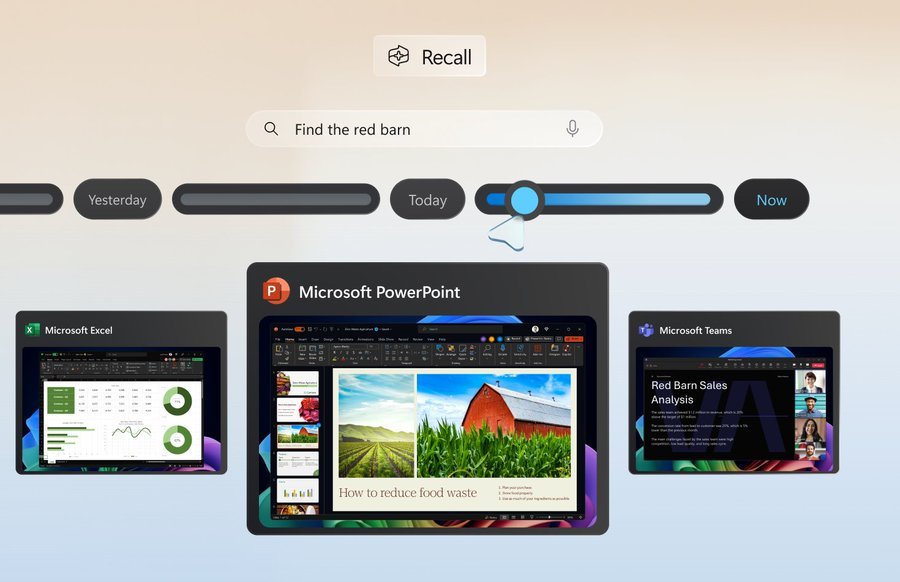
Windows 11, version 24H2* includes a range of new features such as the HDR background support, energy saver, Sudo for Windows, Rust in the Windows kernel, support for Wi-Fi 7, voice clarity and more. It also includes many improvements across Windows. For example, we are introducing a scrollable view of the quick settings flyout from the taskbar, the ability to create 7-zip and TAR archives in File Explorer (in addition to ZIP), and improvements for connecting Bluetooth® Low Energy Audio devices. We will be sharing more details in the coming months on many of the new features and improvements included as part of Windows 11, version 24H2 leading up to general availability. Please note that the new AI features such as Recall announced earlier this week will not be available on your PC after installing this update today as they require a Copilot+ PC. For more information on those new AI features and Copilot+ PCs, see this blog post here.

As part of this update, we’re also evolving the Copilot** experience on Windows as an app that will be pinned to the taskbar. This enables users to get the benefits of a traditional app experience, including the ability to resize, move, and snap the window – feedback we’ve heard from users throughout the preview of Copilot in Windows. This model also allows Microsoft to more agilely develop and optimize the experience based on user feedback. This change will be making is way to Insiders in the Canary, Dev, and Beta Channels shortly.

[ADDED 5/30] As part of the Copilot experience’s evolution on Windows to become an app that is pinned to the taskbar, we are retiring the WIN + C keyboard shortcut. For new devices that ship with a Copilot key, this key will open Copilot. For existing devices without that key, using the WIN + (number position for Copilot pinned to your taskbar) is a great way to open Copilot.


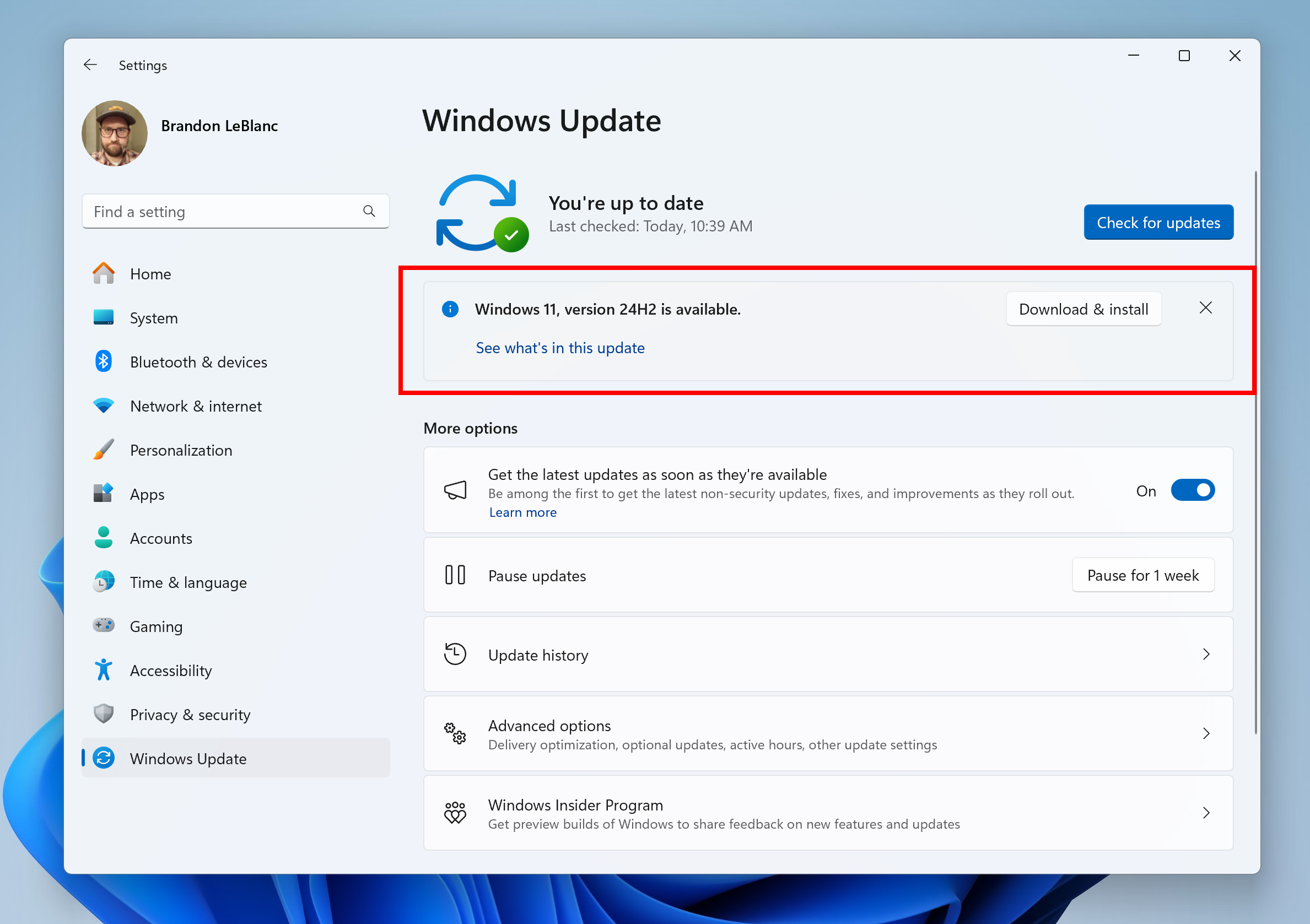
Windows 11, version 24H2 shown as available as an optional update highlighted in a red box.

Windows Insiders in the Release Preview Channel can install Windows 11, version 24H2 via our “seeker” experience in Windows Update. This means if you are an Insider currently in the Release Preview Channel on a PC that meets the Windows 11 hardware requirements, you can go to Settings and Windows Update and choose to download and install Windows 11, version 24H2 if you want. Once you update your PC to Windows 11, version 24H2, you will continue to automatically receive new servicing updates through Windows Update (the typical monthly update process). For instructions on how to join the Windows Insider Program and join your PC to the Release Preview Channel, click here.

PLEASE NOTE: Windows Insiders in the Canary and Dev Channels will not be able to switch to the Release Preview Channel as they are on builds already based on Windows 11, version 24H2 but are on higher build numbers. These Insiders don’t need to switch.

Commercial*** customers enrolled in the Windows Insider Program for Business can begin validating Windows 11, version 24H2 on PCs in their organizations. For these customers, the Windows 11, version 24H2 feature update is available through Windows Update for Business (WUfB) and Windows Server Update Service (WSUS). Azure Marketplace will be coming soon. You can learn more about deploying pre-release feature updates using these deployment methods here. Should any issues arise, IT admins in organizations deploying Release Preview updates can request Microsoft Support.

And finally – ISOs are now available for download for Windows 11, version 24H2 via the Windows Insider ISO download page.

Known issue​

[UPDATE] The below known issue where an Pcasvc.dll error dialog pop-up with the message “Missing entry: PcaWallpaperAppDetect” was appearing has been fixed.

[ADDED 6/3] After updating to Windows 11, version 24H2 (Build 26100.712), you may see an Pcasvc.dll error dialog pop-up with the message “Missing entry: PcaWallpaperAppDetect”. We are working on a fix, but you can follow these instructions to mitigate the issue:
  1. Type “Task Scheduler” in the search box on the taskbar to find and open Task Scheduler.
  2. On the left tree view of Task Scheduler, click on the “Task Scheduler Library” to expand the node.
  3. Keep expanding the nodes by clicking on the tree view in the following order: Microsoft -> Windows -> Application Experience.
  4. After clicking on the “Application Experience” node, find the task named “PcaWallpaperAppDetect” from the list view in the middle of Task Scheduler.
  5. Right-click on that task, click “Delete” in the pop-up menu. Then click “Yes” on the confirmation dialog box asking, “Do you want to delete this task?”.

Thanks,
Windows Insider Program Team

*Please note that Cortana, Tips, and WordPad are removed after upgrading to Windows 11, version 24H2. These apps are deprecated.

**Copilot in Windows is being rolled out gradually to Windows Insiders across our global markets. Customers in the European Economic Area will be able to download the Copilot in Windows experience as an app from the Microsoft Store (coming soon).

***We consider a device a commercial device if it is not running the Windows 11 Home edition AND is being managed by an IT administrator (whether via Microsoft Endpoint Manager or other management solution) or has a volume license key or commercial ID or is joined to a domain.


 Source:


Check Windows Updates


ISO from Microsoft: (26100.863)


UUP Dump:

64-bit ISO download:

ARM64 ISO download:

 
Last edited:
Not to be outdone, the 23H2 boys offered this this afternoon (I'm on 3807):

Clipboard 03.jpg
 

My Computers

System One System Two

  • OS
    11 Pro 24H2 26100.2454
    Computer type
    PC/Desktop
    Manufacturer/Model
    Lenovo ThinkCentre M920S SFF
    CPU
    i7-9700 @ 3.00GHz
    Motherboard
    Lenovo 3132
    Memory
    32GBDDR4 @ 2666MHz
    Graphics Card(s)
    Intel HD 630 Graphics onboard
    Sound Card
    Realtek HD Audio
    Monitor(s) Displays
    LG E2442
    Screen Resolution
    1920x1080
    Hard Drives
    1 x Samsung 970 EVO PLUS 500GB NVMe SSD, 1 x WD_BLACK SN770
    250GB NVMe SSD (OS and programs), 1 x WD_BLACK SN770
    500GB NVMe SSD (Data)
    Case
    Lenovo SFF
    Keyboard
    Cherry Stream TKL JK-8600US-2 Wired
    Mouse
    LogiTech M510 wireless
    Internet Speed
    Fast (for fixed wireless!)
    Browser
    Chrome, sometimes Firefox
    Antivirus
    Malwarebytes Premium & Defender (working together beautifully!)
  • Operating System
    11 Pro 24H2 26100.2454
    Computer type
    PC/Desktop
    Manufacturer/Model
    Lenovo ThinkCentre M920S SFF
    CPU
    i5-8400 @ 2.80GHz
    Motherboard
    Lenovo 3132
    Memory
    32GB DDR4 @ 2600MHz
    Graphics card(s)
    Intel HD 630 Graphics onboard
    Sound Card
    Realtek High Definition Audio onboard
    Monitor(s) Displays
    LG FULL HD (1920x1080@59Hz)
    Screen Resolution
    1920 x 1080
    Hard Drives
    1 x Samsung 970 EVO PLUS NVMe; 1 x Samsung 980 NVMe SSD
    Case
    Lenovo Think Centre SFF
    Keyboard
    Cherry Stream TKL JK-8600US-2 Wired
    Mouse
    LogiTech M510 wireless
    Internet Speed
    Fast (for fixed wireless!)
    Browser
    Chrome
    Antivirus
    Malwarebytes Premium and MS Defender, beautiful together
That would be for the release below for Copilot+ PCs only, but it is now build 26100.863.


That explains the new build number. The KB5039239 standalone msu. installer for AMD x64 is available on Microsoft Catalog.

Downloaded and ran the installer. Rebooted and new version was 26100.863,. Latest RTM build.
 
Last edited:

My Computers

System One System Two

  • OS
    Windows 11 Education For 25H2
    Computer type
    Laptop
    Manufacturer/Model
    HP ZBook G2
    CPU
    Intel® Core i7 5500u
    Motherboard
    HP
    Memory
    8 GB
    Graphics Card(s)
    Intel HD Family Graphics 5500 AMD Firepro 4150M
    Sound Card
    Realtek High Audio
    Hard Drives
    1 TB SSD
    Mouse
    HP USB Mouse
    Antivirus
    Windows Defender
  • Operating System
    Windows 11 Pro For Workstations 25H2
    Computer type
    Laptop
    Manufacturer/Model
    HP Zbook G4
    CPU
    Xeon 1535m v6
    Motherboard
    HP
    Memory
    32 GB
    Graphics card(s)
    AMD Quadro Pro 4100
    Sound Card
    Bang and Olufson Audio
    Hard Drives
    1TB SSD
    Mouse
    HP USB Mouse
    Antivirus
    Windows Defender
Mine already .712, but I didn't get CU, I use .560 ISO in place downgrade, then check update again I get CU .863 this time no issues.
 

My Computer

System One

  • OS
    Windows 11
    Computer type
    Laptop
    Manufacturer/Model
    Acer Nitro V15
    CPU
    Intel 13th
    Memory
    96GB
    Graphics Card(s)
    RTX 4050 6GB
    Monitor(s) Displays
    amazon fire tv 50"
    Screen Resolution
    3840x2160
I'm not in WIP. With new released RTM builds, I run the latest KB msu. standalone installer.
 

My Computers

System One System Two

  • OS
    Windows 11 Education For 25H2
    Computer type
    Laptop
    Manufacturer/Model
    HP ZBook G2
    CPU
    Intel® Core i7 5500u
    Motherboard
    HP
    Memory
    8 GB
    Graphics Card(s)
    Intel HD Family Graphics 5500 AMD Firepro 4150M
    Sound Card
    Realtek High Audio
    Hard Drives
    1 TB SSD
    Mouse
    HP USB Mouse
    Antivirus
    Windows Defender
  • Operating System
    Windows 11 Pro For Workstations 25H2
    Computer type
    Laptop
    Manufacturer/Model
    HP Zbook G4
    CPU
    Xeon 1535m v6
    Motherboard
    HP
    Memory
    32 GB
    Graphics card(s)
    AMD Quadro Pro 4100
    Sound Card
    Bang and Olufson Audio
    Hard Drives
    1TB SSD
    Mouse
    HP USB Mouse
    Antivirus
    Windows Defender
The Recall app has now been removed from the RTM AMD x64 .863 build. If you've a Copilot + PC, an updated version will be installed on it.
 

My Computers

System One System Two

  • OS
    Windows 11 Education For 25H2
    Computer type
    Laptop
    Manufacturer/Model
    HP ZBook G2
    CPU
    Intel® Core i7 5500u
    Motherboard
    HP
    Memory
    8 GB
    Graphics Card(s)
    Intel HD Family Graphics 5500 AMD Firepro 4150M
    Sound Card
    Realtek High Audio
    Hard Drives
    1 TB SSD
    Mouse
    HP USB Mouse
    Antivirus
    Windows Defender
  • Operating System
    Windows 11 Pro For Workstations 25H2
    Computer type
    Laptop
    Manufacturer/Model
    HP Zbook G4
    CPU
    Xeon 1535m v6
    Motherboard
    HP
    Memory
    32 GB
    Graphics card(s)
    AMD Quadro Pro 4100
    Sound Card
    Bang and Olufson Audio
    Hard Drives
    1TB SSD
    Mouse
    HP USB Mouse
    Antivirus
    Windows Defender
That would be for the release below for Copilot+ PCs only, but it is now build 26100.863.


Brink, on the AMD x64 RTM .863 build, the Recall app was removed. It wasn't compatible with PCs not running the required NPU.
 

My Computers

System One System Two

  • OS
    Windows 11 Education For 25H2
    Computer type
    Laptop
    Manufacturer/Model
    HP ZBook G2
    CPU
    Intel® Core i7 5500u
    Motherboard
    HP
    Memory
    8 GB
    Graphics Card(s)
    Intel HD Family Graphics 5500 AMD Firepro 4150M
    Sound Card
    Realtek High Audio
    Hard Drives
    1 TB SSD
    Mouse
    HP USB Mouse
    Antivirus
    Windows Defender
  • Operating System
    Windows 11 Pro For Workstations 25H2
    Computer type
    Laptop
    Manufacturer/Model
    HP Zbook G4
    CPU
    Xeon 1535m v6
    Motherboard
    HP
    Memory
    32 GB
    Graphics card(s)
    AMD Quadro Pro 4100
    Sound Card
    Bang and Olufson Audio
    Hard Drives
    1TB SSD
    Mouse
    HP USB Mouse
    Antivirus
    Windows Defender
Brink, on the AMD x64 RTM .863 build, the Recall app was removed. It wasn't compatible with PCs not running the required NPU.
:shawn:


My Computers

System One System Two

  • OS
    Windows 11 Pro for Workstations
    Computer type
    PC/Desktop
    Manufacturer/Model
    Custom self build
    CPU
    Intel i7-8700K 5 GHz
    Motherboard
    ASUS ROG Maximus XI Formula Z390
    Memory
    64 GB (4x16GB) G.SKILL TridentZ RGB DDR4 3600 MHz (F4-3600C18D-32GTZR)
    Graphics Card(s)
    ASUS ROG-STRIX-GTX1080TI-O11G-GAMING (11GB GDDR5X)
    Sound Card
    Integrated Digital Audio (S/PDIF)
    Monitor(s) Displays
    2 x Samsung Odyssey G75 27"
    Screen Resolution
    2560x1440
    Hard Drives
    1TB Samsung 990 PRO M.2,
    4TB Samsung 990 PRO M.2,
    TerraMaster F8 SSD Plus NAS
    PSU
    Seasonic Prime Titanium 850W
    Case
    Thermaltake Core P3 wall mounted
    Cooling
    Corsair Hydro H115i
    Keyboard
    Amazon Basics Wired Full Keyboard MD005
    Mouse
    Logitech MX Master 4
    Internet Speed
    2 Gbps Download and 100 Mbps Upload
    Browser
    Chrome and Edge
    Antivirus
    Microsoft Defender
    Other Info
    Logitech Z625 speaker system,
    Logitech BRIO 4K Pro webcam,
    HP Color LaserJet Pro MFP M477fdn,
    CyberPower CP1500PFCLCD
    Galaxy S23 Plus phone
  • Operating System
    Windows 11 Pro
    Computer type
    Laptop
    Manufacturer/Model
    Surface Laptop 7 Copilot+ PC
    CPU
    Snapdragon X Elite (12 core) 3.42 GHz
    Memory
    16 GB LPDDR5x-7467 MHz
    Monitor(s) Displays
    15" HDR
    Screen Resolution
    2496 x 1664
    Hard Drives
    1 TB SSD
    Internet Speed
    Wi-Fi 7 and Bluetooth 5.4
    Browser
    Chrome and Edge
    Antivirus
    Microsoft Defender
I see that with this update they just removed this task from task scheduler.
They took the easy way out, instead of fixing PcaSvc.dll to support the new task. 😂🤷‍♂️

1718501407966.png
 

My Computer

System One

  • OS
    Windows 11 Pro 25H2
    Computer type
    PC/Desktop
    Manufacturer/Model
    Dell XPS 8930
    CPU
    Intel I9-9900K
    Memory
    64GB
    Graphics Card(s)
    NVIDIA RTX 2060
    Sound Card
    NVIDIA High Definition Audio
    Monitor(s) Displays
    4k Samsung
    Screen Resolution
    3840 x 2160
    Hard Drives
    512GB NVMe, ADATA SU 800, 2TB HDD
I still having problems with the lock screen not showing up when I turn on my pc, it goes straight into asking password and in the lock screen options is only showing weather no weather and more, anybody knows how to fix it?
 

My Computer

System One

  • OS
    Windows 11 Pro 24H2
    Computer type
    PC/Desktop
    Manufacturer/Model
    Asus
    CPU
    AMD Ryzen 7 5700X
    Motherboard
    ROG STRIX B550-F GAMING (WI-FI)
    Memory
    32GB DDR4 3200MHz
    Graphics Card(s)
    NVIDIA 3060 Ti
Just installed.
DISM cleanup sort of got stuck at around 60%, then jumped to 100%, back to 60% before completing.

/checkhealth showed component store corruption - first time that's ever happened.

/restorehealth and another /checkhealth it seems ok now (no corruption detected). /restorehealth got 'stuck' at the same point as the cleanup for a while

EDIT: Second PC in the house does the same thing
 
Last edited:

My Computer

System One

  • OS
    Windows 11 Pro 25H2 (RP channel)
    Computer type
    PC/Desktop
    Manufacturer/Model
    MSI
    CPU
    AMD Ryzen 7 9800X3D 8-core
    Motherboard
    MEG X870E Godlike
    Memory
    64GB Corsair Titanium 6000/CL30
    Graphics Card(s)
    MSI Suprim 5080 SOC
    Sound Card
    Soundblaster AE-9
    Monitor(s) Displays
    ASUS TUF Gaming VG289Q
    Screen Resolution
    3840x2160
    Hard Drives
    Samsung 9100 Pro 4TB (gen 5 x4, system drive/games)
    Samsung 990 Pro 2TB
    Samsung 980 Pro 2TB
    Samsung 870 Evo 4TB
    Samsung 870 Evo 2TB
    Samsung T9 4TB
    PSU
    Seasonic PX-2200
    Case
    Bequiet! Dark Base Pro 901
    Cooling
    Noctua NH-D15S Chromax black
    Keyboard
    Logitech G915 X (wired)
    Mouse
    Logitech G903 with PowerPlay charger
    Internet Speed
    900Mb/sec
    Browser
    Microsoft Edge
    Antivirus
    Windows Defender
I still having problems with the lock screen not showing up when I turn on my pc, it goes straight into asking password and in the lock screen options is only showing weather no weather and more, anybody knows how to fix it?
"Weather" is the only option on this Build, they have not added the other cards, so you don't get "Weather and more" yet.
Also, make sure the bottom setting on the first picture is on. 😎

1718518574147.png

1718519009348.png
 
Last edited:

My Computer

System One

  • OS
    Windows 11 Pro 25H2
    Computer type
    PC/Desktop
    Manufacturer/Model
    Dell XPS 8930
    CPU
    Intel I9-9900K
    Memory
    64GB
    Graphics Card(s)
    NVIDIA RTX 2060
    Sound Card
    NVIDIA High Definition Audio
    Monitor(s) Displays
    4k Samsung
    Screen Resolution
    3840 x 2160
    Hard Drives
    512GB NVMe, ADATA SU 800, 2TB HDD
I have just received the update (KB5039239) 26100.863 and installed without any issue.
 

Attachments

  • Screenshot 2024-06-16 073312.png
    Screenshot 2024-06-16 073312.png
    12.2 KB · Views: 1

My Computers

System One System Two

  • OS
    Windows 11 Home ((26100.2894)
    Computer type
    Laptop
    Manufacturer/Model
    Acer Swift SF14-51
    CPU
    Intel Core Ultra 5 226V
    Motherboard
    Icefresh_LNV
    Memory
    LPDDR5X16GB
    Graphics Card(s)
    Intel Arc Graphics
    Sound Card
    Realtek
    Monitor(s) Displays
    Samsung ATNA40YK11-0
    Screen Resolution
    2880x1800
    Hard Drives
    512GB NVMe Gen 4 M.2 SSD
    Keyboard
    Generic
    Browser
    Edge
    Antivirus
    Windows Defender
  • Operating System
    Windows 11Home(26120.3073)24H2
    Computer type
    Laptop
    Manufacturer/Model
    Acer Swift SFG14-72
    CPU
    i7-155h
    Motherboard
    Coral_MTH
    Memory
    LPDDR5X 32GB
    Graphics card(s)
    Intel Arc Graphics
    Sound Card
    Realtek
    Monitor(s) Displays
    SamsungATNA40YK 11-0
    Screen Resolution
    2880x1800
    Hard Drives
    1TB NVMe Gen 4 M.2 SSD
    Browser
    Edge, Google Chrome
    Antivirus
    Windows Defender
I still having problems with the lock screen not showing up when I turn on my pc, it goes straight into asking password and in the lock screen options is only showing weather no weather and more, anybody knows how to fix it?
It may show other options if you reboot few times.
 

Attachments

  • Screenshot 2024-06-16 074012.png
    Screenshot 2024-06-16 074012.png
    32.8 KB · Views: 2

My Computers

System One System Two

  • OS
    Windows 11 Home ((26100.2894)
    Computer type
    Laptop
    Manufacturer/Model
    Acer Swift SF14-51
    CPU
    Intel Core Ultra 5 226V
    Motherboard
    Icefresh_LNV
    Memory
    LPDDR5X16GB
    Graphics Card(s)
    Intel Arc Graphics
    Sound Card
    Realtek
    Monitor(s) Displays
    Samsung ATNA40YK11-0
    Screen Resolution
    2880x1800
    Hard Drives
    512GB NVMe Gen 4 M.2 SSD
    Keyboard
    Generic
    Browser
    Edge
    Antivirus
    Windows Defender
  • Operating System
    Windows 11Home(26120.3073)24H2
    Computer type
    Laptop
    Manufacturer/Model
    Acer Swift SFG14-72
    CPU
    i7-155h
    Motherboard
    Coral_MTH
    Memory
    LPDDR5X 32GB
    Graphics card(s)
    Intel Arc Graphics
    Sound Card
    Realtek
    Monitor(s) Displays
    SamsungATNA40YK 11-0
    Screen Resolution
    2880x1800
    Hard Drives
    1TB NVMe Gen 4 M.2 SSD
    Browser
    Edge, Google Chrome
    Antivirus
    Windows Defender
It may show other options if you reboot few times.
The only ones that work are "Weather" or "None". The other ones are useless. 🤣🤣

1718520840067.png
 

My Computer

System One

  • OS
    Windows 11 Pro 25H2
    Computer type
    PC/Desktop
    Manufacturer/Model
    Dell XPS 8930
    CPU
    Intel I9-9900K
    Memory
    64GB
    Graphics Card(s)
    NVIDIA RTX 2060
    Sound Card
    NVIDIA High Definition Audio
    Monitor(s) Displays
    4k Samsung
    Screen Resolution
    3840 x 2160
    Hard Drives
    512GB NVMe, ADATA SU 800, 2TB HDD
So this new build still has two visual bugs. One is with the settings app power options. When you switch to a high performance power plan it still keeps the balanced power plan power mode drop down active but it is blank. Second is under startup in the settings app. The icons are zoomed in when using display scaling other than 100%.
Not for me running 26100.863
 

My Computers

System One System Two

  • OS
    Windows 11 build 26200.7296 / WSL 2 running Ubuntu
    Computer type
    Laptop
    Manufacturer/Model
    Dell Inspiron 14 5430
    CPU
    Intel i7-1355U
    Motherboard
    Dell 0GMW80
    Memory
    16GB
    Graphics Card(s)
    Intel Iris XE
    Sound Card
    Realtek
    Monitor(s) Displays
    Dell 14", LG 32" Curved Wide screen monitor and LG Ultrawide 26"
    Screen Resolution
    1920 x 1200 @ 60Hz, 1920 x 1080 @ 100Hz and 2560 x 1080 @ 60Hz
    Hard Drives
    Samsung 990 Pro 1TB NVME Gen 4 M.2 SSD
    PSU
    Dell
    Case
    Dell
    Cooling
    Dell
    Keyboard
    Dell KM3322W
    Mouse
    Dell Trackpad or Dell KM3322W
    Internet Speed
    900mb down / 400mb up FTTP
    Browser
    Edge 142.0.3595.90
    Antivirus
    Windows Defender
    Other Info
    Windows 365
    1TB OneDrive
    Outlook Classic
    Visual Studio Code running in WSL
    Python 3.14
    Samsung Magician
    Garmin Express
    Dell TB16 Thunderbolt dock
    WSL
    WEI Score: 8.3
  • Operating System
    Windows 11
    Computer type
    Tablet
    Manufacturer/Model
    Microsoft Surface Pro 7
    CPU
    Core i5 - 1035G4
    Motherboard
    Microsoft
    Memory
    8GB
    Graphics card(s)
    Intel Iris Plus
    Monitor(s) Displays
    Surface touch
    Screen Resolution
    2736 x 1824
    Hard Drives
    128GB
    PSU
    Microsoft
    Case
    Microsoft Keyboard
    Cooling
    None
    Keyboard
    Microsoft Surface Keyboard
    Mouse
    Microsoft Arc Intellimouse
    Internet Speed
    900mb / 400mb FTTP
    Browser
    Edge
    Antivirus
    Windows Defender

My Computer

System One

  • OS
    Windows 11 Pro 25H2 (RP channel)
    Computer type
    PC/Desktop
    Manufacturer/Model
    MSI
    CPU
    AMD Ryzen 7 9800X3D 8-core
    Motherboard
    MEG X870E Godlike
    Memory
    64GB Corsair Titanium 6000/CL30
    Graphics Card(s)
    MSI Suprim 5080 SOC
    Sound Card
    Soundblaster AE-9
    Monitor(s) Displays
    ASUS TUF Gaming VG289Q
    Screen Resolution
    3840x2160
    Hard Drives
    Samsung 9100 Pro 4TB (gen 5 x4, system drive/games)
    Samsung 990 Pro 2TB
    Samsung 980 Pro 2TB
    Samsung 870 Evo 4TB
    Samsung 870 Evo 2TB
    Samsung T9 4TB
    PSU
    Seasonic PX-2200
    Case
    Bequiet! Dark Base Pro 901
    Cooling
    Noctua NH-D15S Chromax black
    Keyboard
    Logitech G915 X (wired)
    Mouse
    Logitech G903 with PowerPlay charger
    Internet Speed
    900Mb/sec
    Browser
    Microsoft Edge
    Antivirus
    Windows Defender

My Computer

System One

  • OS
    Windows 11 Pro
    Computer type
    PC/Desktop
    Manufacturer/Model
    Custom Build
    CPU
    Intel Core i9 12900KF
    Motherboard
    ASUS ROG Maximus Z690 Hero
    Memory
    Corsair 64GB DDR5 Vengeance C40 5200Mhz
    Graphics Card(s)
    ASUS GeForce RTX 3090 ROG Strix OC 24GB
    Sound Card
    OnBoard
    Monitor(s) Displays
    Acer Predator XB323UGP 32" QHD G-SYNC-C 144Hz 1MS IPS LED
    Screen Resolution
    2560 x 1440
    Hard Drives
    1x Samsung 980 Pro Series Gen4 250GB M.2 NVMe
    1x Samsung 980 Pro Series Gen4 500GB M.2 NVMe
    2x Samsung 980 Pro Series Gen4 2TB M.2 NVMe
    PSU
    Corsair AX1200i 1200W 80PLUS Titanium Modular
    Case
    Corsair 4000D Black Case w/ Tempered Glass Side Panel
    Cooling
    Noctua NH-U12A Chromax Black CPU Cooler, 4x Noctua 120mm Fans
    Keyboard
    Logitech MK545
    Mouse
    Logitech MX Master 3
    Internet Speed
    Fixed Wireless 150mbps/75mbps
    Browser
    Firefox
    Antivirus
    Kaspersky
    Other Info
    Thrustmaster TS-PC RACER
    Fanatec CSL Elite Pedals with the Load Cell Kit
    Yamaha Amp with Bose Speakers
I have 26100.863 installed on both of my mobile workstations.
 

My Computers

System One System Two

  • OS
    Windows 11 Education For 25H2
    Computer type
    Laptop
    Manufacturer/Model
    HP ZBook G2
    CPU
    Intel® Core i7 5500u
    Motherboard
    HP
    Memory
    8 GB
    Graphics Card(s)
    Intel HD Family Graphics 5500 AMD Firepro 4150M
    Sound Card
    Realtek High Audio
    Hard Drives
    1 TB SSD
    Mouse
    HP USB Mouse
    Antivirus
    Windows Defender
  • Operating System
    Windows 11 Pro For Workstations 25H2
    Computer type
    Laptop
    Manufacturer/Model
    HP Zbook G4
    CPU
    Xeon 1535m v6
    Motherboard
    HP
    Memory
    32 GB
    Graphics card(s)
    AMD Quadro Pro 4100
    Sound Card
    Bang and Olufson Audio
    Hard Drives
    1TB SSD
    Mouse
    HP USB Mouse
    Antivirus
    Windows Defender
"Weather" is the only option on this Build, they have not added the other cards, so you don't get "Weather and more" yet.
Also, make sure the bottom setting on the first picture is on. 😎

View attachment 99274

View attachment 99275
I had this issues on build .719. These latest updates are breaking a lot of the functions that used to work. Another issue no longer working is Linked Devices are no longer shown under the Accounts section in the Settings App. Odd type of progress, seem a really confused bunch at the moment
 

My Computers

System One System Two

  • OS
    Windows 11 25H2
    Computer type
    PC/Desktop
    Manufacturer/Model
    Custom Built
    CPU
    Intel i9 14900KF
    Motherboard
    ASUS Z790 ProArt Creator WiFi
    Memory
    64GB Corsair Vengeance RGB
    Graphics Card(s)
    MSI 4090 Suprim X
    Sound Card
    Onboard
    Monitor(s) Displays
    1 x Asus 24". 1 x Asus 32"
    Screen Resolution
    1920 x 1080 & 2560 x 1440
    Hard Drives
    Multiple
    PSU
    Corsair 1200HX
    Case
    Corsair 7000D RGB
    Cooling
    Corsair H150I Capellix XT
    Keyboard
    Corsair K70 RGB PRO
    Mouse
    Corsair M55 RGB Pro
    Internet Speed
    1000Mbps
    Browser
    Edge
    Antivirus
    Windows Default
  • Operating System
    Windows 11 25H2
    Computer type
    PC/Desktop
    Manufacturer/Model
    Custom Built
    CPU
    Intel i7 6800K
    Motherboard
    ASUS Z99 Deluxe
    Memory
    32GB DDR4 (Corsair)
    Graphics card(s)
    ASUS GTX 1080ti
    Sound Card
    Onboard
    Monitor(s) Displays
    1x Viewsonic 24" 1x LG 19"
    Screen Resolution
    1920 x 1080 & 1600 x 900
    Hard Drives
    3 x SATA SSD
    PSU
    650W Gigabyte Bronze
    Case
    Coolermaster HAF-X
    Cooling
    Noctua NH-15 Chroma black
    Keyboard
    Generic RGB
    Mouse
    Microsoft Basic
    Internet Speed
    1000Mbps
    Browser
    Edge
    Antivirus
    Windows Default
I had this issues on build .719. These latest updates are breaking a lot of the functions that used to work. Another issue no longer working is Linked Devices are no longer shown under the Accounts section in the Settings App. Odd type of progress, seem a really confused bunch at the moment
I never had Linked Devices even with 23H2
 

My Computer

System One

  • OS
    Windows 11 Pro 25H2 (RP channel)
    Computer type
    PC/Desktop
    Manufacturer/Model
    MSI
    CPU
    AMD Ryzen 7 9800X3D 8-core
    Motherboard
    MEG X870E Godlike
    Memory
    64GB Corsair Titanium 6000/CL30
    Graphics Card(s)
    MSI Suprim 5080 SOC
    Sound Card
    Soundblaster AE-9
    Monitor(s) Displays
    ASUS TUF Gaming VG289Q
    Screen Resolution
    3840x2160
    Hard Drives
    Samsung 9100 Pro 4TB (gen 5 x4, system drive/games)
    Samsung 990 Pro 2TB
    Samsung 980 Pro 2TB
    Samsung 870 Evo 4TB
    Samsung 870 Evo 2TB
    Samsung T9 4TB
    PSU
    Seasonic PX-2200
    Case
    Bequiet! Dark Base Pro 901
    Cooling
    Noctua NH-D15S Chromax black
    Keyboard
    Logitech G915 X (wired)
    Mouse
    Logitech G903 with PowerPlay charger
    Internet Speed
    900Mb/sec
    Browser
    Microsoft Edge
    Antivirus
    Windows Defender

Latest Support Threads

Back
Top Bottom