Insider KB5043178 Windows 11 Insider Release Preview build 26100.1876 (24H2) - Sept. 23


UPDATE 10/10:


 Windows Blogs:

Hello Windows Insiders, today we’re releasing Windows 11 Build 26100.1876 (KB5043178) to Insiders in the Release Preview Channel on Windows 11, version 24H2 (Build 16100).

Below is a summary of the new features and improvements included as part of this update separated into two sections: gradual rollout and normal rollout. The bold text within the brackets indicates the item or area of the change we are documenting.

Gradual rollout

These might not be available to all users because they will roll out gradually. Text bolded in brackets indicate the area of the change being documented.
  • [Start menu] New! The “Sign out” option is now on the account manager when you open the Start menu. To change to a different user, select the ellipses (…). A list of other users appears to make it easier to switch.

  • Taskbar] New! You can now share local files directly from the search results that appear in the Search box on the taskbar.

  • [Settings]
    • New! The Delivery Optimization Settings page now matches the Windows 11 design. See Settings > Windows Update > Advanced options > Delivery Optimization.

    • New! There is a new energy recommendation to turn off high dynamic range (HDR). This helps to conserve energy on devices that have HDR displays. Go to Settings > Power & battery > Energy recommendations.

    • [ADDED 9/24] New! This update adds the option to turn off enhanced mouse pointer precision to Settings > Bluetooth & Devices > Mouse. There is also a new option to change the direction in which the mouse scrolls.

    • [ADDED 9/24] New! You can now set Power Mode for when your PC is plugged in and on battery. Go to Settings > System > Power & battery.

  • [Lock screen] New! Media controls now show in the lower part of the lock screen at its center when media is playing.

  • [Battery life] New! When your device’s battery power is running low, a pop-up window will appear that asks you to plug in your device. This occurs when the battery level reaches 20% and while Energy Saver is set to “Always On”.

Normal rollout

This update includes the following features and improvements that are rolling out as part of this update. Text bolded in brackets indicates the area of the change being documented.
  • [Open Source Software] This update adds attributions to credits.txt files for Rust OSS components.
  • [Input Method Editor (IME)] When a combo box has input focus, a memory leak might occur when you close that window.
  • [WebView2 apps] They do not detect input from Xbox 360 and Bluetooth controllers.
  • [ADDED 9/24] [Screen readers] The NonVisual Desktop Access (NVDA) app and other screen readers fail to narrate all the screen content from some apps. This occurs when those apps run with administrator privileges.
Thanks,
Windows Insider Program Team


 Source:


Check Windows Updates


UUP Dump:

64-bit ISO download:

ARM64 ISO download:

 
Last edited:
I'm hoping they'll patch this issue soon.
 

My Computers

System One System Two

  • OS
    Windows 11 Pro
    Computer type
    PC/Desktop
    Manufacturer/Model
    Self Built
    CPU
    Intel Core i9 14900k, Intel UHD 770 integrated
    Motherboard
    Gigabyte Z790 Aorus Master X
    Memory
    32gb G.Skill Trident Z5 7200
    Graphics Card(s)
    Gigabyte RTX 4090 Gaming OC
    Sound Card
    EVGA Nu Audio, Razer Kraken V3 Pro, Realtek Onboard
    Monitor(s) Displays
    Dell U4025QW nano IPS monitor, Samsung Odyssey G75F, Wisecoco 12.6" IPS sensor panel
    Screen Resolution
    5120X2160 x 2 1920x515
    Hard Drives
    WD Black SN8100, Samsung 990 Pro x 3, WD BLACK SN850x, WD Black 8tb HD
    PSU
    FSP Hydro PTM Pro 1350w
    Case
    Thermaltake Level 20 XT
    Cooling
    ARCTIC Liquid Freezer III 420 ARGB in push/pull, Antec Prism X 120mm ARGB Fans x 15
    Keyboard
    Razer Blackwidow V4 Pro
    Mouse
    Razer Basilik V3 Pro on Razer Firefly V2 mouse pad.
    Internet Speed
    950 Mbps cable primary, 6Mbps secondary vdsl
    Browser
    Chrome primary, FF-Edge-IE secondary
    Antivirus
    Norton 360 Premium
    Other Info
    I sit on a Libernovo Omni chair.😍 Sound by Fosi Audio DA-2120C pushing Magnat Series 503 bookshelf speakers and a SVS SB-1000 Pro subwoofer.
  • Operating System
    Windows 11 Pro
    Computer type
    Laptop
    Manufacturer/Model
    2023 Acer Predator Helios 18
    CPU
    Intel 14900HX
    Motherboard
    factory
    Memory
    32gb ddr 5 5600
    Graphics card(s)
    Nvidia RTX 4090 mobile
    Sound Card
    onboard
    Monitor(s) Displays
    18" 250hz IPS
    Screen Resolution
    2560X1600
    Hard Drives
    Samsung 9100 Pro, 990 Pro
    PSU
    factory 330W
    Case
    factory
    Cooling
    factory
    Keyboard
    individual key argb
    Mouse
    touchpad
    Internet Speed
    WiFi 7, 2.5gb ethernet
    Browser
    Chrome primary, FF-IE and Edge secondary
    Antivirus
    Norton 360 Premium
    Other Info
    Acer will not allow WD Black SN8100 to function in m.2 slot 0 and Crucial T710 ssd's to function in either slot.
I'm hoping they'll patch this issue soon.
Doesn't seem to affect anything I can see but knowing it's not right makes me nervous. And I think the rest of us too.
 

My Computer

System One

  • OS
    Win 11 Insider Release Preview and Beta channels.
    Computer type
    Laptop
    Manufacturer/Model
    HP ENVY Bought: March 2017
    CPU
    i5 Core [email protected] (Unsupported for Win 11)
    Motherboard
    HP 81AD (U3E1)
    Memory
    12GB
    Graphics Card(s)
    Generic PnP Monitor (1920x1080@60Hz) Intel HD Graphics 620 (HP)
    Sound Card
    Conexant ISST audio
    Monitor(s) Displays
    Generic PnP Monitor
    Screen Resolution
    1536x864 pixels
    Hard Drives
    HGST HTS721010A9E630
    PSU
    Well...PSU you too!! What's this mean?
    Case
    HP ENVY SILVER
    Cooling
    A fan.
    Keyboard
    USA
    Mouse
    Logitec Anywhere 2
    Internet Speed
    Good enough for me! Fast!
    Browser
    Edge/Waterfox
    Antivirus
    Windows Defender
    Other Info
    No 'mo.
  • [ADDED 9/24] New! This update adds the option to turn off enhanced mouse pointer precision to Settings > Bluetooth & Devices > Mouse. There is also a new option to change the direction in which the mouse scrolls.

  • [ADDED 9/24] New! You can now set Power Mode for when your PC is plugged in and on battery. Go to Settings > System > Power & battery.

  • [ADDED 9/24] [Screen readers] The NonVisual Desktop Access (NVDA) app and other screen readers fail to narrate all the screen content from some apps. This occurs when those apps run with administrator privileges.
The third ADDED is not new feature. It's look like yes because it close to the two other.
Maybe MS need to change something so new feature and bugs will look difference.
 

My Computer

System One

  • OS
    26200.8037
    Computer type
    PC/Desktop
    CPU
    i5-11400F
    Motherboard
    Gigabyte
    Memory
    32GB
    Graphics Card(s)
    Geforce GT-1030
    Keyboard
    Logitech K400
    Mouse
    Logitech M720
    Internet Speed
    600 Mb
    Browser
    Edge
Well I tried to use the ISO for 26100.1742 to do a Repair Install and it left me at that release which is fine with me. I will just wait for whatever comes out on 10.08.24.
 

My Computers

System One System Two

  • OS
    Windows11 Pro 26200.8524
    Computer type
    PC/Desktop
    Manufacturer/Model
    Dell Alienware Aurora R16
    CPU
    Intel Core i9 14900F (24 -Core, 68 MB Total Cache)
    Motherboard
    Dell Alienware
    Memory
    32GB DDR5
    Graphics Card(s)
    RTX 4080 Super w/581.95
    Sound Card
    Realtec
    Monitor(s) Displays
    Corsair XENEON 32QHD165
    Screen Resolution
    2560 X 1440
    Hard Drives
    1-2TB Samsung 990 Pro PCIe NVMe M2 SSD
    1-4TB Samsung 990 Pro PCIe NVMe M2 SSD
    PSU
    1000 Watt Platinum Dell
    Case
    Alienware
    Cooling
    Liquid Closed Loop
    Keyboard
    Corsair Strafe RGB
    Mouse
    Logitech MK270 Wireless
    Internet Speed
    100Gb's Down-20 Up
    Browser
    Firefox 151.0.3
    Antivirus
    Defender
    Other Info
    Very Quiet And Fast
    CyberPower UPS CP1500PFCLCD
  • Operating System
    PClinuxOS Mate (2025.7)
    Computer type
    PC/Desktop
    Manufacturer/Model
    Intel
    CPU
    13th Gen Inter(R) Core(TM) i3-1315U
    Motherboard
    Intel
    Memory
    64 GB DDR4 @3200 MHz.
    Graphics card(s)
    Internal
    Sound Card
    None
    Monitor(s) Displays
    Dell 2419HGCF
    Screen Resolution
    1920 X 1080
    Hard Drives
    SAMSUNG 980 PRO SSD 2TB, PCIe 4.0 M.2 2280
    PSU
    Chicony 30 Watt
    Case
    Small
    Keyboard
    Dell
    Mouse
    Razor
    Internet Speed
    1GB
    Browser
    Slimjet
Well I tried to use the ISO for 26100.1742 to do a Repair Install and it left me at that release which is fine with me. I will just wait for whatever comes out on 10.08.24.
Maybe they'll have it fixed next week for a 24H2 non-Insider Preview. I think the build numbers are a little higher.
 

My Computer

System One

  • OS
    Windows 11
Maybe they'll have it fixed next week for a 24H2 non-Insider Preview. I think the build numbers are a little higher.

That would be today wouldn't it?
 

My Computers

System One System Two

  • OS
    Windows 11 Pro x64
    Computer type
    PC/Desktop
    Manufacturer/Model
    📷🔈🎧 🪛 DIY Photoshop/Audio/Game/tinker
    CPU
    i9 14900K P/E 5.8/4.5 GHz, cache 5.0 GHz
    Motherboard
    Asus ROG Maximus Z790 Dark Hero
    Memory
    🐏 96GB (2x48) G.skill Ripjaws 6800 MT/s
    Graphics Card(s)
    Asus ROG Strix 4070 Ti OC
    Sound Card
    🔊Bowers & Wilkins 606 S3 speakers; Audiolabs 7000a integrated amp; RSL 10S Mk2 sub; Creative Pebble Pro Minimilist
    Monitor(s) Displays
    🖥️🖥️ Eizo CG2730 ColorEdge, ViewSonic VP2768
    Screen Resolution
    🖥️🖥️ 2560 x 1440p x 2
    Hard Drives
    💾 WDC SN850X 4TB nvme, SN850 1TB nvme, SK-Hynix 2 TB P41 nvme,. Sabrent USB-C DS-SC5B 5-bay docking station: 6TB WDC Black, 6TB Ironwolf Pro; 2x 2TB WDC Black HDD
    PSU
    ⚡️ 850W Seasonic Vertex PX-850 ATX 3.0/PCI-E 5.0
    Case
    Fractal Design North XL Mesh, Black Walnut
    Cooling
    ❄️ EK Nucleus black 360 AIO w/Phanteks T30-120 fans, 2 Noctua NF-A14 Chromax case fan, 1 T30-120 fan cooling memory
    Keyboard
    ⌨️ Keychron Q3 Max TKL with custom GMK Redsuns Red Samuri keycaps, TX Stabs
    Mouse
    🖱️ Logitech G305 wireless gaming
    Internet Speed
    ⬇️ 500 Mb/s ⬆️ 12 Mb/s
    Browser
    🔥🦊 Firefox
    Antivirus
    🦺 Defender, Macrium Reflect X 🏆
    Other Info
    Phangkey Amaterasu V2 Desk Mat
  • Computer type
    Laptop
    Manufacturer/Model
    💻 Apple 13" Macbook Pro 2020 (m1)
    CPU
    Apple M1
    Screen Resolution
    2560x1600
    Browser
    Firefox
Well none of my Games would work so I went back to.1876 🤷‍♂️
 

My Computers

System One System Two

  • OS
    Windows11 Pro 26200.8524
    Computer type
    PC/Desktop
    Manufacturer/Model
    Dell Alienware Aurora R16
    CPU
    Intel Core i9 14900F (24 -Core, 68 MB Total Cache)
    Motherboard
    Dell Alienware
    Memory
    32GB DDR5
    Graphics Card(s)
    RTX 4080 Super w/581.95
    Sound Card
    Realtec
    Monitor(s) Displays
    Corsair XENEON 32QHD165
    Screen Resolution
    2560 X 1440
    Hard Drives
    1-2TB Samsung 990 Pro PCIe NVMe M2 SSD
    1-4TB Samsung 990 Pro PCIe NVMe M2 SSD
    PSU
    1000 Watt Platinum Dell
    Case
    Alienware
    Cooling
    Liquid Closed Loop
    Keyboard
    Corsair Strafe RGB
    Mouse
    Logitech MK270 Wireless
    Internet Speed
    100Gb's Down-20 Up
    Browser
    Firefox 151.0.3
    Antivirus
    Defender
    Other Info
    Very Quiet And Fast
    CyberPower UPS CP1500PFCLCD
  • Operating System
    PClinuxOS Mate (2025.7)
    Computer type
    PC/Desktop
    Manufacturer/Model
    Intel
    CPU
    13th Gen Inter(R) Core(TM) i3-1315U
    Motherboard
    Intel
    Memory
    64 GB DDR4 @3200 MHz.
    Graphics card(s)
    Internal
    Sound Card
    None
    Monitor(s) Displays
    Dell 2419HGCF
    Screen Resolution
    1920 X 1080
    Hard Drives
    SAMSUNG 980 PRO SSD 2TB, PCIe 4.0 M.2 2280
    PSU
    Chicony 30 Watt
    Case
    Small
    Keyboard
    Dell
    Mouse
    Razor
    Internet Speed
    1GB
    Browser
    Slimjet
Join the club! 🤣🤷‍♂️
or what's the fun if there were zero problems as remember a bug is a feature and a feature is a bug or else the software industry will be out of business if they didn't have problems! :wink:
 
Last edited:

My Computer

System One

  • OS
    WindowsXP/7/8/8.1/10/11,Linux,Android,FreeBSD Unix
    Computer type
    Laptop
    Manufacturer/Model
    Dell XPS 15 9570
    CPU
    Intel® Core™ i7-8750H 8th Gen 2.2Ghz up to 4.1Ghz
    Motherboard
    Dell XPS 15 9570
    Memory
    64GB using 2x32GB CL16 Mushkin redLine modules
    Graphics Card(s)
    Intel UHD 630 & NVIDIA GeForce GTX 1050 Ti with 4GB DDR5
    Sound Card
    Realtek ALC3266-CG
    Monitor(s) Displays
    15.6" 4K Touch UltraHD 3840x2160 made by Sharp
    Screen Resolution
    3840x2160 4K UltraHD
    Hard Drives
    Samsung MZ-V9P4T0B/AM 990 PRO 4TB PCIe®4.0 NVMe™ M.2 SSD was Toshiba KXG60ZNV1T02 NVMe 1TB SSD
    PSU
    Dell XPS 15 9570
    Case
    Dell XPS 15 9570
    Cooling
    Stock
    Keyboard
    Stock
    Mouse
    SwitftPoint ProPoint
    Internet Speed
    Comcast/XFinity 1.44Gbps/42.5Mbps
    Browser
    Microsoft EDGE (Chromium based) & Google Chrome
    Antivirus
    Windows Defender that came with Windows
or what's the fun if there were zero problems as remember a bug is a feature and a feature is a bug or else the software industry will be out of business if they didn't have problems! :wink:
They call it "Job Security". 🤐😂
 
Last edited:

My Computer

System One

  • OS
    Windows 11 Pro 25H2
    Computer type
    PC/Desktop
    Manufacturer/Model
    Dell XPS 8930
    CPU
    Intel I9-9900K
    Memory
    64GB
    Graphics Card(s)
    NVIDIA RTX 2060
    Sound Card
    NVIDIA High Definition Audio
    Monitor(s) Displays
    4k Samsung
    Screen Resolution
    3840 x 2160
    Hard Drives
    512GB NVMe, ADATA SU 800, 2TB HDD

My Computer

System One

  • OS
    Windows 11
This seems to be 'stuck' here, 8.63GB Windows cleanup. DISM cleaned ok and showed no errors.
Disk Cleanup doesn't seem to remove anything (drive space doesn't increase). It's about 2GB less than before the update on Monday
same issue here as well as running sfc scannow throwing errors even after running the dism thingy. Downloaded the 26100.1150 iso and did an in place reinstall. Ran the scan again and no issues.
Seems like it's a bug because it's not an isolated case. Hopefully when the update is released it's taken care of
 

My Computer

System One

  • OS
    windows 11
    Computer type
    PC/Desktop
    Manufacturer/Model
    Lenovo Legion 5
    CPU
    ryzen 7 3700
    Motherboard
    MATX B550
    Memory
    16g
    Graphics Card(s)
    gtx 1660 super
same issue here as well as running sfc scannow throwing errors even after running the dism thingy. Downloaded the 26100.1150 iso and did an in place reinstall. Ran the scan again and no issues.
Seems like it's a bug because it's not an isolated case. Hopefully when the update is released it's taken care of
Do MS programmers read the posts here to find out about these bugs?
 

My Computer

System One

  • OS
    Windows 11 Iot Enterprise 21h2 22000.3260
    Computer type
    PC/Desktop
    Manufacturer/Model
    Asus
    CPU
    xeon E5-2697v2
    Motherboard
    rampage iv extreme
    Memory
    32gb 8x4gb ddr3 1333 mhz
    Graphics Card(s)
    gtx 570 poit of view
    Sound Card
    realtek HD (ALC898)
    Monitor(s) Displays
    samsung b2030
    Screen Resolution
    1600x900
    Hard Drives
    2tb hd 5400 rpm
    3tb hd 5400 rpm
    1tb nvme pcie 3.0
    PSU
    hx850w
    Keyboard
    mtek
    Internet Speed
    500/250 gpon
    Browser
    r3dfox 146.0
    Antivirus
    none
Do MS programmers read the posts here to find out about these bugs?
The short answer is NO!

If you want MS to be aware of any / this 'Windows Bug', you need to file a report in their 'Feedback Hub' - WinKey+F.

However, don't hold your breath for a response!!
 

My Computer

System One

  • OS
    Windows 11 Pro 25H2 (Build 26200.8524)
    Computer type
    PC/Desktop
    Manufacturer/Model
    Dell Pro Max Tower T2 FCT2250
    CPU
    Intel Core Ultra 9 285 5.6 GHz
    Motherboard
    64-bit operating system, x64-based processor
    Memory
    32.00 GB
    Graphics Card(s)
    Intel Integrated Graphics (128 MB)
    Sound Card
    Realtek Audio
    Monitor(s) Displays
    Dell P2714H Monitor
    Screen Resolution
    1920 x 1080
    Hard Drives
    1 x 512GB M.2 XG10d SED KIOXIA PCIe solid state drive (Internal)
    1 x 2TB Seagate ST2000DM008-2UB102 HDD (Internal)
    1 x 1TB Seagate STGX4000400 External HDD
    1 x 4TB Seagate STGX4000400 External HDD
    1 x 6TB WD Elements AE 2689 External HDD
    PSU
    500 Watts
    Cooling
    Air
    Keyboard
    Microsoft Wired Keyboard 600
    Mouse
    Microsoft USB Basic Optical Mouse v2.0
    Browser
    Firefox
    Antivirus
    Windows Defender + Malwarebytes Premium
    Other Info
    BaseBoard Manufacturer Dell Inc.
    BaseBoard Product 022RY57
    BaseBoard Version A01
I have just come across a strange problem that I have not ever seen. When I try to log into my modem, I keep getting password incorrect. I checked that I am using the correct password as printed on the modem. I reset the modem in case the password was changed and that did not help. I then tried to log on to my router and have the same problem. I tried Frontpage in case MS Edge was doing something strange, but that did not help.

Is there some sort of network or Internet setting that is causing this problem?

Thanks,
AK
 

My Computer

System One

  • OS
    Window 11 Pro
    Computer type
    PC/Desktop
    CPU
    AMD 8700G
    Motherboard
    Asus ROG Strix X670E-E Wifi
    Memory
    G.Skill DDR5 2x32GB EXPO 6000 32-38-38-96
    Graphics Card(s)
    Radeon 5700 XT Gold
    Hard Drives
    Samsung 990 PRO SSD 1 TB
    PSU
    Corsair 860i
    Case
    Cooler Master Haf X
    Cooling
    Corsair H100i
    Keyboard
    Logitech G19
    Mouse
    Logitech G700s
    Internet Speed
    1 GPS up and 1 GPS down
    Browser
    Edge
    Antivirus
    Defender
    Other Info
    Systen currently being built
I have just come across a strange problem that I have not ever seen. When I try to log into my modem, I keep getting password incorrect. I checked that I am using the correct password as printed on the modem. I reset the modem in case the password was changed and that did not help. I then tried to log on to my router and have the same problem. I tried Frontpage in case MS Edge was doing something strange, but that did not help.

Is there some sort of network or Internet setting that is causing this problem?

Thanks,
AK
My Modem/Router password (Access Code) is still the one that I set; I don't use the original default Access Code.
My router was supplied by my Service Provider, in my case AT&T.
Do you own your modem/router or was it supplied by your service provider?
Who else has access to your modem/router with the authority to change the Access Code?
Is it possible that the Access Code was changed by your service provider? Or perhaps by a hacker. 🤷‍♂️

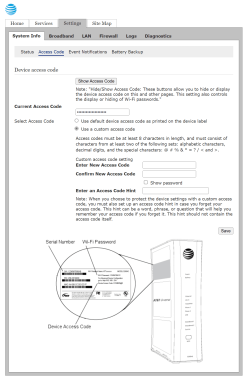
Here below are the pages, specific to my modem/router, where I set my Custom Access Code and also a hint in case I forget the Access Code.

Edition Windows 11 Pro
Version 24H2
Installed on ‎5/‎22/‎2024
OS build 26100.1876
Experience Windows Feature Experience Pack 1000.26100.23.0


1727661304889.png

1727660513084.png
 
Last edited:

My Computer

System One

  • OS
    Windows 11 Pro 25H2
    Computer type
    PC/Desktop
    Manufacturer/Model
    Dell XPS 8930
    CPU
    Intel I9-9900K
    Memory
    64GB
    Graphics Card(s)
    NVIDIA RTX 2060
    Sound Card
    NVIDIA High Definition Audio
    Monitor(s) Displays
    4k Samsung
    Screen Resolution
    3840 x 2160
    Hard Drives
    512GB NVMe, ADATA SU 800, 2TB HDD
Thanks for that information. The modem is supplied by my ISP and I have never changed the admin password and I am the only one that has access to the modem. Just in case the password was somehow changed, I reset the modem and that sets it to the default password, that produced the same result. I have a Netgear router set up as an access point and it too rejects the password.

My laptop has Windows 10 installed and got the same result, so it is not this operating system causing me this problem. I will take this weird problem to the Network forum.

AK
 

My Computer

System One

  • OS
    Window 11 Pro
    Computer type
    PC/Desktop
    CPU
    AMD 8700G
    Motherboard
    Asus ROG Strix X670E-E Wifi
    Memory
    G.Skill DDR5 2x32GB EXPO 6000 32-38-38-96
    Graphics Card(s)
    Radeon 5700 XT Gold
    Hard Drives
    Samsung 990 PRO SSD 1 TB
    PSU
    Corsair 860i
    Case
    Cooler Master Haf X
    Cooling
    Corsair H100i
    Keyboard
    Logitech G19
    Mouse
    Logitech G700s
    Internet Speed
    1 GPS up and 1 GPS down
    Browser
    Edge
    Antivirus
    Defender
    Other Info
    Systen currently being built
Thanks for that information. The modem is supplied by my ISP and I have never changed the admin password and I am the only one that has access to the modem. Just in case the password was somehow changed, I reset the modem and that sets it to the default password, that produced the same result. I have a Netgear router set up as an access point and it too rejects the password.

My laptop has Windows 10 installed and got the same result, so it is not this operating system causing me this problem. I will take this weird problem to the Network forum.

AK
So, if I understand correctly, you have a separate modem and router. Since the modem is supplied by your ISP, you may want to ask the question to your ISP. 🤷‍♂️
Do you own the Netgear router? Strange that both the Modem and the Router reject the password, I assume they are not the same for both pieces of equipment.
Let me know if you find the answer. Good luck.
 

My Computer

System One

  • OS
    Windows 11 Pro 25H2
    Computer type
    PC/Desktop
    Manufacturer/Model
    Dell XPS 8930
    CPU
    Intel I9-9900K
    Memory
    64GB
    Graphics Card(s)
    NVIDIA RTX 2060
    Sound Card
    NVIDIA High Definition Audio
    Monitor(s) Displays
    4k Samsung
    Screen Resolution
    3840 x 2160
    Hard Drives
    512GB NVMe, ADATA SU 800, 2TB HDD
Yes, thanks, I will be contacting my ISP provider tomorrow, statuatory holiday in Canada today and only their AI is working. :-( I did take a picture of the default password and blew it up to make sure I was entering the correct password. I am certain it is a problem with this modem.

As for my access point I am using a Netgear router and that was my mistake; I typed a capital letter when I shouldn't have.

Ak
 

My Computer

System One

  • OS
    Window 11 Pro
    Computer type
    PC/Desktop
    CPU
    AMD 8700G
    Motherboard
    Asus ROG Strix X670E-E Wifi
    Memory
    G.Skill DDR5 2x32GB EXPO 6000 32-38-38-96
    Graphics Card(s)
    Radeon 5700 XT Gold
    Hard Drives
    Samsung 990 PRO SSD 1 TB
    PSU
    Corsair 860i
    Case
    Cooler Master Haf X
    Cooling
    Corsair H100i
    Keyboard
    Logitech G19
    Mouse
    Logitech G700s
    Internet Speed
    1 GPS up and 1 GPS down
    Browser
    Edge
    Antivirus
    Defender
    Other Info
    Systen currently being built
Yes, thanks, I will be contacting my ISP provider tomorrow, statuatory holiday in Canada today and only their AI is working. :-( I did take a picture of the default password and blew it up to make sure I was entering the correct password. I am certain it is a problem with this modem.

As for my access point I am using a Netgear router and that was my mistake; I typed a capital letter when I shouldn't have.

Ak
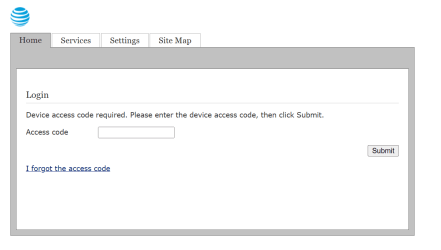
My modem has an option to switch to the default access code and another separate option when I forget the access code.

1727716880666.png

1727717241830.png
 

My Computer

System One

  • OS
    Windows 11 Pro 25H2
    Computer type
    PC/Desktop
    Manufacturer/Model
    Dell XPS 8930
    CPU
    Intel I9-9900K
    Memory
    64GB
    Graphics Card(s)
    NVIDIA RTX 2060
    Sound Card
    NVIDIA High Definition Audio
    Monitor(s) Displays
    4k Samsung
    Screen Resolution
    3840 x 2160
    Hard Drives
    512GB NVMe, ADATA SU 800, 2TB HDD
Yes, thanks, I will be contacting my ISP provider tomorrow, statuatory holiday in Canada today and only their AI is working. :-( I did take a picture of the default password and blew it up to make sure I was entering the correct password. I am certain it is a problem with this modem.

As for my access point I am using a Netgear router and that was my mistake; I typed a capital letter when I shouldn't have.

Ak
Did you try reverting to a previous build of 24H2? I'm assuming you have a backup image? Not sure if your problems started with this particular build?
 

My Computer

System One

  • OS
    Windows 11

Latest Support Threads

Back
Top Bottom