Win Update KB5044284 Windows 11 Cumulative Update build 26100.2033 (24H2) - Oct. 8


UPDATE 10/24:


 Microsoft Support:

October 8, 2024 - KB5044284 (OS Build 26100.2033)​


For information about Windows update terminology, see the article about the types of Windows updates and the monthly quality update types. For an overview of Windows 11, version 24H2, see its update history page.

Note Follow @WindowsUpdate to find out when new content is published to the Windows release health dashboard.


Highlights

  • This update addresses security issues for your Windows operating system.

Improvements

This security update includes improvements that were a part of update KB5043178 (released September 26, 2024). Below is a summary of the key issues that this update addresses when you install this KB. If there are new features, it lists them as well. The bold text within the brackets indicates the item or area of the change we are documenting.
  • [Remote Desktop Gateway Service] Fixed: The service stops responding. This occurs when a service uses remote procedure calls (RPC) over HTTP. Because of this, the clients that are using the service disconnect.
If you installed earlier updates, only the new updates contained in this package will be downloaded and installed on your device.

For more information about security vulnerabilities, please refer to the Security Update Guide website and the October 2024 Security Updates.

Windows 11 servicing stack update (KB 5046306)- 26100.2032​

This update makes quality improvements to the servicing stack, which is the component that installs Windows updates. Servicing stack updates (SSU) ensure that you have a robust and reliable servicing stack so that your devices can receive and install Microsoft updates.

Known issues in this update

Applies toSymptomWorkaround
All usersWe’re aware of an issue where players on Arm devices are unable to download and play Roblox via the Microsoft Store on Windows.Players on Arm devices can play Roblox by downloading the title directly from www.Roblox.com.
Enterprise usersAfter a fresh install or an In-place upgrade to Windows 11, version 24H2, you might face issues with connecting via DirectAccess. You might observe that the DirectAccess connection is not completing and remains in a ‘connecting’ state. Additionally, you can determine if you are affected by this issue by following the below steps:
  • Open Windows PowerShell in administrator prompt. This can be accomplished by opening the Start menu and typing ‘powershell’ and selecting from the results on the right side of the start menu.
  • Type the text ‘netsh interface httpstunnel show interface’ and press enter
  • If your device is experiencing this issue, you’ll observe that the output includes the following text:
    • Last Error Code : 0x57
    • Interface Status : failed to connect to the IPHTTPS server. Waiting to reconnect
You are more likely to face this issue if your device is remotely connecting to a corporate intranet using DirectAccess. Home users of Windows using Home or Pro editions are unlikely to face this issue as DirectAccess is more commonly used in enterprise environments.

Note: Enterprise customers that require DirectAccess are recommended to evaluate Always On VPN (AOVPN) until a fix becomes available.
This issue is addressed in KB5044384.
All usersFollowing the installation of the October 2024 security update, some customers report that the OpenSSH (Open Secure Shell) service fails to start, preventing SSH connections. The service fails with no detailed logging, and manual intervention is required to run the sshd.exe process.

This issue is affecting both enterprise, IOT, and education customers, with a limited number of devices impacted. Microsoft is investigating whether consumer customers using Home or Pro editions of Windows are affected.
Customers can temporarily resolve the issue by updating permissions (ACLs) on the affected directories. Follow these steps:
  1. Open PowerShell as an Administrator.
  2. Update the permissions for C:\ProgramData\ssh and C:\ProgramData\ssh\logs to allow full control for SYSTEM and the Administrators group, while allowing read access for Authenticated Users. You can restrict read access to specific users or groups by modifying the permissions string if needed.

    Use the following commands to update the permissions:
    $directoryPath = "C:\ProgramData\ssh" $acl = Get-Acl -Path $directoryPath $sddlString = "O:BAD:PAI(A;OICI;FA;;;SY)(A;OICI;FA;;;BA)(A;OICI;0x1200a9;;;AU)" $securityDescriptor = New-Object System.Security.AccessControl.RawSecurityDescriptor $sddlString $acl.SetSecurityDescriptorSddlForm($securityDescriptor.GetSddlForm("All")) Set-Acl -Path $directoryPath -AclObject $acl
  3. Repeat the above steps for C:\ProgramData\ssh\logs.
Microsoft is actively investigating the issue and will provide a resolution in an upcoming Windows update. Further communications will be provided when a resolution or additional workarounds are available.

How to get this update

Before you install this update

Microsoft combines the latest servicing stack update (SSU) for your operating system with the latest cumulative update (LCU). For general information about SSUs, see Servicing stack updates and Servicing Stack Updates (SSU): Frequently Asked Questions.

Install this update

To install this update, use one of the following Windows and Microsoft release channels.

AvailableNext Step
Yes (Windows Update)None. This update will be downloaded and installed automatically from Windows Update and Microsoft Update.
Yes (MSU)Before you install this update
To get the standalone package(s) for this update, go to the Microsoft Update Catalog website. This KB contains one or more MSU files that must be installed in order.

Install this update

Method 1: Install all MSU files together

Download all MSU files for KB5044284 from Microsoft Update Catalog and place them in the same folder (for example, C:/Packages). Use Deployment Image Servicing and Management (DISM.exe) to install the target update. DISM will use the folder specified in PackagePath to discover and install one or more prerequisite MSU files as needed.

Updating Windows PC
To apply this update to a running Windows PC, run the following command from an elevated Command Prompt:
DISM /Online /Add-Package /PackagePath:c:\packages\Windows11.0-KB5044284-x64.msu

Or, run the following command from an elevated Windows PowerShell prompt:
Add-WindowsPackage -Online -PackagePath "c:\packages\Windows11.0-KB5044284-x64.msu"

Updating Windows Installation media
To apply this update to Windows Installation media, see Update Windows installation media with Dynamic Update.

To add this update to a mounted image, run the following command from an elevated Command Prompt:
DISM /Image:mountdir /Add-Package /PackagePath:Windows11.0-KB5044284-x64.msu

Or, run the following command from an elevated Windows PowerShell prompt:
Add-WindowsPackage -Path "c:\offline" -PackagePath "Windows11.0-KB5044284-x64.msu" -PreventPending

If you want to remove the LCU

To remove the LCU after installing the combined SSU and LCU package, use the DISM/Remove-Package command line option with the LCU package name as the argument. You can find the package name by using this command: DISM /online /get-packages.

Running Windows Update Standalone Installer (wusa.exe) with the /uninstall switch on the combined package will not work because the combined package contains the SSU. You cannot remove the SSU from the system after installation.

File information

For a list of the files that are provided in this update, download the file information for cumulative update 5044284.

For a list of the files that are provided in the servicing stack update, download the file information for the SSU (KB 5046306) - version 26100.2032.


 Source:


Check Windows Updates


ISO from Microsoft Media Creation Tool (MCT):



UUP Dump:

64-bit ISO download:

ARM64 ISO download:

 
Last edited:

My Computer My Computer

At a glance

Windows 11 64 bitSnapdragon(R) X Elite - X1E80100 - Qualcomm(R...3982 Megabytes Usable Installed MemorySnapdragon
OS
Windows 11 64 bit
Computer type
Laptop
Manufacturer/Model
Samsung Galaxy Book4 Pro 360 5G
CPU
Snapdragon(R) X Elite - X1E80100 - Qualcomm(R) Oryon(TM
Motherboard
Samsung
Memory
3982 Megabytes Usable Installed Memory
Graphics Card(s)
Snapdragon
Sound Card
Samsung
Hard Drives
Built In
Case
Grey
Cooling
Fan
Keyboard
Built in
Mouse
None
Internet Speed
Fast
Browser
Microsoft Dev
Antivirus
Windows Defender
Other Info
Also have a Samsung watch7, Samsung 65 inch TV, and a Samsung Galaxy 25Ultra phone!

And all three of these can get windows 11 and 12 so never out of touch

Also Alexa
Also now a Windows Insider

My Computer My Computer

At a glance

W11 Pro and Insider DevAMD Ryzen 9 7900x2x16GB Kingston 6000MHz, Cl 32 @ 6200MHz Cl30Gigabyte Rx 6600XT Gaming OC 8G Pro
OS
W11 Pro and Insider Dev
Computer type
PC/Desktop
Manufacturer/Model
Home brewed
CPU
AMD Ryzen 9 7900x
Motherboard
ASROCK b650 PRO RS
Memory
2x16GB Kingston 6000MHz, Cl 32 @ 6200MHz Cl30
Graphics Card(s)
Gigabyte Rx 6600XT Gaming OC 8G Pro
Sound Card
MB, Realtek Ac1220p
Monitor(s) Displays
3 x 27"
Screen Resolution
1080p
Hard Drives
Kingston KC3000. 1TBSamsung 970 evo Plus 500GB, Crucial P1 NVMe 1TB, Lexar NVMe 2 TB, Silicon Power M.2 SATA 500GB
PSU
Seasonic 750W
Case
Custom Raidmax
Cooling
Arctic Liquid Freezer III 360mm
Internet Speed
20/19 mbps

My Computer My Computer

At a glance

Windows 11 Pro 25H2Intel I9-9900K64GBNVIDIA RTX 2060
OS
Windows 11 Pro 25H2
Computer type
PC/Desktop
Manufacturer/Model
Dell XPS 8930
CPU
Intel I9-9900K
Memory
64GB
Graphics Card(s)
NVIDIA RTX 2060
Sound Card
NVIDIA High Definition Audio
Monitor(s) Displays
4k Samsung
Screen Resolution
3840 x 2160
Hard Drives
512GB NVMe, ADATA SU 800, 2TB HDD

My Computer My Computer

At a glance

W11 Pro and Insider DevAMD Ryzen 9 7900x2x16GB Kingston 6000MHz, Cl 32 @ 6200MHz Cl30Gigabyte Rx 6600XT Gaming OC 8G Pro
OS
W11 Pro and Insider Dev
Computer type
PC/Desktop
Manufacturer/Model
Home brewed
CPU
AMD Ryzen 9 7900x
Motherboard
ASROCK b650 PRO RS
Memory
2x16GB Kingston 6000MHz, Cl 32 @ 6200MHz Cl30
Graphics Card(s)
Gigabyte Rx 6600XT Gaming OC 8G Pro
Sound Card
MB, Realtek Ac1220p
Monitor(s) Displays
3 x 27"
Screen Resolution
1080p
Hard Drives
Kingston KC3000. 1TBSamsung 970 evo Plus 500GB, Crucial P1 NVMe 1TB, Lexar NVMe 2 TB, Silicon Power M.2 SATA 500GB
PSU
Seasonic 750W
Case
Custom Raidmax
Cooling
Arctic Liquid Freezer III 360mm
Internet Speed
20/19 mbps
But I do want 24H2over WU and it's not coming.
In my case W.U. failed wit error 0xC1900101 and reverted back to 23H2. 😂😝🤬
I had to use the MS ISO 26100.1742 to do the upgrade and that worked fine. After that W.U. brought it up to 26100.2033 which has 2 known bugs.
I applied manually the .msu file below to get to get up to 26100.2152 which, at least, eliminated the SFC /SCANNOW bug.

1729407475284.png
Still have the 8.63 GB of leftover Windows Update Cleanup.
Also, I had to change some settings in the Firewall to get the network to work. 😉👍
24H2 is still not ready for prime time. I hope they cleanup the bugs with next updates. 😝🤬

See also post#36 on this other thread:
 

My Computer My Computer

At a glance

Windows 11 Pro 25H2Intel I9-9900K64GBNVIDIA RTX 2060
OS
Windows 11 Pro 25H2
Computer type
PC/Desktop
Manufacturer/Model
Dell XPS 8930
CPU
Intel I9-9900K
Memory
64GB
Graphics Card(s)
NVIDIA RTX 2060
Sound Card
NVIDIA High Definition Audio
Monitor(s) Displays
4k Samsung
Screen Resolution
3840 x 2160
Hard Drives
512GB NVMe, ADATA SU 800, 2TB HDD
In my case W.U. failed wit error 0xC1900101 and reverted back to 23H2. 😂😝🤬
I had to use the MS ISO 26100.1742 to do the upgrade and that worked fine. After that W.U. brought it up to 26100.2033 which has 2 known bugs.
I applied manually the .msu file below to get to get up to 26100.2152 which, at least, eliminated the SFC /SCANNOW bug.

View attachment 113262
Still have the 8.63 GB of leftover Windows Update Cleanup.
Also, I had to change some settings in the Firewall to get the network to work. 😉👍
24H2 is still not ready for prime time. I hope they cleanup the bugs with next updates. 😝🤬

See also post#36 on this other thread:
That's why I'm waiting for WU, tried In place upgrade with ISO twice but had those usual problems. Dual booting with 24H2 insider Dev. which has same faults but everything else works fine.
 

My Computer My Computer

At a glance

W11 Pro and Insider DevAMD Ryzen 9 7900x2x16GB Kingston 6000MHz, Cl 32 @ 6200MHz Cl30Gigabyte Rx 6600XT Gaming OC 8G Pro
OS
W11 Pro and Insider Dev
Computer type
PC/Desktop
Manufacturer/Model
Home brewed
CPU
AMD Ryzen 9 7900x
Motherboard
ASROCK b650 PRO RS
Memory
2x16GB Kingston 6000MHz, Cl 32 @ 6200MHz Cl30
Graphics Card(s)
Gigabyte Rx 6600XT Gaming OC 8G Pro
Sound Card
MB, Realtek Ac1220p
Monitor(s) Displays
3 x 27"
Screen Resolution
1080p
Hard Drives
Kingston KC3000. 1TBSamsung 970 evo Plus 500GB, Crucial P1 NVMe 1TB, Lexar NVMe 2 TB, Silicon Power M.2 SATA 500GB
PSU
Seasonic 750W
Case
Custom Raidmax
Cooling
Arctic Liquid Freezer III 360mm
Internet Speed
20/19 mbps

My Computers My Computers

  • At a glance

    Windows 11 Pro 25H2 Build 26200.8655Intel(R) Core(TM) i7-4770K CPU @ 3.50GHz32.0 GB of I forget and the box is in storage.Gigabyte nVidia GeForce GTX 1660 Super OC 6GB
    OS
    Windows 11 Pro 25H2 Build 26200.8655
    Computer type
    PC/Desktop
    Manufacturer/Model
    Sin-built 2013
    CPU
    Intel(R) Core(TM) i7-4770K CPU @ 3.50GHz
    Motherboard
    ASUS ROG Maximus VI Formula
    Memory
    32.0 GB of I forget and the box is in storage.
    Graphics Card(s)
    Gigabyte nVidia GeForce GTX 1660 Super OC 6GB
    Sound Card
    ROG SupremeFX Formula 8-Channel High Definition Audio
    Monitor(s) Displays
    5 x LG 25MS500-B - 1 x 24MK430H-B - 1 x Wacom Pro 22" Touch Screen Tablet
    Screen Resolution
    All over the place
    Hard Drives
    Too many to list. OS on Samsung 1TB 870 QVO SATA
    PSU
    Silverstone 1500
    Case
    NZXT Phantom 820 Full-Tower Case
    Cooling
    Noctua NH-D15 Elite Class Dual Tower CPU Cooler / 6 x EziDIY 120mm / 2 x Corsair 140mm somethings / 1 x 140mm Thermaltake something / 2 x 200mm Corsair.
    Keyboard
    Corsair K95 / Logitech diNovo Edge Wireless
    Mouse
    Logitech: G402 / G502 / Mx Masters / Mx Air Cordless
    Internet Speed
    2000/500Mbps
    Browser
    All sorts
    Antivirus
    Kaspersky Premium
    Other Info
    ㅤㅤㅤㅤㅤㅤㅤㅤㅤㅤㅤㅤㅤㅤㅤㅤㅤㅤㅤㅤㅤㅤㅤㅤㅤㅤㅤㅤㅤㅤㅤㅤㅤㅤㅤㅤㅤㅤㅤㅤ⠀⠀⠀⠀⠀⠀⠀⠀⠀⠀
    TP-Link BE9300 WiFi 7 Bluetooth 5.4 (Archer TBE550E)
    TP-Link TX201 V1 2.5GB Lan

    Grandstream HT812 - VoIP
    ASUS DSL-AX82U - Mesh
    ASUS RT-AC68U - Mesh
    ASUS RT-BE88U Router

    Brother MFC-L2880DW Printer

    I’m on a horse.
  • At a glance

    Windows 11 Pro 25H2 Build 26200.8655 (Wifes)13th Generation Intel® Core™ i5-1340P Process...16GB LPDDR5-52001x Intel® Iris® Xe Graphics
    Operating System
    Windows 11 Pro 25H2 Build 26200.8655 (Wifes)
    Computer type
    Laptop
    Manufacturer/Model
    LENOVO Yoga 7 14IRL8 - Type 82YL
    CPU
    13th Generation Intel® Core™ i5-1340P Processor(Core™ i5-1340P)
    Memory
    16GB LPDDR5-5200
    Graphics card(s)
    1x Intel® Iris® Xe Graphics
    Sound Card
    Optimized with Dolby Atmos®
    Screen Resolution
    QHD 2880 x 1800 OLED
    Hard Drives
    M.2 512 GB SSD PCIe
    Mouse
    Logiteck MX Master 3S
    Internet Speed
    2000/500
    Antivirus
    Defender / Malwarebytes
    Other Info
    …still on a horse.


    Wireless Network: Wi-Fi 6E 2x2 AX; Bluetooth® 5.1 or above
    Ports: 1x 1 Novo button; 2 in 1 Audio Combo jack; Micro SD Card Reader; HDMI 1.4b; 2 x USB Type-C (TBT4)
    USB 3.2 Gen 2 DP 1.4a
    PD 3.0); 1 x USB 3.2 Gen1 Type A
    Camera
    1x 1080P FHD IR/RGB Hybrid with Privacy Shutter and Dual Array Microphone
    Graphics
    1x Intel® Iris® Xe Graphics
    Monitor
    14" WUXGA
    Form Factor
    Convertible Notebook
  • Windows 11 Pro 25H2 Build 26200.8655 (Wifes)

    Yoga 7 2-in-1 14IML9 - Type 83DJ

    Processor: Intel® Core™ Ultra 7 155H Processor(Core™ Ultra 7 155H)

    Memory: 32GB LPD5X-7467

    Hard Drive: 1 TB SSD PCIe

    Wireless Network: 1x Wi-Fi 6E 2x2 AX; Bluetooth® 5.1 or above

    Ports: 1 x HDMI 2.1 TMDS; 1 x Novo Button; 1 x Combo Audio Jack
    2 x USB-C (USB 4.0)
    1 x USB-A 3.2 Gen 1

    Camera: 1080P FHD IR Hybrid with Dual Microphone

    Graphics: Intel® Arc™ Graphics

    Monitor: 14" 2.8K

    ...Where's my horse?
I still didn't see the new features of 26100.1882. Maybe next update.
I only got the 4th tile (sports) in lock screen.
 

My Computer My Computer

At a glance

26200.8037i5-11400F32GBGeforce GT-1030
OS
26200.8037
Computer type
PC/Desktop
CPU
i5-11400F
Motherboard
Gigabyte
Memory
32GB
Graphics Card(s)
Geforce GT-1030
Keyboard
Logitech K400
Mouse
Logitech M720
Internet Speed
600 Mb
Browser
Edge
Yesterday I installed 24H2 on three machines, two compatible, one non-compatible. One compatible and the non-compatible installed KB5044284 no problem and updated the version to .2033. My main machine, System 1 in the Specs, refuses to install this KB and after showing 40% for sometime will show a message, "Something didn't go as planned. No need to worry undoing changes. Please keep your computer on." After sometime it resolves itself and boots into Windows. It has done this upon four tries. Before the fourth try I ran sfc and it found and supposedly fixed errors but the problem persists. Anyone else have this problem or know how to resolve it?

This is my main machine which I use for video editing, wouldn't you know. : (
 

My Computers My Computers

  • At a glance

    Windows 11 Pro 25H2Core i7 10700K 3.8 GHzCorsair Vengeance LPX DDR4 128 GB 3000MHzAsus ProArt GeForce RTX 4070 Ti Super 16 GB
    OS
    Windows 11 Pro 25H2
    Computer type
    PC/Desktop
    Manufacturer/Model
    Wordsworth 10000
    CPU
    Core i7 10700K 3.8 GHz
    Motherboard
    Asus ROG Strix Z590-A Gaming Wifi
    Memory
    Corsair Vengeance LPX DDR4 128 GB 3000MHz
    Graphics Card(s)
    Asus ProArt GeForce RTX 4070 Ti Super 16 GB
    Sound Card
    Asus Xonar DSX
    Monitor(s) Displays
    HP 2709m
    Screen Resolution
    1920x1080
    Hard Drives
    Samsung 990 Pro M.2 SSD 2 TB; Samsung 990 Pro M.2 SSD 4 TB
    PSU
    Thermaltake Toughpower GF3 1350W
    Case
    Fractal Design Meshify 2
    Cooling
    CPU-Noctua NH D15 Chromax, GPU-Stock, Case-Noctua Chromax 3x140
    Keyboard
    Microsoft Natural Ergo 4000
    Mouse
    HP X500
    Internet Speed
    Cable
    Browser
    Vivaldi, MS Edge
    Antivirus
    Malwarebytes 5.2.4, Windows Defender
    Other Info
    Klipsch Promedia 5.1 THX
    Asus External Blu-Ray 16D1X-USB 3.0
  • At a glance

    Windows 11 Pro 25H2Core i7 6700K 4.0 GHzCorsair Vengeance LPX DDR4 32 GB 3000MHzAsus GeForce GTX 1050 Ti
    Operating System
    Windows 11 Pro 25H2
    Computer type
    PC/Desktop
    Manufacturer/Model
    Wordsworth 6000
    CPU
    Core i7 6700K 4.0 GHz
    Motherboard
    Asus Z170 Pro
    Memory
    Corsair Vengeance LPX DDR4 32 GB 3000MHz
    Graphics card(s)
    Asus GeForce GTX 1050 Ti
    Sound Card
    Asus Xonar SE
    Monitor(s) Displays
    HP X24ih
    Screen Resolution
    1920x1080
    Hard Drives
    Intel 760p M.2 SSD 500 GB; Intel 540 SSD 480 GB; Intel 335 SSD 240 GB
    PSU
    Thermaltake Toughpower GF1 750W
    Case
    Lian Li PC-B70
    Cooling
    CPU- Noctua NH-D15; GPU-Stock; Case-Noctua Chromax 2x140, 2x120
    Keyboard
    Microsoft Wireless Comfort 5050
    Mouse
    Microsoft Wireless Comfort 5050
    Internet Speed
    Cable
    Browser
    Vivaldi, MS Edge
    Antivirus
    Malwarebytes 4.4.3, Windows Defender
    Other Info
    HP bd 340
    HP bd 240
    Denon DRA-800H
    Klipsch RP-600M
    Klipsch R-100SW (2)

    System 3 Specs
    Windows 11 Pro 25H2
    Core i7 10700K 3.8 GHz
    Asus ROG Strix Z590-A Gaming Wifi
    Corsair Vengeance LPX DDR4 32 GB 3200MHz
    Asus Radeon RX560 Dual 4 GB
    Xonar SE
    Samsung 980 Pro M.2 SSD 1 TB (2)
    Thermaltake Toughpower GF3 850W
    Fractal Design Meshify 2
    CPU-Noctua NH D15 Chromax, GPU-Stock, Case-Noctua Chromax 2x140,1x120
It's a bug they are suppose to be working on. I have same sfc problem so do others.
 

My Computer My Computer

At a glance

Windows 11 proAMD Ryzen 7 5700XG.SKILL Ripjaws V Series (Intel XMP) DDR4 RAM...ASUS Dual GeForce RTX™ 4060 White Edition
OS
Windows 11 pro
Computer type
PC/Desktop
Manufacturer/Model
custom build
CPU
AMD Ryzen 7 5700X
Motherboard
AMD ROG STRIX B550-F
Memory
G.SKILL Ripjaws V Series (Intel XMP) DDR4 RAM 32GB (2x16GB)
Graphics Card(s)
ASUS Dual GeForce RTX™ 4060 White Edition
Sound Card
on-board
Monitor(s) Displays
SAMSUNG 32-Inch Odyssey G50D Series
Screen Resolution
2560 x 1440
Hard Drives
Samsung 990 EVO Plus 1TB, ssd INTEL SSD 730 series 240 GB, and Samsung 840 Evo ssd 500 GB.
PSU
CORSAIR - RMe Series 1000W 80 PLUS Gold Fully Modular ATX Power Supply
Case
Antec 900 Nine Hundred ATX Mid Tower Computer Gaming Case
Cooling
ID-COOLING SE-214-XT Black CPU Cooler All-Black Layout
Keyboard
Logitech 520
Mouse
Logitech 310
Browser
Google Chrome
Antivirus
Windows Defender
It's a bug they are suppose to be working on. I have same sfc problem so do others.
I know about the sfc bug, but is that related to the fact that my computer will not install KB5044284? Upon every reboot that KB is in Windows Update, just as it is again right now, where WU is wanting to Restart to complete the install of KB5044284 when in fact it will not. So I'm stuck in a loop.

Edit: A real slap the forehead moment for me. I found that my C: drive was full in part because it had old versions of Windows still on it (plus video I've been editing) and once I freed up space on the drive KB5044284 installed. :oops::D
 
Last edited:

My Computers My Computers

  • At a glance

    Windows 11 Pro 25H2Core i7 10700K 3.8 GHzCorsair Vengeance LPX DDR4 128 GB 3000MHzAsus ProArt GeForce RTX 4070 Ti Super 16 GB
    OS
    Windows 11 Pro 25H2
    Computer type
    PC/Desktop
    Manufacturer/Model
    Wordsworth 10000
    CPU
    Core i7 10700K 3.8 GHz
    Motherboard
    Asus ROG Strix Z590-A Gaming Wifi
    Memory
    Corsair Vengeance LPX DDR4 128 GB 3000MHz
    Graphics Card(s)
    Asus ProArt GeForce RTX 4070 Ti Super 16 GB
    Sound Card
    Asus Xonar DSX
    Monitor(s) Displays
    HP 2709m
    Screen Resolution
    1920x1080
    Hard Drives
    Samsung 990 Pro M.2 SSD 2 TB; Samsung 990 Pro M.2 SSD 4 TB
    PSU
    Thermaltake Toughpower GF3 1350W
    Case
    Fractal Design Meshify 2
    Cooling
    CPU-Noctua NH D15 Chromax, GPU-Stock, Case-Noctua Chromax 3x140
    Keyboard
    Microsoft Natural Ergo 4000
    Mouse
    HP X500
    Internet Speed
    Cable
    Browser
    Vivaldi, MS Edge
    Antivirus
    Malwarebytes 5.2.4, Windows Defender
    Other Info
    Klipsch Promedia 5.1 THX
    Asus External Blu-Ray 16D1X-USB 3.0
  • At a glance

    Windows 11 Pro 25H2Core i7 6700K 4.0 GHzCorsair Vengeance LPX DDR4 32 GB 3000MHzAsus GeForce GTX 1050 Ti
    Operating System
    Windows 11 Pro 25H2
    Computer type
    PC/Desktop
    Manufacturer/Model
    Wordsworth 6000
    CPU
    Core i7 6700K 4.0 GHz
    Motherboard
    Asus Z170 Pro
    Memory
    Corsair Vengeance LPX DDR4 32 GB 3000MHz
    Graphics card(s)
    Asus GeForce GTX 1050 Ti
    Sound Card
    Asus Xonar SE
    Monitor(s) Displays
    HP X24ih
    Screen Resolution
    1920x1080
    Hard Drives
    Intel 760p M.2 SSD 500 GB; Intel 540 SSD 480 GB; Intel 335 SSD 240 GB
    PSU
    Thermaltake Toughpower GF1 750W
    Case
    Lian Li PC-B70
    Cooling
    CPU- Noctua NH-D15; GPU-Stock; Case-Noctua Chromax 2x140, 2x120
    Keyboard
    Microsoft Wireless Comfort 5050
    Mouse
    Microsoft Wireless Comfort 5050
    Internet Speed
    Cable
    Browser
    Vivaldi, MS Edge
    Antivirus
    Malwarebytes 4.4.3, Windows Defender
    Other Info
    HP bd 340
    HP bd 240
    Denon DRA-800H
    Klipsch RP-600M
    Klipsch R-100SW (2)

    System 3 Specs
    Windows 11 Pro 25H2
    Core i7 10700K 3.8 GHz
    Asus ROG Strix Z590-A Gaming Wifi
    Corsair Vengeance LPX DDR4 32 GB 3200MHz
    Asus Radeon RX560 Dual 4 GB
    Xonar SE
    Samsung 980 Pro M.2 SSD 1 TB (2)
    Thermaltake Toughpower GF3 850W
    Fractal Design Meshify 2
    CPU-Noctua NH D15 Chromax, GPU-Stock, Case-Noctua Chromax 2x140,1x120
Maybe someone more experienced than I will chime in good luck!
 

My Computer My Computer

At a glance

Windows 11 proAMD Ryzen 7 5700XG.SKILL Ripjaws V Series (Intel XMP) DDR4 RAM...ASUS Dual GeForce RTX™ 4060 White Edition
OS
Windows 11 pro
Computer type
PC/Desktop
Manufacturer/Model
custom build
CPU
AMD Ryzen 7 5700X
Motherboard
AMD ROG STRIX B550-F
Memory
G.SKILL Ripjaws V Series (Intel XMP) DDR4 RAM 32GB (2x16GB)
Graphics Card(s)
ASUS Dual GeForce RTX™ 4060 White Edition
Sound Card
on-board
Monitor(s) Displays
SAMSUNG 32-Inch Odyssey G50D Series
Screen Resolution
2560 x 1440
Hard Drives
Samsung 990 EVO Plus 1TB, ssd INTEL SSD 730 series 240 GB, and Samsung 840 Evo ssd 500 GB.
PSU
CORSAIR - RMe Series 1000W 80 PLUS Gold Fully Modular ATX Power Supply
Case
Antec 900 Nine Hundred ATX Mid Tower Computer Gaming Case
Cooling
ID-COOLING SE-214-XT Black CPU Cooler All-Black Layout
Keyboard
Logitech 520
Mouse
Logitech 310
Browser
Google Chrome
Antivirus
Windows Defender
I think I solved it: I added x040:

reg add HKEY_LOCAL_MACHINE\SYSTEM\CurrentControlSet\Control\Secureboot /v AvailableUpdates /t REG_DWORD /d 0x40 /f

Reading on the official Microsoft Page.

HOLY rubbish, IT WORKED, GET RID OF THIS STUPID BUG, MINE WAS NEEDED THE 2023 UPDATED.
THANKS A LOT MAN.
 

My Computer My Computer

At a glance

windows 11
OS
windows 11
Computer type
PC/Desktop
With 24H2 Pro 26100.1742 I had this problem.
My Windows 10 Pro could access Windows 11 24H2 through my network, however Windows 11 24H2 could not access my Windows 10 Pro or any earlier versions of Windows 11 Pro Computers this only happened since I went to 24H2.
To fix this issue I did both of these changes in Local Group Policy Editor. And Now all is happy including me. I hope this helps.

Computer Configuration, Windows Settings, Security Settings, Local Policies, Security Options
Double click on Microsoft Network Client: Digitally sign communications (always)
Double click on Microsoft Network Client: Digitally sign communications (if server agrees)
Set both of these to "Disabled"
Click on OK.

Computer Configuration, Administrative Templates, Network, Lanman Workstation
Double click on "Enable Insecure Guest Logons"
Set this to "Enabled"
Click on OK.

Ive just installed KB5044284 through windows update and I still have full network access
Now on 26100.2033

I'm on a Private Network. Ive done nothing else.
 

My Computer My Computer

At a glance

Windows 11 ProIntel Core i9 12900KFCorsair 64GB DDR5 Vengeance C40 5200MhzASUS GeForce RTX 3090 ROG Strix OC 24GB
OS
Windows 11 Pro
Computer type
PC/Desktop
Manufacturer/Model
Custom Build
CPU
Intel Core i9 12900KF
Motherboard
ASUS ROG Maximus Z690 Hero
Memory
Corsair 64GB DDR5 Vengeance C40 5200Mhz
Graphics Card(s)
ASUS GeForce RTX 3090 ROG Strix OC 24GB
Sound Card
OnBoard
Monitor(s) Displays
Acer Predator XB323UGP 32" QHD G-SYNC-C 144Hz 1MS IPS LED
Screen Resolution
2560 x 1440
Hard Drives
1x Samsung 980 Pro Series Gen4 250GB M.2 NVMe
1x Samsung 980 Pro Series Gen4 500GB M.2 NVMe
2x Samsung 980 Pro Series Gen4 2TB M.2 NVMe
PSU
Corsair AX1200i 1200W 80PLUS Titanium Modular
Case
Corsair 4000D Black Case w/ Tempered Glass Side Panel
Cooling
Noctua NH-U12A Chromax Black CPU Cooler, 4x Noctua 120mm Fans
Keyboard
Logitech MK545
Mouse
Logitech MX Master 3
Internet Speed
Fixed Wireless 150mbps/75mbps
Browser
Firefox
Antivirus
Kaspersky
Other Info
Thrustmaster TS-PC RACER
Fanatec CSL Elite Pedals with the Load Cell Kit
Yamaha Amp with Bose Speakers
HOLY rubbish, IT WORKED, GET RID OF THIS STUPID BUG, MINE WAS NEEDED THE 2023 UPDATED.
THANKS A LOT MAN.
Yeah! It's a pleasure to be able to help people. In my case, once I finished formatting Windows 11 24H2 (I have the iso with the build .2033) I have to do two commands:

1)
Code:
reg add HKEY_LOCAL_MACHINE\SYSTEM\CurrentControlSet\Control\Secureboot /v AvailableUpdates /t REG_DWORD /d 0x200 /f

Reboot a couple of times (this first command to install the “'Windows UEFI CA 2023”).

2)
Code:
reg add HKEY_LOCAL_MACHINE\SYSTEM\CurrentControlSet\Control\Secureboot /v AvailableUpdates /t REG_DWORD /d 0x40 /f

Reboot a couple of times. (This step (instead) will add the “Windows UEFI CA 2023” certificate to the UEFI “Secure Boot Signature Database” (DB))
 

My Computer My Computer

At a glance

Windows 11 Pro 25H2 - 26200.6899Intel i7-13700KF [Undervolt]Corsair VENGEANCE RGB DDR5 32GB 6000MHz C36Zotac RTX 3080 12GB AMP Holo
OS
Windows 11 Pro 25H2 - 26200.6899
Computer type
PC/Desktop
CPU
Intel i7-13700KF [Undervolt]
Motherboard
MAG Z790 TOMAHAWK WIFI
Memory
Corsair VENGEANCE RGB DDR5 32GB 6000MHz C36
Graphics Card(s)
Zotac RTX 3080 12GB AMP Holo
Sound Card
Sound BlasterX AE-5
Monitor(s) Displays
LG 27GN850
Screen Resolution
2560x1440
Hard Drives
WD_BLACK SN850X 1TB OS and GAME | WD_Black SN750 1TB GAME | 960 EVO 500GB Work | 850 EVO 500GB Storage | 850 EVO 250GB Arch Linux with Hyprland
PSU
Seasonic Prime GX-1000
Case
Corsair iCUE 5000x RGB
Cooling
EK Nucleus AIO CR360 Lux D-RGB
Keyboard
AJAZZ AK820 Pro with Gift Switch + SteelSeries QcK XXL
Mouse
Corsair M65 RGB ELITE | Razer Deathadder Elite
Browser
Chrome
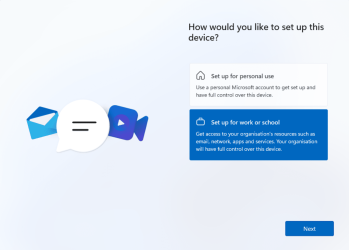
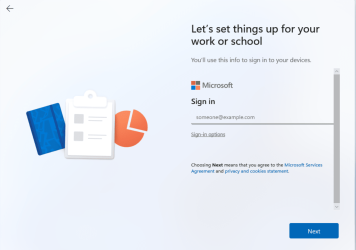
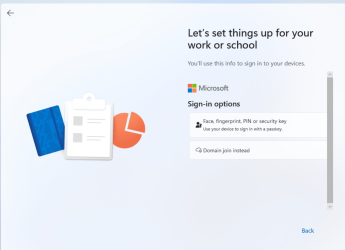
Here is an easy way to install with a local account as an alternative to oobe bypassnro method for any 24H2 build including Insiders.
Regrettably, this does not work for Wndows Home users.

This also works in vm installations where shift+f10 does not work to get to command prompt.


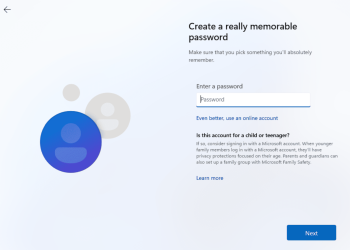
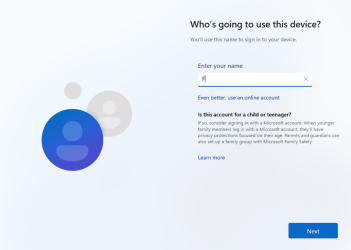
1. At page asking for MS account, click on "Set up for work or school"

p1.png


2. Click on sign-in options

p2.png

3. Click on "Domain join instead"

p3.png

4. Enter your local account name that you wish to use


p4.png


5. Enter a password (or just press enter for no password)

If you enter a password, you need to confirm it and answer 3 security questions in case you need to reset password later.
I have not shown those screens.

p5.png


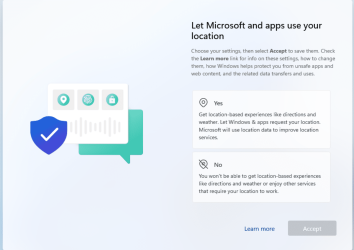
6. Carry on with rest of oobe as normal
p6.png
 

Attachments

  • p4.png
    p4.png
    243.8 KB · Views: 1
  • 1729512574988.png
    1729512574988.png
    297.1 KB · Views: 0
Last edited:

My Computer My Computer

At a glance

Windows 11 Pro + Win11 Canary VM.I9 13th gen i9-13900H 2.60 GHZ16 GB solderedIntegrated Intel Iris XE
OS
Windows 11 Pro + Win11 Canary VM.
Computer type
Laptop
Manufacturer/Model
ASUS Zenbook 14
CPU
I9 13th gen i9-13900H 2.60 GHZ
Motherboard
Yep, Laptop has one.
Memory
16 GB soldered
Graphics Card(s)
Integrated Intel Iris XE
Sound Card
Realtek built in
Monitor(s) Displays
laptop OLED screen
Screen Resolution
2880x1800 touchscreen
Hard Drives
1 TB NVME SSD (only weakness is only one slot)
PSU
Internal + 65W thunderbolt USB4 charger
Case
Yep, got one
Cooling
Stella Artois (UK pint cans - 568 ml) - extra cost.
Keyboard
Built in UK keybd
Mouse
Bluetooth , wireless dongled, wired
Internet Speed
900 mbs (ethernet), wifi 6 typical 350-450 mb/s both up and down
Browser
Edge
Antivirus
Defender
Other Info
TPM 2.0, 2xUSB4 thunderbolt, 1xUsb3 (usb a), 1xUsb-c, hdmi out, 3.5 mm audio out/in combo, ASUS backlit trackpad (inc. switchable number pad)

Macrium Reflect Home V8
Office 365 Family (6 users each 1TB onedrive space)
Hyper-V (a vm runs almost as fast as my older laptop)
Installed fine, it's very responsive launching settings and Start Menu
 

My Computers My Computers

  • At a glance

    Windows 11 ProIntel Core i9-14900HX32 GBIntel UHD Graphics, NVIDIA RTX 4070 Laptop
    OS
    Windows 11 Pro
    Computer type
    Laptop
    Manufacturer/Model
    Lenovo Legion 7i 16IRX9
    CPU
    Intel Core i9-14900HX
    Motherboard
    LENOVO LNVNB161216 Chipset HM 770
    Memory
    32 GB
    Graphics Card(s)
    Intel UHD Graphics, NVIDIA RTX 4070 Laptop
    Sound Card
    Realtek in-built
    Screen Resolution
    3200x2000 200% Scale
    Hard Drives
    C: HDD 1 TB SAMSUNG MZVL21T0HCLR-00BL2
    D: HDD 1 TB CRUCIAL CT1000P3PSSD8
    Antivirus
    BitDefender Free
  • At a glance

    Windows 11 ProI7 10750H32 GBIntel UHD - NVIDIA 1650 Ti Max-Q
    Operating System
    Windows 11 Pro
    Computer type
    Laptop
    Manufacturer/Model
    Lenovo ThinkPad X1 3Gen Extreme
    CPU
    I7 10750H
    Motherboard
    Intel MW-490
    Memory
    32 GB
    Graphics card(s)
    Intel UHD - NVIDIA 1650 Ti Max-Q
    Sound Card
    Realtek in-built
    Screen Resolution
    3840x2160 225% Scale
    Hard Drives
    C: WDC PC SN730 SDBQNTY-1T00-1001 (1 TB)
    D: KINGSTON SNV2S2000G (2 TB)
    Antivirus
    BitDefender
Here is an easy way to install with a local account as an alternative to oobe bypassnro method for any 24H2 build including Insiders.

This also works in vm installations where shift+f10 does not work to get to command prompt.

1. At page asking for MS account, click on "Set up for work or school"

Pro and above only. That option does not appear for Home edition.
 

My Computer My Computer

At a glance

Windows 11
OS
Windows 11
Computer type
Laptop
Noticed 22H4 got installed on my laptop last night, and like a few other posts I saw... I'm unable to access my NAS now. On my desktop machine, where I've not gotten 224H4 yet, zero access issues, as it was BEFORE 22H4 got installed on my laptop.

Given that bit of news, I've decided to prevent 22H4 on my desktop till I figure out how to get my NAS recognized again :confused:
 

My Computers My Computers

  • At a glance

    Windows 11 Pro 24H2 (Build 26100.4770)Intel Core 9 Ultra 285K64G (4x16) DDR5 Corsair RGB Dominator Platinu...Radeon (XFX Mercury) RX 9070XT OC (with Magne...
    OS
    Windows 11 Pro 24H2 (Build 26100.4770)
    Computer type
    PC/Desktop
    Manufacturer/Model
    Custom built
    CPU
    Intel Core 9 Ultra 285K
    Motherboard
    Gigabyte Aorus Z890 Xtreme AI Top
    Memory
    64G (4x16) DDR5 Corsair RGB Dominator Platinum (6400Mhz)
    Graphics Card(s)
    Radeon (XFX Mercury) RX 9070XT OC (with Magnetic Fans)
    Sound Card
    Onboard (DTS:X® Ultra Audio: ESS ES9280A DAC)
    Monitor(s) Displays
    27-inch Eizo Color Edge - CG2700X
    Screen Resolution
    3840 x 2160
    Hard Drives
    4 Samsung NVM 990 Pro drives: 1TB (OS), 2TB, 2 X 4TB.
    PSU
    Seasonic TX-1300 (1300 Watts)
    Case
    Cooler Master H500M
    Cooling
    Corsair Link Titan 280 RX RGB
    Keyboard
    Logitech Craft
    Mouse
    Logitech MX Master 3S
    Internet Speed
    1TB Download. 512mb Upload
    Browser
    Microsoft Edge Chromium
    Antivirus
    Windows Security
    Other Info
    System used for gaming, photography, music, school.
  • At a glance

    Windows 11 Pro 24H2 (Build 26100.4061)Intel Core i9-9900K32gig (4 x 8) Corsair Dominator Platinum DDR4...Radeon XFX Merc 7900XT (20gig)
    Operating System
    Windows 11 Pro 24H2 (Build 26100.4061)
    Computer type
    PC/Desktop
    Manufacturer/Model
    Custom built
    CPU
    Intel Core i9-9900K
    Motherboard
    Gigabyte Z390 Aorus Xtreme
    Memory
    32gig (4 x 8) Corsair Dominator Platinum DDR4 3600Mhz (B-Die)
    Graphics card(s)
    Radeon XFX Merc 7900XT (20gig)
    Sound Card
    Onboard
    Monitor(s) Displays
    24-Inch NEC PA242W
    Screen Resolution
    2880 x 1800
    Hard Drives
    2 X NVME, 1 X SATA SSD
    PSU
    EVGA Super Nova 1000 P2 (1000 Watt)
    Case
    Phantek Enthoo Luxe
    Cooling
    Corsair H115i Elite AIO Cooler
    Keyboard
    Logitech Keys
    Mouse
    Logitech MX Master 3
    Internet Speed
    1TB Download. 512mb Upload
    Browser
    Microsoft Edge Chromium
    Antivirus
    Windows Security
    Other Info
    Backup System
Noticed 22H4 got installed on my laptop last night, and like a few other posts I saw... I'm unable to access my NAS now. On my desktop machine, where I've not gotten 224H4 yet, zero access issues, as it was BEFORE 22H4 got installed on my laptop.

Given that bit of news, I've decided to prevent 22H4 on my desktop till I figure out how to get my NAS recognized again :confused:
24H2?
 

My Computer My Computer

At a glance

Win 11 Insider Release Preview and Beta chann...i5 Core [email protected] (Unsupported for Win 11)12GBGeneric PnP Monitor (1920x1080@60Hz) Intel HD...
OS
Win 11 Insider Release Preview and Beta channels.
Computer type
Laptop
Manufacturer/Model
HP ENVY Bought: March 2017

CPU
i5 Core [email protected] (Unsupported for Win 11)
Motherboard
HP 81AD (U3E1)
Memory
12GB
Graphics Card(s)
Generic PnP Monitor (1920x1080@60Hz) Intel HD Graphics 620 (HP)
Sound Card
Conexant ISST audio
Monitor(s) Displays
Generic PnP Monitor
Screen Resolution
1536x864 pixels
Hard Drives
HGST HTS721010A9E630
PSU
Well...PSU you too!! What's this mean?
Case
HP ENVY SILVER
Cooling
A fan.
Keyboard
USA
Mouse
Logitec Anywhere 2
Internet Speed
Good enough for me! Fast!
Browser
Edge/Waterfox
Antivirus
Windows Defender
Other Info
No 'mo.
Back
Top Bottom