Insider KB5044373 Windows 11 Insider Beta build 22635.4367 (23H2) - Oct. 11


UPDATE 10/18:


 Windows Blogs:

Hello Windows Insiders, today we are releasing Windows 11 Insider Preview Build 22635.4367 (KB5044373) to the Beta Channel.

Changes in Beta Channel builds and updates are documented in two buckets: new features, improvements, and fixes that are being gradually rolled out for Insiders who have turned on the toggle to get the latest updates as they are available (via Settings > Windows Update)* and then new features, improvements, and fixes rolling out to everyone in the Beta Channel. For more information, see the Reminders section at the bottom of this blog post.


Changes and Improvements gradually being rolled out to the Beta Channel with toggle on*

[General]

  • This update includes a small set of general improvements and fixes that improve the overall experience for Insiders running this build on their PCs.

[Windows Share]

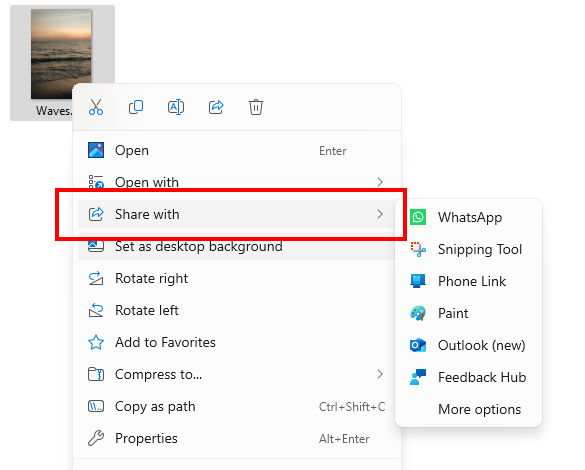
  • We are adding the ability to share directly to apps that support sharing in Windows when right-clicking on local files in File Explorer or the desktop.


    Share with apps directly through the context menu in File Explorer or on the desktop.
    Share with apps directly through the context menu in File Explorer or on the desktop.

Fixes gradually being rolled out to the Beta Channel with toggle on*

[Start menu]

  • Fixed an issue that was leading to some Insiders potentially seeing unexpected amount of spacing between items in the Start menu all apps list.

[Live captions]

  • Fixed an issue causing live captions to crash on launch for some Insiders in the last 2 builds.

[Taskbar]

  • Fixed an issue where if you had multiple windows open for an app on your taskbar, pressing WIN + multiple times wasn’t cycling between the windows, for example, pressing WIN + 1.
  • Fixed an issue for uncombined taskbar users, where app icons were unexpectedly showing instead of the window’s icon next to the window name.

Reminders for Windows Insiders in the Beta Channel

  • Windows Insiders in the Beta Channel will receive updates based on Windows 11, version 23H2 via an enablement package (Build 22635.xxxx).
  • Many features in the Beta Channel are rolled out using Control Feature Rollout technology, starting with a subset of Insiders and ramping up over time as we monitor feedback to see how they land before pushing them out to everyone in this channel.
  • For Windows Insiders in the Beta Channel who want to be the first to get features gradually rolled out to you, you can turn ON the toggle to get the latest updates as they are available via Settings > Windows Update*. Over time, we will increase the rollouts of features to everyone with the toggle turned on. Should you keep this toggle off, new features will gradually be rolled out to your device over time once they are ready.
  • Features and experiences included in these builds may never get released as we try out different concepts and get feedback. Features may change over time, be removed, or replaced and never get released beyond Windows Insiders. Some of these features and experiences could show up in future Windows releases when they’re ready.
  • Some features in active development we preview with Windows Insiders may not be fully localized and localization will happen over time as features are finalized. As you see issues with localization in your language, please report those issues to us via Feedback Hub.
  • Because the Dev and Beta Channels represent parallel development paths from our engineers, there may be cases where features and experiences show up in the Beta Channel first.
  • Check out Flight Hub for a complete look at what build is in which Insider channel.
Thanks,
Amanda & Brandon


 Source:


Check Windows Updates


UUP Dump:

64-bit ISO download:

ARM64 ISO download:

 
Last edited:
Why is Beta still on 23H2 - makes no sense at all?
Good question! If 24H2 is officially out now, since it apparently is since the beginning of the month, it doesn't make sense that there would still be 23H2 Beta releases.
 

My Computer My Computer

At a glance

Windows 11Ryzen 5600X16GBEVGA GT 710
OS
Windows 11
Computer type
PC/Desktop
Manufacturer/Model
Custom built
CPU
Ryzen 5600X
Motherboard
ASRock Steel Legend
Memory
16GB
Graphics Card(s)
EVGA GT 710
Sound Card
None
Monitor(s) Displays
23",24", 19" - flat panels
Screen Resolution
1920x1200
Hard Drives
None - only M.2 SATA and NVMe drives
PSU
750W
Case
Antec
Cooling
stock Wraith cooler
Keyboard
Corsair gaming
Mouse
Logitech M720
Internet Speed
1Gb
Good question! If 24H2 is officially out now, since it apparently is since the beginning of the month, it doesn't make sense that there would still be 23H2 Beta releases.

Don't shoot the messenger, but apparently MS will soon release a 24H2 Beta update and it might include some fixes to bugs which are affecting many users. Again, don't shoot the messenger.
 

My Computer My Computer

At a glance

Windows 11 25H2 Pro (RP Build 26200.8737)
OS
Windows 11 25H2 Pro (RP Build 26200.8737)
Computer type
PC/Desktop
Manufacturer/Model
Alienware

My Computers My Computers

  • At a glance

    Windows 11 EntrepriseIntel Core i5 4690K @ 4.00 GHz16 GB DDR3 1866 MHzAMD Radeon R7 550 4 GB
    OS
    Windows 11 Entreprise
    Computer type
    Laptop
    Manufacturer/Model
    Alienware
    CPU
    Intel Core i5 4690K @ 4.00 GHz
    Motherboard
    Asus B85E-M
    Memory
    16 GB DDR3 1866 MHz
    Graphics Card(s)
    AMD Radeon R7 550 4 GB
    Monitor(s) Displays
    LG Flatron W2053TQ
    Screen Resolution
    1600 x 900
    Hard Drives
    2x SSD Hynix 1 TB Stripped Volume (Windows 11)
    2x SSD Hynix 1 TB Stripped Volume (Swap & Programs)
    1x HDD 4 TB (Data)
    2x HDD 500 GB Mirrored Volume (System Image)
    PSU
    Corsair 500W
    Case
    Generic Mid Tower
    Internet Speed
    1 Gbps
    Other Info
    OLD RIGS ARE BRAVE
  • At a glance

    Windows Server 2016 StandardCore 2 Quad Q95508 GB DDR3 1333 MHZIntel G41
    Operating System
    Windows Server 2016 Standard
    Computer type
    PC/Desktop
    Manufacturer/Model
    DELL
    CPU
    Core 2 Quad Q9550
    Motherboard
    DELL
    Memory
    8 GB DDR3 1333 MHZ
    Graphics card(s)
    Intel G41
    Sound Card
    Onboard HD Audio
    Monitor(s) Displays
    AOC 15"
    Screen Resolution
    1366 x 768
    Hard Drives
    1x SSD 1 TB (System)
    1x SSD 240GB (Swap)
    1x HDD 8 TB (Storage)
    PSU
    DELL 320 W
    Case
    Slim
    Cooling
    Stock
    Internet Speed
    1 Gbps
    Other Info
    OLD RIGS ARE BRAVE

My Computer My Computer

At a glance

Windows 11Ryzen 5600X16GBEVGA GT 710
OS
Windows 11
Computer type
PC/Desktop
Manufacturer/Model
Custom built
CPU
Ryzen 5600X
Motherboard
ASRock Steel Legend
Memory
16GB
Graphics Card(s)
EVGA GT 710
Sound Card
None
Monitor(s) Displays
23",24", 19" - flat panels
Screen Resolution
1920x1200
Hard Drives
None - only M.2 SATA and NVMe drives
PSU
750W
Case
Antec
Cooling
stock Wraith cooler
Keyboard
Corsair gaming
Mouse
Logitech M720
Internet Speed
1Gb
Asking for version naming confusion to be cleared up is not shooting the messenger.

No offence, but maybe try reading the rest of what I posted...

Screen Shot 10-13-24 at 10.11 PM.JPG

I simply said that most likely a Beta version of 24H2 will soon be released (this is what I was told by an insider). So my “don't shoot the messenger” refers to the fact that what I posted isn't official and that I'm simply passing on what I was told...
Cheers!
 

My Computer My Computer

At a glance

Windows 11 25H2 Pro (RP Build 26200.8737)
OS
Windows 11 25H2 Pro (RP Build 26200.8737)
Computer type
PC/Desktop
Manufacturer/Model
Alienware
I don't worry about the 24H2, it won't make much difference to me, my Ryzen 5700 is approved by Microsoft. As for the clock, the update yesterday which I noticed only after noticing the clock related posts is still blocked after shutting down yesterday and restarting today.
 

My Computers My Computers

  • At a glance

    W11 pro betaAthlon 3000G16Gb Crucial DDR4 2400onboard cpu
    OS
    W11 pro beta
    Computer type
    PC/Desktop
    Manufacturer/Model
    home built
    CPU
    Athlon 3000G
    Motherboard
    Asrock A320M-HDV r4.0
    Memory
    16Gb Crucial DDR4 2400
    Graphics Card(s)
    onboard cpu
    Sound Card
    onboard
    Monitor(s) Displays
    LG 22EA53
    Screen Resolution
    1920 x 1080
    Hard Drives
    WD black SN750 M2 500Gb
    PSU
    500W Seasonic core 80+gold non modular
    Case
    Fractal Design Define R2
    Cooling
    front 2 x 120mm rear 100mm stock psu
    Internet Speed
    135/20
    Browser
    Firefox and edge
    Antivirus
    Windows Security and free Malwarebytes
  • At a glance

    W11 pro 64 beta (from W10 pro system builder ...Ryzen 7 5700G4 x 8Gb Corsair Vengeance LPX 3000 DDR4onboard cpu
    Operating System
    W11 pro 64 beta (from W10 pro system builder pack)
    Computer type
    PC/Desktop
    Manufacturer/Model
    homebuilt
    CPU
    Ryzen 7 5700G
    Motherboard
    MSI B450 tomahawk max II
    Memory
    4 x 8Gb Corsair Vengeance LPX 3000 DDR4
    Graphics card(s)
    onboard cpu
    Sound Card
    motherboard
    Monitor(s) Displays
    AOC 27
    Screen Resolution
    2560 x 1440
    Hard Drives
    WD 1Tb Black M2 SN850X on Asus hyper M2 X16 max V2 card
    PSU
    Be Quiet 400 semi modular 80+gold
    Case
    Coolermaster Silencio 650
    Cooling
    140mm front, 120 rear Akasa Vegas Chroma AM
    Internet Speed
    135/20
    Browser
    edge/Firefox
    Antivirus
    WD plus Malwarebytes free
I don't worry about the 24H2, it won't make much difference to me, my Ryzen 5700 is approved by Microsoft. As for the clock, the update yesterday which I noticed only after noticing the clock related posts is still blocked after shutting down yesterday and restarting today.

I also have 5700 (XT) and I rolled back to 23H2. At first it seemed there were no issues/problems, but then I started checking all my programs, etc and 24H2 f'd up 5-6 programs (software) of what I have installed on my PC. I won't blame one side or the other, but either MS released 24H2 too early before software and driver creators and manufacturers had a chance to "catch up" and make sure their programs were completely compatible with this update and without bugs... or those same software and driver creators and manufacturers didn't get a head start before 24H2 would eventually be released to the public.
 

My Computer My Computer

At a glance

Windows 11 25H2 Pro (RP Build 26200.8737)
OS
Windows 11 25H2 Pro (RP Build 26200.8737)
Computer type
PC/Desktop
Manufacturer/Model
Alienware
I noticed the repair in-place install is different with this build compared to 22635.4225, the later which was done on September 24, 2024. The setup.exe was way different with the screens it presented and in 22635.4225, it just logged directly into the Desktop from the lock screen but with this build, it does the Hi and welcome to windows, please wait a moment and spends a few minutes doing things.
 

My Computer My Computer

At a glance

WindowsXP/7/8/8.1/10/11,Linux,Android,FreeBSD...Intel® Core™ i7-8750H 8th Gen 2.2Ghz up to 4....64GB using 2x32GB CL16 Mushkin redLine modulesIntel UHD 630 & NVIDIA GeForce GTX 1050 Ti wi...
OS
WindowsXP/7/8/8.1/10/11,Linux,Android,FreeBSD Unix
Computer type
Laptop
Manufacturer/Model
Dell XPS 15 9570
CPU
Intel® Core™ i7-8750H 8th Gen 2.2Ghz up to 4.1Ghz
Motherboard
Dell XPS 15 9570
Memory
64GB using 2x32GB CL16 Mushkin redLine modules
Graphics Card(s)
Intel UHD 630 & NVIDIA GeForce GTX 1050 Ti with 4GB DDR5
Sound Card
Realtek ALC3266-CG
Monitor(s) Displays
15.6" 4K Touch UltraHD 3840x2160 made by Sharp
Screen Resolution
3840x2160 4K UltraHD
Hard Drives
Samsung MZ-V9P4T0B/AM 990 PRO 4TB PCIe®4.0 NVMe™ M.2 SSD was Toshiba KXG60ZNV1T02 NVMe 1TB SSD
PSU
Dell XPS 15 9570
Case
Dell XPS 15 9570
Cooling
Stock
Keyboard
Stock
Mouse
SwitftPoint ProPoint
Internet Speed
Comcast/XFinity 1.44Gbps/42.5Mbps
Browser
Microsoft EDGE (Chromium based) & Google Chrome
Antivirus
Windows Defender that came with Windows
The repair in-place install also killed .NET 3.5 as it wasn't installed and every method to install it failed until I did the following:
To solve this, we need to disable it, to do that, open the command prompt as admin and enter
DISM /Online /English /Disable-Feature /FeatureName:"NetFx3"
Enable .net 3.5 again, to do that, enter,
DISM /Online /English /Enable-Feature /FeatureName:"NetFx3"
which installed .NET 3.5.

Didn't even realize the .NET 3.5 wasn't working until Core Temp complained about a plug-in not loading.
 

My Computer My Computer

At a glance

WindowsXP/7/8/8.1/10/11,Linux,Android,FreeBSD...Intel® Core™ i7-8750H 8th Gen 2.2Ghz up to 4....64GB using 2x32GB CL16 Mushkin redLine modulesIntel UHD 630 & NVIDIA GeForce GTX 1050 Ti wi...
OS
WindowsXP/7/8/8.1/10/11,Linux,Android,FreeBSD Unix
Computer type
Laptop
Manufacturer/Model
Dell XPS 15 9570
CPU
Intel® Core™ i7-8750H 8th Gen 2.2Ghz up to 4.1Ghz
Motherboard
Dell XPS 15 9570
Memory
64GB using 2x32GB CL16 Mushkin redLine modules
Graphics Card(s)
Intel UHD 630 & NVIDIA GeForce GTX 1050 Ti with 4GB DDR5
Sound Card
Realtek ALC3266-CG
Monitor(s) Displays
15.6" 4K Touch UltraHD 3840x2160 made by Sharp
Screen Resolution
3840x2160 4K UltraHD
Hard Drives
Samsung MZ-V9P4T0B/AM 990 PRO 4TB PCIe®4.0 NVMe™ M.2 SSD was Toshiba KXG60ZNV1T02 NVMe 1TB SSD
PSU
Dell XPS 15 9570
Case
Dell XPS 15 9570
Cooling
Stock
Keyboard
Stock
Mouse
SwitftPoint ProPoint
Internet Speed
Comcast/XFinity 1.44Gbps/42.5Mbps
Browser
Microsoft EDGE (Chromium based) & Google Chrome
Antivirus
Windows Defender that came with Windows
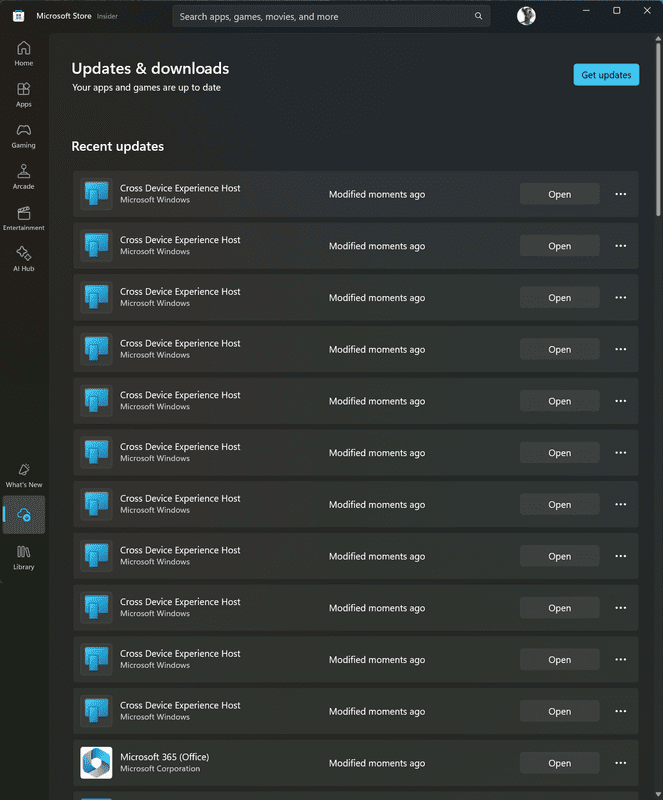
Microsoft Store went crazy today with the Cross Device Experience Host updates....

image.png
 

My Computer My Computer

At a glance

WindowsXP/7/8/8.1/10/11,Linux,Android,FreeBSD...Intel® Core™ i7-8750H 8th Gen 2.2Ghz up to 4....64GB using 2x32GB CL16 Mushkin redLine modulesIntel UHD 630 & NVIDIA GeForce GTX 1050 Ti wi...
OS
WindowsXP/7/8/8.1/10/11,Linux,Android,FreeBSD Unix
Computer type
Laptop
Manufacturer/Model
Dell XPS 15 9570
CPU
Intel® Core™ i7-8750H 8th Gen 2.2Ghz up to 4.1Ghz
Motherboard
Dell XPS 15 9570
Memory
64GB using 2x32GB CL16 Mushkin redLine modules
Graphics Card(s)
Intel UHD 630 & NVIDIA GeForce GTX 1050 Ti with 4GB DDR5
Sound Card
Realtek ALC3266-CG
Monitor(s) Displays
15.6" 4K Touch UltraHD 3840x2160 made by Sharp
Screen Resolution
3840x2160 4K UltraHD
Hard Drives
Samsung MZ-V9P4T0B/AM 990 PRO 4TB PCIe®4.0 NVMe™ M.2 SSD was Toshiba KXG60ZNV1T02 NVMe 1TB SSD
PSU
Dell XPS 15 9570
Case
Dell XPS 15 9570
Cooling
Stock
Keyboard
Stock
Mouse
SwitftPoint ProPoint
Internet Speed
Comcast/XFinity 1.44Gbps/42.5Mbps
Browser
Microsoft EDGE (Chromium based) & Google Chrome
Antivirus
Windows Defender that came with Windows
 

My Computers My Computers

  • At a glance

    Windows 11 Pro for WorkstationsIntel i7-8700K 5 GHz64 GB (4x16GB) G.SKILL TridentZ RGB DDR4 3600...ASUS ROG-STRIX-GTX1080TI-O11G-GAMING (11GB GD...
    OS
    Windows 11 Pro for Workstations
    Computer type
    PC/Desktop
    Manufacturer/Model
    Custom self build
    CPU
    Intel i7-8700K 5 GHz
    Motherboard
    ASUS ROG Maximus XI Formula Z390
    Memory
    64 GB (4x16GB) G.SKILL TridentZ RGB DDR4 3600 MHz (F4-3600C18D-32GTZR)
    Graphics Card(s)
    ASUS ROG-STRIX-GTX1080TI-O11G-GAMING (11GB GDDR5X)
    Sound Card
    Integrated Digital Audio (S/PDIF)
    Monitor(s) Displays
    2 x Samsung Odyssey G75 27"
    Screen Resolution
    2560x1440
    Hard Drives
    1TB Samsung 990 PRO M.2,
    4TB Samsung 990 PRO M.2,
    TerraMaster F8 SSD Plus NAS
    PSU
    Seasonic Prime Titanium 850W
    Case
    Thermaltake Core P3 wall mounted
    Cooling
    Corsair Hydro H115i
    Keyboard
    Amazon Basics Wired Full Keyboard MD005
    Mouse
    Logitech MX Master 4
    Internet Speed
    2 Gbps Download and 100 Mbps Upload
    Browser
    Chrome and Edge
    Antivirus
    Microsoft Defender
    Other Info
    Logitech Z625 speaker system,
    Logitech BRIO 4K Pro webcam,
    HP Color LaserJet Pro MFP M477fdn,
    CyberPower CP1500PFCLCD
    Galaxy S23 Plus phone
  • At a glance

    Windows 11 ProSnapdragon X Elite (12 core) 3.42 GHz16 GB LPDDR5x-7467 MHz
    Operating System
    Windows 11 Pro
    Computer type
    Laptop
    Manufacturer/Model
    Surface Laptop 7 Copilot+ PC
    CPU
    Snapdragon X Elite (12 core) 3.42 GHz
    Memory
    16 GB LPDDR5x-7467 MHz
    Monitor(s) Displays
    15" HDR
    Screen Resolution
    2496 x 1664
    Hard Drives
    1 TB SSD
    Internet Speed
    Wi-Fi 7 and Bluetooth 5.4
    Browser
    Chrome and Edge
    Antivirus
    Microsoft Defender

Latest Support Threads

Back
Top Bottom