Win Update KB5046617 Windows 11 Cumulative Update build 26100.2314 (24H2) - Nov. 12


UPDATE 11/21:


 Microsoft Support:

November 12, 2024 - KB5046617 (OS Build 26100.2314)​


IMPORTANT Because of minimal operations during the Western holidays and the upcoming new year, there won’t be a non-security preview release for the month of December 2024. There will be a monthly security release for December 2024. Normal monthly servicing for both security and non-security preview releases will resume in January 2025.

For information about Windows update terminology, see the article about the types of Windows updates and the monthly quality update types. For an overview of Windows 11, version 24H2, see its update history page.

Note Follow @WindowsUpdate to find out when new content is published to the Windows release health dashboard.

Important: Windows updates do not install Microsoft Store application updates. If you are an enterprise user, see Microsoft Store apps - Configuration Manager. If you are a consumer user, see Get updates for apps and games in Microsoft Store.

Tip: See the release notes for Windows Server 2025.


Highlights

  • This update addresses security issues for your Windows operating system.

Improvements

This security update includes improvements that were a part of update KB5044384 (released October 24, 2024). Below is a summary of the key issues that this update addresses when you install this KB. If there are new features, it lists them as well. The bold text within the brackets indicates the item or area of the change we are documenting.
  • [Task Manager (known issue)] Fixed: The count for the number of groups is wrong or always zero (0) on the Processes tab. This occurs when you turn on “Group by type.”
  • [Windows Subsystem for Linux (WSL)] Fixed: You cannot access your Dev Drive.
  • [Internet connection] Fixed: A small number of devices cannot connect to the internet. This occurs when a DHCP server response has duplicate DHCP options. This stops IPv4 connections on certain networks.
If you installed earlier updates, only the new updates contained in this package will be downloaded and installed on your device.

For more information about security vulnerabilities, please refer to the Security Update Guide website and the November 2024 Security Updates.

Windows 11 servicing stack update (KB5047621)- 26100.2303​

This update makes quality improvements to the servicing stack, which is the component that installs Windows updates. Servicing stack updates (SSU) ensure that you have a robust and reliable servicing stack so that your devices can receive and install Microsoft updates.

Known issues in this update

Applies toSymptomWorkaround
All usersWe’re aware of an issue where players on Arm devices are unable to download and play Roblox via the Microsoft Store on Windows.Players on Arm devices can play Roblox by downloading the title directly from www.Roblox.com.

How to get this update

Before you install this update

Microsoft combines the latest servicing stack update (SSU) for your operating system with the latest cumulative update (LCU). For general information about SSUs, see Servicing stack updates and Servicing Stack Updates (SSU): Frequently Asked Questions.

Install this update

To install this update, use one of the following Windows and Microsoft release channels.

AvailableNext Step
Yes (Windows Update)None. This update will be downloaded and installed automatically from Windows Update and Microsoft Update.
Yes (MSU)Before you install this update
To get the standalone package(s) for this update, go to the Microsoft Update Catalog website. This KB contains one or more MSU files that must be installed in order.

Install this update

Method 1: Install all MSU files together

Download all MSU files for KB5046617 from Microsoft Update Catalog and place them in the same folder (for example, C:/Packages). Use Deployment Image Servicing and Management (DISM.exe) to install the target update. DISM will use the folder specified in PackagePath to discover and install one or more prerequisite MSU files as needed.

Updating Windows PC
To apply this update to a running Windows PC, run the following command from an elevated Command Prompt:

DISM /Online /Add-Package /PackagePath:c:\packages\Windows11.0-KB5046617-x64.msu

Or, run the following command from an elevated Windows PowerShell prompt:

Add-WindowsPackage -Online -PackagePath "c:\packages\Windows11.0-KB5046617-x64.msu"

Updating Windows Installation media
To apply this update to Windows Installation media, see Update Windows installation media with Dynamic Update.

To add this update to a mounted image, run the following command from an elevated Command Prompt:

DISM /Image:mountdir /Add-Package /PackagePath:Windows11.0-KB5046617-x64.msu

Or, run the following command from an elevated Windows PowerShell prompt:

Add-WindowsPackage -Path "c:\offline" -PackagePath "Windows11.0-KB5046617-x64.msu" -PreventPending

Method 2: Install each MSU file individually, in order
Download and install each MSU file individually either using DISM or Windows Update Standalone Installer in the following order:
  1. windows11.0-kb5043080-x64_953449672073f8fb99badb4cc6d5d7849b9c83e8.msu
  2. windows11.0-kb5046617-x64_1e5d7b716c0747592ae80c218f1d81bbb7b0c7ab.msu

If you want to remove the LCU

To remove the LCU after installing the combined SSU and LCU package, use the DISM/Remove-Package command line option with the LCU package name as the argument. You can find the package name by using this command: DISM /online /get-packages.

Running Windows Update Standalone Installer (wusa.exe) with the /uninstall switch on the combined package will not work because the combined package contains the SSU. You cannot remove the SSU from the system after installation.

File information

For a list of the files that are provided in this update, download the file information for cumulative update 5046617.

For a list of the files that are provided in the servicing stack update, download the file information for the SSU (KB5047621) - version 26100.2303.


 Source:


Check Windows Updates


UUP Dump:

64-bit ISO download:

ARM64 ISO download:

 

Attachments

  • Windows_11.png
    Windows_11.png
    152 bytes · Views: 0
Last edited:

See my edit above.
Those are all probably false positives, but there's a LOT of them. ^^

Locally... (Bitdefender) it scans clean.
I'll let MS fix their silly bugs. 😂🤷‍♂️
 

My Computer My Computer

At a glance

Windows 11 Pro 25H2Intel I9-9900K64GBNVIDIA RTX 2060
OS
Windows 11 Pro 25H2
Computer type
PC/Desktop
Manufacturer/Model
Dell XPS 8930
CPU
Intel I9-9900K
Memory
64GB
Graphics Card(s)
NVIDIA RTX 2060
Sound Card
NVIDIA High Definition Audio
Monitor(s) Displays
4k Samsung
Screen Resolution
3840 x 2160
Hard Drives
512GB NVMe, ADATA SU 800, 2TB HDD
PowerRun version on Geeks has a digital signature and copyright.
File in archive does not have a digital signature or a copyright so may have been modified.

Then you can download the new one and replace the old PowerRun. You can also use other tools to take Trustedinstaller permissions.

For me. It's works and solve this problem.
 

My Computer My Computer

At a glance

Windows 11, version 25H2 (26200)AMD Ryzen 9 9950X 16-Core ProcessorDDR5-6000 (CL36) 64.0 GBNVIDIA GeForce RTX 4090
OS
Windows 11, version 25H2 (26200)
Computer type
PC/Desktop
CPU
AMD Ryzen 9 9950X 16-Core Processor
Motherboard
ASRock B650M PG Riptide
Memory
DDR5-6000 (CL36) 64.0 GB
Graphics Card(s)
NVIDIA GeForce RTX 4090
PSU
1200W
Case
Phanteks Enthoo Pro 2
Cooling
Noctua NH-D12L
I'll let MS fix their silly bugs. 😂🤷‍♂️
Then you can download the new one and replace the old PowerRun. You can also use other tools to take Trustedinstaller permissions.
From the .reg file it looks like something that Vivetool could do, maybe fg2001gf11F could work out the ID to use from the .reg file?
 

My Computers My Computers

  • At a glance

    Windows 11 HomeAMD Athlon Silver 3050U8GBRadeon Graphics
    OS
    Windows 11 Home
    Computer type
    Laptop
    Manufacturer/Model
    Acer Aspire 3 A315-23-R9VY
    CPU
    AMD Athlon Silver 3050U
    Memory
    8GB
    Graphics Card(s)
    Radeon Graphics
    Monitor(s) Displays
    laptop screen
    Screen Resolution
    1366x768 native resolution, up to 2560x1440 with Radeon Virtual Super Resolution
    Hard Drives
    1TB Samsung EVO 870 SSD (from April 2026: 250GB EVO 850)
    Internet Speed
    150 Mbps
    Browser
    Edge, Firefox
    Antivirus
    Defender
    Other Info
    fully 'Windows 11 ready' laptop. Windows 10 C: partition migrated from my old unsupported 'main machine' then upgraded to 11. A test migration ran Insider builds for 2 months. When 11 was released on 5th October 2021 it was re-imaged back to 10 and was offered the upgrade in Windows Update on 20th October. Windows Update offered the 22H2 Feature Update on 20th September 2022. It got the 23H2 Feature Update on 4th November 2023 through Windows Update, 24H2 on 3rd October 2024 through Windows Update by setting the Target Release Version for 24H2, and 25H2 on 30th September 2025 through Windows Update by setting the Target Release Version for 25H2.

    UPDATE - 11 April 2026: due to mechanical deterioration this PC has been retired from active duty. The OS with all software and files has been migrated to my System Seven in 'Other systems' to carry on as my general purpose 'main machine'.

    I've now clean installed 25H2 and used Garlin's scripts to update Secure Boot to CA 2023 and revoke the PCA 2011 certificates. It's new role is to test secure boot issues.
  • At a glance

    Windows 11 ProIntel® Core™ i5-520M8GB(integrated graphics) Intel HD Graphics
    Operating System
    Windows 11 Pro
    Computer type
    Laptop
    Manufacturer/Model
    Dell Latitude E4310
    CPU
    Intel® Core™ i5-520M
    Motherboard
    0T6M8G
    Memory
    8GB
    Graphics card(s)
    (integrated graphics) Intel HD Graphics
    Screen Resolution
    1366x768
    Hard Drives
    500GB Crucial MX500 SSD
    Browser
    Firefox, Edge
    Antivirus
    Defender
    Other Info
    unsupported machine: Legacy bios, MBR, TPM 1.2, upgraded from W10 to W11 using W10/W11 hybrid install media workaround.

    In-place upgrade to 22H2 using ISO and a workaround.
    Feature Update to 23H2 by manually installing the Enablement Package.
    In-place upgrade to 24H2 using hybrid 23H2/24H2 install media.
    Upgraded to 25H2 by Enablement Package.

    Also running Insider Dev, and Canary builds and Windows 10 as native boot .vhdx.
  • My SYSTEM THREE is a Dell Latitude 5410, i7-10610U, 32GB RAM, 512GB NVMe ssd, supported device running Windows 11 Pro.

    My SYSTEM FOUR is a 2-in-1 convertible Lenovo Yoga 11e 20DA, Celeron N2930, 8GB RAM, 256GB ssd. Unsupported device: currently running Win10 Pro, plus Win11 Pro RTM and Insider Dev, Beta, and RP 24H2 as native boot vhdx.

    My SYSTEM FIVE is a Dell Latitude 3190 2-in-1, Pentium Silver N5030, 8GB RAM, 1TB NVMe ssd, supported device running Windows 11 Pro, plus Insider Beta, Dev, and Canary builds (and a few others) as a native boot .vhdx.

    My SYSTEM SIX is a Dell Latitude 5550, Core Ultra 7 165H, 64GB RAM, 1TB NVMe SSD, supported device, Windows 11 Pro 24H2, Hyper-V host machine. Updated to 25H2 on 30th September 2025.

    My SYSTEM SEVEN is a Lenovo Thinkpad T580, Intel Core i7-8650U, 16GB RAM, 512GB NVMe SSD + 2nd 512GB NVMe SSD, a supported device for Windows 11. This is my current general purpose 'main machine'. The installed Windows 11 Home from my System One has been migrated to this machine.
From the .reg file it looks like something that Vivetool could do, maybe fg2001gf11F could work out the ID to use from the .reg file?

Yes. If find ID, you can also use Vivetool.
 

My Computer My Computer

At a glance

Windows 11, version 25H2 (26200)AMD Ryzen 9 9950X 16-Core ProcessorDDR5-6000 (CL36) 64.0 GBNVIDIA GeForce RTX 4090
OS
Windows 11, version 25H2 (26200)
Computer type
PC/Desktop
CPU
AMD Ryzen 9 9950X 16-Core Processor
Motherboard
ASRock B650M PG Riptide
Memory
DDR5-6000 (CL36) 64.0 GB
Graphics Card(s)
NVIDIA GeForce RTX 4090
PSU
1200W
Case
Phanteks Enthoo Pro 2
Cooling
Noctua NH-D12L
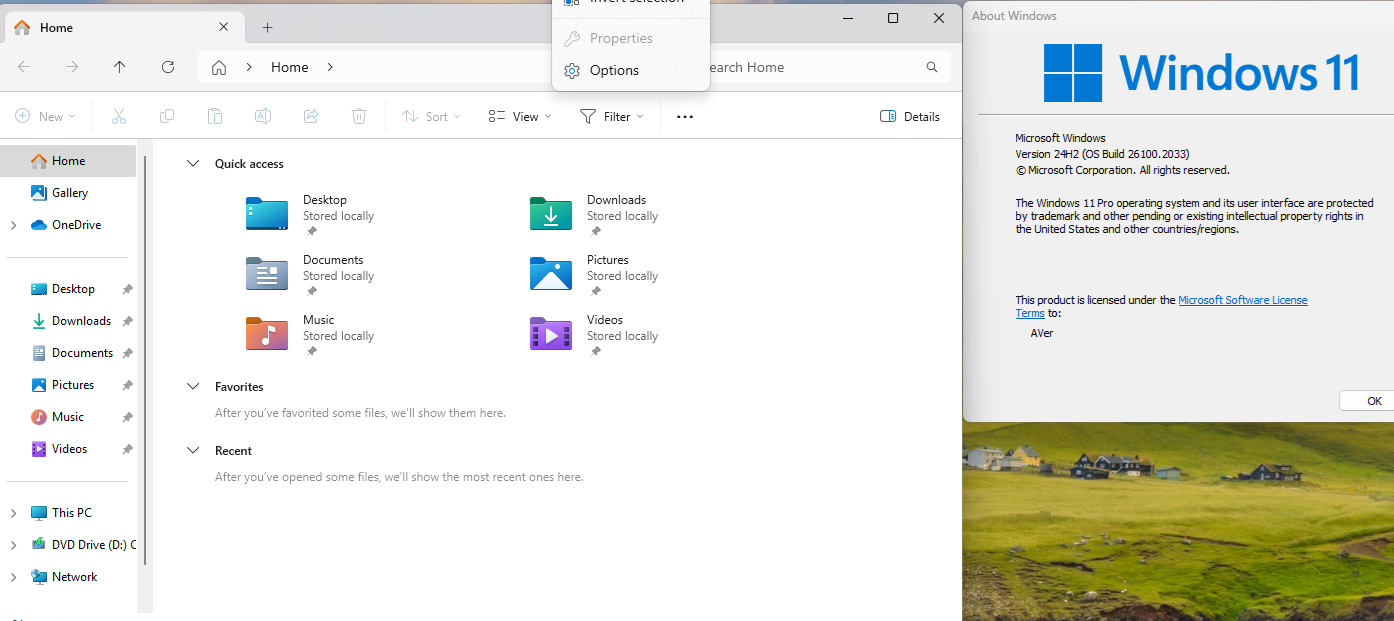
This problem may be caused by a certain feature that also existed in previous versions. I can reproduce this issue on 26100.2033.

Some "Gradual rollout" features are disabled by default. and you can enable these features manually.

ys9PYdD.png
Is it a script or reg correction. Post.
 

My Computer My Computer

At a glance

windows 11pro
OS
windows 11pro
Computer type
PC/Desktop
Reg file has this:

[HKEY_LOCAL_MACHINE\SYSTEM\ControlSet001\Control\FeatureManagement\Overrides\0]

[HKEY_LOCAL_MACHINE\SYSTEM\ControlSet001\Control\FeatureManagement\Overrides\4]

[HKEY_LOCAL_MACHINE\SYSTEM\ControlSet001\Control\FeatureManagement\Overrides\0\2547961487]
"EnabledState"=dword:00000001
"EnabledStateOptions"=dword:00000000

[HKEY_LOCAL_MACHINE\SYSTEM\ControlSet001\Control\FeatureManagement\Overrides\4\2547961487]
"EnabledState"=dword:00000001
"EnabledStateOptions"=dword:00000000
 

My Computer My Computer

At a glance

Windows 11 Pro
OS
Windows 11 Pro
downloading untrusted files is not good for your health. wants to install new notepad... beware of this behavior.
 

My Computer My Computer

At a glance

windows 11pro
OS
windows 11pro
Computer type
PC/Desktop
downloading untrusted files is not good for your health. wants to install new notepad... beware of this behavior.

You have VM or Hyper-V or somethings. bro. You do not need to install a new Notepad.exe. It is built into the system.

Installing the system in a virtual machine is a very simple.
 

My Computer My Computer

At a glance

Windows 11, version 25H2 (26200)AMD Ryzen 9 9950X 16-Core ProcessorDDR5-6000 (CL36) 64.0 GBNVIDIA GeForce RTX 4090
OS
Windows 11, version 25H2 (26200)
Computer type
PC/Desktop
CPU
AMD Ryzen 9 9950X 16-Core Processor
Motherboard
ASRock B650M PG Riptide
Memory
DDR5-6000 (CL36) 64.0 GB
Graphics Card(s)
NVIDIA GeForce RTX 4090
PSU
1200W
Case
Phanteks Enthoo Pro 2
Cooling
Noctua NH-D12L
Is it a script or reg correction. Post.
That problem started with the updates that came after 26100.1742 which did not have any of these silly bugs.
Then they propagated the bugs to Dev and Canary.
Dev 26120.2222 had a partial fix, but did not cover all the cases.
Pretty messy combinations changing behavior also with the Scale and Resolution of the Display. 😵‍💫🤷‍♂️
 

My Computer My Computer

At a glance

Windows 11 Pro 25H2Intel I9-9900K64GBNVIDIA RTX 2060
OS
Windows 11 Pro 25H2
Computer type
PC/Desktop
Manufacturer/Model
Dell XPS 8930
CPU
Intel I9-9900K
Memory
64GB
Graphics Card(s)
NVIDIA RTX 2060
Sound Card
NVIDIA High Definition Audio
Monitor(s) Displays
4k Samsung
Screen Resolution
3840 x 2160
Hard Drives
512GB NVMe, ADATA SU 800, 2TB HDD
It seems that the system is much slower than before this update. Anyone else notice that?

No, my system is just as snappy as it was before this update.

Can you give us more details about what you're seeing in regards to your system being slower?
 

My Computers My Computers

  • At a glance

    Win 11 Pro 25H2 26200.8894Intel® Core™ i7-14700KG.SKILL Ripjaws S5 Series 64GB (2 x 32GB) DDR5ASUS GeForce RTX 4070 Super 12GB
    OS
    Win 11 Pro 25H2 26200.8894
    Computer type
    PC/Desktop
    Manufacturer/Model
    Self Built
    CPU
    Intel® Core™ i7-14700K
    Motherboard
    ASUS TUF Z690-PLUS WIFI (BIOS 4505)
    Memory
    G.SKILL Ripjaws S5 Series 64GB (2 x 32GB) DDR5
    Graphics Card(s)
    ASUS GeForce RTX 4070 Super 12GB
    Sound Card
    Sound Blaster AE-5 Plus
    Monitor(s) Displays
    ASUS TUF Gaming 27" 2K HDR Gaming
    Screen Resolution
    2560 x 1440
    Hard Drives
    Samsung 990 Pro 1TB NVMe (Win 11 25H2)
    SK hynix P41 500GB NVMe
    SK hynix P41 2TB NVMe (x3)
    Crucial P3 Plus 4TB
    PSU
    Corsair RM850x Shift
    Case
    Antec Dark Phantom DP502 FLUX
    Cooling
    Corsair Nautilus 360 RS AIO
    Keyboard
    Logitech MK 320
    Mouse
    Razer Basilisk V3
    Internet Speed
    750Mbs
    Browser
    Firefox
    Antivirus
    Winows Security
    Other Info
    MR 8.1 Home
  • At a glance

    Win 11 Pro 25H2 26200.8894Intel Core i5-1140064 GB DDR4MSI GeForce RTX 3060 Ventus 2X 12GB
    Operating System
    Win 11 Pro 25H2 26200.8894
    Computer type
    PC/Desktop
    Manufacturer/Model
    Self Built
    CPU
    Intel Core i5-11400
    Motherboard
    Asus TUF Gaming Z590 Plus WiFi (BIOS 2803)
    Memory
    64 GB DDR4
    Graphics card(s)
    MSI GeForce RTX 3060 Ventus 2X 12GB
    Sound Card
    SoundBlaster Audigy Fx V2
    Monitor(s) Displays
    Samsung F27T350
    Screen Resolution
    1920x1080
    Hard Drives
    Samsung 980 Pro 1TB
    Samsung 970 EVO Plus 2TB
    Samsung 870 EVO 500GB SSD
    PSU
    Corsair HX750
    Case
    Cougar MX330-G Window
    Cooling
    Thermalright Frozen Edge 240 Black AIO
    Internet Speed
    350Mbps
    Browser
    Firefox
    Antivirus
    Windows Security
  • System Three
    Win 11 Pro 25H2 26200.8894
    ASUS PRIME Z370-P II BIOS 3004 7/12/21
    Intel Core i7-8700 CPU @ 3.20GHz
    32GB DDR4 RAM (4x8)
    iGPU Intel UHD Graphics 630
    Mid-Tower Desktop

My Computers My Computers

  • At a glance

    Win 11 Pro 25H2 26200.8894Intel® Core™ i7-14700KG.SKILL Ripjaws S5 Series 64GB (2 x 32GB) DDR5ASUS GeForce RTX 4070 Super 12GB
    OS
    Win 11 Pro 25H2 26200.8894
    Computer type
    PC/Desktop
    Manufacturer/Model
    Self Built
    CPU
    Intel® Core™ i7-14700K
    Motherboard
    ASUS TUF Z690-PLUS WIFI (BIOS 4505)
    Memory
    G.SKILL Ripjaws S5 Series 64GB (2 x 32GB) DDR5
    Graphics Card(s)
    ASUS GeForce RTX 4070 Super 12GB
    Sound Card
    Sound Blaster AE-5 Plus
    Monitor(s) Displays
    ASUS TUF Gaming 27" 2K HDR Gaming
    Screen Resolution
    2560 x 1440
    Hard Drives
    Samsung 990 Pro 1TB NVMe (Win 11 25H2)
    SK hynix P41 500GB NVMe
    SK hynix P41 2TB NVMe (x3)
    Crucial P3 Plus 4TB
    PSU
    Corsair RM850x Shift
    Case
    Antec Dark Phantom DP502 FLUX
    Cooling
    Corsair Nautilus 360 RS AIO
    Keyboard
    Logitech MK 320
    Mouse
    Razer Basilisk V3
    Internet Speed
    750Mbs
    Browser
    Firefox
    Antivirus
    Winows Security
    Other Info
    MR 8.1 Home
  • At a glance

    Win 11 Pro 25H2 26200.8894Intel Core i5-1140064 GB DDR4MSI GeForce RTX 3060 Ventus 2X 12GB
    Operating System
    Win 11 Pro 25H2 26200.8894
    Computer type
    PC/Desktop
    Manufacturer/Model
    Self Built
    CPU
    Intel Core i5-11400
    Motherboard
    Asus TUF Gaming Z590 Plus WiFi (BIOS 2803)
    Memory
    64 GB DDR4
    Graphics card(s)
    MSI GeForce RTX 3060 Ventus 2X 12GB
    Sound Card
    SoundBlaster Audigy Fx V2
    Monitor(s) Displays
    Samsung F27T350
    Screen Resolution
    1920x1080
    Hard Drives
    Samsung 980 Pro 1TB
    Samsung 970 EVO Plus 2TB
    Samsung 870 EVO 500GB SSD
    PSU
    Corsair HX750
    Case
    Cougar MX330-G Window
    Cooling
    Thermalright Frozen Edge 240 Black AIO
    Internet Speed
    350Mbps
    Browser
    Firefox
    Antivirus
    Windows Security
  • System Three
    Win 11 Pro 25H2 26200.8894
    ASUS PRIME Z370-P II BIOS 3004 7/12/21
    Intel Core i7-8700 CPU @ 3.20GHz
    32GB DDR4 RAM (4x8)
    iGPU Intel UHD Graphics 630
    Mid-Tower Desktop
Anyone using ms pin login and is able to get into safe mode? Every single 24h2 release is the same story; there is an issue with your pin...

@Anibor_11 Right click and run as admin
Nope, I used safe mode with PIN just this morning.
 

My Computer My Computer

At a glance

Windows 11 Pro 25H2 (RP channel)AMD Ryzen 7 9800X3D 8-core64GB Corsair Titanium 6000/CL30MSI Suprim 5080 SOC
OS
Windows 11 Pro 25H2 (RP channel)
Computer type
PC/Desktop
Manufacturer/Model
MSI
CPU
AMD Ryzen 7 9800X3D 8-core
Motherboard
MEG X870E Godlike
Memory
64GB Corsair Titanium 6000/CL30
Graphics Card(s)
MSI Suprim 5080 SOC
Sound Card
Soundblaster AE-9
Monitor(s) Displays
ASUS TUF Gaming VG289Q
Screen Resolution
3840x2160
Hard Drives
Samsung 9100 Pro 4TB (gen 5 x4, system drive/games)
Samsung 990 Pro 2TB
Samsung 980 Pro 2TB
Samsung 870 Evo 4TB
Samsung 870 Evo 2TB
Samsung T9 4TB
PSU
Seasonic PX-2200
Case
Bequiet! Dark Base Pro 901
Cooling
Noctua NH-D15S Chromax black
Keyboard
Logitech G915 X (wired)
Mouse
Logitech G903 with PowerPlay charger
Internet Speed
900Mb/sec
Browser
Microsoft Edge
Antivirus
Windows Defender
I just use the old and trusty password method to log into my Windows.
It has a few advantages...

1. It's been working well for 30 years or so.
2. It doesn't cause "other" problems, because MS released face, pins, Hello, etc., without proper testing.
3. And the computer password, is really the only one you HAVE to remember.
4. The new login methods may "claim" to be more secure... but even using them... people still get hacked.

Sometimes... the old ways just work better. ^^
 

My Computers My Computers

  • At a glance

    Win 11 Home ♦♦♦26200.8875 ♦♦♦♦♦♦♦25H2AMD Ryzen 7 3700XG.Skill (F4-3200C14D-16GTZKW)EVGA RTX 2070 (08G-P4-2171-KR)
    OS
    Win 11 Home ♦♦♦26200.8875 ♦♦♦♦♦♦♦25H2
    Computer type
    PC/Desktop
    Manufacturer/Model
    Built by Ghot® [May 2020]
    CPU
    AMD Ryzen 7 3700X
    Motherboard
    Asus Pro WS X570-ACE (BIOS 5302)
    Memory
    G.Skill (F4-3200C14D-16GTZKW)
    Graphics Card(s)
    EVGA RTX 2070 (08G-P4-2171-KR)
    Sound Card
    Realtek ALC1220P / ALC S1220A
    Monitor(s) Displays
    Dell U3011 30"
    Screen Resolution
    2560 x 1600
    Hard Drives
    2x Samsung 860 EVO 500GB,
    WD 4TB Black FZBX - SATA III,
    WD 8TB Black FZBX - SATA III,
    DRW-24B1ST CD/DVD Burner
    PSU
    PC Power & Cooling 750W Quad EPS12V
    Case
    Cooler Master ATCS 840 Tower
    Cooling
    CM Hyper 212 EVO (push/pull)
    Keyboard
    Ducky DK9008 Shine II Blue LED
    Mouse
    Logitech Optical M-100
    Internet Speed
    300/300
    Browser
    Firefox (latest)
    Antivirus
    Bitdefender Total Security
    Other Info
    Speakers: Klipsch Pro Media 2.1
  • At a glance

    Windows XP Pro 32bit w/SP3AMD Athlon 64 X2 5000+ (OC'd @ 3.2Ghz)TWIN2X2048-6400C4DHX (2 x 1GB, DDR2 800)EVGA 256-P2-N758-TR GeForce 8600GT SSC
    Operating System
    Windows XP Pro 32bit w/SP3
    Computer type
    PC/Desktop
    Manufacturer/Model
    Built by Ghot® (not in use)
    CPU
    AMD Athlon 64 X2 5000+ (OC'd @ 3.2Ghz)
    Motherboard
    ASUS M2N32-SLI Deluxe Wireless Edition
    Memory
    TWIN2X2048-6400C4DHX (2 x 1GB, DDR2 800)
    Graphics card(s)
    EVGA 256-P2-N758-TR GeForce 8600GT SSC
    Sound Card
    Onboard
    Monitor(s) Displays
    ViewSonic G90FB Black 19" Professional (CRT)
    Screen Resolution
    up to 2048 x 1536
    Hard Drives
    WD 36GB 10,000rpm Raptor SATA
    Seagate 80GB 7200rpm SATA
    Lite-On LTR-52246S CD/RW
    Lite-On LH-18A1P CD/DVD Burner
    PSU
    PC Power & Cooling Silencer 750 Quad EPS12V
    Case
    Generic Beige case, 80mm fans
    Cooling
    ZALMAN 9500A 92mm CPU Cooler
    Keyboard
    Logitech Classic Keybooard 200
    Mouse
    Logitech Optical M-BT96a
    Internet Speed
    300/300
    Browser
    Firefox 3.x ??
    Antivirus
    Symantec (Norton)
    Other Info
    Still assembled, still runs. Haven't turned it on for 15 years?
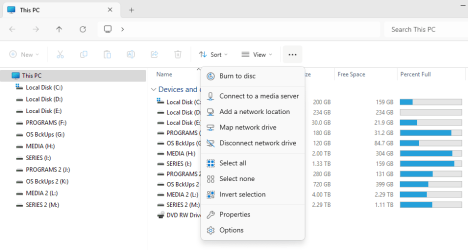
Tried the reg file hack and it works perfectly on 26100.2314 with SAB. Menu now expands up or down to dodge the upper and lower boundaries of the screen as it should have done all along.
Nothing ventured, nothing gained....
1731582122604.png
 

My Computers My Computers

  • At a glance

    Win11 Home 25H2 26200.8328Ryzen 5 7520U16GB DDR5Integrated graphics
    OS
    Win11 Home 25H2 26200.8328
    Computer type
    Laptop
    Manufacturer/Model
    Asus E1504FA
    CPU
    Ryzen 5 7520U
    Memory
    16GB DDR5
    Graphics Card(s)
    Integrated graphics
    Screen Resolution
    1920
    Hard Drives
    1TB Crucial P3+ PCIE 4.0 (in a PCIE 3.0 slot)
    Browser
    Vivaldi
    Antivirus
    Nil
  • At a glance

    Linux Manjaro KDE2nd gen I58GB DDR3Integrated graphics
    Operating System
    Linux Manjaro KDE
    Computer type
    Laptop
    Manufacturer/Model
    Asus A53E
    CPU
    2nd gen I5
    Memory
    8GB DDR3
    Graphics card(s)
    Integrated graphics
    Hard Drives
    256GB SATA SSD
    Browser
    Firefox
    Antivirus
    Nil
downloaded and installed ok no problems so far
 

My Computer My Computer

At a glance

Windows 11 64 bitSnapdragon(R) X Elite - X1E80100 - Qualcomm(R...3982 Megabytes Usable Installed MemorySnapdragon
OS
Windows 11 64 bit
Computer type
Laptop
Manufacturer/Model
Samsung Galaxy Book4 Pro 360 5G
CPU
Snapdragon(R) X Elite - X1E80100 - Qualcomm(R) Oryon(TM
Motherboard
Samsung
Memory
3982 Megabytes Usable Installed Memory
Graphics Card(s)
Snapdragon
Sound Card
Samsung
Hard Drives
Built In
Case
Grey
Cooling
Fan
Keyboard
Built in
Mouse
None
Internet Speed
Fast
Browser
Microsoft Dev
Antivirus
Windows Defender
Other Info
Also have a Samsung watch7, Samsung 65 inch TV, and a Samsung Galaxy 25Ultra phone!

And all three of these can get windows 11 and 12 so never out of touch

Also Alexa
Also now a Windows Insider

My Computer My Computer

At a glance

Windows 11 ProIntel i9-13900KF32 GB Corsair Vengeance DDR5-6000 MHzASUS Dual GeForce RTX 4070
OS
Windows 11 Pro
Computer type
PC/Desktop
Manufacturer/Model
iBUYPOWER
CPU
Intel i9-13900KF
Motherboard
ASUS ROG Maximus Z790 Hero
Memory
32 GB Corsair Vengeance DDR5-6000 MHz
Graphics Card(s)
ASUS Dual GeForce RTX 4070
Sound Card
none
Monitor(s) Displays
Dell U2412M
Screen Resolution
1920 x 1200
Hard Drives
WD Black SN850X NVMe SSD - 1 TB
PSU
Thermaltake Toughpower GF3 1000W
Case
Fractal Design Meshify 2 RGB
Cooling
Corsair H150i RGB Elite
Keyboard
Deck Hassium Pro
Mouse
Logitech MX Master 4
Internet Speed
1500 Mbps download, 40 Mbps upload
Browser
Firefox
Antivirus
Bitdefender Internet Security

My Computer My Computer

At a glance

Windows 11 HomeIntel Core i7-14700KKingston 9905734-423.A00G 2x32GB 3200MT/s nativeInno3d nVidia GeForce RTX 4070 SUPER
OS
Windows 11 Home
Computer type
PC/Desktop
Manufacturer/Model
Msi
CPU
Intel Core i7-14700K
Motherboard
MS-7D96
Memory
Kingston 9905734-423.A00G 2x32GB 3200MT/s native
Graphics Card(s)
Inno3d nVidia GeForce RTX 4070 SUPER
Sound Card
Onboard ALC897, EDIROL FA-66
Monitor(s) Displays
ARZOPA A1 Gamut
Screen Resolution
1920x1080
Hard Drives
2 SSDs, Gigabyte NVMe 256GB, Solidigm P44 Pro 512GB, 5 HDDs, 3 internal 2.5" HDDs, 2 external 2.5" and 3.5".
PSU
Seasonic Prime GX-750
Case
Phanteks Enthoo Pro
Cooling
Noctua NH-D15, 1 bottom intake 140mm, 1 front intake 200mm
Keyboard
EVGA Z15
Mouse
Genesis GX88
Internet Speed
1Gbps
Browser
Chrome, Edge, Firefox
Antivirus
Bitdefender Free, Windows Defender
Other Info
Work in progress, future plan to improve cooling with a contact frame or 420mm AIO, new single HDD to replace small old ones, an optical drive for physical media, MB header extensions.
I just ran: Dism /Online /Cleanup-Image /RestoreHealth

Took 5 mins to complete. Went to 62.x% and then jumped to 100% in a second.
To me... that means it's still broken.


View attachment 116159
One of mine did the same thing after sitting at 62.x% for an hour. Did the same on previous builds. When it seems like it's stuck, it's actually being repaired (for sfc) or restored (for cleanup image). Why it's always 62.x%, who knows?
 

My Computers My Computers

  • At a glance

    Windows 11 HomeAMD Ryzen 7 3750H16GBAMD Radeon RX Vega 10 (Picasso) [AMD]
    OS
    Windows 11 Home
    Computer type
    PC/Desktop
    Manufacturer/Model
    Coofun (MinisForum) UM700
    CPU
    AMD Ryzen 7 3750H
    Motherboard
    BESSTAR TECH LIMITED UM700
    Memory
    16GB
    Graphics Card(s)
    AMD Radeon RX Vega 10 (Picasso) [AMD]
    Monitor(s) Displays
    HP 22 uh; HP N223
    Screen Resolution
    1920x1080
    Hard Drives
    KINGSTON OM8PDP3512B-A01 500GB
    Samsung SSD 860 EVO 1000GB
    Other Info
    System 3 Specs
    OS: Windows 11 Pro
    Lenovo ThinkPad X1 Yoga Gen6
    11th Gen Intel(R) Core(TM) i7-1185G7 @ 3.00GHz
    16GB RAM
    3840x2400 touch
    SKHynix_HFS512GD9TNI-L2B0B nVME SSD

    System 4 Specs
    OS: Windows 11 Pro
    Lenovo ThinkPad X1 Yoga Gen1
    6th Generation Intel® Core™ i7-6500U Processor(Core i7-6500U)
    16GB RAM
    2560x 1440 touch
    Samsung 512 GB SATA SSD

    System 5 Specs
    OS: Windows 11 Home
    HP Pavilion 23-p027c All-in-One
    4th Generation Intel® Core™ i5-4570T Processor
    16GB RAM
    1920 s 1080 touch
    Samsung SSD 860 EVO 500GB
  • At a glance

    Windows 11-Pro 64-bitIntel Core i7-8650U16GB
    Operating System
    Windows 11-Pro 64-bit
    Computer type
    Laptop
    Manufacturer/Model
    Lenovo ThinkPad X1 Carbon Gen 6
    CPU
    Intel Core i7-8650U
    Motherboard
    Lenovo
    Memory
    16GB
    Screen Resolution
    2560 x 1440 WQHD
    Hard Drives
    Samsung 870 EVO Plus - 1TB

My Computers My Computers

  • At a glance

    Win 11 Home ♦♦♦26200.8875 ♦♦♦♦♦♦♦25H2AMD Ryzen 7 3700XG.Skill (F4-3200C14D-16GTZKW)EVGA RTX 2070 (08G-P4-2171-KR)
    OS
    Win 11 Home ♦♦♦26200.8875 ♦♦♦♦♦♦♦25H2
    Computer type
    PC/Desktop
    Manufacturer/Model
    Built by Ghot® [May 2020]
    CPU
    AMD Ryzen 7 3700X
    Motherboard
    Asus Pro WS X570-ACE (BIOS 5302)
    Memory
    G.Skill (F4-3200C14D-16GTZKW)
    Graphics Card(s)
    EVGA RTX 2070 (08G-P4-2171-KR)
    Sound Card
    Realtek ALC1220P / ALC S1220A
    Monitor(s) Displays
    Dell U3011 30"
    Screen Resolution
    2560 x 1600
    Hard Drives
    2x Samsung 860 EVO 500GB,
    WD 4TB Black FZBX - SATA III,
    WD 8TB Black FZBX - SATA III,
    DRW-24B1ST CD/DVD Burner
    PSU
    PC Power & Cooling 750W Quad EPS12V
    Case
    Cooler Master ATCS 840 Tower
    Cooling
    CM Hyper 212 EVO (push/pull)
    Keyboard
    Ducky DK9008 Shine II Blue LED
    Mouse
    Logitech Optical M-100
    Internet Speed
    300/300
    Browser
    Firefox (latest)
    Antivirus
    Bitdefender Total Security
    Other Info
    Speakers: Klipsch Pro Media 2.1
  • At a glance

    Windows XP Pro 32bit w/SP3AMD Athlon 64 X2 5000+ (OC'd @ 3.2Ghz)TWIN2X2048-6400C4DHX (2 x 1GB, DDR2 800)EVGA 256-P2-N758-TR GeForce 8600GT SSC
    Operating System
    Windows XP Pro 32bit w/SP3
    Computer type
    PC/Desktop
    Manufacturer/Model
    Built by Ghot® (not in use)
    CPU
    AMD Athlon 64 X2 5000+ (OC'd @ 3.2Ghz)
    Motherboard
    ASUS M2N32-SLI Deluxe Wireless Edition
    Memory
    TWIN2X2048-6400C4DHX (2 x 1GB, DDR2 800)
    Graphics card(s)
    EVGA 256-P2-N758-TR GeForce 8600GT SSC
    Sound Card
    Onboard
    Monitor(s) Displays
    ViewSonic G90FB Black 19" Professional (CRT)
    Screen Resolution
    up to 2048 x 1536
    Hard Drives
    WD 36GB 10,000rpm Raptor SATA
    Seagate 80GB 7200rpm SATA
    Lite-On LTR-52246S CD/RW
    Lite-On LH-18A1P CD/DVD Burner
    PSU
    PC Power & Cooling Silencer 750 Quad EPS12V
    Case
    Generic Beige case, 80mm fans
    Cooling
    ZALMAN 9500A 92mm CPU Cooler
    Keyboard
    Logitech Classic Keybooard 200
    Mouse
    Logitech Optical M-BT96a
    Internet Speed
    300/300
    Browser
    Firefox 3.x ??
    Antivirus
    Symantec (Norton)
    Other Info
    Still assembled, still runs. Haven't turned it on for 15 years?
Another way to fix the Explorer menu bug...

Run the following in administrative mode:
vivetool.exe /disable /id:51960011
Then reboot.


And we have a winner, folks. ^^


I just updated the following topic to include that ID number...
@Brink


Image1.png


LAB TESTED.png
 
Last edited:

My Computers My Computers

  • At a glance

    Win 11 Home ♦♦♦26200.8875 ♦♦♦♦♦♦♦25H2AMD Ryzen 7 3700XG.Skill (F4-3200C14D-16GTZKW)EVGA RTX 2070 (08G-P4-2171-KR)
    OS
    Win 11 Home ♦♦♦26200.8875 ♦♦♦♦♦♦♦25H2
    Computer type
    PC/Desktop
    Manufacturer/Model
    Built by Ghot® [May 2020]
    CPU
    AMD Ryzen 7 3700X
    Motherboard
    Asus Pro WS X570-ACE (BIOS 5302)
    Memory
    G.Skill (F4-3200C14D-16GTZKW)
    Graphics Card(s)
    EVGA RTX 2070 (08G-P4-2171-KR)
    Sound Card
    Realtek ALC1220P / ALC S1220A
    Monitor(s) Displays
    Dell U3011 30"
    Screen Resolution
    2560 x 1600
    Hard Drives
    2x Samsung 860 EVO 500GB,
    WD 4TB Black FZBX - SATA III,
    WD 8TB Black FZBX - SATA III,
    DRW-24B1ST CD/DVD Burner
    PSU
    PC Power & Cooling 750W Quad EPS12V
    Case
    Cooler Master ATCS 840 Tower
    Cooling
    CM Hyper 212 EVO (push/pull)
    Keyboard
    Ducky DK9008 Shine II Blue LED
    Mouse
    Logitech Optical M-100
    Internet Speed
    300/300
    Browser
    Firefox (latest)
    Antivirus
    Bitdefender Total Security
    Other Info
    Speakers: Klipsch Pro Media 2.1
  • At a glance

    Windows XP Pro 32bit w/SP3AMD Athlon 64 X2 5000+ (OC'd @ 3.2Ghz)TWIN2X2048-6400C4DHX (2 x 1GB, DDR2 800)EVGA 256-P2-N758-TR GeForce 8600GT SSC
    Operating System
    Windows XP Pro 32bit w/SP3
    Computer type
    PC/Desktop
    Manufacturer/Model
    Built by Ghot® (not in use)
    CPU
    AMD Athlon 64 X2 5000+ (OC'd @ 3.2Ghz)
    Motherboard
    ASUS M2N32-SLI Deluxe Wireless Edition
    Memory
    TWIN2X2048-6400C4DHX (2 x 1GB, DDR2 800)
    Graphics card(s)
    EVGA 256-P2-N758-TR GeForce 8600GT SSC
    Sound Card
    Onboard
    Monitor(s) Displays
    ViewSonic G90FB Black 19" Professional (CRT)
    Screen Resolution
    up to 2048 x 1536
    Hard Drives
    WD 36GB 10,000rpm Raptor SATA
    Seagate 80GB 7200rpm SATA
    Lite-On LTR-52246S CD/RW
    Lite-On LH-18A1P CD/DVD Burner
    PSU
    PC Power & Cooling Silencer 750 Quad EPS12V
    Case
    Generic Beige case, 80mm fans
    Cooling
    ZALMAN 9500A 92mm CPU Cooler
    Keyboard
    Logitech Classic Keybooard 200
    Mouse
    Logitech Optical M-BT96a
    Internet Speed
    300/300
    Browser
    Firefox 3.x ??
    Antivirus
    Symantec (Norton)
    Other Info
    Still assembled, still runs. Haven't turned it on for 15 years?
Back
Top Bottom