UPDATE 2/14:
 www.elevenforum.com
Hello Windows Insiders, today we are releasing Windows 11 Insider Preview Build 26120.3073 (KB5050090) to the Dev Channel. With this update, we are previewing the ability to use improved Windows Search to find files saved in your OneDrive with Windows Insiders with Snapdragon-powered Copilot+ PCs. We also have a small Paint update rolling out (see below).
Starting today, we are beginning to offer the same Dev Channel updates based on Windows 11, version 24H2 to Windows Insiders in the Beta Channel. These updates will be optional at first, so if you are in the Beta Channel today, you can upgrade when you are ready to do so.

Optional Windows 11, version 24H2 update offers in Windows Update for Windows Insiders in the Beta Channel highlighted in a red box.
We plan to make these updates recommended later this year, which means you will eventually get upgraded to 24H2-based updates automatically if you are in the Beta Channel. Until that happens, the Beta Channel will continue to receive both updates based on Windows 11, version 24H2 AND Windows 11, version 23H2 (but sometimes not at the same time). Please note that if you choose to upgrade to receiving updates based on Windows 11, version 24H2 in the Beta Channel, you may lose some feature rollouts.
If you are an Insider in the Dev Channel, you now have a window to switch from the Dev Channel to the Beta Channel if you would like. This window will only be open for as long as we’re releasing the same 24H2-based updates across both the Dev and Beta Channels. By the end of February, the Dev Channel will jump ahead to receiving updates with higher build numbers and once this happens, the opportunity to switch between these channels will close. When the Dev Channel jumps ahead, things might not be as stable as the Dev Channel is today, so we highly encourage you to evaluate which channel you would like to be in during the time in which the window to switch is open.
 www.elevenforum.com
Today, we are excited to announce support for also finding photos saved in the cloud with improved Windows Search. Just use your own words to find photos stored and saved in the cloud by describing what they are about like “European castles” or “summer picnics” in the search box at the top right corner of File Explorer. In addition to photos stored locally on your Copilot+ PC, photos from the cloud will now show up in the search results together. In addition to searching for photos, exact matches for your keywords within the text of your cloud files will show in the search results.

Results including mountain bike photos one from the cloud in File Explorer with improved Windows Search.
Finding photos saved in the cloud currently works when searching within File Explorer directly. This will also work directly from the Windows search box on the taskbar in a future flight.
You can try this experience out today with your personal OneDrive when signed in with your Microsoft account and connected to the internet. If you are signed into OneDrive with a work or school account (Entra ID), you will only see matches for keywords you are searching for within the text of your cloud files in the search results – not photos. Third-party cloud providers will be able to support this experience with their services as well with documentation coming soon.
We’re excited to introduce a new way to find your cloud content in Windows and will continue improving search results and capabilities over time. These improved Windows Search experiences continue to gradually roll out to Windows Insiders on Snapdragon-powered Copilot+ PCs, including finding photos saved in the cloud, so you may not see these experiences right away. Support for AMD and Intel-powered Copilot+ PCs is coming soon. See here for more details.
You can learn more about semantic search on Copilot + PCs here.
 www.elevenforum.com
 www.elevenforum.com
FEEDBACK for File Explorer Search: Please file feedback in Feedback Hub (WIN + F) under Files Folders and Online Storage > File Explorer Search.
 www.elevenforum.com
 www.elevenforum.com
 www.elevenforum.com
 www.elevenforum.com

Paint Copilot menu opened.
FEEDBACK: Please file feedback in Feedback Hub (WIN + F) under Apps > Paint.
Amanda & Brandon

 blogs.windows.com
Check Windows Updates
UUP Dump:
64-bit ISO download:

ARM64 ISO download:
 www.elevenforum.com
KB5052086 Windows 11 Insider Beta and Dev build 26120.3281 (24H2) - Feb. 14
Windows Blogs: Source: Check Windows Updates UUP Dump: 64-bit ISO download: https://uupdump.net/selectlang.php?id=18601789-b233-4e10-ae93-d23a34d31e7c ARM64 ISO download: https://uupdump.net/selectlang.php?id=73816b77-02e6-4d7a-a8fd-f8c20e1823da...
www.elevenforum.com
Windows Blogs:
Hello Windows Insiders, today we are releasing Windows 11 Insider Preview Build 26120.3073 (KB5050090) to the Dev Channel. With this update, we are previewing the ability to use improved Windows Search to find files saved in your OneDrive with Windows Insiders with Snapdragon-powered Copilot+ PCs. We also have a small Paint update rolling out (see below).
Starting today, we are beginning to offer the same Dev Channel updates based on Windows 11, version 24H2 to Windows Insiders in the Beta Channel. These updates will be optional at first, so if you are in the Beta Channel today, you can upgrade when you are ready to do so.
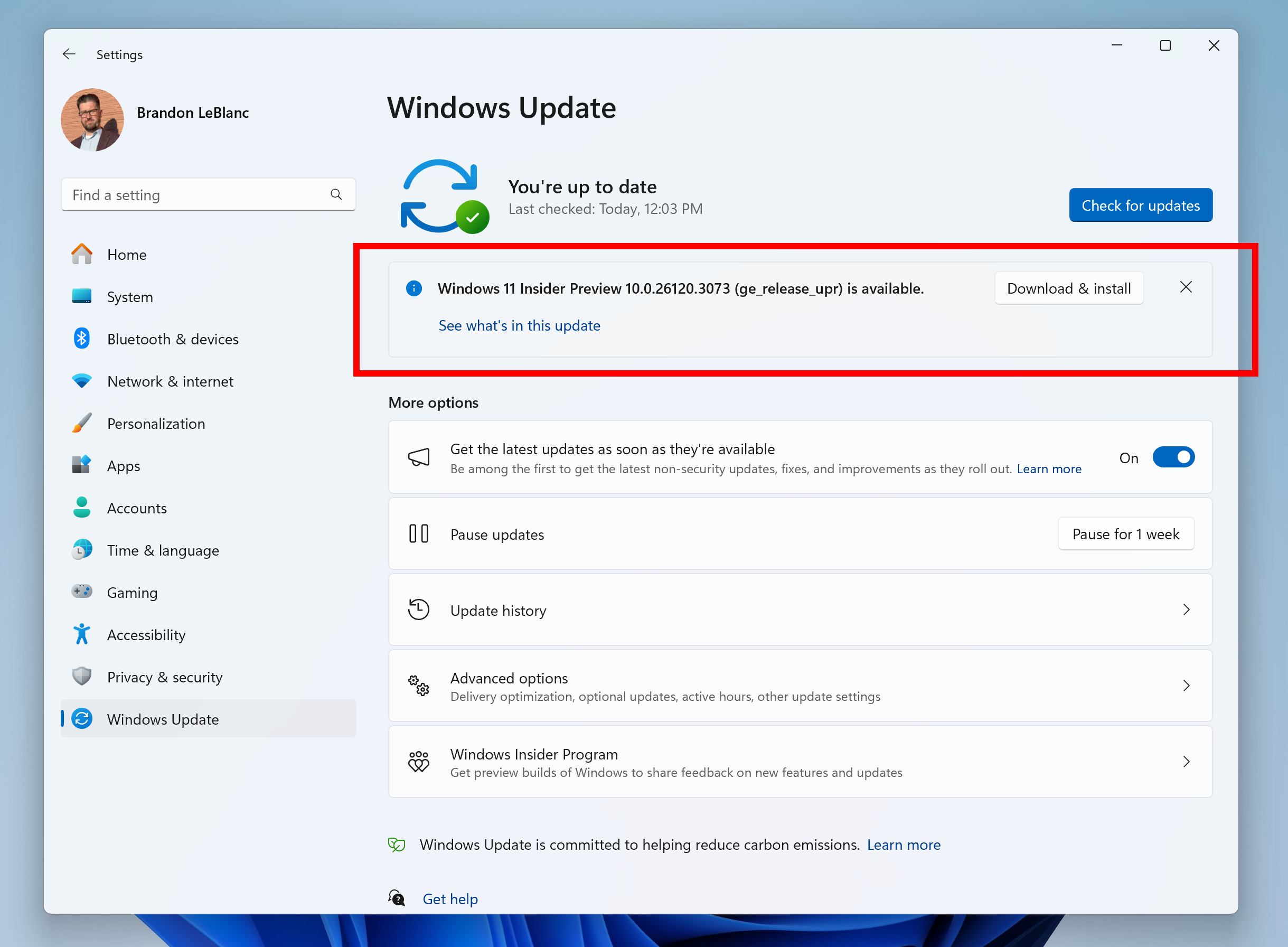
Optional Windows 11, version 24H2 update offers in Windows Update for Windows Insiders in the Beta Channel highlighted in a red box.
We plan to make these updates recommended later this year, which means you will eventually get upgraded to 24H2-based updates automatically if you are in the Beta Channel. Until that happens, the Beta Channel will continue to receive both updates based on Windows 11, version 24H2 AND Windows 11, version 23H2 (but sometimes not at the same time). Please note that if you choose to upgrade to receiving updates based on Windows 11, version 24H2 in the Beta Channel, you may lose some feature rollouts.
If you are an Insider in the Dev Channel, you now have a window to switch from the Dev Channel to the Beta Channel if you would like. This window will only be open for as long as we’re releasing the same 24H2-based updates across both the Dev and Beta Channels. By the end of February, the Dev Channel will jump ahead to receiving updates with higher build numbers and once this happens, the opportunity to switch between these channels will close. When the Dev Channel jumps ahead, things might not be as stable as the Dev Channel is today, so we highly encourage you to evaluate which channel you would like to be in during the time in which the window to switch is open.
Change Windows Insider Program Channel in Windows 11
This tutorial will show you how to change your Windows Insider Program channel to the Beta, Experimental, or Release Preview channel to get Insider preview builds of Windows 11 on your PC. Flighting is the process of running Windows Insider Preview Builds on your device. When you run these...
www.elevenforum.com
New Copilot+ PC experiences
Find photos saved in the cloud with improved Windows Search
A few weeks ago, we began previewing improved Windows Search with Windows Insiders on Copilot+ PCs. In that first preview, we introduced semantic indexing along with traditional lexical indexing for finding files saved locally in indexed locations on Copilot+ PCs with 40+ TOPS NPU onboard.Today, we are excited to announce support for also finding photos saved in the cloud with improved Windows Search. Just use your own words to find photos stored and saved in the cloud by describing what they are about like “European castles” or “summer picnics” in the search box at the top right corner of File Explorer. In addition to photos stored locally on your Copilot+ PC, photos from the cloud will now show up in the search results together. In addition to searching for photos, exact matches for your keywords within the text of your cloud files will show in the search results.
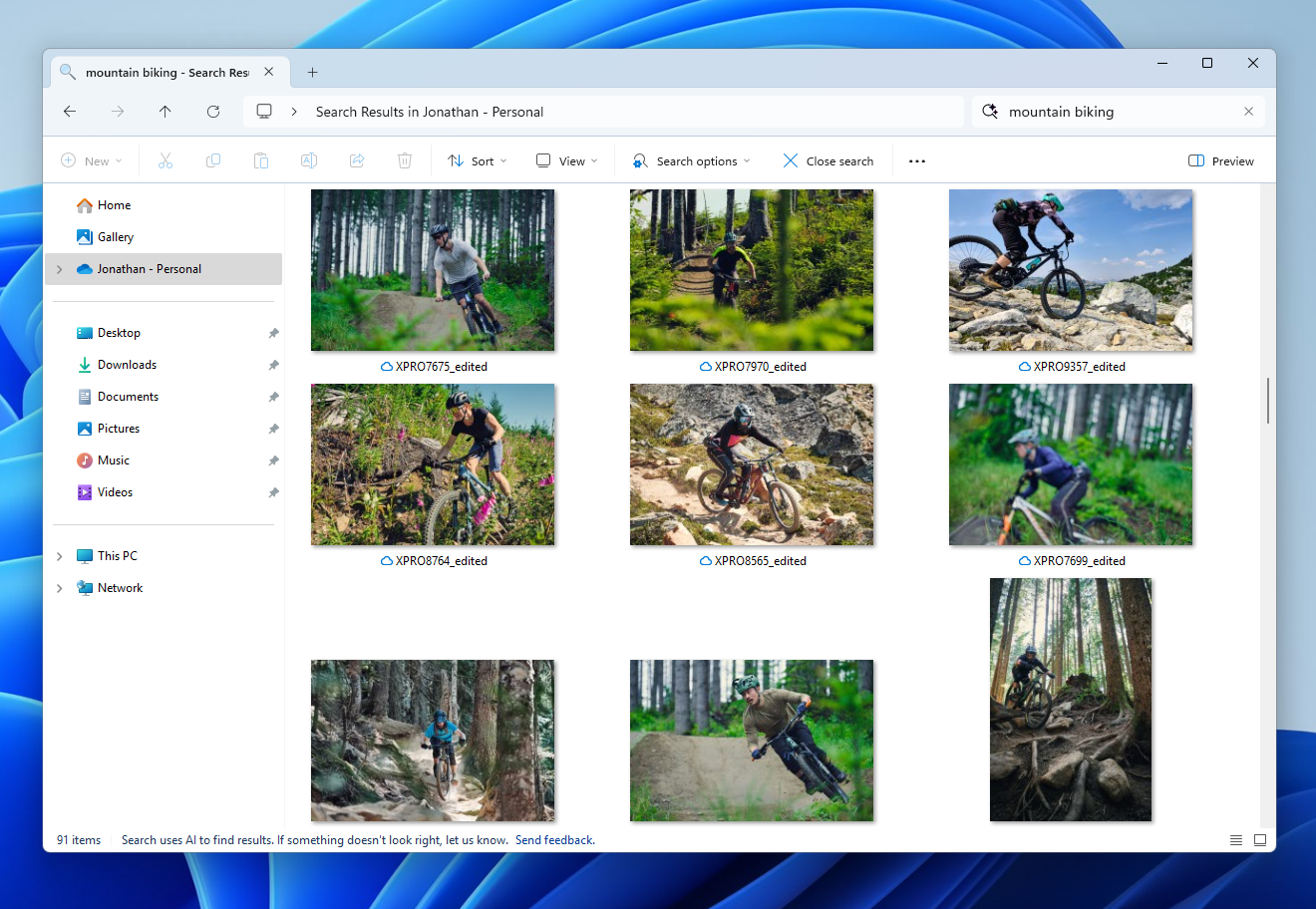
Results including mountain bike photos one from the cloud in File Explorer with improved Windows Search.
Finding photos saved in the cloud currently works when searching within File Explorer directly. This will also work directly from the Windows search box on the taskbar in a future flight.
You can try this experience out today with your personal OneDrive when signed in with your Microsoft account and connected to the internet. If you are signed into OneDrive with a work or school account (Entra ID), you will only see matches for keywords you are searching for within the text of your cloud files in the search results – not photos. Third-party cloud providers will be able to support this experience with their services as well with documentation coming soon.
We’re excited to introduce a new way to find your cloud content in Windows and will continue improving search results and capabilities over time. These improved Windows Search experiences continue to gradually roll out to Windows Insiders on Snapdragon-powered Copilot+ PCs, including finding photos saved in the cloud, so you may not see these experiences right away. Support for AMD and Intel-powered Copilot+ PCs is coming soon. See here for more details.
You can learn more about semantic search on Copilot + PCs here.
Turn On or Off Enhanced Mode for Search Indexer in Windows 11
This tutorial will show you how to turn on or off Enhanced mode for search indexer for all users in Windows 11. Search Indexing in Windows improves the speed and efficiency of searches by creating an index of files and their properties on your device. This index allows Windows to quickly locate...
www.elevenforum.com
Enable or Disable Search Indexing in Windows 11
This tutorial will show you how to enable or disable search indexing for all users in Windows 10 and Windows 11. Indexing the content of your PC helps you get faster results when your searching it for files, emails, or other local content. The search index only includes your selected locations...
www.elevenforum.com
FEEDBACK for File Explorer Search: Please file feedback in Feedback Hub (WIN + F) under Files Folders and Online Storage > File Explorer Search.
Other changes that are included in this Dev and Beta Channel update
This update (Build 26120.3073) includes other changes and improvements available to Windows Insiders across all Windows 11 PCs in addition to the features noted above that are exclusive to Copilot+ PCs. These changes are documented below in two buckets:- New features, improvements, and fixes that are being gradually rolled out for Insiders who have turned on the toggle to get the latest updates as they are available (via Settings > Windows Update*).

Enable or Disable Get Latest Updates as soon as available in Windows 11
This tutorial will show you how to turn on or off "Get the latest updates as soon as they are available" in Windows 11. Starting with Windows 11 build 22621.1635, Microsoft added a new "Get the latest updates as soon as they are available" toggle under Settings > Windows Update. When you turn...
www.elevenforum.com
- New features, improvements, and fixes rolling out to everyone in the Dev Channel.
Changes and Improvements gradually being rolled out to the Dev Channel with toggle on*
[Settings]
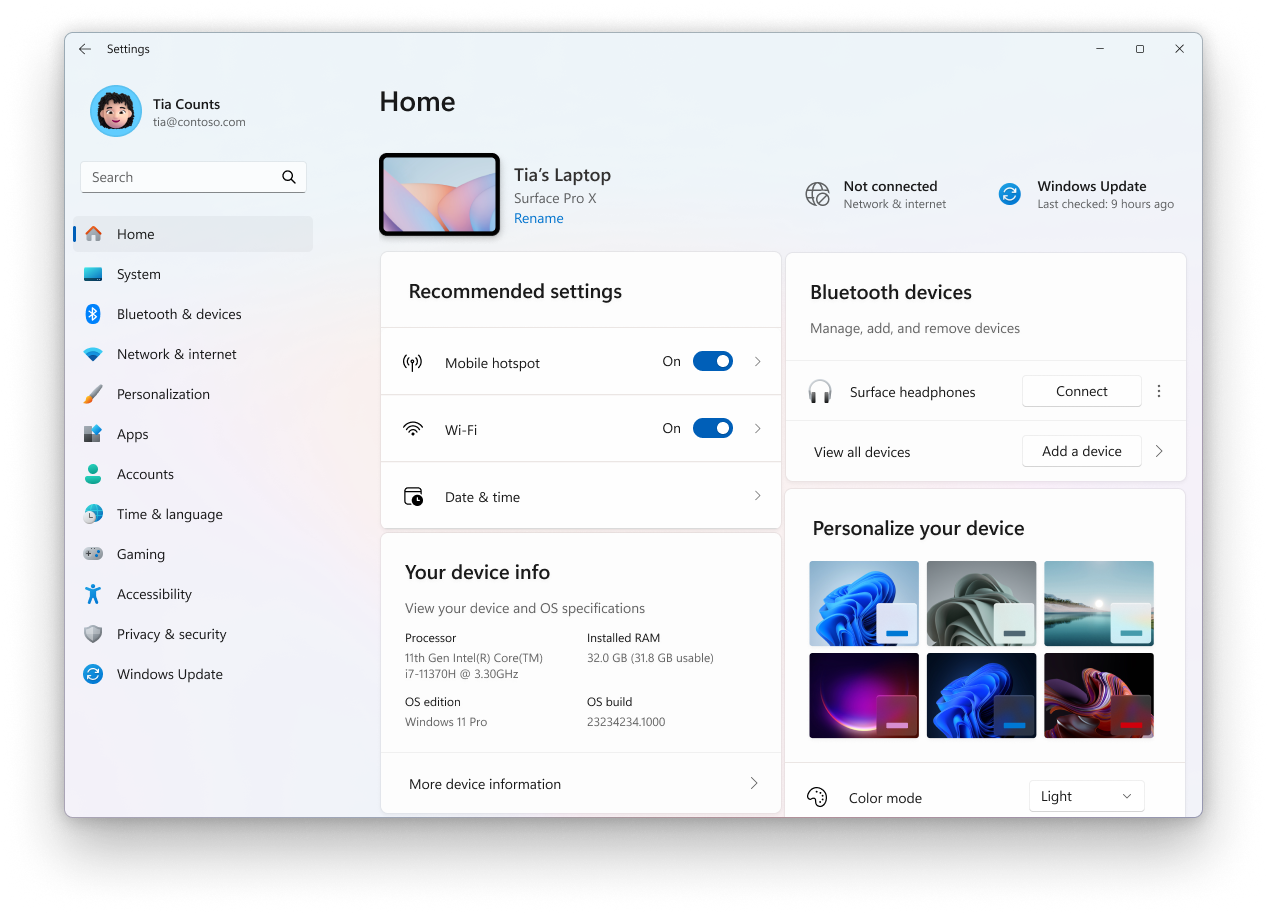
- We are starting to roll out the Settings homepage for commercial customers on PCs managed by an IT administrator. The feature will show some existing cards relevant to enterprise-managed PCs like “Recommended settings” and “Bluetooth devices” as well as two new enterprise-specific device info and accessibility preferences cards. For commercial customers who also use their Microsoft account on their managed PC, there will also be a new accounts card indicating the presence of both work and school and Microsoft account types. We are starting the rollout of this gradually with managed commercial PCs who have both work and school, and Microsoft accounts presently seeing this experience first.

Add or Remove Settings Home page in Windows 11
This tutorial will show you how to add or remove the Home page in Settings for all users in Windows 11. Starting with Windows 11 version 22H2 KB5030310 Build 22621.2361, Microsoft is introduced a new homepage in Settings that offers you a dynamic and personalized experience. It provides an...
www.elevenforum.com

The Settings homepage for a commercial customer on a managed PC.
Fixes gradually being rolled out to the Dev Channel with toggle on*
[Taskbar & System Tray]
- Fixed an issue which was causing the taskbar preview windows to not display sometimes when hovering over open apps in the taskbar.
[File Explorer]
- We did some work to help address an issue where File Explorer might hang when browsing a folder with lots of media in it.
- Fixed an issue where if you opened a File Explorer window and minimized it in, it might not be rendered correctly when you restored it.
[Improved Windows Search]
- Fixed the issue where in some rare cases, searching on Outlook while offline might result in some results not being found.
[Live Captions]
- Fixed an issue where live captions might show an icon in the taskbar, but the window wouldn’t display on the screen, after disconnecting a second monitor.
[Remote Desktop]
- Fixed an issue which was causing Remote Desktop to show significant display / rendering issues when connecting to certain other computers.
[Settings]
- Fixed an issue which was causing Settings to crash when interacting with the Bluetooth & Devices page sometimes.
[Other]
- Fixed an issue where when using GDI+ to shrink an image, the colors may be wrong afterwards..
- Fixed an issue which could cause shutdown to be noticeably slower on certain devices when a controller was connected.
- Fixed an underlying issue causing the Windows Security pop up when signing into certain Wi-Fi networks to not be interactable. This may have also impacted interacting with this pop up for certain other options in Settings.
- Fixed an issue where the description for virtual NICs wasn’t displayed correctly in ncpa.cpl, it showed garbled characters.
Fixes for everyone in the Dev Channel
[General]
- We fixed the issue causing a 0xc0e90001 error to occur when booting into Windows Recovery (WinRE) on Arm64 PCs.
[Other]
- [Memory leak] Fixed: Leaks occur when predictive input ideas show.
- [High dynamic range (HDR)] Fixed: The display of some games appears oversaturated. This occurs when you use Auto HDR.
- [Remote Desktop Gateway] Fixed: You get errors or cannot sign when you connect to Windows 11 workstations. This occurs when you enforce device redirection.
- [USB audio device drivers] Fixed: The code 10 error message, “This device cannot start” appears. This occurs when you connect to certain external audio management devices.
Known issues
[General]
- After you do a PC reset under Settings > System > Recovery, your build version may incorrectly show as Build 26100 instead of Build 26120. This will not prevent you from getting future Dev Channel updates which will resolve this issue.
- [NEW] We’re investigating an issue causing unexpectedly high DCOM CPU usage for some Insiders after opening the Performance section of Task Manager
[Recall]
The following known issues will be fixed in future updates to Windows Insiders:- Recall can be enabled or disabled from “Turn Windows features on or off”. We are caching the Recall binaries on disk while we test add/remove. In a future update we will completely remove the binaries.
- Some users may see a message to “Make sure Recall is saving snapshots”, while the Settings page for Recall shows saving snapshots is enabled. Reboot your device to resolve this issue.
- Make sure you update Microsoft 365 apps to the latest version so you can jump back into specific documents.
[Click to Do]
The following known issues will be fixed in future updates to Windows Insiders:- Sometimes additional context is given when using more intelligent text actions powered by Phi Silica.
- The intelligent text actions leverage the power of Microsoft’s secure cloud to improve your text results by ensuring prompts and responses are safe and appropriate. This data is automatically deleted. Local moderation to ensure the safety of prompts and responses will be added in the future, replacing this cloud endpoint.
- If any of your actions on image entities are no longer appearing, please ensure you have the latest updates for the Photos and Paint app from the Microsoft Store.
[Live captions & real-time translation]
The following known issues will be fixed in future updates to Windows Insiders:- Some Insiders may see a crash on first launch of live captions. Restart live captions if you encounter this issue and you will not see it again.
- If audio is playing or the microphone is enabled, switching languages will crash live captions. Stop audio when changing languages to resume captions or translations.
[Improved Windows Search]
The following known issues will be fixed in future updates to Windows Insiders:- [NEW] The AI sparkle and underline animation in the File Explorer search box is not present in this build even when improved Windows Search is in use on your Copilot+ PC. If your search results are powered by improved Windows Search, you will see a notice at the bottom of File Explorer stating, “Search uses AI to find results” and directing you to file feedback if something doesn’t look right.
- In this build, the search box on the taskbar does not yet have the same underline and sparkles icon UI that the File Explorer search box has. This is coming in a future flight.
- In some rare cases, improved Windows search experiences may not be available and may require a reboot to start working.
- In some rare cases, File explorer search might be unresponsive and may require a reboot to start working.
- The tip about the new search improvements appears whenever you set focus to the search box in File Explorer, rather than only once.
[File Explorer]
- We’re investigating an issue causing File Explorer to be very slow to close for some Insiders when closing using the X button. This may also have an impact on the other title bar buttons.
[Power and Battery]
- [NEW] The colors in the new battery icon aren’t displaying correctly when you have your mode in Personalization > Colors set to certain options with Custom.
[Settings]
- [NEW] The Home page of Settings may crash. If you are impacted by this, you should still be able to open specific Settings pages directly by searching for them from the taskbar.
Paint Update
We are rolling out an update for Paint (version 11.2412.271.0 and higher) to Windows Insiders in the Canary and Dev Channels. In this update, we are introducing the Copilot menu to Paint where you can access all the intelligent features which help you complete your image generation and editing tasks faster. Clicking on the Copilot icon from the toolbar will expand into a drop-down menu where you can easily access the features Cocreator, Image Creator, Generative erase, and Remove background. Note that Cocreator is only available on Copilot+ PCs. Within the dropdown, each feature will also include a short description to help you choose the right tool.
Enable or Disable Cocreator in Paint app in Windows 11
This tutorial will show you how to enable or disable the Cocreator feature in the Microsoft Paint app for all users on a Windows 11 Copilot+ PC. The Paint app included in Windows 11 is a simple and powerful graphics editor with a range of uses. You can edit images quickly or create masterpieces...
www.elevenforum.com
Enable or Disable Image Creator in Paint app in Windows 11
This tutorial will show you how to enable or disable the Image Creator feature in the Microsoft Paint app for all users in Windows 11. The Paint app included in Windows 11 is a simple and powerful graphics editor with a range of uses. You can edit images quickly or create masterpieces with the...
www.elevenforum.com
Use Generative Erase in Paint app in Windows 11
This tutorial will show you how to use the Generative Erase tool in the Microsoft Paint app in Windows 11. The Paint app included in Windows 11 is a simple and powerful graphics editor with a range of uses. You can edit images quickly or create masterpieces with the tools in this app. Once...
www.elevenforum.com
Remove Background of Image in Paint app in Windows 11
This tutorial will show you how to remove the background of any image using the Paint app in Windows 11. The Paint app included in Windows 11 is a simple and powerful graphics editor with a range of uses. You can edit images quickly or create masterpieces with the tools in this app. Once you’re...
www.elevenforum.com
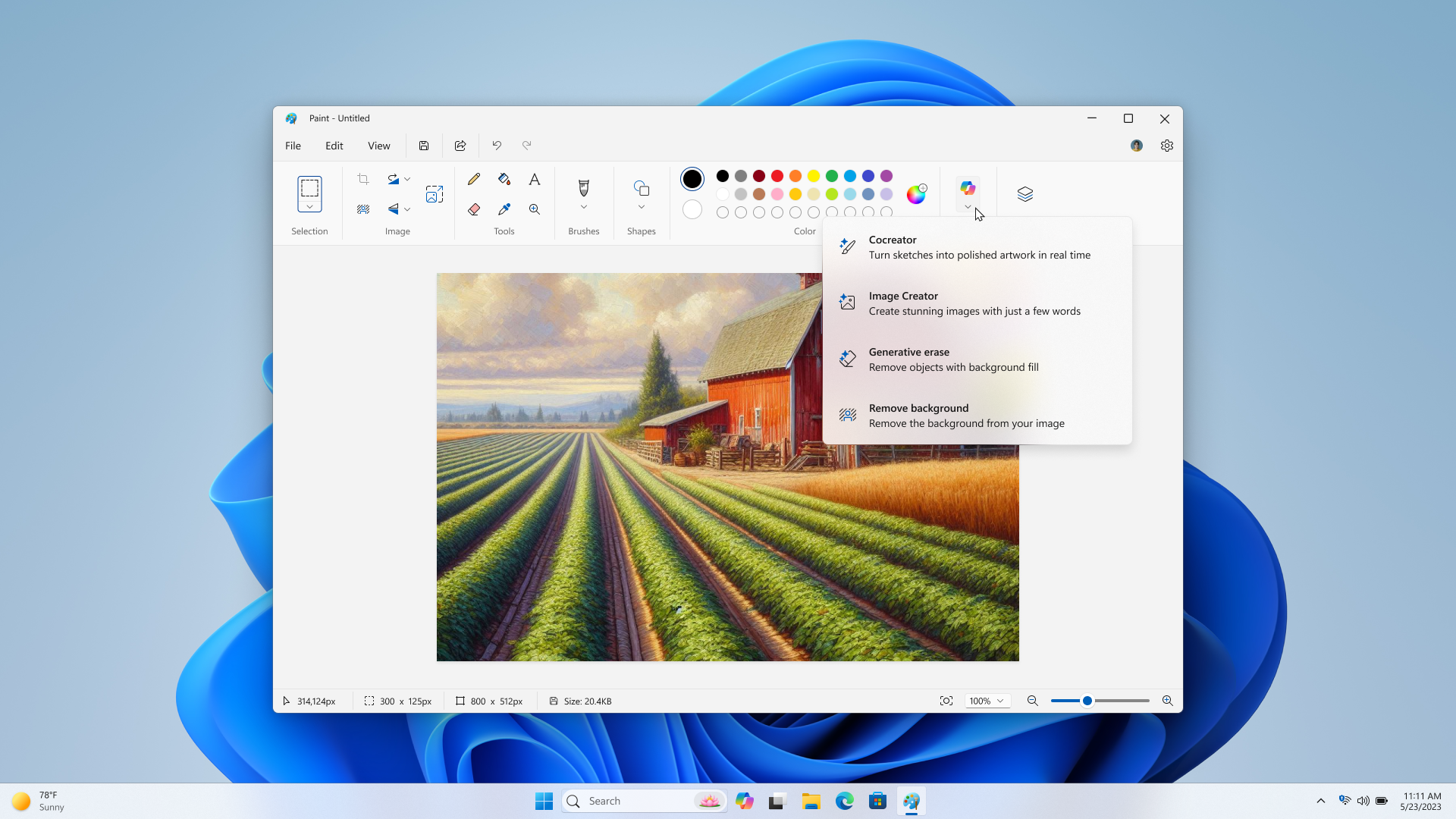
Paint Copilot menu opened.
FEEDBACK: Please file feedback in Feedback Hub (WIN + F) under Apps > Paint.
Reminders for Windows Insiders in the Dev Channel
- Windows Insiders in the Dev Channel receive updates based on Windows 11, version 24H2 via an enablement package (Build 26120.xxxx).
- Updates delivered to the Dev Channel are in a format that offers a preview of enhancements to servicing technology on Windows 11, version 24H2. To learn more, see Introducing Windows 11 checkpoint cumulative updates | Windows IT Pro Blog.
- Many features in the Dev Channel are rolled out using Control Feature Rollout technology, starting with a subset of Insiders and ramping up over time as we monitor feedback to see how they land before pushing them out to everyone in this channel.
- For Windows Insiders in the Dev Channel who want to be the first to get features gradually rolled out to you, you can turn ON the toggle to get the latest updates as they are available via Settings > Windows Update*. Over time, we will increase the rollouts of features to everyone with the toggle turned on. Should you keep this toggle off, new features will gradually be rolled out to your PC over time once they are ready.
- Features and experiences included in these builds may never get released as we try out different concepts and get feedback. Features may change over time, be removed, or replaced and never get released beyond Windows Insiders. Some of these features and experiences could show up in future Windows releases when they’re ready.
- Some features in active development we preview with Windows Insiders may not be fully localized and localization will happen over time as features are finalized. As you see issues with localization in your language, please report those issues to us via Feedback Hub.
- Please note that some accessibility features may not work with features like Recall and Click to Do while in preview with Windows Insiders.
- Because the Dev and Beta Channels represent parallel development paths from our engineers, there may be cases where features and experiences show up in the Beta Channel first.
- Check out Flight Hub for a complete look at what build is in which Insider channel.
Amanda & Brandon
Source:
Announcing Windows 11 Insider Preview Build 26120.3073 (Dev and Beta Channels)
Hello Windows Insiders, today we are releasing Windows 11 Insider Preview Build 26120.3073 (KB5050090) to the Dev Channel. With this update, we are previewing the ability to use improved Windows Search to find files
blogs.windows.com
Check Windows Updates
UUP Dump:
64-bit ISO download:
Select language for Windows 11 Insider Preview 10.0.26120.3073 (ge_release_upr) amd64
Select language for Windows 11 Insider Preview 10.0.26120.3073 (ge_release_upr) amd64 on UUP dump. UUP dump lets you download Unified Update Platform files, like Windows Insider updates, directly from Windows Update.
uupdump.net
ARM64 ISO download:
Select language for Windows 11 Insider Preview 10.0.26120.3073 (ge_release_upr) arm64
Select language for Windows 11 Insider Preview 10.0.26120.3073 (ge_release_upr) arm64 on UUP dump. UUP dump lets you download Unified Update Platform files, like Windows Insider updates, directly from Windows Update.
uupdump.net
UUP Dump - Download Windows Insider ISO
UUP Dump is the most practical and easy way to get ISO images of any Insider Windows 10 or Windows 11 version, as soon as Microsoft has released a new build. UUP Dump creates a download configuration file according to your choices, downloads necessary files directly from Microsoft servers, and...
www.elevenforum.com
Last edited: