Win Update KB5050094 Windows 11 Cumulative Update Preview build 26100.3037 (24H2) - Jan. 28


UPDATE 2/11:


 Microsoft Support:

January 28, 2025 - KB5050094 (OS Build 26100.3037) Preview​


For information about Windows update terminology, see the article about the types of Windows updates and the monthly quality update types. For an overview of Windows 11, version 24H2, see its update history page.

Note Follow @WindowsUpdate to find out when new content is published to the Windows release health dashboard.

Highlights

Gradual rollout

These might not be available to all users because they will roll out gradually.
  • [Taskbar] New! This update improves the previews that show when your cursor hovers over apps on the taskbar. The update also improves their animations.
  • [Windows Studio Effects] New! An icon will appear in the system tray when you use an app that supports Windows Studio Effects. This only occurs on a device that has a neural processing unit (NPU). Select the icon to open the Studio Effects page in Quick Settings. To view the app that is using the camera, hover over the icon for a tooltip.

  • [Fonts] New! This update adds Simsun-ExtG, a new simplified Chinese font. It includes the Biangbiang noodles character. Some apps might not be able to display these new extension characters yet. The font has 9,753 ideographs that support Unicode Extensions G, H, and I. See the list below.
    • Unicode range G 30000-3134A (4,939 chars)
    • Unicode range H 31350-323AF (4,192 chars)
    • Unicode range I 2EBF0-2EE5D (622 chars)
  • [File Explorer]
    • New! When you right-click items in the left pane, the “New Folder” command appears on the context menu.

    • Fixed: After you do a search, that search might repeat when you don’t want it to.
    • Fixed: The date and time properties of a file might update after you copy it.
    • Fixed: Icons on the details pane might not update as you expect when you change a theme. This makes it hard to view the change when you switch between dark and light themes.
    • Fixed: The search box might lose input focus as you type.
  • [Settings] New! You can change time zones in Settings > Time & Language > Date & Time. You don’t have to be an admin to make this change.

    • Fixed: The mouse cursor might disappear. This occurs when you hover over text fields in certain applications.
    • Fixed: If you turn on pointer trails, the mouse cursor becomes transparent, and a black box appears behind it.
    • Fixed: The mouse cursor might stutter when it moves across the screen. This occurs even when the system is not using a lot of resources.
  • [Pinyin Input Method Editor (IME)] Fixed: When you switch app windows, the IME language might change from Chinese to English.
  • [Snipping Tool] Fixed: Snipping Tool screenshots might be distorted. This occurs when you use two or more monitors that have different display scaling.
  • [Microsoft Excel 2016] Fixed: When you open certain files, Excel opens, but the screen might remain on the loading screen.

Normal rollout

  • [High dynamic range (HDR)] Fixed: The display of some games appears oversaturated. This occurs when you use Auto HDR.
  • [Digital/Analog converter (DAC) (known issue)] Fixed: You might experience issues with USB audio devices. This is more likely when you use a DAC audio driver based on USB 1.0. USB audio devices might stop working, which stops playback.
  • [USB audio device drivers] Fixed: The code 10 error message, “This device cannot start” appears. This occurs when you connect to certain external audio management devices.
  • [Chinese Pinyin input method editor (IME)] Bing will stop giving automatic suggestions in the search box for search engine sites, like Baidu. To get manual suggestions, use Ctrl+Tab or the chevron button (>).
  • [USB cameras] Fixed: Your device does not recognize the camera is on. This issue occurs after you install the January 2025 security update.
  • [Passkey] Fixed: This update removes the one-minute timeout when you use a passkey on a phone.

Improvements

This non-security update includes quality improvements. Below is a summary of the key issues that this update addresses when you install this KB. If there are new features, it lists them as well. The bold text within the brackets indicates the item or area of the change we are documenting.

Gradual rollout

These might not be available to all users because they will roll out gradually.
  • [Domains] Fixed: A device might fail to join a domain.
  • [Task Manager] Fixed: It takes too long to close after you close the app.
  • [Dam.sys] Fixed: A watchdog timeout error might occur when your PC resumes from sleep.
  • [Windows update installation] Fixed: Cumulative updates might not install. The error code is 0x800736b3. This occurs after a feature on demand fails to install.

Normal rollout

  • [Memory leak] Fixed: Leaks occur when predictive input ideas show.
  • [Windows Kernel Vulnerable Driver Blocklist file (DriverSiPolicy.p7b)] This update adds to the list of drivers that are at risk for Bring Your Own Vulnerable Driver (BYOVD) attacks.
  • [Remote Desktop Gateway] Fixed: You get errors or cannot sign when you connect to Windows 11 workstations. This occurs when you enforce device redirection.
If you installed earlier updates, only the new updates contained in this package will be downloaded and installed on your device.

Windows 11 servicing stack update (KB5050108) - 26100.3023

This update makes quality improvements to the servicing stack, which is the component that installs Windows updates. Servicing stack updates (SSU) ensure that you have a robust and reliable servicing stack so that your devices can receive and install Microsoft updates. To learn more about SSUs, see Simplifying on-premises deployment of servicing stack updates.

Known issues in this update

Applies toSymptomWorkaround
All usersWe’re aware of an issue where players on Arm devices are unable to download and play Roblox via the Microsoft Store on Windows.Players on Arm devices can play Roblox by downloading the title directly from www.Roblox.com.
All usersFollowing the installation of the October 2024 security update, some customers report that the OpenSSH (Open Secure Shell) service fails to start, preventing SSH connections. The service fails with no detailed logging, and manual intervention is required to run the sshd.exe process.

This issue is affecting both enterprise, IOT, and education customers, with a limited number of devices impacted. Microsoft is investigating whether consumer customers using Home or Pro editions of Windows are affected.
Customers can temporarily resolve the issue by updating permissions (ACLs) on the affected directories. Follow these steps:
  1. Open PowerShell as an Administrator.
  2. Update the permissions for C:\ProgramData\ssh and C:\ProgramData\ssh\logs to allow full control for SYSTEM and the Administrators group, while allowing read access for Authenticated Users. You can restrict read access to specific users or groups by modifying the permissions string if needed.
    Use the following commands to update the permissions:
    $directoryPath = "C:\ProgramData\ssh" $acl = Get-Acl -Path $directoryPath $sddlString = "O:BAD:PAI(A;OICI;FA;;;SY)(A;OICI;FA;;;BA)(A;OICI;0x1200a9;;;AU)" $securityDescriptor = New-Object System.Security.AccessControl.RawSecurityDescriptor $sddlString $acl.SetSecurityDescriptorSddlForm($securityDescriptor.GetSddlForm("All")) Set-Acl -Path $directoryPath -AclObject $acl
  3. Repeat the above steps for C:\ProgramData\ssh\logs.
Microsoft is actively investigating the issue and will provide a resolution in an upcoming Windows update. Further communications will be provided when a resolution or additional workarounds are available.
IT adminsDevices that have certain Citrix components installed might be unable to complete installation of the January 2025 Windows security update. This issue was observed on devices with Citrix Session Recording Agent (SRA) version 2411. The 2411 version of this application was released in December 2024.

Affected devices might initially download and apply the January 2025 Windows security update correctly, such as via the Windows Update page in Settings. However, when restarting the device to complete the update installation, an error message with text similar to “Something didn’t go as planned. No need to worry – undoing changes” appears. The device will then revert to the Windows updates previously present on the device.

This issue likely affects a limited number of organizations as version 2411 of the SRA application is a new version. Home users are not expected to be affected by this issue.
Citrix has documented this issue, including a workaround, which can be performed prior to installing the January 2025 Windows security update. For details, see Citrix’s documentation.

Microsoft is working with Citrix to address this issue and will update this documentation once a resolution is available.

How to get this update

Before you install this update

Microsoft combines the latest servicing stack update (SSU) for your operating system with the latest cumulative update (LCU). For general information about SSUs, see Servicing stack updates and Servicing Stack Updates (SSU): Frequently Asked Questions.

Install this update

To install this update, use one of the following Windows and Microsoft release channels.[/B]

AvailableNext Step
YesGo to Settings > Update & Security > Windows Update. In the Optional updates available area, you will find the link to download and install the update.
YesBefore you install this update

To get the standalone package(s) for this update, go to the Microsoft Update Catalog website. This KB contains one or more MSU files that must be installed in order.

Install this update
Method 1: Install all MSU files together

Download all MSU files for KB5050094 from Microsoft Update Catalog and place them in the same folder (for example, C:/Packages). Use Deployment Image Servicing and Management (DISM.exe) to install the target update. DISM will use the folder specified in PackagePath to discover and install one or more prerequisite MSU files as needed.

Updating Windows PC

To apply this update to a running Windows PC, run the following command from an elevated Command Prompt:
DISM /Online /Add-Package /PackagePath:c:\packages\Windows11.0-KB5050094-x64.msu

Or, run the following command from an elevated Windows PowerShell prompt:
Add-WindowsPackage -Online -PackagePath "c:\packages\Windows11.0-KB5050094-x64.msu"

Updating Windows Installation media
To apply this update to Windows Installation media, see Update Windows installation media with Dynamic Update.

To add this update to a mounted image, run the following command from an elevated Command Prompt:
DISM /Image:mountdir /Add-Package /PackagePath:Windows11.0-KB5050094-x64.msu

Or, run the following command from an elevated Windows PowerShell prompt:
Add-WindowsPackage -Path "c:\offline" -PackagePath "Windows11.0-KB5050094-x64.msu" -PreventPending

Method 2: Install each MSU file individually in order
Download and install each MSU file individually using DISM or Windows Update Standalone Installer in the following order:
  1. windows11.0-kb5043080-x64_953449672073f8fb99badb4cc6d5d7849b9c83e8.msu
  2. windows11.0-kb5050094-x64_3d5a5f9ef20fc35cc1bd2ccb08921ee8713ce622.msu

If you want to remove the LCU

To remove the LCU after installing the combined SSU and LCU package, use the DISM/Remove-Package command line option with the LCU package name as the argument. You can find the package name by using this command: DISM /online /get-packages.

Running Windows Update Standalone Installer (wusa.exe) with the /uninstall switch on the combined package will not work because the combined package contains the SSU. You cannot remove the SSU from the system after installation.

File information

For a list of the files that are provided in this update, download the file information for cumulative update 5050094.

For a list of the files that are provided in the servicing stack update, download the file information for the SSU (K5050108) - version 26100.3023.


 Source:


Check Windows Updates


UUP Dump:

64-bit ISO download:


ARM64 ISO download:

 
Last edited:

well i got the update from the catalog and its taking its sweet time to copy packages to windows update catalog .
looks like its time for a pot off coffee and a pack of smokes lol
You mean copying to the update cache. It takes some time. 😂
 

My Computer My Computer

At a glance

Windows 11 Pro 25H2Intel I9-9900K64GBNVIDIA RTX 2060
OS
Windows 11 Pro 25H2
Computer type
PC/Desktop
Manufacturer/Model
Dell XPS 8930
CPU
Intel I9-9900K
Memory
64GB
Graphics Card(s)
NVIDIA RTX 2060
Sound Card
NVIDIA High Definition Audio
Monitor(s) Displays
4k Samsung
Screen Resolution
3840 x 2160
Hard Drives
512GB NVMe, ADATA SU 800, 2TB HDD

My Computer My Computer

At a glance

WINDOWS 11 WINDOWS 10Intel(R) Core(TM) i7 -3770K CPU 3.50 GZ 3501 ...32.0 GB (31.9 GB usable)AMD RADEON TM R5240 INTELL HD GRAPHICS 4600 T...
OS
WINDOWS 11 WINDOWS 10
Computer type
PC/Desktop
Manufacturer/Model
HP H8 1360T
CPU
Intel(R) Core(TM) i7 -3770K CPU 3.50 GZ 3501 4 CORE
Motherboard
PEGATRON 2AD5
Memory
32.0 GB (31.9 GB usable)
Graphics Card(s)
AMD RADEON TM R5240 INTELL HD GRAPHICS 4600 TIGER 1+1 USB
Sound Card
AMD HD . IDT
Monitor(s) Displays
AOC WAL MART SPECIAL . HP 2311 IX IPS LED DELL 1708 FP
Screen Resolution
1920 X 1080 1600X900 1280X940
Hard Drives
1 FAXING S 100 512GB 1 KINGSTON 120 GB SSD 1 X12 SSD 512 GB
PSU
300 WATT HP
Case
FULL
Cooling
ON BOARD FAN
Keyboard
LOGITEC K 520 WIRELESS
Mouse
LOGITEC M 510 WIRELESS
Internet Speed
55 UP 11.2 DOWN
Browser
CHROME EDGE
Antivirus
WINDOWS SECUIRTY
Other Info
NON SUPPORTED HARDWARE FOR WINDOWS 11
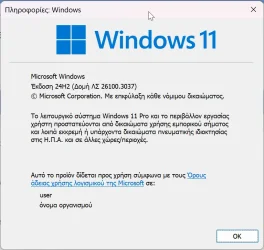
ok its been upgrade to
Edition Windows 11 Pro
Version 24H2
Installed on ‎1/‎10/‎2025
OS build 26100.3037
Experience Windows Feature Experience Pack 1000.26100.48.0

on a unsupported machine
strange that windows update did not pick it up

thanks for all the help

Untitled.webp
 

My Computer My Computer

At a glance

WINDOWS 11 WINDOWS 10Intel(R) Core(TM) i7 -3770K CPU 3.50 GZ 3501 ...32.0 GB (31.9 GB usable)AMD RADEON TM R5240 INTELL HD GRAPHICS 4600 T...
OS
WINDOWS 11 WINDOWS 10
Computer type
PC/Desktop
Manufacturer/Model
HP H8 1360T
CPU
Intel(R) Core(TM) i7 -3770K CPU 3.50 GZ 3501 4 CORE
Motherboard
PEGATRON 2AD5
Memory
32.0 GB (31.9 GB usable)
Graphics Card(s)
AMD RADEON TM R5240 INTELL HD GRAPHICS 4600 TIGER 1+1 USB
Sound Card
AMD HD . IDT
Monitor(s) Displays
AOC WAL MART SPECIAL . HP 2311 IX IPS LED DELL 1708 FP
Screen Resolution
1920 X 1080 1600X900 1280X940
Hard Drives
1 FAXING S 100 512GB 1 KINGSTON 120 GB SSD 1 X12 SSD 512 GB
PSU
300 WATT HP
Case
FULL
Cooling
ON BOARD FAN
Keyboard
LOGITEC K 520 WIRELESS
Mouse
LOGITEC M 510 WIRELESS
Internet Speed
55 UP 11.2 DOWN
Browser
CHROME EDGE
Antivirus
WINDOWS SECUIRTY
Other Info
NON SUPPORTED HARDWARE FOR WINDOWS 11
I'm not an Inder user. I am a normal Windows version user, can I install this version? Will there be a problem, do you have to be an Inder user to install it?
 

My Computer My Computer

At a glance

Windows 11 25H2 26200.8524 Home Single Language13th Gen Intel(R) Core(TM) i7-13700HX32GBx2 Kingston 4800MHz Total: 64GBNVIDIA GeForce RTX 4080 Laptop GPU 175 Watt
OS
Windows 11 25H2 26200.8524 Home Single Language
Computer type
Laptop
Manufacturer/Model
HP OMEN 17,3 2023 Model
CPU
13th Gen Intel(R) Core(TM) i7-13700HX
Motherboard
HM770
Memory
32GBx2 Kingston 4800MHz Total: 64GB
Graphics Card(s)
NVIDIA GeForce RTX 4080 Laptop GPU 175 Watt
Monitor(s) Displays
ViewSonic VX2780-2K 170 Hz
Screen Resolution
2560 *1440-2K - 240 Hz
Hard Drives
2 TB Crucial NVMe M.2 SSD-2 TB Western Digital NVMe M.2 SSD- 2 TB Seagete Portable Harddisk 5400 RPM
Keyboard
HP 4CF00AA Pavilion 800
Mouse
A4tech FG20 Fstyler 2.4Ghz Nano 2000DPI
Internet Speed
50 Mbps
Browser
LibreWolf
Antivirus
Microsoft Defender
Got it:
2025-01-29 11_15_11-Πληροφορίες_ Windows.webp
 

My Computer My Computer

At a glance

Windows 10Ultra Core Ultra 9 185H32GBIntel Arc
OS
Windows 10
Computer type
Laptop
Manufacturer/Model
Lenovo Yoga 7 Pro
CPU
Ultra Core Ultra 9 185H
Motherboard
Lenovo
Memory
32GB
Graphics Card(s)
Intel Arc
ok its been upgrade to
Edition Windows 11 Pro
Version 24H2
Installed on ‎1/‎10/‎2025
OS build 26100.3037
Experience Windows Feature Experience Pack 1000.26100.48.0

on a unsupported machine
strange that windows update did not pick it up

thanks for all the help
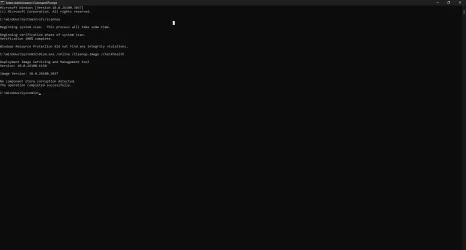
You should run SCANHEALTH not just CHECKHEALTH, they are quite different.
The 1st is for previously detected components problems, the second is scanning for the current problems.
 

My Computer My Computer

At a glance

Windows 11 Pro 25H2Intel I9-9900K64GBNVIDIA RTX 2060
OS
Windows 11 Pro 25H2
Computer type
PC/Desktop
Manufacturer/Model
Dell XPS 8930
CPU
Intel I9-9900K
Memory
64GB
Graphics Card(s)
NVIDIA RTX 2060
Sound Card
NVIDIA High Definition Audio
Monitor(s) Displays
4k Samsung
Screen Resolution
3840 x 2160
Hard Drives
512GB NVMe, ADATA SU 800, 2TB HDD
@Brink
why not a .bat file to run after every update?
including these commands:
Powershell:
sfc /scannow
dism /online /cleanup-image /scanhealth
dism /online /cleanup-image /restorehealth
dism /online /cleanup-image /analyzecomponentstore
dism /online /cleanup-image /startcomponentcleanup
dism /online /cleanup-image /startcomponentcleanup /resetbase
shutdown /r
I'm a bit lazy to type it every time but I'm not that much professional to order these commands and also maybe you know more commands for windows cleanup and repair process.
TNX.

edit: I'm also thinking about some good commands to deep cleanup C drive and then trim it !
 

My Computers My Computers

  • At a glance

    Windows 11 Pro 25H2Ryzen 5 3500U8GBVega 8
    OS
    Windows 11 Pro 25H2
    Computer type
    Laptop
    Manufacturer/Model
    Huawei MateBook D15
    CPU
    Ryzen 5 3500U
    Memory
    8GB
    Graphics Card(s)
    Vega 8
    Screen Resolution
    FHD
    Hard Drives
    256GB Samsung SSD + 1TB HDD
    Browser
    Microsoft Edge
    Antivirus
    ESET Smart Security Premium
  • At a glance

    Windows 10 Enterprise LTSC 21H2intel core i7 6700HQ16GBNvidia Geforce GTX1060 (6GB)
    Operating System
    Windows 10 Enterprise LTSC 21H2
    Computer type
    Laptop
    Manufacturer/Model
    MSI GS73 6RF Stealth Pro
    CPU
    intel core i7 6700HQ
    Memory
    16GB
    Graphics card(s)
    Nvidia Geforce GTX1060 (6GB)
    Screen Resolution
    FHD
    Hard Drives
    128GB SSD + 1TB HDD
    Browser
    Microsoft Edge
    Antivirus
    Windows Defender
alabama let me switch to edge instead of chrome and let me have a go there . whats the worse that can happen lol
You will get lots of anti-Edge zealot posts telling you you have sold your soul to the most evil organisation on earth who specialise in emojis and widgets (allegedly far more addictive than drugs)😂.
 

My Computer My Computer

At a glance

Windows 11 Pro + Win11 Canary VM.I9 13th gen i9-13900H 2.60 GHZ16 GB solderedIntegrated Intel Iris XE
OS
Windows 11 Pro + Win11 Canary VM.
Computer type
Laptop
Manufacturer/Model
ASUS Zenbook 14
CPU
I9 13th gen i9-13900H 2.60 GHZ
Motherboard
Yep, Laptop has one.
Memory
16 GB soldered
Graphics Card(s)
Integrated Intel Iris XE
Sound Card
Realtek built in
Monitor(s) Displays
laptop OLED screen
Screen Resolution
2880x1800 touchscreen
Hard Drives
1 TB NVME SSD (only weakness is only one slot)
PSU
Internal + 65W thunderbolt USB4 charger
Case
Yep, got one
Cooling
Stella Artois (UK pint cans - 568 ml) - extra cost.
Keyboard
Built in UK keybd
Mouse
Bluetooth , wireless dongled, wired
Internet Speed
900 mbs (ethernet), wifi 6 typical 350-450 mb/s both up and down
Browser
Edge
Antivirus
Defender
Other Info
TPM 2.0, 2xUSB4 thunderbolt, 1xUsb3 (usb a), 1xUsb-c, hdmi out, 3.5 mm audio out/in combo, ASUS backlit trackpad (inc. switchable number pad)

Macrium Reflect Home V8
Office 365 Family (6 users each 1TB onedrive space)
Hyper-V (a vm runs almost as fast as my older laptop)
You will get lots of anti-Edge zealot posts telling you you have sold your soul to the most evil organisation on earth who specialise in emojis and widgets (allegedly far more addictive than drugs)😂.

I might just stick to the latter. I like seeing pink elephants.
 

My Computers My Computers

  • At a glance

    Windows 11 Pro 25H2 Build 26200.8655Intel(R) Core(TM) i7-4770K CPU @ 3.50GHz32.0 GB of I forget and the box is in storage.Gigabyte nVidia GeForce GTX 1660 Super OC 6GB
    OS
    Windows 11 Pro 25H2 Build 26200.8655
    Computer type
    PC/Desktop
    Manufacturer/Model
    Sin-built 2013
    CPU
    Intel(R) Core(TM) i7-4770K CPU @ 3.50GHz
    Motherboard
    ASUS ROG Maximus VI Formula
    Memory
    32.0 GB of I forget and the box is in storage.
    Graphics Card(s)
    Gigabyte nVidia GeForce GTX 1660 Super OC 6GB
    Sound Card
    ROG SupremeFX Formula 8-Channel High Definition Audio
    Monitor(s) Displays
    5 x LG 25MS500-B - 1 x 24MK430H-B - 1 x Wacom Pro 22" Touch Screen Tablet
    Screen Resolution
    All over the place
    Hard Drives
    Too many to list. OS on Samsung 1TB 870 QVO SATA
    PSU
    Silverstone 1500
    Case
    NZXT Phantom 820 Full-Tower Case
    Cooling
    Noctua NH-D15 Elite Class Dual Tower CPU Cooler / 6 x EziDIY 120mm / 2 x Corsair 140mm somethings / 1 x 140mm Thermaltake something / 2 x 200mm Corsair.
    Keyboard
    Corsair K95 / Logitech diNovo Edge Wireless
    Mouse
    Logitech: G402 / G502 / Mx Masters / Mx Air Cordless
    Internet Speed
    2000/500Mbps
    Browser
    All sorts
    Antivirus
    Kaspersky Premium
    Other Info
    ㅤㅤㅤㅤㅤㅤㅤㅤㅤㅤㅤㅤㅤㅤㅤㅤㅤㅤㅤㅤㅤㅤㅤㅤㅤㅤㅤㅤㅤㅤㅤㅤㅤㅤㅤㅤㅤㅤㅤㅤ⠀⠀⠀⠀⠀⠀⠀⠀⠀⠀
    TP-Link BE9300 WiFi 7 Bluetooth 5.4 (Archer TBE550E)
    TP-Link TX201 V1 2.5GB Lan

    Grandstream HT812 - VoIP
    ASUS DSL-AX82U - Mesh
    ASUS RT-AC68U - Mesh
    ASUS RT-BE88U Router

    Brother MFC-L2880DW Printer

    I’m on a horse.
  • At a glance

    Windows 11 Pro 25H2 Build 26200.8655 (Wifes)13th Generation Intel® Core™ i5-1340P Process...16GB LPDDR5-52001x Intel® Iris® Xe Graphics
    Operating System
    Windows 11 Pro 25H2 Build 26200.8655 (Wifes)
    Computer type
    Laptop
    Manufacturer/Model
    LENOVO Yoga 7 14IRL8 - Type 82YL
    CPU
    13th Generation Intel® Core™ i5-1340P Processor(Core™ i5-1340P)
    Memory
    16GB LPDDR5-5200
    Graphics card(s)
    1x Intel® Iris® Xe Graphics
    Sound Card
    Optimized with Dolby Atmos®
    Screen Resolution
    QHD 2880 x 1800 OLED
    Hard Drives
    M.2 512 GB SSD PCIe
    Mouse
    Logiteck MX Master 3S
    Internet Speed
    2000/500
    Antivirus
    Defender / Malwarebytes
    Other Info
    …still on a horse.


    Wireless Network: Wi-Fi 6E 2x2 AX; Bluetooth® 5.1 or above
    Ports: 1x 1 Novo button; 2 in 1 Audio Combo jack; Micro SD Card Reader; HDMI 1.4b; 2 x USB Type-C (TBT4)
    USB 3.2 Gen 2 DP 1.4a
    PD 3.0); 1 x USB 3.2 Gen1 Type A
    Camera
    1x 1080P FHD IR/RGB Hybrid with Privacy Shutter and Dual Array Microphone
    Graphics
    1x Intel® Iris® Xe Graphics
    Monitor
    14" WUXGA
    Form Factor
    Convertible Notebook
  • Windows 11 Pro 25H2 Build 26200.8655 (Wifes)

    Yoga 7 2-in-1 14IML9 - Type 83DJ

    Processor: Intel® Core™ Ultra 7 155H Processor(Core™ Ultra 7 155H)

    Memory: 32GB LPD5X-7467

    Hard Drive: 1 TB SSD PCIe

    Wireless Network: 1x Wi-Fi 6E 2x2 AX; Bluetooth® 5.1 or above

    Ports: 1 x HDMI 2.1 TMDS; 1 x Novo Button; 1 x Combo Audio Jack
    2 x USB-C (USB 4.0)
    1 x USB-A 3.2 Gen 1

    Camera: 1080P FHD IR Hybrid with Dual Microphone

    Graphics: Intel® Arc™ Graphics

    Monitor: 14" 2.8K

    ...Where's my horse?
strange i have not been offered it yet .
but i am on a unsupported machine. is this a public release or insiders release
This is a gradual rollout, I've only received it on 1 out of 8 machines so far.
File Explorer 3 dot issue and local machine not visible until FDResPub service manually restarted are persistent still with this preview 26100.3037.
 

My Computer My Computer

At a glance

Windows 11 PRO / Windows Server 2016 Essentials
OS
Windows 11 PRO / Windows Server 2016 Essentials
Apologies for this basic question. We updated 4 devices from 23H2 to 24H2 this month. In 23H2 the Preview Updates were shown even with the "Get the latest updates..." toggle off. Just checked but none of our PC's are showing the Preview Updates. Is this a change from 23H2 to 24H2? We are going to wait until Patch Tuesday before installing them so the toggle is off. Thanks.
 

My Computer My Computer

At a glance

Windows 11 Home
OS
Windows 11 Home
Apologies for this basic question. We updated 4 devices from 23H2 to 24H2 this month. In 23H2 the Preview Updates were shown even with the "Get the latest updates..." toggle off. Just checked but none of our PC's are showing the Preview Updates. Is this a change from 23H2 to 24H2? We are going to wait until Patch Tuesday before installing them so the toggle is off. Thanks.
see this
 

My Computer My Computer

At a glance

26200.8037i5-11400F32GBGeforce GT-1030
OS
26200.8037
Computer type
PC/Desktop
CPU
i5-11400F
Motherboard
Gigabyte
Memory
32GB
Graphics Card(s)
Geforce GT-1030
Keyboard
Logitech K400
Mouse
Logitech M720
Internet Speed
600 Mb
Browser
Edge
Same here, but this update didn't show up on neither of my computers, so installed manually.

The instructions say to install two CU's in a particular order.

View attachment 123608
But @Brink I don't get it. KB5043080 is OS build 26100.1742 and obviously fails to install.

I got that KB back in September

View attachment 123609

@Scott,

Maybe I can clarify this for you...

Prior to 24H2, the monthly patches were released as a cumulative update. The advantage of this is that you only ever needed to download the latest cumulative update. There would be no need to install anything but the latest update even on a completely clean install of Windows.

In 24H2 that changes. There are now two types of updates - a "checkpoint" update and an "incremental" update. Here is how this works:

A checkpoint update is much like a cumulative update. You only need to install the checkpoint update if you are on a build lower than what the checkpoint takes you to. As you had noted, KB5043080 takes the system to build 1742. As a result, you only need to install KB5043080 if you are on a build lower than 1742.

Once you are on that build or newer, you only need to install the latest incremental update.

So, over time, as more and more updates are released, if you had the old style cumulative updates, that cumulative update would get larger every month as more and more updates are released. With the new scheme, Microsoft intends to occasionally release a new checkpoint update which will include all the previous updates (both checkpoint and incremental). Now, the incremental updates start all over again containing only the updates published AFTER that latest checkpoint. So in the months immediately following a checkpoint update the incremental updates will be smaller saving bandwidth and time to download. Eventually, as the incremental gets larger and larger, Microsoft will issue a new checkpoint update.

IMPORTANT: If you are used to incremental and differential updates for backups, this is a little bit different. With backups, when you take incremental updates, you would need to apply ALL incremental updates to a system if you are restoring your data. In this case, all you need is the very latest checkpoint update and the latest incremental update. If there are no incremental updates released yet AFTER the latest checkpoint update, then only the checkpoint update is needed.

Example:

KB5043080 is a checkpoint update that takes you to build 1742. You only need this if your system is on a build lower than 1742.

KB5050094 is an incremental update taking the system to build 3037. Install if you are on 1742 or later but less than 3037. If you are less than 1742, install KB5043080 to get you to build 1742 and then install KB5050094.

Note that you can install KB5043080 followed by KB5050094 without needing to perform a reboot between the two.

Naturally, this only matters if you are installing updates manually. Windows update handles all these details automagically.
 

My Computers My Computers

  • At a glance

    Win11 Pro 25H2 (RTM+)Intel i7-14650HX32 GBNo GPU - Built-in Intel Graphics
    OS
    Win11 Pro 25H2 (RTM+)
    Computer type
    PC/Desktop
    Manufacturer/Model
    Acemagic
    CPU
    Intel i7-14650HX
    Memory
    32 GB
    Graphics Card(s)
    No GPU - Built-in Intel Graphics
    Sound Card
    Integrated
    Monitor(s) Displays
    Varies as machine will often be moved to locations with different monitors
    Screen Resolution
    Varies
    Hard Drives
    1 x 1TB Gen 4 NVMe SSD
    PSU
    120W Power Brick
    Keyboard
    Corsair K70 Max RGB Magnetic Keyboard
    Mouse
    Logitech MX Master 3
    Internet Speed
    1Gb Up / 1 Gb Down
    Browser
    Edge
    Antivirus
    Windows Defender
  • At a glance

    Win11 Pro 25H2 (RTM+)Intel i7-1255U16 GBIntel Iris Xe Graphics
    Operating System
    Win11 Pro 25H2 (RTM+)
    Computer type
    Laptop
    Manufacturer/Model
    Lenovo ThinkBook 13x Gen 2
    CPU
    Intel i7-1255U
    Memory
    16 GB
    Graphics card(s)
    Intel Iris Xe Graphics
    Sound Card
    Realtek® ALC3306-CG codec
    Monitor(s) Displays
    13.3-inch IPS Display
    Screen Resolution
    WQXGA (2560 x 1600)
    Hard Drives
    2 TB 4 x 4 NVMe SSD
    PSU
    USB-C / Thunderbolt 4 Power / Charging
    Keyboard
    Backlit, spill resistant keyboard
    Mouse
    Buttonless Glass Precision Touchpad
    Internet Speed
    1Gb Up / 1Gb Down
    Browser
    Edge
    Antivirus
    Windows Defender
    Other Info
    WiFi 6e / Bluetooth 5.1 / Facial Recognition / Fingerprint Sensor / ToF (Time of Flight) Human Presence Sensor
Wasn't sure if it was a problem with this particular update or a change from 23H2 to 24H2. Thanks.
 

My Computer My Computer

At a glance

Windows 11 Home
OS
Windows 11 Home
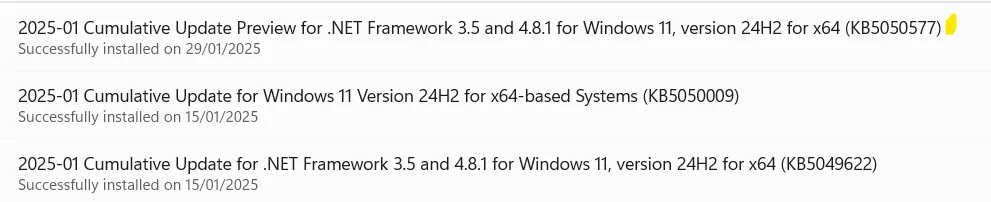
I only got KB5050577 from Windows Update, but not KB5050094. Do I need to manually install KB5050094? Thanks :-)

CU2025.webp
 

My Computer My Computer

At a glance

Win 11 ProIntel Core i7-12650H
OS
Win 11 Pro
Computer type
Laptop
CPU
Intel Core i7-12650H
Manually installed via msu downloaded from the Windows Update Catalog since Windows Update didn't offer me any cumulative updates. Installed and no problems so far.
Captura de ecrã 2025-01-29 133142.webp
 

My Computers My Computers

  • At a glance

    Windows 11 Pro 64-bits 25H2 26200-7922AMD Ryzen 3 3200G with Radeon Vega Graphics 3...32,00 GB TeamGroup DDR4-2667Nvidia GeForce GT 730 & Radeon™ Vega 8 Graphics
    OS
    Windows 11 Pro 64-bits 25H2 26200-7922
    Computer type
    PC/Desktop
    Manufacturer/Model
    Custom self built
    CPU
    AMD Ryzen 3 3200G with Radeon Vega Graphics 3.60 GHz
    Motherboard
    MSI B350 PC MATE
    Memory
    32,00 GB TeamGroup DDR4-2667
    Graphics Card(s)
    Nvidia GeForce GT 730 & Radeon™ Vega 8 Graphics
    Sound Card
    nVIDIA GK208 HDMI/DP High Definition Audio Controller
    Monitor(s) Displays
    AOC 27"
    Screen Resolution
    3840x2160
    Hard Drives
    SSD Team Group T-Force Cardea Zero Z440 1TB Gen4 M.2 NVMe (5000/4400MB/s), SSD Team Group CX2 512GB SATA III (530/470MB/s) and 2x Seagate 1TB BarraCuda 64MB 7200rpm SATA III 3.5 - ST1000DM010
    PSU
    LC-Power 650W V2.3
    Case
    ATX Nox Hummer ZS
    Cooling
    No cooling
    Keyboard
    Logitech K220
    Mouse
    Logitech
    Internet Speed
    1000/200
    Browser
    Firefox 148.0
    Antivirus
    Windows Defender
    Other Info
    Optical Drive ASUS DRW-24D5MT
  • At a glance

    Windows 11 Pro 64-bits 25H2 26200-7922Intel Core i5-8365U16 GBIntel UHD Graphics 620 - Whiskey Lake-U GT2
    Operating System
    Windows 11 Pro 64-bits 25H2 26200-7922
    Computer type
    Laptop
    Manufacturer/Model
    Dell Latitude 5400
    CPU
    Intel Core i5-8365U
    Motherboard
    Dell 03WM4C - Intel Cannon Lake-U PCH-LP Premium
    Memory
    16 GB
    Graphics card(s)
    Intel UHD Graphics 620 - Whiskey Lake-U GT2
    Sound Card
    Intel Cannon Lake-LP - cAVS (Audio, Voice, Speech) [D0]
    Monitor(s) Displays
    Dell NV14N4F
    Screen Resolution
    1920 x 1080
    Hard Drives
    Micron 2200S NVMe 256 GB
    PSU
    Dell X7XY03
    Internet Speed
    1000 Mbps / 200 MBps
    Browser
    Firefox 148.0
    Antivirus
    Microsoft Windows Defender
@Brink
why not a .bat file to run after every update?
including these commands:
Powershell:
sfc /scannow
dism /online /cleanup-image /scanhealth
dism /online /cleanup-image /restorehealth
dism /online /cleanup-image /analyzecomponentstore
dism /online /cleanup-image /startcomponentcleanup
dism /online /cleanup-image /startcomponentcleanup /resetbase
shutdown /r
I'm a bit lazy to type it every time but I'm not that much professional to order these commands and also maybe you know more commands for windows cleanup and repair process.
TNX.

edit: I'm also thinking about some good commands to deep cleanup C drive and then trim it !

It's usually not needed, but if wanted it's fine.
 

My Computers My Computers

  • At a glance

    Windows 11 Pro for WorkstationsIntel i7-8700K 5 GHz64 GB (4x16GB) G.SKILL TridentZ RGB DDR4 3600...ASUS ROG-STRIX-GTX1080TI-O11G-GAMING (11GB GD...
    OS
    Windows 11 Pro for Workstations
    Computer type
    PC/Desktop
    Manufacturer/Model
    Custom self build
    CPU
    Intel i7-8700K 5 GHz
    Motherboard
    ASUS ROG Maximus XI Formula Z390
    Memory
    64 GB (4x16GB) G.SKILL TridentZ RGB DDR4 3600 MHz (F4-3600C18D-32GTZR)
    Graphics Card(s)
    ASUS ROG-STRIX-GTX1080TI-O11G-GAMING (11GB GDDR5X)
    Sound Card
    Integrated Digital Audio (S/PDIF)
    Monitor(s) Displays
    2 x Samsung Odyssey G75 27"
    Screen Resolution
    2560x1440
    Hard Drives
    1TB Samsung 990 PRO M.2,
    4TB Samsung 990 PRO M.2,
    TerraMaster F8 SSD Plus NAS
    PSU
    Seasonic Prime Titanium 850W
    Case
    Thermaltake Core P3 wall mounted
    Cooling
    Corsair Hydro H115i
    Keyboard
    Amazon Basics Wired Full Keyboard MD005
    Mouse
    Logitech MX Master 4
    Internet Speed
    2 Gbps Download and 100 Mbps Upload
    Browser
    Chrome and Edge
    Antivirus
    Microsoft Defender
    Other Info
    Logitech Z625 speaker system,
    Logitech BRIO 4K Pro webcam,
    HP Color LaserJet Pro MFP M477fdn,
    CyberPower CP1500PFCLCD
    Galaxy S23 Plus phone
  • At a glance

    Windows 11 ProSnapdragon X Elite (12 core) 3.42 GHz16 GB LPDDR5x-7467 MHz
    Operating System
    Windows 11 Pro
    Computer type
    Laptop
    Manufacturer/Model
    Surface Laptop 7 Copilot+ PC
    CPU
    Snapdragon X Elite (12 core) 3.42 GHz
    Memory
    16 GB LPDDR5x-7467 MHz
    Monitor(s) Displays
    15" HDR
    Screen Resolution
    2496 x 1664
    Hard Drives
    1 TB SSD
    Internet Speed
    Wi-Fi 7 and Bluetooth 5.4
    Browser
    Chrome and Edge
    Antivirus
    Microsoft Defender
I'll wait until the update show on WU again.
 
Last edited:

My Computer My Computer

At a glance

26200.8037i5-11400F32GBGeforce GT-1030
OS
26200.8037
Computer type
PC/Desktop
CPU
i5-11400F
Motherboard
Gigabyte
Memory
32GB
Graphics Card(s)
Geforce GT-1030
Keyboard
Logitech K400
Mouse
Logitech M720
Internet Speed
600 Mb
Browser
Edge
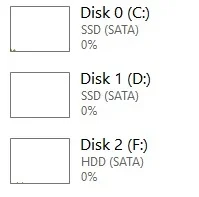
Task Manager still incorrectly listing HDD's as SDD's. Would be great if the incorrect detection increased the speed on the HDD :unsure:
Not having that issue here.

disk.webp
 

My Computer My Computer

At a glance

Windows 11 Pro
OS
Windows 11 Pro
I am yet to get the updates throgh Windows update on both my PCs.. Even if I get I will not update to the Cumulative update preview.
 

My Computers My Computers

  • At a glance

    Windows 11 Pro Version:25H2 OS Build: 26200.873712th Gen Intel core i5-1235U(Alder16*2 (32 GB) DDR 4-3200(1600MHz) Crucial Tech...Intel Iris Xe Graphics (Internal)
    OS
    Windows 11 Pro Version:25H2 OS Build: 26200.8737
    Computer type
    PC/Desktop
    Manufacturer/Model
    Beelink Mini PC Model: SEi12
    CPU
    12th Gen Intel core i5-1235U(Alder
    Motherboard
    SEi (manufactured by AZW)
    Memory
    16*2 (32 GB) DDR 4-3200(1600MHz) Crucial Technology
    Graphics Card(s)
    Intel Iris Xe Graphics (Internal)
    Sound Card
    Internal
    Monitor(s) Displays
    BenQ GW2283
    Screen Resolution
    1920*1080
    Hard Drives
    500GB NVME (Kingston SNV2S500G)
    1TB (Crucial CT1000BX500SSD1)
    PSU
    Power Brick 19V-6.32A , 120.08W
    Keyboard
    Dell KB3322Wi (Wireless)
    Mouse
    Dell WM118t (Wireless)
    Internet Speed
    4G/5G
    Browser
    MS Edge, Chrome
    Antivirus
    Malwarebytes Premium - Subscription
  • At a glance

    Windows 11 Home Version 25H2 Build 26200.8737Intel Core i3 8145UIntel Optane 16GB module + DDR 4 16GB (Optane...Intel UHD Graphics 620
    Operating System
    Windows 11 Home Version 25H2 Build 26200.8737
    Computer type
    PC/Desktop
    Manufacturer/Model
    Dell Inspiron 3280 AIO 22"
    CPU
    Intel Core i3 8145U
    Motherboard
    Dell inc. 027W48
    Memory
    Intel Optane 16GB module + DDR 4 16GB (Optane disabled.)
    Graphics card(s)
    Intel UHD Graphics 620
    Sound Card
    Internal
    Monitor(s) Displays
    Dell Monitor 22"
    Screen Resolution
    1920x1080
    Hard Drives
    Crucial CT1000BX500SSD1 ; 1000,2 GB
    PSU
    Power Brick
    Case
    All-in one
    Keyboard
    Dell Wireless KM636
    Mouse
    Dell Wireless KM 636
    Internet Speed
    4G
    Browser
    Edge, Chrome
    Antivirus
    Malwarebytes
    Other Info
    Upgraded from Windows 10 Home to Windows 11 Home on 28 Oct 2023

Latest Support Threads

Back
Top Bottom