Win Update KB5052093 Windows 11 Cumulative Update Preview build 26100.3323 (24H2) - Feb. 25


UPDATE 3/11:


 Microsoft Support:

February 25, 2025 - KB5052093 (OS Build 26100.3323) Preview​

For information about Windows update terminology, see the article about the types of Windows updates and the monthly quality update types. For an overview of Windows 11, version 24H2, see its update history page.

Note Follow @WindowsUpdate to find out when new content is published to the Windows release health dashboard.

Highlights

Gradual rollout​

These might not be available to all users because they will roll out gradually.
  • [Task Manager] Fixed: It might identify an HDD as an SSD.
  • [Taskbar] New! You can now share files directly from a jump list on the taskbar. Jump lists appear when you right-click an app that has a jump list

  • [Windows Spotlight]
    • New! There’s a quick and easy way to find out more information about a background image. Simply hover over the image or click the “Learn about this picture” icon.
    • New! This update makes Windows Spotlight easier to find. You’ll notice changes to the icon color and background. Also, the icon will show at the lower right area on your desktop.

  • [Lock screen] New! This update makes it easier to learn more about the image on your lock screen when you select the “Like” button.
  • [Narrator] New! There are new functions for Narrator scan mode. Skip past links (n) allows you to go to the text after a link. Use the comma (,) to jump to the start of an item (large table, long list, or another item.) Use the period (.) to jump to the end of an item. This is most helpful when you read long emails, news articles, and wiki pages. Jump to lists (l) allows you to quickly access a list on a web page or in a document. To use these new functions, turn on Narrator first (Windows logo key + Ctrl + Enter). Then turn scan mode on by pressing Caps lock + Spacebar. Note that scan mode is on by default on most web pages (like news articles, wiki page, and so on).

  • [Game Pass Ultimate and PC Game Pass subscribers] New! Some of you might see a new referral card for a PC Game Pass subscription on the Settings home page. With it, you can invite friends and family to try a PC Game Pass for free. If you qualify, the card only appears when you sign in to your PC using your Microsoft account.

  • [File Explorer]
    • New! You can now snooze or turn off the “Start backup” reminder in the File Explorer address bar. This only applies if you are not already backing up your files and folder. To view this new option, right-click Start backup.

    • Fixed: Improves performance when it loads folders that have a large number of media files.
    • Fixed: When you enter a URL in the address bar, it might not go to the location.
    • Fixed: The address bar overlaps files when you use the F11 full-screen mode.
    • Fixed: The context menu opens slowly when you right-click cloud files.
    • Thumbnails for cloud files display more consistently in search results.
  • [HTML Help Viewer] New! This update adds text scaling support.
  • [Start menu] Fixed: The colors are wrong when you open the account manager flyout menu. This occurs when you use a mixed dark and light custom mode in Settings > Personalization > Colors.
  • [Scanners] Fixed: Apps might not recognize a scanner is available when it is connected.
 
Last edited:
I couldn't stand it and amid shaking and quivering with terror, I braved downloading it from the Update Catalogue. After 15 minutes or so, and holding my breath while hopping on one leg and waving a dead chicken around my head, on reboot my computer booted up to the desktop.

IT'S ALIVE!!!!!
You mean the dead chicken?
 

My Computer My Computer

At a glance

Win 11 Insider Release Preview and Beta chann...i5 Core [email protected] (Unsupported for Win 11)12GBGeneric PnP Monitor (1920x1080@60Hz) Intel HD...
OS
Win 11 Insider Release Preview and Beta channels.
Computer type
Laptop
Manufacturer/Model
HP ENVY Bought: March 2017
CPU
i5 Core [email protected] (Unsupported for Win 11)
Motherboard
HP 81AD (U3E1)
Memory
12GB
Graphics Card(s)
Generic PnP Monitor (1920x1080@60Hz) Intel HD Graphics 620 (HP)
Sound Card
Conexant ISST audio
Monitor(s) Displays
Generic PnP Monitor
Screen Resolution
1536x864 pixels
Hard Drives
HGST HTS721010A9E630
PSU
Well...PSU you too!! What's this mean?
Case
HP ENVY SILVER
Cooling
A fan.
Keyboard
USA
Mouse
Logitec Anywhere 2
Internet Speed
Good enough for me! Fast!
Browser
Edge/Waterfox
Antivirus
Windows Defender
Other Info
No 'mo.

My Computers My Computers

  • At a glance

    W11, always updated with latest buildsAMD Ryzen 9 9900XG.Skill Trident Z5 Neo RGB 32GB Kit DDR5-6000...ASUS Dual GeForce RTX™ 3060 V2 OC Edition 12G...
    OS
    W11, always updated with latest builds
    Computer type
    PC/Desktop
    Manufacturer/Model
    Self-made
    CPU
    AMD Ryzen 9 9900X
    Motherboard
    ASUS TUF Gaming B850-Plus WiFi
    Memory
    G.Skill Trident Z5 Neo RGB 32GB Kit DDR5-6000 CL30 (F5-6000J3038F16GX2-TZ5NR)
    Graphics Card(s)
    ASUS Dual GeForce RTX™ 3060 V2 OC Edition 12GB GDDR6
    Monitor(s) Displays
    Eizo CS240, Calibrated with Datacolr SpyderX
    Screen Resolution
    1920X1200
    Hard Drives
    Crucial T705 SSD 1TB PCIe Gen5 NVMe M.2- SO+Archive
    Lexar EQ790 1TB SSD M.2 2280 PCIe Gen4x4 NVMe 1.4- LR& PS Workspace
    PHIXERO SSD P5000-512GB M.2 2280 PCIe Gen4- Backups
    Seagate ST8000DM04- Photo Archive, SATA HD
    Western Digital WD2002FAEX- Generic archive, SATA HD
    PSU
    Be Quiet 850W Pure Power 12M per Pc ATX
    Case
    Phanteks XT Pro
    Cooling
    Be quiet Pure loop 2 360mm
    Keyboard
    Logitech
    Mouse
    Logitech
    Internet Speed
    D/L-700/800 Mbps; U/L 250/300 Mbps WiFi 7 from motherboard
    Browser
    Edge
    Antivirus
    Avast
    Other Info
    Mostly used for photo retouching software & some video slideshows.
  • At a glance

    W11, always updated with latest buildsAMD Ryzen 9 9900XG.Skill Trident Z5 Neo RGB 32GB Kit DDR5-6000...ASUS Dual GeForce RTX™ 3060 V2 OC Edition 12G...
    Operating System
    W11, always updated with latest builds
    Computer type
    PC/Desktop
    Manufacturer/Model
    Self built
    CPU
    AMD Ryzen 9 9900X
    Motherboard
    ASUS TUF Gaming B850-Plus WiFi
    Memory
    G.Skill Trident Z5 Neo RGB 32GB Kit DDR5-6000 CL30 (F5-6000J3038F16GX2-TZ5NR)
    Graphics card(s)
    ASUS Dual GeForce RTX™ 3060 V2 OC Edition 12GB GDDR6- From System 1
    Monitor(s) Displays
    Eizo CS240, Calibrated with Datacolr SpyderX
    Screen Resolution
    1920X1200
    Hard Drives
    Crucial T705 SSD 1TB PCIe Gen5 NVMe M.2- SO+Archive
    Lexar EQ790 1TB SSD M.2 2280 PCIe Gen4x4 NVMe 1.4- LR& PS Workspace
    PHIXERO SSD P5000-512GB M.2 2280 PCIe Gen4- Backups
    Seagate ST8000DM04- Photo Archive, SATA HD - From System 1
    Western Digital WD2002FAEX- Generic archive, SATA HD - From System 1
    PSU
    Be Quiet 850W Pure Power 12M per Pc ATX
    Case
    Phanteks XT Pro
    Cooling
    Be quiet Pure loop 2 360mm
    Keyboard
    Logitech
    Mouse
    Logitech
    Internet Speed
    D/L-700/800 Mbps; U/L 250/300 Mbps WiFi 7 from motherboard
    Browser
    Edge
    Antivirus
    Avast
    Other Info
    Mostly used for photo retouching software, some video slideshows.
Gradual rollout of features in Windows 11 24H2 Build 26100.3323.

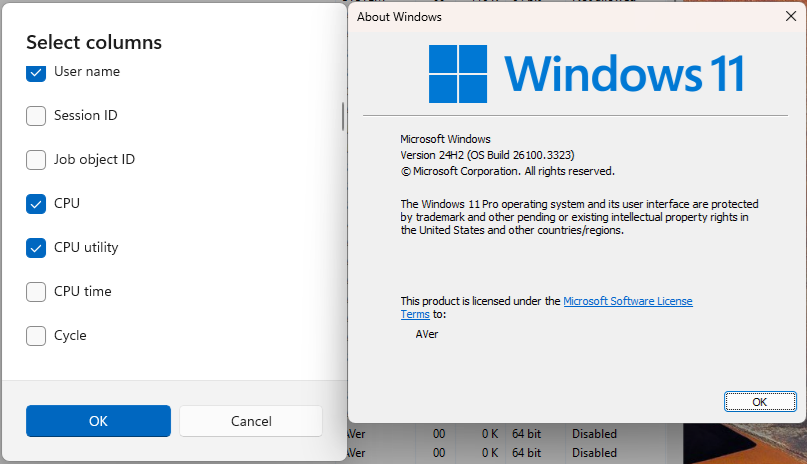
#CFR Key: 2224106123, 372314253 > [Task Manager] New! We are beginning to roll out a change to the way Task Manager calculates CPU utilization for the Processes, Performance, and Users pages. Task Manager will now use the standard metrics to display CPU workload consistently across all pages and aligning with industry standards and third-party tools. For backward compatibility, a new optional column called CPU Utility is available (hidden by default) on the Details tab showing the previous CPU value used on the Processes page.

0aZaN3D.png


Code:
Windows Registry Editor Version 5.00

[HKEY_LOCAL_MACHINE\SYSTEM\ControlSet001\Control\FeatureManagement\Overrides\0]

[HKEY_LOCAL_MACHINE\SYSTEM\ControlSet001\Control\FeatureManagement\Overrides\0\2224106123]
"EnabledState"=dword:00000002
"EnabledStateOptions"=dword:00000000

[HKEY_LOCAL_MACHINE\SYSTEM\ControlSet001\Control\FeatureManagement\Overrides\0\372314253]
"EnabledState"=dword:00000002
"EnabledStateOptions"=dword:00000000

Gradual rollout of features in Windows 11 24H2 Build 26100.3194.

#CFR Key: 1798011530 > [Taskbar] New! This update improves the previews that show when your cursor hovers over apps on the taskbar. The update also improves their animations.

Code:
Windows Registry Editor Version 5.00

[HKEY_LOCAL_MACHINE\SYSTEM\ControlSet001\Control\FeatureManagement\Overrides\0]

[HKEY_LOCAL_MACHINE\SYSTEM\ControlSet001\Control\FeatureManagement\Overrides\0\1798011530]
"EnabledState"=dword:00000002
"EnabledStateOptions"=dword:00000000

#CFR Key: 156965516, 1853569164, 3870238861 > [Taskbar] New! Show jump list when hovering on inactive taskbar apps.

Code:
Windows Registry Editor Version 5.00

[HKEY_LOCAL_MACHINE\SYSTEM\ControlSet001\Control\FeatureManagement\Overrides\0]

[HKEY_LOCAL_MACHINE\SYSTEM\ControlSet001\Control\FeatureManagement\Overrides\0\156965516]
"EnabledState"=dword:00000002
"EnabledStateOptions"=dword:00000000

[HKEY_LOCAL_MACHINE\SYSTEM\ControlSet001\Control\FeatureManagement\Overrides\0\1853569164]
"EnabledState"=dword:00000002
"EnabledStateOptions"=dword:00000000

[HKEY_LOCAL_MACHINE\SYSTEM\ControlSet001\Control\FeatureManagement\Overrides\0\3870238861]
"EnabledState"=dword:00000002
"EnabledStateOptions"=dword:00000000

#CFR Key: 1853569164, 3058906765 > New! During text entry, type Windows logo key + . (period). The emoji keyboard will appear. Select an emoji with the mouse, or keep typing to search through the available emojis for one you like.

Code:
Windows Registry Editor Version 5.00

[HKEY_LOCAL_MACHINE\SYSTEM\ControlSet001\Control\FeatureManagement\Overrides\0]

[HKEY_LOCAL_MACHINE\SYSTEM\ControlSet001\Control\FeatureManagement\Overrides\0\1853569164]
"EnabledState"=dword:00000002
"EnabledStateOptions"=dword:00000000

[HKEY_LOCAL_MACHINE\SYSTEM\ControlSet001\Control\FeatureManagement\Overrides\0\3058906765]
"EnabledState"=dword:00000002
"EnabledStateOptions"=dword:00000000

#CFR Key: 1853569164, 3231150730 > [Taskbar] New! Show smaller taskbar icons" option in the Settings app.

Code:
Windows Registry Editor Version 5.00

[HKEY_LOCAL_MACHINE\SYSTEM\ControlSet001\Control\FeatureManagement\Overrides\0]

[HKEY_LOCAL_MACHINE\SYSTEM\ControlSet001\Control\FeatureManagement\Overrides\0\1853569164]
"EnabledState"=dword:00000002
"EnabledStateOptions"=dword:00000000

[HKEY_LOCAL_MACHINE\SYSTEM\ControlSet001\Control\FeatureManagement\Overrides\0\3231150730]
"EnabledState"=dword:00000002
"EnabledStateOptions"=dword:00000000

#CFR Key: 1507140749, 3037514383 > [File Explorer] New! Opening new folders in a new tab instead of creating additional windows.

Code:
Windows Registry Editor Version 5.00

[HKEY_LOCAL_MACHINE\SYSTEM\ControlSet001\Control\FeatureManagement\Overrides\0]

[HKEY_LOCAL_MACHINE\SYSTEM\ControlSet001\Control\FeatureManagement\Overrides\0\1507140749]
"EnabledState"=dword:00000002
"EnabledStateOptions"=dword:00000000

[HKEY_LOCAL_MACHINE\SYSTEM\ControlSet001\Control\FeatureManagement\Overrides\0\3037514383]
"EnabledState"=dword:00000002
"EnabledStateOptions"=dword:00000000
The CFR keys are different from the ids we activate with vivetool? Each vivetool id corresponds to a specific CFR key? When we enable an id with vivetool then the EnableState of the corresponded CFR changes from 1 to 2? Do I understand it correctly?
 

My Computer My Computer

At a glance

Windows 10Ultra Core Ultra 9 185H32GBIntel Arc
OS
Windows 10
Computer type
Laptop
Manufacturer/Model
Lenovo Yoga 7 Pro
CPU
Ultra Core Ultra 9 185H
Motherboard
Lenovo
Memory
32GB
Graphics Card(s)
Intel Arc
I have traded in the Vive tool for the dead chicken 🐔 method. Best advice I have learned from this forum since Win 11 came out. Gets rid of the bugs and he comes alive afterwards. MS techs don't know what they're missing.
 

My Computer My Computer

At a glance

Win 11 Insider Release Preview and Beta chann...i5 Core [email protected] (Unsupported for Win 11)12GBGeneric PnP Monitor (1920x1080@60Hz) Intel HD...
OS
Win 11 Insider Release Preview and Beta channels.
Computer type
Laptop
Manufacturer/Model
HP ENVY Bought: March 2017
CPU
i5 Core [email protected] (Unsupported for Win 11)
Motherboard
HP 81AD (U3E1)
Memory
12GB
Graphics Card(s)
Generic PnP Monitor (1920x1080@60Hz) Intel HD Graphics 620 (HP)
Sound Card
Conexant ISST audio
Monitor(s) Displays
Generic PnP Monitor
Screen Resolution
1536x864 pixels
Hard Drives
HGST HTS721010A9E630
PSU
Well...PSU you too!! What's this mean?
Case
HP ENVY SILVER
Cooling
A fan.
Keyboard
USA
Mouse
Logitec Anywhere 2
Internet Speed
Good enough for me! Fast!
Browser
Edge/Waterfox
Antivirus
Windows Defender
Other Info
No 'mo.
I couldn't stand it and amid shaking and quivering with terror, I braved downloading it from the Update Catalogue. After 15 minutes or so, and holding my breath while hopping on one leg and waving a dead chicken around my head, on reboot my computer booted up to the desktop.

IT'S ALIVE!!!!!
We are proud of you, hero!
 

My Computers My Computers

  • At a glance

    Windows 11 Pro 25H2Ryzen 5 3500U8GBVega 8
    OS
    Windows 11 Pro 25H2
    Computer type
    Laptop
    Manufacturer/Model
    Huawei MateBook D15
    CPU
    Ryzen 5 3500U
    Memory
    8GB
    Graphics Card(s)
    Vega 8
    Screen Resolution
    FHD
    Hard Drives
    256GB Samsung SSD + 1TB HDD
    Browser
    Microsoft Edge
    Antivirus
    ESET Smart Security Premium
  • At a glance

    Windows 10 Enterprise LTSC 21H2intel core i7 6700HQ16GBNvidia Geforce GTX1060 (6GB)
    Operating System
    Windows 10 Enterprise LTSC 21H2
    Computer type
    Laptop
    Manufacturer/Model
    MSI GS73 6RF Stealth Pro
    CPU
    intel core i7 6700HQ
    Memory
    16GB
    Graphics card(s)
    Nvidia Geforce GTX1060 (6GB)
    Screen Resolution
    FHD
    Hard Drives
    128GB SSD + 1TB HDD
    Browser
    Microsoft Edge
    Antivirus
    Windows Defender
Welp, I just got the update today from WU, finished fine
 

My Computer My Computer

At a glance

Windows 1115GB RAM
OS
Windows 11
Computer type
Laptop
Manufacturer/Model
HP
Memory
15GB RAM
Hard Drives
SSD 1TB
Browser
Chrome
  • Like
Reactions: Gas
Confirmed, all my RTM 26100 machines are now seeing it offered in Windows Update.
 

My Computers My Computers

  • At a glance

    Windows 11 HomeAMD Athlon Silver 3050U8GBRadeon Graphics
    OS
    Windows 11 Home
    Computer type
    Laptop
    Manufacturer/Model
    Acer Aspire 3 A315-23-R9VY
    CPU
    AMD Athlon Silver 3050U
    Memory
    8GB
    Graphics Card(s)
    Radeon Graphics
    Monitor(s) Displays
    laptop screen
    Screen Resolution
    1366x768 native resolution, up to 2560x1440 with Radeon Virtual Super Resolution
    Hard Drives
    1TB Samsung EVO 870 SSD (from April 2026: 250GB EVO 850)
    Internet Speed
    150 Mbps
    Browser
    Edge, Firefox
    Antivirus
    Defender
    Other Info
    fully 'Windows 11 ready' laptop. Windows 10 C: partition migrated from my old unsupported 'main machine' then upgraded to 11. A test migration ran Insider builds for 2 months. When 11 was released on 5th October 2021 it was re-imaged back to 10 and was offered the upgrade in Windows Update on 20th October. Windows Update offered the 22H2 Feature Update on 20th September 2022. It got the 23H2 Feature Update on 4th November 2023 through Windows Update, 24H2 on 3rd October 2024 through Windows Update by setting the Target Release Version for 24H2, and 25H2 on 30th September 2025 through Windows Update by setting the Target Release Version for 25H2.

    UPDATE - 11 April 2026: due to mechanical deterioration this PC has been retired from active duty. The OS with all software and files has been migrated to my System Seven in 'Other systems' to carry on as my general purpose 'main machine'.
  • At a glance

    Windows 11 ProIntel® Core™ i5-520M8GB(integrated graphics) Intel HD Graphics
    Operating System
    Windows 11 Pro
    Computer type
    Laptop
    Manufacturer/Model
    Dell Latitude E4310
    CPU
    Intel® Core™ i5-520M
    Motherboard
    0T6M8G
    Memory
    8GB
    Graphics card(s)
    (integrated graphics) Intel HD Graphics
    Screen Resolution
    1366x768
    Hard Drives
    500GB Crucial MX500 SSD
    Browser
    Firefox, Edge
    Antivirus
    Defender
    Other Info
    unsupported machine: Legacy bios, MBR, TPM 1.2, upgraded from W10 to W11 using W10/W11 hybrid install media workaround.

    In-place upgrade to 22H2 using ISO and a workaround.
    Feature Update to 23H2 by manually installing the Enablement Package.
    In-place upgrade to 24H2 using hybrid 23H2/24H2 install media.
    Upgraded to 25H2 by Enablement Package.

    Also running Insider Dev, and Canary builds and Windows 10 as native boot .vhdx.
  • My SYSTEM THREE is a Dell Latitude 5410, i7-10610U, 32GB RAM, 512GB NVMe ssd, supported device running Windows 11 Pro.

    My SYSTEM FOUR is a 2-in-1 convertible Lenovo Yoga 11e 20DA, Celeron N2930, 8GB RAM, 256GB ssd. Unsupported device: currently running Win10 Pro, plus Win11 Pro RTM and Insider Dev, Beta, and RP 24H2 as native boot vhdx.

    My SYSTEM FIVE is a Dell Latitude 3190 2-in-1, Pentium Silver N5030, 8GB RAM, 1TB NVMe ssd, supported device running Windows 11 Pro, plus Insider Beta, Dev, and Canary builds (and a few others) as a native boot .vhdx.

    My SYSTEM SIX is a Dell Latitude 5550, Core Ultra 7 165H, 64GB RAM, 1TB NVMe SSD, supported device, Windows 11 Pro 24H2, Hyper-V host machine. Updated to 25H2 on 30th September 2025.

    My SYSTEM SEVEN is a Lenovo Thinkpad T580, Intel Core i7-8650U, 16GB RAM, 512GB NVMe SSD + 2nd 512GB NVMe SSD, a supported device for Windows 11. This is my current general purpose 'main machine'. The installed Windows 11 Home from my System One has been migrated to this machine.
My second computer that started with Windows 10, just updated to 24H2 26100.3323 with no problems!
 

My Computers My Computers

  • At a glance

    Windows 11 Home 25H2 26200.8655AMD Ryzen 3 5300G8gbRadeon Graphics 4.00GHZ
    OS
    Windows 11 Home 25H2 26200.8655
    Computer type
    PC/Desktop
    Manufacturer/Model
    HP Pavilion TP01-2xxx
    CPU
    AMD Ryzen 3 5300G
    Memory
    8gb
    Graphics Card(s)
    Radeon Graphics 4.00GHZ
    Monitor(s) Displays
    ViewSonic
    Keyboard
    HP
    Mouse
    wireless Microsoft
    Browser
    FireFox
    Antivirus
    Avira
  • At a glance

    Updated Windows 10 to 11 25H2 26200.8655Intel Core i3 8100 @3.60 GHz8.GBIntel UHD 360 (HP)
    Operating System
    Updated Windows 10 to 11 25H2 26200.8655
    Computer type
    PC/Desktop
    Manufacturer/Model
    HP
    CPU
    Intel Core i3 8100 @3.60 GHz
    Motherboard
    HP 8653 (U3E1)
    Memory
    8.GB
    Graphics card(s)
    Intel UHD 360 (HP)
    Sound Card
    Realtek High Def
    Monitor(s) Displays
    ViewSonic
    Other Info
    #3 System: HP laptop Windows 25H2 11Pro 26200.8524
I'm downloading it now:cautious: 24H2 (OS Build 26100.3194) back in Feb.
 

My Computer My Computer

At a glance

Windows 11 25H2 (OS Build 26200.8737)Processor: 11th Gen Intel(R) Core(TM) i5-1135...12GBIntel R Iris R XE Graphics family
OS
Windows 11 25H2 (OS Build 26200.8737)
Computer type
Laptop
Manufacturer/Model
Dell
CPU
Processor: 11th Gen Intel(R) Core(TM) i5-1135G7 @ 2.40G
Motherboard
64-bit operating system Dell 0XMF7W
Memory
12GB
Graphics Card(s)
Intel R Iris R XE Graphics family
Sound Card
Cirrus Speakers High Definition Audio
Monitor(s) Displays
Generic PnP monitor
Screen Resolution
1920 x 1080
Hard Drives
NVMe 670p SSDPEKNU512GZ NVMe I NTEL 512GB
Case
cheap
Mouse
Logitech wireless mouse
Internet Speed
16 Mps download
Browser
Google Chrome
Antivirus
Security: Microsoft Defender & Malwarebytes Premium (with browser guard)
Other Info
Dell model: Inspiron 15 3511
Now showing on windows update this KB
 

My Computer My Computer

At a glance

WINDOWS11i9 10900X 5GHZ uncore 3.2ghzCORSAIR DOMINATOR PLATINUM 3000MHZ QUAD CHANN...ASUS TUF RTX 3090
OS
WINDOWS11
Computer type
PC/Desktop
CPU
i9 10900X 5GHZ uncore 3.2ghz
Motherboard
ASUS RAMPAGE VI EXTREME X299
Memory
CORSAIR DOMINATOR PLATINUM 3000MHZ QUAD CHANNEL 32GB O.C 3600MHZ
Graphics Card(s)
ASUS TUF RTX 3090
Monitor(s) Displays
NEMESIS NC27QGH
Screen Resolution
2560X1440
Hard Drives
SAMSUNG 970 EVO PLUS 500GB-RAID 0 HDD 8TB
PSU
THERMALTAKE GRAND TOUCHPOWER 1250W GOLD
Case
CM HAF 932 LIMITED EDITION
Cooling
BE QUIET PURE LOOP 360MM
Mouse
GLORIOUS MODEL O
Internet Speed
FIBER 100/10
downloading now from WU - very very slow....
 

My Computer My Computer

At a glance

Windows 11 Intel i5 10400 HD630 graphics chipi5-1040012 gbHD630 chipset
OS
Windows 11 Intel i5 10400 HD630 graphics chip
Computer type
PC/Desktop
Manufacturer/Model
HP
CPU
i5-10400
Memory
12 gb
Graphics Card(s)
HD630 chipset
Monitor(s) Displays
LG 24inch
Hard Drives
SSD, external usb drive 1tb for files/backups
Keyboard
wireless Logi
Mouse
ms 4000 wireless mouse
Internet Speed
10meg
Browser
Firefox
Antivirus
Defender
Other Info
Win11 Home 25h2 26200.8737 06/23/2026
Hi all, has anyone heard or read about these KB5053387 & KB5053143 updates?
Microsoft released Windows 11 KB5053387/KB5053143 Setup and recovery updates
Those updates are not updates that you would need to install on a running (online) instance of Windows.

They are only needed for the purpose of updating your ISO image or physical installation media if you are adding updates to those images.

If you are interested in any further details regarding these types of updates, do let me know and I'll be happy to provide you with more detail.
 

My Computers My Computers

  • At a glance

    Win11 Pro 25H2 (RTM+)Intel i7-14650HX32 GBNo GPU - Built-in Intel Graphics
    OS
    Win11 Pro 25H2 (RTM+)
    Computer type
    PC/Desktop
    Manufacturer/Model
    Acemagic
    CPU
    Intel i7-14650HX
    Memory
    32 GB
    Graphics Card(s)
    No GPU - Built-in Intel Graphics
    Sound Card
    Integrated
    Monitor(s) Displays
    Varies as machine will often be moved to locations with different monitors
    Screen Resolution
    Varies
    Hard Drives
    1 x 1TB Gen 4 NVMe SSD
    PSU
    120W Power Brick
    Keyboard
    Corsair K70 Max RGB Magnetic Keyboard
    Mouse
    Logitech MX Master 3
    Internet Speed
    1Gb Up / 1 Gb Down
    Browser
    Edge
    Antivirus
    Windows Defender
  • At a glance

    Win11 Pro 25H2 (RTM+)Intel i7-1255U16 GBIntel Iris Xe Graphics
    Operating System
    Win11 Pro 25H2 (RTM+)
    Computer type
    Laptop
    Manufacturer/Model
    Lenovo ThinkBook 13x Gen 2
    CPU
    Intel i7-1255U
    Memory
    16 GB
    Graphics card(s)
    Intel Iris Xe Graphics
    Sound Card
    Realtek® ALC3306-CG codec
    Monitor(s) Displays
    13.3-inch IPS Display
    Screen Resolution
    WQXGA (2560 x 1600)
    Hard Drives
    2 TB 4 x 4 NVMe SSD
    PSU
    USB-C / Thunderbolt 4 Power / Charging
    Keyboard
    Backlit, spill resistant keyboard
    Mouse
    Buttonless Glass Precision Touchpad
    Internet Speed
    1Gb Up / 1Gb Down
    Browser
    Edge
    Antivirus
    Windows Defender
    Other Info
    WiFi 6e / Bluetooth 5.1 / Facial Recognition / Fingerprint Sensor / ToF (Time of Flight) Human Presence Sensor
40 mins.
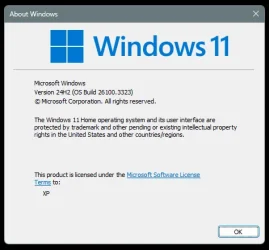
24H2 (OS Build 26100.3323) 3/04//2025
 

Attachments

  • Screenshot 2025-03-04 173105.webp
    Screenshot 2025-03-04 173105.webp
    23.9 KB · Views: 1

My Computer My Computer

At a glance

Windows 11 25H2 (OS Build 26200.8737)Processor: 11th Gen Intel(R) Core(TM) i5-1135...12GBIntel R Iris R XE Graphics family
OS
Windows 11 25H2 (OS Build 26200.8737)
Computer type
Laptop
Manufacturer/Model
Dell
CPU
Processor: 11th Gen Intel(R) Core(TM) i5-1135G7 @ 2.40G
Motherboard
64-bit operating system Dell 0XMF7W
Memory
12GB
Graphics Card(s)
Intel R Iris R XE Graphics family
Sound Card
Cirrus Speakers High Definition Audio
Monitor(s) Displays
Generic PnP monitor
Screen Resolution
1920 x 1080
Hard Drives
NVMe 670p SSDPEKNU512GZ NVMe I NTEL 512GB
Case
cheap
Mouse
Logitech wireless mouse
Internet Speed
16 Mps download
Browser
Google Chrome
Antivirus
Security: Microsoft Defender & Malwarebytes Premium (with browser guard)
Other Info
Dell model: Inspiron 15 3511
Those updates are not updates that you would need to install on a running (online) instance of Windows.

They are only needed for the purpose of updating your ISO image or physical installation media if you are adding updates to those images.

If you are interested in any further details regarding these types of updates, do let me know and I'll be happy to provide you with more detail.
Thank you very much Hsehestedt for explaining about those updates and thank you also for being so helpful in giving more details, what you explained is enough for me.
 

My Computers My Computers

  • At a glance

    W11, always updated with latest buildsAMD Ryzen 9 9900XG.Skill Trident Z5 Neo RGB 32GB Kit DDR5-6000...ASUS Dual GeForce RTX™ 3060 V2 OC Edition 12G...
    OS
    W11, always updated with latest builds
    Computer type
    PC/Desktop
    Manufacturer/Model
    Self-made
    CPU
    AMD Ryzen 9 9900X
    Motherboard
    ASUS TUF Gaming B850-Plus WiFi
    Memory
    G.Skill Trident Z5 Neo RGB 32GB Kit DDR5-6000 CL30 (F5-6000J3038F16GX2-TZ5NR)
    Graphics Card(s)
    ASUS Dual GeForce RTX™ 3060 V2 OC Edition 12GB GDDR6
    Monitor(s) Displays
    Eizo CS240, Calibrated with Datacolr SpyderX
    Screen Resolution
    1920X1200
    Hard Drives
    Crucial T705 SSD 1TB PCIe Gen5 NVMe M.2- SO+Archive
    Lexar EQ790 1TB SSD M.2 2280 PCIe Gen4x4 NVMe 1.4- LR& PS Workspace
    PHIXERO SSD P5000-512GB M.2 2280 PCIe Gen4- Backups
    Seagate ST8000DM04- Photo Archive, SATA HD
    Western Digital WD2002FAEX- Generic archive, SATA HD
    PSU
    Be Quiet 850W Pure Power 12M per Pc ATX
    Case
    Phanteks XT Pro
    Cooling
    Be quiet Pure loop 2 360mm
    Keyboard
    Logitech
    Mouse
    Logitech
    Internet Speed
    D/L-700/800 Mbps; U/L 250/300 Mbps WiFi 7 from motherboard
    Browser
    Edge
    Antivirus
    Avast
    Other Info
    Mostly used for photo retouching software & some video slideshows.
  • At a glance

    W11, always updated with latest buildsAMD Ryzen 9 9900XG.Skill Trident Z5 Neo RGB 32GB Kit DDR5-6000...ASUS Dual GeForce RTX™ 3060 V2 OC Edition 12G...
    Operating System
    W11, always updated with latest builds
    Computer type
    PC/Desktop
    Manufacturer/Model
    Self built
    CPU
    AMD Ryzen 9 9900X
    Motherboard
    ASUS TUF Gaming B850-Plus WiFi
    Memory
    G.Skill Trident Z5 Neo RGB 32GB Kit DDR5-6000 CL30 (F5-6000J3038F16GX2-TZ5NR)
    Graphics card(s)
    ASUS Dual GeForce RTX™ 3060 V2 OC Edition 12GB GDDR6- From System 1
    Monitor(s) Displays
    Eizo CS240, Calibrated with Datacolr SpyderX
    Screen Resolution
    1920X1200
    Hard Drives
    Crucial T705 SSD 1TB PCIe Gen5 NVMe M.2- SO+Archive
    Lexar EQ790 1TB SSD M.2 2280 PCIe Gen4x4 NVMe 1.4- LR& PS Workspace
    PHIXERO SSD P5000-512GB M.2 2280 PCIe Gen4- Backups
    Seagate ST8000DM04- Photo Archive, SATA HD - From System 1
    Western Digital WD2002FAEX- Generic archive, SATA HD - From System 1
    PSU
    Be Quiet 850W Pure Power 12M per Pc ATX
    Case
    Phanteks XT Pro
    Cooling
    Be quiet Pure loop 2 360mm
    Keyboard
    Logitech
    Mouse
    Logitech
    Internet Speed
    D/L-700/800 Mbps; U/L 250/300 Mbps WiFi 7 from motherboard
    Browser
    Edge
    Antivirus
    Avast
    Other Info
    Mostly used for photo retouching software, some video slideshows.
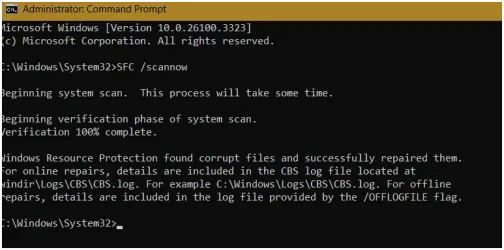
Almost every time I get a KB update (like this one) I have feeling I should do a scan? and, more than 50% of the time. Well I posted a pic...any comments?
 

Attachments

  • Screenshot 2025-03-04 183037.webp
    Screenshot 2025-03-04 183037.webp
    33.4 KB · Views: 1

My Computer My Computer

At a glance

Windows 11 25H2 (OS Build 26200.8737)Processor: 11th Gen Intel(R) Core(TM) i5-1135...12GBIntel R Iris R XE Graphics family
OS
Windows 11 25H2 (OS Build 26200.8737)
Computer type
Laptop
Manufacturer/Model
Dell
CPU
Processor: 11th Gen Intel(R) Core(TM) i5-1135G7 @ 2.40G
Motherboard
64-bit operating system Dell 0XMF7W
Memory
12GB
Graphics Card(s)
Intel R Iris R XE Graphics family
Sound Card
Cirrus Speakers High Definition Audio
Monitor(s) Displays
Generic PnP monitor
Screen Resolution
1920 x 1080
Hard Drives
NVMe 670p SSDPEKNU512GZ NVMe I NTEL 512GB
Case
cheap
Mouse
Logitech wireless mouse
Internet Speed
16 Mps download
Browser
Google Chrome
Antivirus
Security: Microsoft Defender & Malwarebytes Premium (with browser guard)
Other Info
Dell model: Inspiron 15 3511
  • Helpful
Reactions: Gas
Almost every time I get a KB update (like this one) I have feeling I should do a scan? and, more than 50% of the time. Well I posted a pic...any comments?
Thank you, Remover, good to know, better to install only the updates showing in WU as I thought, that is why I asked in this great forum, I was sure that some skilled members like you and Hsehestedt would explain.
 

My Computers My Computers

  • At a glance

    W11, always updated with latest buildsAMD Ryzen 9 9900XG.Skill Trident Z5 Neo RGB 32GB Kit DDR5-6000...ASUS Dual GeForce RTX™ 3060 V2 OC Edition 12G...
    OS
    W11, always updated with latest builds
    Computer type
    PC/Desktop
    Manufacturer/Model
    Self-made
    CPU
    AMD Ryzen 9 9900X
    Motherboard
    ASUS TUF Gaming B850-Plus WiFi
    Memory
    G.Skill Trident Z5 Neo RGB 32GB Kit DDR5-6000 CL30 (F5-6000J3038F16GX2-TZ5NR)
    Graphics Card(s)
    ASUS Dual GeForce RTX™ 3060 V2 OC Edition 12GB GDDR6
    Monitor(s) Displays
    Eizo CS240, Calibrated with Datacolr SpyderX
    Screen Resolution
    1920X1200
    Hard Drives
    Crucial T705 SSD 1TB PCIe Gen5 NVMe M.2- SO+Archive
    Lexar EQ790 1TB SSD M.2 2280 PCIe Gen4x4 NVMe 1.4- LR& PS Workspace
    PHIXERO SSD P5000-512GB M.2 2280 PCIe Gen4- Backups
    Seagate ST8000DM04- Photo Archive, SATA HD
    Western Digital WD2002FAEX- Generic archive, SATA HD
    PSU
    Be Quiet 850W Pure Power 12M per Pc ATX
    Case
    Phanteks XT Pro
    Cooling
    Be quiet Pure loop 2 360mm
    Keyboard
    Logitech
    Mouse
    Logitech
    Internet Speed
    D/L-700/800 Mbps; U/L 250/300 Mbps WiFi 7 from motherboard
    Browser
    Edge
    Antivirus
    Avast
    Other Info
    Mostly used for photo retouching software & some video slideshows.
  • At a glance

    W11, always updated with latest buildsAMD Ryzen 9 9900XG.Skill Trident Z5 Neo RGB 32GB Kit DDR5-6000...ASUS Dual GeForce RTX™ 3060 V2 OC Edition 12G...
    Operating System
    W11, always updated with latest builds
    Computer type
    PC/Desktop
    Manufacturer/Model
    Self built
    CPU
    AMD Ryzen 9 9900X
    Motherboard
    ASUS TUF Gaming B850-Plus WiFi
    Memory
    G.Skill Trident Z5 Neo RGB 32GB Kit DDR5-6000 CL30 (F5-6000J3038F16GX2-TZ5NR)
    Graphics card(s)
    ASUS Dual GeForce RTX™ 3060 V2 OC Edition 12GB GDDR6- From System 1
    Monitor(s) Displays
    Eizo CS240, Calibrated with Datacolr SpyderX
    Screen Resolution
    1920X1200
    Hard Drives
    Crucial T705 SSD 1TB PCIe Gen5 NVMe M.2- SO+Archive
    Lexar EQ790 1TB SSD M.2 2280 PCIe Gen4x4 NVMe 1.4- LR& PS Workspace
    PHIXERO SSD P5000-512GB M.2 2280 PCIe Gen4- Backups
    Seagate ST8000DM04- Photo Archive, SATA HD - From System 1
    Western Digital WD2002FAEX- Generic archive, SATA HD - From System 1
    PSU
    Be Quiet 850W Pure Power 12M per Pc ATX
    Case
    Phanteks XT Pro
    Cooling
    Be quiet Pure loop 2 360mm
    Keyboard
    Logitech
    Mouse
    Logitech
    Internet Speed
    D/L-700/800 Mbps; U/L 250/300 Mbps WiFi 7 from motherboard
    Browser
    Edge
    Antivirus
    Avast
    Other Info
    Mostly used for photo retouching software, some video slideshows.
@Gas I can't explain..sorry... I came here in 2023 from Windows 7 after appx: 15 years & XP before. Windows 11 is still new to me ..... Lets see if I get any replies. ? EDIT: I'm no skilled member....... but, theres lots here.... cheers ....
 
Last edited:

My Computer My Computer

At a glance

Windows 11 25H2 (OS Build 26200.8737)Processor: 11th Gen Intel(R) Core(TM) i5-1135...12GBIntel R Iris R XE Graphics family
OS
Windows 11 25H2 (OS Build 26200.8737)
Computer type
Laptop
Manufacturer/Model
Dell
CPU
Processor: 11th Gen Intel(R) Core(TM) i5-1135G7 @ 2.40G
Motherboard
64-bit operating system Dell 0XMF7W
Memory
12GB
Graphics Card(s)
Intel R Iris R XE Graphics family
Sound Card
Cirrus Speakers High Definition Audio
Monitor(s) Displays
Generic PnP monitor
Screen Resolution
1920 x 1080
Hard Drives
NVMe 670p SSDPEKNU512GZ NVMe I NTEL 512GB
Case
cheap
Mouse
Logitech wireless mouse
Internet Speed
16 Mps download
Browser
Google Chrome
Antivirus
Security: Microsoft Defender & Malwarebytes Premium (with browser guard)
Other Info
Dell model: Inspiron 15 3511
Finally showed up in my Windows Update. Installed fairly quickly and SFC found no integrity violations. Looks to be running fine and smoothly so far.
 

My Computer My Computer

At a glance

Windows 11 Pro x64 25H2 26200 6899Intel iT-14700F 5270MHz32GB - 2x G Skill F5-6400J3239G16ASUS Phoenix AMD Radeon RX550
OS
Windows 11 Pro x64 25H2 26200 6899
Computer type
PC/Desktop
Manufacturer/Model
Home made
CPU
Intel iT-14700F 5270MHz
Motherboard
ASUS ROG STRIX Z690-F Gaming WiFi - FW 4101
Memory
32GB - 2x G Skill F5-6400J3239G16
Graphics Card(s)
ASUS Phoenix AMD Radeon RX550
Monitor(s) Displays
Asus PA329Q
Screen Resolution
3840x2160, Custom scaling is 130.
Hard Drives
Samsung 990 PRO 512GB
4x Samsung 870 EVO 4TB @ RAID 10
PSU
Corsair HX-850i
Case
Fractal Design - Define 7 XL
Cooling
Thermalright Phantom Spirit 120 SE CPU Air Cooler, 4x Noctua NF-A12x25 Case Fans
Keyboard
Logitech MX Keys
Mouse
Logitech MX Ergo Trackball
Gradual rollout of features in Windows 11 24H2 Build 26100.3323.

#CFR Key: 2224106123, 372314253 > [Task Manager] New! We are beginning to roll out a change to the way Task Manager calculates CPU utilization for the Processes, Performance, and Users pages. Task Manager will now use the standard metrics to display CPU workload consistently across all pages and aligning with industry standards and third-party tools. For backward compatibility, a new optional column called CPU Utility is available (hidden by default) on the Details tab showing the previous CPU value used on the Processes page.

0aZaN3D.png


Code:
Windows Registry Editor Version 5.00

[HKEY_LOCAL_MACHINE\SYSTEM\ControlSet001\Control\FeatureManagement\Overrides\0]

[HKEY_LOCAL_MACHINE\SYSTEM\ControlSet001\Control\FeatureManagement\Overrides\0\2224106123]
"EnabledState"=dword:00000002
"EnabledStateOptions"=dword:00000000

[HKEY_LOCAL_MACHINE\SYSTEM\ControlSet001\Control\FeatureManagement\Overrides\0\372314253]
"EnabledState"=dword:00000002
"EnabledStateOptions"=dword:00000000

Gradual rollout of features in Windows 11 24H2 Build 26100.3194.

#CFR Key: 1798011530 > [Taskbar] New! This update improves the previews that show when your cursor hovers over apps on the taskbar. The update also improves their animations.

Code:
Windows Registry Editor Version 5.00

[HKEY_LOCAL_MACHINE\SYSTEM\ControlSet001\Control\FeatureManagement\Overrides\0]

[HKEY_LOCAL_MACHINE\SYSTEM\ControlSet001\Control\FeatureManagement\Overrides\0\1798011530]
"EnabledState"=dword:00000002
"EnabledStateOptions"=dword:00000000

#CFR Key: 156965516, 1853569164, 3870238861 > [Taskbar] New! Show jump list when hovering on inactive taskbar apps.

Code:
Windows Registry Editor Version 5.00

[HKEY_LOCAL_MACHINE\SYSTEM\ControlSet001\Control\FeatureManagement\Overrides\0]

[HKEY_LOCAL_MACHINE\SYSTEM\ControlSet001\Control\FeatureManagement\Overrides\0\156965516]
"EnabledState"=dword:00000002
"EnabledStateOptions"=dword:00000000

[HKEY_LOCAL_MACHINE\SYSTEM\ControlSet001\Control\FeatureManagement\Overrides\0\1853569164]
"EnabledState"=dword:00000002
"EnabledStateOptions"=dword:00000000

[HKEY_LOCAL_MACHINE\SYSTEM\ControlSet001\Control\FeatureManagement\Overrides\0\3870238861]
"EnabledState"=dword:00000002
"EnabledStateOptions"=dword:00000000

#CFR Key: 1853569164, 3058906765 > New! During text entry, type Windows logo key + . (period). The emoji keyboard will appear. Select an emoji with the mouse, or keep typing to search through the available emojis for one you like.

Code:
Windows Registry Editor Version 5.00

[HKEY_LOCAL_MACHINE\SYSTEM\ControlSet001\Control\FeatureManagement\Overrides\0]

[HKEY_LOCAL_MACHINE\SYSTEM\ControlSet001\Control\FeatureManagement\Overrides\0\1853569164]
"EnabledState"=dword:00000002
"EnabledStateOptions"=dword:00000000

[HKEY_LOCAL_MACHINE\SYSTEM\ControlSet001\Control\FeatureManagement\Overrides\0\3058906765]
"EnabledState"=dword:00000002
"EnabledStateOptions"=dword:00000000

#CFR Key: 1853569164, 3231150730 > [Taskbar] New! Show smaller taskbar icons" option in the Settings app.

Code:
Windows Registry Editor Version 5.00

[HKEY_LOCAL_MACHINE\SYSTEM\ControlSet001\Control\FeatureManagement\Overrides\0]

[HKEY_LOCAL_MACHINE\SYSTEM\ControlSet001\Control\FeatureManagement\Overrides\0\1853569164]
"EnabledState"=dword:00000002
"EnabledStateOptions"=dword:00000000

[HKEY_LOCAL_MACHINE\SYSTEM\ControlSet001\Control\FeatureManagement\Overrides\0\3231150730]
"EnabledState"=dword:00000002
"EnabledStateOptions"=dword:00000000

#CFR Key: 1507140749, 3037514383 > [File Explorer] New! Opening new folders in a new tab instead of creating additional windows.

Code:
Windows Registry Editor Version 5.00

[HKEY_LOCAL_MACHINE\SYSTEM\ControlSet001\Control\FeatureManagement\Overrides\0]

[HKEY_LOCAL_MACHINE\SYSTEM\ControlSet001\Control\FeatureManagement\Overrides\0\1507140749]
"EnabledState"=dword:00000002
"EnabledStateOptions"=dword:00000000

[HKEY_LOCAL_MACHINE\SYSTEM\ControlSet001\Control\FeatureManagement\Overrides\0\3037514383]
"EnabledState"=dword:00000002
"EnabledStateOptions"=dword:00000000

How do you use these, tried to make reg files, but they refuse to import
 

My Computers My Computers

  • At a glance

    Windows 11 25H2Intel i9 14900KF64GB Corsair Vengeance RGBMSI 4090 Suprim X
    OS
    Windows 11 25H2
    Computer type
    PC/Desktop
    Manufacturer/Model
    Custom Built
    CPU
    Intel i9 14900KF
    Motherboard
    ASUS Z790 ProArt Creator WiFi
    Memory
    64GB Corsair Vengeance RGB
    Graphics Card(s)
    MSI 4090 Suprim X
    Sound Card
    Onboard
    Monitor(s) Displays
    1 x Asus 24". 1 x Asus 32"
    Screen Resolution
    1920 x 1080 & 2560 x 1440
    Hard Drives
    Multiple
    PSU
    Corsair 1200HX
    Case
    Corsair 7000D RGB
    Cooling
    Corsair H150I Capellix XT
    Keyboard
    Corsair K70 RGB PRO
    Mouse
    Corsair M55 RGB Pro
    Internet Speed
    1000Mbps
    Browser
    Edge
    Antivirus
    Windows Default
  • At a glance

    Windows 11 25H2Intel i7 6800K32GB DDR4 (Corsair)ASUS GTX 1080ti
    Operating System
    Windows 11 25H2
    Computer type
    PC/Desktop
    Manufacturer/Model
    Custom Built
    CPU
    Intel i7 6800K
    Motherboard
    ASUS Z99 Deluxe
    Memory
    32GB DDR4 (Corsair)
    Graphics card(s)
    ASUS GTX 1080ti
    Sound Card
    Onboard
    Monitor(s) Displays
    1x Viewsonic 24" 1x LG 19"
    Screen Resolution
    1920 x 1080 & 1600 x 900
    Hard Drives
    3 x SATA SSD
    PSU
    650W Gigabyte Bronze
    Case
    Coolermaster HAF-X
    Cooling
    Noctua NH-15 Chroma black
    Keyboard
    Generic RGB
    Mouse
    Microsoft Basic
    Internet Speed
    1000Mbps
    Browser
    Edge
    Antivirus
    Windows Default
Well, it finally showed up in WU for me.. installed fairly fast.


Image1.webp

Image2.webp

And when I run either of these commands, I get the Bitdefender error shown below.

Image1.webp
 
Last edited:

My Computers My Computers

  • At a glance

    Win 11 Home ♦♦♦26200.8737 ♦♦♦♦♦♦♦25H2AMD Ryzen 7 3700XG.Skill (F4-3200C14D-16GTZKW)EVGA RTX 2070 (08G-P4-2171-KR)
    OS
    Win 11 Home ♦♦♦26200.8737 ♦♦♦♦♦♦♦25H2
    Computer type
    PC/Desktop
    Manufacturer/Model
    Built by Ghot® [May 2020]
    CPU
    AMD Ryzen 7 3700X
    Motherboard
    Asus Pro WS X570-ACE (BIOS 5302)
    Memory
    G.Skill (F4-3200C14D-16GTZKW)
    Graphics Card(s)
    EVGA RTX 2070 (08G-P4-2171-KR)
    Sound Card
    Realtek ALC1220P / ALC S1220A
    Monitor(s) Displays
    Dell U3011 30"
    Screen Resolution
    2560 x 1600
    Hard Drives
    2x Samsung 860 EVO 500GB,
    WD 4TB Black FZBX - SATA III,
    WD 8TB Black FZBX - SATA III,
    DRW-24B1ST CD/DVD Burner
    PSU
    PC Power & Cooling 750W Quad EPS12V
    Case
    Cooler Master ATCS 840 Tower
    Cooling
    CM Hyper 212 EVO (push/pull)
    Keyboard
    Ducky DK9008 Shine II Blue LED
    Mouse
    Logitech Optical M-100
    Internet Speed
    300/300
    Browser
    Firefox (latest)
    Antivirus
    Bitdefender Total Security
    Other Info
    Speakers: Klipsch Pro Media 2.1
  • At a glance

    Windows XP Pro 32bit w/SP3AMD Athlon 64 X2 5000+ (OC'd @ 3.2Ghz)TWIN2X2048-6400C4DHX (2 x 1GB, DDR2 800)EVGA 256-P2-N758-TR GeForce 8600GT SSC
    Operating System
    Windows XP Pro 32bit w/SP3
    Computer type
    PC/Desktop
    Manufacturer/Model
    Built by Ghot® (not in use)
    CPU
    AMD Athlon 64 X2 5000+ (OC'd @ 3.2Ghz)
    Motherboard
    ASUS M2N32-SLI Deluxe Wireless Edition
    Memory
    TWIN2X2048-6400C4DHX (2 x 1GB, DDR2 800)
    Graphics card(s)
    EVGA 256-P2-N758-TR GeForce 8600GT SSC
    Sound Card
    Onboard
    Monitor(s) Displays
    ViewSonic G90FB Black 19" Professional (CRT)
    Screen Resolution
    up to 2048 x 1536
    Hard Drives
    WD 36GB 10,000rpm Raptor SATA
    Seagate 80GB 7200rpm SATA
    Lite-On LTR-52246S CD/RW
    Lite-On LH-18A1P CD/DVD Burner
    PSU
    PC Power & Cooling Silencer 750 Quad EPS12V
    Case
    Generic Beige case, 80mm fans
    Cooling
    ZALMAN 9500A 92mm CPU Cooler
    Keyboard
    Logitech Classic Keybooard 200
    Mouse
    Logitech Optical M-BT96a
    Internet Speed
    300/300
    Browser
    Firefox 3.x ??
    Antivirus
    Symantec (Norton)
    Other Info
    Still assembled, still runs. Haven't turned it on for 15 years?
  • Like
Reactions: Gas

Latest Support Threads

Back
Top Bottom