Insider KB5055613 Windows 11 Insider Beta build 26120.3863 (24H2) - April 11


UPDATE 4/21:


 Windows Blogs:

Hello Windows Insiders, today we are releasing Windows 11 Insider Preview Build 26120.3863 (KB5055613) to the Beta Channel for Windows Insiders on Windows 11, version 24H2.

Changes in Beta Channel builds and updates are documented in two buckets: new features, improvements, and fixes that are being gradually rolled out for Insiders who have turned on the toggle to get the latest updates as they are available (via Settings > Windows Update*) and then new features, improvements, and fixes rolling out to everyone in the Beta Channel. For more information, see the Reminders section at the bottom of this blog post.


New Copilot+ PC experiences

Find the settings you want more easily with the Windows search box

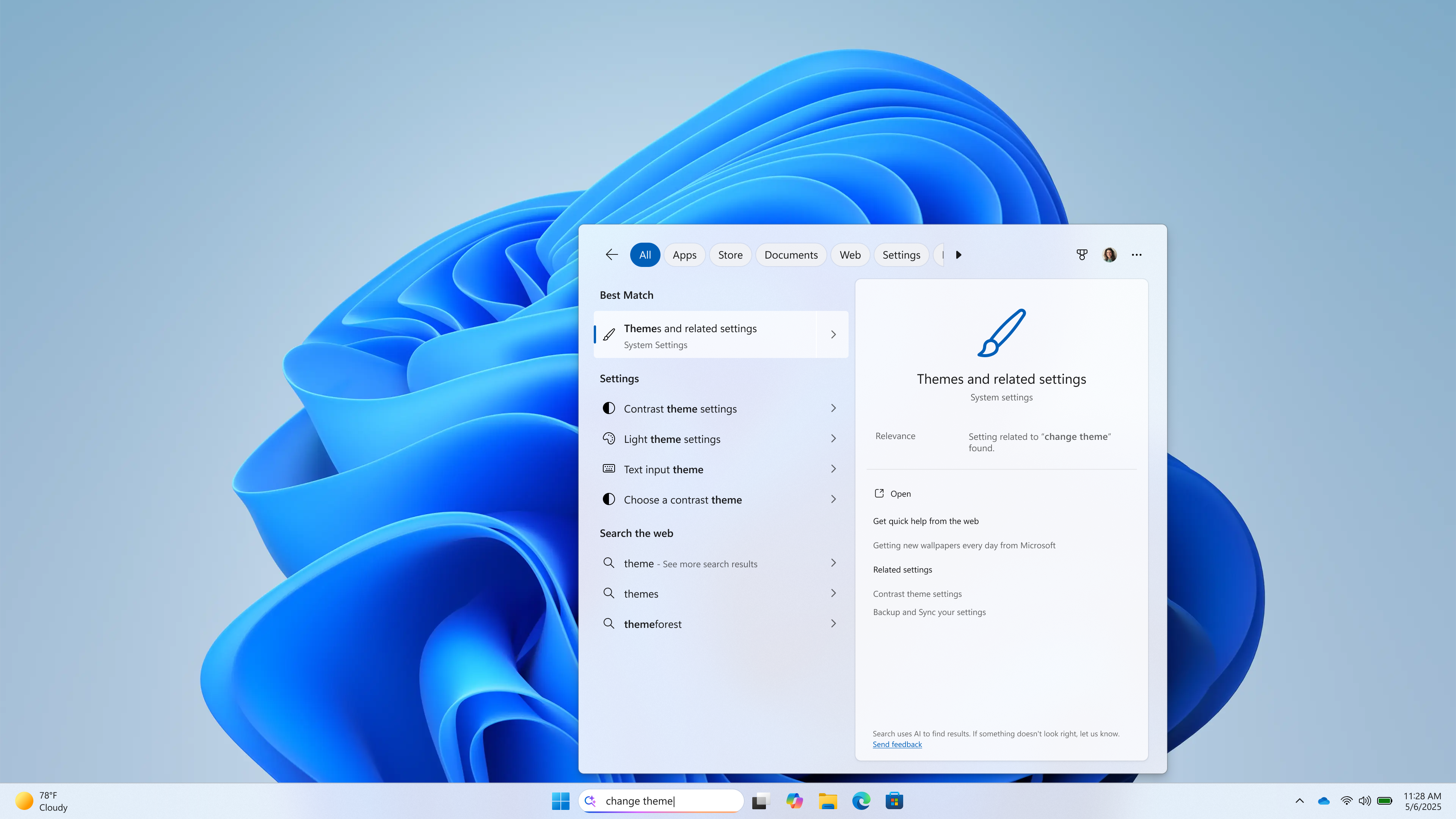
As part of improving Windows Search on Copilot+ PCs, we’re beginning to roll out the ability to type a setting you’re looking for in the Windows search box on your taskbar without needing to remember the exact setting name. For example, you can use your own words to find settings like “change my theme” or “about my PC”. You no longer need to remember the exact setting name you are looking for. Thanks to the power of the 40+ TOPS NPU onboard Copilot+ PCs, these search improvements work even when you’re not connected to the internet. You can learn more about semantic search on Copilot + PCs here.


Windows search box on the taskbar showing a semantic settings search.

FEEDBACK for Windows Taskbar Search: Please file feedback in Feedback Hub (WIN + F) under Desktop Environment > Search.

Making visual content more accessible with image descriptions in Narrator

We are enhancing digital accessibility with the ability to get rich, detailed descriptions of images, charts, graphs in Narrator by using the power of AI on Copilot+ PCs. In today’s digital world, images are everywhere—on websites, apps, and documents. But for blind and low-vision users, many of these visuals remain inaccessible due to missing or inadequate alt text.

With this new feature that is beginning to roll out, Narrator will now generate more richer image descriptions on your Copilot+ PC. Simply press Narrator key + Ctrl + D and Narrator will read out a contextual description of the image describing people, objects, colours, text, and numbers from the image. On non-Copilot+ PCs, this experience will continue to give you very basic image descriptions.

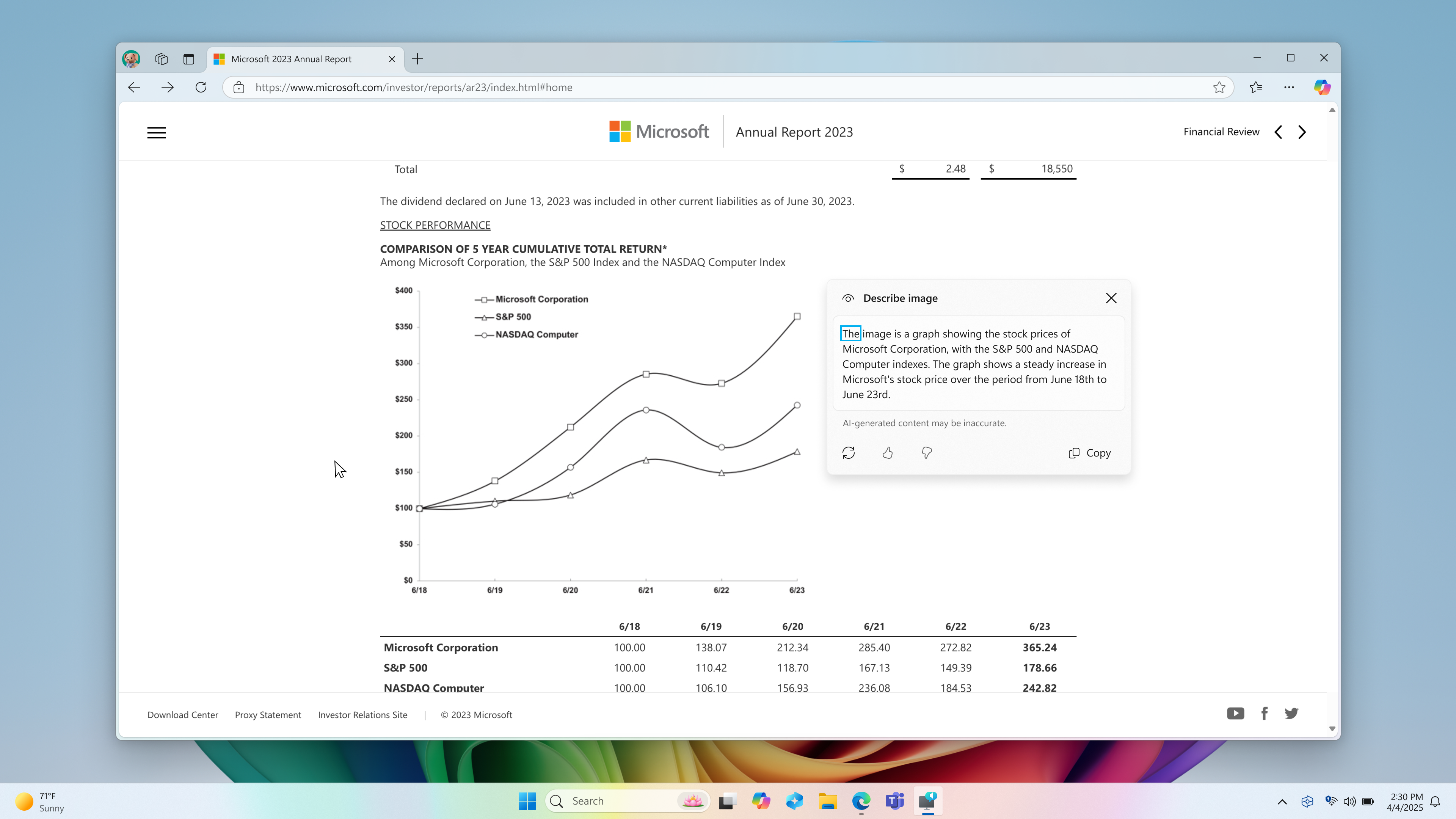
For example, for an image about stock performance, users will get the following detailed description. The image is a graph showing the stock prices of Microsoft Corporation, with the S&P 500 and NASDAQ Computer indexes. The graph shows a steady increase in Microsoft’s stock price over the period from June 18th to June 23rd.

Screenshot of Edge browser containing an image of “stock performance graph” with “Describe image” window open next to it showing the description of the image.

The window also contains regenerate, like, dislike and copy button at the bottom.

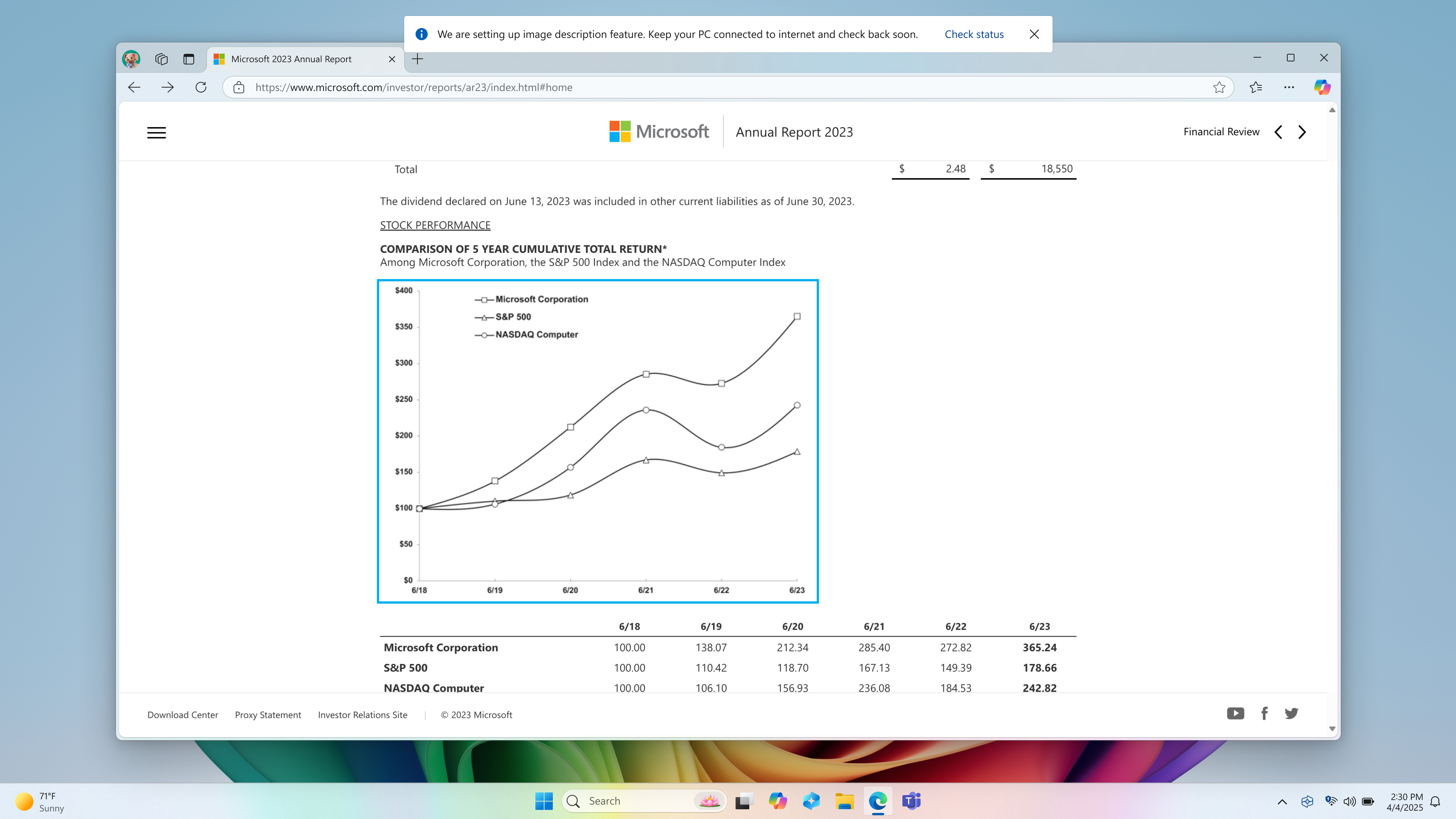
Screenshot of Edge browser with Narrator’s focus on an image of graph. There’s an info bar on top of the screen which says, “We are setting up image description feature. Keep your PC connected to internet and check back soon.” along with a “Check status” button.

This feature is currently available on Snapdragon-powered Copilot+ PCs, with support for AMD and Intel-powered Copilot+ PCs coming soon. To turn Narrator on, you can press “Ctrl + Windows key + Enter” on your PC or search for “Narrator” in Windows search box. When you try the image descriptions feature for the first time using Narrator Key + Ctrl + D, we download the models required for getting image descriptions. You can check the download status via Settings > Windows update.

If you are new to Narrator, you can find more information and learn about using Narrator from the complete guide to Narrator.

Also check out frequently asked questions about rich image descriptions in Narrator here.

FEEDBACK: Please file feedback in Feedback Hub (WIN + F) under Accessibility > Narrator.

Changes and Improvements gradually being rolled out to the Beta Channel with toggle on*

[Widgets]

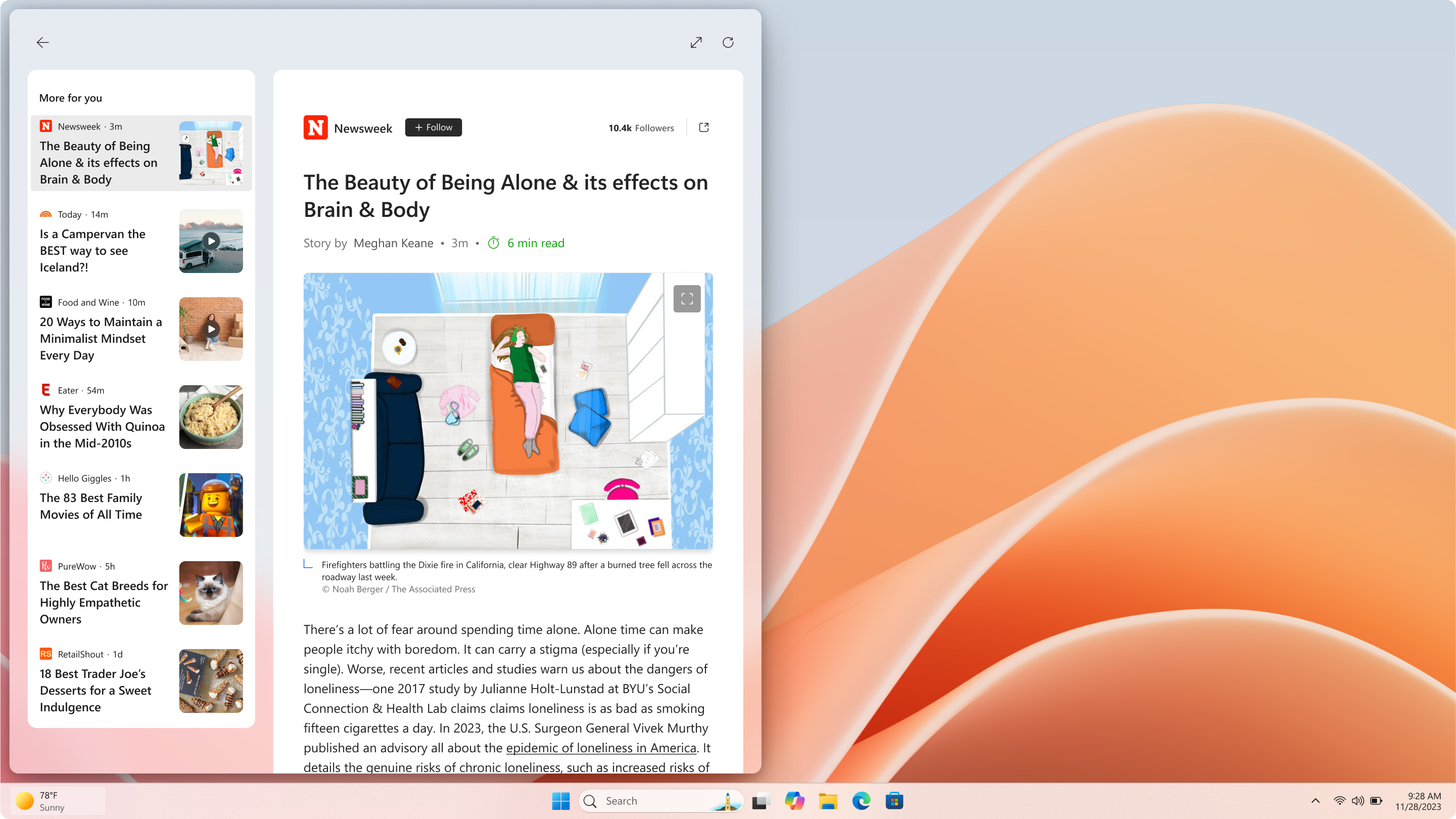
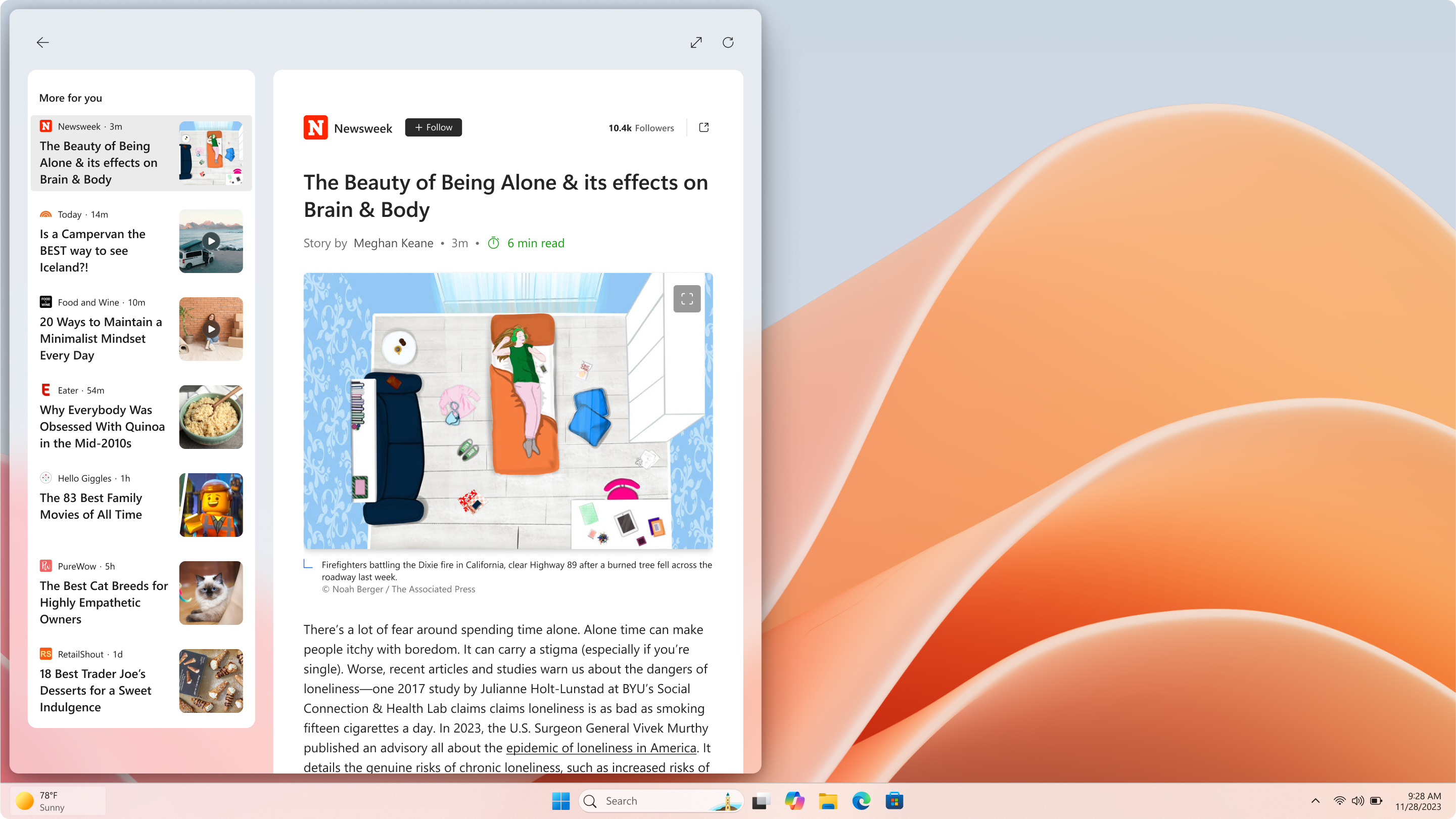
  • We are trying out the ability to read content such as full articles, slideshows, and videos directly within your MSN feed in the widgets board in Windows 11. Try it out and let us know what you think by using the feedback button at the top of your widgets board. As a reminder, you can manage whether your MSN feed is shown in the widgets board or not directly within the widget settings. We are beginning to roll this change out to Windows Insiders across all channels.


    Full article shown directly in the MSN feed in the widgets board.
    Full article shown directly in the MSN feed in the widgets board.
The following improvements are for Windows Insiders in the European Economic Area (EEA) with the new lock screen widgets experience (previously referred to as “Weather and more”):
  • There are some new updates to the new Widgets on Lock experience. In addition to accessibility and craftsmanship improvements, the Lock screen weather widget now supports customization. To configure your weather widget, go to Settings > Personalization > Lock screen and click the “Customize widget” option from the weather widget more options menu. More widgets will be customizable in the future.

Fixes gradually being rolled out to the Beta Channel with toggle on*

[Recall (Preview)]

The following fixes are rolling out for Recall on Copilot+ PCs:
  • Fixed an issue which could cause Settings to crash when adding an app to filter on under Privacy & Security > Recall & Snapshots.

[File Explorer]

  • Fixed an issue causing File Explorer Home to crash for some Insiders after the latest flights.
  • Fixed an issue where the Organize and New Folder options might not be visible in the Save Dialog when using dark mode.

[Taskbar]

  • Fixed an issue which was causing app icons in the taskbar to become unexpectedly oversized in recent flights after disconnecting from an external display and some other cases.

[Desktop icons]

  • Updated the logic for apps pinned to the desktop, so that packaged apps no longer show an accent colored backplate (for example, if you were to drag and drop Snipping Tool from the apps list in Start to the desktop). In doing this, the icons should be bigger and easier to see now. Please note, you may need to create new shortcuts for this to take effect, if you already have something on your desktop.

[Input]

  • If your touchpad wasn’t working with the previous flight, that should be resolved now.

[Graphics]

  • Fixed an issue where when using CopyPixels the pixels may be unexpectedly inverted in certain cases.
  • Fixed an issue where some JPG images weren’t displaying, although they could display correctly on older builds.

Fixes for everyone in the Beta Channel

[General]

  • We fixed the issue causing Windows Sandbox to not work in the last flight.

Known issues

[General]

  • [REMINDER] When joining the Beta Channels on Windows 11, version 24H2 – you will be offered Build 26120.3360 After installing that update, you will be offered the most recent update available. This 2-hop experience to get onto the latest 24H2-based flight in the Beta Channel is just temporary.
  • After you do a PC reset under Settings > System > Recovery, your build version may incorrectly show as Build 26100 instead of Build 26120. This will not prevent you from getting future Beta Channel updates, which will resolve this issue.
  • Quick Assist will not work for non-administrator users.
  • [NEW] After installing this update, Windows Recovery Environment (WinRE) may not work, and you may not be able to use the “Fix problems using Windows Update” option under Settings > Recovery. These issues will be fixed in another update soon.
  • [NEW] Some apps may appear blank after installing this update. Closing and re-launching the app may correct the issue.
  • [NEW] Some apps like Spotify may fail to launch after installing this update. If you uninstall the update, these apps should launch again. We’re working on a fix. Be sure to file feedback if you hit this before uninstalling the update!

[Recall (Preview)]

  • [REMINDER] You are always in control and can always choose to remove Recall anytime via “Turn Windows features on or off”. Removing Recall will delete entry points and binaries. Like any feature, Windows sometimes keeps temporary copies of binaries for serviceability. These Recall binaries are not executable and are eventually removed over time.
  • [REMINDER] Make sure you update Microsoft 365 apps to the latest version so you can jump back into specific documents.
The following known issues will be fixed in future updates to Windows Insiders:
  • Some Insiders may experience an issue where Recall is unable to automatically save snapshots, and the setting can’t be turned on in Settings. We’re working on a fix for this issue.

[Click to Do (Preview)]

  • [REMINDER] The intelligent text actions are now locally moderated to ensure the safety of prompts and responses and has replaced the cloud endpoint. Now that these intelligent text actions are fully local, they are also available in Click to Do in Recall.
  • [REMINDER] If any of your actions on image entities are no longer appearing, please ensure you have the latest updates for the Photos and Paint app from the Microsoft Store.
The following known issues will be fixed in future updates to Windows Insiders:
  • In small cases, Click to Do may fail to launch. Trying again should get Click to Do to launch.
  • There is an issue where images that are used with Click to Do image actions are stuck in your temp folder on your PC. This issue will be fixed in the next flight. You can manually clear your temp folder under C:\Users\{username}\AppData\Local\Temp.
  • We’re investigating reports that the Click to Do icon is incorrectly showing up on non-Copilot+ PCs. If you happen to see this on your non-Copilot+ PC, please file feedback in Feedback Hub and let us know.

[Improved Windows Search]

  • [REMINDER] For improved Windows Search on Copilot+ PCs, it is recommended that you plug in your Copilot+ PC for the initial search indexing to get completed. You can check your search indexing status under Settings > Privacy & security > Searching Windows.

[Task Manager]

  • [NEW] Search and other options such as filtering in Task Manager does not work.
  • After adding the new CPU Utility column, you may notice that System Idle Process always shows as 0.
  • The CPU graphs in the Performance page are still using the old CPU utility calculations.

Reminders for Windows Insiders in the Beta Channel

  • Windows Insiders in the Beta Channel on Windows 11, version 24H2 will receive updates based on Windows 11, version 24H2 via an enablement package (Build 26120.xxxx).
  • Updates delivered to the Beta Channel are in a format that offers a preview of enhancements to servicing technology on Windows 11, version 24H2. To learn more, see Introducing Windows 11 checkpoint cumulative updates | Windows IT Pro Blog.
  • Many features in the Beta Channel are rolled out using Controlled Feature Rollout technology, starting with a subset of Insiders and ramping up over time as we monitor feedback to see how they land before pushing them out to everyone in this channel.
  • For Windows Insiders in the Beta Channel who want to be the first to get features gradually rolled out to you, you can turn ON the toggle to get the latest updates as they are available via Settings > Windows Update*. Over time, we will increase the rollouts of features to everyone with the toggle turned on. Should you keep this toggle off, new features will gradually be rolled out to your PC over time once they are ready.
  • Features and experiences included in these builds may never get released as we try out different concepts and get feedback. Features may change over time, be removed, or replaced and never get released beyond Windows Insiders. Some of these features and experiences could show up in future Windows releases when they’re ready.
  • Some features in active development we preview with Windows Insiders may not be fully localized and localization will happen over time as features are finalized. As you see issues with localization in your language, please report those issues to us via Feedback Hub.
  • Please note that some accessibility features may not work with features like Recall and Click to Do while in preview with Windows Insiders.
  • Because the Dev and Beta Channels represent parallel development paths from our engineers, there may be cases where features and experiences show up in the Beta Channel first.
  • Check out Flight Hub for a complete look at what build is in which Insider channel.
Thanks,
Amanda & Brandon


 Source:


Check Windows Updates


UUP Dump:

64-bit ISO download:

ARM64 ISO download:

 
Last edited:
KB5055613.webp
 

My Computers My Computers

  • At a glance

    Windows 11 Pro for WorkstationsIntel i7-8700K 5 GHz64 GB (4x16GB) G.SKILL TridentZ RGB DDR4 3600...ASUS ROG-STRIX-GTX1080TI-O11G-GAMING (11GB GD...
    OS
    Windows 11 Pro for Workstations
    Computer type
    PC/Desktop
    Manufacturer/Model
    Custom self build
    CPU
    Intel i7-8700K 5 GHz
    Motherboard
    ASUS ROG Maximus XI Formula Z390
    Memory
    64 GB (4x16GB) G.SKILL TridentZ RGB DDR4 3600 MHz (F4-3600C18D-32GTZR)
    Graphics Card(s)
    ASUS ROG-STRIX-GTX1080TI-O11G-GAMING (11GB GDDR5X)
    Sound Card
    Integrated Digital Audio (S/PDIF)
    Monitor(s) Displays
    2 x Samsung Odyssey G75 27"
    Screen Resolution
    2560x1440
    Hard Drives
    1TB Samsung 990 PRO M.2,
    4TB Samsung 990 PRO M.2,
    TerraMaster F8 SSD Plus NAS
    PSU
    Seasonic Prime Titanium 850W
    Case
    Thermaltake Core P3 wall mounted
    Cooling
    Corsair Hydro H115i
    Keyboard
    Amazon Basics Wired Full Keyboard MD005
    Mouse
    Logitech MX Master 4
    Internet Speed
    2 Gbps Download and 100 Mbps Upload
    Browser
    Chrome and Edge
    Antivirus
    Microsoft Defender
    Other Info
    Logitech Z625 speaker system,
    Logitech BRIO 4K Pro webcam,
    HP Color LaserJet Pro MFP M477fdn,
    CyberPower CP1500PFCLCD
    Galaxy S23 Plus phone
  • At a glance

    Windows 11 ProSnapdragon X Elite (12 core) 3.42 GHz16 GB LPDDR5x-7467 MHz
    Operating System
    Windows 11 Pro
    Computer type
    Laptop
    Manufacturer/Model
    Surface Laptop 7 Copilot+ PC
    CPU
    Snapdragon X Elite (12 core) 3.42 GHz
    Memory
    16 GB LPDDR5x-7467 MHz
    Monitor(s) Displays
    15" HDR
    Screen Resolution
    2496 x 1664
    Hard Drives
    1 TB SSD
    Internet Speed
    Wi-Fi 7 and Bluetooth 5.4
    Browser
    Chrome and Edge
    Antivirus
    Microsoft Defender
Installed fine on my desktop and installing now on my primary laptop.
 

My Computers My Computers

  • At a glance

    Windows 11 ProIntel Core i9 14900k, Intel UHD 770 integrated32gb G.Skill Trident Z5 7200Gigabyte RTX 4090 Gaming OC
    OS
    Windows 11 Pro
    Computer type
    PC/Desktop
    Manufacturer/Model
    Self Built
    CPU
    Intel Core i9 14900k, Intel UHD 770 integrated
    Motherboard
    Gigabyte Z790 Aorus Master X
    Memory
    32gb G.Skill Trident Z5 7200
    Graphics Card(s)
    Gigabyte RTX 4090 Gaming OC
    Sound Card
    EVGA Nu Audio, Razer Kraken V3 Pro, Realtek Onboard
    Monitor(s) Displays
    Dell U4025QW nano IPS monitor, Samsung Odyssey G75F, Wisecoco 12.6" IPS sensor panel
    Screen Resolution
    5120X2160 x 2 1920x515
    Hard Drives
    WD Black SN8100, Samsung 990 Pro x 3, WD BLACK SN850x, WD Black 8tb HD
    PSU
    FSP Hydro PTM Pro 1350w
    Case
    Thermaltake Level 20 XT
    Cooling
    ARCTIC Liquid Freezer III 420 ARGB in push/pull, Antec Prism X 120mm ARGB Fans x 15
    Keyboard
    Razer Blackwidow V4 Pro
    Mouse
    Razer Basilik V3 Pro on Razer Firefly V2 mouse pad.
    Internet Speed
    950 Mbps cable primary, 6Mbps secondary vdsl
    Browser
    Chrome primary, FF-Edge-IE secondary
    Antivirus
    Norton 360 Premium
    Other Info
    I sit on a Libernovo Omni chair.😍 Sound by Fosi Audio DA-2120C pushing Magnat Series 503 bookshelf speakers and a SVS SB-1000 Pro subwoofer.
  • At a glance

    Windows 11 ProIntel 14900HX32gb ddr 5 5600Nvidia RTX 4090 mobile
    Operating System
    Windows 11 Pro
    Computer type
    Laptop
    Manufacturer/Model
    2023 Acer Predator Helios 18
    CPU
    Intel 14900HX
    Motherboard
    factory
    Memory
    32gb ddr 5 5600
    Graphics card(s)
    Nvidia RTX 4090 mobile
    Sound Card
    onboard
    Monitor(s) Displays
    18" 250hz IPS
    Screen Resolution
    2560X1600
    Hard Drives
    Samsung 9100 Pro, 990 Pro
    PSU
    factory 330W
    Case
    factory
    Cooling
    factory
    Keyboard
    individual key argb
    Mouse
    touchpad
    Internet Speed
    WiFi 7, 2.5gb ethernet
    Browser
    Chrome primary, FF-IE and Edge secondary
    Antivirus
    Norton 360 Premium
    Other Info
    Acer will not allow WD Black SN8100 to function in m.2 slot 0 and Crucial T710 ssd's to function in either slot.
Downloading and installing.

1744392627567.webp

1744392977286.webp
Done:

Edition Windows 11 Pro
Version 24H2
Installed on ‎1/‎24/‎2025
OS build 26120.3863
Experience Windows Feature Experience Pack 1000.26100.83.0
 
Last edited:

My Computer My Computer

At a glance

Windows 11 Pro 25H2Intel I9-9900K64GBNVIDIA RTX 2060
OS
Windows 11 Pro 25H2
Computer type
PC/Desktop
Manufacturer/Model
Dell XPS 8930
CPU
Intel I9-9900K
Memory
64GB
Graphics Card(s)
NVIDIA RTX 2060
Sound Card
NVIDIA High Definition Audio
Monitor(s) Displays
4k Samsung
Screen Resolution
3840 x 2160
Hard Drives
512GB NVMe, ADATA SU 800, 2TB HDD
I just noticed the restart reminder on the desktop and checked out the forum. I don't usually get the updates here in the UK until the next day.
Here goes the restart. About 4 minutes including logging back in and seems ok.
 

My Computers My Computers

  • At a glance

    W11 pro betaAthlon 3000G16Gb Crucial DDR4 2400onboard cpu
    OS
    W11 pro beta
    Computer type
    PC/Desktop
    Manufacturer/Model
    home built
    CPU
    Athlon 3000G
    Motherboard
    Asrock A320M-HDV r4.0
    Memory
    16Gb Crucial DDR4 2400
    Graphics Card(s)
    onboard cpu
    Sound Card
    onboard
    Monitor(s) Displays
    LG 22EA53
    Screen Resolution
    1920 x 1080
    Hard Drives
    WD black SN750 M2 500Gb
    PSU
    500W Seasonic core 80+gold non modular
    Case
    Fractal Design Define R2
    Cooling
    front 2 x 120mm rear 100mm stock psu
    Internet Speed
    135/20
    Browser
    Firefox and edge
    Antivirus
    Windows Security and free Malwarebytes
  • At a glance

    W11 pro 64 beta (from W10 pro system builder ...Ryzen 7 5700G4 x 8Gb Corsair Vengeance LPX 3000 DDR4onboard cpu
    Operating System
    W11 pro 64 beta (from W10 pro system builder pack)
    Computer type
    PC/Desktop
    Manufacturer/Model
    homebuilt
    CPU
    Ryzen 7 5700G
    Motherboard
    MSI B450 tomahawk max II
    Memory
    4 x 8Gb Corsair Vengeance LPX 3000 DDR4
    Graphics card(s)
    onboard cpu
    Sound Card
    motherboard
    Monitor(s) Displays
    AOC 27
    Screen Resolution
    2560 x 1440
    Hard Drives
    WD 1Tb Black M2 SN850X on Asus hyper M2 X16 max V2 card
    PSU
    Be Quiet 400 semi modular 80+gold
    Case
    Coolermaster Silencio 650
    Cooling
    140mm front, 120 rear Akasa Vegas Chroma AM
    Internet Speed
    135/20
    Browser
    edge/Firefox
    Antivirus
    WD plus Malwarebytes free
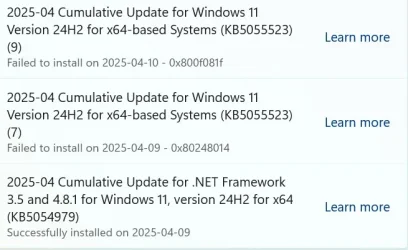
Mine is constantly failing, anyone have any options ?
 

Attachments

  • 2025-04 Cumulative Update for Windows 11 Version 24H2 for x64-based Systems(KB5055523).webp
    2025-04 Cumulative Update for Windows 11 Version 24H2 for x64-based Systems(KB5055523).webp
    35.4 KB · Views: 1
  • Failed to install on ‎2025-‎04-‎10 - 0x800f081f.webp
    Failed to install on ‎2025-‎04-‎10 - 0x800f081f.webp
    30.7 KB · Views: 1

My Computer My Computer

At a glance

Windows 11x64bit
OS
Windows 11x64bit
Computer type
Laptop
Manufacturer/Model
Asus Vivobook S 14 Flip
Done:
2025-04-11 21_43_36-Πληροφορίες_ Windows.webp
 

My Computer My Computer

At a glance

Windows 10Ultra Core Ultra 9 185H32GBIntel Arc
OS
Windows 10
Computer type
Laptop
Manufacturer/Model
Lenovo Yoga 7 Pro
CPU
Ultra Core Ultra 9 185H
Motherboard
Lenovo
Memory
32GB
Graphics Card(s)
Intel Arc
Desktop and both laptops updated without issue.
 

My Computers My Computers

  • At a glance

    Windows 11 ProIntel Core i9 14900k, Intel UHD 770 integrated32gb G.Skill Trident Z5 7200Gigabyte RTX 4090 Gaming OC
    OS
    Windows 11 Pro
    Computer type
    PC/Desktop
    Manufacturer/Model
    Self Built
    CPU
    Intel Core i9 14900k, Intel UHD 770 integrated
    Motherboard
    Gigabyte Z790 Aorus Master X
    Memory
    32gb G.Skill Trident Z5 7200
    Graphics Card(s)
    Gigabyte RTX 4090 Gaming OC
    Sound Card
    EVGA Nu Audio, Razer Kraken V3 Pro, Realtek Onboard
    Monitor(s) Displays
    Dell U4025QW nano IPS monitor, Samsung Odyssey G75F, Wisecoco 12.6" IPS sensor panel
    Screen Resolution
    5120X2160 x 2 1920x515
    Hard Drives
    WD Black SN8100, Samsung 990 Pro x 3, WD BLACK SN850x, WD Black 8tb HD
    PSU
    FSP Hydro PTM Pro 1350w
    Case
    Thermaltake Level 20 XT
    Cooling
    ARCTIC Liquid Freezer III 420 ARGB in push/pull, Antec Prism X 120mm ARGB Fans x 15
    Keyboard
    Razer Blackwidow V4 Pro
    Mouse
    Razer Basilik V3 Pro on Razer Firefly V2 mouse pad.
    Internet Speed
    950 Mbps cable primary, 6Mbps secondary vdsl
    Browser
    Chrome primary, FF-Edge-IE secondary
    Antivirus
    Norton 360 Premium
    Other Info
    I sit on a Libernovo Omni chair.😍 Sound by Fosi Audio DA-2120C pushing Magnat Series 503 bookshelf speakers and a SVS SB-1000 Pro subwoofer.
  • At a glance

    Windows 11 ProIntel 14900HX32gb ddr 5 5600Nvidia RTX 4090 mobile
    Operating System
    Windows 11 Pro
    Computer type
    Laptop
    Manufacturer/Model
    2023 Acer Predator Helios 18
    CPU
    Intel 14900HX
    Motherboard
    factory
    Memory
    32gb ddr 5 5600
    Graphics card(s)
    Nvidia RTX 4090 mobile
    Sound Card
    onboard
    Monitor(s) Displays
    18" 250hz IPS
    Screen Resolution
    2560X1600
    Hard Drives
    Samsung 9100 Pro, 990 Pro
    PSU
    factory 330W
    Case
    factory
    Cooling
    factory
    Keyboard
    individual key argb
    Mouse
    touchpad
    Internet Speed
    WiFi 7, 2.5gb ethernet
    Browser
    Chrome primary, FF-IE and Edge secondary
    Antivirus
    Norton 360 Premium
    Other Info
    Acer will not allow WD Black SN8100 to function in m.2 slot 0 and Crucial T710 ssd's to function in either slot.
Went smoothly for me, 2 laptops had 5 reclaimable packages.
Dism /online /Cleanup-Image /StartComponentCleanup

cleared it up to 0 again. All else fine so far.
 

My Computer My Computer

At a glance

Windows 11Apple M1 Max 10 core/4 CPU assigned to Parall...64GB/24GB assigned to Parallels 17 VMApple 32 core GPU
OS
Windows 11
Computer type
Laptop
Manufacturer/Model
Apple MacBook Pro 16" 2021
CPU
Apple M1 Max 10 core/4 CPU assigned to Parallels 17 VM
Motherboard
Apple Silicon M1 Max
Memory
64GB/24GB assigned to Parallels 17 VM
Graphics Card(s)
Apple 32 core GPU
Sound Card
Apple
Monitor(s) Displays
16.2" Liquid Retina XDR
Screen Resolution
3456-by-2234 native resolution at 254 psi
Hard Drives
4TB SSD
PSU
Apple
Case
Apple
Cooling
Apple
Keyboard
Apple
Mouse
N/A; Apple Trackpad
Internet Speed
1.2Gb/42Gb
Browser
Parallels 17 VM: MS Edge
Antivirus
Parallels 17 VM: MS Defender
1744402742772.webp
 

My Computer My Computer

At a glance

W11 Pro and Insider DevAMD Ryzen 9 7900x2x16GB Kingston 6000MHz, Cl 32 @ 6200MHz Cl30Gigabyte Rx 6600XT Gaming OC 8G Pro
OS
W11 Pro and Insider Dev
Computer type
PC/Desktop
Manufacturer/Model
Home brewed
CPU
AMD Ryzen 9 7900x
Motherboard
ASROCK b650 PRO RS
Memory
2x16GB Kingston 6000MHz, Cl 32 @ 6200MHz Cl30
Graphics Card(s)
Gigabyte Rx 6600XT Gaming OC 8G Pro
Sound Card
MB, Realtek Ac1220p
Monitor(s) Displays
3 x 27"
Screen Resolution
1080p
Hard Drives
Kingston KC3000. 1TBSamsung 970 evo Plus 500GB, Crucial P1 NVMe 1TB, Lexar NVMe 2 TB, Silicon Power M.2 SATA 500GB
PSU
Seasonic 750W
Case
Custom Raidmax
Cooling
Arctic Liquid Freezer III 360mm
Internet Speed
20/19 mbps
Updated ok.
 

My Computers My Computers

  • At a glance

    Win 11 Pro 25H2 Beta 26220.8925AMD Ryzen 7 5700UCrucial 64GB DDR4 SDRAM PC4-25600AMD Radeon Vega Graphics 1.80 GHz - Adrenalin...
    OS
    Win 11 Pro 25H2 Beta 26220.8925
    Computer type
    PC/Desktop
    Manufacturer/Model
    Asus MiniPC PN51-E1
    CPU
    AMD Ryzen 7 5700U
    Motherboard
    Asus PN51-E1 - Bios Version 0505
    Memory
    Crucial 64GB DDR4 SDRAM PC4-25600
    Graphics Card(s)
    AMD Radeon Vega Graphics 1.80 GHz - Adrenalin Edition 23.9.2
    Sound Card
    USB to Sound Blaster Live (24bit External) to Firestone DAC to Event Studio Monitors
    Monitor(s) Displays
    Gigabyte 27" 165 hertz
    Screen Resolution
    2560 x 1440
    Hard Drives
    Samsung SSD 970 EVO Plus 2TB PCIE NVME
    PSU
    65 Watt
    Case
    Asus Mini
    Cooling
    Air
    Keyboard
    Logitech K810
    Mouse
    Logitech MX Master 2S
    Internet Speed
    Telstra Modem Wifi - NBN 50/18
    Browser
    Firefox
    Antivirus
    Microsoft
    Other Info
    This replaced my Linux Notebook. I've used Windows since V2, tried various Linux distros but Windows continues to win for me.
  • At a glance

    Win 11 Home 26H2 26300.8935Core i7-7700HQ @2.8 Ghz16.0 GBNVIDIA GeForce GTX 1060 (6 GB)
    Operating System
    Win 11 Home 26H2 26300.8935
    Computer type
    Laptop
    Manufacturer/Model
    Resistance
    CPU
    Core i7-7700HQ @2.8 Ghz
    Motherboard
    Resistance
    Memory
    16.0 GB
    Graphics card(s)
    NVIDIA GeForce GTX 1060 (6 GB)
    Screen Resolution
    4k
    Hard Drives
    1.8tb
Updated without issues from Build 26120.3671 Beta in a Windows Update based update unless mentioned below:

1744409313043.webp

Windows Recovery Environment (WinRE) updated to 26100.3863 from 26100.3653 which was last updated by 26120.3653 Beta in a Windows Update based update:

1744409429675.webp

which unfortunately is not much use as WinRE might be broken according to the OP:

1744409707127.webp

The following all passed without any complaints unless noted:
Dism /Online /Cleanup-Image /CheckHealth
The component store is repairable.
The operation completed successfully.
*This one is interesting as Dism /Online /Cleanup-Image /ScanHealth claims the opposite with component store has no corruption at all*

Dism /Online /Cleanup-Image /ScanHealth
No component store corruption detected.
The operation completed successfully.

Dism /Online /Cleanup-Image /RestoreHealth
The restore operation completed successfully.
The operation completed successfully.

sfc /scannow
Beginning system scan. This process will take some time.

Beginning verification phase of system scan.
Verification 100% complete.

Windows Resource Protection did not find any integrity violations.

Dism /online /cleanup-image /analyzecomponentstore
The operation completed successfully. which had 10 Reclaimable Packages

Dism /online /cleanup-image /startcomponentcleanup
The operation completed successfully.
*The 100% on this one not real as it goes from 9% to 100% staying at 100% for some time then back to 20% to 100% staying at 100% for some time then back to 60% to 100%*
after the cleaning, it showed 2 Reclaimable Packages when Dism /online /cleanup-image /analyzecomponentstore was ran again.

As noted previously, for Windows 11 24H2 Build 26120.3073 Beta, 26120.3281 Beta, 26120.3291 Beta, 26120.3360 Beta, 26120.3576 Beta, 26120.3585 Beta, 26120.3653 Beta, 26120.3671 Beta, 26120.3863 Beta - the DISM for for /ScanHealth and /RestoreHealth seems to be faster compared to 23H2, /CheckHealth is always instant.

Just like Windows 11 24H2 Build 26120.3073 Beta/26120.3281 Beta, 26120.3291 Beta, 26120.3360 Beta, 26120.3576 Beta, 26120.3585 Beta, 26120.3653 Beta, 26120.3671 Beta, 26120.3863 Beta compared to 23H2 Build 22635.4870 Beta as well as 23H2 Beta Builds in general:
1) It takes a lot longer to load all the startup items
2) CPU % usage is way higher
 

My Computer My Computer

At a glance

WindowsXP/7/8/8.1/10/11,Linux,Android,FreeBSD...Intel® Core™ i7-8750H 8th Gen 2.2Ghz up to 4....64GB using 2x32GB CL16 Mushkin redLine modulesIntel UHD 630 & NVIDIA GeForce GTX 1050 Ti wi...
OS
WindowsXP/7/8/8.1/10/11,Linux,Android,FreeBSD Unix
Computer type
Laptop
Manufacturer/Model
Dell XPS 15 9570
CPU
Intel® Core™ i7-8750H 8th Gen 2.2Ghz up to 4.1Ghz
Motherboard
Dell XPS 15 9570
Memory
64GB using 2x32GB CL16 Mushkin redLine modules
Graphics Card(s)
Intel UHD 630 & NVIDIA GeForce GTX 1050 Ti with 4GB DDR5
Sound Card
Realtek ALC3266-CG
Monitor(s) Displays
15.6" 4K Touch UltraHD 3840x2160 made by Sharp
Screen Resolution
3840x2160 4K UltraHD
Hard Drives
Samsung MZ-V9P4T0B/AM 990 PRO 4TB PCIe®4.0 NVMe™ M.2 SSD was Toshiba KXG60ZNV1T02 NVMe 1TB SSD
PSU
Dell XPS 15 9570
Case
Dell XPS 15 9570
Cooling
Stock
Keyboard
Stock
Mouse
SwitftPoint ProPoint
Internet Speed
Comcast/XFinity 1.44Gbps/42.5Mbps
Browser
Microsoft EDGE (Chromium based) & Google Chrome
Antivirus
Windows Defender that came with Windows
Downloaded on 2 computers without issues, so far. SFC and dism found no errors on either computer.
 
Last edited:

My Computers My Computers

  • At a glance

    windows 10 & 11AMD Ryzen 7X64GbRadeon RX 480 8Gb
    OS
    windows 10 & 11
    Computer type
    PC/Desktop
    Manufacturer/Model
    iBuyPower (special build)
    CPU
    AMD Ryzen 7X
    Motherboard
    Asus Prime x370 Pro
    Memory
    64Gb
    Graphics Card(s)
    Radeon RX 480 8Gb
    Monitor(s) Displays
    Samsung UHD 27 inch
    Screen Resolution
    UHD
    Hard Drives
    3 Samsung 1 TB SSD each; 1 Samsung PCIe M.2 at 2 TB
  • At a glance

    Windows 11 proAMD 9 5900X32 GbNvidia GeForce RTX 3080 Ti 12 GB GDDR6X
    Operating System
    Windows 11 pro
    Computer type
    PC/Desktop
    Manufacturer/Model
    IBuyPower
    CPU
    AMD 9 5900X
    Motherboard
    Asus x570 ROG Crosshair VIII Dark Hero WI-FI 6E ARGB
    Memory
    32 Gb
    Graphics card(s)
    Nvidia GeForce RTX 3080 Ti 12 GB GDDR6X
    Sound Card
    3D PREMIUM surround sound onboard
    Monitor(s) Displays
    Samsung 32 inch UHD curved monitor
    Screen Resolution
    UHD
    Hard Drives
    Samsung 980 pro 2 tb gen 4 NVMe ssd
    PSU
    850 watt consair RM850X
    Case
    Lian Li LANCOOL ONE tempered glass RGB gaming case
    Cooling
    DEEPCOOL GAMERSTORM RGB 240 mm CASTLE 240EX liquid cooler
    Keyboard
    Ares m.2 gaming keyboard
    Mouse
    Ares m.2 gaming optical mouse
    Internet Speed
    450
    Browser
    Firefox / Edge
    Antivirus
    Windows defender
    Other Info
    With all this gaming rig I am not a gamer!
I have updated but phone links to Start menu is now not avalable. In start personalize menu this function is not present.
 

My Computer My Computer

At a glance

windows 11
OS
windows 11
Computer type
Laptop
Manufacturer/Model
hp
[NEW] Some apps like Spotify may fail to launch after installing this update. If you uninstall the update, these apps should launch again. We’re working on a fix. Be sure to file feedback if you hit this before uninstalling the update!
 

My Computers My Computers

  • At a glance

    Windows 11 Pro for WorkstationsIntel i7-8700K 5 GHz64 GB (4x16GB) G.SKILL TridentZ RGB DDR4 3600...ASUS ROG-STRIX-GTX1080TI-O11G-GAMING (11GB GD...
    OS
    Windows 11 Pro for Workstations
    Computer type
    PC/Desktop
    Manufacturer/Model
    Custom self build
    CPU
    Intel i7-8700K 5 GHz
    Motherboard
    ASUS ROG Maximus XI Formula Z390
    Memory
    64 GB (4x16GB) G.SKILL TridentZ RGB DDR4 3600 MHz (F4-3600C18D-32GTZR)
    Graphics Card(s)
    ASUS ROG-STRIX-GTX1080TI-O11G-GAMING (11GB GDDR5X)
    Sound Card
    Integrated Digital Audio (S/PDIF)
    Monitor(s) Displays
    2 x Samsung Odyssey G75 27"
    Screen Resolution
    2560x1440
    Hard Drives
    1TB Samsung 990 PRO M.2,
    4TB Samsung 990 PRO M.2,
    TerraMaster F8 SSD Plus NAS
    PSU
    Seasonic Prime Titanium 850W
    Case
    Thermaltake Core P3 wall mounted
    Cooling
    Corsair Hydro H115i
    Keyboard
    Amazon Basics Wired Full Keyboard MD005
    Mouse
    Logitech MX Master 4
    Internet Speed
    2 Gbps Download and 100 Mbps Upload
    Browser
    Chrome and Edge
    Antivirus
    Microsoft Defender
    Other Info
    Logitech Z625 speaker system,
    Logitech BRIO 4K Pro webcam,
    HP Color LaserJet Pro MFP M477fdn,
    CyberPower CP1500PFCLCD
    Galaxy S23 Plus phone
  • At a glance

    Windows 11 ProSnapdragon X Elite (12 core) 3.42 GHz16 GB LPDDR5x-7467 MHz
    Operating System
    Windows 11 Pro
    Computer type
    Laptop
    Manufacturer/Model
    Surface Laptop 7 Copilot+ PC
    CPU
    Snapdragon X Elite (12 core) 3.42 GHz
    Memory
    16 GB LPDDR5x-7467 MHz
    Monitor(s) Displays
    15" HDR
    Screen Resolution
    2496 x 1664
    Hard Drives
    1 TB SSD
    Internet Speed
    Wi-Fi 7 and Bluetooth 5.4
    Browser
    Chrome and Edge
    Antivirus
    Microsoft Defender
To enable the improvements to the new customizable lock widgets experience in Dev/Beta including weather widget customization, run:

vivetool /enable /id:56659543


My Computers My Computers

  • At a glance

    Windows 11 Pro for WorkstationsIntel i7-8700K 5 GHz64 GB (4x16GB) G.SKILL TridentZ RGB DDR4 3600...ASUS ROG-STRIX-GTX1080TI-O11G-GAMING (11GB GD...
    OS
    Windows 11 Pro for Workstations
    Computer type
    PC/Desktop
    Manufacturer/Model
    Custom self build
    CPU
    Intel i7-8700K 5 GHz
    Motherboard
    ASUS ROG Maximus XI Formula Z390
    Memory
    64 GB (4x16GB) G.SKILL TridentZ RGB DDR4 3600 MHz (F4-3600C18D-32GTZR)
    Graphics Card(s)
    ASUS ROG-STRIX-GTX1080TI-O11G-GAMING (11GB GDDR5X)
    Sound Card
    Integrated Digital Audio (S/PDIF)
    Monitor(s) Displays
    2 x Samsung Odyssey G75 27"
    Screen Resolution
    2560x1440
    Hard Drives
    1TB Samsung 990 PRO M.2,
    4TB Samsung 990 PRO M.2,
    TerraMaster F8 SSD Plus NAS
    PSU
    Seasonic Prime Titanium 850W
    Case
    Thermaltake Core P3 wall mounted
    Cooling
    Corsair Hydro H115i
    Keyboard
    Amazon Basics Wired Full Keyboard MD005
    Mouse
    Logitech MX Master 4
    Internet Speed
    2 Gbps Download and 100 Mbps Upload
    Browser
    Chrome and Edge
    Antivirus
    Microsoft Defender
    Other Info
    Logitech Z625 speaker system,
    Logitech BRIO 4K Pro webcam,
    HP Color LaserJet Pro MFP M477fdn,
    CyberPower CP1500PFCLCD
    Galaxy S23 Plus phone
  • At a glance

    Windows 11 ProSnapdragon X Elite (12 core) 3.42 GHz16 GB LPDDR5x-7467 MHz
    Operating System
    Windows 11 Pro
    Computer type
    Laptop
    Manufacturer/Model
    Surface Laptop 7 Copilot+ PC
    CPU
    Snapdragon X Elite (12 core) 3.42 GHz
    Memory
    16 GB LPDDR5x-7467 MHz
    Monitor(s) Displays
    15" HDR
    Screen Resolution
    2496 x 1664
    Hard Drives
    1 TB SSD
    Internet Speed
    Wi-Fi 7 and Bluetooth 5.4
    Browser
    Chrome and Edge
    Antivirus
    Microsoft Defender
Bluetooth is working fine again , thanks for the fix !
 

My Computers My Computers

  • At a glance

    11 Pro5950XCORSAIR Vengeance RGB RT 32GB (4x16GB) DDR4 3...Zotac AMP Extreme Airo 4090/ Lian Li Vertical...
    OS
    11 Pro
    Computer type
    PC/Desktop
    Manufacturer/Model
    Me
    CPU
    5950X
    Motherboard
    ASUS DARK HERO X570
    Memory
    CORSAIR Vengeance RGB RT 32GB (4x16GB) DDR4 3733CL14x16GB
    Graphics Card(s)
    Zotac AMP Extreme Airo 4090/ Lian Li Vertical GPU PCI-E 5.0 v4
    Monitor(s) Displays
    TCL 55"646 Class 6-Series 4K QLED Dolby Vision HDR
    Screen Resolution
    4K
    Hard Drives
    SAMSUNG 980 PRO SSD 1TB/500GB M.2 and 2TB M.2
    PSU
    Seasonic Prime TX-1600 ATX3.1
    Case
    Fractal Meshify 2 XL /3-140X38 Silverstone/3 140x38 BGear
    Cooling
    The Arctic Liquid Freezer III 420 Push/pull x6 Noctua 14 3000rpm
    Mouse
    G502 HERO
    Internet Speed
    Mbps 350.00
    Other Info
    Two CyberPower CP1500PFCLCD PFC Sinewave UPS Battery Backup and Surge Protector, 1500VA/1000W
  • At a glance

    Win 11 pro2700XTRIDENT Z F-43600V15D-16GTZ /G.SKILL DDR4 380...1080Ti
    Operating System
    Win 11 pro
    Computer type
    PC/Desktop
    Manufacturer/Model
    Me
    CPU
    2700X
    Motherboard
    ASUS Prime 450M
    Memory
    TRIDENT Z F-43600V15D-16GTZ /G.SKILL DDR4 3800CL14 FASTEST PRESET 16GB /G-skill16Gb cl16/3600
    Graphics card(s)
    1080Ti
    Monitor(s) Displays
    50'
    Screen Resolution
    4K HDR
    Hard Drives
    M.2 500GB SABRENT / 3TB and 250GB SSD
    PSU
    FSP Hydro PTM PRO 1200W ATX 3.0 PCI-E GEN-5 80 Plus Platinum=EVGA 1300G2 /Corsairs 750w
If I'm not mistaken, Sandbox is supposed to have been fixed....but I'm having an issue getting Sandbox to open. Anyone else having this issue? Running DISM /Online /Cleanup-image /RestoreHealth currently right now. We'll see where that takes me.
 

My Computer My Computer

At a glance

Windows 11 Professional 25H2; Fedora KDE Plasma12th Gen Intel(R) Core(TM) i3-1215U 1.20 GHz16 GBVideo Card: Intel Arc UHD Graphics (Alder Lak...
OS
Windows 11 Professional 25H2; Fedora KDE Plasma
Computer type
PC/Desktop
Manufacturer/Model
Acer
CPU
12th Gen Intel(R) Core(TM) i3-1215U 1.20 GHz
Motherboard
Acer Aspire C24-1700
Memory
16 GB
Graphics Card(s)
Video Card: Intel Arc UHD Graphics (Alder Lake-P 282 GT2) - Integrated Graphics Controller [ACER]
Sound Card
Intel Alder Lake-P PCH - cAVS (Audio, Voice, Speech)
Monitor(s) Displays
Acer [Unknown Model: ACR40B0]
Screen Resolution
1920x1080
Hard Drives
SSD: WDC PC SN530 SDBPNPZ-512G-1114
SSD: TEAM TM8PS7512G
HDD: WDC WD20JDRW-11C7VS0
HDD: Seagate ST2000LM007-1R8174 HDD: Seagate ST1000LM035-1RK172
Case
Acer AIO
Keyboard
Razer Ornata V3 X
Mouse
Razer Basilisk V3
Browser
Brave, Chrome, Firefox, Edge
Antivirus
Microsoft Defender
Okay, so apparently I solved my issue with Sandbox. Apparently at some point Microsoft Edge became disabled....I was able to fix the corruption with SFC and DISM commands and now Sandbox functions properly. So all is good now.
 

My Computer My Computer

At a glance

Windows 11 Professional 25H2; Fedora KDE Plasma12th Gen Intel(R) Core(TM) i3-1215U 1.20 GHz16 GBVideo Card: Intel Arc UHD Graphics (Alder Lak...
OS
Windows 11 Professional 25H2; Fedora KDE Plasma
Computer type
PC/Desktop
Manufacturer/Model
Acer
CPU
12th Gen Intel(R) Core(TM) i3-1215U 1.20 GHz
Motherboard
Acer Aspire C24-1700
Memory
16 GB
Graphics Card(s)
Video Card: Intel Arc UHD Graphics (Alder Lake-P 282 GT2) - Integrated Graphics Controller [ACER]
Sound Card
Intel Alder Lake-P PCH - cAVS (Audio, Voice, Speech)
Monitor(s) Displays
Acer [Unknown Model: ACR40B0]
Screen Resolution
1920x1080
Hard Drives
SSD: WDC PC SN530 SDBPNPZ-512G-1114
SSD: TEAM TM8PS7512G
HDD: WDC WD20JDRW-11C7VS0
HDD: Seagate ST2000LM007-1R8174 HDD: Seagate ST1000LM035-1RK172
Case
Acer AIO
Keyboard
Razer Ornata V3 X
Mouse
Razer Basilisk V3
Browser
Brave, Chrome, Firefox, Edge
Antivirus
Microsoft Defender
Nobody complains about the disappearance of the phone link from the start menu?
 

My Computer My Computer

At a glance

windows 11
OS
windows 11
Computer type
Laptop
Manufacturer/Model
hp
Back
Top Bottom