Win Update KB5058411 Windows 11 Cumulative Update build 26100.4061 (24H2) - May 13


UPDATE 5/28:


 Microsoft Support:

May 13, 2025 - KB5058411 (OS Build 26100.4061)​

For information about Windows update terminology, see types of Windows updates and the monthly quality update types. To find an overview of Windows 11, version 24H2, see its update history page.

Be sure to follow @WindowsUpdate to find out when new content is published to the Windows release health dashboard.

Important: Windows updates don't install Microsoft Store application updates. If you are an enterprise user, see Microsoft Store apps - Configuration Manager. If you are a consumer user, see Get updates for apps and games in Microsoft Store.


Highlights​

  • This update addresses security issues for your Windows operating system.

Improvements

This security update includes improvements that were a part of update KB5055627 (released April 25, 2025). The following summary outlines key issues addressed by the KB update after you install it. Also, included are available new features. The bold text within the brackets indicates the item or area of the change.
 
Last edited:
All good here on both comps.
 

My Computers My Computers

  • At a glance

    windows 11 25H2I5-85008GB
    OS
    windows 11 25H2
    Computer type
    PC/Desktop
    Manufacturer/Model
    Dell Optiplex 3060
    CPU
    I5-8500
    Motherboard
    Dell
    Memory
    8GB
    Monitor(s) Displays
    2 x Dell 24 inch
    Screen Resolution
    2560 x 1440
    Hard Drives
    250GB NVMe SSD, 2x 250 GB SSD
    PSU
    Intel(R) Core(TM) i5-8500 CPU @ 3.00GHz 3.00 GHz
    Mouse
    Logitech M310t
    Internet Speed
    100/20
    Browser
    Edge
    Antivirus
    Win Defender
  • At a glance

    Win 11 25H2I5-6300U8GBFHD
    Operating System
    Win 11 25H2
    Computer type
    Laptop
    Manufacturer/Model
    HP Elitebook 840 G3
    CPU
    I5-6300U
    Memory
    8GB
    Graphics card(s)
    FHD
    Hard Drives
    256 SSD
    Internet Speed
    100/20
    Browser
    Edge
I have never seen any problems reported except for drivers. I'm to the point where I simply don't bother to ever check any longer.
 

My Computers My Computers

  • At a glance

    Win11 Pro 25H2 (RTM+)Intel i7-14650HX32 GBNo GPU - Built-in Intel Graphics
    OS
    Win11 Pro 25H2 (RTM+)
    Computer type
    PC/Desktop
    Manufacturer/Model
    Acemagic
    CPU
    Intel i7-14650HX
    Memory
    32 GB
    Graphics Card(s)
    No GPU - Built-in Intel Graphics
    Sound Card
    Integrated
    Monitor(s) Displays
    Varies as machine will often be moved to locations with different monitors
    Screen Resolution
    Varies
    Hard Drives
    1 x 1TB Gen 4 NVMe SSD
    PSU
    120W Power Brick
    Keyboard
    Corsair K70 Max RGB Magnetic Keyboard
    Mouse
    Logitech MX Master 3
    Internet Speed
    1Gb Up / 1 Gb Down
    Browser
    Edge
    Antivirus
    Windows Defender
  • At a glance

    Win11 Pro 25H2 (RTM+)Intel i7-1255U16 GBIntel Iris Xe Graphics
    Operating System
    Win11 Pro 25H2 (RTM+)
    Computer type
    Laptop
    Manufacturer/Model
    Lenovo ThinkBook 13x Gen 2
    CPU
    Intel i7-1255U
    Memory
    16 GB
    Graphics card(s)
    Intel Iris Xe Graphics
    Sound Card
    Realtek® ALC3306-CG codec
    Monitor(s) Displays
    13.3-inch IPS Display
    Screen Resolution
    WQXGA (2560 x 1600)
    Hard Drives
    2 TB 4 x 4 NVMe SSD
    PSU
    USB-C / Thunderbolt 4 Power / Charging
    Keyboard
    Backlit, spill resistant keyboard
    Mouse
    Buttonless Glass Precision Touchpad
    Internet Speed
    1Gb Up / 1Gb Down
    Browser
    Edge
    Antivirus
    Windows Defender
    Other Info
    WiFi 6e / Bluetooth 5.1 / Facial Recognition / Fingerprint Sensor / ToF (Time of Flight) Human Presence Sensor
Interesting that I had the exact same two files "corrupt". I did update my Bluetooth drivers a couple days ago per Intel's latest downloads. Any chance you did the same?
I did the update, no issues at all running DISM and SFC, clean as a whistle.

However, I do see that they decided to screw with the appearance of the drives in Explorer, change for no reason again! :rolleyes:
 

My Computers My Computers

  • At a glance

    Win 11 Pro 25H2, Build 26200.8737Intel Core i5 1450064GB DDR4GeForce RTX 4060
    OS
    Win 11 Pro 25H2, Build 26200.8737
    Computer type
    PC/Desktop
    Manufacturer/Model
    Home Brew
    CPU
    Intel Core i5 14500
    Motherboard
    Gigabyte B760M G P WIFI
    Memory
    64GB DDR4
    Graphics Card(s)
    GeForce RTX 4060
    Sound Card
    Chipset Realtek
    Monitor(s) Displays
    LG 45" Ultragear, Acer 24" 1080p
    Screen Resolution
    5120x1440, 1920x1080
    Hard Drives
    Crucial P310 2TB 2280 PCIe Gen4 3D NAND NVMe M.2 SSD (O/S)
    Silicon Power 2TB US75 NVMe PCIe Gen4 M.2 2280 SSD (backup)
    Crucial BX500 2TB 3D NAND (2nd backup)
    Seagate 4TB Ironwolf, rotating HDD archive files
    External off-line backup Drives: 2 NVMe 4TB drives in external enclosures
    PSU
    Thermaltake Toughpower GF3 750W
    Case
    LIAN LI LANCOOL 216 E-ATX PC Case
    Cooling
    Lots of fans!
    Keyboard
    Microsoft Comfort Curve 2000
    Mouse
    Logitech G305
    Internet Speed
    Verizon FiOS 1GB
    Browser
    Firefox
    Antivirus
    Malware Bytes & Windows Defender Security
  • At a glance

    Win 11 Pro 25H2, Build 26200.8655Intel Core i5 1440032GB DDR5Intel 700 Embedded GPU
    Operating System
    Win 11 Pro 25H2, Build 26200.8655
    Computer type
    PC/Desktop
    Manufacturer/Model
    Home Brew
    CPU
    Intel Core i5 14400
    Motherboard
    Gigabyte B760M DS3H AX
    Memory
    32GB DDR5
    Graphics card(s)
    Intel 700 Embedded GPU
    Sound Card
    Realtek Embedded
    Monitor(s) Displays
    27" HP 1080p
    Screen Resolution
    1920x1080
    Hard Drives
    Crucial P310 2TB 2280 PCIe Gen4 eD NAND PCIe SSD
    Samsung EVO 990 2TB NVMe Gen4 SSD
    Samsung 2TB SATA SSD
    PSU
    Thermaltake Smart BM3 650W
    Case
    Okinos Micro ATX Case
    Cooling
    Fans
    Keyboard
    Microsoft Comfort Curve 2000
    Mouse
    Logitech G305
    Internet Speed
    Verizon FiOS 1GB
    Browser
    Firefox
    Antivirus
    Malware Bytes & Windows Defender Security
  • Nimo N171 17" Laptop, (Intel i3-1215U, 16GB RAM, 2TB NVMe, Win11 Pro)
    Acemagic Vista Mini PC V1 (Intel N150, 16GB RAM, 1TB NVMe, Win11 Pro)
    HP ENVY h8-1540t, (24GB RAM, 2TB SSD, 2TB HDD, Win11 Pro)
This one failed 3 times for me with Install error - 0x800f0983. System is brand new Win11 Pro that I have been updating successfully for the past few days. A number of updates have installed ok - but not this one.

After first error I just ran it again. After second error I did some Googling and deleted WinReagent and all its files. After 2nd fail I ran sfc which found no errors. Also ran Dism.exe /online /Cleanup-Image /StartComponentCleanup /ResetBase which ended OK. Also deleted WinReagent and all it's files. Third time failed again same way. So here I am.

I found a YouTube video about how to fix 0x800f0983, but it has a lot of steps that I am unfamiliar with and don't want to experiment with. Could not find anything that describes what that error is or means, or how to fix it. I'm hoping someone has some suggestion about what I should do. The system runs ok without the upgrade, but I expect I won't be able to install any new ones until I get this one completed.
 

My Computer My Computer

At a glance

Win11 ProAMD Ryzen 5 5500U16 GBRadeon 2100
OS
Win11 Pro
Computer type
PC/Desktop
Manufacturer/Model
BeeLink SER Mini
CPU
AMD Ryzen 5 5500U
Motherboard
BeeLink SER
Memory
16 GB
Graphics Card(s)
Radeon 2100
Sound Card
none
Monitor(s) Displays
Primary: Phillips 4K; Secondary: LG 4K
Screen Resolution
Both 3860 x 2160
Hard Drives
C: NVme 500 GB Windows only
D: 128 GB NVme User data + Windows Temp via Junction Link
PSU
External
Case
Mini
Cooling
Internal fan
Keyboard
Logitech Wireless Lighted
Mouse
Kensington ExpertMouse wireless trackball
Internet Speed
500/500
Browser
Brave
Antivirus
Windows Defender
Run SFC just to make sure you haven't "upset" Windows.
Windows is so touchy... like a big baby. :D

:-)
:lmao: Certainly been my experience with Windows 10 and now 11. I still have two Windows 7 installs remaining that've been in place for over a dozen years at this point and they've been the most rock-solid, boring, no drama installs I can remember. Maybe Win 2K takes the no-drama crown but those machines are looooong gone now.

Interesting that I had the exact same two files "corrupt". I did update my Bluetooth drivers a couple days ago per Intel's latest downloads. Any chance you did the same?

No, I haven't touched drivers on this machine for quite a while. I ran DISM and SFC just prior to applying this update just to be sure no existing issues were present.

Oddly, those 2 drivers are not associated with any devices on this machine. Who knows, just another Windows mystery...
 

My Computers My Computers

  • At a glance

    Windows 11Intel(R) Core(TM) i7-2760QM16 GB
    OS
    Windows 11
    Computer type
    Laptop
    Manufacturer/Model
    Lenovo T520
    CPU
    Intel(R) Core(TM) i7-2760QM
    Memory
    16 GB
    Screen Resolution
    1920x1080
    Browser
    Firefox
  • At a glance

    Windows 1116 GB
    Operating System
    Windows 11
    Computer type
    Laptop
    Manufacturer/Model
    Lenovo T480s
    Memory
    16 GB
    Screen Resolution
    1920x1080
:-)
:lmao: Certainly been my experience with Windows 10 and now 11. I still have two Windows 7 installs remaining that've been in place for over a dozen years at this point and they've been the most rock-solid, boring, no drama installs I can remember. Maybe Win 2K takes the no-drama crown but those machines are looooong gone now.


No, I haven't touched drivers on this machine for quite a while. I ran DISM and SFC just prior to applying this update just to be sure no existing issues were present.

Oddly, those 2 drivers are not associated with any devices on this machine. Who knows, just another Windows mystery...

Huh. So we have two choices, maybe three:
1) MS gave us corrupted drivers in the update recently
or 2) MS gave us good drivers and they both got corrupted by repeatable MS operations
or 3) In the most amazing coincidence possible, we both randomly corrupted the same drivers

It will be interesting to see if the next update corrupts them again.
 

My Computer My Computer

At a glance

Windows 11 Pro 24H2Intel Ultra 7 155H16gbIntel Arc integrated
OS
Windows 11 Pro 24H2
Computer type
Laptop
Manufacturer/Model
HP
CPU
Intel Ultra 7 155H
Memory
16gb
Graphics Card(s)
Intel Arc integrated
Hard Drives
SSD
Yeah on the board, but no drivers are installed and it's disabled in BIOS.

Even if you haven't installed any drivers, once windows boots for the first time, it always installs the generic drivers already present. That's probably why.
 

My Computer My Computer

At a glance

Windows 11 Pro 25H2 - 26200.6899Intel i7-13700KF [Undervolt]Corsair VENGEANCE RGB DDR5 32GB 6000MHz C36Zotac RTX 3080 12GB AMP Holo
OS
Windows 11 Pro 25H2 - 26200.6899
Computer type
PC/Desktop
CPU
Intel i7-13700KF [Undervolt]
Motherboard
MAG Z790 TOMAHAWK WIFI
Memory
Corsair VENGEANCE RGB DDR5 32GB 6000MHz C36
Graphics Card(s)
Zotac RTX 3080 12GB AMP Holo
Sound Card
Sound BlasterX AE-5
Monitor(s) Displays
LG 27GN850
Screen Resolution
2560x1440
Hard Drives
WD_BLACK SN850X 1TB OS and GAME | WD_Black SN750 1TB GAME | 960 EVO 500GB Work | 850 EVO 500GB Storage | 850 EVO 250GB Arch Linux with Hyprland
PSU
Seasonic Prime GX-1000
Case
Corsair iCUE 5000x RGB
Cooling
EK Nucleus AIO CR360 Lux D-RGB
Keyboard
AJAZZ AK820 Pro with Gift Switch + SteelSeries QcK XXL
Mouse
Corsair M65 RGB ELITE | Razer Deathadder Elite
Browser
Chrome
Even if you haven't installed any drivers, once windows boots for the first time, it always installs the generic drivers already present. That's probably why.
Even if the BT adaptor is disabled? Windows can't detect it at all
 

My Computer My Computer

At a glance

Windows 11 Pro 25H2 (RP channel)AMD Ryzen 7 9800X3D 8-core64GB Corsair Titanium 6000/CL30MSI Suprim 5080 SOC
OS
Windows 11 Pro 25H2 (RP channel)
Computer type
PC/Desktop
Manufacturer/Model
MSI
CPU
AMD Ryzen 7 9800X3D 8-core
Motherboard
MEG X870E Godlike
Memory
64GB Corsair Titanium 6000/CL30
Graphics Card(s)
MSI Suprim 5080 SOC
Sound Card
Soundblaster AE-9
Monitor(s) Displays
ASUS TUF Gaming VG289Q
Screen Resolution
3840x2160
Hard Drives
Samsung 9100 Pro 4TB (gen 5 x4, system drive/games)
Samsung 990 Pro 2TB
Samsung 980 Pro 2TB
Samsung 870 Evo 4TB
Samsung 870 Evo 2TB
Samsung T9 4TB
PSU
Seasonic PX-2200
Case
Bequiet! Dark Base Pro 901
Cooling
Noctua NH-D15S Chromax black
Keyboard
Logitech G915 X (wired)
Mouse
Logitech G903 with PowerPlay charger
Internet Speed
900Mb/sec
Browser
Microsoft Edge
Antivirus
Windows Defender
Even if the BT adaptor is disabled? Windows can't detect it at all
Disable by BIOS? Sorry... I didn't realize that you had installed Windows with the Bluetooth adapter disabled in the BIOS. My bad!
Have a nice day
 

My Computer My Computer

At a glance

Windows 11 Pro 25H2 - 26200.6899Intel i7-13700KF [Undervolt]Corsair VENGEANCE RGB DDR5 32GB 6000MHz C36Zotac RTX 3080 12GB AMP Holo
OS
Windows 11 Pro 25H2 - 26200.6899
Computer type
PC/Desktop
CPU
Intel i7-13700KF [Undervolt]
Motherboard
MAG Z790 TOMAHAWK WIFI
Memory
Corsair VENGEANCE RGB DDR5 32GB 6000MHz C36
Graphics Card(s)
Zotac RTX 3080 12GB AMP Holo
Sound Card
Sound BlasterX AE-5
Monitor(s) Displays
LG 27GN850
Screen Resolution
2560x1440
Hard Drives
WD_BLACK SN850X 1TB OS and GAME | WD_Black SN750 1TB GAME | 960 EVO 500GB Work | 850 EVO 500GB Storage | 850 EVO 250GB Arch Linux with Hyprland
PSU
Seasonic Prime GX-1000
Case
Corsair iCUE 5000x RGB
Cooling
EK Nucleus AIO CR360 Lux D-RGB
Keyboard
AJAZZ AK820 Pro with Gift Switch + SteelSeries QcK XXL
Mouse
Corsair M65 RGB ELITE | Razer Deathadder Elite
Browser
Chrome
I like to run Driver Store Explorer (aka RAPR) to delete unused drivers from my system.

Start RAPR.
Click on "Select Old Driver(s)".
Click "Delete Driver(s).

Suppose you want to get rid of a BT driver but Windows for some reason thinks that driver is still in use. You can then select that driver and tick the checkbox for "Force Deletion" because by default the program will only delete drivers that are unused by the system for safety.

This is also especially good after installing a new display driver because as huge as those are deleting an old version can clear a couple GB.

NOTE: Before forcing deletion of any driver, I like to be on the safe side and export all my drivers so that I can easily recover if I screw up. This takes just two commands from a command prompt:

MD C:\Drivers_Backup
pnputil /export-driver * C:\Drivers_Backup


My Computers My Computers

  • At a glance

    Win11 Pro 25H2 (RTM+)Intel i7-14650HX32 GBNo GPU - Built-in Intel Graphics
    OS
    Win11 Pro 25H2 (RTM+)
    Computer type
    PC/Desktop
    Manufacturer/Model
    Acemagic
    CPU
    Intel i7-14650HX
    Memory
    32 GB
    Graphics Card(s)
    No GPU - Built-in Intel Graphics
    Sound Card
    Integrated
    Monitor(s) Displays
    Varies as machine will often be moved to locations with different monitors
    Screen Resolution
    Varies
    Hard Drives
    1 x 1TB Gen 4 NVMe SSD
    PSU
    120W Power Brick
    Keyboard
    Corsair K70 Max RGB Magnetic Keyboard
    Mouse
    Logitech MX Master 3
    Internet Speed
    1Gb Up / 1 Gb Down
    Browser
    Edge
    Antivirus
    Windows Defender
  • At a glance

    Win11 Pro 25H2 (RTM+)Intel i7-1255U16 GBIntel Iris Xe Graphics
    Operating System
    Win11 Pro 25H2 (RTM+)
    Computer type
    Laptop
    Manufacturer/Model
    Lenovo ThinkBook 13x Gen 2
    CPU
    Intel i7-1255U
    Memory
    16 GB
    Graphics card(s)
    Intel Iris Xe Graphics
    Sound Card
    Realtek® ALC3306-CG codec
    Monitor(s) Displays
    13.3-inch IPS Display
    Screen Resolution
    WQXGA (2560 x 1600)
    Hard Drives
    2 TB 4 x 4 NVMe SSD
    PSU
    USB-C / Thunderbolt 4 Power / Charging
    Keyboard
    Backlit, spill resistant keyboard
    Mouse
    Buttonless Glass Precision Touchpad
    Internet Speed
    1Gb Up / 1Gb Down
    Browser
    Edge
    Antivirus
    Windows Defender
    Other Info
    WiFi 6e / Bluetooth 5.1 / Facial Recognition / Fingerprint Sensor / ToF (Time of Flight) Human Presence Sensor
I like to run Driver Store Explorer (aka RAPR) to delete unused drivers from my system.

Start RAPR.
Click on "Select Old Driver(s)".
Click "Delete Driver(s).

Suppose you want to get rid of a BT driver but Windows for some reason thinks that driver is still in use. You can then select that driver and tick the checkbox for "Force Deletion" because by default the program will only delete drivers that are unused by the system for safety.

This is also especially good after installing a new display driver because as huge as those are deleting an old version can clear a couple GB.

NOTE: Before forcing deletion of any driver, I like to be on the safe side and export all my drivers so that I can easily recover if I screw up. This takes just two commands from a command prompt:

MD C:\Drivers_Backup
pnputil /export-driver * C:\Drivers_Backup

I love this program so much!
 

My Computer My Computer

At a glance

Windows 11 Pro 25H2 - 26200.6899Intel i7-13700KF [Undervolt]Corsair VENGEANCE RGB DDR5 32GB 6000MHz C36Zotac RTX 3080 12GB AMP Holo
OS
Windows 11 Pro 25H2 - 26200.6899
Computer type
PC/Desktop
CPU
Intel i7-13700KF [Undervolt]
Motherboard
MAG Z790 TOMAHAWK WIFI
Memory
Corsair VENGEANCE RGB DDR5 32GB 6000MHz C36
Graphics Card(s)
Zotac RTX 3080 12GB AMP Holo
Sound Card
Sound BlasterX AE-5
Monitor(s) Displays
LG 27GN850
Screen Resolution
2560x1440
Hard Drives
WD_BLACK SN850X 1TB OS and GAME | WD_Black SN750 1TB GAME | 960 EVO 500GB Work | 850 EVO 500GB Storage | 850 EVO 250GB Arch Linux with Hyprland
PSU
Seasonic Prime GX-1000
Case
Corsair iCUE 5000x RGB
Cooling
EK Nucleus AIO CR360 Lux D-RGB
Keyboard
AJAZZ AK820 Pro with Gift Switch + SteelSeries QcK XXL
Mouse
Corsair M65 RGB ELITE | Razer Deathadder Elite
Browser
Chrome

My Computers My Computers

  • At a glance

    Win11 Pro 25H2 (RTM+)Intel i7-14650HX32 GBNo GPU - Built-in Intel Graphics
    OS
    Win11 Pro 25H2 (RTM+)
    Computer type
    PC/Desktop
    Manufacturer/Model
    Acemagic
    CPU
    Intel i7-14650HX
    Memory
    32 GB
    Graphics Card(s)
    No GPU - Built-in Intel Graphics
    Sound Card
    Integrated
    Monitor(s) Displays
    Varies as machine will often be moved to locations with different monitors
    Screen Resolution
    Varies
    Hard Drives
    1 x 1TB Gen 4 NVMe SSD
    PSU
    120W Power Brick
    Keyboard
    Corsair K70 Max RGB Magnetic Keyboard
    Mouse
    Logitech MX Master 3
    Internet Speed
    1Gb Up / 1 Gb Down
    Browser
    Edge
    Antivirus
    Windows Defender
  • At a glance

    Win11 Pro 25H2 (RTM+)Intel i7-1255U16 GBIntel Iris Xe Graphics
    Operating System
    Win11 Pro 25H2 (RTM+)
    Computer type
    Laptop
    Manufacturer/Model
    Lenovo ThinkBook 13x Gen 2
    CPU
    Intel i7-1255U
    Memory
    16 GB
    Graphics card(s)
    Intel Iris Xe Graphics
    Sound Card
    Realtek® ALC3306-CG codec
    Monitor(s) Displays
    13.3-inch IPS Display
    Screen Resolution
    WQXGA (2560 x 1600)
    Hard Drives
    2 TB 4 x 4 NVMe SSD
    PSU
    USB-C / Thunderbolt 4 Power / Charging
    Keyboard
    Backlit, spill resistant keyboard
    Mouse
    Buttonless Glass Precision Touchpad
    Internet Speed
    1Gb Up / 1Gb Down
    Browser
    Edge
    Antivirus
    Windows Defender
    Other Info
    WiFi 6e / Bluetooth 5.1 / Facial Recognition / Fingerprint Sensor / ToF (Time of Flight) Human Presence Sensor
Is this update just for security?
 

My Computer My Computer

At a glance

Windows 11i5-14500DDR4RTX 4080 SUPER
OS
Windows 11
Computer type
PC/Desktop
Manufacturer/Model
MSI
CPU
i5-14500
Motherboard
MSI MPG Z790 Edge WiFi DDR4
Memory
DDR4
Graphics Card(s)
RTX 4080 SUPER
Screen Resolution
2K
I hope to see new feature tomorrow morning.
 

My Computer My Computer

At a glance

26200.8037i5-11400F32GBGeforce GT-1030
OS
26200.8037
Computer type
PC/Desktop
CPU
i5-11400F
Motherboard
Gigabyte
Memory
32GB
Graphics Card(s)
Geforce GT-1030
Keyboard
Logitech K400
Mouse
Logitech M720
Internet Speed
600 Mb
Browser
Edge
Hello everyone,

I'd like to know if I'm the only one experiencing a bug when resetting my PC ? I did a clean install of Windows with the official ISO downloaded from the Microsoft website, then applied the KB5058411 update with DISM.

When I choose to completely reset my PC from Settings, the reset begins and then displays a blue screen saying that a problem was encountered during the reset, and that no changes were made.

I noticed this bug with the KB5058411 update and the KB5055627. I have no problems with previous updates. I tried it on a laptop and a virtual machine, and I'm experiencing this problem in both cases.

Have you noticed the same problem ?
 

My Computer My Computer

At a glance

Windows 11
OS
Windows 11
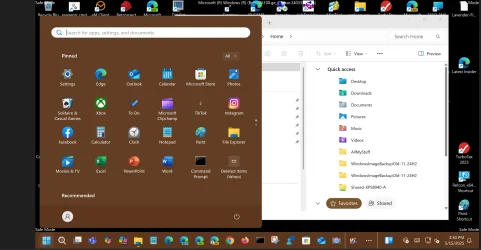
So I just discovered this build has the same safe mode issue as the Beta builds in that when booting into safe Mode your start menu and certain taskbar functions don't work. On my ARM64 PC Safe mode functions normally with this build however.
 

My Computers My Computers

  • At a glance

    Windows 11 25H2Intel Core Ultra 9 275HX (24-Core)64GB DDR5 6400MT/sNVIDIA GeForce RTX 5080 and Intel UHD Graphics
    OS
    Windows 11 25H2
    Computer type
    Laptop
    Manufacturer/Model
    Alienware 18 Area-51
    CPU
    Intel Core Ultra 9 275HX (24-Core)
    Motherboard
    Alienware
    Memory
    64GB DDR5 6400MT/s
    Graphics Card(s)
    NVIDIA GeForce RTX 5080 and Intel UHD Graphics
    Sound Card
    Onboard, Realtek high-performance Audio chips (ALC3329 & ALC1708))
    Monitor(s) Displays
    300HZ 18-inch QHD 500 nit Comfort View+
    Screen Resolution
    2560 x 1600
    Hard Drives
    2TB NVMe M.2 PCIe Gen 5 SSD
    Case
    Magnesium Alloy
    Cooling
    Advanced Cryo-Tech Quad-Fan Cooling system & large vapor chamber
    Keyboard
    Cherry MX ultra low profile mechanical keyboard with per key AlienFX RGB lighting
    Mouse
    Logitech MX Master 4
    Browser
    Vivaldi (main), Firefox, Chrome, Edge
    Antivirus
    MS Defender and Malwarebytes Free
  • At a glance

    Windows 11 25H2Qualcomm Snapdragon X Elite (12 Core) ARM bas...16GB LPDDR5Qualcomm Adreno X1-85
    Operating System
    Windows 11 25H2
    Computer type
    Laptop
    Manufacturer/Model
    Microsoft Surface Laptop 7
    CPU
    Qualcomm Snapdragon X Elite (12 Core) ARM based CPU
    Motherboard
    Microsoft Corp.
    Memory
    16GB LPDDR5
    Graphics card(s)
    Qualcomm Adreno X1-85
    Sound Card
    Omnisonic speakers with Dolby Atmos spatial sound
    Monitor(s) Displays
    120 Hz 13.8-inch 600 nit PixelSense Flow touchscreen
    Screen Resolution
    2304x1536
    Hard Drives
    1TB NVMe Gen 4 SSD
    Case
    Anodized Aluminum
    Cooling
    Traditional active cooling fan system
    Keyboard
    Mechanical QWERTY, backlit when in use
    Mouse
    Logitech MX Master 4 and Surface Arc Mouse
    Browser
    Vivaldi (main), Firefox, Chrome, Edge
    Antivirus
    MS Defender and Malwarebytes Free

My Computer My Computer

At a glance

Windows 11 Pro 24H2Intel Ultra 7 155H16gbIntel Arc integrated
OS
Windows 11 Pro 24H2
Computer type
Laptop
Manufacturer/Model
HP
CPU
Intel Ultra 7 155H
Memory
16gb
Graphics Card(s)
Intel Arc integrated
Hard Drives
SSD
So I just discovered this build has the same safe mode issue as the Beta builds in that when booting into safe Mode your start menu and certain taskbar functions don't work. On my ARM64 PC Safe mode functions normally with this build however.
I think they may still have a problem with Windows surface as reported in the blog, not very clear.
  • We’re investigating an issue where core Windows surfaces are not able to load in safe mode (File Explorer, Start menu, and others) after the previous flight.

It works fine on my Intel x64, with this Build 26100.4061 and latest Beta and Dev builds. 🤞

1747348619661.webp
 

My Computer My Computer

At a glance

Windows 11 Pro 25H2Intel I9-9900K64GBNVIDIA RTX 2060
OS
Windows 11 Pro 25H2
Computer type
PC/Desktop
Manufacturer/Model
Dell XPS 8930
CPU
Intel I9-9900K
Memory
64GB
Graphics Card(s)
NVIDIA RTX 2060
Sound Card
NVIDIA High Definition Audio
Monitor(s) Displays
4k Samsung
Screen Resolution
3840 x 2160
Hard Drives
512GB NVMe, ADATA SU 800, 2TB HDD
That's why Vivetool is my prime suspect. :-)
That's why I never use it. I can wait until MS activates these items that are hidden. It's messing with the registry I no likey. Mom always said: "That's a no-no"
 

My Computer My Computer

At a glance

Win 11 Insider Release Preview and Beta chann...i5 Core [email protected] (Unsupported for Win 11)12GBGeneric PnP Monitor (1920x1080@60Hz) Intel HD...
OS
Win 11 Insider Release Preview and Beta channels.
Computer type
Laptop
Manufacturer/Model
HP ENVY Bought: March 2017
CPU
i5 Core [email protected] (Unsupported for Win 11)
Motherboard
HP 81AD (U3E1)
Memory
12GB
Graphics Card(s)
Generic PnP Monitor (1920x1080@60Hz) Intel HD Graphics 620 (HP)
Sound Card
Conexant ISST audio
Monitor(s) Displays
Generic PnP Monitor
Screen Resolution
1536x864 pixels
Hard Drives
HGST HTS721010A9E630
PSU
Well...PSU you too!! What's this mean?
Case
HP ENVY SILVER
Cooling
A fan.
Keyboard
USA
Mouse
Logitec Anywhere 2
Internet Speed
Good enough for me! Fast!
Browser
Edge/Waterfox
Antivirus
Windows Defender
Other Info
No 'mo.
Interesting, I never noticed that before. On the first system that I checked this looks just fine. On the second system I have the first number messed up (where you have 7.42 TB) but the second number that is messed up for you is fine for me.
The number gets messed up only when it goes to 10TB or higher. This problem has nothing to do with vivetool. 😵‍💫🤷‍♂️
In the case showing earlier it should say "of 19.11 TB" Looks like they screwed up the calculation or did not leave enough space for numbers that have an extra digit. 🤣

1747352777110.webp
 
Last edited:

My Computer My Computer

At a glance

Windows 11 Pro 25H2Intel I9-9900K64GBNVIDIA RTX 2060
OS
Windows 11 Pro 25H2
Computer type
PC/Desktop
Manufacturer/Model
Dell XPS 8930
CPU
Intel I9-9900K
Memory
64GB
Graphics Card(s)
NVIDIA RTX 2060
Sound Card
NVIDIA High Definition Audio
Monitor(s) Displays
4k Samsung
Screen Resolution
3840 x 2160
Hard Drives
512GB NVMe, ADATA SU 800, 2TB HDD

Latest Support Threads

Back
Top Bottom