Win Update KB5063060 Windows 11 Out-of-Band build 26100.4351 (24H2) - June 11


UPDATE 6/26:


 Microsoft Support:

June 11, 2025 - KB5063060 (OS Build 26100.4351) Out-of-band​

For information about Windows update terminology, see types of Windows updates and the monthly quality update types. To find an overview, see the update history page for Windows 11, version 24H2.

Follow @WindowsUpdate to find out when new content is published to the Windows release health dashboard.

Improvements

This Out-of-band (OOB) update includes quality improvements. This update is cumulative and includes security fixes and improvements from the June 10, 2025, security update (KB5060842), in addition to the following:
  • [Fix for incompatibility issue with Easy Anti-Cheat] This update addresses an incompatibility issue where Windows might restart unexpectedly when opening games that use the Easy Anti-Cheat service. Easy Anti-Cheat automatically installs with certain games to enhance security and prevent cheating in multiplayer online PC games.

    Note: Windows users likely didn't experience this issue because the update that led to the incompatibility issue (KB5060842) was not offered to devices with Easy Anti-Cheat installed.
This OOB update downloads and installs automatically from Windows Update and Microsoft Update on devices with Easy Anti-Cheat installed and on devices that have not installed KB5060842 yet.

Windows 11 servicing stack update (KB5059502)- 26100.4193​

This update makes quality improvements to the servicing stack, which is the component that installs Windows updates. Servicing stack updates (SSU) ensure that you have a robust and reliable servicing stack so that your devices can receive and install Microsoft updates. To learn more about SSUs, see Simplifying on-premises deployment of servicing stack updates.

Known issues in this update

1 Noto fonts issue

Applies to: All users

Symptom
There are reports of blurry or unclear CJK (Chinese, Japanese, Korean) text when displayed at 96 DPI (100% scaling) in Chromium-based browsers such as Microsoft Edge and Google Chrome. The March 2025 Preview Update introduced Noto fonts in collaboration with Google, for CJK languages as fallbacks to improve text rendering when websites or apps don’t specify appropriate fonts. The issue is due to limited pixel density at 96 DPI, which can reduce the clarity and alignment of CJK characters. Increasing the display scaling improves clarity by enhancing text rendering.

Workaround
As a temporary workaround, increase your display scaling to 125% or 150% to improve text clarity. For more information, see Change your screen resolution and layout in Windows.


We are investigating this issue and will provide more information when it is available.

How to get this update

Before you install this update

Microsoft combines the latest servicing stack update (SSU) for your operating system with the latest cumulative update (LCU). For general information about SSUs, see Servicing stack updates and Servicing Stack Updates (SSU): Frequently Asked Questions.

Install this update

To install this update, use one of the following Windows and Microsoft release channels.

AvailableNext Step
Included
This update downloads and installs automatically from Windows Update and Microsoft Update.
Not included
MSU from MUC. See the other options.


If you want to remove the LCU

To remove the LCU after installing the combined SSU and LCU package, use the DISM/Remove-Package command line option with the LCU package name as the argument. You can find the package name by using this command: DISM /online /get-packages.

Running Windows Update Standalone Installer (wusa.exe) with the /uninstall switch on the combined package will not work because the combined package contains the SSU. You cannot remove the SSU from the system after installation.

File information

For a list of the files in this update, download the file information for cumulative update 5063060.

For a list of the files in the servicing stack update, download the file information for the SSU (KB5059502) - version 26100.4193.


 Source:


Check Windows Updates


UUP Dump:

64-bit ISO download:

ARM64 ISO download:

 
Last edited:

Getting it now...

kb5063060.webp
 

My Computer My Computer

At a glance

Windows 11Intel® Xeon® X5690 3.47GHz Six-CoreG.Skill PC3-12800 1600MHz 24GBNVIDIA GeForce GTX 1050
OS
Windows 11
Computer type
PC/Desktop
Manufacturer/Model
Asus/Custom Build
CPU
Intel® Xeon® X5690 3.47GHz Six-Core
Motherboard
Asus P6T Deluxe v2
Memory
G.Skill PC3-12800 1600MHz 24GB
Graphics Card(s)
NVIDIA GeForce GTX 1050
Sound Card
SoundMAX ADI AD2000B HD Audio
Monitor(s) Displays
Acer T232HL Touch Screen
Screen Resolution
1920 x 1080 @ 60Hz
Hard Drives
6 Crucial MX500 SSD 1TB each.
PSU
Thermaltake Toughpower Gold 850W
Case
Thermaltake Armor VA8000SWA
Cooling
Thermaltake Air Cooling System
Keyboard
Illuminated Multimedia LED Keyboard
Mouse
M16 Dual Mode Illuminated Mouse - Bluetooth / 2.4 GHz Mode
Internet Speed
800 Mbps
Browser
Edge / Opera / Vivaldi / Chrome / Firefox / Brave
Antivirus
Windows Defender Security
Sounds okay!

1749680164846.webp
 

My Computer My Computer

At a glance

Windows 11Intel® Xeon® X5690 3.47GHz Six-CoreG.Skill PC3-12800 1600MHz 24GBNVIDIA GeForce GTX 1050
OS
Windows 11
Computer type
PC/Desktop
Manufacturer/Model
Asus/Custom Build
CPU
Intel® Xeon® X5690 3.47GHz Six-Core
Motherboard
Asus P6T Deluxe v2
Memory
G.Skill PC3-12800 1600MHz 24GB
Graphics Card(s)
NVIDIA GeForce GTX 1050
Sound Card
SoundMAX ADI AD2000B HD Audio
Monitor(s) Displays
Acer T232HL Touch Screen
Screen Resolution
1920 x 1080 @ 60Hz
Hard Drives
6 Crucial MX500 SSD 1TB each.
PSU
Thermaltake Toughpower Gold 850W
Case
Thermaltake Armor VA8000SWA
Cooling
Thermaltake Air Cooling System
Keyboard
Illuminated Multimedia LED Keyboard
Mouse
M16 Dual Mode Illuminated Mouse - Bluetooth / 2.4 GHz Mode
Internet Speed
800 Mbps
Browser
Edge / Opera / Vivaldi / Chrome / Firefox / Brave
Antivirus
Windows Defender Security
It's installing now. very fast, going to reboot.
 

My Computers My Computers

  • At a glance

    W11, always updated with latest buildsAMD Ryzen 9 9900XG.Skill Trident Z5 Neo RGB 32GB Kit DDR5-6000...ASUS Dual GeForce RTX™ 3060 V2 OC Edition 12G...
    OS
    W11, always updated with latest builds
    Computer type
    PC/Desktop
    Manufacturer/Model
    Self-made
    CPU
    AMD Ryzen 9 9900X
    Motherboard
    ASUS TUF Gaming B850-Plus WiFi
    Memory
    G.Skill Trident Z5 Neo RGB 32GB Kit DDR5-6000 CL30 (F5-6000J3038F16GX2-TZ5NR)
    Graphics Card(s)
    ASUS Dual GeForce RTX™ 3060 V2 OC Edition 12GB GDDR6
    Monitor(s) Displays
    Eizo CS240, Calibrated with Datacolr SpyderX
    Screen Resolution
    1920X1200
    Hard Drives
    Crucial T705 SSD 1TB PCIe Gen5 NVMe M.2- SO+Archive
    Lexar EQ790 1TB SSD M.2 2280 PCIe Gen4x4 NVMe 1.4- LR& PS Workspace
    PHIXERO SSD P5000-512GB M.2 2280 PCIe Gen4- Backups
    Seagate ST8000DM04- Photo Archive, SATA HD
    Western Digital WD2002FAEX- Generic archive, SATA HD
    PSU
    Be Quiet 850W Pure Power 12M per Pc ATX
    Case
    Phanteks XT Pro
    Cooling
    Be quiet Pure loop 2 360mm
    Keyboard
    Logitech
    Mouse
    Logitech
    Internet Speed
    D/L-700/800 Mbps; U/L 250/300 Mbps WiFi 7 from motherboard
    Browser
    Edge
    Antivirus
    Avast
    Other Info
    Mostly used for photo retouching software & some video slideshows.
  • At a glance

    W11, always updated with latest buildsAMD Ryzen 9 9900XG.Skill Trident Z5 Neo RGB 32GB Kit DDR5-6000...ASUS Dual GeForce RTX™ 3060 V2 OC Edition 12G...
    Operating System
    W11, always updated with latest builds
    Computer type
    PC/Desktop
    Manufacturer/Model
    Self built
    CPU
    AMD Ryzen 9 9900X
    Motherboard
    ASUS TUF Gaming B850-Plus WiFi
    Memory
    G.Skill Trident Z5 Neo RGB 32GB Kit DDR5-6000 CL30 (F5-6000J3038F16GX2-TZ5NR)
    Graphics card(s)
    ASUS Dual GeForce RTX™ 3060 V2 OC Edition 12GB GDDR6- From System 1
    Monitor(s) Displays
    Eizo CS240, Calibrated with Datacolr SpyderX
    Screen Resolution
    1920X1200
    Hard Drives
    Crucial T705 SSD 1TB PCIe Gen5 NVMe M.2- SO+Archive
    Lexar EQ790 1TB SSD M.2 2280 PCIe Gen4x4 NVMe 1.4- LR& PS Workspace
    PHIXERO SSD P5000-512GB M.2 2280 PCIe Gen4- Backups
    Seagate ST8000DM04- Photo Archive, SATA HD - From System 1
    Western Digital WD2002FAEX- Generic archive, SATA HD - From System 1
    PSU
    Be Quiet 850W Pure Power 12M per Pc ATX
    Case
    Phanteks XT Pro
    Cooling
    Be quiet Pure loop 2 360mm
    Keyboard
    Logitech
    Mouse
    Logitech
    Internet Speed
    D/L-700/800 Mbps; U/L 250/300 Mbps WiFi 7 from motherboard
    Browser
    Edge
    Antivirus
    Avast
    Other Info
    Mostly used for photo retouching software, some video slideshows.
All seems working good, today AMD released a new update" Updated AGESA to ComboAM5 PI 1.2.0.3d" I don't know if this Out-of-band update has something to do withy it.
 

My Computers My Computers

  • At a glance

    W11, always updated with latest buildsAMD Ryzen 9 9900XG.Skill Trident Z5 Neo RGB 32GB Kit DDR5-6000...ASUS Dual GeForce RTX™ 3060 V2 OC Edition 12G...
    OS
    W11, always updated with latest builds
    Computer type
    PC/Desktop
    Manufacturer/Model
    Self-made
    CPU
    AMD Ryzen 9 9900X
    Motherboard
    ASUS TUF Gaming B850-Plus WiFi
    Memory
    G.Skill Trident Z5 Neo RGB 32GB Kit DDR5-6000 CL30 (F5-6000J3038F16GX2-TZ5NR)
    Graphics Card(s)
    ASUS Dual GeForce RTX™ 3060 V2 OC Edition 12GB GDDR6
    Monitor(s) Displays
    Eizo CS240, Calibrated with Datacolr SpyderX
    Screen Resolution
    1920X1200
    Hard Drives
    Crucial T705 SSD 1TB PCIe Gen5 NVMe M.2- SO+Archive
    Lexar EQ790 1TB SSD M.2 2280 PCIe Gen4x4 NVMe 1.4- LR& PS Workspace
    PHIXERO SSD P5000-512GB M.2 2280 PCIe Gen4- Backups
    Seagate ST8000DM04- Photo Archive, SATA HD
    Western Digital WD2002FAEX- Generic archive, SATA HD
    PSU
    Be Quiet 850W Pure Power 12M per Pc ATX
    Case
    Phanteks XT Pro
    Cooling
    Be quiet Pure loop 2 360mm
    Keyboard
    Logitech
    Mouse
    Logitech
    Internet Speed
    D/L-700/800 Mbps; U/L 250/300 Mbps WiFi 7 from motherboard
    Browser
    Edge
    Antivirus
    Avast
    Other Info
    Mostly used for photo retouching software & some video slideshows.
  • At a glance

    W11, always updated with latest buildsAMD Ryzen 9 9900XG.Skill Trident Z5 Neo RGB 32GB Kit DDR5-6000...ASUS Dual GeForce RTX™ 3060 V2 OC Edition 12G...
    Operating System
    W11, always updated with latest builds
    Computer type
    PC/Desktop
    Manufacturer/Model
    Self built
    CPU
    AMD Ryzen 9 9900X
    Motherboard
    ASUS TUF Gaming B850-Plus WiFi
    Memory
    G.Skill Trident Z5 Neo RGB 32GB Kit DDR5-6000 CL30 (F5-6000J3038F16GX2-TZ5NR)
    Graphics card(s)
    ASUS Dual GeForce RTX™ 3060 V2 OC Edition 12GB GDDR6- From System 1
    Monitor(s) Displays
    Eizo CS240, Calibrated with Datacolr SpyderX
    Screen Resolution
    1920X1200
    Hard Drives
    Crucial T705 SSD 1TB PCIe Gen5 NVMe M.2- SO+Archive
    Lexar EQ790 1TB SSD M.2 2280 PCIe Gen4x4 NVMe 1.4- LR& PS Workspace
    PHIXERO SSD P5000-512GB M.2 2280 PCIe Gen4- Backups
    Seagate ST8000DM04- Photo Archive, SATA HD - From System 1
    Western Digital WD2002FAEX- Generic archive, SATA HD - From System 1
    PSU
    Be Quiet 850W Pure Power 12M per Pc ATX
    Case
    Phanteks XT Pro
    Cooling
    Be quiet Pure loop 2 360mm
    Keyboard
    Logitech
    Mouse
    Logitech
    Internet Speed
    D/L-700/800 Mbps; U/L 250/300 Mbps WiFi 7 from motherboard
    Browser
    Edge
    Antivirus
    Avast
    Other Info
    Mostly used for photo retouching software, some video slideshows.
26100.4351...installing momentarily as Win Update is moving me involuntarily to '.4351 from '.4349. Will chime in if I run into any issues.
 

My Computer My Computer

At a glance

Win11 Experimental Channel for 26H2 buildsAMD R7 7800X3DGSkill 2x16GB @ 6400MT/sXFX 9070 XT SWIFT tri-fan (PCIe5.0)
OS
Win11 Experimental Channel for 26H2 builds
Computer type
PC/Desktop
Manufacturer/Model
a cherry-picked assembly
CPU
AMD R7 7800X3D
Motherboard
MSI x870 Tomahawk Wi-Fi, 8-layer, 2 oz copper, server PCB
Memory
GSkill 2x16GB @ 6400MT/s
Graphics Card(s)
XFX 9070 XT SWIFT tri-fan (PCIe5.0)
Sound Card
Creative Labs G8 USB External Sound device, Gaming DAC, Sound Card & Earphone AMP.. HIGHLY RECOMMENDED, btw. Totally changed my opinion of external USB sound. I like!...;)
Monitor(s) Displays
Philips 42" OLED @ 4k
Screen Resolution
3840x2160
Hard Drives
*Boot: Samsung 980 Pro 2 TB NVMe (PCIe4x4)
*Samsung 980 EVO NVMe 500GB (PCIe 4x4)
*Kingston SNV3S2000G 2TB NVMe (PCIe4x4)
*Samsung 960 EVO 250GB NVMe(PCIe3x2)
*8TB Toshiba x300 HDD
*ST4000DM004 S3 4TB HDD
PSU
Gigabyte 850W Gold, Rev 2
Case
Lian Li Lancool 217, white, with wood trim, very nice looking--tired of black, 5-fans standard
Cooling
Air coutesy Lian Li
Keyboard
Cherry MX 2.0S RGB
Mouse
Razer Basilisk V3 24k DPI
Internet Speed
~950Mbps down and up!
Browser
Firefox x64 DE
Antivirus
Defender
Other Info
Great New system. Exceeds my expectations by quite a bit, btw. I love the USB G8 SoundBlaster, it's quite an improvement over the G6!
24H2 26100.4351 installed successfully.
 

My Computers My Computers

  • At a glance

    Windows 11 ProIntel Series 3 Core Ultra X9 388H64GB LPDDR5x 9600 MT/sIntel Arc graphics B390 Panther Lake
    OS
    Windows 11 Pro
    Computer type
    Laptop
    Manufacturer/Model
    Dell XPS 16 DA16260
    CPU
    Intel Series 3 Core Ultra X9 388H
    Memory
    64GB LPDDR5x 9600 MT/s
    Graphics Card(s)
    Intel Arc graphics B390 Panther Lake
    Monitor(s) Displays
    16" 3.2K Tandem OLED Infinity Edge
    Screen Resolution
    3200 x 2000 16:10 236 PPI
    Hard Drives
    1 Terabyte M.2 PCIe NVMe SSD
    Case
    Black Anodized Aluminum
    Cooling
    Vapor Chamber Cooling
    Mouse
    None
    Internet Speed
    942 Mbps Netgear Mesh + 2 Satellites
    Browser
    Microsoft Edge (Chromium)
    Antivirus
    Windows Security (Defender)
    Other Info
    NPU delivering 67 TOPS
    Microsoft 365 subscription
    Microsoft Office 365
    Microsoft OneDrive 1TB Cloud
    Microsoft Visual Studio
    Microsoft Visual Studio Code
    Microsoft Sysinternals Suite
    Microsoft BitLocker
    Microsoft Copilot
    Dell Support Assist
    Dell Command | Update
    Macrium Reflect X subscription
    1Password Password Manager
    Amazon Kindle for PC
    Lightroom/Photoshop subscription
    Interactive Brokers Trader Workstation
  • At a glance

    Windows 11 ProSnapdragon® X Elite (12 Core) with Hexagon NP...32GB LPDDR5x 8448 MT/sIntegrated Adreno GPU
    Operating System
    Windows 11 Pro
    Computer type
    Laptop
    Manufacturer/Model
    Microsoft Surface Laptop 7
    CPU
    Snapdragon® X Elite (12 Core) with Hexagon NPU delivering 45 TOPS
    Memory
    32GB LPDDR5x 8448 MT/s
    Graphics card(s)
    Integrated Adreno GPU
    Sound Card
    Omnisonic speakers with Dolby Atmos spatial sound
    Monitor(s) Displays
    13.8″ PixelSense Flow touchscreen 120 Hz 600 NIT
    Screen Resolution
    2304 × 1536 (201 PPI), 3:2 aspect ratio
    Hard Drives
    1 TB PCIe NVMe Gen 4 SSD
    Case
    Black Anodized Aluminum
    Cooling
    Vapor Chamber Cooling
    Mouse
    None
    Internet Speed
    942 Mbps Netgear Mesh + 2 Satellites
    Browser
    Microsoft Edge (Chromium)
    Antivirus
    Windows Security (Defender)
    Other Info
    Microsoft 365 subscription (Office)
    Microsoft Office 365
    Microsoft OneDrive 1TB Cloud
    Microsoft Visual Studio 2026
    Microsoft Visual Studio Code
    Interactive Brokers Trader Workstation
    Lightroom/Photoshop subscription
    1Password Password Manager
    Microsoft Sysinternals
    Amazon Kindle for PC
    Microsoft BitLocker
    Microsoft Copilot
As Ghot says above:

Disk Cleanup still has the 194MB bug though.

Yes, it does. I tried the cleanup utility SirCleaner (freeware version) discussed on another thread for the 2nd time in 2 days. Gained about 2Gb, although obviously not all that is down to the Disk Cleanup bug.

And an earlier comment, again I think from Ghot, that the very large sizes of the recent update msu files is likely a "one size fits all" approach and the update process just picks and chooses from that large update file to fit what it detects on the actual PC coincides with my view. It is interesting though, that the msu file size as posted on the MS Update Catalog is now generally significantly larger than what I find is then downloaded ... for that I'm grateful.
 

My Computer My Computer

At a glance

Windows 11Intel i5 10210U16GbIntel UHD
OS
Windows 11
Computer type
Laptop
Manufacturer/Model
HP 15s_du1xxx
CPU
Intel i5 10210U
Motherboard
85F1
Memory
16Gb
Graphics Card(s)
Intel UHD
Sound Card
Realtek
Screen Resolution
1920 x 1080

My Computers My Computers

  • At a glance

    Win 11 Pro 25H2 26200.8894Intel® Core™ i7-14700KG.SKILL Ripjaws S5 Series 64GB (2 x 32GB) DDR5ASUS GeForce RTX 4070 Super 12GB
    OS
    Win 11 Pro 25H2 26200.8894
    Computer type
    PC/Desktop
    Manufacturer/Model
    Self Built
    CPU
    Intel® Core™ i7-14700K
    Motherboard
    ASUS TUF Z690-PLUS WIFI (BIOS 4505)
    Memory
    G.SKILL Ripjaws S5 Series 64GB (2 x 32GB) DDR5
    Graphics Card(s)
    ASUS GeForce RTX 4070 Super 12GB
    Sound Card
    Sound Blaster AE-5 Plus
    Monitor(s) Displays
    ASUS TUF Gaming 27" 2K HDR Gaming
    Screen Resolution
    2560 x 1440
    Hard Drives
    Samsung 990 Pro 1TB NVMe (Win 11 25H2)
    SK hynix P41 500GB NVMe
    SK hynix P41 2TB NVMe (x3)
    Crucial P3 Plus 4TB
    PSU
    Corsair RM850x Shift
    Case
    Antec Dark Phantom DP502 FLUX
    Cooling
    Corsair Nautilus 360 RS AIO
    Keyboard
    Logitech MK 320
    Mouse
    Razer Basilisk V3
    Internet Speed
    750Mbs
    Browser
    Firefox
    Antivirus
    Winows Security
    Other Info
    MR 8.1 Home
  • At a glance

    Win 11 Pro 25H2 26200.8894Intel Core i5-1140064 GB DDR4MSI GeForce RTX 3060 Ventus 2X 12GB
    Operating System
    Win 11 Pro 25H2 26200.8894
    Computer type
    PC/Desktop
    Manufacturer/Model
    Self Built
    CPU
    Intel Core i5-11400
    Motherboard
    Asus TUF Gaming Z590 Plus WiFi (BIOS 2803)
    Memory
    64 GB DDR4
    Graphics card(s)
    MSI GeForce RTX 3060 Ventus 2X 12GB
    Sound Card
    SoundBlaster Audigy Fx V2
    Monitor(s) Displays
    Samsung F27T350
    Screen Resolution
    1920x1080
    Hard Drives
    Samsung 980 Pro 1TB
    Samsung 970 EVO Plus 2TB
    Samsung 870 EVO 500GB SSD
    PSU
    Corsair HX750
    Case
    Cougar MX330-G Window
    Cooling
    Thermalright Frozen Edge 240 Black AIO
    Internet Speed
    350Mbps
    Browser
    Firefox
    Antivirus
    Windows Security
  • System Three
    Win 11 Pro 25H2 26200.8894
    ASUS PRIME Z370-P II BIOS 3004 7/12/21
    Intel Core i7-8700 CPU @ 3.20GHz
    32GB DDR4 RAM (4x8)
    iGPU Intel UHD Graphics 630
    Mid-Tower Desktop

My Computers My Computers

  • At a glance

    Win 11 Home ♦♦♦26200.8875 ♦♦♦♦♦♦♦25H2AMD Ryzen 7 3700XG.Skill (F4-3200C14D-16GTZKW)EVGA RTX 2070 (08G-P4-2171-KR)
    OS
    Win 11 Home ♦♦♦26200.8875 ♦♦♦♦♦♦♦25H2
    Computer type
    PC/Desktop
    Manufacturer/Model
    Built by Ghot® [May 2020]
    CPU
    AMD Ryzen 7 3700X
    Motherboard
    Asus Pro WS X570-ACE (BIOS 5302)
    Memory
    G.Skill (F4-3200C14D-16GTZKW)
    Graphics Card(s)
    EVGA RTX 2070 (08G-P4-2171-KR)
    Sound Card
    Realtek ALC1220P / ALC S1220A
    Monitor(s) Displays
    Dell U3011 30"
    Screen Resolution
    2560 x 1600
    Hard Drives
    2x Samsung 860 EVO 500GB,
    WD 4TB Black FZBX - SATA III,
    WD 8TB Black FZBX - SATA III,
    DRW-24B1ST CD/DVD Burner
    PSU
    PC Power & Cooling 750W Quad EPS12V
    Case
    Cooler Master ATCS 840 Tower
    Cooling
    CM Hyper 212 EVO (push/pull)
    Keyboard
    Ducky DK9008 Shine II Blue LED
    Mouse
    Logitech Optical M-100
    Internet Speed
    300/300
    Browser
    Firefox (latest)
    Antivirus
    Bitdefender Total Security
    Other Info
    Speakers: Klipsch Pro Media 2.1
  • At a glance

    Windows XP Pro 32bit w/SP3AMD Athlon 64 X2 5000+ (OC'd @ 3.2Ghz)TWIN2X2048-6400C4DHX (2 x 1GB, DDR2 800)EVGA 256-P2-N758-TR GeForce 8600GT SSC
    Operating System
    Windows XP Pro 32bit w/SP3
    Computer type
    PC/Desktop
    Manufacturer/Model
    Built by Ghot® (not in use)
    CPU
    AMD Athlon 64 X2 5000+ (OC'd @ 3.2Ghz)
    Motherboard
    ASUS M2N32-SLI Deluxe Wireless Edition
    Memory
    TWIN2X2048-6400C4DHX (2 x 1GB, DDR2 800)
    Graphics card(s)
    EVGA 256-P2-N758-TR GeForce 8600GT SSC
    Sound Card
    Onboard
    Monitor(s) Displays
    ViewSonic G90FB Black 19" Professional (CRT)
    Screen Resolution
    up to 2048 x 1536
    Hard Drives
    WD 36GB 10,000rpm Raptor SATA
    Seagate 80GB 7200rpm SATA
    Lite-On LTR-52246S CD/RW
    Lite-On LH-18A1P CD/DVD Burner
    PSU
    PC Power & Cooling Silencer 750 Quad EPS12V
    Case
    Generic Beige case, 80mm fans
    Cooling
    ZALMAN 9500A 92mm CPU Cooler
    Keyboard
    Logitech Classic Keybooard 200
    Mouse
    Logitech Optical M-BT96a
    Internet Speed
    300/300
    Browser
    Firefox 3.x ??
    Antivirus
    Symantec (Norton)
    Other Info
    Still assembled, still runs. Haven't turned it on for 15 years?
Strange. Already successfully installed, but trying to download again.
 

My Computer My Computer

At a glance

Windows 11 ProIntel Core Ultra 265KTeamGroup T-Force Vulcan DDR5 6400MHz 32GBMSI GeForce RTX 3050
OS
Windows 11 Pro
Computer type
PC/Desktop
Manufacturer/Model
Self Build
CPU
Intel Core Ultra 265K
Motherboard
Gigabyte Z890 AOROS Elite
Memory
TeamGroup T-Force Vulcan DDR5 6400MHz 32GB
Graphics Card(s)
MSI GeForce RTX 3050
Sound Card
GPU NVIDIA High Definition Audio via HDMI to Denon AVR-S670BT Receiver
Monitor(s) Displays
LG 32UN650 32" 4k
Screen Resolution
3840x2160 @ 60Hz (175% scaling)
Hard Drives
Samsung 980 Pro NVMe 1TB x2
PSU
Corsair RM850x
Case
be quiet! Pure Base 600
Cooling
Thermalright Phantom Spirit 120SE & be quiet! Silent Wings Pro x3 case fans
Keyboard
Arteck Backlit USB Wired
Mouse
Logitech M510
Internet Speed
500Mb down/12Mb up
Browser
Firefox & Edge
Antivirus
Windows Defender & Free MBAM
Other Info
Main PC
I got this OOB update too one day after I received the KB5060842 update, both installed without issues.
 

My Computers My Computers

  • At a glance

    Windows 11 Home 25H2 build: 26200.8737Intel(R) Core(TM) Ultra 7 258V, 2200 Mhz, 8 C...32 GB LPDDR5X (soldered)Intel(R) Arc(TM) 140V GPU (16GB)
    OS
    Windows 11 Home 25H2 build: 26200.8737
    Computer type
    Laptop
    Manufacturer/Model
    Acer Swift A.I SF14-51T
    CPU
    Intel(R) Core(TM) Ultra 7 258V, 2200 Mhz, 8 Cores
    Motherboard
    Icefish_LNV, Version V1.15
    Memory
    32 GB LPDDR5X (soldered)
    Graphics Card(s)
    Intel(R) Arc(TM) 140V GPU (16GB)
    Sound Card
    RealTek + Intel Smart Sound
    Monitor(s) Displays
    14" IPS WUXGA
    Screen Resolution
    1920x1200x60Hz
    Hard Drives
    Micron_2550_MTFDKBA1T0TGE, NVMe Gen4, 1TB
    PSU
    45W USB-C GaN charger
    Case
    Full aluminum body
    Cooling
    1 fan
    Keyboard
    US with Backlight
    Mouse
    Precision Trackpad
    Internet Speed
    25 Mb/s 5G
    Browser
    Edge
    Antivirus
    Windows Defender
    Other Info
    BIOS Version/Date Insyde Corp. V1.15, 8/28/2025, Windows Hello IR camera with Facial recognition. Secure Boot 2026 KEK key installed
  • At a glance

    Windows 11 Home 25H2 build: 26200.8875Intel 12th Gen. i7 12700H, 14 cores, 2.3 GHz ...8GB LPDDR4 on board + 8GB LPDDR4 3200 MHz in ...Intel Iris Xe supports up to 4096 x 2304 @ 120Hz
    Operating System
    Windows 11 Home 25H2 build: 26200.8875
    Computer type
    Laptop
    Manufacturer/Model
    Asus Vivobook K3502Z S15 15" OLED
    CPU
    Intel 12th Gen. i7 12700H, 14 cores, 2.3 GHz (24M Cache, up to 4.7 GHz, 6P+8E cores)
    Motherboard
    Alder Lake-H, 1700-4700 MHz clock rate
    Memory
    8GB LPDDR4 on board + 8GB LPDDR4 3200 MHz in Dual Channel.
    Graphics card(s)
    Intel Iris Xe supports up to 4096 x 2304 @ 120Hz
    Sound Card
    Harman Kardon - DTS
    Monitor(s) Displays
    OLED 15.6inch 2.8K (2880 x 1620)
    Screen Resolution
    16:9 aspect ratio 0.2ms response time 120Hz refresh rate, 550nits
    Hard Drives
    512GB M.2 NVMe Gen4 PCIe 4.0 SSD, Micron_2450_MTFDKBA512TFK
    PSU
    90-Watt USB charger (Thunderbolt4)
    Case
    Metal lid, plastic case
    Cooling
    1 fan
    Keyboard
    With adjustable backlight
    Mouse
    Precision Trackpad
    Internet Speed
    ISP provides 15 mb/s WIFI LTE (4G), laptop WIFI 6 adapter.
    Browser
    Edge
    Antivirus
    Windows Defender
    Other Info
    BIOS American Megatrends International, LLC. 10.1.2.312, 13/03/2024. Network adapter: Intel Wi-Fi 6E AX211 160 MHz, Secure Boot 2026 KEK key installed
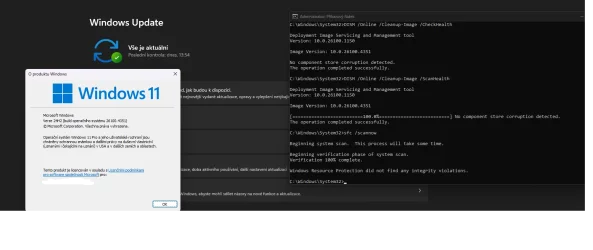
It was a quick update. But had to run restorehealth and sfc also found some issues.

After restart everything clean.

1749729483458.webp
 

My Computer My Computer

At a glance

Windows 11 Pro x64, 24H2Ryzen 7 7700xKingston 32GB KIT DDR5 6000MHz CL36 FURY Beas...SAPPHIRE PULSE AMD Radeon RX 7900 XTX 24G
OS
Windows 11 Pro x64, 24H2
Computer type
PC/Desktop
Manufacturer/Model
Asus
CPU
Ryzen 7 7700x
Motherboard
ASUS TUF GAMING B650-PLUS WIFI
Memory
Kingston 32GB KIT DDR5 6000MHz CL36 FURY Beast Black EXPO
Graphics Card(s)
SAPPHIRE PULSE AMD Radeon RX 7900 XTX 24G
Sound Card
DTS APO4x
Monitor(s) Displays
27" Philips 27M1N3500LS Gaming, 27" Philips 275S9JAL
Screen Resolution
2560 x 1440
Hard Drives
2x Kingston KC3000 NVMe 2TB
PSU
Corsair RM850 White (2021)
Case
be quiet! Pure Base 500DX White
Cooling
DeepCool AK620 White
Keyboard
YENKEE YKB 3400 PANZER - CZ
Mouse
Razer DeathAdder V2
Internet Speed
200Mbps
Browser
Google Chrome
Antivirus
Microsoft Defender
Other Info
It is a gaming PC.
I've just installed kb5063060 on our Dell Inspiron 16 5625 and have had constant freezes since then. I've uninstalled the update and have updates paused. I'm really not sure where to go from here and would be grateful for any advice. Thanks.
 

My Computer My Computer

At a glance

Windows 11 Home
OS
Windows 11 Home
Strange. Yesterday the 26100.4349 update and today an Out-of-Band update 26100.4351. Seems to be urgent....?? An update to the update system and solving some issue with the anti-cheating system... Was that so important???? Installed itself and all I have to do is rebooting. No 0-30% and 30-100% anywhere to be seen. A second reboot was needed to let the update do it's thing. At first I used restart, there is also a restart and applying the update (4 min). Never saw a difference before between the two. Used a second time restart and now the update was applied without any incidents.

SFC an DISM /Restorehealth went OK. /AnalyzeComponentStore found 8 packages reclaimable, but after the /StartComponentCleanup the usual 2 packages (from 1742) were left over. So the update installed itself without any incidents..
 

My Computers My Computers

  • At a glance

    Win 11 Pro 25H2 Build 26200.8894, Zorin OS ProIntel® Core™ i7-12700KF 12th Gen. (S1700)32GB DDR5 5600-36 Vengeance (2x16)PCIe4.0 Asus NVIDIA RTX3060Ti
    OS
    Win 11 Pro 25H2 Build 26200.8894, Zorin OS Pro
    Computer type
    PC/Desktop
    Manufacturer/Model
    Self built
    CPU
    Intel® Core™ i7-12700KF 12th Gen. (S1700)
    Motherboard
    ASUS Prime Z690-A, BIOS v4505 (Z690 Intel Chipset)
    Memory
    32GB DDR5 5600-36 Vengeance (2x16)
    Graphics Card(s)
    PCIe4.0 Asus NVIDIA RTX3060Ti
    Sound Card
    Onboard; Realtek
    Monitor(s) Displays
    34" LG 34UC79G-B Curved 21:9 144Hz
    Screen Resolution
    2560x1080 (No HDR)
    Hard Drives
    250Gb Samsung 870PRO NVMe (Win 11 Pro)
    1Tb Samsung 980PRO NVMe
    1Tb Samsung 970EVO NVMe
    2Tb Samsung 990PRO NVMe with heatsink.
    4Tb WDC WD40EZRZ Blue SATA (Int.)
    4Tb WDC WD40EZRZ Blue SATA (Int.)
    3Tb WDC WD30EFRZ Red SATA (Int.)
    256Gb Samsung 840PRO SSD (RHEL 9,5)
    256Gb Samsung 850PRO SSD (Zorin OS Pro 18)
    PSU
    Coolermaster 850W V2 Gold with internal 12cm exaust fan
    Case
    Be-Quiet Pure Base 600.
    Cooling
    3x Be-Quiet! 12/14cm "Silent Wings 4" casefans, 1x Arctic Freezer i35 CPU towerblock with fan.
    Keyboard
    Steelseries APEX 7 keyboard.
    Mouse
    Logitech G-502 Hero
    Internet Speed
    1Gb
    Browser
    Brave
    Antivirus
    F-Secure
    Other Info
    No Noise system.
    256Gb Kingston Travler USB 3.0 drive.
    64Gb Sandisk USB 3.2 drive. (Ventoy)
    8Gb Philips USB 3.0 drive. (Win. Inst.)
    8Gb Philips USB 3.0 drive. (Rescue disk)
    2Tb WD USB 3.0 Passport drive.
    USB Ext. 500Gb WD SATA drive.
    External USB 3.0 C.A. CD/DVD* burner.
  • At a glance

    Windows 11 Pro 25H2Intel® Core™ i7-6700K 6th Gen. (S1151)32Gb DDR4 2400 Corsair Vengeance (4x8)ASUS GeForce GTX1080
    Operating System
    Windows 11 Pro 25H2
    Computer type
    PC/Desktop
    Manufacturer/Model
    Selfbuild
    CPU
    Intel® Core™ i7-6700K 6th Gen. (S1151)
    Motherboard
    ASUS Maximus VIII Ranger (Intel Chipset Z170)
    Memory
    32Gb DDR4 2400 Corsair Vengeance (4x8)
    Graphics card(s)
    ASUS GeForce GTX1080
    Sound Card
    Onboard; Realtek
    Monitor(s) Displays
    LG IPS277L 27" WideLED, IPS
    Screen Resolution
    1920x1080
    Hard Drives
    Samsung 850 Pro SSD
    PSU
    Zalman ZM600-HP with internal exhaust fan. Heatpipes & Modular cables.
    Case
    Cooler Master Aero
    Cooling
    Scythe Mugen 4 dual fan towerblock.
    Keyboard
    Red Dragon
    Mouse
    Red Dragon
    Internet Speed
    1Gb
    Browser
    Chrome
    Antivirus
    F-Secure
Strange. Yesterday the 26100.4349 update and today an Out-of-Band update 26100.4351. Seems to be urgent....?? An update to the update system and solving some issue with the anti-cheating system... Was that so important???? Installed itself and all I have to do is rebooting. No 0-30% and 30-100% anywhere to be seen. A second reboot was needed to let the update do it's thing. At first I used restart, there is also a restart and applying the update (4 min). Never saw a difference before between the two. Used a second time restart and now the update was applied without any incidents.

SFC an DISM /Restorehealth went OK. /AnalyzeComponentStore found 8 packages reclaimable, but after the /StartComponentCleanup the usual 2 packages (from 1742) were left over. So the update installed itself without any incidents..

Out of Band (OOB) updates are considered Emergency Hotfixes for a recent update. The normal June 2025 Monthly Update broke another vendor's anti-cheat driver. So why do you (a non-gamer) care? You don't obviously.

But a major game publisher complained to MS, the update did something that was breaking their game(s). This was unacceptable and since they're a major game publisher, MS rushed out an unscheduled (or "Out of Band") fix. As a non-gamer, you may not have noticed anything wrong after applying the first update.

If another major software company had a similar problem, or MS discovered a terrible bug in their own update, you would expect an OOB release.

What's not normal is seeing two OOB updates in a row, for two months. That just may be bad luck on MS's part.

Sometimes the reason for the OOB isn't so important that everyone needs to install it right away. But it's there so impacted users don't have to wait until the next Patch Tuesday for a fix.
 

My Computer My Computer

At a glance

Windows 7
OS
Windows 7
I've just installed kb5063060 on our Dell Inspiron 16 5625 and have had constant freezes since then. I've uninstalled the update and have updates paused. I'm really not sure where to go from here and would be grateful for any advice. Thanks.
Don't know either! Did Windows Update reported an error? If you take a look inside C:\Windows\Logs\CBS\CBS.log. Do you see somewhere something starting with [HRESULT = 0x800f0991 (example) - <Error message>]? In normal situations you would see [HRESULT = 0x00000000 - S_OK] ; The update went OK. (Should still be visible in the log because of today. Any actions after that will be sequential logged) The errorcode you see is also the same errorcode that Windows Update will report. Errorcode may differ but if it is there, something went wrong. Depending on the errorcode we can maybe have a clue what went wrong.

Was the update complete? Because working with that one and on a regular basis freezes does not sound to good to me. Did you made recent some changes to your configuration? It's a tiny update this time, no cause to behave this way. If it did you should also seen that after 26100.4351, That was a major update. Seems some device intermittent goes away an back again. Disconnect as much as possible of your laptop. except the ethernet cable of course. Retry.

Don't worry! If it's come to that an In-Place-Install will solve everything. It's quick and leads always to succes. After the install the latest updates will go without any incidents. With an In-Place-Install all your data will be left alone. Only the Windows engine will be replaced by the original one. 2 updates bring you to this version; 26100.4351. (first 26100.4349 (a major one) and then this tiny one on top of it.)
 

My Computers My Computers

  • At a glance

    Win 11 Pro 25H2 Build 26200.8894, Zorin OS ProIntel® Core™ i7-12700KF 12th Gen. (S1700)32GB DDR5 5600-36 Vengeance (2x16)PCIe4.0 Asus NVIDIA RTX3060Ti
    OS
    Win 11 Pro 25H2 Build 26200.8894, Zorin OS Pro
    Computer type
    PC/Desktop
    Manufacturer/Model
    Self built
    CPU
    Intel® Core™ i7-12700KF 12th Gen. (S1700)
    Motherboard
    ASUS Prime Z690-A, BIOS v4505 (Z690 Intel Chipset)
    Memory
    32GB DDR5 5600-36 Vengeance (2x16)
    Graphics Card(s)
    PCIe4.0 Asus NVIDIA RTX3060Ti
    Sound Card
    Onboard; Realtek
    Monitor(s) Displays
    34" LG 34UC79G-B Curved 21:9 144Hz
    Screen Resolution
    2560x1080 (No HDR)
    Hard Drives
    250Gb Samsung 870PRO NVMe (Win 11 Pro)
    1Tb Samsung 980PRO NVMe
    1Tb Samsung 970EVO NVMe
    2Tb Samsung 990PRO NVMe with heatsink.
    4Tb WDC WD40EZRZ Blue SATA (Int.)
    4Tb WDC WD40EZRZ Blue SATA (Int.)
    3Tb WDC WD30EFRZ Red SATA (Int.)
    256Gb Samsung 840PRO SSD (RHEL 9,5)
    256Gb Samsung 850PRO SSD (Zorin OS Pro 18)
    PSU
    Coolermaster 850W V2 Gold with internal 12cm exaust fan
    Case
    Be-Quiet Pure Base 600.
    Cooling
    3x Be-Quiet! 12/14cm "Silent Wings 4" casefans, 1x Arctic Freezer i35 CPU towerblock with fan.
    Keyboard
    Steelseries APEX 7 keyboard.
    Mouse
    Logitech G-502 Hero
    Internet Speed
    1Gb
    Browser
    Brave
    Antivirus
    F-Secure
    Other Info
    No Noise system.
    256Gb Kingston Travler USB 3.0 drive.
    64Gb Sandisk USB 3.2 drive. (Ventoy)
    8Gb Philips USB 3.0 drive. (Win. Inst.)
    8Gb Philips USB 3.0 drive. (Rescue disk)
    2Tb WD USB 3.0 Passport drive.
    USB Ext. 500Gb WD SATA drive.
    External USB 3.0 C.A. CD/DVD* burner.
  • At a glance

    Windows 11 Pro 25H2Intel® Core™ i7-6700K 6th Gen. (S1151)32Gb DDR4 2400 Corsair Vengeance (4x8)ASUS GeForce GTX1080
    Operating System
    Windows 11 Pro 25H2
    Computer type
    PC/Desktop
    Manufacturer/Model
    Selfbuild
    CPU
    Intel® Core™ i7-6700K 6th Gen. (S1151)
    Motherboard
    ASUS Maximus VIII Ranger (Intel Chipset Z170)
    Memory
    32Gb DDR4 2400 Corsair Vengeance (4x8)
    Graphics card(s)
    ASUS GeForce GTX1080
    Sound Card
    Onboard; Realtek
    Monitor(s) Displays
    LG IPS277L 27" WideLED, IPS
    Screen Resolution
    1920x1080
    Hard Drives
    Samsung 850 Pro SSD
    PSU
    Zalman ZM600-HP with internal exhaust fan. Heatpipes & Modular cables.
    Case
    Cooler Master Aero
    Cooling
    Scythe Mugen 4 dual fan towerblock.
    Keyboard
    Red Dragon
    Mouse
    Red Dragon
    Internet Speed
    1Gb
    Browser
    Chrome
    Antivirus
    F-Secure
Out of Band (OOB) updates are considered Emergency Hotfixes for a recent update. The normal June 2025 Monthly Update broke another vendor's anti-cheat driver. So why do you (a non-gamer) care? You don't obviously.
😆😆I am a professional and sure I game on a regulair basis, but I don't use that crap ever. I never go online because (I am old!) they will beat the crap out of me by younger gamers. No fun in that! I am not a masochist.... 😂😂

But yes. I must agree. This was an emergency update (small and a quick fix) because they forgot to include it into 26100.4349. MS is getting sloppy! What's really worry's me is the so called new update engine. "More faster and quicker..." Yeah.... I don't believe in fairy tails anymore. The whole update proces is slow and crappy. Looking at my CPU, Drive, Ethernet activity... They all barely almost flatlines. So where is the system busy with? Playing poker inside my memory? Downloading the KB's and applying them is much faster. So why the hell are they talking about improved. My internet activity when a spike talks about 102kbps while I have a 1Gbps connection. I know before any update it's checking everything on my PC if nothing is damaged. I know a necessary step. But then again no high CPU or Disk usage what so ever.... And my system is damn fast!!!!
 

My Computers My Computers

  • At a glance

    Win 11 Pro 25H2 Build 26200.8894, Zorin OS ProIntel® Core™ i7-12700KF 12th Gen. (S1700)32GB DDR5 5600-36 Vengeance (2x16)PCIe4.0 Asus NVIDIA RTX3060Ti
    OS
    Win 11 Pro 25H2 Build 26200.8894, Zorin OS Pro
    Computer type
    PC/Desktop
    Manufacturer/Model
    Self built
    CPU
    Intel® Core™ i7-12700KF 12th Gen. (S1700)
    Motherboard
    ASUS Prime Z690-A, BIOS v4505 (Z690 Intel Chipset)
    Memory
    32GB DDR5 5600-36 Vengeance (2x16)
    Graphics Card(s)
    PCIe4.0 Asus NVIDIA RTX3060Ti
    Sound Card
    Onboard; Realtek
    Monitor(s) Displays
    34" LG 34UC79G-B Curved 21:9 144Hz
    Screen Resolution
    2560x1080 (No HDR)
    Hard Drives
    250Gb Samsung 870PRO NVMe (Win 11 Pro)
    1Tb Samsung 980PRO NVMe
    1Tb Samsung 970EVO NVMe
    2Tb Samsung 990PRO NVMe with heatsink.
    4Tb WDC WD40EZRZ Blue SATA (Int.)
    4Tb WDC WD40EZRZ Blue SATA (Int.)
    3Tb WDC WD30EFRZ Red SATA (Int.)
    256Gb Samsung 840PRO SSD (RHEL 9,5)
    256Gb Samsung 850PRO SSD (Zorin OS Pro 18)
    PSU
    Coolermaster 850W V2 Gold with internal 12cm exaust fan
    Case
    Be-Quiet Pure Base 600.
    Cooling
    3x Be-Quiet! 12/14cm "Silent Wings 4" casefans, 1x Arctic Freezer i35 CPU towerblock with fan.
    Keyboard
    Steelseries APEX 7 keyboard.
    Mouse
    Logitech G-502 Hero
    Internet Speed
    1Gb
    Browser
    Brave
    Antivirus
    F-Secure
    Other Info
    No Noise system.
    256Gb Kingston Travler USB 3.0 drive.
    64Gb Sandisk USB 3.2 drive. (Ventoy)
    8Gb Philips USB 3.0 drive. (Win. Inst.)
    8Gb Philips USB 3.0 drive. (Rescue disk)
    2Tb WD USB 3.0 Passport drive.
    USB Ext. 500Gb WD SATA drive.
    External USB 3.0 C.A. CD/DVD* burner.
  • At a glance

    Windows 11 Pro 25H2Intel® Core™ i7-6700K 6th Gen. (S1151)32Gb DDR4 2400 Corsair Vengeance (4x8)ASUS GeForce GTX1080
    Operating System
    Windows 11 Pro 25H2
    Computer type
    PC/Desktop
    Manufacturer/Model
    Selfbuild
    CPU
    Intel® Core™ i7-6700K 6th Gen. (S1151)
    Motherboard
    ASUS Maximus VIII Ranger (Intel Chipset Z170)
    Memory
    32Gb DDR4 2400 Corsair Vengeance (4x8)
    Graphics card(s)
    ASUS GeForce GTX1080
    Sound Card
    Onboard; Realtek
    Monitor(s) Displays
    LG IPS277L 27" WideLED, IPS
    Screen Resolution
    1920x1080
    Hard Drives
    Samsung 850 Pro SSD
    PSU
    Zalman ZM600-HP with internal exhaust fan. Heatpipes & Modular cables.
    Case
    Cooler Master Aero
    Cooling
    Scythe Mugen 4 dual fan towerblock.
    Keyboard
    Red Dragon
    Mouse
    Red Dragon
    Internet Speed
    1Gb
    Browser
    Chrome
    Antivirus
    F-Secure
To answer @KevTech's post (which I think he deleted), 24H2 had prior issues with Easy Anti-Cheat, but the original June 2025 update made it worse:

Improvements​

This Out-of-band (OOB) update includes quality improvements. This update is cumulative and includes security fixes and improvements from the June 10, 2025, security update (KB506842), in addition to the following:
  • [Fix for incompatibility issue with Easy Anti-Cheat] This update addresses an incompatibility issue where Windows might restart unexpectedly when opening games that use the Easy Anti-Cheat service. Easy Anti-Cheat automatically installs with certain games to enhance security and prevent cheating in multiplayer online PC games.

    Note: Windows users likely didn't experience this issue because the update that led to the incompatibility issue (KB506842) was not offered to devices with Easy Anti-Cheat installed.
 

My Computer My Computer

At a glance

Windows 7
OS
Windows 7
Decided to bite potential bullet and just installed it today - all good and rather smooth, although a wee lengthy (>30 minutes?).
 

My Computer My Computer

At a glance

Windows 11 Home 25H2Intel Core i7-11700KHyperX XMP RGB 48GB (2x8GB, 2x16GB)NVIDIA GeForce RTX 3070 Ti (8 GB)
OS
Windows 11 Home 25H2
Computer type
PC/Desktop
Manufacturer/Model
HP OMEN 30L GT13-1056na
CPU
Intel Core i7-11700K
Motherboard
OasisOC (Z590)
Memory
HyperX XMP RGB 48GB (2x8GB, 2x16GB)
Graphics Card(s)
NVIDIA GeForce RTX 3070 Ti (8 GB)
Sound Card
ALC3866-CG (on-board)
Monitor(s) Displays
HP OMEN 32
Screen Resolution
QHD
Hard Drives
WD Black 1TB PCIe NVMe
Samsung 980 Pro 1TB PCIe NVMe
Seagate 2TB 7200
PSU
Internal 800 W
Case
30L
Cooling
120mm AIO liquid cooling system
Keyboard
Logitech Craft
Mouse
Logitech MX Master 2S
Internet Speed
FTTC
Browser
FireFox Quantum
Antivirus
Windows Defender
Other Info
Logitech MX Sound
Logitech Spotlight
WD My Book Home Edition 2TB (Caviard, WD2002FAEX-007BA0)
Synology DS124 16TB (WD Red Pro, WD161KFGX-68AFPN0)
WD My Cloud 8TB (WD Red Pro, WD8005FFBX-68CAKN0)
WD My Cloud 4TB (WD Red, WD40EFRX-68WT0N0)
Question about those DISM and SFC commands that so many of you are running:

I almost never run those commands. But I just tried it and as I typically see posted here it fixed and replaced (supposedly) two bluetooth related files.

But here is the question: In reality, is there actually a problem here? Again, I almost never run these but bluetooth is never a problem for me, so are these files really bad?

Has anyone here ever actually made a backup copy of the bad files to compare with to see what's going on? My morning backup ran just before I ran those commands so I think that I may pull those files from my backup and compare to see what the heck is going on here, or am I simply repeating what any of you may have already done?
 

My Computers My Computers

  • At a glance

    Win11 Pro 25H2 (RTM+)Intel i7-14650HX32 GBNo GPU - Built-in Intel Graphics
    OS
    Win11 Pro 25H2 (RTM+)
    Computer type
    PC/Desktop
    Manufacturer/Model
    Acemagic
    CPU
    Intel i7-14650HX
    Memory
    32 GB
    Graphics Card(s)
    No GPU - Built-in Intel Graphics
    Sound Card
    Integrated
    Monitor(s) Displays
    Varies as machine will often be moved to locations with different monitors
    Screen Resolution
    Varies
    Hard Drives
    1 x 1TB Gen 4 NVMe SSD
    PSU
    120W Power Brick
    Keyboard
    Corsair K70 Max RGB Magnetic Keyboard
    Mouse
    Logitech MX Master 3
    Internet Speed
    1Gb Up / 1 Gb Down
    Browser
    Edge
    Antivirus
    Windows Defender
  • At a glance

    Win11 Pro 25H2 (RTM+)Intel i7-1255U16 GBIntel Iris Xe Graphics
    Operating System
    Win11 Pro 25H2 (RTM+)
    Computer type
    Laptop
    Manufacturer/Model
    Lenovo ThinkBook 13x Gen 2
    CPU
    Intel i7-1255U
    Memory
    16 GB
    Graphics card(s)
    Intel Iris Xe Graphics
    Sound Card
    Realtek® ALC3306-CG codec
    Monitor(s) Displays
    13.3-inch IPS Display
    Screen Resolution
    WQXGA (2560 x 1600)
    Hard Drives
    2 TB 4 x 4 NVMe SSD
    PSU
    USB-C / Thunderbolt 4 Power / Charging
    Keyboard
    Backlit, spill resistant keyboard
    Mouse
    Buttonless Glass Precision Touchpad
    Internet Speed
    1Gb Up / 1Gb Down
    Browser
    Edge
    Antivirus
    Windows Defender
    Other Info
    WiFi 6e / Bluetooth 5.1 / Facial Recognition / Fingerprint Sensor / ToF (Time of Flight) Human Presence Sensor

Latest Support Threads

Back
Top Bottom