Solved KB5063878 update can not be uninstalled


My Computers My Computers

  • At a glance

    Windows 11 Enterprise 25H2 26200 7462Intel XEON E5-2699 v364GB Teamgroup UD4-3600NVIDIA GeForce GTX 1080 Ti
    OS
    Windows 11 Enterprise 25H2 26200 7462
    Computer type
    PC/Desktop
    Manufacturer/Model
    Custom Build
    CPU
    Intel XEON E5-2699 v3
    Motherboard
    ASUS X99-A
    Memory
    64GB Teamgroup UD4-3600
    Graphics Card(s)
    NVIDIA GeForce GTX 1080 Ti
    Sound Card
    Integrated
    Monitor(s) Displays
    ACER X34 Predator
    Screen Resolution
    3440 x 1440
    Hard Drives
    Crucial CT1000P 3P SSD8 1TB
    Crucial CT1000 BX500 SSD 1TB
    PSU
    GameMax Pro
    Case
    Fractal Design
    Cooling
    Corsair H110iGT + 6 140mm Fans
    Keyboard
    Corsair K4
    Mouse
    G-Skill G502
    Internet Speed
    300MBs
    Browser
    Chrome
    Antivirus
    OEM
    Other Info
    ASUS RT-AC87U Router
  • At a glance

    25H2 26200.50748GB
    Operating System
    25H2 26200.5074
    Computer type
    Laptop
    Manufacturer/Model
    ASUS X555LA
    Memory
    8GB
    Browser
    Chrome
    Antivirus
    OEM

My Computers My Computers

  • At a glance

    Windows 11 Pro 25H2 build: (26200.7623)32GB
    OS
    Windows 11 Pro 25H2 build: (26200.7623)
    Computer type
    Laptop
    Manufacturer/Model
    Microsoft Surface Pro
    Memory
    32GB
  • At a glance

    Microsoft 25H2 ProIntel Core Ultra 764GBIntel Integrated Graphics
    Operating System
    Microsoft 25H2 Pro
    Computer type
    Laptop
    Manufacturer/Model
    Dell Pro 14 - PC14250
    CPU
    Intel Core Ultra 7
    Memory
    64GB
    Graphics card(s)
    Intel Integrated Graphics
    Hard Drives
    Micron 1TB SSD
I figured out the reason causing error 0x800F0825, at least in my case.

If you have Windows Sandbox enabled, that is the reason. You have to disable it in the "Turn Windows Features on and off" menu, reboot, then you'll be able to uninstall KB5063878.

You'll even be able to uninstall with the regular GUI "Uninstall" option in the Windows Update settings menu, no need for a special command. You'll probably want to pause updates in the update settings before restarting after uninstalling it though.

Basically in the CBS.log file it revealed the problem:
Code:
2025-08-23 13:09:12, Error   CBS    Container base layer depends on LCU version greater than '10.0.26100.4946'.: 800f0825 [Error,Facility=(000f),Code=2085 (0x0825)]
2025-08-23 13:09:12, Info   CBS    Failed verifying that the target package: Package_for_RollupFix~31bf3856ad364e35~amd64~~26100.4946.1.26 doesn't have a container layer dependency [HRESULT = 0x800f0825 - CBS_E_CANNOT_REMOVE]

The "Container base layer" it's talking about has to do with the Windows Sandbox. Disabling the feature removes that dependency allowing the uninstall to proceed.

You can turn the feature back on after uninstalling the update.

 

My Computer My Computer

At a glance

Windows 11
OS
Windows 11
I figured out the reason causing error 0x800F0825, at least in my case.

If you have Windows Sandbox enabled, that is the reason. You have to disable it in the "Turn Windows Features on and off" menu, reboot, then you'll be able to uninstall KB5063878.

You'll even be able to uninstall with the regular GUI "Uninstall" option in the Windows Update settings menu, no need for a special command. You'll probably want to pause updates in the update settings before restarting after uninstalling it though.

Basically in the CBS.log file it revealed the problem:
Code:
2025-08-23 13:09:12, Error   CBS    Container base layer depends on LCU version greater than '10.0.26100.4946'.: 800f0825 [Error,Facility=(000f),Code=2085 (0x0825)]
2025-08-23 13:09:12, Info   CBS    Failed verifying that the target package: Package_for_RollupFix~31bf3856ad364e35~amd64~~26100.4946.1.26 doesn't have a container layer dependency [HRESULT = 0x800f0825 - CBS_E_CANNOT_REMOVE]

The "Container base layer" it's talking about has to do with the Windows Sandbox. Disabling the feature removes that dependency allowing the uninstall to proceed.

You can turn the feature back on after uninstalling the update.
Dude you are an angel!
This was exactly my problem!
I disable the sandbox, restarted the PC and after that no more error to uninstall the KB5063878.
Thank you so much! 🫂
 

My Computer My Computer

At a glance

Windows 11AMD Ryzen 5600X32GB DDR4 @3600MHzNvidia RTX 3080 10G
OS
Windows 11
Computer type
PC/Desktop
Manufacturer/Model
Custom Build
CPU
AMD Ryzen 5600X
Motherboard
MSI B450 Gaming Plus (MS-7B86)
Memory
32GB DDR4 @3600MHz
Graphics Card(s)
Nvidia RTX 3080 10G

My Computer My Computer

At a glance

Windows 115900x32 GB G.SkillRX 6800 XT
OS
Windows 11
Computer type
PC/Desktop
CPU
5900x
Motherboard
MAG X570S TOMAHAWK MAX WIFI
Memory
32 GB G.Skill
Graphics Card(s)
RX 6800 XT
Sound Card
Creative Sound Blaster Z
Monitor(s) Displays
BENQ and AOC QHD 120Hz
Screen Resolution
QHD
Hard Drives
2TB Intel 660p and 2TB Sabrent Rokect 4 plus nvme, 4TB HDD HGST
PSU
Corsair RM750
Case
Bloody rage
Cooling
Water cooling gamdias 240
Keyboard
razer ornata
Mouse
razer da v2
Browser
FF and Chrome
Antivirus
Malwarebytes
I use two Samsung T9 4TB Portable SSD drives for my daily image backups. Currently my backup image size is 218GB. I alternate with the T9 drives. Each drive stores 15 images. Between the two drives I'm storing image backups for the past 30 days.


As my signature says, I'm a firm believer in the 3-2-1 Backup Strategy. 3 copies of my data on 2 different media types 1 of which must always be offsite.
IMO, for what it's worth, you've a solid, bulletproof plan, Gary.....

Very carefully construed strategy.....and in today's realm, one can never be careful enough.

Thanks for sharing that!

Tim
 

My Computers My Computers

  • At a glance

    Windows 11 Pro 25H2 OS Build 26200.7705Gen 5 Haswell i7-477032 GB G. SKILL DDR-3 Ripjaws X- 8GB x 4Integrated Intel 4600 (112MB)
    OS
    Windows 11 Pro 25H2 OS Build 26200.7705
    Computer type
    PC/Desktop
    Manufacturer/Model
    HP ENVY 700-515xt CTO (mATX platform)
    CPU
    Gen 5 Haswell i7-4770
    Motherboard
    OEM (Asus)
    Memory
    32 GB G. SKILL DDR-3 Ripjaws X- 8GB x 4
    Graphics Card(s)
    Integrated Intel 4600 (112MB)
    Sound Card
    OEM
    Monitor(s) Displays
    HP 27eb
    Screen Resolution
    1920 x 1080
    Hard Drives
    Samsung 860 PRO 256GB, SG ST1000DM003-1CH162, Barracuda 7200.14 Series, 1 TB storage, 64MB cache and a SATA 6Gb/s interface (Hard drive is used for Storage only)
    PSU
    OEM 350W
    Case
    OEM
    Cooling
    OEM (ACPI fans)
    Keyboard
    Logitech K120
    Mouse
    Logitech M100
    Internet Speed
    440.1 Down/ 11.2 Up, 13 ms latency, server based in Chicago, IP- Spectrum in Midland, MI
    Browser
    Google Chrome
    Antivirus
    MS Defender
  • At a glance

    Android 15Qualcomm Snapdragon 8 Gen 28GB LPDDR5X (ramped to 12GB, borrowed from 51...Integrated Adreno 740 GPU
    Operating System
    Android 15
    Manufacturer/Model
    Motorola Edge+ 2023
    CPU
    Qualcomm Snapdragon 8 Gen 2
    Motherboard
    What's that???.....
    Memory
    8GB LPDDR5X (ramped to 12GB, borrowed from 512GB UFS 4.0 storage)
    Graphics card(s)
    Integrated Adreno 740 GPU
    Sound Card
    Dolby Atmos
    Monitor(s) Displays
    Display Technology - pOLED, HDR10+, 10-bit; Over a billion shades of color, DCI-P3 color space, Dolby Vision®, 165Hz refresh rate, Touch rate: 360Hz, Peak Brightness: 1300 nits
    Screen Resolution
    Resolution - FHD+ (2400 x 1080) | 394ppi
    Hard Drives
    UFS 4.0 internal storage, which is the standard type of high-speed flash storage for modern flagship smartphones.
    PSU
    5100mAh Li-Ion, Charging - 68W TurboPower™ charging | 15W wireless charging | 5W wireless power sharing
    Case
    Sandblasted aluminum
    Keyboard
    GBoard and Google Voice typing
    Mouse
    Yep.....primarily rt. index finger
    Internet Speed
    499.23 down, 11.53 up, 12 ms latency
    Browser
    Chrome
    Antivirus
    Nah......built in Motorola Security
    Other Info
    This device smokes the Samsung Galaxy S25 Ultra, for $400-$500 less, except the Camera specs. My eyes can't tell the difference!
I figured out the reason causing error 0x800F0825, at least in my case.

If you have Windows Sandbox enabled, that is the reason. You have to disable it in the "Turn Windows Features on and off" menu, reboot, then you'll be able to uninstall KB5063878.

You'll even be able to uninstall with the regular GUI "Uninstall" option in the Windows Update settings menu, no need for a special command. You'll probably want to pause updates in the update settings before restarting after uninstalling it though.

Basically in the CBS.log file it revealed the problem:
Code:
2025-08-23 13:09:12, Error   CBS    Container base layer depends on LCU version greater than '10.0.26100.4946'.: 800f0825 [Error,Facility=(000f),Code=2085 (0x0825)]
2025-08-23 13:09:12, Info   CBS    Failed verifying that the target package: Package_for_RollupFix~31bf3856ad364e35~amd64~~26100.4946.1.26 doesn't have a container layer dependency [HRESULT = 0x800f0825 - CBS_E_CANNOT_REMOVE]

The "Container base layer" it's talking about has to do with the Windows Sandbox. Disabling the feature removes that dependency allowing the uninstall to proceed.

You can turn the feature back on after uninstalling the update.
Thank you, Joe......

I didn't have an issue with uninstalling the KB in question.... however, out of curiosity and wanting to
learn something, we pursued your direction regarding the Optional Features to see what we had.

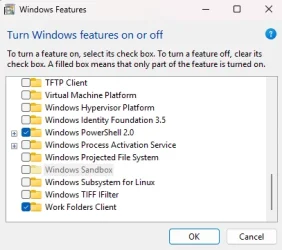
Well, we found the 'Windows Sandbox' option, but it may appear it's not been added(?).....
Though unchecked, the 'Windows Sandbox' feature is greyed out..... (see attach'mt)

Again, thanks!
Tim

Screenshot 2025-08-27 172438.webp
 

My Computers My Computers

  • At a glance

    Windows 11 Pro 25H2 OS Build 26200.7705Gen 5 Haswell i7-477032 GB G. SKILL DDR-3 Ripjaws X- 8GB x 4Integrated Intel 4600 (112MB)
    OS
    Windows 11 Pro 25H2 OS Build 26200.7705
    Computer type
    PC/Desktop
    Manufacturer/Model
    HP ENVY 700-515xt CTO (mATX platform)
    CPU
    Gen 5 Haswell i7-4770
    Motherboard
    OEM (Asus)
    Memory
    32 GB G. SKILL DDR-3 Ripjaws X- 8GB x 4
    Graphics Card(s)
    Integrated Intel 4600 (112MB)
    Sound Card
    OEM
    Monitor(s) Displays
    HP 27eb
    Screen Resolution
    1920 x 1080
    Hard Drives
    Samsung 860 PRO 256GB, SG ST1000DM003-1CH162, Barracuda 7200.14 Series, 1 TB storage, 64MB cache and a SATA 6Gb/s interface (Hard drive is used for Storage only)
    PSU
    OEM 350W
    Case
    OEM
    Cooling
    OEM (ACPI fans)
    Keyboard
    Logitech K120
    Mouse
    Logitech M100
    Internet Speed
    440.1 Down/ 11.2 Up, 13 ms latency, server based in Chicago, IP- Spectrum in Midland, MI
    Browser
    Google Chrome
    Antivirus
    MS Defender
  • At a glance

    Android 15Qualcomm Snapdragon 8 Gen 28GB LPDDR5X (ramped to 12GB, borrowed from 51...Integrated Adreno 740 GPU
    Operating System
    Android 15
    Manufacturer/Model
    Motorola Edge+ 2023
    CPU
    Qualcomm Snapdragon 8 Gen 2
    Motherboard
    What's that???.....
    Memory
    8GB LPDDR5X (ramped to 12GB, borrowed from 512GB UFS 4.0 storage)
    Graphics card(s)
    Integrated Adreno 740 GPU
    Sound Card
    Dolby Atmos
    Monitor(s) Displays
    Display Technology - pOLED, HDR10+, 10-bit; Over a billion shades of color, DCI-P3 color space, Dolby Vision®, 165Hz refresh rate, Touch rate: 360Hz, Peak Brightness: 1300 nits
    Screen Resolution
    Resolution - FHD+ (2400 x 1080) | 394ppi
    Hard Drives
    UFS 4.0 internal storage, which is the standard type of high-speed flash storage for modern flagship smartphones.
    PSU
    5100mAh Li-Ion, Charging - 68W TurboPower™ charging | 15W wireless charging | 5W wireless power sharing
    Case
    Sandblasted aluminum
    Keyboard
    GBoard and Google Voice typing
    Mouse
    Yep.....primarily rt. index finger
    Internet Speed
    499.23 down, 11.53 up, 12 ms latency
    Browser
    Chrome
    Antivirus
    Nah......built in Motorola Security
    Other Info
    This device smokes the Samsung Galaxy S25 Ultra, for $400-$500 less, except the Camera specs. My eyes can't tell the difference!

Latest Support Threads

Back
Top Bottom