Win Update KB5065426 Windows 11 Cumulative Update build 26100.6584 (24H2) - Sep. 9


UPDATE 9/29:


 Microsoft Support:

September 9, 2025 - KB5065426 (OS Build 26100.6584)​

Windows Secure Boot certificate expiration

Important:
Secure Boot certificates used by most Windows devices are set to expire starting in June 2026. This might affect the ability of certain personal and business devices to boot securely if not updated in time. To avoid disruption, we recommend reviewing the guidance and taking action to update certificates in advance. For details and preparation steps, see Windows Secure Boot certificate expiration and CA updates.


To learn more about Windows update terminology, see types of Windows updates and monthly quality update types. For an overview, see the update history page for Windows 11, version 24H2.

Stay informed! Follow @WindowsUpdate for the latest updates from the Windows Release Health Dashboard.

Windows Updates do not include updates for Microsoft Store apps.
If you're an enterprise user, see Microsoft Store apps - Configuration Manager.
If you're a consumer user, see Get updates for apps and games in Microsoft Store.


Change log​

Change dateChange description
September 24, 2025Update: The fix is included in the September 2025 Security Update (KB5065426).

[Kernel] Fixed: This update addresses an issue that could cause an unexpected system state on some platforms due to an incorrect interrupt state.

Highlights

  • This update addresses security issues for your Windows operating system.

Improvements

This security update contains fixes and quality improvements from KB5064081 (released August 29, 2025). The following summary outlines key issues addressed by this update. Also, included are available new features. The bold text within the brackets indicates the item or area of the change.
  • [App compatibility (known issue)] Fixed: Addresses an issue that caused non-admin users to receive unexpected User Account Control (UAC) prompts when MSI installers perform certain custom actions. These actions might include configuration or repair operations in the foreground or background, during the initial installation of an application.

    This issue could prevent non-admin users from running apps that perform MSI repairs, including Office Professional Plus 2010 and multiple applications from Autodesk (including AutoCAD). This fix reduces the scope for requiring UAC prompts for MSI repairs and enables IT admins to disable UAC prompts for specific apps by adding them to an allowlist.

    For more information, see Unexpected UAC prompts when running MSI repair operations after installing the August 2025 Windows security update.
  • [File server] This update enabled auditing SMB client compatibility for SMB Server signing as well as SMB Server EPA. This allows customers to assess their environment and identify any potential device or software incompatibility issues before deploying the hardening measures that are already supported by SMB Server. For detailed guidance, see CVE-2025-55234.
  • [Input]
    • Fixed: This update addresses an issue that caused certain apps to stop responding input in some input method scenarios.
    • Fixed: This update addresses an issue that caused some Internet Information Services (IIS) modules to disappear from IIS Manager, preventing users from configuring IIS using the IIS Manager interface.
  • [Kernel] Fixed: This update addresses an issue that could cause an unexpected system state on some platforms due to an incorrect interrupt state.
  • [Networking (known issue)] Fixed: This update addresses an issue that affects audio in apps using the Network Device Interface (NDI). Audio stutters when Display Capture is on in OBS Studio Application. This can occur after installing KB5063878.
If you've already installed previous updates, your device will download and install only the new updates included in this package.
For more information about security vulnerabilities, see the Security Update Guide website and the September 2025 Security Updates.

AI Components

This release updates the following AI components:

AI ComponentVersion
Image Search1.2508.906.0
Content Extraction1.2508.906.0
Semantic Analysis1.2508.906.0
Settings Model1.2508.906.0

Windows 11 servicing stack update (KB5064531)- 26100.5074​

This update makes quality improvements to the servicing stack, which is the component that installs Windows updates. Servicing stack updates (SSU) ensure that you have a robust and reliable servicing stack so that your devices can receive and install Microsoft updates. To learn more about SSUs, see Simplifying on-premises deployment of servicing stack updates.

Known issues in this update

1 PSDirect connections failing in hotpatched devices

Symptoms

We are aware of an edge case affecting hotpatched devices that have installed the September 2025 Hotpatch update (KB5065474) or the September 2025 security update (KB5065426). These devices might experience failures with PowerShell Direct (PSDirect) connections when the host and guest virtual machines (VMs) are both not fully updated.

When a patched guest VM attempts to connect to an unpatched host (or vice versa), the system is expected to fall back to a legacy handshake and clean up the socket gracefully. However, this fallback mechanism fails intermittently, resulting in socket cleanup issues. The connection failure might appear random, and users might observe Event ID 4625 logged in the Security Event log within Windows Event Viewer.

Workaround:

This issue is addressed in KB5066360. If your hotpatched device is experiencing issues with PSDirect connection, we recommend updating both the host and guest VM with these updates.

2 SMBv1 protocol connectivity

Symptoms

After installing this Windows update released on or after September 9, 2025, you might fail to connect to shared files and folders using the Server Message Block (SMB) v1 protocol on NetBIOS over TCP/IP (NetBT). This issue can occur if either the SMB client or the SMB server has the September 2025 security update installed.

Note: The SMBv1 protocol is deprecated and no longer installed by default in modern versions of Windows and Windows Server. Deployments that use newer versions of the protocol, SMBv2 or SMBv3, are not affected by this problem.

Workaround

This issue is addressed in KB5065789.

3 Problems playing protected content in some BluRay/DVD/Digital TV apps

Symptoms

Some Digital TV and Blu-ray/DVD apps might not play protected content as expected after installing the August 29, 2025, Windows non-security preview update (KB5064081), or later updates.

Apps that use Enhanced Video Renderer with HDCP enforcement or Digital Rights Management (DRM) for digital audio might show copyright protection errors, frequent playback interruptions, unexpected stops, or black screens.

Streaming services are not affected.

Workaround

The non-security September 2025 Windows preview update (KB5065789) and later updates address problems affecting certain applications that use the Enhanced Video Renderer (EVR) with HDCP (High-bandwidth Digital Content Protection) enforcement. The non-security October Windows preview update (KB5067036) includes additional improvements to address problems affecting applications using Digital Rights Media (DRM) for digital audio.

4 Password icon might be missing or invisible in the lock screen sign-in options

Symptoms

After installing the August 2025 non-security preview update (KB5064081) or later updates, you might notice that the password icon is not visible in the sign-in options on the lock screen. If you hover over the space where the icon should appear, you’ll see that the password button is still available. Select this placeholder to open the password text box and enter your password. After entering your password, you can sign in normally.

Workaround

Microsoft is working to resolve this issue and will provide information when it’s available.

How to get this update

Before you install this update

Microsoft combines the latest servicing stack update (SSU) for your operating system with the latest cumulative update (LCU). For general information about SSUs, see Servicing stack updates and Servicing Stack Updates (SSU): Frequently Asked Questions.

Install this update

To install this update, use one of the following Windows and Microsoft release channels.

AvailableNext Step
Included
This update downloads and installs automatically from Windows Update and Microsoft Update.
Yes 1Before you install this update

To get the standalone package(s) for this update, go to the Microsoft Update Catalog website. This KB contains one or more MSU files that require installation in a specific order.

Install this update

Method 1: Install all MSU files together


Download all MSU files for KB5065426 from Microsoft Update Catalog and place them in the same folder (for example, C:/Packages). Use Deployment Image Servicing and Management (DISM.exe) to install the target update. DISM will use the folder specified in PackagePath to discover and install one or more prerequisite MSU files as needed.

Updating Windows PC

To apply this update to a running Windows PC, run the following command from an elevated Command Prompt:

DISM /Online /Add-Package /PackagePath:c:\packages\Windows11.0-KB5065426-x64.msu

Or, run the following command from an elevated Windows PowerShell prompt:

Add-WindowsPackage -Online -PackagePath "c:\packages\Windows11.0-KB5065426-x64.msu"

Or use Windows Update Standalone Installer to install the target update.

Updating Windows Installation media

To apply this update to Windows Installation media, see Update Windows installation media with Dynamic Update.

Note: When downloading other Dynamic Update packages, ensure they match the same month as this KB. If the SafeOS Dynamic Update or Setup Dynamic Update is not available for the same month as this KB, use the most recently published version of each.

To add this update to a mounted image, run the following command from an elevated Command Prompt:

DISM /Image:mountdir /Add-Package /PackagePath:Windows11.0-KB5065426-x64.msu

Or, run the following command from an elevated Windows PowerShell prompt:

Add-WindowsPackage -Path "c:\offline" -PackagePath "Windows11.0-KB5065426-x64.msu" -PreventPending

Method 2: Install each MSU file individually, in order

Download and install each MSU file individually either using DISM or Windows Update Standalone Installer in the following order:
  1. windows11.0-kb5043080-x64_953449672073f8fb99badb4cc6d5d7849b9c83e8.msu
  2. windows11.0-kb5065426-x64_199ed7806a74fe78e3b0ef4f2073760000f71972.msu
1 This latest cumulative update includes updates for AI components. Even though the AI component updates are included in the update, the AI components are only applicable to Windows Copilot+ PCs and will not install on Windows PC or Windows Server.

If you want to remove the LCU

To remove the LCU after installing the combined SSU and LCU package, use the DISM/Remove-Package command line option with the LCU package name as the argument. You can find the package name by using this command: DISM /online /get-packages.

Running Windows Update Standalone Installer (wusa.exe) with the /uninstall switch on the combined package will not work because the combined package contains the SSU. You cannot remove the SSU from the system after installation.

File information

For a list of the files provided in this update, download the file information for cumulative update 5065426.

For a list of the files provided in the servicing stack update, download the file information for the SSU (KB5064531) - version 26100.5074.


 Source:


Check Windows Updates


ISO from Microsoft:



UUP Dump:

64-bit ISO download:

ARM64 ISO download:

 
Last edited:
Just to let you know, this doesn't happen to everyone! this is on 25H

1757515226503.webp
 

My Computers My Computers

  • At a glance

    windows 10 & 11AMD Ryzen 7X64GbRadeon RX 480 8Gb
    OS
    windows 10 & 11
    Computer type
    PC/Desktop
    Manufacturer/Model
    iBuyPower (special build)
    CPU
    AMD Ryzen 7X
    Motherboard
    Asus Prime x370 Pro
    Memory
    64Gb
    Graphics Card(s)
    Radeon RX 480 8Gb
    Monitor(s) Displays
    Samsung UHD 27 inch
    Screen Resolution
    UHD
    Hard Drives
    3 Samsung 1 TB SSD each; 1 Samsung PCIe M.2 at 2 TB
  • At a glance

    Windows 11 proAMD 9 5900X32 GbNvidia GeForce RTX 3080 Ti 12 GB GDDR6X
    Operating System
    Windows 11 pro
    Computer type
    PC/Desktop
    Manufacturer/Model
    IBuyPower
    CPU
    AMD 9 5900X
    Motherboard
    Asus x570 ROG Crosshair VIII Dark Hero WI-FI 6E ARGB
    Memory
    32 Gb
    Graphics card(s)
    Nvidia GeForce RTX 3080 Ti 12 GB GDDR6X
    Sound Card
    3D PREMIUM surround sound onboard
    Monitor(s) Displays
    Samsung 32 inch UHD curved monitor
    Screen Resolution
    UHD
    Hard Drives
    Samsung 980 pro 2 tb gen 4 NVMe ssd
    PSU
    850 watt consair RM850X
    Case
    Lian Li LANCOOL ONE tempered glass RGB gaming case
    Cooling
    DEEPCOOL GAMERSTORM RGB 240 mm CASTLE 240EX liquid cooler
    Keyboard
    Ares m.2 gaming keyboard
    Mouse
    Ares m.2 gaming optical mouse
    Internet Speed
    450
    Browser
    Firefox / Edge
    Antivirus
    Windows defender
    Other Info
    With all this gaming rig I am not a gamer!
Updated both my Dell Inspiron 3280 ( Windows 11 Home) and Beelink SEi12 MiniPC ( Windows 11 Pro)

10-09-2025 15-16-43.webp

Running DISM /Online /Cleanup-Image /CheckHealth showed No Component store corruption.
But - DISM AnalyseComponentStore showed 2 Reclaimable packages on both the machines.
DISM StartComponentCleanup "reclaimed" the 2 on both the machines.
Rerun
of DISM AnalyseComponentStore showed 0 Reclaimable Packages.
 

My Computers My Computers

  • At a glance

    Windows 11 Pro Version:25H2 OS Build: 26200.889412th Gen Intel core i5-1235U(Alder16*2 (32 GB) DDR 4-3200(1600MHz) Crucial Tech...Intel Iris Xe Graphics (Internal)
    OS
    Windows 11 Pro Version:25H2 OS Build: 26200.8894
    Computer type
    PC/Desktop
    Manufacturer/Model
    Beelink Mini PC Model: SEi12
    CPU
    12th Gen Intel core i5-1235U(Alder
    Motherboard
    SEi (manufactured by AZW)
    Memory
    16*2 (32 GB) DDR 4-3200(1600MHz) Crucial Technology
    Graphics Card(s)
    Intel Iris Xe Graphics (Internal)
    Sound Card
    Internal
    Monitor(s) Displays
    BenQ GW2283
    Screen Resolution
    1920*1080
    Hard Drives
    500GB NVME (Kingston SNV2S500G)
    1TB (Crucial CT1000BX500SSD1)
    PSU
    Power Brick 19V-6.32A , 120.08W
    Keyboard
    Dell KB3322Wi (Wireless)
    Mouse
    Dell WM118t (Wireless)
    Internet Speed
    4G/5G
    Browser
    MS Edge, Chrome
    Antivirus
    Malwarebytes Premium - Subscription
  • At a glance

    Windows 11 Home Version 25H2 Build 26200.8894Intel Core i3 8145UIntel Optane 16GB module + DDR 4 16GB (Optane...Intel UHD Graphics 620
    Operating System
    Windows 11 Home Version 25H2 Build 26200.8894
    Computer type
    PC/Desktop
    Manufacturer/Model
    Dell Inspiron 3280 AIO 22"
    CPU
    Intel Core i3 8145U
    Motherboard
    Dell inc. 027W48
    Memory
    Intel Optane 16GB module + DDR 4 16GB (Optane disabled.)
    Graphics card(s)
    Intel UHD Graphics 620
    Sound Card
    Internal
    Monitor(s) Displays
    Dell Monitor 22"
    Screen Resolution
    1920x1080
    Hard Drives
    Crucial CT1000BX500SSD1 ; 1000,2 GB
    PSU
    Power Brick
    Case
    All-in one
    Keyboard
    Dell Wireless KM636
    Mouse
    Dell Wireless KM 636
    Internet Speed
    4G
    Browser
    Edge, Chrome
    Antivirus
    Malwarebytes
    Other Info
    Upgraded from Windows 10 Home to Windows 11 Home on 28 Oct 2023

My Computer My Computer

At a glance

Windows 11 Pro 25H2Intel Core i7-11800H16GB (2x8 GB)RTX 3060 Laptop GPU
OS
Windows 11 Pro 25H2
Computer type
Laptop
Manufacturer/Model
Acer Predator Helios 300 PH314-54-72ZJ
CPU
Intel Core i7-11800H
Motherboard
TGL
Memory
16GB (2x8 GB)
Graphics Card(s)
RTX 3060 Laptop GPU
Sound Card
Realtek ALC295
Monitor(s) Displays
1
Screen Resolution
2560 x 1440 @ 165Hz
Hard Drives
1TB NVMe SSD, 512GB NVMe SSD, 1TB 7200 RPM HDD
Cooling
Aeroblade 5th Gen 3D fan
Keyboard
RGB Laptop keyboard
Mouse
Logitech Lightsync G203
Internet Speed
175 Mbps up/175 Mbps down
Browser
Firefox with uBlock Origin and YouTube enhancing extensions..
Antivirus
Windows Security with Core Isolation on
Updated both my Dell Inspiron 3280 ( Windows 11 Home) and Beelink SEi12 MiniPC ( Windows 11 Pro)

View attachment 144954

Running DISM /Online /Cleanup-Image /CheckHealth showed No Component store corruption.
But - DISM AnalyseComponentStore showed 2 Reclaimable packages on both the machines.
DISM StartComponentCleanup "reclaimed" the 2 on both the machines.
Rerun
of DISM AnalyseComponentStore showed 0 Reclaimable Packages.
Often when I remove those reclaimable and/or unreclaimable packages I get install errors on the following Windows Updates. I left them from the last .5074 build and this weeks update went smoothly without a hitch. However now I'm up to eight reclaimable packages lol. Anyhow someone had mentioned that some of those packages weren't meant to be removed and would cause issues if you did. I'll post one of those AI answers below on the reclaimable packages but I still don't have a clearly defined answer on reclaimable packages:

Reasons for "Reclaimable Packages"
  • Safety Mechanism:
    Windows keeps staged or superseded components as a safety measure, providing a fallback for future updates, feature installations, or system rollbacks if a new update fails or causes problems.

  • Incomplete Cleanup:
    The DISM command, while designed for cleanup, may be too conservative and not remove all outdated components, especially those that are part of critical system components or have hard link quirks that make them difficult to delete.

  • Checkpoint Cumulative Updates:
    In newer Windows versions, "checkpoint cumulative updates" are introduced, where a cumulative update serves as a new baseline for future updates. These updates require components to be in a "Staged" state, which is a normal part of this update process.

  • System Dependencies:
    Certain features, optional components, or other updates might still have dependencies on the outdated "reclaimable" packages, preventing them from being removed.

  • Interrupted or Failed Updates:
    If a Windows update process was interrupted or failed at any point, it may leave behind components as a precaution, preventing them from being cleaned up.

  • Hard Link Management:
    The component store uses hard links for files. When cleaning up, DISM must correctly account for these hard links to avoid deleting files that are still in use by other parts of the system, which can lead to some packages remaining undeleted.
 

My Computers My Computers

  • At a glance

    Windows 11 25H2Intel Core Ultra 9 275HX (24-Core)64GB DDR5 6400MT/sNVIDIA GeForce RTX 5080 and Intel UHD Graphics
    OS
    Windows 11 25H2
    Computer type
    Laptop
    Manufacturer/Model
    Alienware 18 Area-51
    CPU
    Intel Core Ultra 9 275HX (24-Core)
    Motherboard
    Alienware
    Memory
    64GB DDR5 6400MT/s
    Graphics Card(s)
    NVIDIA GeForce RTX 5080 and Intel UHD Graphics
    Sound Card
    Onboard, Realtek high-performance Audio chips (ALC3329 & ALC1708))
    Monitor(s) Displays
    300HZ 18-inch QHD 500 nit Comfort View+
    Screen Resolution
    2560 x 1600
    Hard Drives
    2TB NVMe M.2 PCIe Gen 5 SSD
    Case
    Magnesium Alloy
    Cooling
    Advanced Cryo-Tech Quad-Fan Cooling system & large vapor chamber
    Keyboard
    Cherry MX ultra low profile mechanical keyboard with per key AlienFX RGB lighting
    Mouse
    Logitech MX Master 4
    Browser
    Vivaldi (main), Firefox, Chrome, Edge
    Antivirus
    MS Defender and Malwarebytes Free
  • At a glance

    Windows 11 25H2Qualcomm Snapdragon X Elite (12 Core) ARM bas...16GB LPDDR5Qualcomm Adreno X1-85
    Operating System
    Windows 11 25H2
    Computer type
    Laptop
    Manufacturer/Model
    Microsoft Surface Laptop 7
    CPU
    Qualcomm Snapdragon X Elite (12 Core) ARM based CPU
    Motherboard
    Microsoft Corp.
    Memory
    16GB LPDDR5
    Graphics card(s)
    Qualcomm Adreno X1-85
    Sound Card
    Omnisonic speakers with Dolby Atmos spatial sound
    Monitor(s) Displays
    120 Hz 13.8-inch 600 nit PixelSense Flow touchscreen
    Screen Resolution
    2304x1536
    Hard Drives
    1TB NVMe Gen 4 SSD
    Case
    Anodized Aluminum
    Cooling
    Traditional active cooling fan system
    Keyboard
    Mechanical QWERTY, backlit when in use
    Mouse
    Logitech MX Master 4 and Surface Arc Mouse
    Browser
    Vivaldi (main), Firefox, Chrome, Edge
    Antivirus
    MS Defender and Malwarebytes Free
@FrancoDT


I had the same problem. My solution was as follows.

I ran this...
Dism.exe /online /Cleanup-Image /StartComponentCleanup /ResetBase

That took me down to TWO reclaimable packages, which doesn't seem to cause issues with Updates.
Disk Cleanup then has the 194MB bug, but I can live with that.

After each update now, I just run this...
Dism.exe /online /Cleanup-Image /StartComponentCleanup


Haven't had any issues other than the Disk Cleanup bug, which seems to be just a reporting error.
 

My Computers My Computers

  • At a glance

    Win 11 Home ♦♦♦26200.8875 ♦♦♦♦♦♦♦25H2AMD Ryzen 7 3700XG.Skill (F4-3200C14D-16GTZKW)EVGA RTX 2070 (08G-P4-2171-KR)
    OS
    Win 11 Home ♦♦♦26200.8875 ♦♦♦♦♦♦♦25H2
    Computer type
    PC/Desktop
    Manufacturer/Model
    Built by Ghot® [May 2020]
    CPU
    AMD Ryzen 7 3700X
    Motherboard
    Asus Pro WS X570-ACE (BIOS 5302)
    Memory
    G.Skill (F4-3200C14D-16GTZKW)
    Graphics Card(s)
    EVGA RTX 2070 (08G-P4-2171-KR)
    Sound Card
    Realtek ALC1220P / ALC S1220A
    Monitor(s) Displays
    Dell U3011 30"
    Screen Resolution
    2560 x 1600
    Hard Drives
    2x Samsung 860 EVO 500GB,
    WD 4TB Black FZBX - SATA III,
    WD 8TB Black FZBX - SATA III,
    DRW-24B1ST CD/DVD Burner
    PSU
    PC Power & Cooling 750W Quad EPS12V
    Case
    Cooler Master ATCS 840 Tower
    Cooling
    CM Hyper 212 EVO (push/pull)
    Keyboard
    Ducky DK9008 Shine II Blue LED
    Mouse
    Logitech Optical M-100
    Internet Speed
    300/300
    Browser
    Firefox (latest)
    Antivirus
    Bitdefender Total Security
    Other Info
    Speakers: Klipsch Pro Media 2.1
  • At a glance

    Windows XP Pro 32bit w/SP3AMD Athlon 64 X2 5000+ (OC'd @ 3.2Ghz)TWIN2X2048-6400C4DHX (2 x 1GB, DDR2 800)EVGA 256-P2-N758-TR GeForce 8600GT SSC
    Operating System
    Windows XP Pro 32bit w/SP3
    Computer type
    PC/Desktop
    Manufacturer/Model
    Built by Ghot® (not in use)
    CPU
    AMD Athlon 64 X2 5000+ (OC'd @ 3.2Ghz)
    Motherboard
    ASUS M2N32-SLI Deluxe Wireless Edition
    Memory
    TWIN2X2048-6400C4DHX (2 x 1GB, DDR2 800)
    Graphics card(s)
    EVGA 256-P2-N758-TR GeForce 8600GT SSC
    Sound Card
    Onboard
    Monitor(s) Displays
    ViewSonic G90FB Black 19" Professional (CRT)
    Screen Resolution
    up to 2048 x 1536
    Hard Drives
    WD 36GB 10,000rpm Raptor SATA
    Seagate 80GB 7200rpm SATA
    Lite-On LTR-52246S CD/RW
    Lite-On LH-18A1P CD/DVD Burner
    PSU
    PC Power & Cooling Silencer 750 Quad EPS12V
    Case
    Generic Beige case, 80mm fans
    Cooling
    ZALMAN 9500A 92mm CPU Cooler
    Keyboard
    Logitech Classic Keybooard 200
    Mouse
    Logitech Optical M-BT96a
    Internet Speed
    300/300
    Browser
    Firefox 3.x ??
    Antivirus
    Symantec (Norton)
    Other Info
    Still assembled, still runs. Haven't turned it on for 15 years?
@FrancoDT


I had the same problem. My solution was as follows.

I ran this...
Dism.exe /online /Cleanup-Image /StartComponentCleanup /ResetBase

That took me down to TWO reclaimable packages, which doesn't seem to cause issues with Updates.
Disk Cleanup then has the 194MB bug, but I can live with that.

After each update now, I just run this...
Dism.exe /online /Cleanup-Image /StartComponentCleanup


Haven't had any issues other than the Disk Cleanup bug, which seems to be just a reporting error.
I'm just not sure what approach to take anymore. I never had a Windows Update error before I started messing with cleaning up those reclaimable packages. When I leave them alone no issues but man eight packages on two machines seems excessive. I'll see what happens the next update and if the number drops or climbs again. I would definitely suggest people leave those two unreclaimable packages that sometimes appear alone though. They won't remove with the normal component cleanup process and I don't think they are meant to be removed by using the work around.
 

My Computers My Computers

  • At a glance

    Windows 11 25H2Intel Core Ultra 9 275HX (24-Core)64GB DDR5 6400MT/sNVIDIA GeForce RTX 5080 and Intel UHD Graphics
    OS
    Windows 11 25H2
    Computer type
    Laptop
    Manufacturer/Model
    Alienware 18 Area-51
    CPU
    Intel Core Ultra 9 275HX (24-Core)
    Motherboard
    Alienware
    Memory
    64GB DDR5 6400MT/s
    Graphics Card(s)
    NVIDIA GeForce RTX 5080 and Intel UHD Graphics
    Sound Card
    Onboard, Realtek high-performance Audio chips (ALC3329 & ALC1708))
    Monitor(s) Displays
    300HZ 18-inch QHD 500 nit Comfort View+
    Screen Resolution
    2560 x 1600
    Hard Drives
    2TB NVMe M.2 PCIe Gen 5 SSD
    Case
    Magnesium Alloy
    Cooling
    Advanced Cryo-Tech Quad-Fan Cooling system & large vapor chamber
    Keyboard
    Cherry MX ultra low profile mechanical keyboard with per key AlienFX RGB lighting
    Mouse
    Logitech MX Master 4
    Browser
    Vivaldi (main), Firefox, Chrome, Edge
    Antivirus
    MS Defender and Malwarebytes Free
  • At a glance

    Windows 11 25H2Qualcomm Snapdragon X Elite (12 Core) ARM bas...16GB LPDDR5Qualcomm Adreno X1-85
    Operating System
    Windows 11 25H2
    Computer type
    Laptop
    Manufacturer/Model
    Microsoft Surface Laptop 7
    CPU
    Qualcomm Snapdragon X Elite (12 Core) ARM based CPU
    Motherboard
    Microsoft Corp.
    Memory
    16GB LPDDR5
    Graphics card(s)
    Qualcomm Adreno X1-85
    Sound Card
    Omnisonic speakers with Dolby Atmos spatial sound
    Monitor(s) Displays
    120 Hz 13.8-inch 600 nit PixelSense Flow touchscreen
    Screen Resolution
    2304x1536
    Hard Drives
    1TB NVMe Gen 4 SSD
    Case
    Anodized Aluminum
    Cooling
    Traditional active cooling fan system
    Keyboard
    Mechanical QWERTY, backlit when in use
    Mouse
    Logitech MX Master 4 and Surface Arc Mouse
    Browser
    Vivaldi (main), Firefox, Chrome, Edge
    Antivirus
    MS Defender and Malwarebytes Free
Lately, scanhealth only comes back with a pass, if after the first patch-Tuesday update done on a clean install on 24H2! That's absurd!
After any more LCUs, scanhealth starts coming back with a fail.

Two times, CBS showed that files were supposed to be copied to the component store, and thus, Windows Update may silently fail to copy some files to the component store, with no indication of that in advance.

This time, when CBS failed the component store check, CBS didn't report metadata corruption, OTOH. Just that some files needed to be fetched via WU.
 
Last edited:

My Computers My Computers

  • At a glance

    Windows 11 Pro x64 24H2Ryzen 9 5900X64 GB G.Skill RipJaws V F4-3200C16D-64GVKASRock Steel Legend Arc B580 12 GB
    OS
    Windows 11 Pro x64 24H2
    Computer type
    PC/Desktop
    CPU
    Ryzen 9 5900X
    Motherboard
    ASRock B550 PG Velocita (UEFI-BIOS 3.90)
    Memory
    64 GB G.Skill RipJaws V F4-3200C16D-64GVK
    Graphics Card(s)
    ASRock Steel Legend Arc B580 12 GB
    Monitor(s) Displays
    Alienware AW3423DWF OLED ultrawide
    Hard Drives
    Samsung 990 Pro 1 TB NVMe SSD
    PSU
    eVGA Supernova 750 G3
    Case
    Corsair 275R
    Internet Speed
    VTel FTTH 1 Gb down and 1 Gb up
  • At a glance

    Windows 11 Home x64 25H2Ryzen 7 5800X3D32 GB (2x16 GB G.Skill TridentZ Neo)Sapphire Nitro+ Radeon RX 6750 XT
    Operating System
    Windows 11 Home x64 25H2
    Computer type
    PC/Desktop
    CPU
    Ryzen 7 5800X3D
    Motherboard
    Asus ROG Strix B550-F Gaming (UEFI-BIOS version 3636)
    Memory
    32 GB (2x16 GB G.Skill TridentZ Neo)
    Graphics card(s)
    Sapphire Nitro+ Radeon RX 6750 XT
    Hard Drives
    Samsung 970 Pro 512 GB NVMe SSD
    PSU
    Corsair RM850x
    Case
    Fractal Focus G
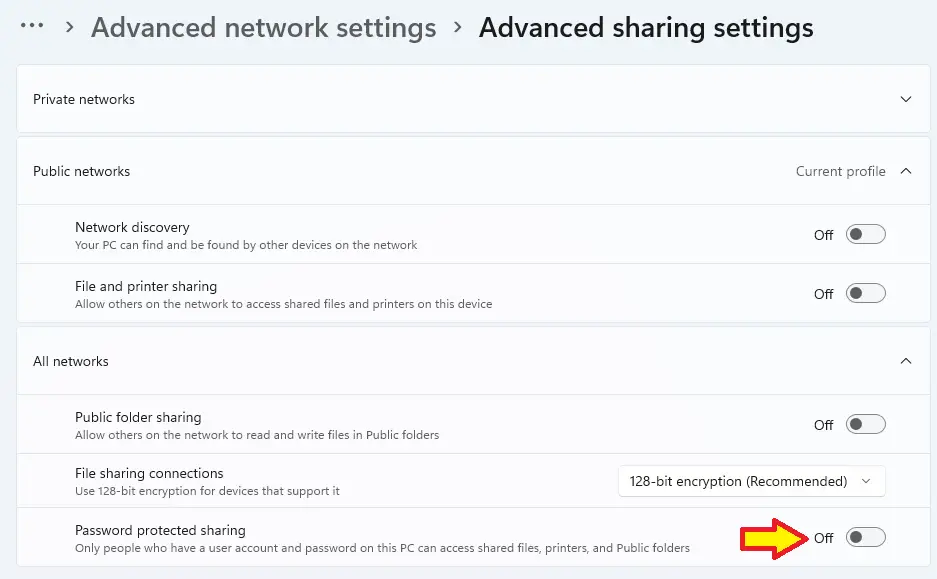
Is anyone else having SMB share issues since the update?

I literally was transferring files to a networked laptop through its shared folder before the update, now I can't access it, it just pops open the credential manager prompt asking for username/password, and is not accepting them. Nothing has changed on the sharing machine but I did go ahead and reset the password just to be sure.

I ask because there is mention of SMB changes due to a vulnerability, am just wondering if others have solved this and if so, how?
 

My Computers My Computers

  • At a glance

    Windows 1114700K64GB G.Skill Trident Z NeoMSI 4080 Suprim X
    OS
    Windows 11
    Computer type
    PC/Desktop
    Manufacturer/Model
    Custom
    CPU
    14700K
    Motherboard
    Asus Strix Z790-F Wi-Fi II
    Memory
    64GB G.Skill Trident Z Neo
    Graphics Card(s)
    MSI 4080 Suprim X
    Monitor(s) Displays
    LG Ultragear Ultrawide
    Screen Resolution
    3440x1440
    Hard Drives
    Firecuda 530 1TB
    Firecuda 530 4TB
    PSU
    BeQuiet Dark Power Pro 13
    Case
    Lian Li O11 Vision Compact
    Cooling
    EK Nucleus CR360 Dark
    Keyboard
    Steelseries Apex Pro TKL 2023
    Mouse
    Logitech G502 X Plus
    Internet Speed
    1GB
    Browser
    Edge
  • At a glance

    Windows 1113700K64GB Crucial 5200MT/sProArt 4070 Super
    Operating System
    Windows 11
    Computer type
    PC/Desktop
    Manufacturer/Model
    NUC 13 Extreme
    CPU
    13700K
    Motherboard
    Intel Compute i7
    Memory
    64GB Crucial 5200MT/s
    Graphics card(s)
    ProArt 4070 Super
    Hard Drives
    Samsung 990 Pro
    WD Black SN850X 4TB
    2x Samsung 870 QVO 8TB
Is anyone else having SMB share issues since the update?

I literally was transferring files to a networked laptop through its shared folder before the update, now I can't access it, it just pops open the credential manager prompt asking for username/password, and is not accepting them. Nothing has changed on the sharing machine but I did go ahead and reset the password just to be sure.

I ask because there is mention of SMB changes due to a vulnerability, am just wondering if others have solved this and if so, how?

try this:

Code:
Windows Registry Editor Version 5.00

[HKEY_LOCAL_MACHINE\SYSTEM\ControlSet001\Services\LanmanWorkstation\Parameters]
"AllowInsecureGuestAuth"=dword:00000001
"RequireSecuritySignature"=dword:00000000

and

2eHMPC6.png
 

My Computer My Computer

At a glance

Windows 11, version 25H2 (26200)AMD Ryzen 9 9950X 16-Core ProcessorDDR5-6000 (CL36) 64.0 GBNVIDIA GeForce RTX 4090
OS
Windows 11, version 25H2 (26200)
Computer type
PC/Desktop
CPU
AMD Ryzen 9 9950X 16-Core Processor
Motherboard
ASRock B650M PG Riptide
Memory
DDR5-6000 (CL36) 64.0 GB
Graphics Card(s)
NVIDIA GeForce RTX 4090
PSU
1200W
Case
Phanteks Enthoo Pro 2
Cooling
Noctua NH-D12L
try this:

Code:
Windows Registry Editor Version 5.00

[HKEY_LOCAL_MACHINE\SYSTEM\ControlSet001\Services\LanmanWorkstation\Parameters]
"AllowInsecureGuestAuth"=dword:00000001
"RequireSecuritySignature"=dword:00000000

and

2eHMPC6.png
Unfortunately, this doesn't fix either machine... (I tried sharing a folder to test the other way)
 

My Computers My Computers

  • At a glance

    Windows 1114700K64GB G.Skill Trident Z NeoMSI 4080 Suprim X
    OS
    Windows 11
    Computer type
    PC/Desktop
    Manufacturer/Model
    Custom
    CPU
    14700K
    Motherboard
    Asus Strix Z790-F Wi-Fi II
    Memory
    64GB G.Skill Trident Z Neo
    Graphics Card(s)
    MSI 4080 Suprim X
    Monitor(s) Displays
    LG Ultragear Ultrawide
    Screen Resolution
    3440x1440
    Hard Drives
    Firecuda 530 1TB
    Firecuda 530 4TB
    PSU
    BeQuiet Dark Power Pro 13
    Case
    Lian Li O11 Vision Compact
    Cooling
    EK Nucleus CR360 Dark
    Keyboard
    Steelseries Apex Pro TKL 2023
    Mouse
    Logitech G502 X Plus
    Internet Speed
    1GB
    Browser
    Edge
  • At a glance

    Windows 1113700K64GB Crucial 5200MT/sProArt 4070 Super
    Operating System
    Windows 11
    Computer type
    PC/Desktop
    Manufacturer/Model
    NUC 13 Extreme
    CPU
    13700K
    Motherboard
    Intel Compute i7
    Memory
    64GB Crucial 5200MT/s
    Graphics card(s)
    ProArt 4070 Super
    Hard Drives
    Samsung 990 Pro
    WD Black SN850X 4TB
    2x Samsung 870 QVO 8TB
Is anyone else having SMB share issues since the update?

I literally was transferring files to a networked laptop through its shared folder before the update, now I can't access it, it just pops open the credential manager prompt asking for username/password, and is not accepting them. Nothing has changed on the sharing machine but I did go ahead and reset the password just to be sure.

I ask because there is mention of SMB changes due to a vulnerability, am just wondering if others have solved this and if so, how?
Check out this thread:


This last update trashed a lot of networks, including our's.
 

My Computer My Computer

At a glance

Windows 11 25H212th Gen i9 -12900K64GBIntel UHD Graphics
OS
Windows 11 25H2
Computer type
PC/Desktop
Manufacturer/Model
Dell
CPU
12th Gen i9 -12900K
Memory
64GB
Graphics Card(s)
Intel UHD Graphics
Monitor(s) Displays
Dual Dell U2717D
Screen Resolution
2560x1440
Hard Drives
2TB Lexar SSD, 2TB Crucial SSD, 2TB Kingston SSD
Check out this thread:


This last update trashed a lot of networks, including our's.
Thanks, at least its not me.

Here's another symptom that just started since this update.

A few seconds after rebooting my display just cuts out for a second, and then comes back. It wasn't doing this before the update.
I did update the intel gpu driver (I have igpu enabled along with nvidia card), and in event viewer it complains about Dotnet, but that was the only issue. I did a display driver uninstall of the Intel driver but it still is doing it. So its not that, wondering if this has started happening to anyone else too?

I'm just going to revert back to one of my macrium images and just block this update as well, previously blocked the dreaded "SSD killer" update too (although I see Phison have finally admitted firmwares were the issue). Honestly, never had so many issues with Windows updates as recently. Prior to these have had a good run of no issues that affect me.
 

My Computers My Computers

  • At a glance

    Windows 1114700K64GB G.Skill Trident Z NeoMSI 4080 Suprim X
    OS
    Windows 11
    Computer type
    PC/Desktop
    Manufacturer/Model
    Custom
    CPU
    14700K
    Motherboard
    Asus Strix Z790-F Wi-Fi II
    Memory
    64GB G.Skill Trident Z Neo
    Graphics Card(s)
    MSI 4080 Suprim X
    Monitor(s) Displays
    LG Ultragear Ultrawide
    Screen Resolution
    3440x1440
    Hard Drives
    Firecuda 530 1TB
    Firecuda 530 4TB
    PSU
    BeQuiet Dark Power Pro 13
    Case
    Lian Li O11 Vision Compact
    Cooling
    EK Nucleus CR360 Dark
    Keyboard
    Steelseries Apex Pro TKL 2023
    Mouse
    Logitech G502 X Plus
    Internet Speed
    1GB
    Browser
    Edge
  • At a glance

    Windows 1113700K64GB Crucial 5200MT/sProArt 4070 Super
    Operating System
    Windows 11
    Computer type
    PC/Desktop
    Manufacturer/Model
    NUC 13 Extreme
    CPU
    13700K
    Motherboard
    Intel Compute i7
    Memory
    64GB Crucial 5200MT/s
    Graphics card(s)
    ProArt 4070 Super
    Hard Drives
    Samsung 990 Pro
    WD Black SN850X 4TB
    2x Samsung 870 QVO 8TB
test this comand

dism.exe /Online /Cleanup-Image /StartComponentCleanup /ResetBase
Thanks Mau0, I tried the command and it went to 80& and reported completed.
 

My Computer My Computer

At a glance

Windows 11AMD Ryzen 8700G64 GBOnboard
OS
Windows 11
Computer type
PC/Desktop
Manufacturer/Model
Generic
CPU
AMD Ryzen 8700G
Motherboard
Gigabyte B650 UD AC
Memory
64 GB
Graphics Card(s)
Onboard
Sound Card
Onboard
Monitor(s) Displays
Del U2723QE
Screen Resolution
3840 x 2160
Hard Drives
Corsiar MP600 1TB
PSU
Silverstone 750 GOLD
Case
Silverstone FARA 513

My Computers My Computers

  • At a glance

    Windows 11 Pro x64 24H2Ryzen 9 5900X64 GB G.Skill RipJaws V F4-3200C16D-64GVKASRock Steel Legend Arc B580 12 GB
    OS
    Windows 11 Pro x64 24H2
    Computer type
    PC/Desktop
    CPU
    Ryzen 9 5900X
    Motherboard
    ASRock B550 PG Velocita (UEFI-BIOS 3.90)
    Memory
    64 GB G.Skill RipJaws V F4-3200C16D-64GVK
    Graphics Card(s)
    ASRock Steel Legend Arc B580 12 GB
    Monitor(s) Displays
    Alienware AW3423DWF OLED ultrawide
    Hard Drives
    Samsung 990 Pro 1 TB NVMe SSD
    PSU
    eVGA Supernova 750 G3
    Case
    Corsair 275R
    Internet Speed
    VTel FTTH 1 Gb down and 1 Gb up
  • At a glance

    Windows 11 Home x64 25H2Ryzen 7 5800X3D32 GB (2x16 GB G.Skill TridentZ Neo)Sapphire Nitro+ Radeon RX 6750 XT
    Operating System
    Windows 11 Home x64 25H2
    Computer type
    PC/Desktop
    CPU
    Ryzen 7 5800X3D
    Motherboard
    Asus ROG Strix B550-F Gaming (UEFI-BIOS version 3636)
    Memory
    32 GB (2x16 GB G.Skill TridentZ Neo)
    Graphics card(s)
    Sapphire Nitro+ Radeon RX 6750 XT
    Hard Drives
    Samsung 970 Pro 512 GB NVMe SSD
    PSU
    Corsair RM850x
    Case
    Fractal Focus G
in event viewer it complains about Dotnet, but that was the only issue. I did a display driver uninstall of the Intel driver but it still is doing it. So its not that, wondering if this has started happening to anyone else too?
I suspect it's Intel's Driver & Support Assistant, which seems to often be the only thing, where one program uses a late version of Dot Net.

DSA, if you want to uninstall, must be uninstalled separately, which can be found as a separate entry in Apps. (it's not lumped in with drivers, even when the Intel driver installer package bundles it)
 

My Computers My Computers

  • At a glance

    Windows 11 Pro x64 24H2Ryzen 9 5900X64 GB G.Skill RipJaws V F4-3200C16D-64GVKASRock Steel Legend Arc B580 12 GB
    OS
    Windows 11 Pro x64 24H2
    Computer type
    PC/Desktop
    CPU
    Ryzen 9 5900X
    Motherboard
    ASRock B550 PG Velocita (UEFI-BIOS 3.90)
    Memory
    64 GB G.Skill RipJaws V F4-3200C16D-64GVK
    Graphics Card(s)
    ASRock Steel Legend Arc B580 12 GB
    Monitor(s) Displays
    Alienware AW3423DWF OLED ultrawide
    Hard Drives
    Samsung 990 Pro 1 TB NVMe SSD
    PSU
    eVGA Supernova 750 G3
    Case
    Corsair 275R
    Internet Speed
    VTel FTTH 1 Gb down and 1 Gb up
  • At a glance

    Windows 11 Home x64 25H2Ryzen 7 5800X3D32 GB (2x16 GB G.Skill TridentZ Neo)Sapphire Nitro+ Radeon RX 6750 XT
    Operating System
    Windows 11 Home x64 25H2
    Computer type
    PC/Desktop
    CPU
    Ryzen 7 5800X3D
    Motherboard
    Asus ROG Strix B550-F Gaming (UEFI-BIOS version 3636)
    Memory
    32 GB (2x16 GB G.Skill TridentZ Neo)
    Graphics card(s)
    Sapphire Nitro+ Radeon RX 6750 XT
    Hard Drives
    Samsung 970 Pro 512 GB NVMe SSD
    PSU
    Corsair RM850x
    Case
    Fractal Focus G
I always have a bunch of the errors that seem to be constantly there. I've stopped chasing them unless I experience a specific issue that seems to be related.

1757623632292.webp
 

My Computers My Computers

  • At a glance

    Win 11 Pro 25H2, Build 26200.8894Intel Core i5 1450064GB DDR4GeForce RTX 4060
    OS
    Win 11 Pro 25H2, Build 26200.8894
    Computer type
    PC/Desktop
    Manufacturer/Model
    Home Brew
    CPU
    Intel Core i5 14500
    Motherboard
    Gigabyte B760M G P WIFI
    Memory
    64GB DDR4
    Graphics Card(s)
    GeForce RTX 4060
    Sound Card
    Chipset Realtek
    Monitor(s) Displays
    LG 45" Ultragear, Acer 24" 1080p
    Screen Resolution
    5120x1440, 1920x1080
    Hard Drives
    Crucial P310 2TB 2280 PCIe Gen4 3D NAND NVMe M.2 SSD (O/S)
    Silicon Power 2TB US75 NVMe PCIe Gen4 M.2 2280 SSD (backup)
    Crucial BX500 2TB 3D NAND (2nd backup)
    Seagate 4TB Ironwolf, rotating HDD archive files
    External off-line backup Drives: 2 NVMe 4TB drives in external enclosures
    PSU
    Thermaltake Toughpower GF3 750W
    Case
    LIAN LI LANCOOL 216 E-ATX PC Case
    Cooling
    Lots of fans!
    Keyboard
    Microsoft Comfort Curve 2000
    Mouse
    Logitech G305
    Internet Speed
    Verizon FiOS 1GB
    Browser
    Firefox
    Antivirus
    Malware Bytes & Windows Defender Security
  • At a glance

    Win 11 Pro 25H2, Build 26200.8894Intel Core i5 1440032GB DDR5Intel 700 Embedded GPU
    Operating System
    Win 11 Pro 25H2, Build 26200.8894
    Computer type
    PC/Desktop
    Manufacturer/Model
    Home Brew
    CPU
    Intel Core i5 14400
    Motherboard
    Gigabyte B760M DS3H AX
    Memory
    32GB DDR5
    Graphics card(s)
    Intel 700 Embedded GPU
    Sound Card
    Realtek Embedded
    Monitor(s) Displays
    27" HP 1080p
    Screen Resolution
    1920x1080
    Hard Drives
    Crucial P310 2TB 2280 PCIe Gen4 eD NAND PCIe SSD
    Samsung EVO 990 2TB NVMe Gen4 SSD
    Samsung 2TB SATA SSD
    PSU
    Thermaltake Smart BM3 650W
    Case
    Okinos Micro ATX Case
    Cooling
    Fans
    Keyboard
    Microsoft Comfort Curve 2000
    Mouse
    Logitech G305
    Internet Speed
    Verizon FiOS 1GB
    Browser
    Firefox
    Antivirus
    Malware Bytes & Windows Defender Security
  • Nimo N171 17" Laptop, (Intel i3-1215U, 16GB RAM, 2TB NVMe, Win11 Pro)
    Acemagic Vista Mini PC V1 (Intel N150, 16GB RAM, 1TB NVMe, Win11 Pro)
    HP ENVY h8-1540t, (24GB RAM, 2TB SSD, 2TB HDD, Win11 Pro)
I always have a bunch of the errors that seem to be constantly there. I've stopped chasing them unless I experience a specific issue that seems to be related.

View attachment 145077
I don't have quite as much of those. Most of the errors I have, are related to IGS, because IGS fails to find LEDs on my Sparkle Titan Arc A770, LOL.
 

My Computers My Computers

  • At a glance

    Windows 11 Pro x64 24H2Ryzen 9 5900X64 GB G.Skill RipJaws V F4-3200C16D-64GVKASRock Steel Legend Arc B580 12 GB
    OS
    Windows 11 Pro x64 24H2
    Computer type
    PC/Desktop
    CPU
    Ryzen 9 5900X
    Motherboard
    ASRock B550 PG Velocita (UEFI-BIOS 3.90)
    Memory
    64 GB G.Skill RipJaws V F4-3200C16D-64GVK
    Graphics Card(s)
    ASRock Steel Legend Arc B580 12 GB
    Monitor(s) Displays
    Alienware AW3423DWF OLED ultrawide
    Hard Drives
    Samsung 990 Pro 1 TB NVMe SSD
    PSU
    eVGA Supernova 750 G3
    Case
    Corsair 275R
    Internet Speed
    VTel FTTH 1 Gb down and 1 Gb up
  • At a glance

    Windows 11 Home x64 25H2Ryzen 7 5800X3D32 GB (2x16 GB G.Skill TridentZ Neo)Sapphire Nitro+ Radeon RX 6750 XT
    Operating System
    Windows 11 Home x64 25H2
    Computer type
    PC/Desktop
    CPU
    Ryzen 7 5800X3D
    Motherboard
    Asus ROG Strix B550-F Gaming (UEFI-BIOS version 3636)
    Memory
    32 GB (2x16 GB G.Skill TridentZ Neo)
    Graphics card(s)
    Sapphire Nitro+ Radeon RX 6750 XT
    Hard Drives
    Samsung 970 Pro 512 GB NVMe SSD
    PSU
    Corsair RM850x
    Case
    Fractal Focus G
I don't have quite as much of those. Most of the errors I have, are related to IGS, because IGS fails to find LEDs on my Sparkle Titan Arc A770, LOL.
I chased a few of these years ago and then realized I was on a snipe hunt and stopped worrying about it. I can't remember any Windows computer that doesn't have an assortment of "error" entries in Event Log.
 

My Computers My Computers

  • At a glance

    Win 11 Pro 25H2, Build 26200.8894Intel Core i5 1450064GB DDR4GeForce RTX 4060
    OS
    Win 11 Pro 25H2, Build 26200.8894
    Computer type
    PC/Desktop
    Manufacturer/Model
    Home Brew
    CPU
    Intel Core i5 14500
    Motherboard
    Gigabyte B760M G P WIFI
    Memory
    64GB DDR4
    Graphics Card(s)
    GeForce RTX 4060
    Sound Card
    Chipset Realtek
    Monitor(s) Displays
    LG 45" Ultragear, Acer 24" 1080p
    Screen Resolution
    5120x1440, 1920x1080
    Hard Drives
    Crucial P310 2TB 2280 PCIe Gen4 3D NAND NVMe M.2 SSD (O/S)
    Silicon Power 2TB US75 NVMe PCIe Gen4 M.2 2280 SSD (backup)
    Crucial BX500 2TB 3D NAND (2nd backup)
    Seagate 4TB Ironwolf, rotating HDD archive files
    External off-line backup Drives: 2 NVMe 4TB drives in external enclosures
    PSU
    Thermaltake Toughpower GF3 750W
    Case
    LIAN LI LANCOOL 216 E-ATX PC Case
    Cooling
    Lots of fans!
    Keyboard
    Microsoft Comfort Curve 2000
    Mouse
    Logitech G305
    Internet Speed
    Verizon FiOS 1GB
    Browser
    Firefox
    Antivirus
    Malware Bytes & Windows Defender Security
  • At a glance

    Win 11 Pro 25H2, Build 26200.8894Intel Core i5 1440032GB DDR5Intel 700 Embedded GPU
    Operating System
    Win 11 Pro 25H2, Build 26200.8894
    Computer type
    PC/Desktop
    Manufacturer/Model
    Home Brew
    CPU
    Intel Core i5 14400
    Motherboard
    Gigabyte B760M DS3H AX
    Memory
    32GB DDR5
    Graphics card(s)
    Intel 700 Embedded GPU
    Sound Card
    Realtek Embedded
    Monitor(s) Displays
    27" HP 1080p
    Screen Resolution
    1920x1080
    Hard Drives
    Crucial P310 2TB 2280 PCIe Gen4 eD NAND PCIe SSD
    Samsung EVO 990 2TB NVMe Gen4 SSD
    Samsung 2TB SATA SSD
    PSU
    Thermaltake Smart BM3 650W
    Case
    Okinos Micro ATX Case
    Cooling
    Fans
    Keyboard
    Microsoft Comfort Curve 2000
    Mouse
    Logitech G305
    Internet Speed
    Verizon FiOS 1GB
    Browser
    Firefox
    Antivirus
    Malware Bytes & Windows Defender Security
  • Nimo N171 17" Laptop, (Intel i3-1215U, 16GB RAM, 2TB NVMe, Win11 Pro)
    Acemagic Vista Mini PC V1 (Intel N150, 16GB RAM, 1TB NVMe, Win11 Pro)
    HP ENVY h8-1540t, (24GB RAM, 2TB SSD, 2TB HDD, Win11 Pro)
I chased a few of these years ago and then realized I was on a snipe hunt and stopped worrying about it. I can't remember any Windows computer that doesn't have an assortment of "error" entries in Event Log.
Same here, I've learned to ignore event viewer as to keep my sanity lol.
 

My Computers My Computers

  • At a glance

    Windows 11 25H2Intel Core Ultra 9 275HX (24-Core)64GB DDR5 6400MT/sNVIDIA GeForce RTX 5080 and Intel UHD Graphics
    OS
    Windows 11 25H2
    Computer type
    Laptop
    Manufacturer/Model
    Alienware 18 Area-51
    CPU
    Intel Core Ultra 9 275HX (24-Core)
    Motherboard
    Alienware
    Memory
    64GB DDR5 6400MT/s
    Graphics Card(s)
    NVIDIA GeForce RTX 5080 and Intel UHD Graphics
    Sound Card
    Onboard, Realtek high-performance Audio chips (ALC3329 & ALC1708))
    Monitor(s) Displays
    300HZ 18-inch QHD 500 nit Comfort View+
    Screen Resolution
    2560 x 1600
    Hard Drives
    2TB NVMe M.2 PCIe Gen 5 SSD
    Case
    Magnesium Alloy
    Cooling
    Advanced Cryo-Tech Quad-Fan Cooling system & large vapor chamber
    Keyboard
    Cherry MX ultra low profile mechanical keyboard with per key AlienFX RGB lighting
    Mouse
    Logitech MX Master 4
    Browser
    Vivaldi (main), Firefox, Chrome, Edge
    Antivirus
    MS Defender and Malwarebytes Free
  • At a glance

    Windows 11 25H2Qualcomm Snapdragon X Elite (12 Core) ARM bas...16GB LPDDR5Qualcomm Adreno X1-85
    Operating System
    Windows 11 25H2
    Computer type
    Laptop
    Manufacturer/Model
    Microsoft Surface Laptop 7
    CPU
    Qualcomm Snapdragon X Elite (12 Core) ARM based CPU
    Motherboard
    Microsoft Corp.
    Memory
    16GB LPDDR5
    Graphics card(s)
    Qualcomm Adreno X1-85
    Sound Card
    Omnisonic speakers with Dolby Atmos spatial sound
    Monitor(s) Displays
    120 Hz 13.8-inch 600 nit PixelSense Flow touchscreen
    Screen Resolution
    2304x1536
    Hard Drives
    1TB NVMe Gen 4 SSD
    Case
    Anodized Aluminum
    Cooling
    Traditional active cooling fan system
    Keyboard
    Mechanical QWERTY, backlit when in use
    Mouse
    Logitech MX Master 4 and Surface Arc Mouse
    Browser
    Vivaldi (main), Firefox, Chrome, Edge
    Antivirus
    MS Defender and Malwarebytes Free
Updated last night, all appears to be well.

Off topic a little. Comment from a new W11 user. The memory leak related to Windows Explorer is the first time I experienced it. I open and close File Explorer a lot but I never experienced Windows explorer not releasing memory in W10. I read about it and I get it that it is known that this is happening and MS is OK about it. The computer feels fine even though by the time I am about to turn it off, the PC is using more than 500 MB, but it shocked me the first time I saw Explorer using that much memory.

Bo
 

My Computer My Computer

At a glance

Windows1116GB
OS
Windows11
Computer type
PC/Desktop
Manufacturer/Model
HP
Memory
16GB
Keyboard
HP 310
Mouse
HP
Browser
Firefox

Latest Support Threads

Back
Top Bottom