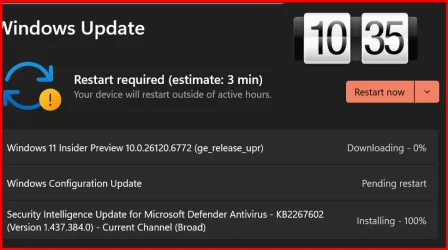
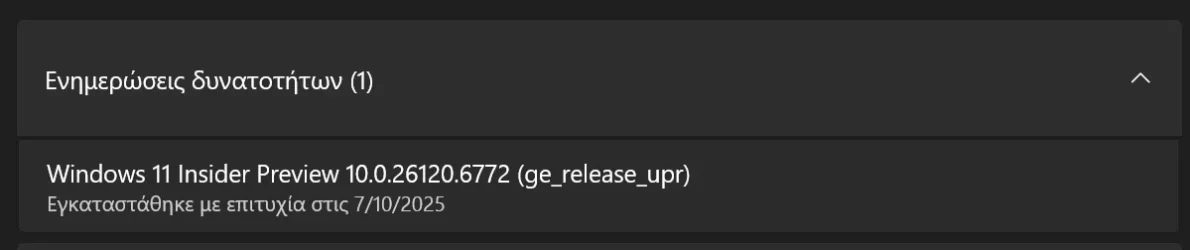
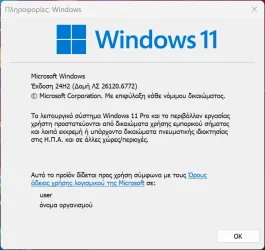
UPDATE 10/10:
 www.elevenforum.com
Hello Windows Insiders, today we are releasing Windows 11 Insider Preview Build 26120.6772 (KB5065797) to the Beta Channel for Windows Insiders on Windows 11, version 24H2.
Changes in Beta Channel builds and updates are documented in two buckets: new features, improvements, and fixes that are being gradually rolled out for Insiders who have turned on the toggle to get the latest updates as they are available (via Settings > Windows Update*) and then new features, improvements, and fixes rolling out to everyone in the Beta Channel. For more information, see the Reminders section at the bottom of this blog post.
 www.elevenforum.com
Image Object select in Click to Do: Image Object select is designed to help you speed up your creative flow and precisely select objects within images. Just hover over your image to preview selectable areas. Once selected, you can easily copy and paste your object into other apps or use it to kick off a chat with Copilot for deeper insights or creative actions.
 www.elevenforum.com

Image of three kittens sitting on a wooden surface with a computer context menu overlaid on the center kitten. The context menu includes options like “Copy,” “Paste,” and “Properties,” along with other options like “Ask Copilot”.
Unit conversion: We’re introducing the ability to do unit conversion in Click to Do to help you quickly access conversions for number + unit combinations displayed on screen. Currently, we primarily support conversions for length, area, volume, weight, temperature, and speed.
 www.elevenforum.com
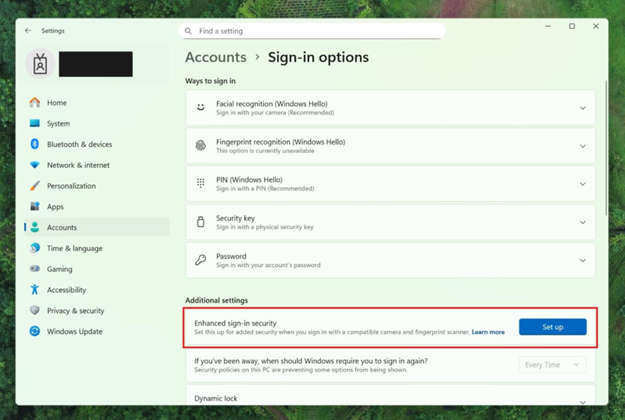
Settings dialog under Accounts–>Sign-in options, where Additional settings has an option outlined in red for “Enhanced sign-in security” with a button for “Set up”
FEEDBACK: Please file feedback in Feedback Hub (WIN + F) under Security and Privacy > Windows Hello Fingerprint.
Amanda

 blogs.windows.com
Check Windows Updates
UUP Dump:
64-bit ISO download:

ARM64 ISO download:
 www.elevenforum.com
KB5067103 Windows 11 Insider Beta build 26120.6780 (24H2) - Oct. 10
Windows Insider Blog: Source: https://blogs.windows.com/windows-insider/2025/10/06/announcing-windows-11-insider-preview-build-26220-6772-dev-channel/ Check Windows Updates UUP Dump: 64-bit ISO download: https://uupdump.net/selectlang.php?id=c223fe60-68a3-48ea-a9fc-486b137d710d ARM64...
www.elevenforum.com
Windows Insider Blog:
Hello Windows Insiders, today we are releasing Windows 11 Insider Preview Build 26120.6772 (KB5065797) to the Beta Channel for Windows Insiders on Windows 11, version 24H2.
Changes in Beta Channel builds and updates are documented in two buckets: new features, improvements, and fixes that are being gradually rolled out for Insiders who have turned on the toggle to get the latest updates as they are available (via Settings > Windows Update*) and then new features, improvements, and fixes rolling out to everyone in the Beta Channel. For more information, see the Reminders section at the bottom of this blog post.
Enable or Disable Get Latest Updates as soon as available in Windows 11
This tutorial will show you how to turn on or off "Get the latest updates as soon as they are available" in Windows 11. Starting with Windows 11 build 22621.1635, Microsoft added a new "Get the latest updates as soon as they are available" toggle under Settings > Windows Update. When you turn...
www.elevenforum.com
New features gradually being rolled out to the Beta Channel with toggle on*
[Click to Do (Preview)]
The following changes and improvements are rolling out for Click to Do on Copilot+ PCs:Image Object select in Click to Do: Image Object select is designed to help you speed up your creative flow and precisely select objects within images. Just hover over your image to preview selectable areas. Once selected, you can easily copy and paste your object into other apps or use it to kick off a chat with Copilot for deeper insights or creative actions.
Use Click to Do in Windows 11
This tutorial will show you how to use Click to Do to perform AI actions with text and images for your account on a Windows 11 Copilot+ PC. Click to Do (preview) helps you get things done faster by identifying text and images on your screen that you can take actions with. Click to Do analyzes...
www.elevenforum.com
Image of three kittens sitting on a wooden surface with a computer context menu overlaid on the center kitten. The context menu includes options like “Copy,” “Paste,” and “Properties,” along with other options like “Ask Copilot”.
Unit conversion: We’re introducing the ability to do unit conversion in Click to Do to help you quickly access conversions for number + unit combinations displayed on screen. Currently, we primarily support conversions for length, area, volume, weight, temperature, and speed.
- When users hover over a number + unit, a floating tooltip appears showing the conversion.
- When users select the number + unit, the context menu opens with additional conversion options.
- Users can also access more conversions via the Copilot app (currently supported in Microsoft Copilot. This capability is not yet available for Windows Insiders in the EEA (European Economic Area) or China.
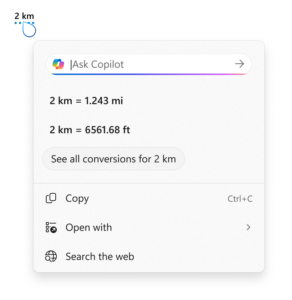
Screenshot showing the conversion tool for Click to Do using the example of 2 kilometers. It displays conversions to miles (1.243 mi) and feet (6561.68 ft), with options to copy, open with, or search the web.
[Windows Hello]
Windows Hello Enhanced Sign-in Security Now Supports Peripheral Fingerprint Sensors: Windows Hello Enhanced Sign-in Security (ESS) is expanding to support peripheral fingerprint sensors in Windows 11. Previously, ESS was only available on PCs with built-in biometric sensors, but now Windows 11 PCs, including desktops and Copilot+ PCs, can benefit from the most secure sign-in experience Windows Hello has to offer. Just plug in a supported ESS fingerprint reader, head to Settings > Accounts > Sign-in options and follow the prompts to enroll.
Enable or Disable Enhanced Sign-in Security in Windows 11
This tutorial will show you how to enable or disable Enhanced Sign-in Security for all users in Windows 11. Windows Hello enables biometrics or PIN authentication, eliminating the need for a password. Biometric authentication uses facial recognition or fingerprint to prove a user's identity in...
www.elevenforum.com
Settings dialog under Accounts–>Sign-in options, where Additional settings has an option outlined in red for “Enhanced sign-in security” with a button for “Set up”
FEEDBACK: Please file feedback in Feedback Hub (WIN + F) under Security and Privacy > Windows Hello Fingerprint.
Changes and Improvements gradually being rolled out to the Beta Channel with toggle on*
[Windows Setup Experience]
- Ability to name your default user folder in OOBE: You can now customize the name of your default user folder, “C:\User\<name>”, during set up. To do so, follow these steps:

Change Name of User Profile Folder in Windows 11
This tutorial will show you how to rename a user profile folder for any account (local account or Microsoft account) in Windows 10 and Windows 11. When adding a new user account in Windows, a profile for the account is automatically created when the user signs in to the new account for the...
www.elevenforum.com
- On the Microsoft account sign in page, press Shift + F10 to open Command Prompt.
- Type the following commands:
cd oobepress enter and then typeSetDefaultUserFolder.cmd <YourFolderName> - <YourFolderName> can be 16 characters max.
- Only Unicode characters are supported and special characters will be removed
- Proceed with MSA sign-in.
- The custom folder name will be applied if valid.
- If not set, Windows will automatically generate a profile folder name from your Microsoft email address.
- Local-only commands removal: We are removing known mechanisms for creating a local account in the Windows Setup experience (OOBE). While these mechanisms were often used to bypass Microsoft account setup, they also inadvertently skip critical setup screens, potentially causing users to exit OOBE with a device that is not fully configured for use. Users will need to complete OOBE with internet and a Microsoft account, to ensure device is setup correctly.

Clean Install Windows 11
This tutorial will show you step by step on how to clean install Windows 11 at boot on your PC with or without an Internet connection and setup with a local account or Microsoft account. Windows 11 has all the power and security of Windows 10 with a redesigned and refreshed look. It also comes...
www.elevenforum.com
[File Explorer]
- Dark Mode: We’ve made improvements to the dark mode experience in File Explorer starting with key actions like copy, move, and delete dialogs. You’ll now see a consistent dark mode experience in:
- The default and expanded state for copy, move, and delete dialogs
- Progress bars and chart views
- Dialogs for confirming states like skip, override, and file selection
- Multiple confirmation and error dialogs
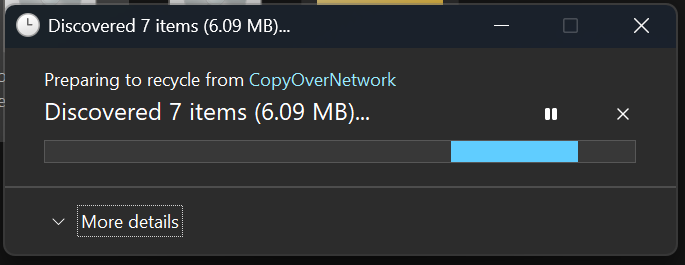
The new discover dialog in dark mode.
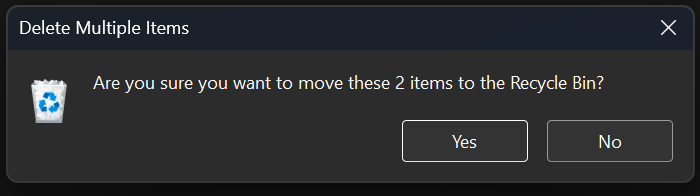
The new recycle bin dialog in dark mode.
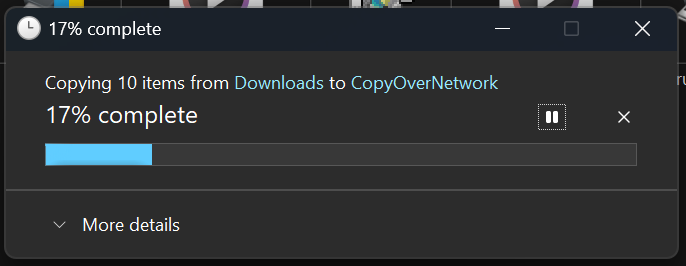
The new copy dialog in dark mode.

The new replace or skip files dialog in dark mode.
Fixes gradually being rolled out to the Beta Channel with toggle on*
[General]
- Fixed an underlying issue which caused multiple features which were rolling out to unexpectedly disappear from some Insider PCs after the previous flight.
[Taskbar & System Tray]
- Fixed an issue after the latest updates where when “automatically hide the taskbar” was enabled sometimes you would still see the system tray peeking up while the taskbar was hidden. Also fixed an issue where it wasn’t hiding anymore when you were on the desktop with all app windows minimized.
- Fixed a focus related issue when clicking on an app preview thumbnail which could result on it dismissing but the app window not actually coming to the foreground.
[File Explorer]
- Fixed an issue where Encrypted File System (EFS) related dialogs in File Explorer weren’t responding to increased text scaling.
[Windows Studio Effects]
- Fixed an issue for some classes of external webcams, where turning on “Use Windows Studio Effects” in the advanced camera setting might result in a camera preview failure. If you were impacted by this known issue in the latest builds, and turned off Windows Studio Effects inside the camera settings to workaround it, you can enable it again now.
[Settings]
- Fixed an issue causing certain network adapters to show an incorrect link speed
[Other]
- Fixed an issue impacting the ability to start Hyper-V virtual machines with Trusted Platform Module (TPM) on ARM64 devices.
- Fixed an issue that could affect playback of protected content in certain Blu-ray, DVD, and digital TV apps that used Enhanced Video Rendererwith HDCP enforcement.
Known issues
[Click to Do]
- Launching Click to Do on your primary display via right-edge gesture will result in the swipe visuals appearing on the incorrect display. The issue is being investigated.
[Lock and login screens]
- [NEW] The touch keyboard may fail to launch on the login screen. If you encounter this, you can use the on-screen keyboard in the accessibility menu as a workaround.
[Taskbar & System Tray]
- Our new animations on taskbar previews have been turned off temporarily because they were interfering with the ability to share a window from its preview, we will note when they’re brought back.
[Search]
- Certain searches may show unexpected text instead of the expected results and images.
[Xbox Controllers]
- Some Insiders are experiencing an issue where using their Xbox Controller via Bluetooth is causing their PC to bugcheck. Here is how to resolve the issue. Open Device Manager by searching for it via the search box on your taskbar. Once Device Manager is open, click on “View” and then “Devices by Driver”. Find the driver named “oemXXX.inf (XboxGameControllerDriver.inf)” where the “XXX” will be a specific number on your PC. Right-click on that driver and click “Uninstall”.
Reminders for Windows Insiders in the Beta Channel
- Windows Insiders in the Beta Channel on Windows 11, version 24H2 will receive updates based on Windows 11, version 24H2 via an enablement package (Build 26120.xxxx).
- Updates delivered to the Beta Channel are in a format that offers a preview of enhancements to servicing technology on Windows 11, version 24H2. To learn more, see Introducing Windows 11 checkpoint cumulative updates | Windows IT Pro Blog.
- Many features in the Beta Channel are rolled out using Controlled Feature Rollout technology, starting with a subset of Insiders and ramping up over time as we monitor feedback to see how they land before pushing them out to everyone in this channel.
- For Windows Insiders in the Beta Channel who want to be the first to get features gradually rolled out to you, you can turn ON the toggle to get the latest updates as they are available via Settings > Windows Update*. Over time, we will increase the rollouts of features to everyone with the toggle turned on. Should you keep this toggle off, new features will gradually be rolled out to your PC over time once they are ready.
- Features and experiences included in these builds may never get released as we try out different concepts and get feedback. Features may change over time, be removed, or replaced and never get released beyond Windows Insiders. Some of these features and experiences could show up in future Windows releases when they’re ready.
- Some features in active development we preview with Windows Insiders may not be fully localized and localization will happen over time as features are finalized. As you see issues with localization in your language, please report those issues to us via Feedback Hub.
- Please note that some accessibility features may not work with features like Recall and Click to Do while in preview with Windows Insiders.
- Because the Dev and Beta Channels represent parallel development paths from our engineers, there may be cases where features and experiences show up in the Beta Channel first.
- Check out Flight Hub for a complete look at what build is in which Insider channel.
Amanda
Source:
Announcing Windows 11 Insider Preview Build 26120.6772 (Beta Channel)
Hello Windows Insiders, today we are releasing Windows 11 Insider Preview Build 26120.6772 (KB5065797) to the Beta Channel for Windows Insiders on Windows 11, version 24H2. Changes in Beta Channel b
blogs.windows.com
Check Windows Updates
UUP Dump:
64-bit ISO download:
Select language for Windows 11 Insider Preview 10.0.26120.6772 (ge_release_upr) amd64
Select language for Windows 11 Insider Preview 10.0.26120.6772 (ge_release_upr) amd64 on UUP dump. UUP dump lets you download Unified Update Platform files, like Windows Insider updates, directly from Windows Update.
uupdump.net
ARM64 ISO download:
Select language for Windows 11 Insider Preview 10.0.26120.6772 (ge_release_upr) arm64
Select language for Windows 11 Insider Preview 10.0.26120.6772 (ge_release_upr) arm64 on UUP dump. UUP dump lets you download Unified Update Platform files, like Windows Insider updates, directly from Windows Update.
uupdump.net
UUP Dump - Download Windows Insider ISO
UUP Dump is the most practical and easy way to get ISO images of any Insider Windows 10 or Windows 11 version, as soon as Microsoft has released a new build. UUP Dump creates a download configuration file according to your choices, downloads necessary files directly from Microsoft servers, and...
www.elevenforum.com
Last edited: