Insider KB5065797 Windows 11 Insider Beta build 26120.6772 (24H2) - Oct. 6


UPDATE 10/10:


 Windows Insider Blog:

Hello Windows Insiders, today we are releasing Windows 11 Insider Preview Build 26120.6772 (KB5065797) to the Beta Channel for Windows Insiders on Windows 11, version 24H2.

Changes in Beta Channel builds and updates are documented in two buckets: new features, improvements, and fixes that are being gradually rolled out for Insiders who have turned on the toggle to get the latest updates as they are available (via Settings > Windows Update*) and then new features, improvements, and fixes rolling out to everyone in the Beta Channel. For more information, see the Reminders section at the bottom of this blog post.


New features gradually being rolled out to the Beta Channel with toggle on*

[Click to Do (Preview)]

The following changes and improvements are rolling out for Click to Do on Copilot+ PCs:

Image Object select in Click to Do:
Image Object select is designed to help you speed up your creative flow and precisely select objects within images. Just hover over your image to preview selectable areas. Once selected, you can easily copy and paste your object into other apps or use it to kick off a chat with Copilot for deeper insights or creative actions.


Image of three kittens sitting on a wooden surface with a computer context menu overlaid on the center kitten. The context menu includes options like Copy, Paste, and Properties, along with other options like “Ask Copilot”.

Image of three kittens sitting on a wooden surface with a computer context menu overlaid on the center kitten. The context menu includes options like “Copy,” “Paste,” and “Properties,” along with other options like “Ask Copilot”.

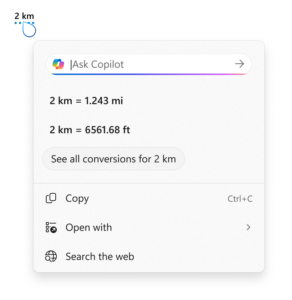
Unit conversion: We’re introducing the ability to do unit conversion in Click to Do to help you quickly access conversions for number + unit combinations displayed on screen. Currently, we primarily support conversions for length, area, volume, weight, temperature, and speed.

  • When users hover over a number + unit, a floating tooltip appears showing the conversion.
  • When users select the number + unit, the context menu opens with additional conversion options.
  • Users can also access more conversions via the Copilot app (currently supported in Microsoft Copilot. This capability is not yet available for Windows Insiders in the EEA (European Economic Area) or China.

    Screenshot showing the conversion tool for Click to Do using the example of 2 kilometers. It displays conversions to miles (1.243 mi) and feet (6561.68 ft), with options to copy, open with, or search the web.

    Screenshot showing the conversion tool for Click to Do using the example of 2 kilometers. It displays conversions to miles (1.243 mi) and feet (6561.68 ft), with options to copy, open with, or search the web.

[Windows Hello]

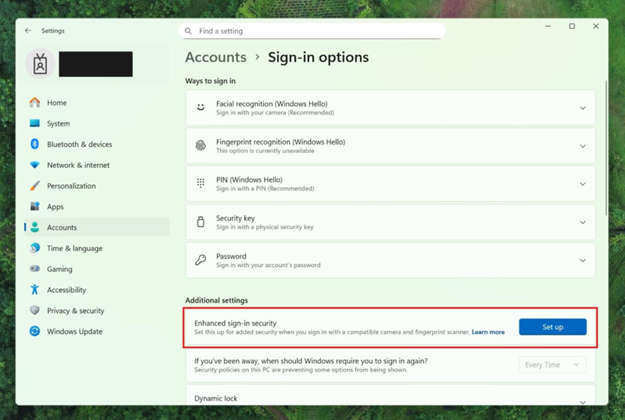
Windows Hello Enhanced Sign-in Security Now Supports Peripheral Fingerprint Sensors: Windows Hello Enhanced Sign-in Security (ESS) is expanding to support peripheral fingerprint sensors in Windows 11. Previously, ESS was only available on PCs with built-in biometric sensors, but now Windows 11 PCs, including desktops and Copilot+ PCs, can benefit from the most secure sign-in experience Windows Hello has to offer. Just plug in a supported ESS fingerprint reader, head to Settings > Accounts > Sign-in options and follow the prompts to enroll.


Settings dialog under Accounts-->Sign-in options, where Additional settings has an option outlined in red for “Enhanced sign-in security” with a button for “Set up”

Settings dialog under Accounts–>Sign-in options, where Additional settings has an option outlined in red for “Enhanced sign-in security” with a button for “Set up”

FEEDBACK: Please file feedback in Feedback Hub (WIN + F) under Security and Privacy > Windows Hello Fingerprint.

Changes and Improvements gradually being rolled out to the Beta Channel with toggle on*

[Windows Setup Experience]

  • Ability to name your default user folder in OOBE: You can now customize the name of your default user folder, “C:\User\<name>”, during set up. To do so, follow these steps:

    • On the Microsoft account sign in page, press Shift + F10 to open Command Prompt.
    • Type the following commands: cd oobe press enter and then type SetDefaultUserFolder.cmd <YourFolderName>
    • <YourFolderName> can be 16 characters max.
    • Only Unicode characters are supported and special characters will be removed
    • Proceed with MSA sign-in.
    • The custom folder name will be applied if valid.
    • If not set, Windows will automatically generate a profile folder name from your Microsoft email address.
  • Local-only commands removal: We are removing known mechanisms for creating a local account in the Windows Setup experience (OOBE). While these mechanisms were often used to bypass Microsoft account setup, they also inadvertently skip critical setup screens, potentially causing users to exit OOBE with a device that is not fully configured for use. Users will need to complete OOBE with internet and a Microsoft account, to ensure device is setup correctly.

[File Explorer]

  • Dark Mode: We’ve made improvements to the dark mode experience in File Explorer starting with key actions like copy, move, and delete dialogs. You’ll now see a consistent dark mode experience in:
    • The default and expanded state for copy, move, and delete dialogs
    • Progress bars and chart views
    • Dialogs for confirming states like skip, override, and file selection
    • Multiple confirmation and error dialogs

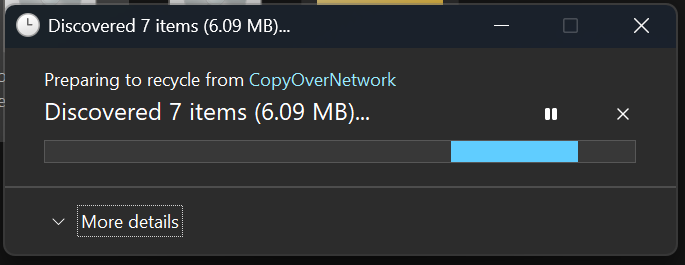
    The new discover dialog in dark mode.

    The new discover dialog in dark mode.

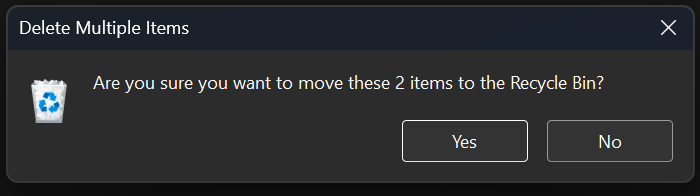
    The new recycle bin dialog in dark mode.

    The new recycle bin dialog in dark mode.

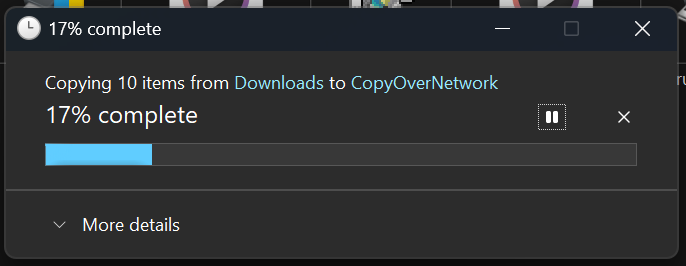
    The new copy dialog in dark mode.

    The new copy dialog in dark mode.

    The new replace or skip files dialog in dark mode.

    The new replace or skip files dialog in dark mode.

Fixes gradually being rolled out to the Beta Channel with toggle on*

[General]

  • Fixed an underlying issue which caused multiple features which were rolling out to unexpectedly disappear from some Insider PCs after the previous flight.

[Taskbar & System Tray]

  • Fixed an issue after the latest updates where when “automatically hide the taskbar” was enabled sometimes you would still see the system tray peeking up while the taskbar was hidden. Also fixed an issue where it wasn’t hiding anymore when you were on the desktop with all app windows minimized.
  • Fixed a focus related issue when clicking on an app preview thumbnail which could result on it dismissing but the app window not actually coming to the foreground.

[File Explorer]

  • Fixed an issue where Encrypted File System (EFS) related dialogs in File Explorer weren’t responding to increased text scaling.

[Windows Studio Effects]

  • Fixed an issue for some classes of external webcams, where turning on “Use Windows Studio Effects” in the advanced camera setting might result in a camera preview failure. If you were impacted by this known issue in the latest builds, and turned off Windows Studio Effects inside the camera settings to workaround it, you can enable it again now.

[Settings]

  • Fixed an issue causing certain network adapters to show an incorrect link speed

[Other]

  • Fixed an issue impacting the ability to start Hyper-V virtual machines with Trusted Platform Module (TPM) on ARM64 devices.
  • Fixed an issue that could affect playback of protected content in certain Blu-ray, DVD, and digital TV apps that used Enhanced Video Rendererwith HDCP enforcement.

Known issues

[Click to Do]

  • Launching Click to Do on your primary display via right-edge gesture will result in the swipe visuals appearing on the incorrect display. The issue is being investigated.

[Lock and login screens]

  • [NEW] The touch keyboard may fail to launch on the login screen. If you encounter this, you can use the on-screen keyboard in the accessibility menu as a workaround.

[Taskbar & System Tray]

  • Our new animations on taskbar previews have been turned off temporarily because they were interfering with the ability to share a window from its preview, we will note when they’re brought back.

[Search]

  • Certain searches may show unexpected text instead of the expected results and images.

[Xbox Controllers]

  • Some Insiders are experiencing an issue where using their Xbox Controller via Bluetooth is causing their PC to bugcheck. Here is how to resolve the issue. Open Device Manager by searching for it via the search box on your taskbar. Once Device Manager is open, click on “View” and then “Devices by Driver”. Find the driver named “oemXXX.inf (XboxGameControllerDriver.inf)” where the “XXX” will be a specific number on your PC. Right-click on that driver and click “Uninstall”.

Reminders for Windows Insiders in the Beta Channel

  • Windows Insiders in the Beta Channel on Windows 11, version 24H2 will receive updates based on Windows 11, version 24H2 via an enablement package (Build 26120.xxxx).
  • Updates delivered to the Beta Channel are in a format that offers a preview of enhancements to servicing technology on Windows 11, version 24H2. To learn more, see Introducing Windows 11 checkpoint cumulative updates | Windows IT Pro Blog.
  • Many features in the Beta Channel are rolled out using Controlled Feature Rollout technology, starting with a subset of Insiders and ramping up over time as we monitor feedback to see how they land before pushing them out to everyone in this channel.
  • For Windows Insiders in the Beta Channel who want to be the first to get features gradually rolled out to you, you can turn ON the toggle to get the latest updates as they are available via Settings > Windows Update*. Over time, we will increase the rollouts of features to everyone with the toggle turned on. Should you keep this toggle off, new features will gradually be rolled out to your PC over time once they are ready.
  • Features and experiences included in these builds may never get released as we try out different concepts and get feedback. Features may change over time, be removed, or replaced and never get released beyond Windows Insiders. Some of these features and experiences could show up in future Windows releases when they’re ready.
  • Some features in active development we preview with Windows Insiders may not be fully localized and localization will happen over time as features are finalized. As you see issues with localization in your language, please report those issues to us via Feedback Hub.
  • Please note that some accessibility features may not work with features like Recall and Click to Do while in preview with Windows Insiders.
  • Because the Dev and Beta Channels represent parallel development paths from our engineers, there may be cases where features and experiences show up in the Beta Channel first.
  • Check out Flight Hub for a complete look at what build is in which Insider channel.
Thanks,
Amanda


 Source:


Check Windows Updates


UUP Dump:

64-bit ISO download:

ARM64 ISO download:

 
Last edited:
unusually quiet in these comments...
 

My Computers

System One System Two

  • OS
    Windows 11
    Computer type
    Laptop
    Manufacturer/Model
    HP Pavilion Laptop 15-cw1xxx
    CPU
    AMD Ryzen 5 3500U with Radeon Vega Mobile Gfx
    Memory
    8.00 GB
    Graphics Card(s)
    AMD Radeon(TM) Vega 8 Graphics
    Sound Card
    Realtek High Definition Audio
    Monitor(s) Displays
    Generic PnP Monitor
    Screen Resolution
    1920x1080
    Hard Drives
    LITEON CV8-8E128-HP (SSD)
    WDC WD10SPZX-60Z10T0 (Hard Drive)
    PSU
    Microsoft ACPI-Compliant Control Method Battery
    Case
    Proprietary HP Pavilion Laptop 15 shell
    Cooling
    Active Fan Cooling
    Keyboard
    Standard PS/2 Keyboard
    Mouse
    ELAN Clickpad
    Internet Speed
    35.50 Mbps download 23.44 Mbps upload
    Browser
    Edge
    Antivirus
    Windows Defender
  • Operating System
    Windows 11 24h2
    Computer type
    PC/Desktop
    Manufacturer/Model
    Apple iMac "Core i5" 2.7 21.5" (Late 2012)
    CPU
    Intel® Core™ i5-3330S Processor
    Motherboard
    Ivy Bridge (LGA 1155)
    Memory
    8.00 GB DDR3 1600 MHz
    Graphics card(s)
    NVIDIA GeForce GT 640M
    Sound Card
    Cirrus Logic CS4206B (AB 90)
    Monitor(s) Displays
    Generic Monitor (iMac)
    Screen Resolution
    1920x1080
    Hard Drives
    APPLE HDD HTS541010A9E662 (Hard Drive 1TB)
    PSU
    Integrated
    Case
    iMac Aluminum Body
    Cooling
    Fan
    Keyboard
    HP SK-2085
    Mouse
    Lenovo
    Internet Speed
    90.8 Mbps download 23.4 Mbps upload
    Browser
    Google Chrome
    Antivirus
    Windows Defender
unusually quiet in these comments...
Mine is up and running without issue except for the Next Desktop Background missing from the right click context menu while on slideshow. That occurred on the previous build and carried over to this one.
 

My Computers

System One System Two

  • OS
    Windows 11 25H2
    Computer type
    Laptop
    Manufacturer/Model
    Alienware 18 Area-51
    CPU
    Intel Core Ultra 9 275HX (24-Core)
    Motherboard
    Alienware
    Memory
    64GB DDR5 6400MT/s
    Graphics Card(s)
    NVIDIA GeForce RTX 5080 and Intel UHD Graphics
    Sound Card
    Onboard, Realtek high-performance Audio chips (ALC3329 & ALC1708))
    Monitor(s) Displays
    300HZ 18-inch QHD 500 nit Comfort View+
    Screen Resolution
    2560 x 1600
    Hard Drives
    2TB NVMe M.2 PCIe Gen 5 SSD
    Case
    Magnesium Alloy
    Cooling
    Advanced Cryo-Tech Quad-Fan Cooling system & large vapor chamber
    Keyboard
    Cherry MX ultra low profile mechanical keyboard with per key AlienFX RGB lighting
    Mouse
    Logitech MX Master 4
    Browser
    Vivaldi (main), Firefox, Chrome, Edge
    Antivirus
    MS Defender and Malwarebytes Free
  • Operating System
    Windows 11 25H2
    Computer type
    Laptop
    Manufacturer/Model
    Microsoft Surface Laptop 7
    CPU
    Qualcomm Snapdragon X Elite (12 Core) ARM based CPU
    Motherboard
    Microsoft Corp.
    Memory
    16GB LPDDR5
    Graphics card(s)
    Qualcomm Adreno X1-85
    Sound Card
    Omnisonic speakers with Dolby Atmos spatial sound
    Monitor(s) Displays
    120 Hz 13.8-inch 600 nit PixelSense Flow touchscreen
    Screen Resolution
    2304x1536
    Hard Drives
    1TB NVMe Gen 4 SSD
    Case
    Anodized Aluminum
    Cooling
    Traditional active cooling fan system
    Keyboard
    Mechanical QWERTY, backlit when in use
    Mouse
    Logitech MX Master 4 and Surface Arc Mouse
    Browser
    Vivaldi (main), Firefox, Chrome, Edge
    Antivirus
    MS Defender and Malwarebytes Free
Mine is up and running without issue except for the Next Desktop Background missing from the right click context menu while on slideshow. That occurred on the previous build and carried over to this one.
that's a bummer. I've also noticed that spotlight can be very finicky
 

My Computers

System One System Two

  • OS
    Windows 11
    Computer type
    Laptop
    Manufacturer/Model
    HP Pavilion Laptop 15-cw1xxx
    CPU
    AMD Ryzen 5 3500U with Radeon Vega Mobile Gfx
    Memory
    8.00 GB
    Graphics Card(s)
    AMD Radeon(TM) Vega 8 Graphics
    Sound Card
    Realtek High Definition Audio
    Monitor(s) Displays
    Generic PnP Monitor
    Screen Resolution
    1920x1080
    Hard Drives
    LITEON CV8-8E128-HP (SSD)
    WDC WD10SPZX-60Z10T0 (Hard Drive)
    PSU
    Microsoft ACPI-Compliant Control Method Battery
    Case
    Proprietary HP Pavilion Laptop 15 shell
    Cooling
    Active Fan Cooling
    Keyboard
    Standard PS/2 Keyboard
    Mouse
    ELAN Clickpad
    Internet Speed
    35.50 Mbps download 23.44 Mbps upload
    Browser
    Edge
    Antivirus
    Windows Defender
  • Operating System
    Windows 11 24h2
    Computer type
    PC/Desktop
    Manufacturer/Model
    Apple iMac "Core i5" 2.7 21.5" (Late 2012)
    CPU
    Intel® Core™ i5-3330S Processor
    Motherboard
    Ivy Bridge (LGA 1155)
    Memory
    8.00 GB DDR3 1600 MHz
    Graphics card(s)
    NVIDIA GeForce GT 640M
    Sound Card
    Cirrus Logic CS4206B (AB 90)
    Monitor(s) Displays
    Generic Monitor (iMac)
    Screen Resolution
    1920x1080
    Hard Drives
    APPLE HDD HTS541010A9E662 (Hard Drive 1TB)
    PSU
    Integrated
    Case
    iMac Aluminum Body
    Cooling
    Fan
    Keyboard
    HP SK-2085
    Mouse
    Lenovo
    Internet Speed
    90.8 Mbps download 23.4 Mbps upload
    Browser
    Google Chrome
    Antivirus
    Windows Defender
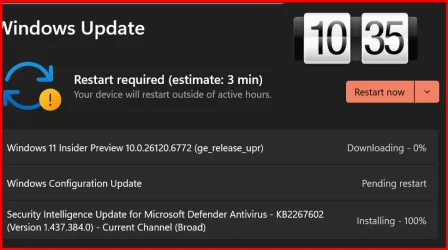
Downloading and installing.

1759791770752.webp

1759792116506.webp
Done:

Edition Windows 11 Pro
Version 24H2
Installed on ‎1/‎24/‎2025
OS build 26120.6772
Experience Windows Feature Experience Pack 1000.26100.260.0
 
Last edited:

My Computer

System One

  • OS
    Windows 11 Pro 25H2
    Computer type
    PC/Desktop
    Manufacturer/Model
    Dell XPS 8930
    CPU
    Intel I9-9900K
    Memory
    64GB
    Graphics Card(s)
    NVIDIA RTX 2060
    Sound Card
    NVIDIA High Definition Audio
    Monitor(s) Displays
    4k Samsung
    Screen Resolution
    3840 x 2160
    Hard Drives
    512GB NVMe, ADATA SU 800, 2TB HDD
Updated ok.
 

My Computer

System One

  • OS
    Win 11 Pro 25H2 Beta 26220.8544
    Computer type
    PC/Desktop
    Manufacturer/Model
    Asus MiniPC PN51-E1
    CPU
    AMD Ryzen 7 5700U
    Motherboard
    Asus PN51-E1 - Bios Version 0505
    Memory
    Crucial 64GB DDR4 SDRAM PC4-25600
    Graphics Card(s)
    AMD Radeon Vega Graphics 1.80 GHz - Adrenalin Edition 23.9.2
    Sound Card
    USB to Sound Blaster Live (24bit External) to Firestone DAC to Event Studio Monitors
    Monitor(s) Displays
    Gigabyte 27" 165 hertz
    Screen Resolution
    2560 x 1440
    Hard Drives
    Samsung SSD 970 EVO Plus 2TB PCIE NVME
    PSU
    65 Watt
    Case
    Asus Mini
    Cooling
    Air
    Keyboard
    Logitech K810
    Mouse
    Logitech MX Master 2S
    Internet Speed
    Telstra Modem Wifi - NBN 50/18
    Browser
    Firefox
    Antivirus
    Microsoft
    Other Info
    This replaced my Linux Notebook. I've used Windows since V2, tried various Linux distros but Windows continues to win for me.
Installation took a long time. Seems to be working OK. Download acted like a full install instead of an update??? Anyone else have this?
 
Last edited:

My Computers

System One System Two

  • OS
    windows 10 & 11
    Computer type
    PC/Desktop
    Manufacturer/Model
    iBuyPower (special build)
    CPU
    AMD Ryzen 7X
    Motherboard
    Asus Prime x370 Pro
    Memory
    64Gb
    Graphics Card(s)
    Radeon RX 480 8Gb
    Monitor(s) Displays
    Samsung UHD 27 inch
    Screen Resolution
    UHD
    Hard Drives
    3 Samsung 1 TB SSD each; 1 Samsung PCIe M.2 at 2 TB
  • Operating System
    Windows 11 pro
    Computer type
    PC/Desktop
    Manufacturer/Model
    IBuyPower
    CPU
    AMD 9 5900X
    Motherboard
    Asus x570 ROG Crosshair VIII Dark Hero WI-FI 6E ARGB
    Memory
    32 Gb
    Graphics card(s)
    Nvidia GeForce RTX 3080 Ti 12 GB GDDR6X
    Sound Card
    3D PREMIUM surround sound onboard
    Monitor(s) Displays
    Samsung 32 inch UHD curved monitor
    Screen Resolution
    UHD
    Hard Drives
    Samsung 980 pro 2 tb gen 4 NVMe ssd
    PSU
    850 watt consair RM850X
    Case
    Lian Li LANCOOL ONE tempered glass RGB gaming case
    Cooling
    DEEPCOOL GAMERSTORM RGB 240 mm CASTLE 240EX liquid cooler
    Keyboard
    Ares m.2 gaming keyboard
    Mouse
    Ares m.2 gaming optical mouse
    Internet Speed
    450
    Browser
    Firefox / Edge
    Antivirus
    Windows defender
    Other Info
    With all this gaming rig I am not a gamer!
Slow download and install, but all OK. Build prepared and waiting for 25H2 enablement package. I'm tempted to try the .msu file I used on my regular PCs after I get this new Beta backed up.
 

My Computer

System One

  • OS
    Windows 11 Pro
    Computer type
    PC/Desktop
    Manufacturer/Model
    Self Build
    CPU
    Intel Core Ultra 265K
    Motherboard
    Gigabyte Z890 AOROS Elite
    Memory
    TeamGroup T-Force Vulcan DDR5 6400MHz 32GB
    Graphics Card(s)
    MSI GeForce RTX 3050
    Sound Card
    GPU NVIDIA High Definition Audio via HDMI to Denon AVR-S670BT Receiver
    Monitor(s) Displays
    LG 32UN650 32" 4k
    Screen Resolution
    3840x2160 @ 60Hz (175% scaling)
    Hard Drives
    Samsung 980 Pro NVMe 1TB x2
    PSU
    Corsair RM850x
    Case
    be quiet! Pure Base 600
    Cooling
    Thermalright Phantom Spirit 120SE & be quiet! Silent Wings Pro x3 case fans
    Keyboard
    Arteck Backlit USB Wired
    Mouse
    Logitech M510
    Internet Speed
    500Mb down/12Mb up
    Browser
    Firefox & Edge
    Antivirus
    Windows Defender & Free MBAM
    Other Info
    Main PC
Slow download and install, but all OK. Build prepared and waiting for 25H2 enablement package. I'm tempted to try the .msu file I used on my regular PCs after I get this new Beta backed up.
Slowest update I have seen in a long time. 😝🤬🤷‍♂️
 

My Computer

System One

  • OS
    Windows 11 Pro 25H2
    Computer type
    PC/Desktop
    Manufacturer/Model
    Dell XPS 8930
    CPU
    Intel I9-9900K
    Memory
    64GB
    Graphics Card(s)
    NVIDIA RTX 2060
    Sound Card
    NVIDIA High Definition Audio
    Monitor(s) Displays
    4k Samsung
    Screen Resolution
    3840 x 2160
    Hard Drives
    512GB NVMe, ADATA SU 800, 2TB HDD
1759826237369.webp
 

My Computer

System One

  • OS
    W11 Pro and Insider Dev
    Computer type
    PC/Desktop
    Manufacturer/Model
    Home brewed
    CPU
    AMD Ryzen 9 7900x
    Motherboard
    ASROCK b650 PRO RS
    Memory
    2x16GB Kingston 6000MHz, Cl 32 @ 6200MHz Cl30
    Graphics Card(s)
    Gigabyte Rx 6600XT Gaming OC 8G Pro
    Sound Card
    MB, Realtek Ac1220p
    Monitor(s) Displays
    3 x 27"
    Screen Resolution
    1080p
    Hard Drives
    Kingston KC3000. 1TBSamsung 970 evo Plus 500GB, Crucial P1 NVMe 1TB, Lexar NVMe 2 TB, Silicon Power M.2 SATA 500GB
    PSU
    Seasonic 750W
    Case
    Custom Raidmax
    Cooling
    Arctic Liquid Freezer III 360mm
    Internet Speed
    20/19 mbps
This is a bummer. I do not have a problem with MS accouts per se, but if you set up a clean install with oobe, and there is a later build than in the downloaded iso, it takes ages to do oobe as it stops to get updates to bring installed version up to latest build.

Using a local account just installs the version (RTM unless MS update iso) on iso i.e. it does not check for updates but you can do that later with WU.

Only mitigating factor is you do not have to use the MS generated account name anymore (no an issue with local accounts). The implementation is cack-handed - why not just a simple screen where you enter name like that for naming pc - MS are so recidivist at times!

Local-only commands removal: We are removing known mechanisms for creating a local account in the Windows Setup experience (OOBE). While these mechanisms were often used to bypass Microsoft account setup, they also inadvertently skip critical setup screens, potentially causing users to exit OOBE with a device that is not fully configured for use. Users will need to complete OOBE with internet and a Microsoft account, to ensure device is setup correctly.

  • Ability to name your default user folder in OOBE: You can now customize the name of your default user folder, “C:\User\<name>”, during set up. To do so, follow these steps:

    Change Name of User Profile Folder in Windows 11

    This tutorial will show you how to rename a user profile folder for any account (local account or Microsoft account) in Windows 10 and Windows 11.
    • On the Microsoft account sign in page,press Shift + F10 to open Command Prompt.
    • Type the following commands:“cd oobe” press enter and then type “SetDefaultUserFolder.cmd <YourFolderName>”
    • <YourFolderName> can be 16 characters max.
    • Only Unicode characters are supported and special characters will be removed
    • Proceed with MSA sign-in.
    • The custom folder name will be applied if valid.
    • If not set, Windows will automatically generate a profile folder name from your Microsoft email address.


My Computer

System One

  • OS
    Windows 11 Pro + Win11 Canary VM.
    Computer type
    Laptop
    Manufacturer/Model
    ASUS Zenbook 14
    CPU
    I9 13th gen i9-13900H 2.60 GHZ
    Motherboard
    Yep, Laptop has one.
    Memory
    16 GB soldered
    Graphics Card(s)
    Integrated Intel Iris XE
    Sound Card
    Realtek built in
    Monitor(s) Displays
    laptop OLED screen
    Screen Resolution
    2880x1800 touchscreen
    Hard Drives
    1 TB NVME SSD (only weakness is only one slot)
    PSU
    Internal + 65W thunderbolt USB4 charger
    Case
    Yep, got one
    Cooling
    Stella Artois (UK pint cans - 568 ml) - extra cost.
    Keyboard
    Built in UK keybd
    Mouse
    Bluetooth , wireless dongled, wired
    Internet Speed
    900 mbs (ethernet), wifi 6 typical 350-450 mb/s both up and down
    Browser
    Edge
    Antivirus
    Defender
    Other Info
    TPM 2.0, 2xUSB4 thunderbolt, 1xUsb3 (usb a), 1xUsb-c, hdmi out, 3.5 mm audio out/in combo, ASUS backlit trackpad (inc. switchable number pad)

    Macrium Reflect Home V8
    Office 365 Family (6 users each 1TB onedrive space)
    Hyper-V (a vm runs almost as fast as my older laptop)
This is a bummer. I do not have a problem with MS accouts per se, but if you set up a clean install with oobe, and there is a later build than in the downloaded iso, it takes ages to do oobe as it stops to get updates to bring installed version up to latest build.

Using a local account just installs the version (RTM unless MS update iso) on iso i.e. it does not check for updates but you can do that later with WU.

Only mitigating factor is you do not have to use the MS generated account name anymore (no an issue with local accounts). The implementation is cack-handed - why not just a simple screen where you enter name like that for naming pc - MS are so recidivist at times!

Local-only commands removal: We are removing known mechanisms for creating a local account in the Windows Setup experience (OOBE). While these mechanisms were often used to bypass Microsoft account setup, they also inadvertently skip critical setup screens, potentially causing users to exit OOBE with a device that is not fully configured for use. Users will need to complete OOBE with internet and a Microsoft account, to ensure device is setup correctly.

  • Ability to name your default user folder in OOBE: You can now customize the name of your default user folder, “C:\User\<name>”, during set up. To do so, follow these steps:

    Change Name of User Profile Folder in Windows 11

    This tutorial will show you how to rename a user profile folder for any account (local account or Microsoft account) in Windows 10 and Windows 11.
    • On the Microsoft account sign in page,press Shift + F10 to open Command Prompt.
    • Type the following commands:“cd oobe” press enter and then type “SetDefaultUserFolder.cmd <YourFolderName>”
    • <YourFolderName> can be 16 characters max.
    • Only Unicode characters are supported and special characters will be removed
    • Proceed with MSA sign-in.
    • The custom folder name will be applied if valid.
    • If not set, Windows will automatically generate a profile folder name from your Microsoft email address.
For W11 > Home editions - the easiest way (IMHO BAR NONE) is simply in the OOBE phase is to check work or school for is computer for home, work, school options and then for login options choose domain join (you don't need to have a domain). This has worked for DONKEYS years and still continues to do so -- although zillions of people running W11 Pro post problems on these forums about how to install with a local account. I don't have W11 HOME so I don't know anything about ANYTHING on W11 Home though nor do I wish to --that's another exercise best left to other people.

It's definitely true about horses, water and drinking !!!

Þú getur leitt hest að vatni en þú getur ekki látið hann drekka !!!!

Cheers
jimbo
 

My Computer

System One

  • OS
    Windows XP,11 Linux Fedora Rawhide pre-release 45
    Computer type
    PC/Desktop
    CPU
    2 X Intel i7
    Screen Resolution
    4KUHD X 2
For W11 > Home editions - the easiest way (IMHO BAR NONE) is simply in the OOBE phase is to check work or school for is computer for home, work, school options and then for login options choose domain join (you don't need to have a domain). This has worked for DONKEYS years and still continues to do so -- although zillions of people running W11 Pro post problems on these forums about how to install with a local account. I don't have W11 HOME so I don't know anything about ANYTHING on W11 Home though nor do I wish to --that's another exercise best left to other people.

It's definitely true about horses, water and drinking !!!

Þú getur leitt hest að vatni en þú getur ekki látið hann drekka !!!!

Cheers
jimbo
Have you checked that still works.
 

My Computer

System One

  • OS
    Windows 11 Pro + Win11 Canary VM.
    Computer type
    Laptop
    Manufacturer/Model
    ASUS Zenbook 14
    CPU
    I9 13th gen i9-13900H 2.60 GHZ
    Motherboard
    Yep, Laptop has one.
    Memory
    16 GB soldered
    Graphics Card(s)
    Integrated Intel Iris XE
    Sound Card
    Realtek built in
    Monitor(s) Displays
    laptop OLED screen
    Screen Resolution
    2880x1800 touchscreen
    Hard Drives
    1 TB NVME SSD (only weakness is only one slot)
    PSU
    Internal + 65W thunderbolt USB4 charger
    Case
    Yep, got one
    Cooling
    Stella Artois (UK pint cans - 568 ml) - extra cost.
    Keyboard
    Built in UK keybd
    Mouse
    Bluetooth , wireless dongled, wired
    Internet Speed
    900 mbs (ethernet), wifi 6 typical 350-450 mb/s both up and down
    Browser
    Edge
    Antivirus
    Defender
    Other Info
    TPM 2.0, 2xUSB4 thunderbolt, 1xUsb3 (usb a), 1xUsb-c, hdmi out, 3.5 mm audio out/in combo, ASUS backlit trackpad (inc. switchable number pad)

    Macrium Reflect Home V8
    Office 365 Family (6 users each 1TB onedrive space)
    Hyper-V (a vm runs almost as fast as my older laptop)
Have you checked that still works.
worked yesterday on a dev new install build (26220.6772) -- tried 2 ways -- one via the install to physical vhdx file and another - bog standard install via ISO created via uupdump -->usb stick via rufus - no extra options clicked to "cheat ithe install".

For the vhdx install I had to use the dism /Apply-Image method to start the install -- but worked the same as normal install at the GUI OOBE phase. Ooth installs simple, and quick - but on decent hardware this stuff is a doddle.

Cheers
jimbo
 

My Computer

System One

  • OS
    Windows XP,11 Linux Fedora Rawhide pre-release 45
    Computer type
    PC/Desktop
    CPU
    2 X Intel i7
    Screen Resolution
    4KUHD X 2
worked yesterday on a dev new install build (26220.6772) -- tried 2 ways -- one via the install to physical vhdx file and another - bog standard install via ISO created via uupdump -->usb stick via rufus - no extra options clicked to "cheat ithe install".

Cheers
jimbo
This is a Beta change!
 

My Computer

System One

  • OS
    Windows 11 Pro + Win11 Canary VM.
    Computer type
    Laptop
    Manufacturer/Model
    ASUS Zenbook 14
    CPU
    I9 13th gen i9-13900H 2.60 GHZ
    Motherboard
    Yep, Laptop has one.
    Memory
    16 GB soldered
    Graphics Card(s)
    Integrated Intel Iris XE
    Sound Card
    Realtek built in
    Monitor(s) Displays
    laptop OLED screen
    Screen Resolution
    2880x1800 touchscreen
    Hard Drives
    1 TB NVME SSD (only weakness is only one slot)
    PSU
    Internal + 65W thunderbolt USB4 charger
    Case
    Yep, got one
    Cooling
    Stella Artois (UK pint cans - 568 ml) - extra cost.
    Keyboard
    Built in UK keybd
    Mouse
    Bluetooth , wireless dongled, wired
    Internet Speed
    900 mbs (ethernet), wifi 6 typical 350-450 mb/s both up and down
    Browser
    Edge
    Antivirus
    Defender
    Other Info
    TPM 2.0, 2xUSB4 thunderbolt, 1xUsb3 (usb a), 1xUsb-c, hdmi out, 3.5 mm audio out/in combo, ASUS backlit trackpad (inc. switchable number pad)

    Macrium Reflect Home V8
    Office 365 Family (6 users each 1TB onedrive space)
    Hyper-V (a vm runs almost as fast as my older laptop)
This one did quite a number of changes in settings including screwing up my dual BOOT menu. I made 8,5.GB windows.old and twice that for Cleanmgr to clean.
Can't put CMD.EXE in context menu or to set to always run as administrator.
 

My Computer

System One

  • OS
    W11 Pro and Insider Dev
    Computer type
    PC/Desktop
    Manufacturer/Model
    Home brewed
    CPU
    AMD Ryzen 9 7900x
    Motherboard
    ASROCK b650 PRO RS
    Memory
    2x16GB Kingston 6000MHz, Cl 32 @ 6200MHz Cl30
    Graphics Card(s)
    Gigabyte Rx 6600XT Gaming OC 8G Pro
    Sound Card
    MB, Realtek Ac1220p
    Monitor(s) Displays
    3 x 27"
    Screen Resolution
    1080p
    Hard Drives
    Kingston KC3000. 1TBSamsung 970 evo Plus 500GB, Crucial P1 NVMe 1TB, Lexar NVMe 2 TB, Silicon Power M.2 SATA 500GB
    PSU
    Seasonic 750W
    Case
    Custom Raidmax
    Cooling
    Arctic Liquid Freezer III 360mm
    Internet Speed
    20/19 mbps
This is a Beta change!
Made a typo -- yes it was a beta -- -- but it worked !!

creating the iso via uupdump took far longer than the install -- you a while ago had an alternative location for generating Win 11 ISO's which were better than UUPDUMP -- are they stuill there and if so can you specify the links.

Cheers
jimbo
 

My Computer

System One

  • OS
    Windows XP,11 Linux Fedora Rawhide pre-release 45
    Computer type
    PC/Desktop
    CPU
    2 X Intel i7
    Screen Resolution
    4KUHD X 2
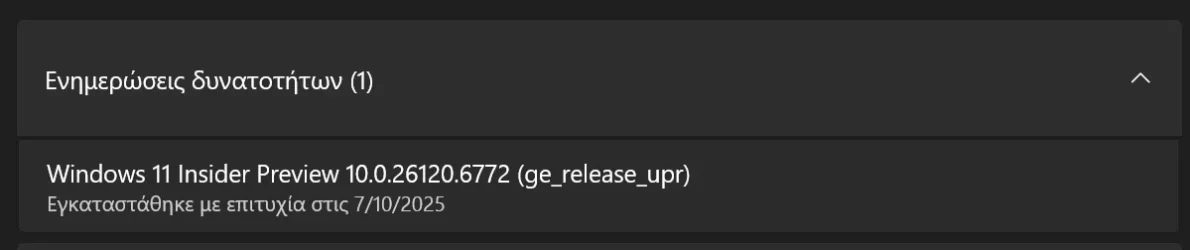
I don't know why but I got a ge_release_upr.

2025-10-07 15_23_26-Ρυθμίσεις.webp

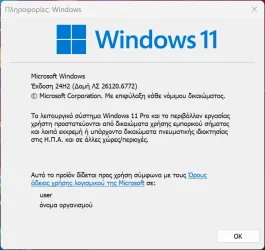
It took some time but I finally got it installed:

2025-10-07 15_22_06-Πληροφορίες_ Windows.webp
 

My Computer

System One

  • OS
    Windows 10
    Computer type
    Laptop
    Manufacturer/Model
    Lenovo Yoga 7 Pro
    CPU
    Ultra Core Ultra 9 185H
    Motherboard
    Lenovo
    Memory
    32GB
    Graphics Card(s)
    Intel Arc
After 10 years of complaining (on Feedback) since start of Windows 10 in 2015, we can now set our own username on an MS account without installing as a local account first!

It is stupidly over complicated (particularly for beginners) using a CMD batch file but it does work.
 

My Computer

System One

  • OS
    Windows 11 Pro + Win11 Canary VM.
    Computer type
    Laptop
    Manufacturer/Model
    ASUS Zenbook 14
    CPU
    I9 13th gen i9-13900H 2.60 GHZ
    Motherboard
    Yep, Laptop has one.
    Memory
    16 GB soldered
    Graphics Card(s)
    Integrated Intel Iris XE
    Sound Card
    Realtek built in
    Monitor(s) Displays
    laptop OLED screen
    Screen Resolution
    2880x1800 touchscreen
    Hard Drives
    1 TB NVME SSD (only weakness is only one slot)
    PSU
    Internal + 65W thunderbolt USB4 charger
    Case
    Yep, got one
    Cooling
    Stella Artois (UK pint cans - 568 ml) - extra cost.
    Keyboard
    Built in UK keybd
    Mouse
    Bluetooth , wireless dongled, wired
    Internet Speed
    900 mbs (ethernet), wifi 6 typical 350-450 mb/s both up and down
    Browser
    Edge
    Antivirus
    Defender
    Other Info
    TPM 2.0, 2xUSB4 thunderbolt, 1xUsb3 (usb a), 1xUsb-c, hdmi out, 3.5 mm audio out/in combo, ASUS backlit trackpad (inc. switchable number pad)

    Macrium Reflect Home V8
    Office 365 Family (6 users each 1TB onedrive space)
    Hyper-V (a vm runs almost as fast as my older laptop)
For W11 > Home editions - the easiest way (IMHO BAR NONE) is simply in the OOBE phase is to check work or school for is computer for home, work, school options and then for login options choose domain join (you don't need to have a domain). This has worked for DONKEYS years and still continues to do so -- although zillions of people running W11 Pro post problems on these forums about how to install with a local account. I don't have W11 HOME so I don't know anything about ANYTHING on W11 Home though nor do I wish to --that's another exercise best left to other people.

It's definitely true about horses, water and drinking !!!

Þú getur leitt hest að vatni en þú getur ekki látið hann drekka !!!!

Cheers
jimbo
I can confirm the domain join trick works on Pro

The start ms-cxh:localonly trick did not work any more.
 

My Computer

System One

  • OS
    Windows 11 Pro + Win11 Canary VM.
    Computer type
    Laptop
    Manufacturer/Model
    ASUS Zenbook 14
    CPU
    I9 13th gen i9-13900H 2.60 GHZ
    Motherboard
    Yep, Laptop has one.
    Memory
    16 GB soldered
    Graphics Card(s)
    Integrated Intel Iris XE
    Sound Card
    Realtek built in
    Monitor(s) Displays
    laptop OLED screen
    Screen Resolution
    2880x1800 touchscreen
    Hard Drives
    1 TB NVME SSD (only weakness is only one slot)
    PSU
    Internal + 65W thunderbolt USB4 charger
    Case
    Yep, got one
    Cooling
    Stella Artois (UK pint cans - 568 ml) - extra cost.
    Keyboard
    Built in UK keybd
    Mouse
    Bluetooth , wireless dongled, wired
    Internet Speed
    900 mbs (ethernet), wifi 6 typical 350-450 mb/s both up and down
    Browser
    Edge
    Antivirus
    Defender
    Other Info
    TPM 2.0, 2xUSB4 thunderbolt, 1xUsb3 (usb a), 1xUsb-c, hdmi out, 3.5 mm audio out/in combo, ASUS backlit trackpad (inc. switchable number pad)

    Macrium Reflect Home V8
    Office 365 Family (6 users each 1TB onedrive space)
    Hyper-V (a vm runs almost as fast as my older laptop)

Latest Support Threads

Back
Top Bottom