Win Update KB5068861 Windows 11 Cumulative Update build 26100.7171 (24H2) and 26200.7171 (25H2) - Nov. 11


UPDATE 12/01:


 Microsoft Support:

November 11, 2025 - KB5068861 (OS Builds 26200.7171 and 26100.7171)​

This cumulative update for Windows 11, version 25H2 and 24H2 (KB5068861), includes the latest security fixes and improvements, along with non-security updates from last month’s optional preview release. To learn more about differences between security updates, optional non-security preview updates, out-of-band (OOB) updates, and continuous innovation, see Windows monthly updates explained. For information on Windows update terminology, see the different types of Windows software updates.

To view the latest updates about this release, visit the Windows release health dashboard or the update history page for Windows 11, version 25H2 and 24H2.

Announcements and messages

This section provides key notifications related to this release, including announcements, change logs, and end-of-support notices.

Simplified Windows update titles​

A new, standardized title format makes Windows updates easier to read and understand. It improves clarity by removing unnecessary technical elements like platform architecture. Key identifiers such as date prefixes, the KB number, and build or version are retained to help you quickly recognize each update.

For more details, see Simplified Windows Update titles or its accompanying blog post.

December servicing update schedule​

Due to reduced operations during the Western holidays in December and New Year's Day, Microsoft will not release a non-security preview update in December 2025. The monthly security update will still be available as scheduled. Regular monthly servicing, including both security updates and non-security preview updates, will resume in January 2026.

Windows Secure Boot certificate expiration​

Important: Secure Boot certificates used by most Windows devices are set to expire starting in June 2026. This might affect the ability of certain personal and business devices to boot securely if not updated in time. To avoid disruption, we recommend reviewing the guidance and taking action to update certificates in advance. For details and preparation steps, see Windows Secure Boot certificate expiration and CA updates.


Microsoft Store apps updates​

Windows Updates do not include updates for Microsoft Store apps.

If you're an enterprise user, see Microsoft Store apps - Configuration Manager.

If you're a consumer user, see Get updates for apps and games in Microsoft Store.


Highlights

  • This update addresses security issues for your Windows operating system.

Improvements

This security update contains fixes and quality improvements from KB5067036 (released October 28, 2025). The following summary outlines key issues addressed by this update. Also, included are available new features. The bold text within the brackets indicates the item or area of the change.
  • [Gaming]
    • Fixed: This update addresses an issue that affects gaming handheld devices. These devices were unable to stay in low-power states, which caused faster battery drain.
    • Fixed: This update addresses an issue on some handheld gaming devices where after signing in using the built-in Gamepad, the controller might not respond in apps for about five seconds, causing a delay. After you submit your password or PIN, the touch keyboard on the sign-in screen hides automatically.
  • [Storage] Fixed: This update addresses an issue that could cause some Storage Spaces to become inaccessible or Storage Spaces Direct to fail when creating a storage cluster.
  • [System utilities (known issue)] Fixed: This update addresses an issue where closing Task Manager with the Close button didn’t fully end the process, leaving background instances that could slow performance over time. This might occur after installing KB5067036.
  • [Voice Access] Fixed: This update addresses an issue where Voice Access failed during initial setup if no microphone was connected and the voice model wasn’t installed.
  • [Window management] Fixed: This update addresses an issue where selecting the desktop could unexpectedly open Task View.
  • [Networking] Fixed: This update fixes an issue in the HTTP.sys request parser, a Windows component that reads and processes HTTP requests. The parser allowed a single line break within HTTP/1.1 chunk extensions, where the RFC 9112 standard requires a carriage return and line feed (CRLF) sequence to terminate each chunk. This can cause a parsing discrepancy when front end proxies are a part of the setup.

    To turn off strict parsing, use the following registry key:

    Registry Key: [HKEY_LOCAL_MACHINE\SYSTEM\CurrentControlSet\Services\Http\Parameters]
    Registry value: "HttpAllowLenientChunkExtParsing"=dword:00000001
    Data to be set: 1
If you've already installed previous updates, your device will download and install only the new updates included in this package.

For more information about security vulnerabilities, see the Security Update Guide website and the November 2025 Security Updates.

AI Components

This release updates the following AI components:

AI ComponentVersion
Image Search1.2510.1159.0
Content Extraction1.2510.1159.0
Semantic Analysis1.2510.1159.0
Settings Model1.2510.1159.0

Windows 11 servicing stack update (KB5067035)- 26100.7010

This update makes quality improvements to the servicing stack, which is the component that installs Windows updates. Servicing stack updates (SSU) ensure that you have a robust and reliable servicing stack so that your devices can receive and install Microsoft updates. To learn more about SSUs, see Simplifying on-premises deployment of servicing stack updates.

Known issues in this update

1 Password icon might be missing or invisible in the lock screen sign-in options

Symptoms

After installing the August 2025 non-security preview update (KB5064081) or later updates, you might notice that the password icon is not visible in the sign-in options on the lock screen. If you hover over the space where the icon should appear, you’ll see that the password button is still available. Select this placeholder to open the password text box and enter your password. After entering your password, you can sign in normally.

Workaround

Microsoft is working to resolve this issue and will provide information when it’s available.

How to get this update

Before you install this update

Microsoft combines the latest servicing stack update (SSU) for your operating system with the latest cumulative update (LCU). For general information about SSUs, see Servicing stack updates and Servicing Stack Updates (SSU): Frequently Asked Questions.

Install this update

To install this update, use one of the following Windows and Microsoft release channels.

AvailableNext Step
Included
This update downloads and installs automatically from Windows Update and Microsoft Update.
Yes 1Before you install this update

To get the standalone package(s) for this update, go to the Microsoft Update Catalog website. This KB contains one or more MSU files that require installation in a specific order.

Install this update
Method 1: Install all MSU files together


Download all MSU files for KB5068861 from Microsoft Update Catalog and place them in the same folder (for example, C:/Packages). Use Deployment Image Servicing and Management (DISM.exe) to install the target update. DISM will use the folder specified in PackagePath to discover and install one or more prerequisite MSU files as needed.

Updating Windows PC

To apply this update to a running Windows PC, run the following command from an elevated Command Prompt:

DISM /Online /Add-Package /PackagePath:c:\packages\Windows11.0-KB5068861-x64.msu

Or, run the following command from an elevated Windows PowerShell prompt:

Add-WindowsPackage -Online -PackagePath "c:\packages\Windows11.0-KB5068861-x64.msu"

Or use Windows Update Standalone Installer to install the target update.

Updating Windows Installation media

To apply this update to Windows Installation media, see Update Windows installation media with Dynamic Update.

Note: When downloading other Dynamic Update packages, ensure they match the same month as this KB. If the SafeOS Dynamic Update or Setup Dynamic Update is not available for the same month as this KB, use the most recently published version of each.

To add this update to a mounted image, run the following command from an elevated Command Prompt:

DISM /Image:mountdir /Add-Package /PackagePath:Windows11.0-KB5068861-x64.msu

Or, run the following command from an elevated Windows PowerShell prompt:

Add-WindowsPackage -Path "c:\offline" -PackagePath "Windows11.0-KB5068861-x64.msu" -PreventPending

Method 2: Install each MSU file individually, in order

Download and install each MSU file individually either using DISM or Windows Update Standalone Installer in the following order:
  1. windows11.0-kb5043080-x64_953449672073f8fb99badb4cc6d5d7849b9c83e8.msu
  2. windows11.0-kb5068861-x64_199ed7806a74fe78e3b0ef4f2073760000f71972.msu
1 This latest cumulative update includes updates for AI components. Even though the AI component updates are included in the update, the AI components are only applicable to Windows Copilot+ PCs and will not install on Windows PC or Windows Server.

If you want to remove the LCU

To remove the LCU after installing the combined SSU and LCU package, use the DISM/Remove-Package command line option with the LCU package name as the argument. You can find the package name by using this command: DISM /online /get-packages.

Running Windows Update Standalone Installer (wusa.exe) with the /uninstall switch on the combined package will not work because the combined package contains the SSU. You cannot remove the SSU from the system after installation.

File information

For a list of the files provided in this update, download the file information for cumulative update 5068861.

For a list of the files provided in the servicing stack update, download the file information for the SSU (KB5067035) - version 26100.7010.


 Source:


Check Windows Updates


ISO or USB from Microsoft Media Creation Tool (MCT):



UUP Dump:

64-bit ISO download:

ARM64 ISO download:

 
Last edited:
I did the RESET with my backup laptop Acer PHN16_71 that has no programs or files so I will lose nothing, I did get the option keep your files which I selected in RESET using WindowsRe on a bootable flash drive.
I avoid RESET as much as I can, it is my last resort.
I keep my files on a separate data disk, so I can as well do a clean install without touching them. 😉
 

My Computer

System One

  • OS
    Windows 11 Pro 25H2
    Computer type
    PC/Desktop
    Manufacturer/Model
    Dell XPS 8930
    CPU
    Intel I9-9900K
    Memory
    64GB
    Graphics Card(s)
    NVIDIA RTX 2060
    Sound Card
    NVIDIA High Definition Audio
    Monitor(s) Displays
    4k Samsung
    Screen Resolution
    3840 x 2160
    Hard Drives
    512GB NVMe, ADATA SU 800, 2TB HDD
Anyone got new feature that belong to previous updates in this update ?
 

My Computer

System One

  • OS
    26200.8037
    Computer type
    PC/Desktop
    CPU
    i5-11400F
    Motherboard
    Gigabyte
    Memory
    32GB
    Graphics Card(s)
    Geforce GT-1030
    Keyboard
    Logitech K400
    Mouse
    Logitech M720
    Internet Speed
    600 Mb
    Browser
    Edge
Something is fishy, try the ISO from uupdump 26200.7171. 🤷‍♂️

I updated 6 different machines today just with W.U. and had no problems updating. 🤷‍♂️

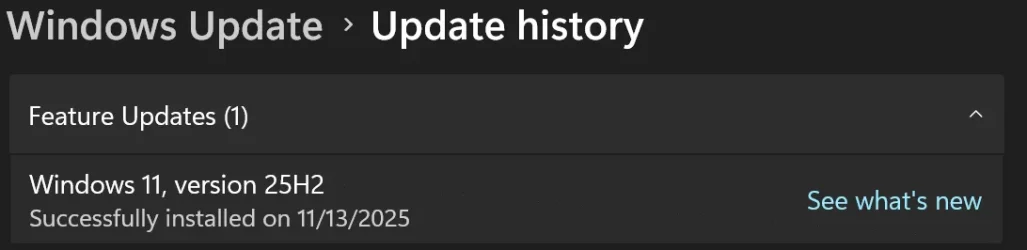
That repair version you show on your history is an old one from 29/10/2025.
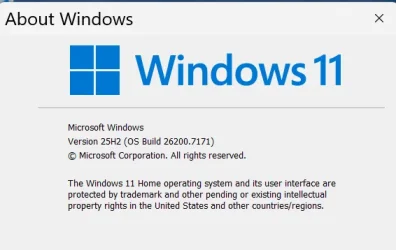
I did mention that I only used it on 29 October and it did nothing for that preview update failure. I did not use it for todays update as it takes 5 hours to complete (each run) and since it did not work before (ran it twice on 2 different laptops) I decided to do something quicker. BTW Reset actually worked I am now on Build 26200.7171 but all Windows settings are gone.
 

Attachments

  • Update 25H2.webp
    Update 25H2.webp
    15.1 KB · Views: 2
  • Winver 13 November  2025.webp
    Winver 13 November 2025.webp
    20 KB · Views: 1
Last edited:

My Computers

System One System Two

  • OS
    Windows 11 Home 25H2 build: 26200.8524
    Computer type
    Laptop
    Manufacturer/Model
    Acer Swift A.I SF14-51T
    CPU
    Intel(R) Core(TM) Ultra 7 258V, 2200 Mhz, 8 Cores
    Motherboard
    Icefish_LNV, Version V1.15
    Memory
    32 GB LPDDR5X (soldered)
    Graphics Card(s)
    Intel(R) Arc(TM) 140V GPU (16GB)
    Sound Card
    RealTek + Intel Smart Sound
    Monitor(s) Displays
    14" IPS WUXGA
    Screen Resolution
    1920x1200x60Hz
    Hard Drives
    Micron_2550_MTFDKBA1T0TGE, NVMe Gen4, 1TB
    PSU
    45W USB-C GaN charger
    Case
    Full aluminum body
    Cooling
    1 fan
    Keyboard
    US with Backlight
    Mouse
    Precision Trackpad
    Internet Speed
    25 Mb/s 5G
    Browser
    Edge
    Antivirus
    Windows Defender
    Other Info
    BIOS Version/Date Insyde Corp. V1.15, 8/28/2025, Windows Hello IR camera with Facial recognition. Secure Boot 2026 KEK key installed
  • Operating System
    Windows 11 Home 25H2 build: 26200.8524
    Computer type
    Laptop
    Manufacturer/Model
    Asus Vivobook K3502Z S15 15" OLED
    CPU
    Intel 12th Gen. i7 12700H, 14 cores, 2.3 GHz (24M Cache, up to 4.7 GHz, 6P+8E cores)
    Motherboard
    Alder Lake-H, 1700-4700 MHz clock rate
    Memory
    8GB LPDDR4 on board + 8GB LPDDR4 3200 MHz in Dual Channel.
    Graphics card(s)
    Intel Iris Xe supports up to 4096 x 2304 @ 120Hz
    Sound Card
    Harman Kardon - DTS
    Monitor(s) Displays
    OLED 15.6inch 2.8K (2880 x 1620)
    Screen Resolution
    16:9 aspect ratio 0.2ms response time 120Hz refresh rate, 550nits
    Hard Drives
    512GB M.2 NVMe Gen4 PCIe 4.0 SSD, Micron_2450_MTFDKBA512TFK
    PSU
    90-Watt USB charger (Thunderbolt4)
    Case
    Metal lid, plastic case
    Cooling
    1 fan
    Keyboard
    With adjustable backlight
    Mouse
    Precision Trackpad
    Internet Speed
    ISP provides 15 mb/s WIFI LTE (4G), laptop WIFI 6 adapter.
    Browser
    Edge
    Antivirus
    Windows Defender
    Other Info
    BIOS American Megatrends International, LLC. 10.1.2.312, 13/03/2024. Network adapter: Intel Wi-Fi 6E AX211 160 MHz, Secure Boot 2026 KEK key installed

My Computer

System One

  • OS
    Windows 11
    Computer type
    PC/Desktop
    Manufacturer/Model
    Asus/Custom Build
    CPU
    Intel® Xeon® X5690 3.47GHz Six-Core
    Motherboard
    Asus P6T Deluxe v2
    Memory
    G.Skill PC3-12800 1600MHz 24GB
    Graphics Card(s)
    NVIDIA GeForce GTX 1050
    Sound Card
    SoundMAX ADI AD2000B HD Audio
    Monitor(s) Displays
    Acer T232HL Touch Screen
    Screen Resolution
    1920 x 1080 @ 60Hz
    Hard Drives
    6 Crucial MX500 SSD 1TB each.
    PSU
    Thermaltake Toughpower Gold 850W
    Case
    Thermaltake Armor VA8000SWA
    Cooling
    Thermaltake Air Cooling System
    Keyboard
    Illuminated Multimedia LED Keyboard
    Mouse
    M16 Dual Mode Illuminated Mouse - Bluetooth / 2.4 GHz Mode
    Internet Speed
    800 Mbps
    Browser
    Edge / Opera / Vivaldi / Chrome / Firefox / Brave
    Antivirus
    Windows Defender Security

My Computers

System One System Two

  • OS
    Windows 11 Pro
    Computer type
    PC/Desktop
    Manufacturer/Model
    Stigg's Build
    CPU
    Intel Core i9-10900X
    Motherboard
    GIGABYTE X299X DESIGNARE 10G
    Memory
    Corsair 64 GB (4 x 16 GB) CMW64GX4M4C3000C15 Vengeance RGB Pro 3000Mhz DDR4
    Graphics Card(s)
    GIGABYTE GeForce GTX 1660 Super Mini ITX 6 GB OC
    Sound Card
    Realtek ALC1220
    Monitor(s) Displays
    Samsung 27" FHD LED FreeSync Gaming Monitor (LS27F350FHEXXY)
    Screen Resolution
    1920 x 1080
    Hard Drives
    Samsung 970 Pro Series 1TB M.2 2280 NVMe SSD
    Western Digital Red Pro WD8003FFBX-68B9AN0 8 TB, 7200 RPM, SATA-III
    Western Digital Red Pro WD8003FFBX-68B9AN0 8 TB, 7200 RPM, SATA-III
    PSU
    Corsair HX1200 1200W 80 Plus Platinum
    Case
    Fractal Design Define 7 Black Solid Case
    Cooling
    Noctua NH-D15 Chromax Black
    Keyboard
    Razer Ornata V2
    Mouse
    Razer DeathAdder Essential
    Internet Speed
    FTTN 100Mbps / 40Mbps
    Browser
    Mozilla Firefox
    Antivirus
    N/A
    Other Info
    Logitech BRIO 4k Ultra HD USB-C Webcam
  • Operating System
    Windows 10 Pro
    Computer type
    Laptop
    Manufacturer/Model
    ASUS ROG Zephyrus M GM501GS
    CPU
    Core i7-8750H
    Motherboard
    Zephyrus M GM501GS
    Memory
    SK Hynix 32 GB (2 x 16 GB) HMA82GS6CJR8N-VK 16 GB DDR4-2666 DDR4 SDRAM
    Graphics card(s)
    NVIDIA GeForce GTX 1070
    Sound Card
    Realtek ALC294
    Monitor(s) Displays
    AU Optronics B156HAN07.1 [15.6" LCD]
    Screen Resolution
    1920 x 1080
    Hard Drives
    Samsung MZVKW512HMJP-00000 512 GB, PCI-E 3.0 x4
    Samsung SSD 860 QVO 4TB 4 TB, SATA-III
    PSU
    N/A
    Case
    N/A
    Cooling
    N/A
    Keyboard
    PC/AT Enhanced PS2 Keyboard (101/102-Key)
    Mouse
    Razer DeathAdder Essential
    Internet Speed
    FTTN 100Mbps / 40Mbps
    Browser
    Mozilla Firefox
    Antivirus
    N/A
    Other Info
    USB2.0 HD UVC Webcam
No, MCT is creating 26200.6899. 😉

26200.6899.251011-1532.25h2_ge_release_svc_refresh_CLIENTCONSUMER_RET_x64FRE_en-us.esd
That could cause error code 0x800f0983, even when I never had such with the updates fetched via OOBE.

With 24H2 and 25H2, it would be updates afterwards that are prone to breaking, usually the next month's update or so.
Usually never the first month's updates on the first month of the clean install.
 

My Computers

System One System Two

  • OS
    Windows 11 Pro x64 24H2
    Computer type
    PC/Desktop
    CPU
    Ryzen 9 5900X
    Motherboard
    ASRock B550 PG Velocita (UEFI-BIOS 3.90)
    Memory
    64 GB G.Skill RipJaws V F4-3200C16D-64GVK
    Graphics Card(s)
    ASRock Steel Legend Arc B580 12 GB
    Monitor(s) Displays
    Alienware AW3423DWF OLED ultrawide
    Hard Drives
    Samsung 990 Pro 1 TB NVMe SSD
    PSU
    eVGA Supernova 750 G3
    Case
    Corsair 275R
    Internet Speed
    VTel FTTH 1 Gb down and 1 Gb up
  • Computer type
    PC/Desktop
    CPU
    Ryzen 7 5800X3D
    Motherboard
    Asus ROG Strix B550-F Gaming (UEFI-BIOS version 3607)
    Memory
    32 GB (2x16 GB G.Skill TridentZ Neo)
    Graphics card(s)
    Sapphire Nitro+ Radeon RX 6750 XT
    Hard Drives
    Samsung 970 Pro 512 GB NVMe SSD
    PSU
    Corsair RM850x
    Case
    Fractal Focus G
I did mention that I only used it on 29 October and it did nothing for that preview update failure. I did not use it for todays update as it takes 5 hours to complete (each run) and since it did not work before (ran it twice on 2 different laptops) I decided to do something quicker. :( BTW Reset failed to update KB5068861 (26200.7171), back to square one.
As expected, it still fails, it is a catch 22 because the fix they mention in the blog is included after you get up to 26200.7015 or higher.

I'm confused now, I thought you said that you tried a Repair version today with the latest repair version 26200.7171, if that failed too, your only other choice is an ISO from uupdump.
Good luck. 😵‍💫🤷‍♂️

5 Hours seems to be excessive; you must have a very slow machine and/or internet. 😂
 

My Computer

System One

  • OS
    Windows 11 Pro 25H2
    Computer type
    PC/Desktop
    Manufacturer/Model
    Dell XPS 8930
    CPU
    Intel I9-9900K
    Memory
    64GB
    Graphics Card(s)
    NVIDIA RTX 2060
    Sound Card
    NVIDIA High Definition Audio
    Monitor(s) Displays
    4k Samsung
    Screen Resolution
    3840 x 2160
    Hard Drives
    512GB NVMe, ADATA SU 800, 2TB HDD
Install error - 0x800f0991
In your case, it could be a warning sign of a faulty SSD. Other symptoms of faulty SSD: Randomly extremely slow, especially on a reboot, and/or SFC /scannow fails with message "Windows Resource Protection found corrupt files but was unable to fix some of them".
 

My Computers

System One System Two

  • OS
    Windows 11 Pro x64 24H2
    Computer type
    PC/Desktop
    CPU
    Ryzen 9 5900X
    Motherboard
    ASRock B550 PG Velocita (UEFI-BIOS 3.90)
    Memory
    64 GB G.Skill RipJaws V F4-3200C16D-64GVK
    Graphics Card(s)
    ASRock Steel Legend Arc B580 12 GB
    Monitor(s) Displays
    Alienware AW3423DWF OLED ultrawide
    Hard Drives
    Samsung 990 Pro 1 TB NVMe SSD
    PSU
    eVGA Supernova 750 G3
    Case
    Corsair 275R
    Internet Speed
    VTel FTTH 1 Gb down and 1 Gb up
  • Computer type
    PC/Desktop
    CPU
    Ryzen 7 5800X3D
    Motherboard
    Asus ROG Strix B550-F Gaming (UEFI-BIOS version 3607)
    Memory
    32 GB (2x16 GB G.Skill TridentZ Neo)
    Graphics card(s)
    Sapphire Nitro+ Radeon RX 6750 XT
    Hard Drives
    Samsung 970 Pro 512 GB NVMe SSD
    PSU
    Corsair RM850x
    Case
    Fractal Focus G
That could cause error code 0x800f0983, even when I never had such with the updates fetched via OOBE.

With 24H2 and 25H2, it would be updates afterwards that are prone to breaking, usually the next month's update or so.
Usually never the first month's updates on the first month of the clean install.
You can use a higher ISO from UUPDUMP including the fix for code 0x800f0983, it needs to be 26200.7015 or higher according to the MS blog.
 

My Computer

System One

  • OS
    Windows 11 Pro 25H2
    Computer type
    PC/Desktop
    Manufacturer/Model
    Dell XPS 8930
    CPU
    Intel I9-9900K
    Memory
    64GB
    Graphics Card(s)
    NVIDIA RTX 2060
    Sound Card
    NVIDIA High Definition Audio
    Monitor(s) Displays
    4k Samsung
    Screen Resolution
    3840 x 2160
    Hard Drives
    512GB NVMe, ADATA SU 800, 2TB HDD
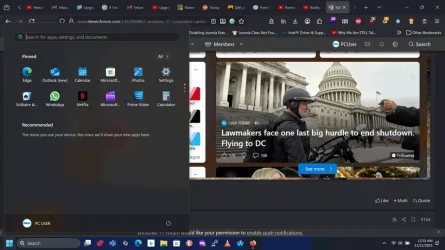
Now this crappy new format of widgets showed up also on build 26200.7171.
The process for signing in is a mess and tied to EDGE sign in instead of being independent like it was before. 😝🤬🤷‍♂️

View attachment 152545
Get O&O ShutUp10++ and turn off your Windows11 widgets.
www.oo-software.com/en/download/current/ooshutup10

I have zero ads, onedrive is GONE and nonexistent, and my start menu is as sparse as I want it to be (well, almost -need to remove netflix maybe lol)

I still have local account only.

start-menu.webp
 
Last edited:

My Computers

System One System Two

  • OS
    Windows 11 Pro 25H2 (OS Build 26200.8246)
    Computer type
    Laptop
    Manufacturer/Model
    Dell Precision Mobile Workstation
    CPU
    Intel(R) Xeon(R) CPU E3-1535M v5 @ 2.90 Max Turbo 3.80
    Motherboard
    00V5FJ
    Memory
    64GB DDR4 ECC (Error-Correcting Code memory)
    Graphics Card(s)
    NVIDIA Quadro M2000M 4GB GDDR5 & Intel(R) HD Graphics P530
    Sound Card
    Realtek Audio
    Monitor(s) Displays
    15.6" 4K UltraHD
    Screen Resolution
    4K UHD 3840x2160
    Hard Drives
    2TB Crucial NVMe & 2TB Seagate SATA
    PSU
    Dell 180W 19.5V-9.23A
    Keyboard
    Backlit
    Mouse
    Logitech G703 & Logitech G305
    Internet Speed
    WIFI: Intel(R) Wi-Fi 6E AX210NGW(Gig+) 160MHz Bands 2.4GHz(574Mbps), 5GHz 2.4Gbps, 6 GHz (160MHz) 2.4Gbps
    Browser
    Mozilla Firefox
    Antivirus
    Windows Defender/Microsoft Security + additional Anti Spyware, Anti Malware, etc.
    Other Info
    Thunderbolt 3
  • Operating System
    Windows 11 Pro 24H2 (OS Build 26100.6725)
    Computer type
    PC/Desktop
    Manufacturer/Model
    Dell Precision Workstation T5610
    CPU
    Dual (X2) Intel(R) Xeon(R) CPU E5-2690 0 @ 2.90GHz Max Turbo 3.80
    Motherboard
    0WN7Y6
    Memory
    64GB DDR3 ECC (Error-Correcting Code memory)
    Graphics card(s)
    NVIDIA GeForce GTX 970 4GB of GDDR5
    Sound Card
    Realtek Audio & NVIDIA High Definition Audio
    Monitor(s) Displays
    3 Acer Monitors
    Screen Resolution
    1920x1080
    Hard Drives
    2 Seagate Barracuda ST2000DM008-2UB102 (RAID)
    Mouse
    Logitech G305
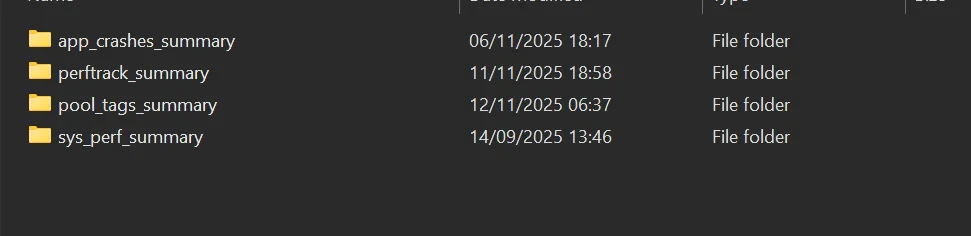
Has anyone noticed the "C:\Programdata\whesvc" folder? It's got a bunch of jsons in it for me.
 

My Computers

System One System Two

  • OS
    Windows 11 Pro 25H2
    Computer type
    PC/Desktop
    CPU
    5800X3D
    Motherboard
    Asus B550-F Strix
    Memory
    64gb DDR4 3600mhz
    Graphics Card(s)
    RTX 3080
    Screen Resolution
    1440p
    PSU
    Corsair RM850x
    Case
    Corsair 4000D
    Cooling
    Noctua NH-D15
  • Operating System
    Linux Mint
    Computer type
    PC/Desktop
    CPU
    i5-4670K OC @ 4.2ghz
    Memory
    16gb DDR3
    Graphics card(s)
    MSI GTX 1080
    Monitor(s) Displays
    1920x1080 VA panel
    Screen Resolution
    1920x1080p
    Hard Drives
    1x SSD
    PSU
    Corsair RM750x
    Cooling
    Coolermaster 212 air cooler
    Other Info
    RIP Win 10 the 4670k is old but still strong.
Get O&O ShutUp10++ and turn off your Windows11 widgets.
I have zero ads, onedrive is GONE and nonexistent, and my start menu is as sparse as I want it to be (well, almost -need to remove netflix maybe lol)

I still have local account only.
I have the local account too. Never use OneDrive either. 😂😂

I'm just checking for the bugs that MS keeps creating.
I don't care about using the stupid Widgets.
 

My Computer

System One

  • OS
    Windows 11 Pro 25H2
    Computer type
    PC/Desktop
    Manufacturer/Model
    Dell XPS 8930
    CPU
    Intel I9-9900K
    Memory
    64GB
    Graphics Card(s)
    NVIDIA RTX 2060
    Sound Card
    NVIDIA High Definition Audio
    Monitor(s) Displays
    4k Samsung
    Screen Resolution
    3840 x 2160
    Hard Drives
    512GB NVMe, ADATA SU 800, 2TB HDD

Attachments

  • Screenshot 2025-11-12 064340.webp
    Screenshot 2025-11-12 064340.webp
    14.8 KB · Views: 3

My Computer

System One

  • OS
    Windows 11 Pro 25H2 (RP channel)
    Computer type
    PC/Desktop
    Manufacturer/Model
    MSI
    CPU
    AMD Ryzen 7 9800X3D 8-core
    Motherboard
    MEG X870E Godlike
    Memory
    64GB Corsair Titanium 6000/CL30
    Graphics Card(s)
    MSI Suprim 5080 SOC
    Sound Card
    Soundblaster AE-9
    Monitor(s) Displays
    ASUS TUF Gaming VG289Q
    Screen Resolution
    3840x2160
    Hard Drives
    Samsung 9100 Pro 4TB (gen 5 x4, system drive/games)
    Samsung 990 Pro 2TB
    Samsung 980 Pro 2TB
    Samsung 870 Evo 4TB
    Samsung 870 Evo 2TB
    Samsung T9 4TB
    PSU
    Seasonic PX-2200
    Case
    Bequiet! Dark Base Pro 901
    Cooling
    Noctua NH-D15S Chromax black
    Keyboard
    Logitech G915 X (wired)
    Mouse
    Logitech G903 with PowerPlay charger
    Internet Speed
    900Mb/sec
    Browser
    Microsoft Edge
    Antivirus
    Windows Defender
Has anyone noticed the "C:\Programdata\whesvc" folder? It's got a bunch of jsons in it for me.
@Webweaver Yes, I have one file:

C:\ProgramData\Whesvc\sys_perf_summary\sys_perf_input_delays\
sys_perf_input_delays_2025-11-02_03_56_27_978.json


Part of which is surveying system info.


region
CSwitchAvailableRegion
DurationInMs101742.33
StartTimeInMs9.17
StopTimeInMs101751.49
Region
DurationInMs103427.66
StartTimeInMs3.77
StopTimeInMs103431.43
SystemConfigMetric
BiosDate"03/09/2023"
BiosVersion"1.31.3"
BuildLab"26100.1.amd64fre.ge_release.240331-1435"
OemManufacturer"Dell Inc."
OemModel"Precision 7510"
OsVersionBuild26200
ProcessorCount4
ProcessorFrequencyMHz2904
ProcessorModel"Intel(R) Xeon(R) CPU E3-1535M v5 @ 2.90GHz"
UsableRamInMB65420
TopLevelMetric
CpuMetric
AvgFrequencyInMHz2682.87
AvgInstructionsPerCycle0.57
CpuTimeInMs113537.55
CpuUtilization27.9
CycleCount304605990748
InstructionCount174967625093
DiskMetric
DiskActivityCount2740
DiskReadMiB4.58
DiskServiceTimeAvgInUs151.35
DiskWriteMiB164.36
PagefileIoMiB4.72
DpcIsrMetric
DpcCount166654
DpcTimeMs2971.28
IsrCount71442
IsrTimeMs1485.96
MemoryMetric
AvgCommitSizeMiB21915
AvgWorkingSetSizeMiB19331
PeakCommitSizeMiB21951
PeakWorkingSetSizeMiB19368
SnapshotCount71
PowerSnapMetric
BigTotalCycles0
EventTimestampInMs101794.14
IntervalDurationInSeconds587
IsDCfalse
IsEnergySaverOnfalse
IsMonitorOntrue
LittleTotalCycles2895913349585
 

My Computers

System One System Two

  • OS
    Windows 11 Pro 25H2 (OS Build 26200.8246)
    Computer type
    Laptop
    Manufacturer/Model
    Dell Precision Mobile Workstation
    CPU
    Intel(R) Xeon(R) CPU E3-1535M v5 @ 2.90 Max Turbo 3.80
    Motherboard
    00V5FJ
    Memory
    64GB DDR4 ECC (Error-Correcting Code memory)
    Graphics Card(s)
    NVIDIA Quadro M2000M 4GB GDDR5 & Intel(R) HD Graphics P530
    Sound Card
    Realtek Audio
    Monitor(s) Displays
    15.6" 4K UltraHD
    Screen Resolution
    4K UHD 3840x2160
    Hard Drives
    2TB Crucial NVMe & 2TB Seagate SATA
    PSU
    Dell 180W 19.5V-9.23A
    Keyboard
    Backlit
    Mouse
    Logitech G703 & Logitech G305
    Internet Speed
    WIFI: Intel(R) Wi-Fi 6E AX210NGW(Gig+) 160MHz Bands 2.4GHz(574Mbps), 5GHz 2.4Gbps, 6 GHz (160MHz) 2.4Gbps
    Browser
    Mozilla Firefox
    Antivirus
    Windows Defender/Microsoft Security + additional Anti Spyware, Anti Malware, etc.
    Other Info
    Thunderbolt 3
  • Operating System
    Windows 11 Pro 24H2 (OS Build 26100.6725)
    Computer type
    PC/Desktop
    Manufacturer/Model
    Dell Precision Workstation T5610
    CPU
    Dual (X2) Intel(R) Xeon(R) CPU E5-2690 0 @ 2.90GHz Max Turbo 3.80
    Motherboard
    0WN7Y6
    Memory
    64GB DDR3 ECC (Error-Correcting Code memory)
    Graphics card(s)
    NVIDIA GeForce GTX 970 4GB of GDDR5
    Sound Card
    Realtek Audio & NVIDIA High Definition Audio
    Monitor(s) Displays
    3 Acer Monitors
    Screen Resolution
    1920x1080
    Hard Drives
    2 Seagate Barracuda ST2000DM008-2UB102 (RAID)
    Mouse
    Logitech G305
Has anyone noticed the "C:\Programdata\whesvc" folder? It's got a bunch of jsons in it for me.
Yes, and its not new to this build
 

My Computers

System One System Two

  • OS
    Windows 11 25H2
    Computer type
    PC/Desktop
    Manufacturer/Model
    Custom Built
    CPU
    Intel i9 14900KF
    Motherboard
    ASUS Z790 ProArt Creator WiFi
    Memory
    64GB Corsair Vengeance RGB
    Graphics Card(s)
    MSI 4090 Suprim X
    Sound Card
    Onboard
    Monitor(s) Displays
    1 x Asus 24". 1 x Asus 32"
    Screen Resolution
    1920 x 1080 & 2560 x 1440
    Hard Drives
    Multiple
    PSU
    Corsair 1200HX
    Case
    Corsair 7000D RGB
    Cooling
    Corsair H150I Capellix XT
    Keyboard
    Corsair K70 RGB PRO
    Mouse
    Corsair M55 RGB Pro
    Internet Speed
    1000Mbps
    Browser
    Edge
    Antivirus
    Windows Default
  • Operating System
    Windows 11 25H2
    Computer type
    PC/Desktop
    Manufacturer/Model
    Custom Built
    CPU
    Intel i7 6800K
    Motherboard
    ASUS Z99 Deluxe
    Memory
    32GB DDR4 (Corsair)
    Graphics card(s)
    ASUS GTX 1080ti
    Sound Card
    Onboard
    Monitor(s) Displays
    1x Viewsonic 24" 1x LG 19"
    Screen Resolution
    1920 x 1080 & 1600 x 900
    Hard Drives
    3 x SATA SSD
    PSU
    650W Gigabyte Bronze
    Case
    Coolermaster HAF-X
    Cooling
    Noctua NH-15 Chroma black
    Keyboard
    Generic RGB
    Mouse
    Microsoft Basic
    Internet Speed
    1000Mbps
    Browser
    Edge
    Antivirus
    Windows Default
I've been using 25H2 26200.7171 continuously for over 8 hours and have had zero issues so far.
Am I correct in thinking that 'gradual rollout' means some changes are yet to 'turn on', meaning, you're not quite out of the woods yet ? :unsure::p
 

My Computers

System One System Two

  • OS
    Windows 11 Pro 25H2 26200.7171
    Computer type
    PC/Desktop
    CPU
    AMD Ryzen 5 7600 [Curve Optimizer All Core -50mV]
    Motherboard
    ASRock B650M Pro RS WiFi [BIOS v3.50]
    Memory
    G.Skill Flare X5 32 GB DDR5 6000 MT/s CL30
    Graphics Card(s)
    AMD Sapphire Pulse Radeon RX 6700 XT
    Monitor(s) Displays
    BenQ Zowie XL2411P 24"
    Screen Resolution
    1920 x 1080 144Hz
    Hard Drives
    Lexar NM790 2TB
    PSU
    XPG Pylon 550W
    Case
    XPG Valor Air
    Cooling
    Thermalright Phantom Spirit 120 SE
    Mouse
    Roccat Burst Core
  • Operating System
    Windows 11 Home 25H2
    Computer type
    Laptop
    Manufacturer/Model
    Lenovo Ideapad 3
    CPU
    Intel 11th Gen i3-1115G4
    Memory
    20 GB
    Graphics card(s)
    Intel UHD Graphics
    Monitor(s) Displays
    14" 1920x1080
    Hard Drives
    Kingston SNV2S500G
Last edited:

My Computers

System One System Two

  • OS
    Windows 11 Pro 25H2 (OS Build 26200.8246)
    Computer type
    Laptop
    Manufacturer/Model
    Dell Precision Mobile Workstation
    CPU
    Intel(R) Xeon(R) CPU E3-1535M v5 @ 2.90 Max Turbo 3.80
    Motherboard
    00V5FJ
    Memory
    64GB DDR4 ECC (Error-Correcting Code memory)
    Graphics Card(s)
    NVIDIA Quadro M2000M 4GB GDDR5 & Intel(R) HD Graphics P530
    Sound Card
    Realtek Audio
    Monitor(s) Displays
    15.6" 4K UltraHD
    Screen Resolution
    4K UHD 3840x2160
    Hard Drives
    2TB Crucial NVMe & 2TB Seagate SATA
    PSU
    Dell 180W 19.5V-9.23A
    Keyboard
    Backlit
    Mouse
    Logitech G703 & Logitech G305
    Internet Speed
    WIFI: Intel(R) Wi-Fi 6E AX210NGW(Gig+) 160MHz Bands 2.4GHz(574Mbps), 5GHz 2.4Gbps, 6 GHz (160MHz) 2.4Gbps
    Browser
    Mozilla Firefox
    Antivirus
    Windows Defender/Microsoft Security + additional Anti Spyware, Anti Malware, etc.
    Other Info
    Thunderbolt 3
  • Operating System
    Windows 11 Pro 24H2 (OS Build 26100.6725)
    Computer type
    PC/Desktop
    Manufacturer/Model
    Dell Precision Workstation T5610
    CPU
    Dual (X2) Intel(R) Xeon(R) CPU E5-2690 0 @ 2.90GHz Max Turbo 3.80
    Motherboard
    0WN7Y6
    Memory
    64GB DDR3 ECC (Error-Correcting Code memory)
    Graphics card(s)
    NVIDIA GeForce GTX 970 4GB of GDDR5
    Sound Card
    Realtek Audio & NVIDIA High Definition Audio
    Monitor(s) Displays
    3 Acer Monitors
    Screen Resolution
    1920x1080
    Hard Drives
    2 Seagate Barracuda ST2000DM008-2UB102 (RAID)
    Mouse
    Logitech G305
Am I correct in thinking that 'gradual rollout' means some changes are yet to 'turn on', meaning, you're not quite out of the woods yet ? :unsure::p
They should call that "gradual crapout". 🤣🤣
 

My Computer

System One

  • OS
    Windows 11 Pro 25H2
    Computer type
    PC/Desktop
    Manufacturer/Model
    Dell XPS 8930
    CPU
    Intel I9-9900K
    Memory
    64GB
    Graphics Card(s)
    NVIDIA RTX 2060
    Sound Card
    NVIDIA High Definition Audio
    Monitor(s) Displays
    4k Samsung
    Screen Resolution
    3840 x 2160
    Hard Drives
    512GB NVMe, ADATA SU 800, 2TB HDD

My Computer

System One

  • OS
    Windows 11 Pro 25H2
    Computer type
    PC/Desktop
    Manufacturer/Model
    Dell XPS 8930
    CPU
    Intel I9-9900K
    Memory
    64GB
    Graphics Card(s)
    NVIDIA RTX 2060
    Sound Card
    NVIDIA High Definition Audio
    Monitor(s) Displays
    4k Samsung
    Screen Resolution
    3840 x 2160
    Hard Drives
    512GB NVMe, ADATA SU 800, 2TB HDD
Back
Top Bottom