Win Update KB5068861 Windows 11 Cumulative Update build 26100.7171 (24H2) and 26200.7171 (25H2) - Nov. 11


UPDATE 12/01:


 Microsoft Support:

November 11, 2025 - KB5068861 (OS Builds 26200.7171 and 26100.7171)​

This cumulative update for Windows 11, version 25H2 and 24H2 (KB5068861), includes the latest security fixes and improvements, along with non-security updates from last month’s optional preview release. To learn more about differences between security updates, optional non-security preview updates, out-of-band (OOB) updates, and continuous innovation, see Windows monthly updates explained. For information on Windows update terminology, see the different types of Windows software updates.

To view the latest updates about this release, visit the Windows release health dashboard or the update history page for Windows 11, version 25H2 and 24H2.

Announcements and messages

This section provides key notifications related to this release, including announcements, change logs, and end-of-support notices.

Simplified Windows update titles​

A new, standardized title format makes Windows updates easier to read and understand. It improves clarity by removing unnecessary technical elements like platform architecture. Key identifiers such as date prefixes, the KB number, and build or version are retained to help you quickly recognize each update.

For more details, see Simplified Windows Update titles or its accompanying blog post.

December servicing update schedule​

Due to reduced operations during the Western holidays in December and New Year's Day, Microsoft will not release a non-security preview update in December 2025. The monthly security update will still be available as scheduled. Regular monthly servicing, including both security updates and non-security preview updates, will resume in January 2026.

Windows Secure Boot certificate expiration​

Important: Secure Boot certificates used by most Windows devices are set to expire starting in June 2026. This might affect the ability of certain personal and business devices to boot securely if not updated in time. To avoid disruption, we recommend reviewing the guidance and taking action to update certificates in advance. For details and preparation steps, see Windows Secure Boot certificate expiration and CA updates.


Microsoft Store apps updates​

Windows Updates do not include updates for Microsoft Store apps.

If you're an enterprise user, see Microsoft Store apps - Configuration Manager.

If you're a consumer user, see Get updates for apps and games in Microsoft Store.


Highlights

  • This update addresses security issues for your Windows operating system.

Improvements

This security update contains fixes and quality improvements from KB5067036 (released October 28, 2025). The following summary outlines key issues addressed by this update. Also, included are available new features. The bold text within the brackets indicates the item or area of the change.
  • [Gaming]
    • Fixed: This update addresses an issue that affects gaming handheld devices. These devices were unable to stay in low-power states, which caused faster battery drain.
    • Fixed: This update addresses an issue on some handheld gaming devices where after signing in using the built-in Gamepad, the controller might not respond in apps for about five seconds, causing a delay. After you submit your password or PIN, the touch keyboard on the sign-in screen hides automatically.
  • [Storage] Fixed: This update addresses an issue that could cause some Storage Spaces to become inaccessible or Storage Spaces Direct to fail when creating a storage cluster.
  • [System utilities (known issue)] Fixed: This update addresses an issue where closing Task Manager with the Close button didn’t fully end the process, leaving background instances that could slow performance over time. This might occur after installing KB5067036.
  • [Voice Access] Fixed: This update addresses an issue where Voice Access failed during initial setup if no microphone was connected and the voice model wasn’t installed.
  • [Window management] Fixed: This update addresses an issue where selecting the desktop could unexpectedly open Task View.
  • [Networking] Fixed: This update fixes an issue in the HTTP.sys request parser, a Windows component that reads and processes HTTP requests. The parser allowed a single line break within HTTP/1.1 chunk extensions, where the RFC 9112 standard requires a carriage return and line feed (CRLF) sequence to terminate each chunk. This can cause a parsing discrepancy when front end proxies are a part of the setup.

    To turn off strict parsing, use the following registry key:

    Registry Key: [HKEY_LOCAL_MACHINE\SYSTEM\CurrentControlSet\Services\Http\Parameters]
    Registry value: "HttpAllowLenientChunkExtParsing"=dword:00000001
    Data to be set: 1
If you've already installed previous updates, your device will download and install only the new updates included in this package.

For more information about security vulnerabilities, see the Security Update Guide website and the November 2025 Security Updates.

AI Components

This release updates the following AI components:

AI ComponentVersion
Image Search1.2510.1159.0
Content Extraction1.2510.1159.0
Semantic Analysis1.2510.1159.0
Settings Model1.2510.1159.0

Windows 11 servicing stack update (KB5067035)- 26100.7010

This update makes quality improvements to the servicing stack, which is the component that installs Windows updates. Servicing stack updates (SSU) ensure that you have a robust and reliable servicing stack so that your devices can receive and install Microsoft updates. To learn more about SSUs, see Simplifying on-premises deployment of servicing stack updates.

Known issues in this update

1 Password icon might be missing or invisible in the lock screen sign-in options

Symptoms

After installing the August 2025 non-security preview update (KB5064081) or later updates, you might notice that the password icon is not visible in the sign-in options on the lock screen. If you hover over the space where the icon should appear, you’ll see that the password button is still available. Select this placeholder to open the password text box and enter your password. After entering your password, you can sign in normally.

Workaround

Microsoft is working to resolve this issue and will provide information when it’s available.

How to get this update

Before you install this update

Microsoft combines the latest servicing stack update (SSU) for your operating system with the latest cumulative update (LCU). For general information about SSUs, see Servicing stack updates and Servicing Stack Updates (SSU): Frequently Asked Questions.

Install this update

To install this update, use one of the following Windows and Microsoft release channels.

AvailableNext Step
Included
This update downloads and installs automatically from Windows Update and Microsoft Update.
Yes 1Before you install this update

To get the standalone package(s) for this update, go to the Microsoft Update Catalog website. This KB contains one or more MSU files that require installation in a specific order.

Install this update
Method 1: Install all MSU files together


Download all MSU files for KB5068861 from Microsoft Update Catalog and place them in the same folder (for example, C:/Packages). Use Deployment Image Servicing and Management (DISM.exe) to install the target update. DISM will use the folder specified in PackagePath to discover and install one or more prerequisite MSU files as needed.

Updating Windows PC

To apply this update to a running Windows PC, run the following command from an elevated Command Prompt:

DISM /Online /Add-Package /PackagePath:c:\packages\Windows11.0-KB5068861-x64.msu

Or, run the following command from an elevated Windows PowerShell prompt:

Add-WindowsPackage -Online -PackagePath "c:\packages\Windows11.0-KB5068861-x64.msu"

Or use Windows Update Standalone Installer to install the target update.

Updating Windows Installation media

To apply this update to Windows Installation media, see Update Windows installation media with Dynamic Update.

Note: When downloading other Dynamic Update packages, ensure they match the same month as this KB. If the SafeOS Dynamic Update or Setup Dynamic Update is not available for the same month as this KB, use the most recently published version of each.

To add this update to a mounted image, run the following command from an elevated Command Prompt:

DISM /Image:mountdir /Add-Package /PackagePath:Windows11.0-KB5068861-x64.msu

Or, run the following command from an elevated Windows PowerShell prompt:

Add-WindowsPackage -Path "c:\offline" -PackagePath "Windows11.0-KB5068861-x64.msu" -PreventPending

Method 2: Install each MSU file individually, in order

Download and install each MSU file individually either using DISM or Windows Update Standalone Installer in the following order:
  1. windows11.0-kb5043080-x64_953449672073f8fb99badb4cc6d5d7849b9c83e8.msu
  2. windows11.0-kb5068861-x64_199ed7806a74fe78e3b0ef4f2073760000f71972.msu
1 This latest cumulative update includes updates for AI components. Even though the AI component updates are included in the update, the AI components are only applicable to Windows Copilot+ PCs and will not install on Windows PC or Windows Server.

If you want to remove the LCU

To remove the LCU after installing the combined SSU and LCU package, use the DISM/Remove-Package command line option with the LCU package name as the argument. You can find the package name by using this command: DISM /online /get-packages.

Running Windows Update Standalone Installer (wusa.exe) with the /uninstall switch on the combined package will not work because the combined package contains the SSU. You cannot remove the SSU from the system after installation.

File information

For a list of the files provided in this update, download the file information for cumulative update 5068861.

For a list of the files provided in the servicing stack update, download the file information for the SSU (KB5067035) - version 26100.7010.


 Source:


Check Windows Updates


ISO or USB from Microsoft Media Creation Tool (MCT):



UUP Dump:

64-bit ISO download:

ARM64 ISO download:

 
Last edited:
Update Process Summary :
Update ID: KB5068861 (November 2025 Security Update)
Download Status: ✅ Successful
Installation Status: ❌ Failed
Error Code: 0x800f0983
After using DISM /Online /Cleanup-Image /RestoreHealth
sfc /scannow
Error Code Keeps Occurring
I do not know what to do more, appreciated if anyone has suggestions on how to get installed
 

My Computer

System One

  • OS
    Windows 11 Home x64 Version 25H2 Build 26200.8457
    Computer type
    Laptop
    Manufacturer/Model
    ASUSTeK COMPUTER INC./N751JX
    CPU
    Intel® Core™ i7-4750HQ CPU @ 2.00GHz
    Motherboard
    ASUSTeK Computer INC., BIOS version AMI N751JX.211
    Memory
    16 GB
    Graphics Card(s)
    Intel® Iris™ Pro Graphics 5200
    Sound Card
    Realtek High Definition Audio
    Internet Speed
    250 Mbps
    Antivirus
    Safe Online (F-Secure)
Had these error ( 0x800f0983 ) in all previous updates also , only a repair did the job, except in latest update , went smooth and all fine . 🛠️
 

My Computer

System One

  • OS
    Windows11 Pro 25H2
    Computer type
    PC/Desktop
    Manufacturer/Model
    Asus
    CPU
    i7
    Motherboard
    z97k
    Memory
    32GB
    Graphics Card(s)
    nVidia
    Sound Card
    Realtek
    Hard Drives
    3
    Cooling
    air
    Browser
    Edge
    Antivirus
    ESET
Anyone else getting this error message on every logon and then periodically? Under Event Viewer / Applications.

I've tried a repair install and SFC / DISM commands - no changes...

View attachment 152491
I got the same error. I am at a loss when it comes to this error.
 

My Computer

System One

  • OS
    Windows 11 Home 25h2
    Computer type
    PC/Desktop
    Manufacturer/Model
    HP
I wasted an entire day trying to get this update to install on the wife's laptop. Many thanks to those here who recommended System > Recovery > Fix via Windows Update. This was a new one to me. It took a long time to complete, but it worked. I guess this is what AI-powered quality control looks like for Windows updates ....
 

My Computer

System One

  • OS
    Windows 11
Have you got "Receive updates for other Microsoft products" in "Windows Update > Advanced Options" checked?
Don't know if that will make a difference.
No, it's not checked. I'll activate it and see.

Edit:
I checked the Microsoft website to see what updates this option includes, and .NET is listed.

I reinstalled an older version of .NET 8. I ran a Windows Update search, but the latest .NET 8 version isn't available. It probably takes a few days for the selected option to take effect.
 
Last edited:

My Computer

System One

  • OS
    windows 11
Update Process Summary :
Update ID: KB5068861 (November 2025 Security Update)
Download Status: ✅ Successful
Installation Status: ❌ Failed
Error Code: 0x800f0983
After using DISM /Online /Cleanup-Image /RestoreHealth
sfc /scannow
Error Code Keeps Occurring
I do not know what to do more, appreciated if anyone has suggestions on how to get installed

Exact same thing, and on two computers! I had it happen last month on another one, and the only fix was download an ISO and do an in-place 'upgrade.' Both the DISM and SFC commands show 100% healthy, but the November updates just will not install. Both are currently running the October Patch Tuesday update, both Win11 25H2.
 

My Computers

System One System Two

  • OS
    Windows 11 Pro
    Computer type
    PC/Desktop
    Manufacturer/Model
    built myself
    CPU
    Intel Core i7 10700K
    Motherboard
    MSI Z490-A Pro
    Graphics Card(s)
    Intel UHD Graphics 630
    Antivirus
    Microsoft Defender
    Other Info
    TPM 2.0
  • Operating System
    Windows 11 Pro
    Computer type
    PC/Desktop
    Manufacturer/Model
    built myself
    CPU
    Intel Core i7 6800K
    Motherboard
    Asus X99-E
    Graphics card(s)
    NVIDIA GeForce GTX 1050 Ti
    Antivirus
    Microsoft Defender
    Other Info
    no TPM
I got the same error. I am at a loss when it comes to this error.
See post #106 in this thread, explains why its happening, and how to clear it out.
Basically : C://ProgramData->microsoft->windows->WER : clear report Queue folder

Did this and don't see the error or restart/login anymore.
 

My Computer

System One

  • OS
    Windows 11 Intel i5 10400 HD630 graphics chip
    Computer type
    PC/Desktop
    Manufacturer/Model
    HP
    CPU
    i5-10400
    Memory
    12 gb
    Graphics Card(s)
    HD630 chipset
    Monitor(s) Displays
    LG 24inch
    Hard Drives
    SSD, external usb drive 1tb for files/backups
    Keyboard
    wireless Logi
    Mouse
    ms 4000 wireless mouse
    Internet Speed
    10meg
    Browser
    Firefox
    Antivirus
    Defender
    Other Info
    Win11 Home 25h2 26200.8524 05/26/2026
I've tried an inplace repair but it's failed (unsupported hardware).

I've tried using Rufus but it's failing (failure to write Drive). I'm obviously doing something wrong.
When I download the ISO via MCT should I place it on my C: drive or my external USB (clean) D: drive which I going to use as the Bootable drive?
 

My Computer

System One

  • OS
    Windows 11
    Computer type
    Laptop
    Manufacturer/Model
    Dell Inspiron 7737
I've tried an inplace repair but it's failed (unsupported hardware).

I've tried using Rufus but it's failing (failure to write Drive). I'm obviously doing something wrong.
When I download the ISO via MCT should I place it on my C: drive or my external USB (clean) D: drive which I going to use as the Bootable drive?

Hello, :alien:

Since your system doesn't meet requirements, you'll need to do option 3 below first, then try the repair install again.


My Computers

System One System Two

  • OS
    Windows 11 Pro for Workstations
    Computer type
    PC/Desktop
    Manufacturer/Model
    Custom self build
    CPU
    Intel i7-8700K 5 GHz
    Motherboard
    ASUS ROG Maximus XI Formula Z390
    Memory
    64 GB (4x16GB) G.SKILL TridentZ RGB DDR4 3600 MHz (F4-3600C18D-32GTZR)
    Graphics Card(s)
    ASUS ROG-STRIX-GTX1080TI-O11G-GAMING (11GB GDDR5X)
    Sound Card
    Integrated Digital Audio (S/PDIF)
    Monitor(s) Displays
    2 x Samsung Odyssey G75 27"
    Screen Resolution
    2560x1440
    Hard Drives
    1TB Samsung 990 PRO M.2,
    4TB Samsung 990 PRO M.2,
    TerraMaster F8 SSD Plus NAS
    PSU
    Seasonic Prime Titanium 850W
    Case
    Thermaltake Core P3 wall mounted
    Cooling
    Corsair Hydro H115i
    Keyboard
    Amazon Basics Wired Full Keyboard MD005
    Mouse
    Logitech MX Master 4
    Internet Speed
    2 Gbps Download and 100 Mbps Upload
    Browser
    Chrome and Edge
    Antivirus
    Microsoft Defender
    Other Info
    Logitech Z625 speaker system,
    Logitech BRIO 4K Pro webcam,
    HP Color LaserJet Pro MFP M477fdn,
    CyberPower CP1500PFCLCD
    Galaxy S23 Plus phone
  • Operating System
    Windows 11 Pro
    Computer type
    Laptop
    Manufacturer/Model
    Surface Laptop 7 Copilot+ PC
    CPU
    Snapdragon X Elite (12 core) 3.42 GHz
    Memory
    16 GB LPDDR5x-7467 MHz
    Monitor(s) Displays
    15" HDR
    Screen Resolution
    2496 x 1664
    Hard Drives
    1 TB SSD
    Internet Speed
    Wi-Fi 7 and Bluetooth 5.4
    Browser
    Chrome and Edge
    Antivirus
    Microsoft Defender
I'm noticing something strange with this build and last build. The Windows Security icon near the clock shows a ! mark like something is wrong, however upon actually opening Windows Security, it shows no problems and the icon clears to a green checkmark.

After a certain amount of time, the icon goes back to showing a ! mark.

Anyone else seeing this?

1763055620774.webp
 

My Computer

System One

  • OS
    Windows 11 Pro 25H2
    Computer type
    PC/Desktop
    Manufacturer/Model
    Skytech / Central Computers
    CPU
    AMD Ryzen 9 9950X3D 16-Core Processor
    Motherboard
    Gigabyte X870E AORUS PRO ICE
    Memory
    64GB Corsair DDR5 RAM @ 6000 MT/s
    Graphics Card(s)
    ASUS TUF Gaming GeForce RTX 4090 OC Edition 24GB GDDR6X
    Sound Card
    Sound Blaster Audigy Fx V2
    Monitor(s) Displays
    Sony SDMU27M90 (DP HDR), Acer KA272, ASUS VG328QA1A
    Screen Resolution
    3840x2160 HDR
    Hard Drives
    Samsung SSD 990 PRO 4TB, Samsung SSD 860 EVO 1TB, Seagate ST8000DM004-2CX88 8TB
    Case
    Fractal Meshify 2
    Cooling
    Arctic Freezer III 360mm
Thanks Brink. I've just tried this method you've just posted. I've now got this

2025-11-13 17 42 41.webp
 

My Computer

System One

  • OS
    Windows 11
    Computer type
    Laptop
    Manufacturer/Model
    Dell Inspiron 7737

My Computers

System One System Two

  • OS
    Windows 11 Pro for Workstations
    Computer type
    PC/Desktop
    Manufacturer/Model
    Custom self build
    CPU
    Intel i7-8700K 5 GHz
    Motherboard
    ASUS ROG Maximus XI Formula Z390
    Memory
    64 GB (4x16GB) G.SKILL TridentZ RGB DDR4 3600 MHz (F4-3600C18D-32GTZR)
    Graphics Card(s)
    ASUS ROG-STRIX-GTX1080TI-O11G-GAMING (11GB GDDR5X)
    Sound Card
    Integrated Digital Audio (S/PDIF)
    Monitor(s) Displays
    2 x Samsung Odyssey G75 27"
    Screen Resolution
    2560x1440
    Hard Drives
    1TB Samsung 990 PRO M.2,
    4TB Samsung 990 PRO M.2,
    TerraMaster F8 SSD Plus NAS
    PSU
    Seasonic Prime Titanium 850W
    Case
    Thermaltake Core P3 wall mounted
    Cooling
    Corsair Hydro H115i
    Keyboard
    Amazon Basics Wired Full Keyboard MD005
    Mouse
    Logitech MX Master 4
    Internet Speed
    2 Gbps Download and 100 Mbps Upload
    Browser
    Chrome and Edge
    Antivirus
    Microsoft Defender
    Other Info
    Logitech Z625 speaker system,
    Logitech BRIO 4K Pro webcam,
    HP Color LaserJet Pro MFP M477fdn,
    CyberPower CP1500PFCLCD
    Galaxy S23 Plus phone
  • Operating System
    Windows 11 Pro
    Computer type
    Laptop
    Manufacturer/Model
    Surface Laptop 7 Copilot+ PC
    CPU
    Snapdragon X Elite (12 core) 3.42 GHz
    Memory
    16 GB LPDDR5x-7467 MHz
    Monitor(s) Displays
    15" HDR
    Screen Resolution
    2496 x 1664
    Hard Drives
    1 TB SSD
    Internet Speed
    Wi-Fi 7 and Bluetooth 5.4
    Browser
    Chrome and Edge
    Antivirus
    Microsoft Defender
@ Brink

Yes. When I download the ISO using MCT (the direct ISO download is older than I have installed), do I need to save to C: drive and then when I open it in Rufus to mount/load it in my external USB D: drive
 
Last edited:

My Computer

System One

  • OS
    Windows 11
    Computer type
    Laptop
    Manufacturer/Model
    Dell Inspiron 7737
I'm noticing something strange with this build and last build. The Windows Security icon near the clock shows a ! mark like something is wrong, however upon actually opening Windows Security, it shows no problems and the icon clears to a green checkmark.

After a certain amount of time, the icon goes back to showing a ! mark.

Anyone else seeing this?

View attachment 152754
Mine is in the system tray, I don't keep them out like yours. 🤷‍♂️ The only time it shows a question mark is while doing updates or if a scan is required.

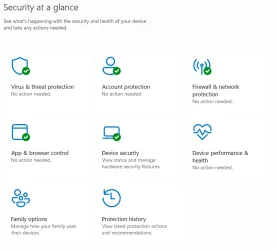
Open the Security dashboard and see if anything shows up there when you see the yellow question mark.
Normally they should be all green like shown below.

1763058482752.webp

1763058617041.webp
 

My Computer

System One

  • OS
    Windows 11 Pro 25H2
    Computer type
    PC/Desktop
    Manufacturer/Model
    Dell XPS 8930
    CPU
    Intel I9-9900K
    Memory
    64GB
    Graphics Card(s)
    NVIDIA RTX 2060
    Sound Card
    NVIDIA High Definition Audio
    Monitor(s) Displays
    4k Samsung
    Screen Resolution
    3840 x 2160
    Hard Drives
    512GB NVMe, ADATA SU 800, 2TB HDD
do I need to save to C: drive and then when I open it in Rufus to mount/load it in my external USB D: drive
Save wherever you like, if your device is compatible and if you don't need any Rufus provided modifications or options to delete excess hidden partitions, then you can just open setup file from the mounted ISO to see if it allows to keep everything and install newer Windows.

If you would update your profile "My Computer" to include more info, then others wouldn't need to guess if your laptop should be fully compatible with newer Win11 or not.
 

My Computer

System One

  • OS
    Windows 11 25H2
    Computer type
    PC/Desktop
    CPU
    AMD 5700G
    Motherboard
    ASROCK B550 Steel Legend
    Memory
    G.Skill Flare X 32GB (2x16GB) 3200MHz CL14
    Graphics Card(s)
    CPU Integrated
    Monitor(s) Displays
    ASUS ProART HDR
    Screen Resolution
    2K
    Hard Drives
    SSD Samsung 860 240GB
    PSU
    CoolerMaster V550
Mine is in the system tray, I don't keep them out like yours. 🤷‍♂️ The only time it shows a question mark is while doing updates or if a scan is required.
Open the Security dashboard and see if anything shows up there when you see the yellow question mark.
Normally they should be all green like shown below.

View attachment 152764

View attachment 152765
As I mentioned, the icon shows a yellow ! mark while it's in the tray, but when I open Windows Security and look as the dashboard everything is fine and the icon reverts to a green check. After awhile, it will go back to the yellow ! mark.
 

My Computer

System One

  • OS
    Windows 11 Pro 25H2
    Computer type
    PC/Desktop
    Manufacturer/Model
    Skytech / Central Computers
    CPU
    AMD Ryzen 9 9950X3D 16-Core Processor
    Motherboard
    Gigabyte X870E AORUS PRO ICE
    Memory
    64GB Corsair DDR5 RAM @ 6000 MT/s
    Graphics Card(s)
    ASUS TUF Gaming GeForce RTX 4090 OC Edition 24GB GDDR6X
    Sound Card
    Sound Blaster Audigy Fx V2
    Monitor(s) Displays
    Sony SDMU27M90 (DP HDR), Acer KA272, ASUS VG328QA1A
    Screen Resolution
    3840x2160 HDR
    Hard Drives
    Samsung SSD 990 PRO 4TB, Samsung SSD 860 EVO 1TB, Seagate ST8000DM004-2CX88 8TB
    Case
    Fractal Meshify 2
    Cooling
    Arctic Freezer III 360mm
As I mentioned, the icon shows a yellow ! mark while it's in the tray, but when I open Windows Security and look as the dashboard everything is fine and the icon reverts to a green check. After awhile, it will go back to the yellow ! mark.
How long is a while?
Mine is not showing any yellow exclamation mark unless there is an update in process or a scan due.
 
Last edited:

My Computer

System One

  • OS
    Windows 11 Pro 25H2
    Computer type
    PC/Desktop
    Manufacturer/Model
    Dell XPS 8930
    CPU
    Intel I9-9900K
    Memory
    64GB
    Graphics Card(s)
    NVIDIA RTX 2060
    Sound Card
    NVIDIA High Definition Audio
    Monitor(s) Displays
    4k Samsung
    Screen Resolution
    3840 x 2160
    Hard Drives
    512GB NVMe, ADATA SU 800, 2TB HDD
Sometimes mine will show a yellow exclamation mark if a system scan is overdue. Usually, if I see a yellow exclamation mark, I just click it in the system tray, and it will take me right to where the problem is.
 

My Computers

System One System Two

  • OS
    Windows 11 Pro 25H2 26200.8457
    Computer type
    PC/Desktop
    Manufacturer/Model
    Dell Tower Plus EBT2250, DOB: 06/15/2025
    CPU
    Intel® Core™ Ultra 7 265 1.8GHz to 5.3GHz (Arrow Lake)
    Motherboard
    Dell Inc. 02D3NT A00 (U3E1)
    Memory
    SK Hynix 32GB DDR5 5600 Desktop RAM UDIMM Non-ECC PC5-5600B
    Graphics Card(s)
    Dell NVIDIA® GeForce RTX™ 4060 8GB GDDR6 & (iGPU) Integrated Intel® UHD Graphics
    Sound Card
    Chipset Realtek High-Definition Audio with Dolby Atmos
    Monitor(s) Displays
    Dell Ultra Sharp U2515H 25-Inch Screen LED-Lit
    Screen Resolution
    2560 X 1440
    Hard Drives
    Samsung (NVMe PM9C1a 1024GB) M.2 PCIe NVMe Solid State Drive (OS), with Samsung Piccolo (S4LY022) 6-Core 4 Channel Controller.

    Samsung T7 500GB SSD, USB-C External Drive
    PSU
    Dell 460W
    Case
    Dell Tower Plus EBT 2250
    Cooling
    Fan
    Keyboard
    Dell Wired Keyboard - KB216
    Mouse
    Logitech M510
    Internet Speed
    Intel Killer E3100G 2.5 Gigabit Ethernet Controller
    Browser
    Microsoft Edge
    Antivirus
    Microsoft Windows Security
    Other Info
    The Samsung NVMe PM9C1a 1024GB SSD does not use a Phison NAND controller. Instead, it uses Samsung's in-house developed Piccolo (S4LY022) 6-Core 4 Channel Controller. The PM9C1a utilizes a controller built using Samsung's 5-nanometer process and seventh-generation V-NAND technology. 🤔
  • Operating System
    Windows 11 Pro 25H2 26200.8457
    Computer type
    Laptop
    Manufacturer/Model
    Dell Inspiron 15 7000 (7591) 2-in-1, DOB: 11/30/2019
    CPU
    10th Generation Intel Core i7-10510U Processor (8MB Cache, up to 4.9 GHz) Comet Lake
    Motherboard
    Dell 0NNW5N
    Memory
    16GB DDR4 RAM
    Graphics card(s)
    NVIDIA® GeForce® MX250 with 2GB GDDR5 graphics memory
    Sound Card
    Chipset Realtek ALC3254 🤔🤣
    Monitor(s) Displays
    Dell 15.6-inch UHD Truelife Touch Narrow Border WVA Display with Active Pen support
    Screen Resolution
    3840 x 2160
    Hard Drives
    Intel NVME 512GB SSD with 32GB Intel Optane Memory, M.2 80mm PCIe 3.0 RAID

    SanDisk 256GB Extreme microSDXC UHS-I Memory Card
    PSU
    Dell 4-Cell Battery, 68 Whr (Integrated), 90 Watt AC Adapter
    Case
    Dell Inspiron 15 7000 2-in-1 (7591)
    Cooling
    Standard Dell Case Fan & Havit HV-F2056 USB Powered (3 Fans) Laptop Cooling Pad.
    Keyboard
    Dell
    Mouse
    Logitech Wireless Mouse M650L
    Internet Speed
    Wireless/Wired connectivity (WiFi 6 - 802.11 ax)
    Browser
    Microsoft Edge
    Antivirus
    Microsoft Windows Security
    Other Info
    From Dell: 512GB NVME Solid State Drive accelerated by 32GB Intel Optane Memory are the fastest as compared to NAND SSDs. Intel Optane H10 with SSD offers speedy storage and accelerates opening your programs.
How long is a while?
Mine is not showing any yellow exclamation mark unless there is an update in process or a scan due.
Sometimes mine will show a yellow exclamation mark if a system scan is overdue. Usually, if I see a yellow exclamation mark, I just click it in the system tray, and it will take me right to where the problem is.
Yes, that is the expected behavior that I am not seeing.

Double-clicking on the icon with the yellow ! mark takes me to Windows Security where everything is green and nothing needs to be done.
 

My Computer

System One

  • OS
    Windows 11 Pro 25H2
    Computer type
    PC/Desktop
    Manufacturer/Model
    Skytech / Central Computers
    CPU
    AMD Ryzen 9 9950X3D 16-Core Processor
    Motherboard
    Gigabyte X870E AORUS PRO ICE
    Memory
    64GB Corsair DDR5 RAM @ 6000 MT/s
    Graphics Card(s)
    ASUS TUF Gaming GeForce RTX 4090 OC Edition 24GB GDDR6X
    Sound Card
    Sound Blaster Audigy Fx V2
    Monitor(s) Displays
    Sony SDMU27M90 (DP HDR), Acer KA272, ASUS VG328QA1A
    Screen Resolution
    3840x2160 HDR
    Hard Drives
    Samsung SSD 990 PRO 4TB, Samsung SSD 860 EVO 1TB, Seagate ST8000DM004-2CX88 8TB
    Case
    Fractal Meshify 2
    Cooling
    Arctic Freezer III 360mm
Okay. Not sure if it makes a difference or not, but I just single left-clicked it. Most likely that is what you are doing, so I understand your frustration. One time I had to hunt around in WS... I eventually found the error, it was fairly well hidden, I think it had something to do with Core Isolation, not sure.
 

My Computers

System One System Two

  • OS
    Windows 11 Pro 25H2 26200.8457
    Computer type
    PC/Desktop
    Manufacturer/Model
    Dell Tower Plus EBT2250, DOB: 06/15/2025
    CPU
    Intel® Core™ Ultra 7 265 1.8GHz to 5.3GHz (Arrow Lake)
    Motherboard
    Dell Inc. 02D3NT A00 (U3E1)
    Memory
    SK Hynix 32GB DDR5 5600 Desktop RAM UDIMM Non-ECC PC5-5600B
    Graphics Card(s)
    Dell NVIDIA® GeForce RTX™ 4060 8GB GDDR6 & (iGPU) Integrated Intel® UHD Graphics
    Sound Card
    Chipset Realtek High-Definition Audio with Dolby Atmos
    Monitor(s) Displays
    Dell Ultra Sharp U2515H 25-Inch Screen LED-Lit
    Screen Resolution
    2560 X 1440
    Hard Drives
    Samsung (NVMe PM9C1a 1024GB) M.2 PCIe NVMe Solid State Drive (OS), with Samsung Piccolo (S4LY022) 6-Core 4 Channel Controller.

    Samsung T7 500GB SSD, USB-C External Drive
    PSU
    Dell 460W
    Case
    Dell Tower Plus EBT 2250
    Cooling
    Fan
    Keyboard
    Dell Wired Keyboard - KB216
    Mouse
    Logitech M510
    Internet Speed
    Intel Killer E3100G 2.5 Gigabit Ethernet Controller
    Browser
    Microsoft Edge
    Antivirus
    Microsoft Windows Security
    Other Info
    The Samsung NVMe PM9C1a 1024GB SSD does not use a Phison NAND controller. Instead, it uses Samsung's in-house developed Piccolo (S4LY022) 6-Core 4 Channel Controller. The PM9C1a utilizes a controller built using Samsung's 5-nanometer process and seventh-generation V-NAND technology. 🤔
  • Operating System
    Windows 11 Pro 25H2 26200.8457
    Computer type
    Laptop
    Manufacturer/Model
    Dell Inspiron 15 7000 (7591) 2-in-1, DOB: 11/30/2019
    CPU
    10th Generation Intel Core i7-10510U Processor (8MB Cache, up to 4.9 GHz) Comet Lake
    Motherboard
    Dell 0NNW5N
    Memory
    16GB DDR4 RAM
    Graphics card(s)
    NVIDIA® GeForce® MX250 with 2GB GDDR5 graphics memory
    Sound Card
    Chipset Realtek ALC3254 🤔🤣
    Monitor(s) Displays
    Dell 15.6-inch UHD Truelife Touch Narrow Border WVA Display with Active Pen support
    Screen Resolution
    3840 x 2160
    Hard Drives
    Intel NVME 512GB SSD with 32GB Intel Optane Memory, M.2 80mm PCIe 3.0 RAID

    SanDisk 256GB Extreme microSDXC UHS-I Memory Card
    PSU
    Dell 4-Cell Battery, 68 Whr (Integrated), 90 Watt AC Adapter
    Case
    Dell Inspiron 15 7000 2-in-1 (7591)
    Cooling
    Standard Dell Case Fan & Havit HV-F2056 USB Powered (3 Fans) Laptop Cooling Pad.
    Keyboard
    Dell
    Mouse
    Logitech Wireless Mouse M650L
    Internet Speed
    Wireless/Wired connectivity (WiFi 6 - 802.11 ax)
    Browser
    Microsoft Edge
    Antivirus
    Microsoft Windows Security
    Other Info
    From Dell: 512GB NVME Solid State Drive accelerated by 32GB Intel Optane Memory are the fastest as compared to NAND SSDs. Intel Optane H10 with SSD offers speedy storage and accelerates opening your programs.

Latest Support Threads

Back
Top Bottom