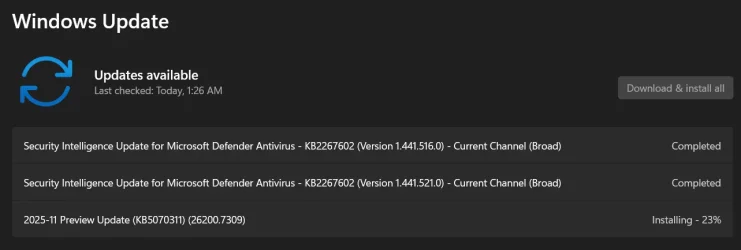
UPDATE 12/01:
 www.elevenforum.com
To view the latest updates about this release, visit the Windows release health dashboard or the update history page for Windows 11, version 25H2 and 24H2.
For more details, see Simplified Windows Update titles or its accompanying blog post.
 www.elevenforum.com
If you're an enterprise user, see Microsoft Store apps - Configuration Manager.
If you're a consumer user, see Get updates for apps and games in Microsoft Store.
 www.elevenforum.com
For more information about security vulnerabilities, see the Security Update Guide website and the November 2025 Security Updates.
Symptoms
After installing the August 2025 non-security preview update (KB5064081) or later updates, you might notice that the password icon is not visible in the sign-in options on the lock screen. If you hover over the space where the icon should appear, you’ll see that the password button is still available. Select this placeholder to open the password text box and enter your password. After entering your password, you can sign in normally.
Workaround
Microsoft is working to resolve this issue and will provide information when it’s available.
Microsoft combines the latest servicing stack update (SSU) for your operating system with the latest cumulative update (LCU). For general information about SSUs, see Servicing stack updates and Servicing Stack Updates (SSU): Frequently Asked Questions.
Install this update
To install this update, use one of the following Windows and Microsoft release channels.
1 This latest cumulative update includes updates for AI components. Even though the AI component updates are included in the update, the AI components are only applicable to Windows Copilot+ PCs and will not install on Windows PC or Windows Server.
If you want to remove the LCU
To remove the LCU after installing the combined SSU and LCU package, use the DISM/Remove-Package command line option with the LCU package name as the argument. You can find the package name by using this command: DISM /online /get-packages.
Running Windows Update Standalone Installer (wusa.exe) with the /uninstall switch on the combined package will not work because the combined package contains the SSU. You cannot remove the SSU from the system after installation.
File information
For a list of the files provided in this update, download the file information for cumulative update 5068861.
For a list of the files provided in the servicing stack update, download the file information for the SSU (KB5067035) - version 26100.7010.
 support.microsoft.com
Check Windows Updates
ISO or USB from Microsoft Media Creation Tool (MCT):
 www.elevenforum.com
UUP Dump:
64-bit ISO download:


ARM64 ISO download:
 www.elevenforum.com
KB5070311 Windows 11 Cumulative Update Preview build 26100.7309 (24H2) and 26200.7309 (25H2) - Dec. 1
UPDATE 12/09: https://www.elevenforum.com/t/kb5072033-windows-11-cumulative-update-build-26100-7462-24h2-and-26200-7462-25h2-dec-9.42805/ Microsoft Support: December 1, 2025 - KB5070311 (OS Builds 26200.7309 and 26100.7309) Preview This non-security update for Windows 11, version 25H2 and 24H2...
www.elevenforum.com
Microsoft Support:
November 11, 2025 - KB5068861 (OS Builds 26200.7171 and 26100.7171)
This cumulative update for Windows 11, version 25H2 and 24H2 (KB5068861), includes the latest security fixes and improvements, along with non-security updates from last month’s optional preview release. To learn more about differences between security updates, optional non-security preview updates, out-of-band (OOB) updates, and continuous innovation, see Windows monthly updates explained. For information on Windows update terminology, see the different types of Windows software updates.To view the latest updates about this release, visit the Windows release health dashboard or the update history page for Windows 11, version 25H2 and 24H2.
Announcements and messages
This section provides key notifications related to this release, including announcements, change logs, and end-of-support notices.Simplified Windows update titles
A new, standardized title format makes Windows updates easier to read and understand. It improves clarity by removing unnecessary technical elements like platform architecture. Key identifiers such as date prefixes, the KB number, and build or version are retained to help you quickly recognize each update.For more details, see Simplified Windows Update titles or its accompanying blog post.
December servicing update schedule
Due to reduced operations during the Western holidays in December and New Year's Day, Microsoft will not release a non-security preview update in December 2025. The monthly security update will still be available as scheduled. Regular monthly servicing, including both security updates and non-security preview updates, will resume in January 2026.Windows Secure Boot certificate expiration
Important: Secure Boot certificates used by most Windows devices are set to expire starting in June 2026. This might affect the ability of certain personal and business devices to boot securely if not updated in time. To avoid disruption, we recommend reviewing the guidance and taking action to update certificates in advance. For details and preparation steps, see Windows Secure Boot certificate expiration and CA updates.
Updating Microsoft Secure Boot keys before expiration in June 2026
https://support.microsoft.com/en-us/topic/if-you-re-prevented-from-updating-secure-boot-certificates-e01cc486-8721-457f-9bc7-5cb801c1759e UPDATE 4/02: https://support.microsoft.com/en-us/topic/secure-boot-certificate-update-status-in-the-windows-security-app-5ce39986-7dd2-4852-8c21-ef30dd04f046...
www.elevenforum.com
Microsoft Store apps updates
Windows Updates do not include updates for Microsoft Store apps.If you're an enterprise user, see Microsoft Store apps - Configuration Manager.
If you're a consumer user, see Get updates for apps and games in Microsoft Store.
Get updates for apps and games in Microsoft Store in Windows 11
This tutorial will show you how to manually check for app and game updates to download and install in the Microsoft Store for your account in Windows 11. Microsoft redesigned the Microsoft Store from the ground up in Windows 11, making space for more content, keeping the user experience simple...
www.elevenforum.com
Highlights
- This update addresses security issues for your Windows operating system.
Improvements
This security update contains fixes and quality improvements from KB5067036 (released October 28, 2025). The following summary outlines key issues addressed by this update. Also, included are available new features. The bold text within the brackets indicates the item or area of the change.- [Gaming]
- Fixed: This update addresses an issue that affects gaming handheld devices. These devices were unable to stay in low-power states, which caused faster battery drain.
- Fixed: This update addresses an issue on some handheld gaming devices where after signing in using the built-in Gamepad, the controller might not respond in apps for about five seconds, causing a delay. After you submit your password or PIN, the touch keyboard on the sign-in screen hides automatically.
- [Storage] Fixed: This update addresses an issue that could cause some Storage Spaces to become inaccessible or Storage Spaces Direct to fail when creating a storage cluster.
- [System utilities (known issue)] Fixed: This update addresses an issue where closing Task Manager with the Close button didn’t fully end the process, leaving background instances that could slow performance over time. This might occur after installing KB5067036.
- [Voice Access] Fixed: This update addresses an issue where Voice Access failed during initial setup if no microphone was connected and the voice model wasn’t installed.
- [Window management] Fixed: This update addresses an issue where selecting the desktop could unexpectedly open Task View.
- [Networking] Fixed: This update fixes an issue in the HTTP.sys request parser, a Windows component that reads and processes HTTP requests. The parser allowed a single line break within HTTP/1.1 chunk extensions, where the RFC 9112 standard requires a carriage return and line feed (CRLF) sequence to terminate each chunk. This can cause a parsing discrepancy when front end proxies are a part of the setup.
To turn off strict parsing, use the following registry key:
Registry Key: [HKEY_LOCAL_MACHINE\SYSTEM\CurrentControlSet\Services\Http\Parameters]
Registry value: "HttpAllowLenientChunkExtParsing"=dword:00000001
Data to be set: 1
For more information about security vulnerabilities, see the Security Update Guide website and the November 2025 Security Updates.
AI Components
This release updates the following AI components:| AI Component | Version |
|---|---|
| Image Search | 1.2510.1159.0 |
| Content Extraction | 1.2510.1159.0 |
| Semantic Analysis | 1.2510.1159.0 |
| Settings Model | 1.2510.1159.0 |
Windows 11 servicing stack update (KB5067035)- 26100.7010
This update makes quality improvements to the servicing stack, which is the component that installs Windows updates. Servicing stack updates (SSU) ensure that you have a robust and reliable servicing stack so that your devices can receive and install Microsoft updates. To learn more about SSUs, see Simplifying on-premises deployment of servicing stack updates.Known issues in this update
1 Password icon might be missing or invisible in the lock screen sign-in options
Symptoms
After installing the August 2025 non-security preview update (KB5064081) or later updates, you might notice that the password icon is not visible in the sign-in options on the lock screen. If you hover over the space where the icon should appear, you’ll see that the password button is still available. Select this placeholder to open the password text box and enter your password. After entering your password, you can sign in normally.
Workaround
Microsoft is working to resolve this issue and will provide information when it’s available.
How to get this update
Before you install this updateMicrosoft combines the latest servicing stack update (SSU) for your operating system with the latest cumulative update (LCU). For general information about SSUs, see Servicing stack updates and Servicing Stack Updates (SSU): Frequently Asked Questions.
Install this update
To install this update, use one of the following Windows and Microsoft release channels.
| Available | Next Step |
|---|---|

| This update downloads and installs automatically from Windows Update and Microsoft Update. |
| Yes 1 | Before you install this update To get the standalone package(s) for this update, go to the Microsoft Update Catalog website. This KB contains one or more MSU files that require installation in a specific order. Install this update Method 1: Install all MSU files together Download all MSU files for KB5068861 from Microsoft Update Catalog and place them in the same folder (for example, C:/Packages). Use Deployment Image Servicing and Management (DISM.exe) to install the target update. DISM will use the folder specified in PackagePath to discover and install one or more prerequisite MSU files as needed. Updating Windows PC To apply this update to a running Windows PC, run the following command from an elevated Command Prompt: DISM /Online /Add-Package /PackagePath:c:\packages\Windows11.0-KB5068861-x64.msuOr, run the following command from an elevated Windows PowerShell prompt: Add-WindowsPackage -Online -PackagePath "c:\packages\Windows11.0-KB5068861-x64.msu"Or use Windows Update Standalone Installer to install the target update. Updating Windows Installation media To apply this update to Windows Installation media, see Update Windows installation media with Dynamic Update. Note: When downloading other Dynamic Update packages, ensure they match the same month as this KB. If the SafeOS Dynamic Update or Setup Dynamic Update is not available for the same month as this KB, use the most recently published version of each. To add this update to a mounted image, run the following command from an elevated Command Prompt: DISM /Image:mountdir /Add-Package /PackagePath:Windows11.0-KB5068861-x64.msuOr, run the following command from an elevated Windows PowerShell prompt: Add-WindowsPackage -Path "c:\offline" -PackagePath "Windows11.0-KB5068861-x64.msu" -PreventPendingMethod 2: Install each MSU file individually, in order Download and install each MSU file individually either using DISM or Windows Update Standalone Installer in the following order:
|
If you want to remove the LCU
To remove the LCU after installing the combined SSU and LCU package, use the DISM/Remove-Package command line option with the LCU package name as the argument. You can find the package name by using this command: DISM /online /get-packages.
Running Windows Update Standalone Installer (wusa.exe) with the /uninstall switch on the combined package will not work because the combined package contains the SSU. You cannot remove the SSU from the system after installation.
File information
For a list of the files provided in this update, download the file information for cumulative update 5068861.
For a list of the files provided in the servicing stack update, download the file information for the SSU (KB5067035) - version 26100.7010.
Source:
November 11, 2025—KB5068861 (OS Builds 26200.7171 and 26100.7171) | Microsoft Support
November 11, 2025—KB5068861 (OS Builds 26200.7171 and 26100.7171)
support.microsoft.com
Check Windows Updates
ISO or USB from Microsoft Media Creation Tool (MCT):
Download Official Windows 11 ISO file from Microsoft
This tutorial will show you how to download an official Windows Server or Windows 11 64-bit or ARM64 ISO file from Microsoft. Microsoft provides ISO files for Windows Server and Windows 11 to download. You can use these ISO files to clean install or in-place upgrade Windows 11. The Flight Hub...
www.elevenforum.com
UUP Dump:
64-bit ISO download:
Select language for Windows 11, version 24H2 (26100.7171) amd64
Select language for Windows 11, version 24H2 (26100.7171) amd64 on UUP dump. UUP dump lets you download Unified Update Platform files, like Windows Insider updates, directly from Windows Update.
uupdump.net
Select language for Windows 11, version 25H2 (26200.7171) amd64
Select language for Windows 11, version 25H2 (26200.7171) amd64 on UUP dump. UUP dump lets you download Unified Update Platform files, like Windows Insider updates, directly from Windows Update.
uupdump.net
ARM64 ISO download:
Select language for Windows 11, version 24H2 (26100.7171) arm64
Select language for Windows 11, version 24H2 (26100.7171) arm64 on UUP dump. UUP dump lets you download Unified Update Platform files, like Windows Insider updates, directly from Windows Update.
uupdump.net
Select language for Windows 11, version 25H2 (26200.7171) arm64
Select language for Windows 11, version 25H2 (26200.7171) arm64 on UUP dump. UUP dump lets you download Unified Update Platform files, like Windows Insider updates, directly from Windows Update.
uupdump.net
UUP Dump - Download Windows Insider ISO
UUP Dump is the most practical and easy way to get ISO images of any Insider Windows 10 or Windows 11 version, as soon as Microsoft has released a new build. UUP Dump creates a download configuration file according to your choices, downloads necessary files directly from Microsoft servers, and...
www.elevenforum.com
Last edited: