Win Update KB5070773 Windows 11 Out-of-band Update build 26100.6901 (24H2) and 26200.6901 (25H2) - Oct. 20


UPDATE 10/28:


 Microsoft Support:

October 20, 2025 - KB5070773 (OS Builds 26200.6901 and 26100.6901) Out-of-band​

Windows Secure Boot certificate expiration

Important
: Secure Boot certificates used by most Windows devices are set to expire starting in June 2026. This might affect the ability of certain personal and business devices to boot securely if not updated in time. To avoid disruption, we recommend reviewing the guidance and taking action to update certificates in advance. For details and preparation steps, see Windows Secure Boot certificate expiration and CA updates.


To learn about Windows update terminology, see types of Windows updates and monthly quality update types. For an overview, see the update history page for Windows 11, version24H2 and version 25H2.

Stay informed! Follow @WindowsUpdate for the latest updates from the Windows Release Health Dashboard.

Improvements

This out-of-band (OOB) update includes quality improvements. This update is cumulative and includes security fixes and improvements from the October 14, 2025, security update (KB5066835), in addition to the following:
  • [USB] Fixed: After installing the Windows security update released on October 14, 2025 (KB5066835), USB devices, such as keyboards and mice, do not function in the Windows Recovery Environment (WinRE). This issue prevents navigation of any of the recovery options within WinRE. Note that the USB devices continue to work normally within the Windows operating system.

AI Components

This release updates the following AI components:

AI ComponentVersion
Image Search1.2509.1022.0
Content Extraction1.2509.1022.0
Semantic Analysis1.2509.1022.0
Settings Model1.2509.1022.0

Windows 11 servicing stack update (KB5067360)- 26100.6893​

This update makes quality improvements to the servicing stack, which is the component that installs Windows updates. Servicing stack updates (SSU) ensure that you have a robust and reliable servicing stack so that your devices can receive and install Microsoft updates. To learn more about SSUs, see Simplifying on-premises deployment of servicing stack updates.

Known issues in this update

1 Problems playing protected content in some BluRay/DVD/Digital TV apps

Symptoms
Some Digital TV and Blu-ray/DVD apps might not play protected content as expected after installing the August 29, 2025, Windows non-security preview update (KB5064081), or later updates.

Apps that use Enhanced Video Renderer with HDCP enforcement or Digital Rights Management (DRM) for digital audio might show copyright protection errors, frequent playback interruptions, unexpected stops, or black screens.

Streaming services are not affected.

Workaround
The non-security September 2025 Windows preview update (KB5065789) and later updates address problems affecting certain applications that use the Enhanced Video Renderer (EVR) with HDCP (High-bandwidth Digital Content Protection) enforcement. The non-security October Windows preview update (KB5067036) includes additional improvements to address problems affecting applications using Digital Rights Media (DRM) for digital audio.

2 IIS websites might fail to load

Symptoms
After installing the non-security September update (KB5065789) for Windows 11, version 25H2, or the security October update (KB5066835) for Windows 11, version 24H2, server-side applications that rely on HTTP.sys might experience issues with incoming connections. As a result, Internet Information Services (IIS) websites might fail to load and display an error message such as “Connection reset – error (ERR_CONNECTION_RESET)” or a similar message. This includes websites hosted on http://localhost/ and other IIS connections.

This issue may result from various conditions, including internet connectivity, timing of update installation, and device restarts. It might not occur in all environments, even if the update is installed.

The following steps can help resolve this issue in environments where it's observed:
  1. On the affected device, open Settings and go to Windows Update.
  2. Select Start , type Check for updates, and Check for updates from the results.
  3. If updates are available, install them.
  4. Restart your device.
Note: Make sure to restart your device, even if no updates are installed.

Workaround

This issue is addressed in KB5067036.

How to get this update

Before you install this update

Microsoft combines the latest servicing stack update (SSU) for your operating system with the latest cumulative update (LCU). For general information about SSUs, see Servicing stack updates and Servicing Stack Updates (SSU): Frequently Asked Questions.

Install this update

To install this update, use one of the following Windows and Microsoft release channels.

AvailableNext Step
Included
This update downloads and installs automatically from Windows Update and Microsoft Update.
Yes 1Before you install this update
To get the standalone package(s) for this update, go to the Microsoft Update Catalog website. This KB contains one or more MSU files that require installation in a specific order.

Install this update
Method 1: Install all MSU files together


Download all MSU files for KB5070773 from Microsoft Update Catalog and place them in the same folder (for example, C:/Packages). Use Deployment Image Servicing and Management (DISM.exe) to install the target update. DISM will use the folder specified in PackagePath to discover and install one or more prerequisite MSU files as needed.

Updating Windows PC

To apply this update to a running Windows PC, run the following command from an elevated Command Prompt:

DISM /Online /Add-Package /PackagePath:c:\packages\Windows11.0-KB5070773-x64.msu

Or, run the following command from an elevated Windows PowerShell prompt:

Add-WindowsPackage -Online -PackagePath "c:\packages\Windows11.0-KB5070773-x64.msu"

Updating Windows Installation media

To apply this update to Windows Installation media, see Update Windows installation media with Dynamic Update.

Note: When downloading other Dynamic Update packages, ensure they match the same month as this KB. If the SafeOS Dynamic Update or Setup Dynamic Update is not available for the same month as this KB, use the most recently published version of each.

To add this update to a mounted image, run the following command from an elevated Command Prompt:

DISM /Image:mountdir /Add-Package /PackagePath:Windows11.0-KB5070773-x64.msu

Or, run the following command from an elevated Windows PowerShell prompt:

Add-WindowsPackage -Path "c:\offline" -PackagePath "Windows11.0-KB5070773-x64.msu" -PreventPending

Method 2: Install each MSU file individually in order

Download and install each MSU file individually using DISM or Windows Update Standalone Installer in the following order:
  1. windows11.0-kb5043080-x64_953449672073f8fb99badb4cc6d5d7849b9c83e8.msu
  2. windows11.0-kb5070773-x64_6640d1a7a2a393bd2db6f97b7eb4fe3907806902.msu
1 This latest cumulative update includes updates for AI components. Even though the AI component updates are included in the update, the AI components are only applicable to Windows Copilot+ PCs and will not install on Windows PC or Windows Server.

If you want to remove the LCU

To remove the LCU after installing the combined SSU and LCU package, use the DISM/Remove-Package command line option with the LCU package name as the argument. You can find the package name by using this command: DISM /online /get-packages.

Running Windows Update Standalone Installer (wusa.exe) with the /uninstall switch on the combined package will not work because the combined package contains the SSU. You cannot remove the SSU from the system after installation.

File information

For a list of the files provided in this update, download the file information for cumulative update 5070773.

For a list of the files provided in the servicing stack update, download the file information for the SSU KB5067360 - version 26100.6893.


 Source:


Check Windows Updates


UUP Dump:

64-bit ISO download:

ARM64 ISO download:

 
Last edited:

My Computer

System One

  • OS
    Windows 11 Pro 25H2
    Computer type
    PC/Desktop
    Manufacturer/Model
    Dell XPS 8930
    CPU
    Intel I9-9900K
    Memory
    64GB
    Graphics Card(s)
    NVIDIA RTX 2060
    Sound Card
    NVIDIA High Definition Audio
    Monitor(s) Displays
    4k Samsung
    Screen Resolution
    3840 x 2160
    Hard Drives
    512GB NVMe, ADATA SU 800, 2TB HDD
So is this good, I don't know what I'm looking at here??? WindowsTerminal_uURHc8XHEi.webp
 

My Computers

System One System Two

  • OS
    Windows 11 25H2
    Computer type
    Laptop
    Manufacturer/Model
    Alienware 18 Area-51
    CPU
    Intel Core Ultra 9 275HX (24-Core)
    Motherboard
    Alienware
    Memory
    64GB DDR5 6400MT/s
    Graphics Card(s)
    NVIDIA GeForce RTX 5080 and Intel UHD Graphics
    Sound Card
    Onboard, Realtek high-performance Audio chips (ALC3329 & ALC1708))
    Monitor(s) Displays
    300HZ 18-inch QHD 500 nit Comfort View+
    Screen Resolution
    2560 x 1600
    Hard Drives
    2TB NVMe M.2 PCIe Gen 5 SSD
    Case
    Magnesium Alloy
    Cooling
    Advanced Cryo-Tech Quad-Fan Cooling system & large vapor chamber
    Keyboard
    Cherry MX ultra low profile mechanical keyboard with per key AlienFX RGB lighting
    Mouse
    Logitech MX Master 4
    Browser
    Vivaldi (main), Firefox, Chrome, Edge
    Antivirus
    MS Defender and Malwarebytes Free
  • Operating System
    Windows 11 25H2
    Computer type
    Laptop
    Manufacturer/Model
    Microsoft Surface Laptop 7
    CPU
    Qualcomm Snapdragon X Elite (12 Core) ARM based CPU
    Motherboard
    Microsoft Corp.
    Memory
    16GB LPDDR5
    Graphics card(s)
    Qualcomm Adreno X1-85
    Sound Card
    Omnisonic speakers with Dolby Atmos spatial sound
    Monitor(s) Displays
    120 Hz 13.8-inch 600 nit PixelSense Flow touchscreen
    Screen Resolution
    2304x1536
    Hard Drives
    1TB NVMe Gen 4 SSD
    Case
    Anodized Aluminum
    Cooling
    Traditional active cooling fan system
    Keyboard
    Mechanical QWERTY, backlit when in use
    Mouse
    Logitech MX Master 4 and Surface Arc Mouse
    Browser
    Vivaldi (main), Firefox, Chrome, Edge
    Antivirus
    MS Defender and Malwarebytes Free
So is this good, I don't know what I'm looking at here??? View attachment 150040

Generally, Safe OS Dynamic Update will be updated at the same time as the security cumulative update of the month. However, if you have no problems in WinRE environment, you can ignore it. The next security update may update the WinRE image.

If you update security updates offline using DISM, the WinRE image may not be updated.
 

My Computer

System One

  • OS
    Windows 11, version 25H2 (26200)
    Computer type
    PC/Desktop
    CPU
    AMD Ryzen 9 9950X 16-Core Processor
    Motherboard
    ASRock B650M PG Riptide
    Memory
    DDR5-6000 (CL36) 64.0 GB
    Graphics Card(s)
    NVIDIA GeForce RTX 4090
    PSU
    1200W
    Case
    Phanteks Enthoo Pro 2
    Cooling
    Noctua NH-D12L
Windows 11 26100.6901 24H2... Just installed it now without any problems!

kb5070773.webp

1761103070970.webp
 

My Computer

System One

  • OS
    Windows 11
    Computer type
    PC/Desktop
    Manufacturer/Model
    Asus/Custom Build
    CPU
    Intel® Xeon® X5690 3.47GHz Six-Core
    Motherboard
    Asus P6T Deluxe v2
    Memory
    G.Skill PC3-12800 1600MHz 24GB
    Graphics Card(s)
    NVIDIA GeForce GTX 1050
    Sound Card
    SoundMAX ADI AD2000B HD Audio
    Monitor(s) Displays
    Acer T232HL Touch Screen
    Screen Resolution
    1920 x 1080 @ 60Hz
    Hard Drives
    6 Crucial MX500 SSD 1TB each.
    PSU
    Thermaltake Toughpower Gold 850W
    Case
    Thermaltake Armor VA8000SWA
    Cooling
    Thermaltake Air Cooling System
    Keyboard
    Illuminated Multimedia LED Keyboard
    Mouse
    M16 Dual Mode Illuminated Mouse - Bluetooth / 2.4 GHz Mode
    Internet Speed
    800 Mbps
    Browser
    Edge / Opera / Vivaldi / Chrome / Firefox / Brave
    Antivirus
    Windows Defender Security
26200.6901 Life in the fast lane...back to the betas...;) Installed in ~3 minutes through Windows Update, as usual. No problems noted thus far.
 

My Computer

System One

  • OS
    Win11 Release Beta channel
    Computer type
    PC/Desktop
    Manufacturer/Model
    a cherry-picked assembly
    CPU
    AMD R7 7800X3D
    Motherboard
    MSI x870 Tomahawk Wi-Fi, 8-layer, 2 oz copper, server PCB
    Memory
    GSkill 2x16GB @ 6400MT/s
    Graphics Card(s)
    XFX 9070 XT SWIFT tri-fan (PCIe5.0)
    Sound Card
    Creative Labs G8 USB External Sound device, Gaming DAC, Sound Card & Earphone AMP.. HIGHLY RECOMMENDED, btw. Totally changed my opinion of external USB sound. I like!...;)
    Monitor(s) Displays
    Philips 43" Momentum DisplayHDR 1000-certified
    Screen Resolution
    3840x2160
    Hard Drives
    *Boot: Samsung 980 Pro 2 TB NVMe (PCIe4x4)
    *Samsung 980 EVO NVMe 500GB (PCIe 4x4)
    *Kingston SNV3S2000G 2TB NVMe (PCIe4x4)
    *Samsung 960 EVO 250GB NVMe(PCIe3x2)
    *8TB Toshiba x300 HDD
    *ST4000DM004 S3 4TB HDD
    PSU
    Gigabyte 850W Gold, Rev 2
    Case
    Lian Li Lancool 217, white, with wood trim, very nice looking--tired of black, 5-fans standard
    Cooling
    Air coutesy Lian Li
    Keyboard
    Cherry MX 2.0S RGB
    Mouse
    Razer Basilisk V3 24k DPI
    Internet Speed
    ~950Mbps down and up!
    Browser
    Firefox x64 DE
    Antivirus
    Defender
    Other Info
    Great New system. Exceeds my expectations by quite a bit, btw. I love the USB G8 SoundBlaster, it's quite an improvement over the G6!

My Computer

System One

  • OS
    Windows 11 Pro 25H2
    Computer type
    PC/Desktop
    Manufacturer/Model
    Dell XPS 8930
    CPU
    Intel I9-9900K
    Memory
    64GB
    Graphics Card(s)
    NVIDIA RTX 2060
    Sound Card
    NVIDIA High Definition Audio
    Monitor(s) Displays
    4k Samsung
    Screen Resolution
    3840 x 2160
    Hard Drives
    512GB NVMe, ADATA SU 800, 2TB HDD
ServicePack Build should be 6901, yours shows a different number. 🤷‍♂️
Well, that's actually the new RP build I installed today. I was just asking if the rest looks ok. That says 7014 by the way.
 

My Computers

System One System Two

  • OS
    Windows 11 25H2
    Computer type
    Laptop
    Manufacturer/Model
    Alienware 18 Area-51
    CPU
    Intel Core Ultra 9 275HX (24-Core)
    Motherboard
    Alienware
    Memory
    64GB DDR5 6400MT/s
    Graphics Card(s)
    NVIDIA GeForce RTX 5080 and Intel UHD Graphics
    Sound Card
    Onboard, Realtek high-performance Audio chips (ALC3329 & ALC1708))
    Monitor(s) Displays
    300HZ 18-inch QHD 500 nit Comfort View+
    Screen Resolution
    2560 x 1600
    Hard Drives
    2TB NVMe M.2 PCIe Gen 5 SSD
    Case
    Magnesium Alloy
    Cooling
    Advanced Cryo-Tech Quad-Fan Cooling system & large vapor chamber
    Keyboard
    Cherry MX ultra low profile mechanical keyboard with per key AlienFX RGB lighting
    Mouse
    Logitech MX Master 4
    Browser
    Vivaldi (main), Firefox, Chrome, Edge
    Antivirus
    MS Defender and Malwarebytes Free
  • Operating System
    Windows 11 25H2
    Computer type
    Laptop
    Manufacturer/Model
    Microsoft Surface Laptop 7
    CPU
    Qualcomm Snapdragon X Elite (12 Core) ARM based CPU
    Motherboard
    Microsoft Corp.
    Memory
    16GB LPDDR5
    Graphics card(s)
    Qualcomm Adreno X1-85
    Sound Card
    Omnisonic speakers with Dolby Atmos spatial sound
    Monitor(s) Displays
    120 Hz 13.8-inch 600 nit PixelSense Flow touchscreen
    Screen Resolution
    2304x1536
    Hard Drives
    1TB NVMe Gen 4 SSD
    Case
    Anodized Aluminum
    Cooling
    Traditional active cooling fan system
    Keyboard
    Mechanical QWERTY, backlit when in use
    Mouse
    Logitech MX Master 4 and Surface Arc Mouse
    Browser
    Vivaldi (main), Firefox, Chrome, Edge
    Antivirus
    MS Defender and Malwarebytes Free
Well, that's actually the new RP build I installed today. I was just asking if the rest looks ok. That says 7014 by the way.

Windows Recovery Environment (WinRE) ServicePack 7014 is 2025-10 Safe OS Dynamic Release Preview Update for Windows (Ge) Version 25H2 for x64-based Systems (KB5067040). You on KB5067036 Windows 11 Insider Release Preview build 26100.7015 (24H2) and 26200.7015 (25H2). wrong thread.

If you update KB5067036 (26x00.7015) it will also install KB5067040 Safe OS Dynamic Release Preview Update.
 

My Computer

System One

  • OS
    Windows 11, version 25H2 (26200)
    Computer type
    PC/Desktop
    CPU
    AMD Ryzen 9 9950X 16-Core Processor
    Motherboard
    ASRock B650M PG Riptide
    Memory
    DDR5-6000 (CL36) 64.0 GB
    Graphics Card(s)
    NVIDIA GeForce RTX 4090
    PSU
    1200W
    Case
    Phanteks Enthoo Pro 2
    Cooling
    Noctua NH-D12L
Well, that's actually the new RP build I installed today. I was just asking if the rest looks ok. That says 7014 by the way.
OK, that was hard to read on your screenshot. 😂😂

Here is mine after today's update. We are in the wrong thread here. 😂😂🤷‍♂️
1761108935753.webp
 
Last edited:

My Computer

System One

  • OS
    Windows 11 Pro 25H2
    Computer type
    PC/Desktop
    Manufacturer/Model
    Dell XPS 8930
    CPU
    Intel I9-9900K
    Memory
    64GB
    Graphics Card(s)
    NVIDIA RTX 2060
    Sound Card
    NVIDIA High Definition Audio
    Monitor(s) Displays
    4k Samsung
    Screen Resolution
    3840 x 2160
    Hard Drives
    512GB NVMe, ADATA SU 800, 2TB HDD
I removed these two reclaimable packages by accident , possible to get them back ............?
I removed them in 24H2 , never update-problems .............removing them in 25H2 gave me several times errors after updates ( with no succes ) .........."installation-failure"
Looking for a safe (!) way for cleaning after upgrades/updates..................
 
Last edited:

My Computer

System One

  • OS
    Windows11 Pro 25H2
    Computer type
    PC/Desktop
    Manufacturer/Model
    Asus
    CPU
    i7
    Motherboard
    z97k
    Memory
    32GB
    Graphics Card(s)
    nVidia
    Sound Card
    Realtek
    Hard Drives
    3
    Cooling
    air
    Browser
    Edge
    Antivirus
    ESET
I removed these two reclaimable packages by accident , possible to get them back ............?
Reinstalling with the repair version will get those back. 😉
 

My Computer

System One

  • OS
    Windows 11 Pro 25H2
    Computer type
    PC/Desktop
    Manufacturer/Model
    Dell XPS 8930
    CPU
    Intel I9-9900K
    Memory
    64GB
    Graphics Card(s)
    NVIDIA RTX 2060
    Sound Card
    NVIDIA High Definition Audio
    Monitor(s) Displays
    4k Samsung
    Screen Resolution
    3840 x 2160
    Hard Drives
    512GB NVMe, ADATA SU 800, 2TB HDD
Tried the desktop again and still failure. I noticed every-time I tried the restore health has to repair things though in this last case nothing else has been used since yesterdays abortive instill and repair after it.
 

My Computers

System One System Two

  • OS
    Windows 11
    Computer type
    PC/Desktop
    Manufacturer/Model
    Chilblast Photoe editer
    CPU
    AMD Ryzen 9 3900X 12-
    Motherboard
    AMD AM4 ATX
    Memory
    32
    Graphics Card(s)
    RTX 470
    Monitor(s) Displays
    Benq SW240 Dell U213
    Screen Resolution
    1920X1200
    Hard Drives
    1 Tb SSD 2 Tb SSD 2Tb Hdd
    Mouse
    logi
    Internet Speed
    500 up and down
    Browser
    Firefox
    Antivirus
    Bitdefender Total Security
  • Computer type
    Laptop
    Manufacturer/Model
    XPS 14 9440
    Browser
    Firefox
    Antivirus
    Bitdefender Total
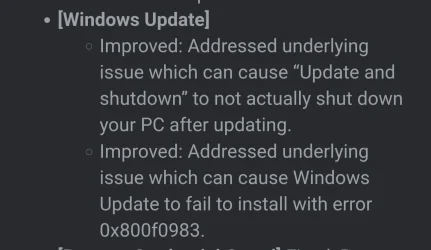
Error 0x800f0983 again. Tried a manual install via both methods. Had to run another "Fix problems use Windows Update" repair install. DSM and SFC came up clean when troubleshooting. Update installed after the Repair install. MoUsoCoreWorker.exe was active with the OS drive for about 15 minutes before the download started. Judging from the CBS log Windows Update must have done an image scan. The update did install correctly. OS is 26200.6901 now.

I haven't had any major issues with WU for as long as I can remember. Now twice in the same month.
 
Last edited:

My Computer

System One

  • OS
    Windows 11 Home 25H2 26200.6901
    Computer type
    PC/Desktop
    Manufacturer/Model
    Custom
    CPU
    AMD 9800X3D
    Motherboard
    MSI B850 Gaming Plus Wifi
    Memory
    Patriot Viper
    Graphics Card(s)
    EVGA GeForce RTX 3070 Ti FTW3 ULTRA GAMING
    Sound Card
    Realtek 7.1 Surround Sound High Definition Audio CODEC (Built-in w/ Motherboard)
    Monitor(s) Displays
    ACER XG270HU
    Screen Resolution
    2560x1440 144hz
    Hard Drives
    Samsung 980 PRO NVMe M.2 PCI-E x4 SSD, 1TB for OS/Apps
    Western Digital Blue Series 3D NAND SATA III 2.5in Solid State Drive, 2TB (Games)
    PSU
    Corsair RM White Series RM850 80+ Gold Modular ATX Power Supply, 850W
    Case
    NXZT H9 Flow
    Cooling
    Be Quiet Light Loop 360
    Keyboard
    Razer Cynosa V2
    Mouse
    Razer Naga Trinity
    Internet Speed
    Cable 934Mbps download 50Mbps Upload
    Browser
    Edge/Chrome
    Antivirus
    Windows Antivirus/Defender. Bitdefender when not Troubleshooting
Error 0x800f0983 again. Tried a manual install via both methods. Had to run another "Fix problems use Windows Update" repair install. DSM and SFC came up clean when troubleshooting. Update installed after the Repair install but it took 20 mins. MoUsoCoreWorker.exe was active with the OS drive for about 15 minutes before the download started. Judging from the CBS log Windows Update must have done an image scan. The update did install correctly. OS is 26200.6901 now.

I havent had any major issues with WU for as long as I can remember. Now twice in the same month.
MS have listed this error as a fix on the RP update today. A lot of users had the same error
 

Attachments

  • Screenshot_20251022_204834_Edge.webp
    Screenshot_20251022_204834_Edge.webp
    42.3 KB · Views: 2

My Computer

System One

  • OS
    Windows 11 Pro 25H2 (RP channel)
    Computer type
    PC/Desktop
    Manufacturer/Model
    MSI
    CPU
    AMD Ryzen 7 9800X3D 8-core
    Motherboard
    MEG X870E Godlike
    Memory
    64GB Corsair Titanium 6000/CL30
    Graphics Card(s)
    MSI Suprim 5080 SOC
    Sound Card
    Soundblaster AE-9
    Monitor(s) Displays
    ASUS TUF Gaming VG289Q
    Screen Resolution
    3840x2160
    Hard Drives
    Samsung 9100 Pro 4TB (gen 5 x4, system drive/games)
    Samsung 990 Pro 2TB
    Samsung 980 Pro 2TB
    Samsung 870 Evo 4TB
    Samsung 870 Evo 2TB
    Samsung T9 4TB
    PSU
    Seasonic PX-2200
    Case
    Bequiet! Dark Base Pro 901
    Cooling
    Noctua NH-D15S Chromax black
    Keyboard
    Logitech G915 X (wired)
    Mouse
    Logitech G903 with PowerPlay charger
    Internet Speed
    900Mb/sec
    Browser
    Microsoft Edge
    Antivirus
    Windows Defender
Error 0x800f0983 again. Tried a manual install via both methods. Had to run another "Fix problems use Windows Update" repair install. DSM and SFC came up clean when troubleshooting. Update installed after the Repair install but it took 20 mins. MoUsoCoreWorker.exe was active with the OS drive for about 15 minutes before the download started. Judging from the CBS log Windows Update must have done an image scan. The update did install correctly. OS is 26200.6901 now.

I havent had any major issues with WU for as long as I can remember. Now twice in the same month.
My exact experience with this update.

Had to repair install like you and then it applied, but was slow to do so. Very strange.

Windows has been a wreck since 24h2 for me. I've never had to repair install / completely reinstall more than on these versions of Windows. I feel like a beta tester at this point.

Worst thing is that I only really use my PC for gaming. I wish MS would release a really cut back version of Windows just suited to gaming - remove all of the copilot bs and extra bits that I'll never use and I'll be happy...
 

My Computer

System One

  • OS
    windows 11 25h2
    Computer type
    PC/Desktop
    CPU
    14700KF
    Motherboard
    MSI MAG Z790 Tomahawk WiFi
    Memory
    32GB DDR5
    Graphics Card(s)
    MSI 4090 VENTUS 3X
    Monitor(s) Displays
    CORSAIR XENEON 27QHD240 OLED
    Screen Resolution
    1440p
    Hard Drives
    M.2 SSD
    PSU
    HX1000i 2023
    Case
    Corsair 4000D
    Cooling
    Noctua Nh-U12A
    Keyboard
    WOOTING HE Full
    Mouse
    Logitech G502 X Wired
MS have listed this error as a fix on the RP update today. A lot of users had the same error

Thanks for the info.

My exact experience with this update.

Had to repair install like you and then it applied, but was slow to do so. Very strange.

Windows has been a wreck since 24h2 for me. I've never had to repair install / completely reinstall more than on these versions of Windows. I feel like a beta tester at this point.

Worst thing is that I only really use my PC for gaming. I wish MS would release a really cut back version of Windows just suited to gaming - remove all of the copilot bs and extra bits that I'll never use and I'll be happy...

I had a different system when I was using 24h2. My current PC is just over a month old with only 25h2 setup. Having some mild paranoia when something like this happens whether these issues could be the PC or not.
 

My Computer

System One

  • OS
    Windows 11 Home 25H2 26200.6901
    Computer type
    PC/Desktop
    Manufacturer/Model
    Custom
    CPU
    AMD 9800X3D
    Motherboard
    MSI B850 Gaming Plus Wifi
    Memory
    Patriot Viper
    Graphics Card(s)
    EVGA GeForce RTX 3070 Ti FTW3 ULTRA GAMING
    Sound Card
    Realtek 7.1 Surround Sound High Definition Audio CODEC (Built-in w/ Motherboard)
    Monitor(s) Displays
    ACER XG270HU
    Screen Resolution
    2560x1440 144hz
    Hard Drives
    Samsung 980 PRO NVMe M.2 PCI-E x4 SSD, 1TB for OS/Apps
    Western Digital Blue Series 3D NAND SATA III 2.5in Solid State Drive, 2TB (Games)
    PSU
    Corsair RM White Series RM850 80+ Gold Modular ATX Power Supply, 850W
    Case
    NXZT H9 Flow
    Cooling
    Be Quiet Light Loop 360
    Keyboard
    Razer Cynosa V2
    Mouse
    Razer Naga Trinity
    Internet Speed
    Cable 934Mbps download 50Mbps Upload
    Browser
    Edge/Chrome
    Antivirus
    Windows Antivirus/Defender. Bitdefender when not Troubleshooting
" I havent had any major issues with WU for as long as I can remember. Now twice in the same month. "..................indeed !
Never (!) WU-problems in 24H2 !
25H2 starts with lots of problems , this "0x800f0983" is a famous one (!) , looots of people facing this error .........
Seems very difficult for MS to explain the cause , so we can easily search for working solutions !
Got these error also twice ( on two latest updates ) , re-installed twice , costed me a lot of time ...........
Will see next month, second tuesday............ ;-)
 

My Computer

System One

  • OS
    Windows11 Pro 25H2
    Computer type
    PC/Desktop
    Manufacturer/Model
    Asus
    CPU
    i7
    Motherboard
    z97k
    Memory
    32GB
    Graphics Card(s)
    nVidia
    Sound Card
    Realtek
    Hard Drives
    3
    Cooling
    air
    Browser
    Edge
    Antivirus
    ESET
" I havent had any major issues with WU for as long as I can remember. Now twice in the same month. "..................indeed !
Never (!) WU-problems in 24H2 !
25H2 starts with lots of problems , this "0x800f0983" is a famous one (!) , looots of people facing this error .........
Seems very difficult for MS to explain the cause , so we can easily search for working solutions !
Got these error also twice ( on two latest updates ) , re-installed twice , costed me a lot of time ...........
Will see next month, second tuesday............ ;-)

I have seen people reporting the error on Feedback Hub, reddit, here and MS support forums. No solution has worked besides the repair install. I was on a clean install as of the 16th, No issues with the system, apps, nor gaming. I do not mess with Windows like cleaners apps or modifications. I turn on dark mode and setup my region/location settings. Setup hardware drivers and install my games. That is it.
 

My Computer

System One

  • OS
    Windows 11 Home 25H2 26200.6901
    Computer type
    PC/Desktop
    Manufacturer/Model
    Custom
    CPU
    AMD 9800X3D
    Motherboard
    MSI B850 Gaming Plus Wifi
    Memory
    Patriot Viper
    Graphics Card(s)
    EVGA GeForce RTX 3070 Ti FTW3 ULTRA GAMING
    Sound Card
    Realtek 7.1 Surround Sound High Definition Audio CODEC (Built-in w/ Motherboard)
    Monitor(s) Displays
    ACER XG270HU
    Screen Resolution
    2560x1440 144hz
    Hard Drives
    Samsung 980 PRO NVMe M.2 PCI-E x4 SSD, 1TB for OS/Apps
    Western Digital Blue Series 3D NAND SATA III 2.5in Solid State Drive, 2TB (Games)
    PSU
    Corsair RM White Series RM850 80+ Gold Modular ATX Power Supply, 850W
    Case
    NXZT H9 Flow
    Cooling
    Be Quiet Light Loop 360
    Keyboard
    Razer Cynosa V2
    Mouse
    Razer Naga Trinity
    Internet Speed
    Cable 934Mbps download 50Mbps Upload
    Browser
    Edge/Chrome
    Antivirus
    Windows Antivirus/Defender. Bitdefender when not Troubleshooting
I have seen people reporting the error on Feedback Hub, reddit, here and MS support forums. No solution has worked besides the repair install. I was on a clean install as of the 16th, No issues with the system, apps, nor gaming. I do not mess with Windows like cleaners apps or modifications. I turn on dark mode and setup my region/location settings. Setup hardware drivers and install my games. That is it.
I guess I was lucky, I updated 5 machines with W.U. and never hit that error 0x800f0983. 🤞
 

My Computer

System One

  • OS
    Windows 11 Pro 25H2
    Computer type
    PC/Desktop
    Manufacturer/Model
    Dell XPS 8930
    CPU
    Intel I9-9900K
    Memory
    64GB
    Graphics Card(s)
    NVIDIA RTX 2060
    Sound Card
    NVIDIA High Definition Audio
    Monitor(s) Displays
    4k Samsung
    Screen Resolution
    3840 x 2160
    Hard Drives
    512GB NVMe, ADATA SU 800, 2TB HDD
I have seen people reporting the error on Feedback Hub, reddit, here and MS support forums. No solution has worked besides the repair install. I was on a clean install as of the 16th, No issues with the system, apps, nor gaming. I do not mess with Windows like cleaners apps or modifications. I turn on dark mode and setup my region/location settings. Setup hardware drivers and install my games. That is it.

Repair install doesn't work either (well, maybe for some it does - but definitely not for all - i can attest to that from personal experience). No biggie, worth ignoring - till next (stable in a more general sense) update is released. Even from a servicing point of view - i don't get the obsession with a "legacy (outdated troubleshooter)" feature like Windows PE (WinPE). Not in 2025 - with so many free and capable back-up tools (a proper back-up - beats dabbling with old school features like Windows PE (WinPE). A fix was bound to be released anyway - even if a rushed fix (the one from this topic) - doesn't work for everyone - a proper one should be included with next patch. So why stress over WinPe - as if it impacts Window's actual functionality for daily use? 🤔
 
Last edited:

My Computer

System One

  • OS
    WinDOS 25H2
    Computer type
    Laptop
    CPU
    Intel & AMD
    Memory
    SO-DIMM SK Hynix 15.8 GB Dual-Channel DDR4-2666 (2 x 8 GB) 1329MHz (19-19-19-43)
    Graphics Card(s)
    nVidia RTX 2060 6GB Mobile GPU (TU106M)
    Sound Card
    Onbord Realtek ALC1220
    Screen Resolution
    1920 x 1080
    Hard Drives
    1x Samsung PM981 NVMe PCIe M.2 512GB / 1x Seagate Expansion ST1000LM035 1TB
Back
Top Bottom