Win Update KB5072033 Windows 11 Cumulative Update build 26100.7462 (24H2) and 26200.7462 (25H2) - Dec. 9


UPDATE 1/13:


 Microsoft Support:

December 9, 2025 - KB5072033 (OS Builds 26200.7462 and 26100.7462)​

This cumulative update for Windows 11, version 25H2 and 24H2 (KB5072033), includes the latest security fixes and improvements, along with non-security updates from last month’s optional preview release. To learn more about differences between security updates, optional non-security preview updates, out-of-band (OOB) updates, and continuous innovation, see Windows monthly updates explained. For information on Windows update terminology, see the different types of Windows software updates.

To view the latest updates about this release, visit the Windows release health dashboard or the update history page for Windows 11, version 25H2 and 24H2.


Announcements and messages

This section provides key notifications related to this release, including announcements, change logs, and end-of-support notices.

Simplified Windows update titles​

A new, standardized title format makes Windows updates easier to read and understand. It improves clarity by removing unnecessary technical elements like platform architecture. Key identifiers such as date prefixes, the KB number, and build or version are retained to help you quickly recognize each update.

For more details, see Simplified Windows Update titles or its accompanying blog post.

December servicing update schedule
Due to reduced operations during the Western holidays in December and New Year's Day, Microsoft will not release a non-security preview update in December 2025. The monthly security update will still be available as scheduled. Regular monthly servicing, including both security updates and non-security preview updates, will resume in January 2026.


Windows Secure Boot certificate expiration​

Important: Secure Boot certificates used by most Windows devices are set to expire starting in June 2026. This might affect the ability of certain personal and business devices to boot securely if not updated in time. To avoid disruption, we recommend reviewing the guidance and taking action to update certificates in advance. For details and preparation steps, see Windows Secure Boot certificate expiration and CA updates.


Microsoft Store apps updates​

Windows Updates do not include updates for Microsoft Store apps.
If you're an enterprise user, see Microsoft Store apps - Configuration Manager.

If you're a consumer user, see Get updates for apps and games in Microsoft Store.

Change log​

Change dateChange description
December 15, 2025Update: This feature is included in the December 2025 non-security update (KB5072033).

[System Components] The AppX Deployment Service (Appxsvc) has moved to Automatic startup type to improve reliability in some isolated scenarios.

Highlights

  • This update addresses security issues for your Windows operating system.

Improvements

This security update contains fixes and quality improvements from KB5070311 (released December 1, 2025). The following summary outlines key issues addressed by this update. Also, included are available new features. The bold text within the brackets indicates the item or area of the change.
  • [Copilot] Fixed: This update addresses an issue where Ask Copilot didn’t activate the Click to Do window as expected. The window now appears in the foreground when you share data with Copilot.
  • [File Explorer (known issue)] Fixed: This update addresses an issue where File Explorer briefly flashes white when you navigate between pages. This issue might occur after you install KB5070311.
  • [Networking] Fixed: This update fixes an issue where external virtual switches lose their physical network adapter (NIC) bindings after a host reboot. When this happens, the switches revert to internal mode, resulting in loss of network connectivity for virtual machines and blocking normal server operations.
  • [PowerShell 5.1] Invoke-WebRequest now includes a confirmation prompt with a security warning of script execution risk. You can choose to continue or cancel the request. For additional details, see CVE-2025-54100 and KB5074596: PowerShell 5.1: Preventing script execution from web content.
  • [System Components] The AppX Deployment Service (Appxsvc) has moved to Automatic startup type to improve reliability in some isolated scenarios.
If you've already installed previous updates, your device will download and install only the new updates included in this package.

For more information about security vulnerabilities, see the Security Update Guide website and the December 2025 Security Updates.

AI Components

This release updates the following AI components:

AI ComponentVersion
Image Search1.2511.1224.0
Content Extraction1.2511.1224.0
Semantic Analysis1.2511.1224.0
Settings Model1.2511.1224.0

Windows 11 servicing stack update (KB5071142)- 26100.7295

This update makes quality improvements to the servicing stack, which is the component that installs Windows updates. Servicing stack updates (SSU) ensure that you have a robust and reliable servicing stack so that your devices can receive and install Microsoft updates. To learn more about SSUs, see Simplifying on-premises deployment of servicing stack updates.

Known issues in this update

1 Password icon might be missing or invisible in the lock screen sign-in options

Symptoms

After installing the August 2025 non-security preview update (KB5064081) or later updates, you might notice that the password icon is not visible in the sign-in options on the lock screen. If you hover over the space where the icon should appear, you’ll see that the password button is still available. Select this placeholder to open the password text box and enter your password. After entering your password, you can sign in normally.

Individuals using Windows Home or Pro editions on personal devices are very unlikely to experience this issue. This issue primarily affects enterprise or managed IT environments.

Workaround

This issue is mitigated using Known Issue Rollback (KIR).

For enterprise-managed devices managed by IT departments that have installed the affected update and encountered this issue, IT administrators can resolve it by installing and configuring the Group policy listed below. The special Group Policy can be found in Computer Configuration > Administrative Templates > <Group Policy name listed below>.

For information on deploying and configuring these special Group Policy, please see How to use Group Policy to deploy a Known Issue Rollback.

Group Policy downloads with Group Policy name:
Important: You will need to install and configure the Group Policy for your version of Windows to resolve this issue. You will also need to restart your device(s) to apply the group policy setting. Note that the Group Policy will temporarily disable the change causing this issue.

We are working on a resolution in a future Windows update and will provide more information when it is available.

2 Mirror networking on Windows Subsystem for Linux might fail

Symptoms

After installing the October 2025 Windows non-security update (KB5067036), released on October 28, 2025, or a later update, mirrored networking mode in Windows Subsystem for Linux (WSL) might cause issues with some third-party VPNs. When this issue occurs, you might see a “No route to host” error, even though the Windows host can still access the same destinations. As a result, you might be unable to access corporate resources over VPN and experience failures with VPN-dependent services.

This issue happens because the VPN application's virtual interface doesn’t respond to ARP (Address Resolution Protocol) requests. Reports indicate that Cisco Secure Client (formerly Cisco AnyConnect) and OpenVPN are affected.

Note: Home users of Windows Home or Pro editions are unlikely to experience this issue. It primarily affects connectivity to enterprise resources over VPN, including DirectAccess.

Workaround

The issue is under investigation, and additional information will be shared as soon as it becomes available.

3 RemoteApp sessions might fail to start on Azure Virtual Desktop

Symptoms

Note:
Individuals using Windows Home or Pro editions on personal devices are very unlikely to experience this issue as Azure Virtual Desktop (AVD) is more commonly used in enterprise environments.

After installing the November 2025 Windows non-security update (KB5070311) or later updates, you might experience RemoteApp connection failures in Azure Virtual Desktop (AVD) environments. Full desktop sessions aren’t affected.

Workaround

To mitigate this issue, apply one of these workarounds:

Option 1: Add registry keys manually

Important:
Editing the registry incorrectly can cause system issues. Back up the registry before making changes.
  1. Open Command Prompt as an administrator.
  2. Run this command: reg add ""HKEY_LOCAL_MACHINE\SOFTWARE\Microsoft\Windows NT\CurrentVersion\WinLogon\ShellPrograms\RdpShell.exe" /v "ShouldStartRailRPC" /t REG_DWORD /d 1 /f
  3. Restart the device to apply the change.
Option 2: Use Known Issue Rollback (KIR)

This issue is mitigated using Known Issue Rollback (KIR). The fix will apply automatically, but it may take up to 24 hours (starting December 12, 2025, at 6:00 PM PT) for it to reach Windows Pro and Windows Enterprise devices that receive updates directly from Microsoft. Restarting your device can help the fix apply sooner.

For enterprise-managed devices where Windows updates are managed by IT departments, administrators can apply the KIR by installing and configuring the following special Group Policy.

Group Policy Details

  • Location: Computer Configuration > Administrative Templates > [Group Policy name below]
  • Download for Download for Windows 11, version 25H2 and Windows 11, version 24H2 and Windows Server 2025: KB5072033 25121301401 Known Issue Rollback
Important:  You'll need to install and configure the Group Policy for your version of Windows to resolve this issue. You will also need to restart your device(s) to apply the group policy setting. Note that the Group Policy will temporarily disable the change causing this issue.

For information on deploying and configuring this special Group Policy, see How to use Group Policy to deploy a Known Issue Rollback.

Organizations affected by this issue can find more details on Azure Portal under the Messages ID: Q_P4-HFG.

Microsoft is working to resolve this issue and will provide information when it’s available. After the update with the resolution is released, organizations will not need to install either one of the workarounds to address this issue.

How to get this update

Before you install this update

Microsoft combines the latest servicing stack update (SSU) for your operating system with the latest cumulative update (LCU). For general information about SSUs, see Servicing stack updates and Servicing Stack Updates (SSU): Frequently Asked Questions.

Install this update

To install this update, use one of the following Windows and Microsoft release channels.

AvailableNext Step
Included
This update downloads and installs automatically from Windows Update and Microsoft Update.
Yes 1Before you install this update

To get the standalone package(s) for this update, go to the Microsoft Update Catalog website. This KB contains one or more MSU files that require installation in a specific order.

Install this update
Method 1: Install all MSU files together


Download all MSU files for KB5072033 from Microsoft Update Catalog and place them in the same folder (for example, C:/Packages). Use Deployment Image Servicing and Management (DISM.exe) to install the target update. DISM will use the folder specified in PackagePath to discover and install one or more prerequisite MSU files as needed.

Updating Windows PC

To apply this update to a running Windows PC, run the following command from an elevated Command Prompt:

DISM /Online /Add-Package /PackagePath:c:\packages\Windows11.0-KB5072033-x64.msu

Or, run the following command from an elevated Windows PowerShell prompt:

Add-WindowsPackage -Online -PackagePath "c:\packages\Windows11.0-KB5072033-x64.msu"

Or use Windows Update Standalone Installer to install the target update.

Updating Windows Installation media

To apply this update to Windows Installation media, see Update Windows installation media with Dynamic Update.

Note: When downloading other Dynamic Update packages, ensure they match the same month as this KB. If the SafeOS Dynamic Update or Setup Dynamic Update is not available for the same month as this KB, use the most recently published version of each.

To add this update to a mounted image, run the following command from an elevated Command Prompt:

DISM /Image:mountdir /Add-Package /PackagePath:Windows11.0-KB5072033-x64.msu

Or, run the following command from an elevated Windows PowerShell prompt:

Add-WindowsPackage -Path "c:\offline" -PackagePath "Windows11.0-KB5072033-x64.msu" -PreventPending

Method 2: Install each MSU file individually, in order

Download and install each MSU file individually either using DISM or Windows Update Standalone Installer in the following order:
  1. windows11.0-kb5043080-x64_953449672073f8fb99badb4cc6d5d7849b9c83e8.msu
  2. windows11.0-kb5072033-x64_199ed7806a74fe78e3b0ef4f2073760000f71972.msu
1 This latest cumulative update includes updates for AI components. Even though the AI component updates are included in the update, the AI components are only applicable to Windows Copilot+ PCs and will not install on Windows PC or Windows Server.

If you want to remove the LCU

To remove the LCU after installing the combined SSU and LCU package, use the DISM/Remove-Package command line option with the LCU package name as the argument. You can find the package name by using this command: DISM /online /get-packages.

Running Windows Update Standalone Installer (wusa.exe) with the /uninstall switch on the combined package will not work because the combined package contains the SSU. You cannot remove the SSU from the system after installation.

File information

For a list of the files provided in this update, download the file information for cumulative update 5072033.

For a list of the files provided in the servicing stack update, download the file information for the SSU (KB5071142) - version 26100.7295.


 Source:


Check Windows Updates


ISO or USB from MCT:



UUP Dump:

64-bit ISO download:

ARM64 ISO download:

 
Last edited:

The problem is common to all users not just some.
It just needs a specific sequence to reproduce. 😎🤷‍♂️
What is the specific sequence? I will attempt to reproduce it.
 

My Computers

System One System Two

  • OS
    Windows 11 Pro
    Computer type
    Laptop
    Manufacturer/Model
    Dell XPS 16 DA16260
    CPU
    Intel Series 3 Core Ultra X9 388H
    Memory
    64GB LPDDR5x 9600 MT/s
    Graphics Card(s)
    Intel Arc graphics B390 Panther Lake
    Monitor(s) Displays
    16" 3.2K Tandem OLED Infinity Edge
    Screen Resolution
    3200 x 2000 16:10 236 PPI
    Hard Drives
    1 Terabyte M.2 PCIe NVMe SSD
    Case
    Black Anodized Aluminum
    Cooling
    Vapor Chamber Cooling
    Mouse
    None
    Internet Speed
    942 Mbps Netgear Mesh + 2 Satellites
    Browser
    Microsoft Edge (Chromium)
    Antivirus
    Windows Security (Defender)
    Other Info
    NPU delivering 67 TOPS
    Microsoft 365 subscription
    Microsoft OneDrive 1TB Cloud
    Microsoft Visual Studio
    Microsoft Visual Studio Code
    Microsoft Sysinternals Suite
    Microsoft BitLocker
    Microsoft Copilot
    Dell Support Assist
    Dell Command | Update
    Macrium Reflect X subscription
    1Password Password Manager
    Amazon Kindle for PC
    Lightroom/Photoshop subscription
    Interactive Brokers Trader Workstation
  • Operating System
    Windows 11 Pro
    Computer type
    Laptop
    Manufacturer/Model
    Microsoft Surface Laptop 7
    CPU
    Snapdragon® X Elite (12 Core) with Hexagon NPU delivering 45 TOPS
    Memory
    32GB LPDDR5x 8448 MT/s
    Graphics card(s)
    Integrated Adreno GPU
    Sound Card
    Omnisonic speakers with Dolby Atmos spatial sound
    Monitor(s) Displays
    13.8″ PixelSense Flow touchscreen 120 Hz 600 NIT
    Screen Resolution
    2304 × 1536 (201 PPI), 3:2 aspect ratio
    Hard Drives
    1 TB PCIe NVMe Gen 4 SSD
    Case
    Black Anodized Aluminum
    Cooling
    Vapor Chamber Cooling
    Mouse
    None
    Internet Speed
    942 Mbps Netgear Mesh + 2 Satellites
    Browser
    Microsoft Edge (Chromium)
    Antivirus
    Windows Security (Defender)
    Other Info
    Microsoft 365 subscription (Office)
    Microsoft OneDrive 1TB Cloud
    Microsoft Visual Studio 2026
    Microsoft Visual Studio Code
    Interactive Brokers Trader Workstation
    Lightroom/Photoshop subscription
    1Password Password Manager
    Microsoft Sysinternals
    Amazon Kindle for PC
    Microsoft BitLocker
    Microsoft Copilot
What is the specific sequence? I will attempt to reproduce it.
There are 3 different cases. I'll give you the easier one of the 3 cases.
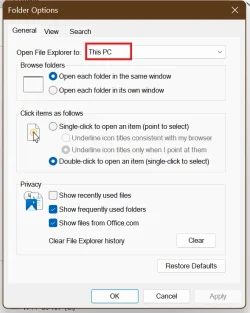
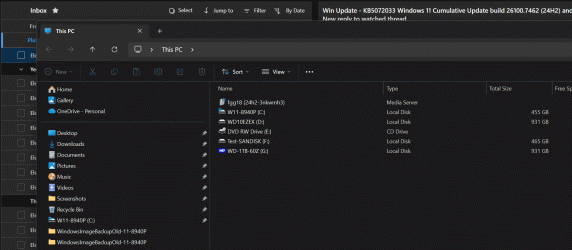
1) While in Dark mode, if you open file explore on "This PC" instead of "Home", and then add a new tab hitting the + sign or using Ctrl + T. it will flash a white empty window every time you add a tab.

1766046729200.webp

1766047204732.gif
 

My Computer

System One

  • OS
    Windows 11 Pro 25H2
    Computer type
    PC/Desktop
    Manufacturer/Model
    Dell XPS 8930
    CPU
    Intel I9-9900K
    Memory
    64GB
    Graphics Card(s)
    NVIDIA RTX 2060
    Sound Card
    NVIDIA High Definition Audio
    Monitor(s) Displays
    4k Samsung
    Screen Resolution
    3840 x 2160
    Hard Drives
    512GB NVMe, ADATA SU 800, 2TB HDD
OK. My File Explorer defaults to OneDrive since that's where I keep all data and photos.
 

My Computers

System One System Two

  • OS
    Windows 11 Pro
    Computer type
    Laptop
    Manufacturer/Model
    Dell XPS 16 DA16260
    CPU
    Intel Series 3 Core Ultra X9 388H
    Memory
    64GB LPDDR5x 9600 MT/s
    Graphics Card(s)
    Intel Arc graphics B390 Panther Lake
    Monitor(s) Displays
    16" 3.2K Tandem OLED Infinity Edge
    Screen Resolution
    3200 x 2000 16:10 236 PPI
    Hard Drives
    1 Terabyte M.2 PCIe NVMe SSD
    Case
    Black Anodized Aluminum
    Cooling
    Vapor Chamber Cooling
    Mouse
    None
    Internet Speed
    942 Mbps Netgear Mesh + 2 Satellites
    Browser
    Microsoft Edge (Chromium)
    Antivirus
    Windows Security (Defender)
    Other Info
    NPU delivering 67 TOPS
    Microsoft 365 subscription
    Microsoft OneDrive 1TB Cloud
    Microsoft Visual Studio
    Microsoft Visual Studio Code
    Microsoft Sysinternals Suite
    Microsoft BitLocker
    Microsoft Copilot
    Dell Support Assist
    Dell Command | Update
    Macrium Reflect X subscription
    1Password Password Manager
    Amazon Kindle for PC
    Lightroom/Photoshop subscription
    Interactive Brokers Trader Workstation
  • Operating System
    Windows 11 Pro
    Computer type
    Laptop
    Manufacturer/Model
    Microsoft Surface Laptop 7
    CPU
    Snapdragon® X Elite (12 Core) with Hexagon NPU delivering 45 TOPS
    Memory
    32GB LPDDR5x 8448 MT/s
    Graphics card(s)
    Integrated Adreno GPU
    Sound Card
    Omnisonic speakers with Dolby Atmos spatial sound
    Monitor(s) Displays
    13.8″ PixelSense Flow touchscreen 120 Hz 600 NIT
    Screen Resolution
    2304 × 1536 (201 PPI), 3:2 aspect ratio
    Hard Drives
    1 TB PCIe NVMe Gen 4 SSD
    Case
    Black Anodized Aluminum
    Cooling
    Vapor Chamber Cooling
    Mouse
    None
    Internet Speed
    942 Mbps Netgear Mesh + 2 Satellites
    Browser
    Microsoft Edge (Chromium)
    Antivirus
    Windows Security (Defender)
    Other Info
    Microsoft 365 subscription (Office)
    Microsoft OneDrive 1TB Cloud
    Microsoft Visual Studio 2026
    Microsoft Visual Studio Code
    Interactive Brokers Trader Workstation
    Lightroom/Photoshop subscription
    1Password Password Manager
    Microsoft Sysinternals
    Amazon Kindle for PC
    Microsoft BitLocker
    Microsoft Copilot
OK. My File Explorer defaults to OneDrive since that's where I keep all data and photos.
I don't use OneDrive ever. I don't want my data lost in the cloud. 😂😂🤷‍♂️
 

My Computer

System One

  • OS
    Windows 11 Pro 25H2
    Computer type
    PC/Desktop
    Manufacturer/Model
    Dell XPS 8930
    CPU
    Intel I9-9900K
    Memory
    64GB
    Graphics Card(s)
    NVIDIA RTX 2060
    Sound Card
    NVIDIA High Definition Audio
    Monitor(s) Displays
    4k Samsung
    Screen Resolution
    3840 x 2160
    Hard Drives
    512GB NVMe, ADATA SU 800, 2TB HDD
Yes, I see a brief whit flash when I press "+".
 

My Computers

System One System Two

  • OS
    Windows 11 Pro
    Computer type
    Laptop
    Manufacturer/Model
    Dell XPS 16 DA16260
    CPU
    Intel Series 3 Core Ultra X9 388H
    Memory
    64GB LPDDR5x 9600 MT/s
    Graphics Card(s)
    Intel Arc graphics B390 Panther Lake
    Monitor(s) Displays
    16" 3.2K Tandem OLED Infinity Edge
    Screen Resolution
    3200 x 2000 16:10 236 PPI
    Hard Drives
    1 Terabyte M.2 PCIe NVMe SSD
    Case
    Black Anodized Aluminum
    Cooling
    Vapor Chamber Cooling
    Mouse
    None
    Internet Speed
    942 Mbps Netgear Mesh + 2 Satellites
    Browser
    Microsoft Edge (Chromium)
    Antivirus
    Windows Security (Defender)
    Other Info
    NPU delivering 67 TOPS
    Microsoft 365 subscription
    Microsoft OneDrive 1TB Cloud
    Microsoft Visual Studio
    Microsoft Visual Studio Code
    Microsoft Sysinternals Suite
    Microsoft BitLocker
    Microsoft Copilot
    Dell Support Assist
    Dell Command | Update
    Macrium Reflect X subscription
    1Password Password Manager
    Amazon Kindle for PC
    Lightroom/Photoshop subscription
    Interactive Brokers Trader Workstation
  • Operating System
    Windows 11 Pro
    Computer type
    Laptop
    Manufacturer/Model
    Microsoft Surface Laptop 7
    CPU
    Snapdragon® X Elite (12 Core) with Hexagon NPU delivering 45 TOPS
    Memory
    32GB LPDDR5x 8448 MT/s
    Graphics card(s)
    Integrated Adreno GPU
    Sound Card
    Omnisonic speakers with Dolby Atmos spatial sound
    Monitor(s) Displays
    13.8″ PixelSense Flow touchscreen 120 Hz 600 NIT
    Screen Resolution
    2304 × 1536 (201 PPI), 3:2 aspect ratio
    Hard Drives
    1 TB PCIe NVMe Gen 4 SSD
    Case
    Black Anodized Aluminum
    Cooling
    Vapor Chamber Cooling
    Mouse
    None
    Internet Speed
    942 Mbps Netgear Mesh + 2 Satellites
    Browser
    Microsoft Edge (Chromium)
    Antivirus
    Windows Security (Defender)
    Other Info
    Microsoft 365 subscription (Office)
    Microsoft OneDrive 1TB Cloud
    Microsoft Visual Studio 2026
    Microsoft Visual Studio Code
    Interactive Brokers Trader Workstation
    Lightroom/Photoshop subscription
    1Password Password Manager
    Microsoft Sysinternals
    Amazon Kindle for PC
    Microsoft BitLocker
    Microsoft Copilot

My Computer

System One

  • OS
    Win 11 Insider Release Preview and Beta channels.
    Computer type
    Laptop
    Manufacturer/Model
    HP ENVY Bought: March 2017
    CPU
    i5 Core [email protected] (Unsupported for Win 11)
    Motherboard
    HP 81AD (U3E1)
    Memory
    12GB
    Graphics Card(s)
    Generic PnP Monitor (1920x1080@60Hz) Intel HD Graphics 620 (HP)
    Sound Card
    Conexant ISST audio
    Monitor(s) Displays
    Generic PnP Monitor
    Screen Resolution
    1536x864 pixels
    Hard Drives
    HGST HTS721010A9E630
    PSU
    Well...PSU you too!! What's this mean?
    Case
    HP ENVY SILVER
    Cooling
    A fan.
    Keyboard
    USA
    Mouse
    Logitec Anywhere 2
    Internet Speed
    Good enough for me! Fast!
    Browser
    Edge/Waterfox
    Antivirus
    Windows Defender
    Other Info
    No 'mo.
I don't use OneDrive ever. I don't want my data lost in the cloud. 😂😂🤷‍♂️
I've used OneDrive for close to 20 years and have never lost even a byte of data. I understand your fears, and many don't trust cloud storage. I don't put my trust in any one backup strategy.
 

My Computers

System One System Two

  • OS
    Windows 11 Pro
    Computer type
    Laptop
    Manufacturer/Model
    Dell XPS 16 DA16260
    CPU
    Intel Series 3 Core Ultra X9 388H
    Memory
    64GB LPDDR5x 9600 MT/s
    Graphics Card(s)
    Intel Arc graphics B390 Panther Lake
    Monitor(s) Displays
    16" 3.2K Tandem OLED Infinity Edge
    Screen Resolution
    3200 x 2000 16:10 236 PPI
    Hard Drives
    1 Terabyte M.2 PCIe NVMe SSD
    Case
    Black Anodized Aluminum
    Cooling
    Vapor Chamber Cooling
    Mouse
    None
    Internet Speed
    942 Mbps Netgear Mesh + 2 Satellites
    Browser
    Microsoft Edge (Chromium)
    Antivirus
    Windows Security (Defender)
    Other Info
    NPU delivering 67 TOPS
    Microsoft 365 subscription
    Microsoft OneDrive 1TB Cloud
    Microsoft Visual Studio
    Microsoft Visual Studio Code
    Microsoft Sysinternals Suite
    Microsoft BitLocker
    Microsoft Copilot
    Dell Support Assist
    Dell Command | Update
    Macrium Reflect X subscription
    1Password Password Manager
    Amazon Kindle for PC
    Lightroom/Photoshop subscription
    Interactive Brokers Trader Workstation
  • Operating System
    Windows 11 Pro
    Computer type
    Laptop
    Manufacturer/Model
    Microsoft Surface Laptop 7
    CPU
    Snapdragon® X Elite (12 Core) with Hexagon NPU delivering 45 TOPS
    Memory
    32GB LPDDR5x 8448 MT/s
    Graphics card(s)
    Integrated Adreno GPU
    Sound Card
    Omnisonic speakers with Dolby Atmos spatial sound
    Monitor(s) Displays
    13.8″ PixelSense Flow touchscreen 120 Hz 600 NIT
    Screen Resolution
    2304 × 1536 (201 PPI), 3:2 aspect ratio
    Hard Drives
    1 TB PCIe NVMe Gen 4 SSD
    Case
    Black Anodized Aluminum
    Cooling
    Vapor Chamber Cooling
    Mouse
    None
    Internet Speed
    942 Mbps Netgear Mesh + 2 Satellites
    Browser
    Microsoft Edge (Chromium)
    Antivirus
    Windows Security (Defender)
    Other Info
    Microsoft 365 subscription (Office)
    Microsoft OneDrive 1TB Cloud
    Microsoft Visual Studio 2026
    Microsoft Visual Studio Code
    Interactive Brokers Trader Workstation
    Lightroom/Photoshop subscription
    1Password Password Manager
    Microsoft Sysinternals
    Amazon Kindle for PC
    Microsoft BitLocker
    Microsoft Copilot
I'm going to see if I can get back to sleep again. Enjoy! Goodnight. :sleep:
 

My Computers

System One System Two

  • OS
    Windows 11 Pro
    Computer type
    Laptop
    Manufacturer/Model
    Dell XPS 16 DA16260
    CPU
    Intel Series 3 Core Ultra X9 388H
    Memory
    64GB LPDDR5x 9600 MT/s
    Graphics Card(s)
    Intel Arc graphics B390 Panther Lake
    Monitor(s) Displays
    16" 3.2K Tandem OLED Infinity Edge
    Screen Resolution
    3200 x 2000 16:10 236 PPI
    Hard Drives
    1 Terabyte M.2 PCIe NVMe SSD
    Case
    Black Anodized Aluminum
    Cooling
    Vapor Chamber Cooling
    Mouse
    None
    Internet Speed
    942 Mbps Netgear Mesh + 2 Satellites
    Browser
    Microsoft Edge (Chromium)
    Antivirus
    Windows Security (Defender)
    Other Info
    NPU delivering 67 TOPS
    Microsoft 365 subscription
    Microsoft OneDrive 1TB Cloud
    Microsoft Visual Studio
    Microsoft Visual Studio Code
    Microsoft Sysinternals Suite
    Microsoft BitLocker
    Microsoft Copilot
    Dell Support Assist
    Dell Command | Update
    Macrium Reflect X subscription
    1Password Password Manager
    Amazon Kindle for PC
    Lightroom/Photoshop subscription
    Interactive Brokers Trader Workstation
  • Operating System
    Windows 11 Pro
    Computer type
    Laptop
    Manufacturer/Model
    Microsoft Surface Laptop 7
    CPU
    Snapdragon® X Elite (12 Core) with Hexagon NPU delivering 45 TOPS
    Memory
    32GB LPDDR5x 8448 MT/s
    Graphics card(s)
    Integrated Adreno GPU
    Sound Card
    Omnisonic speakers with Dolby Atmos spatial sound
    Monitor(s) Displays
    13.8″ PixelSense Flow touchscreen 120 Hz 600 NIT
    Screen Resolution
    2304 × 1536 (201 PPI), 3:2 aspect ratio
    Hard Drives
    1 TB PCIe NVMe Gen 4 SSD
    Case
    Black Anodized Aluminum
    Cooling
    Vapor Chamber Cooling
    Mouse
    None
    Internet Speed
    942 Mbps Netgear Mesh + 2 Satellites
    Browser
    Microsoft Edge (Chromium)
    Antivirus
    Windows Security (Defender)
    Other Info
    Microsoft 365 subscription (Office)
    Microsoft OneDrive 1TB Cloud
    Microsoft Visual Studio 2026
    Microsoft Visual Studio Code
    Interactive Brokers Trader Workstation
    Lightroom/Photoshop subscription
    1Password Password Manager
    Microsoft Sysinternals
    Amazon Kindle for PC
    Microsoft BitLocker
    Microsoft Copilot

My Computers

System One System Two

  • OS
    Win 11 Pro
    Computer type
    PC/Desktop
    Manufacturer/Model
    ABS (Newegg)
    CPU
    Intel(R) Core(TM) i5-10400F CPU @ 2.90GHz
    Motherboard
    ASUSTeK COMPUTER INC. PRIME B560M-A AC Rev 1.xx
    Memory
    Corsair VENGEANCE® LPX 32GB (2 x 16GB) DDR4 DRAM 3600MHz
    Graphics Card(s)
    MSI NVIDIA GeForce RTX 3060 Ti
    Sound Card
    Realtek Digital Output (Realtek(R) Audio)
    Monitor(s) Displays
    Viewsonic VS 2725 -2k 27"
    Screen Resolution
    2560x1440 100hz
    Hard Drives
    T-FORCE TM8FP800 1TB + a couple SATA SSDs
    PSU
    Gigabyte P650E
    Case
    DeepCool Matrexx 50 mid-tower
    Cooling
    Assassin X 120 Refined SE and 5 Thermalright TL-C12C case fans
    Keyboard
    Redragon K655 or K720
    Mouse
    CoolerMaster MM711 or Redragon M612
    Internet Speed
    Starlink: speed varies
    Browser
    Brave (default), Chrome (for ATG), Edge (for ATMS)
    Antivirus
    Windows Defender
    Other Info
    An assortment of "land fill, obsolete" computers all running Linux Mint 22 (at the moment).
  • Operating System
    Linux Mint 22.2 Cinnamon
    Computer type
    PC/Desktop
    Manufacturer/Model
    Hewlett-Packard HP ProDesk 600 G1 SFF
    CPU
    i5 4590
    Motherboard
    HP
    Memory
    16 GB
    Graphics card(s)
    Intel(R) HD Graphics 4600
    Sound Card
    Realtek High Definition Audio
    Monitor(s) Displays
    Generic 24"
    Hard Drives
    Samsung SSD 860 EVO 500GB
    Hitachi HUA722010CLA330
    WDC WD40EZAZ-19SF3B0
    PSU
    Factory 240 watt
    Case
    Low Profile Desktop
    Cooling
    Factory cooling
    Keyboard
    HP
    Mouse
    HP
    Internet Speed
    Starlink
    Browser
    Brave
    Antivirus
    ?
    Other Info
    This is my media server
This is new discovery. When I right-click a file on desktop, the right-click menu opens on transparent menu and then turns into dark menu.

Animation.gif

Isn't this amusing ?

Mind you this PC is not Windows 11-compliant.
 

My Computers

System One System Two

  • OS
    Windows 11 Pro build 26200.8524
    Computer type
    PC/Desktop
    Manufacturer/Model
    Home Built
    CPU
    Intel i7-4790
    Motherboard
    Asus H97 Pro Gamer with add-on TPM1.2 module
    Memory
    Teams DDR3-1600 4x4 GB
    Graphics Card(s)
    MSI Nvidia GeForce GTX 1050Ti
    Sound Card
    Realtek ALC1150
    Monitor(s) Displays
    Dell P2425D
    Screen Resolution
    2560 by 1440 pixels
    Hard Drives
    Corsair NVMe M.2 Core XT 1000 GB (Windows 11 v.25H2); Samsung SATA Evo 870 500 GB (Windows 11 v.25H2);
    PSU
    Corsair HX850
    Case
    Gigabyte Solo 210
    Cooling
    Zalman CNPS7X Tower
    Keyboard
    Microsoft AIO Wireless (includes touchpad)
    Mouse
    HP S1000 Plus Wireless
    Internet Speed
    500 Mb fiber optic
    Browser
    Chrome; MS Edge
    Antivirus
    Windows Defender
  • Operating System
    MacOS 12 Monterey
    Computer type
    Laptop
    Manufacturer/Model
    Apple Macbook Air
    CPU
    Intel Core i5
    Memory
    8 GB
    Graphics card(s)
    Intel integrated
    Screen Resolution
    1440 by 900 pixels
    Hard Drives
    128 GB
    Keyboard
    Built-in
    Mouse
    Microsoft Wireless
    Internet Speed
    802.11 ac
    Browser
    Chrome; Safari
    Antivirus
    N/A
This is new discovery. When I right-click a file on desktop, the right-click menu opens on transparent menu and then turns into dark menu.

View attachment 157268

Isn't this amusing ?

Mind you this PC is not Windows 11-compliant.
I don't have that. Check your video driver.
 

My Computer

System One

  • OS
    Windows 11 Education
    Computer type
    PC/Desktop
    CPU
    Intel® Core™ i9-13900K Desktop Processor 16 (8P+8E)
    Motherboard
    Asus TUF Gaming Z790-PLUS WIFI D4
    Memory
    G.Skill Ripjaws V Series 32gb (2x16gb) DDR4 3600mhz
    Graphics Card(s)
    Asus Dual Geforce Rtx™ 3060 TI Edition 8gb Gddr6
    Monitor(s) Displays
    BenQ EW3270U 31.5” 3840x2160 UHD 16:9 HDR LED 4K LG 27UK850-W 27'' 4K UHD IPS LED Monitor with HDR10
    Screen Resolution
    3840x2160
    Hard Drives
    Samsung 990 with heatsink PRO PCIe 4.0 Gen 4 NVMe® SSD 1TB
    WD_BLACK SN850X NVMe M.2 2280 1TB PCI-Express 4.0
    Crucial T500 2TB Gen4
    Samsung 970 Evo M.2 2280 2tb Pcie Gen3. X4
    PSU
    Corsair AXi Series AX860i Digital 860W 80 PLUS PSU
    Case
    Fractal Meshify C ATX Mid Tower Case
    Keyboard
    Logi MX Keys
    Mouse
    Logi M705
    Internet Speed
    400 mbs
    Browser
    Firefox
    Antivirus
    Eset NOD32
    Other Info
    Love fast boots
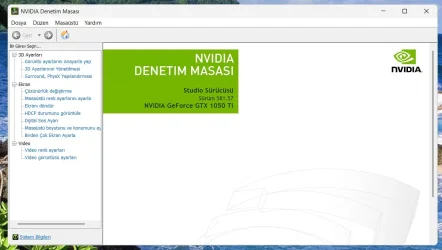
@Zardoc Thanks. Video driver is the latest Studio drivers on the Nvidia website.

Screenshot 2025-12-18 175410.webp
 

My Computers

System One System Two

  • OS
    Windows 11 Pro build 26200.8524
    Computer type
    PC/Desktop
    Manufacturer/Model
    Home Built
    CPU
    Intel i7-4790
    Motherboard
    Asus H97 Pro Gamer with add-on TPM1.2 module
    Memory
    Teams DDR3-1600 4x4 GB
    Graphics Card(s)
    MSI Nvidia GeForce GTX 1050Ti
    Sound Card
    Realtek ALC1150
    Monitor(s) Displays
    Dell P2425D
    Screen Resolution
    2560 by 1440 pixels
    Hard Drives
    Corsair NVMe M.2 Core XT 1000 GB (Windows 11 v.25H2); Samsung SATA Evo 870 500 GB (Windows 11 v.25H2);
    PSU
    Corsair HX850
    Case
    Gigabyte Solo 210
    Cooling
    Zalman CNPS7X Tower
    Keyboard
    Microsoft AIO Wireless (includes touchpad)
    Mouse
    HP S1000 Plus Wireless
    Internet Speed
    500 Mb fiber optic
    Browser
    Chrome; MS Edge
    Antivirus
    Windows Defender
  • Operating System
    MacOS 12 Monterey
    Computer type
    Laptop
    Manufacturer/Model
    Apple Macbook Air
    CPU
    Intel Core i5
    Memory
    8 GB
    Graphics card(s)
    Intel integrated
    Screen Resolution
    1440 by 900 pixels
    Hard Drives
    128 GB
    Keyboard
    Built-in
    Mouse
    Microsoft Wireless
    Internet Speed
    802.11 ac
    Browser
    Chrome; Safari
    Antivirus
    N/A

My Computer

System One

  • OS
    Windows 11 Pro
    Computer type
    PC/Desktop
    Manufacturer/Model
    Custom Build
    CPU
    Intel Core i9 12900KF
    Motherboard
    ASUS ROG Maximus Z690 Hero
    Memory
    Corsair 64GB DDR5 Vengeance C40 5200Mhz
    Graphics Card(s)
    ASUS GeForce RTX 3090 ROG Strix OC 24GB
    Sound Card
    OnBoard
    Monitor(s) Displays
    Acer Predator XB323UGP 32" QHD G-SYNC-C 144Hz 1MS IPS LED
    Screen Resolution
    2560 x 1440
    Hard Drives
    1x Samsung 980 Pro Series Gen4 250GB M.2 NVMe
    1x Samsung 980 Pro Series Gen4 500GB M.2 NVMe
    2x Samsung 980 Pro Series Gen4 2TB M.2 NVMe
    PSU
    Corsair AX1200i 1200W 80PLUS Titanium Modular
    Case
    Corsair 4000D Black Case w/ Tempered Glass Side Panel
    Cooling
    Noctua NH-U12A Chromax Black CPU Cooler, 4x Noctua 120mm Fans
    Keyboard
    Logitech MK545
    Mouse
    Logitech MX Master 3
    Internet Speed
    Fixed Wireless 150mbps/75mbps
    Browser
    Firefox
    Antivirus
    Kaspersky
    Other Info
    Thrustmaster TS-PC RACER
    Fanatec CSL Elite Pedals with the Load Cell Kit
    Yamaha Amp with Bose Speakers
@Wolfzz Unfortunately, this driver does not support my graphics card. My card is not in the list of supported products. Thanks anyway.
 

My Computers

System One System Two

  • OS
    Windows 11 Pro build 26200.8524
    Computer type
    PC/Desktop
    Manufacturer/Model
    Home Built
    CPU
    Intel i7-4790
    Motherboard
    Asus H97 Pro Gamer with add-on TPM1.2 module
    Memory
    Teams DDR3-1600 4x4 GB
    Graphics Card(s)
    MSI Nvidia GeForce GTX 1050Ti
    Sound Card
    Realtek ALC1150
    Monitor(s) Displays
    Dell P2425D
    Screen Resolution
    2560 by 1440 pixels
    Hard Drives
    Corsair NVMe M.2 Core XT 1000 GB (Windows 11 v.25H2); Samsung SATA Evo 870 500 GB (Windows 11 v.25H2);
    PSU
    Corsair HX850
    Case
    Gigabyte Solo 210
    Cooling
    Zalman CNPS7X Tower
    Keyboard
    Microsoft AIO Wireless (includes touchpad)
    Mouse
    HP S1000 Plus Wireless
    Internet Speed
    500 Mb fiber optic
    Browser
    Chrome; MS Edge
    Antivirus
    Windows Defender
  • Operating System
    MacOS 12 Monterey
    Computer type
    Laptop
    Manufacturer/Model
    Apple Macbook Air
    CPU
    Intel Core i5
    Memory
    8 GB
    Graphics card(s)
    Intel integrated
    Screen Resolution
    1440 by 900 pixels
    Hard Drives
    128 GB
    Keyboard
    Built-in
    Mouse
    Microsoft Wireless
    Internet Speed
    802.11 ac
    Browser
    Chrome; Safari
    Antivirus
    N/A
@Wolfzz Unfortunately, this driver does not support my graphics card. My card is not in the list of supported products. Thanks anyway.
GTX 960 also , not in list.........
 

My Computer

System One

  • OS
    Windows11 Pro 25H2
    Computer type
    PC/Desktop
    Manufacturer/Model
    Asus
    CPU
    i7
    Motherboard
    z97k
    Memory
    32GB
    Graphics Card(s)
    nVidia
    Sound Card
    Realtek
    Hard Drives
    3
    Cooling
    air
    Browser
    Edge
    Antivirus
    ESET
New known issue below added:

3 RemoteApp sessions might fail to start on Azure Virtual Desktop

Symptoms

Note:
Individuals using Windows Home or Pro editions on personal devices are very unlikely to experience this issue as Azure Virtual Desktop (AVD) is more commonly used in enterprise environments.

After installing the November 2025 Windows non-security update (KB5070311) or later updates, you might experience RemoteApp connection failures in Azure Virtual Desktop (AVD) environments. Full desktop sessions aren’t affected.

Workaround

To mitigate this issue, apply one of these workarounds:

Option 1: Add registry keys manually

Important:
Editing the registry incorrectly can cause system issues. Back up the registry before making changes.
  1. Open Command Prompt as an administrator.
  2. Run this command: reg add ""HKEY_LOCAL_MACHINE\SOFTWARE\Microsoft\Windows NT\CurrentVersion\WinLogon\ShellPrograms\RdpShell.exe" /v "ShouldStartRailRPC" /t REG_DWORD /d 1 /f
  3. Restart the device to apply the change.
Option 2: Use Known Issue Rollback (KIR)

This issue is mitigated using Known Issue Rollback (KIR). The fix will apply automatically, but it may take up to 24 hours (starting December 12, 2025, at 6:00 PM PT) for it to reach Windows Pro and Windows Enterprise devices that receive updates directly from Microsoft. Restarting your device can help the fix apply sooner.

For enterprise-managed devices where Windows updates are managed by IT departments, administrators can apply the KIR by installing and configuring the following special Group Policy.

Group Policy Details

  • Location: Computer Configuration > Administrative Templates > [Group Policy name below]
  • Download for Download for Windows 11, version 25H2 and Windows 11, version 24H2 and Windows Server 2025: KB5072033 25121301401 Known Issue Rollback
Important:  You'll need to install and configure the Group Policy for your version of Windows to resolve this issue. You will also need to restart your device(s) to apply the group policy setting. Note that the Group Policy will temporarily disable the change causing this issue.

For information on deploying and configuring this special Group Policy, see How to use Group Policy to deploy a Known Issue Rollback.

Organizations affected by this issue can find more details on Azure Portal under the Messages ID: Q_P4-HFG.

Microsoft is working to resolve this issue and will provide information when it’s available. After the update with the resolution is released, organizations will not need to install either one of the workarounds to address this issue.
 

My Computers

System One System Two

  • OS
    Windows 11 Pro for Workstations
    Computer type
    PC/Desktop
    Manufacturer/Model
    Custom self build
    CPU
    Intel i7-8700K 5 GHz
    Motherboard
    ASUS ROG Maximus XI Formula Z390
    Memory
    64 GB (4x16GB) G.SKILL TridentZ RGB DDR4 3600 MHz (F4-3600C18D-32GTZR)
    Graphics Card(s)
    ASUS ROG-STRIX-GTX1080TI-O11G-GAMING (11GB GDDR5X)
    Sound Card
    Integrated Digital Audio (S/PDIF)
    Monitor(s) Displays
    2 x Samsung Odyssey G75 27"
    Screen Resolution
    2560x1440
    Hard Drives
    1TB Samsung 990 PRO M.2,
    4TB Samsung 990 PRO M.2,
    TerraMaster F8 SSD Plus NAS
    PSU
    Seasonic Prime Titanium 850W
    Case
    Thermaltake Core P3 wall mounted
    Cooling
    Corsair Hydro H115i
    Keyboard
    Amazon Basics Wired Full Keyboard MD005
    Mouse
    Logitech MX Master 4
    Internet Speed
    2 Gbps Download and 100 Mbps Upload
    Browser
    Chrome and Edge
    Antivirus
    Microsoft Defender
    Other Info
    Logitech Z625 speaker system,
    Logitech BRIO 4K Pro webcam,
    HP Color LaserJet Pro MFP M477fdn,
    CyberPower CP1500PFCLCD
    Galaxy S23 Plus phone
  • Operating System
    Windows 11 Pro
    Computer type
    Laptop
    Manufacturer/Model
    Surface Laptop 7 Copilot+ PC
    CPU
    Snapdragon X Elite (12 core) 3.42 GHz
    Memory
    16 GB LPDDR5x-7467 MHz
    Monitor(s) Displays
    15" HDR
    Screen Resolution
    2496 x 1664
    Hard Drives
    1 TB SSD
    Internet Speed
    Wi-Fi 7 and Bluetooth 5.4
    Browser
    Chrome and Edge
    Antivirus
    Microsoft Defender
NativeNVME on Clients @uncyler825

Code:
reg add HKEY_LOCAL_MACHINE\SYSTEM\CurrentControlSet\Policies\Microsoft\FeatureManagement\Overrides /v 1853569164 /t REG_DWORD /d 1 /f

reg add HKEY_LOCAL_MACHINE\SYSTEM\CurrentControlSet\Policies\Microsoft\FeatureManagement\Overrides /v 156965516 /t REG_DWORD /d 1 /f

reg add HKEY_LOCAL_MACHINE\SYSTEM\CurrentControlSet\Policies\Microsoft\FeatureManagement\Overrides /v 735209102 /t REG_DWORD /d 1 /f

1766082121138.webp
 
Last edited:

My Computer

System One

  • OS
    Windows
NativeNVME on Clients @uncyler825

Code:
reg add HKEY_LOCAL_MACHINE\SYSTEM\CurrentControlSet\Policies\Microsoft\FeatureManagement\Overrides /v 1853569164 /t REG_DWORD /d 1 /f

reg add HKEY_LOCAL_MACHINE\SYSTEM\CurrentControlSet\Policies\Microsoft\FeatureManagement\Overrides /v 156965516 /t REG_DWORD /d 1 /f

reg add HKEY_LOCAL_MACHINE\SYSTEM\CurrentControlSet\Policies\Microsoft\FeatureManagement\Overrides /v 735209102 /t REG_DWORD /d 1 /f

View attachment 157314

I don't enable it because it will enable experimental feature ID 1853569164 and 156965516 , which could introduce some potential bugs.
 

My Computer

System One

  • OS
    Windows 11, version 25H2 (26200)
    Computer type
    PC/Desktop
    CPU
    AMD Ryzen 9 9950X 16-Core Processor
    Motherboard
    ASRock B650M PG Riptide
    Memory
    DDR5-6000 (CL36) 64.0 GB
    Graphics Card(s)
    NVIDIA GeForce RTX 4090
    PSU
    1200W
    Case
    Phanteks Enthoo Pro 2
    Cooling
    Noctua NH-D12L
@Wolfzz Unfortunately, this driver does not support my graphics card. My card is not in the list of supported products. Thanks anyway.
581.94 (Hotfix driver) is sadly the latest one available that supports 10th series.

Nvidia dropped the support for old graphic cards (700, 900 and 10 series) in 591.44 drivers.
 

My Computers

System One System Two

  • OS
    Windows 11 Pro 24H2
    Computer type
    PC/Desktop
    Manufacturer/Model
    Multi
    CPU
    Intel i9-9900k
    Motherboard
    Gigabyte Z390 Aorus Master
    Memory
    Corsair Vengeance LPX 32GB (2 x 16GB)
    Graphics Card(s)
    Gigabyte RTX 2080Ti Gaming OC
    Monitor(s) Displays
    Samsung LC32HGQ
    Screen Resolution
    WQHD
    Hard Drives
    Samsung 970 Evo Plus 1 TB
    Crucial MX100 512 GB
    Samsung 840 Pro 256 GB
    Seagate ST4000DM000-1F2168 4 TB
    PSU
    Seasonic P-860 Platinium
    Case
    Corsair Graphite 780T
    Cooling
    Noctua NH-U14S
    Keyboard
    Corsair K70 MK.2 Low profile
    Mouse
    Logitech G Pro HERO
    Internet Speed
    200 Mb/s
    Browser
    Mozilla Firefox
    Antivirus
    Windows Defender
    Other Info
    BIOS version F11
  • Operating System
    Windows 11 Home 24H2
    Computer type
    Laptop
    Manufacturer/Model
    Clevo W650KJ1
    CPU
    Intel i5 7500
    Motherboard
    Clevo W65KK/KJ1
    Memory
    2×8 Go Corsair Vengeance 2400Mhz DDR4
    Graphics card(s)
    Nvidia GeForce GTX 1050
    Sound Card
    Integrated
    Screen Resolution
    1920x1080
    Hard Drives
    Samsung 850 Evo M.2 SATA 250 GB
    Seagate ST1000LM035 1 TB
    Browser
    Mozilla Firefox
    Antivirus
    Windows Defender
    Other Info
    Replaced original Wi-Fi card by an Intel® Wireless-AC 9260
    BIOS version 1.05.13
Installed W11 Pro this morning, ran all available updates including this one, and nottaproblemo, so far (fingers crossed)
 

My Computer

System One

  • OS
    Windows 982.41.63.55.01.01.01
    Computer type
    PC/Desktop
    Manufacturer/Model
    AZW
    CPU
    i5-11320H
    Motherboard
    AZW
    Memory
    32GB
    Graphics Card(s)
    Intel Iris Xe
    Sound Card
    built-in
    Monitor(s) Displays
    2x 43" Samsung + 1x 32" Samsung
    Screen Resolution
    1920 x 1080
    Hard Drives
    WD Black 850X 8TB, WD Black SN850 4TB, Sandisk Ultra 3D SSD 1TB, 4x Crucial 4TB external
    PSU
    built in
    Case
    mini-me box
    Cooling
    Built-in fan & vents
    Keyboard
    Logi G613
    Mouse
    MX Master 3
    Internet Speed
    1GB
    Browser
    Firefox
    Antivirus
    Whatdatiz ???
Back
Top Bottom