Insider KB5074157 Windows 11 Insider Beta build 26220.7653 (25H2) - Jan. 16


UPDATE 1/27:


 Windows Insider Blog:

Hello Windows Insiders, today we are releasing Windows 11 Insider Preview Build 26220.7653 (KB5074157) to the Beta Channel.

Changes in Beta Channel builds and updates are documented in two buckets: new features, improvements, and fixes that are being gradually rolled out for Insiders who have turned on the toggle to get the latest updates as they are available (via Settings > Windows Update*) and then new features, improvements, and fixes rolling out to everyone in the Beta Channel. For more information, see the Reminders section at the bottom of this blog post.


Changes and Improvements gradually being rolled out with toggle on*

[Account Settings]

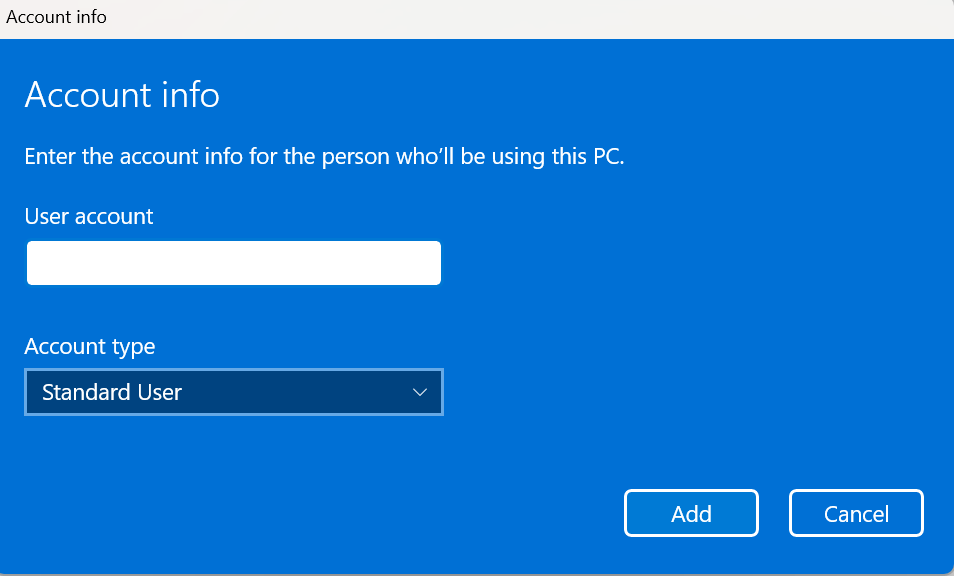
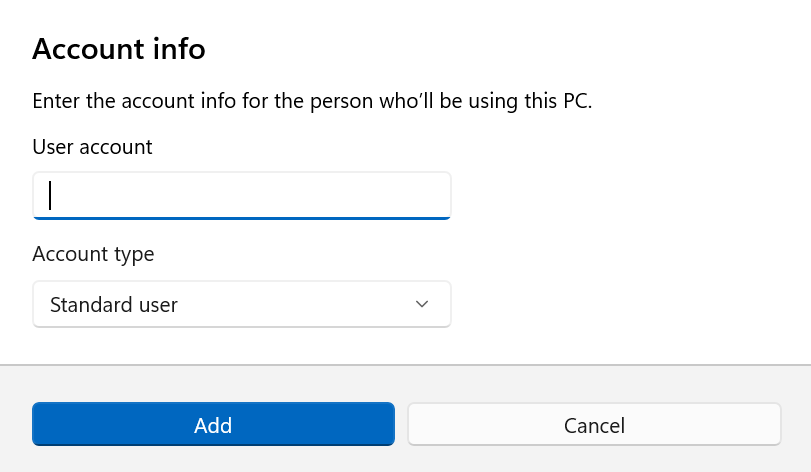
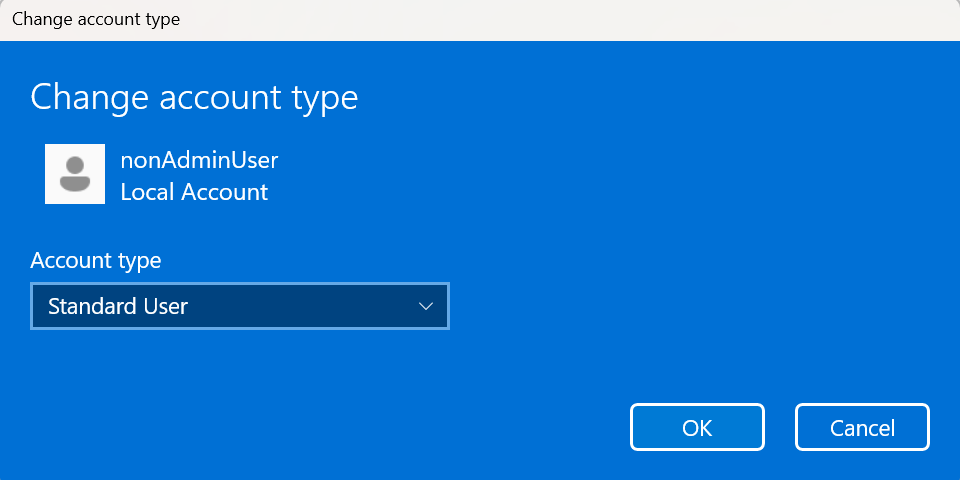
We’re updating the design of dialogs in “Accounts > Other Users” based on modern WinUI framework with support for dark mode:

Old 'Add account' dialog user experience for work or school users.
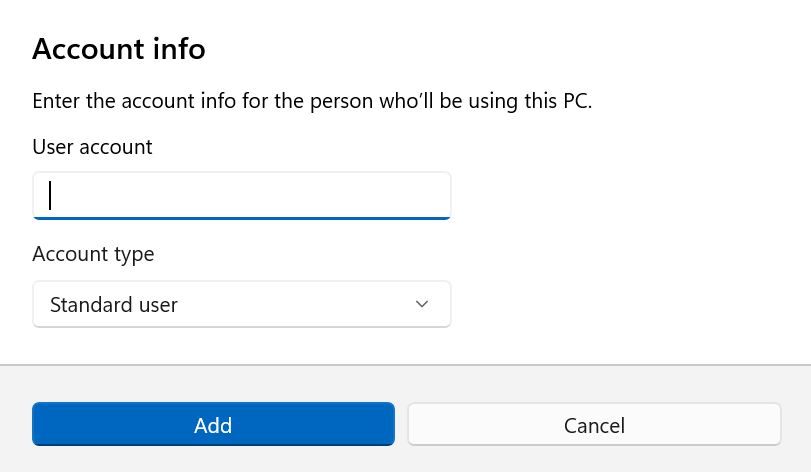
Old ‘Add account’ dialog user experience for work or school users.

New 'Add account' dialog user experience for work or school users.
New ‘Add account’ dialog user experience for work or school users.

Please note that the visibility of the above dialog option depends on whether a domain joined work or school account is configured on the device.
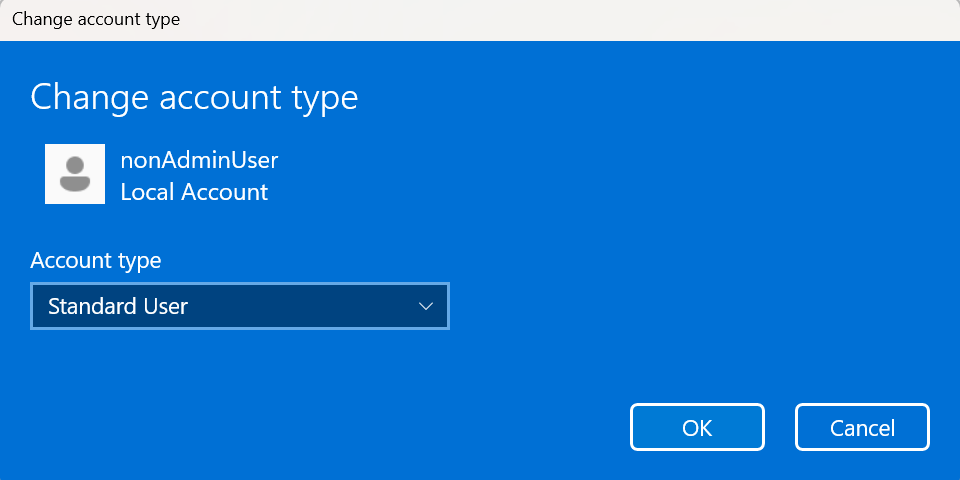
Old 'Change account type' dialog user experience for other users present on the device.
Old ‘Change account type’ dialog user experience for other users present on the device.
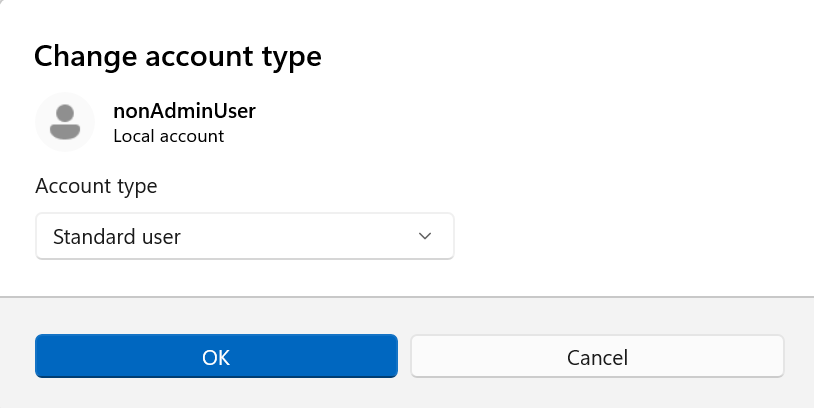
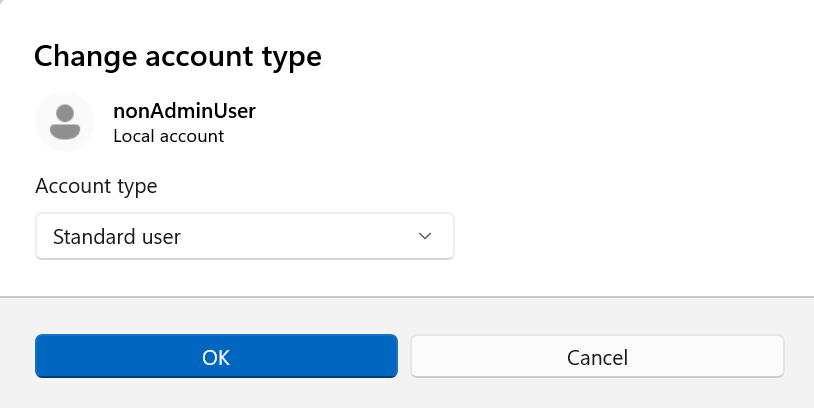
New 'Change account type' dialog user experience for other users present on the device.
New ‘Change account type’ dialog user experience for other users present on the device.

Feedback: Please share your feedback in Feedback Hub (WIN + F) under “Settings -> User Profile Account Settings.

[Click to Do]

The Copilot prompt suggestions in Click to Do will now load instantly. This change is not yet rolling out to Windows Insiders in the EEA (European Economic Area) or China.

[Desktop Background]

  • You can now set .webp images for your desktop background in Settings > Personalization > Desktop Background.

Fixes gradually being rolled out with toggle on*

[Taskbar and System Tray]

  • Fixed an issue in the latest builds where, when the taskbar was set to autohide, it might invoke before interacting with the bottom of the screen, blocking the use of apps in that area.
  • Fixed a recent issue which was causing the Start menu, notification center, and quick settings to not open on click sometimes, although using the keyboard shortcuts for each of these still worked.

[Start menu]

  • Fixed a memory leak when opening the Start menu, which could lead to performance issues over time.
  • Fixed an issue for Arabic and Hebrew users, where Start menu was opening on the wrong side of the screen when the taskbar icons weren’t centered.
  • Fixed an issue where if you opened a folder of pinned apps in Start menu and tried to pan it with touch, it would dismiss Start menu.

[Bluetooth]

  • Fixed an issue causing Bluetooth device battery level to not show for some Insiders after the latest builds, even though the devices supported it.

[Xbox full screen experience for PC]

  • This build fixes some unexpected app and game behavior when using FSE. We’re continuing to validate scenarios and as such keeping the known issue active for now. Thank you Insiders that have been sharing feedback!

[Login and Lock Screens]

  • Fixed an issue which could cause the password icon to appear blank on the login screen.

[Settings]

  • Fixed an issue causing Settings to crash when interacting with audio devices in the last two builds.
  • Fixed an issue where the keyboard character repeat delay in Settings > Bluetooth & Devices > Keyboard was backwards from how it was set in the backend.

[Other]

  • Fixed a few issues with clipped text in msinfo32 when using a high display scaling.
  • Fixed an issue impacting some Insiders where clicking on .appinstaller files to install MSIX packages was unexpectedly failing with an invalid argument error.
  • Fixed an underlying issue which was causing Notepad to not display an underscore in text with certain fonts when your display was set to 125%.
  • Fixed an underlying issue which could cause explorer.exe to hang when first logging into your PC, if certain apps were configured as startup apps. This could make the taskbar not appear.

Known issues

[Xbox full screen experience for PC]

  • Some apps may behave unexpectedly when using FSE, particularly those that expect to be locked to a given size or launch additional windows.

[Taskbar & System Tray]

  • We’re investigating an issue where for some Insiders apps aren’t showing in the system tray when they should be.

[Display & Graphics]

  • [NEW] We’re working on the fix for an issue causing secondary monitors to not display correctly and show black screens after the latest updates for a small number of Insiders.

[Click to Do]

  • We’re working on the fix for an issue where the Microsoft 365 Copilot prompt box on selected images does not function if the Microsoft 365 Copilot app is not running.

Reminders for Windows Insiders in the Dev & Beta Channels

  • Updates are based on Windows 11, version 25H2 via an enablement package (Build 26220.xxxx).
  • Many features are rolled out using Controlled Feature Rollout technology, starting with a subset of Insiders and ramping up over time as we monitor feedback to see how they land before pushing them out to everyone in this channel.
  • For Windows Insiders who want to be the first to get features gradually rolled out to you, you can turn ON the toggle to get the latest updates as they are available via Settings > Windows Update*. Over time, we will increase the rollouts of features to everyone with the toggle turned on. Should you keep this toggle off, new features will gradually be rolled out to your PC over time once they are ready.
  • Features and experiences included in these builds may never get released as we try out different concepts and get feedback. Features may change over time, be removed, or replaced and never get released beyond Windows Insiders. Some of these features and experiences could show up in future Windows releases when they’re ready.
  • Some features in active development we preview with Windows Insiders may not be fully localized and localization will happen over time as features are finalized. As you see issues with localization in your language, please report those issues to us via Feedback Hub.
  • Check out Flight Hub for a complete look at what build is in which Insider channel.
Thanks,
Windows Insider Program Team


 Source:


Check Windows Updates


UUP Dump:

64-bit ISO download:

ARM64 ISO download:

 
Last edited:
Getting it!
1768587784239.webp
 

My Computer

System One

  • OS
    Win11 Insider[Always the latest Dev/Beta releases]
    Computer type
    Laptop
    Manufacturer/Model
    Asus TUF Gaming FA506IU Laptop
    CPU
    AMD Ryzen 7 4800H with Radeon Graphics
    Motherboard
    AMD K17.6 FCH, AMD K17.6 IMC
    Memory
    G.SKILL [Samsung Die] DRR4 - 3200Mhz CL18 (18-19-19-36) - 32GB(16GBx2)
    Graphics Card(s)
    nVidia GTX 1660ti GDDR6 6GB(90W) 2.02Ghz Core & +548Mhz Mem-OC'ed [VBIOS Unlocked]
    Sound Card
    Realtek ALC256 @ AMD K17.6
    Monitor(s) Displays
    LM156LF-2F03 144HZ with Adaptive SYNC
    Screen Resolution
    1920x1080 - 144Hz
    Hard Drives
    WDC PC SN530 SDBPNPZ-256G-1002 + SHGP31-500GM-2 + ST1000LM035-1RK172 + Samsung SSD 870 QVO 1TB 1000.2 GB
    PSU
    ASUS Power Brick 180W
    Case
    Laptop Case with Dual Fan
    Cooling
    Dual Fans Design with Self-Cleaning Cooling
    Keyboard
    Asus Aura RGB with Overstroke technology
    Mouse
    ROG SICA Gaming Mouse
    Internet Speed
    100Mbps FiberOptic [100 Mbps Down - 50 Mbps Up]
    Browser
    Chrome/Firefox/Tor
    Antivirus
    Symantec Endpoint Protection with Windows Defender (Active Mode) + Custom DNS Server
    Other Info
    CPU with -15 Curve Optimizer all cores and -50 Cure optimizer on iGPU
    BCLK OC to 101.6Mhz
    Benchmark Scores:-
    CineBench R23 Single core:- 1290 points
    CineBench R23 Multi core:- 11111 points
Wow the new style account menus are absolute game changers. I cannot impress how excited I am to now have such a significant new productivity tool. 🤪
 

My Computer

System One

  • OS
    Windows 11 Pro + Win11 Canary VM.
    Computer type
    Laptop
    Manufacturer/Model
    ASUS Zenbook 14
    CPU
    I9 13th gen i9-13900H 2.60 GHZ
    Motherboard
    Yep, Laptop has one.
    Memory
    16 GB soldered
    Graphics Card(s)
    Integrated Intel Iris XE
    Sound Card
    Realtek built in
    Monitor(s) Displays
    laptop OLED screen
    Screen Resolution
    2880x1800 touchscreen
    Hard Drives
    1 TB NVME SSD (only weakness is only one slot)
    PSU
    Internal + 65W thunderbolt USB4 charger
    Case
    Yep, got one
    Cooling
    Stella Artois (UK pint cans - 568 ml) - extra cost.
    Keyboard
    Built in UK keybd
    Mouse
    Bluetooth , wireless dongled, wired
    Internet Speed
    900 mbs (ethernet), wifi 6 typical 350-450 mb/s both up and down
    Browser
    Edge
    Antivirus
    Defender
    Other Info
    TPM 2.0, 2xUSB4 thunderbolt, 1xUsb3 (usb a), 1xUsb-c, hdmi out, 3.5 mm audio out/in combo, ASUS backlit trackpad (inc. switchable number pad)

    Macrium Reflect Home V8
    Office 365 Family (6 users each 1TB onedrive space)
    Hyper-V (a vm runs almost as fast as my older laptop)
Wow the new style account menus are absolute game changers. I cannot impress how excited I am to now have such a significant new productivity tool. 🤪
Almost as good as new emojis. ;-)
 

My Computer

System One

  • OS
    Windows 11 Pro
    Computer type
    PC/Desktop
    Manufacturer/Model
    Self Build
    CPU
    Intel Core Ultra 265K
    Motherboard
    Gigabyte Z890 AOROS Elite
    Memory
    TeamGroup T-Force Vulcan DDR5 6400MHz 32GB
    Graphics Card(s)
    MSI GeForce RTX 3050
    Sound Card
    GPU NVIDIA High Definition Audio via HDMI to Denon AVR-S670BT Receiver
    Monitor(s) Displays
    LG 32UN650 32" 4k
    Screen Resolution
    3840x2160 @ 60Hz (175% scaling)
    Hard Drives
    Samsung 980 Pro NVMe 1TB x2
    PSU
    Corsair RM850x
    Case
    be quiet! Pure Base 600
    Cooling
    Thermalright Phantom Spirit 120SE & be quiet! Silent Wings Pro x3 case fans
    Keyboard
    Arteck Backlit USB Wired
    Mouse
    Logitech M510
    Internet Speed
    500Mb down/12Mb up
    Browser
    Firefox & Edge
    Antivirus
    Windows Defender & Free MBAM
    Other Info
    Main PC
Downloading and installing.

1768590386130.webp
1768590437611.webp
1768590918883.webp

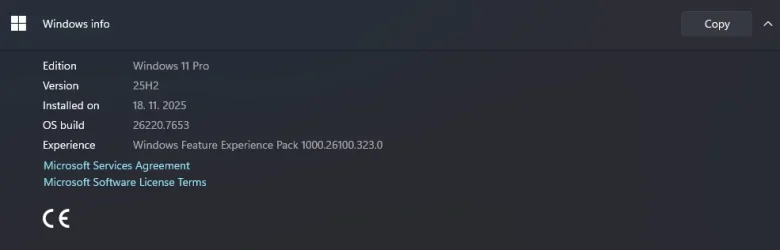
Done:

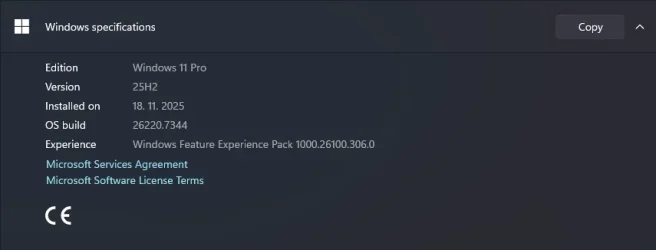
Edition Windows 11 Pro
Version 25H2
Installed on ‎10/‎31/‎2025
OS build 26220.7653
Experience Windows Feature Experience Pack 1000.26100.323.0

Updated 3 machines.
 
Last edited:
My Computer

System One

  • OS
    Windows 11 Pro 25H2
    Computer type
    PC/Desktop
    Manufacturer/Model
    Dell XPS 8930
    CPU
    Intel I9-9900K
    Memory
    64GB
    Graphics Card(s)
    NVIDIA RTX 2060
    Sound Card
    NVIDIA High Definition Audio
    Monitor(s) Displays
    4k Samsung
    Screen Resolution
    3840 x 2160
    Hard Drives
    512GB NVMe, ADATA SU 800, 2TB HDD
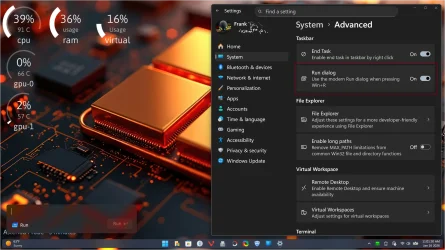
So it looks like they fixed the new Run Dialog box again if you want to switch it back on.
 

Attachments

  • Screenshot 2026-01-16 110138.webp
    Screenshot 2026-01-16 110138.webp
    319.6 KB · Views: 1

My Computers

System One System Two

  • OS
    Windows 11 25H2
    Computer type
    Laptop
    Manufacturer/Model
    Alienware 18 Area-51
    CPU
    Intel Core Ultra 9 275HX (24-Core)
    Motherboard
    Alienware
    Memory
    64GB DDR5 6400MT/s
    Graphics Card(s)
    NVIDIA GeForce RTX 5080 and Intel UHD Graphics
    Sound Card
    Onboard, Realtek high-performance Audio chips (ALC3329 & ALC1708))
    Monitor(s) Displays
    300HZ 18-inch QHD 500 nit Comfort View+
    Screen Resolution
    2560 x 1600
    Hard Drives
    2TB NVMe M.2 PCIe Gen 5 SSD
    Case
    Magnesium Alloy
    Cooling
    Advanced Cryo-Tech Quad-Fan Cooling system & large vapor chamber
    Keyboard
    Cherry MX ultra low profile mechanical keyboard with per key AlienFX RGB lighting
    Mouse
    Logitech MX Master 4
    Browser
    Vivaldi (main), Firefox, Chrome, Edge
    Antivirus
    MS Defender and Malwarebytes Free
  • Operating System
    Windows 11 25H2
    Computer type
    Laptop
    Manufacturer/Model
    Microsoft Surface Laptop 7
    CPU
    Qualcomm Snapdragon X Elite (12 Core) ARM based CPU
    Motherboard
    Microsoft Corp.
    Memory
    16GB LPDDR5
    Graphics card(s)
    Qualcomm Adreno X1-85
    Sound Card
    Omnisonic speakers with Dolby Atmos spatial sound
    Monitor(s) Displays
    120 Hz 13.8-inch 600 nit PixelSense Flow touchscreen
    Screen Resolution
    2304x1536
    Hard Drives
    1TB NVMe Gen 4 SSD
    Case
    Anodized Aluminum
    Cooling
    Traditional active cooling fan system
    Keyboard
    Mechanical QWERTY, backlit when in use
    Mouse
    Logitech MX Master 4 and Surface Arc Mouse
    Browser
    Vivaldi (main), Firefox, Chrome, Edge
    Antivirus
    MS Defender and Malwarebytes Free
No parallel Dev build? Looks like the Dev and Beta channels are finally parting company.
 

My Computers

System One System Two

  • OS
    Windows 11 Home
    Computer type
    Laptop
    Manufacturer/Model
    Acer Aspire 3 A315-23-R9VY
    CPU
    AMD Athlon Silver 3050U
    Memory
    8GB
    Graphics Card(s)
    Radeon Graphics
    Monitor(s) Displays
    laptop screen
    Screen Resolution
    1366x768 native resolution, up to 2560x1440 with Radeon Virtual Super Resolution
    Hard Drives
    1TB Samsung EVO 870 SSD (from April 2026: 250GB EVO 850)
    Internet Speed
    150 Mbps
    Browser
    Edge, Firefox
    Antivirus
    Defender
    Other Info
    fully 'Windows 11 ready' laptop. Windows 10 C: partition migrated from my old unsupported 'main machine' then upgraded to 11. A test migration ran Insider builds for 2 months. When 11 was released on 5th October 2021 it was re-imaged back to 10 and was offered the upgrade in Windows Update on 20th October. Windows Update offered the 22H2 Feature Update on 20th September 2022. It got the 23H2 Feature Update on 4th November 2023 through Windows Update, 24H2 on 3rd October 2024 through Windows Update by setting the Target Release Version for 24H2, and 25H2 on 30th September 2025 through Windows Update by setting the Target Release Version for 25H2.

    UPDATE - 11 April 2026: due to mechanical deterioration this PC has been retired from active duty. The OS with all software and files has been migrated to my System Seven below to carry on as my general purpose 'main machine'.

    My SYSTEM THREE is a Dell Latitude 5410, i7-10610U, 32GB RAM, 512GB NVMe ssd, supported device running Windows 11 Pro.

    My SYSTEM FOUR is a 2-in-1 convertible Lenovo Yoga 11e 20DA, Celeron N2930, 8GB RAM, 256GB ssd. Unsupported device: currently running Win10 Pro, plus Win11 Pro RTM and Insider Dev, Beta, and RP 24H2 as native boot vhdx.

    My SYSTEM FIVE is a Dell Latitude 3190 2-in-1, Pentium Silver N5030, 8GB RAM, 1TB NVMe ssd, supported device running Windows 11 Pro, plus Insider Beta, Dev, and Canary builds (and a few others) as a native boot .vhdx.

    My SYSTEM SIX is a Dell Latitude 5550, Core Ultra 7 165H, 64GB RAM, 1TB NVMe SSD, supported device, Windows 11 Pro 24H2, Hyper-V host machine. Updated to 25H2 on 30th September 2025.

    My SYSTEM SEVEN is a Lenovo Thinkpad T580, Intel Core i7-8650U, 16GB RAM, 512GB NVMe SSD + 2nd 512GB NVMe SSD, a supported device for Windows 11. This is my current general purpose 'main machine'. The installed Windows 11 Home from my System One has been migrated to this machine.
  • Operating System
    Windows 11 Pro
    Computer type
    Laptop
    Manufacturer/Model
    Dell Latitude E4310
    CPU
    Intel® Core™ i5-520M
    Motherboard
    0T6M8G
    Memory
    8GB
    Graphics card(s)
    (integrated graphics) Intel HD Graphics
    Screen Resolution
    1366x768
    Hard Drives
    500GB Crucial MX500 SSD
    Browser
    Firefox, Edge
    Antivirus
    Defender
    Other Info
    unsupported machine: Legacy bios, MBR, TPM 1.2, upgraded from W10 to W11 using W10/W11 hybrid install media workaround. In-place upgrade to 22H2 using ISO and a workaround. Feature Update to 23H2 by manually installing the Enablement Package. In-place upgrade to 24H2 using hybrid 23H2/24H2 install media. Upgraded to 25H2 by Enablement Package. Also running Insider Dev, and Canary builds and Windows 10 as native boot .vhdx.

    My SYSTEM THREE is a Dell Latitude 5410, i7-10610U, 32GB RAM, 512GB NVMe ssd, supported device running Windows 11 Pro.

    My SYSTEM FOUR is a 2-in-1 convertible Lenovo Yoga 11e 20DA, Celeron N2930, 8GB RAM, 256GB ssd. Unsupported device: currently running Win10 Pro, plus Win11 Pro RTM and Insider Dev, Beta, and RP 24H2 as native boot vhdx.

    My SYSTEM FIVE is a Dell Latitude 3190 2-in-1, Pentium Silver N5030, 8GB RAM, 1TB NVMe ssd, supported device running Windows 11 Pro, plus Insider Beta, Dev, and Canary builds (and a few others) as a native boot .vhdx.

    My SYSTEM SIX is a Dell Latitude 5550, Core Ultra 7 165H, 64GB RAM, 1TB NVMe SSD, supported device, Windows 11 Pro 24H2, Hyper-V host machine. Updated to 25H2 on 30th September 2025.

    My SYSTEM SEVEN is a Lenovo Thinkpad T580, Intel Core i7-8650U, 16GB RAM, 512GB NVMe SSD + 2nd 512GB NVMe SSD, a supported device for Windows 11. This is my current general purpose 'main machine'. The installed Windows 11 Home from my System One has been migrated to this machine.
26220.7653 up today!
 

My Computer

System One

  • OS
    windows 11 pro
    Computer type
    PC/Desktop
    Manufacturer/Model
    Self built
    CPU
    9900k
    Motherboard
    Z390 aorus ultra
    Memory
    64gb Corsair vengence 3200mhz
    Graphics Card(s)
    2080ti fe
    Sound Card
    onboard
    Monitor(s) Displays
    40" philips
    Screen Resolution
    3840x2160
    Hard Drives
    samsung 980 ssd 1tb
    samsung 850 evo 1tb
    samsung 2tb X2
    WD 1tb
    PSU
    1200w Antech
    Case
    Cosmos 11
    Cooling
    cpu water
    Keyboard
    Logitech
    Mouse
    cmstorm devastator
    Internet Speed
    50-20
    Browser
    firefox
    Antivirus
    defender
Is this :
Updated3-dialog2-old.png

Updated4-dialog2-new.png


already was in build 26220.7523 (in [Other]) ? The same feature.
  • Updated the “Change Account Type” dialog in Settings > Accounts > Other accounts to better align with other modern dialogs in Settings.
 

My Computer

System One

  • OS
    26200.8037
    Computer type
    PC/Desktop
    CPU
    i5-11400F
    Motherboard
    Gigabyte
    Memory
    32GB
    Graphics Card(s)
    Geforce GT-1030
    Keyboard
    Logitech K400
    Mouse
    Logitech M720
    Internet Speed
    600 Mb
    Browser
    Edge
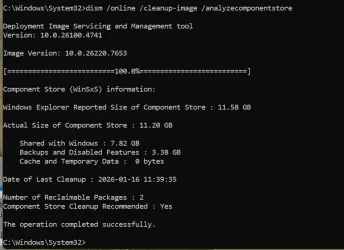
And now this. From 5 Reclaimable to the usual 2 after the cleanup.
Another machine showed 6 reclaimable and went down to the usual 2 after cleanup.
No idea why one with 5 and one with 6. 🤷‍♂️

1768592423526.webp

1768592479540.webp
 

My Computer

System One

  • OS
    Windows 11 Pro 25H2
    Computer type
    PC/Desktop
    Manufacturer/Model
    Dell XPS 8930
    CPU
    Intel I9-9900K
    Memory
    64GB
    Graphics Card(s)
    NVIDIA RTX 2060
    Sound Card
    NVIDIA High Definition Audio
    Monitor(s) Displays
    4k Samsung
    Screen Resolution
    3840 x 2160
    Hard Drives
    512GB NVMe, ADATA SU 800, 2TB HDD
And now this. From 5 Reclaimable to the usual 2 after the cleanup.
Another machine showed 6 reclaimable and went down to the usual 2 after cleanup.
No idea why one with 5 and one with 6
I had four on mine and went to the two usual Unreclaimable packages after cleanup.
 

My Computers

System One System Two

  • OS
    Windows 11 25H2
    Computer type
    Laptop
    Manufacturer/Model
    Alienware 18 Area-51
    CPU
    Intel Core Ultra 9 275HX (24-Core)
    Motherboard
    Alienware
    Memory
    64GB DDR5 6400MT/s
    Graphics Card(s)
    NVIDIA GeForce RTX 5080 and Intel UHD Graphics
    Sound Card
    Onboard, Realtek high-performance Audio chips (ALC3329 & ALC1708))
    Monitor(s) Displays
    300HZ 18-inch QHD 500 nit Comfort View+
    Screen Resolution
    2560 x 1600
    Hard Drives
    2TB NVMe M.2 PCIe Gen 5 SSD
    Case
    Magnesium Alloy
    Cooling
    Advanced Cryo-Tech Quad-Fan Cooling system & large vapor chamber
    Keyboard
    Cherry MX ultra low profile mechanical keyboard with per key AlienFX RGB lighting
    Mouse
    Logitech MX Master 4
    Browser
    Vivaldi (main), Firefox, Chrome, Edge
    Antivirus
    MS Defender and Malwarebytes Free
  • Operating System
    Windows 11 25H2
    Computer type
    Laptop
    Manufacturer/Model
    Microsoft Surface Laptop 7
    CPU
    Qualcomm Snapdragon X Elite (12 Core) ARM based CPU
    Motherboard
    Microsoft Corp.
    Memory
    16GB LPDDR5
    Graphics card(s)
    Qualcomm Adreno X1-85
    Sound Card
    Omnisonic speakers with Dolby Atmos spatial sound
    Monitor(s) Displays
    120 Hz 13.8-inch 600 nit PixelSense Flow touchscreen
    Screen Resolution
    2304x1536
    Hard Drives
    1TB NVMe Gen 4 SSD
    Case
    Anodized Aluminum
    Cooling
    Traditional active cooling fan system
    Keyboard
    Mechanical QWERTY, backlit when in use
    Mouse
    Logitech MX Master 4 and Surface Arc Mouse
    Browser
    Vivaldi (main), Firefox, Chrome, Edge
    Antivirus
    MS Defender and Malwarebytes Free
Update went smoothly. In addition, I was able to switch from the Dev channel back to the BETA channel with no issues.

DISM cleanup reduced my package store nearly in half from 16GB to a bit over 8GB. Leaving the two remaining packages alone based on prior experience with updates failing after cleaning them.
 
Last edited:

My Computer

System One

  • OS
    Windows 11 25H2
    Computer type
    PC/Desktop
    Manufacturer/Model
    EVGA home brew
    CPU
    Broadwell-e 6850K 4.5ghz @1.36v
    Motherboard
    EVGA X99 FTW K
    Memory
    32GB Corsair LPM 3600 C16
    Graphics Card(s)
    EVGA RTX 3080Ti FTW
    Sound Card
    Asus Centurion true 7.1 headset. (5 speakers in each earpeice)
    Monitor(s) Displays
    LG C4 55"
    Screen Resolution
    4K 144hz
    Hard Drives
    Various models of SSDs ~10TB No HDDs installed.
    PSU
    be quiet! BN516 Straight Power 12-1000w 80 Plus Platinum
    Case
    Corsair 780T modified to dual 200mm intake fans
    Cooling
    Corsair H110i
    Keyboard
    Corsair K95 Platinum
    Mouse
    Corsair M65 RGB Elite
    Internet Speed
    50Mbs
Installed here with no issues, all scans clean.
 

My Computers

System One System Two

  • OS
    Win 11 Pro 25H2, Build 26200.8524
    Computer type
    PC/Desktop
    Manufacturer/Model
    Home Brew
    CPU
    Intel Core i5 14500
    Motherboard
    Gigabyte B760M G P WIFI
    Memory
    64GB DDR4
    Graphics Card(s)
    GeForce RTX 4060
    Sound Card
    Chipset Realtek
    Monitor(s) Displays
    LG 45" Ultragear, Acer 24" 1080p
    Screen Resolution
    5120x1440, 1920x1080
    Hard Drives
    Crucial P310 2TB 2280 PCIe Gen4 3D NAND NVMe M.2 SSD (O/S)
    Silicon Power 2TB US75 NVMe PCIe Gen4 M.2 2280 SSD (backup)
    Crucial BX500 2TB 3D NAND (2nd backup)
    Seagate 4TB Ironwolf, rotating HDD archive files
    External off-line backup Drives: 2 NVMe 4TB drives in external enclosures
    PSU
    Thermaltake Toughpower GF3 750W
    Case
    LIAN LI LANCOOL 216 E-ATX PC Case
    Cooling
    Lots of fans!
    Keyboard
    Microsoft Comfort Curve 2000
    Mouse
    Logitech G305
    Internet Speed
    Verizon FiOS 1GB
    Browser
    Firefox
    Antivirus
    Malware Bytes & Windows Defender Security
  • Operating System
    Win 11 Pro 25H2, Build 26200.8524
    Computer type
    PC/Desktop
    Manufacturer/Model
    Home Brew
    CPU
    Intel Core i5 14400
    Motherboard
    Gigabyte B760M DS3H AX
    Memory
    32GB DDR5
    Graphics card(s)
    Intel 700 Embedded GPU
    Sound Card
    Realtek Embedded
    Monitor(s) Displays
    27" HP 1080p
    Screen Resolution
    1920x1080
    Hard Drives
    Crucial P310 2TB 2280 PCIe Gen4 eD NAND PCIe SSD
    Samsung EVO 990 2TB NVMe Gen4 SSD
    Samsung 2TB SATA SSD
    PSU
    Thermaltake Smart BM3 650W
    Case
    Okinos Micro ATX Case
    Cooling
    Fans
    Keyboard
    Microsoft Comfort Curve 2000
    Mouse
    Logitech G305
    Internet Speed
    Verizon FiOS 1GB
    Browser
    Firefox
    Antivirus
    Malware Bytes & Windows Defender Security
Got it. So far so good. Annoying issue with ejecting removable storage in explorer (switching explorer to desktop folder on ejecting) is finally fixed. New Run Dialog works fine now win both "run" from start menu and Win+R Flyouts works so far but cant confirm until monday when i am in office using multimonitor setup, as it was happening then mostly. Will update when i try.
Screenshot 2026-01-16 234639.webp

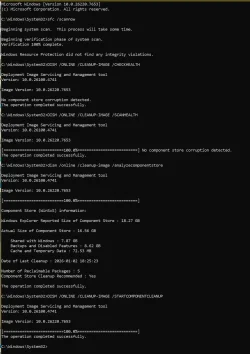
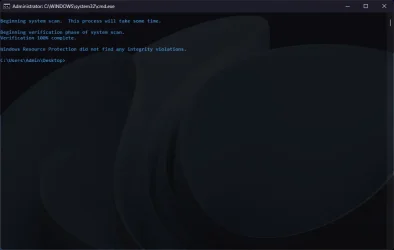
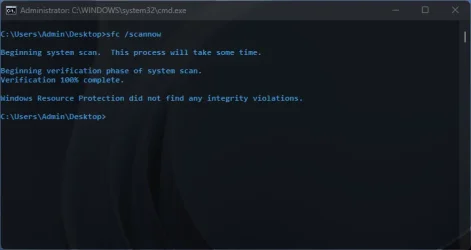
SFC scan:
Screenshot 2026-01-16 233820.webp

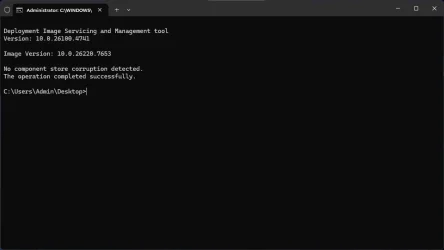
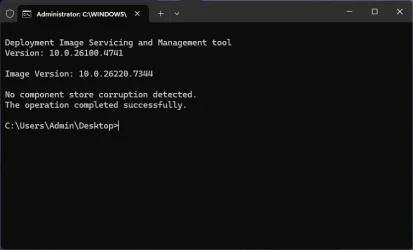
DISM check:
Screenshot 2026-01-16 233857.webp
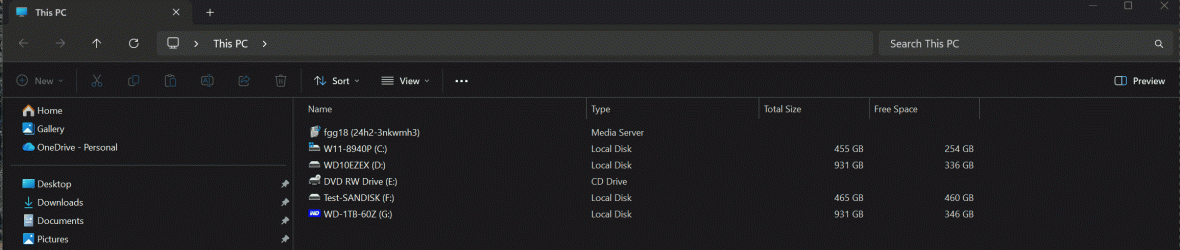
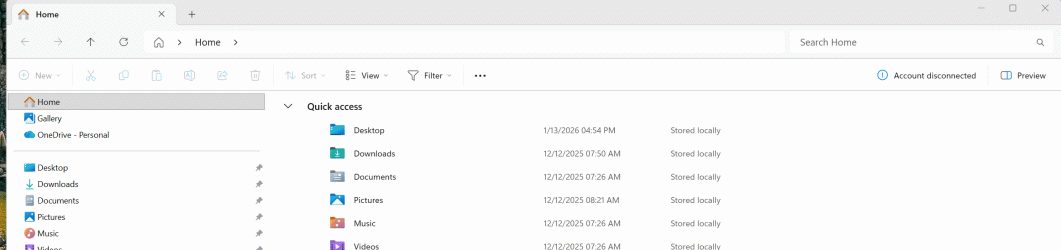
Explorer Issue when ejecting removable media fixed:
giphy.gif

So all good for me. (y) ;-) :-)

EDIT: Wrong screenshot posted
EDIT: New Run Dialog works fine now win both run from start menu and Win+R
EDIT: Explorer issue when removing removable media gone
 

Attachments

  • Screenshot 2025-12-05 213754.webp
    Screenshot 2025-12-05 213754.webp
    14.1 KB · Views: 1
  • Screenshot 2025-12-05 213718.webp
    Screenshot 2025-12-05 213718.webp
    14 KB · Views: 1
  • Screenshot 2025-12-05 214118.webp
    Screenshot 2025-12-05 214118.webp
    10.5 KB · Views: 1
Last edited:

My Computer

System One

  • OS
    Win 11 Pro Insider Beta (26220.8370), Kali Linux
    Computer type
    Laptop
    Manufacturer/Model
    HP Victus 15
    CPU
    AMD Ryzen 5 5600H
    Memory
    16GB (2x8GB) Dual Channel
    Graphics Card(s)
    Nvidia RTX 3050
    Monitor(s) Displays
    1080p IPS 144Hz (Laptop Screen) + 3x 1080p 60Hz screens
    Screen Resolution
    4x 1920x1080 monitors
    Hard Drives
    M.2 NVMe 512GB Samsung - PCIe 4.0x4 - Main system drive

    USB-A and USB-C M.2 NVMe Enclosure with NVMe SSSTC 256GB - NVM Express 1.3 - Ventoy with all install files and all ISO images i use.

    USB External SSD Kingston XS100 1TB - USB 3.2 Gen 2 - WindowsToGo (Clone of my existing Sytem), and all games I play.

    USB External SSHD Seagate FireCuda 2TB - USB 3.0 - For Macrium system images, data, photos, stays always safe at home
    PSU
    200W
    Cooling
    Zalman ZM-NC3 Cooling pad
    Keyboard
    Dell KM7120W
    Mouse
    Dell KM7120W
    Internet Speed
    1Gb/s down / 500Mb/s up
    Browser
    Chrome
    Antivirus
    Windows Defender
Finally update which fixed some issues and no sfc and dism errors. (y)
 

My Computer

System One

  • OS
    Win 11 Pro Insider Beta (26220.8370), Kali Linux
    Computer type
    Laptop
    Manufacturer/Model
    HP Victus 15
    CPU
    AMD Ryzen 5 5600H
    Memory
    16GB (2x8GB) Dual Channel
    Graphics Card(s)
    Nvidia RTX 3050
    Monitor(s) Displays
    1080p IPS 144Hz (Laptop Screen) + 3x 1080p 60Hz screens
    Screen Resolution
    4x 1920x1080 monitors
    Hard Drives
    M.2 NVMe 512GB Samsung - PCIe 4.0x4 - Main system drive

    USB-A and USB-C M.2 NVMe Enclosure with NVMe SSSTC 256GB - NVM Express 1.3 - Ventoy with all install files and all ISO images i use.

    USB External SSD Kingston XS100 1TB - USB 3.2 Gen 2 - WindowsToGo (Clone of my existing Sytem), and all games I play.

    USB External SSHD Seagate FireCuda 2TB - USB 3.0 - For Macrium system images, data, photos, stays always safe at home
    PSU
    200W
    Cooling
    Zalman ZM-NC3 Cooling pad
    Keyboard
    Dell KM7120W
    Mouse
    Dell KM7120W
    Internet Speed
    1Gb/s down / 500Mb/s up
    Browser
    Chrome
    Antivirus
    Windows Defender
Annoying issue with ejecting removable storage in explorer (switching explorer to desktop folder on ejecting) is finally fixed.
Finally, I hope they propagate the fix to next Dev Build too. 😂
They still did not fix the file explorer white and black flashes. 🤬😝
 

My Computer

System One

  • OS
    Windows 11 Pro 25H2
    Computer type
    PC/Desktop
    Manufacturer/Model
    Dell XPS 8930
    CPU
    Intel I9-9900K
    Memory
    64GB
    Graphics Card(s)
    NVIDIA RTX 2060
    Sound Card
    NVIDIA High Definition Audio
    Monitor(s) Displays
    4k Samsung
    Screen Resolution
    3840 x 2160
    Hard Drives
    512GB NVMe, ADATA SU 800, 2TB HDD
Finally, I hope they propagate the fix to next Dev Build too. 😂
They still did not fix the file explorer white and black flashes. 🤬😝
I have no issues with flashbangs, but cant confirm as i am using StartAllBack where issue never appeared for me.
 

My Computer

System One

  • OS
    Win 11 Pro Insider Beta (26220.8370), Kali Linux
    Computer type
    Laptop
    Manufacturer/Model
    HP Victus 15
    CPU
    AMD Ryzen 5 5600H
    Memory
    16GB (2x8GB) Dual Channel
    Graphics Card(s)
    Nvidia RTX 3050
    Monitor(s) Displays
    1080p IPS 144Hz (Laptop Screen) + 3x 1080p 60Hz screens
    Screen Resolution
    4x 1920x1080 monitors
    Hard Drives
    M.2 NVMe 512GB Samsung - PCIe 4.0x4 - Main system drive

    USB-A and USB-C M.2 NVMe Enclosure with NVMe SSSTC 256GB - NVM Express 1.3 - Ventoy with all install files and all ISO images i use.

    USB External SSD Kingston XS100 1TB - USB 3.2 Gen 2 - WindowsToGo (Clone of my existing Sytem), and all games I play.

    USB External SSHD Seagate FireCuda 2TB - USB 3.0 - For Macrium system images, data, photos, stays always safe at home
    PSU
    200W
    Cooling
    Zalman ZM-NC3 Cooling pad
    Keyboard
    Dell KM7120W
    Mouse
    Dell KM7120W
    Internet Speed
    1Gb/s down / 500Mb/s up
    Browser
    Chrome
    Antivirus
    Windows Defender
I have no issues with flashbangs, but cant confirm as i am using StartAllBack where issue never appeared for me.
I'm not using StartAllBack.
The problem is quite easy to reproduce but Microsoft is ignoring or does not understand the FBH reports and how to reproduce the behavior.
White flash while in Dark mode or black flash while in Light mode. 🤣🤣

1768606584201.gif

1768606600395.gif
 

My Computer

System One

  • OS
    Windows 11 Pro 25H2
    Computer type
    PC/Desktop
    Manufacturer/Model
    Dell XPS 8930
    CPU
    Intel I9-9900K
    Memory
    64GB
    Graphics Card(s)
    NVIDIA RTX 2060
    Sound Card
    NVIDIA High Definition Audio
    Monitor(s) Displays
    4k Samsung
    Screen Resolution
    3840 x 2160
    Hard Drives
    512GB NVMe, ADATA SU 800, 2TB HDD
I'm not using StartAllBack.
The problem is quite easy to reproduce but Microsoft is ignoring or does not understand the FBH reports and how to reproduce the behavior.
White flash while in Dark mode or black flash while in Light mode. 🤣🤣

View attachment 160145

View attachment 160146
Thats super annoying, thankfully i am using StartAllBack and have no such an issue.... But is shame that MS is still ignoring this issue. will be interested if someone can report the status on this build. But if you are on this build then its clearly not fixed, which is a shame.
 

My Computer

System One

  • OS
    Win 11 Pro Insider Beta (26220.8370), Kali Linux
    Computer type
    Laptop
    Manufacturer/Model
    HP Victus 15
    CPU
    AMD Ryzen 5 5600H
    Memory
    16GB (2x8GB) Dual Channel
    Graphics Card(s)
    Nvidia RTX 3050
    Monitor(s) Displays
    1080p IPS 144Hz (Laptop Screen) + 3x 1080p 60Hz screens
    Screen Resolution
    4x 1920x1080 monitors
    Hard Drives
    M.2 NVMe 512GB Samsung - PCIe 4.0x4 - Main system drive

    USB-A and USB-C M.2 NVMe Enclosure with NVMe SSSTC 256GB - NVM Express 1.3 - Ventoy with all install files and all ISO images i use.

    USB External SSD Kingston XS100 1TB - USB 3.2 Gen 2 - WindowsToGo (Clone of my existing Sytem), and all games I play.

    USB External SSHD Seagate FireCuda 2TB - USB 3.0 - For Macrium system images, data, photos, stays always safe at home
    PSU
    200W
    Cooling
    Zalman ZM-NC3 Cooling pad
    Keyboard
    Dell KM7120W
    Mouse
    Dell KM7120W
    Internet Speed
    1Gb/s down / 500Mb/s up
    Browser
    Chrome
    Antivirus
    Windows Defender
Got it. So far so good. Annoying issue with ejecting removable storage in explorer (switching explorer to desktop folder on ejecting) is finally fixed. New Run Dialog works fine now win both "run" from start menu and Win+R Flyouts works so far but cant confirm until monday when i am in office using multimonitor setup, as it was happening then mostly. Will update when i try.
View attachment 160142

SFC scan:
View attachment 160143

DISM check:
View attachment 160144
Explorer Issue when ejecting removable media fixed:
giphy.gif

So all good for me. (y) ;-) :-)

EDIT: Wrong screenshot posted
EDIT: New Run Dialog works fine now win both run from start menu and Win+R
EDIT: Explorer issue when removing removable media gone
UPDATE: Issue with flyouts still happens even on single monitor setup. But still it may be StartAllBack issue, can someone confirm the issue withoutusing StartAllBack please? :unsure: :rolleyes: :(
 

My Computer

System One

  • OS
    Win 11 Pro Insider Beta (26220.8370), Kali Linux
    Computer type
    Laptop
    Manufacturer/Model
    HP Victus 15
    CPU
    AMD Ryzen 5 5600H
    Memory
    16GB (2x8GB) Dual Channel
    Graphics Card(s)
    Nvidia RTX 3050
    Monitor(s) Displays
    1080p IPS 144Hz (Laptop Screen) + 3x 1080p 60Hz screens
    Screen Resolution
    4x 1920x1080 monitors
    Hard Drives
    M.2 NVMe 512GB Samsung - PCIe 4.0x4 - Main system drive

    USB-A and USB-C M.2 NVMe Enclosure with NVMe SSSTC 256GB - NVM Express 1.3 - Ventoy with all install files and all ISO images i use.

    USB External SSD Kingston XS100 1TB - USB 3.2 Gen 2 - WindowsToGo (Clone of my existing Sytem), and all games I play.

    USB External SSHD Seagate FireCuda 2TB - USB 3.0 - For Macrium system images, data, photos, stays always safe at home
    PSU
    200W
    Cooling
    Zalman ZM-NC3 Cooling pad
    Keyboard
    Dell KM7120W
    Mouse
    Dell KM7120W
    Internet Speed
    1Gb/s down / 500Mb/s up
    Browser
    Chrome
    Antivirus
    Windows Defender

Latest Support Threads

Back
Top Bottom