Insider KB5077221 Windows 11 Insider Canary build 28020.1611 (26H1) - Feb. 12


UPDATE 2/20:

UPDATE 2/18:


 Windows Insider Blog:

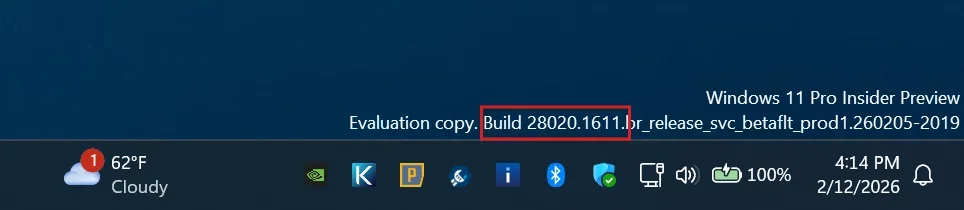
Hello Windows Insiders, today we are releasing Windows 11 Insider Preview Build 28020.1611 to the Canary Channel (the desktop watermark is showing the wrong build number and will be addressed in a near term build). (KB 5077221)


What’s new in Canary Build 28020.1611

Changes and Improvements gradually being rolled out with toggle on*


[Built-in Sysmon]

Previously announced here, Windows now brings Sysmon functionality natively to Windows. Sysmon functionality allows you to capture system events that can help with threat detection, and you can use custom configuration files to filter the events you want to monitor. The captured events are written on the Windows event log, enabling them to be used with security applications and a wide range of use cases.


Built-in Sysmon is disabled by default and must be explicitly enabled.
  1. Go to Settings > System > Optional features > More Windows features > checking Sysmon or in PowerShell or command prompt:
    • Dism /Online /Enable-Feature /FeatureName:Sysmon
  2. To complete the installation, from PowerShell or command prompt run:
    • sysmon -i
Note: If you’ve already installed Sysmon from the website, it must be uninstalled before enabling the built-in Sysmon.

Documentation will be added to Windows soon. The functionality of Sysmon remains unchanged, learn more https://learn.microsoft.com/sysinternals/downloads/sysmon.

[Windows Share]

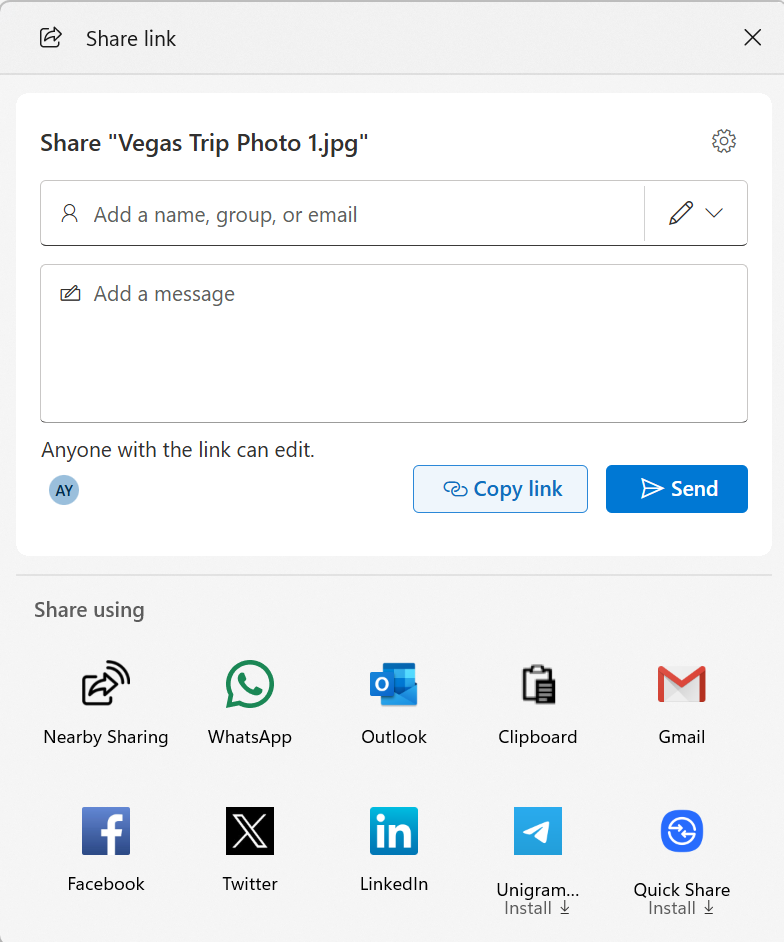
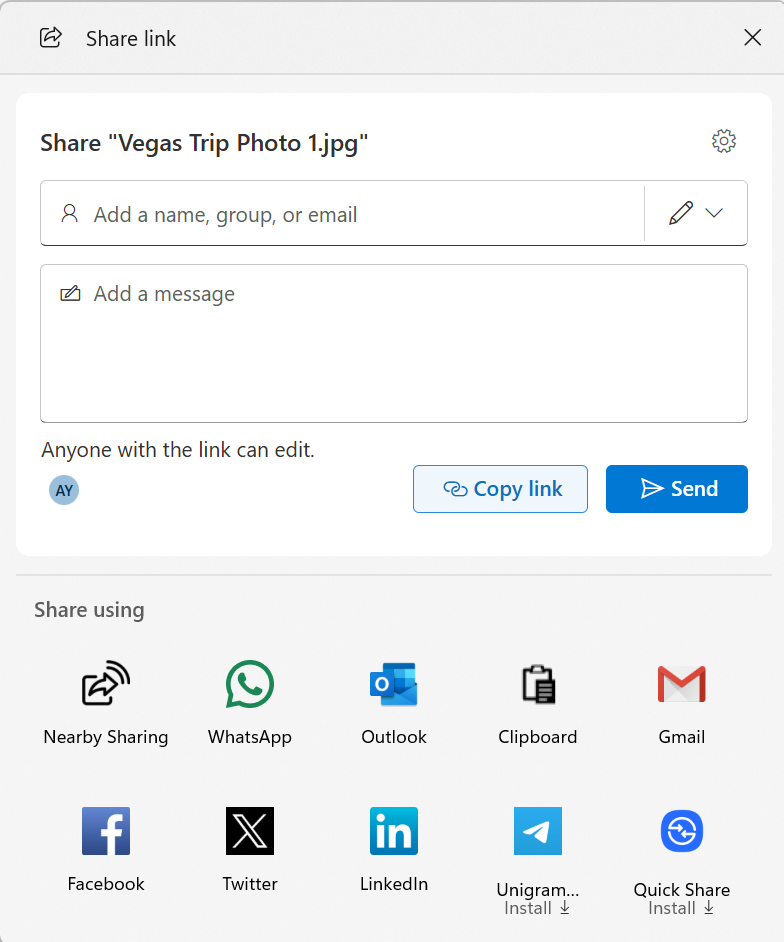
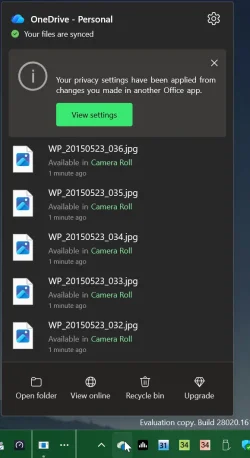
  • When you share a OneDrive cloud file by right-clicking to share on the file – new options for sharing that link through other apps will be provided under “Share using” when the “Copy link” button is clicked. This experience is rolling out to Windows Insiders signed in with their Microsoft accounts not in the EEA.


    Ability to share OneDrive cloud file links via other apps via the Windows share window.
    Ability to share OneDrive cloud file links via other apps via the Windows share window.

[General]

  • Fixed the desktop watermark to show the correct build number.

Reminders for Windows Insiders in the Canary Channel

  • These builds can be unstable and may be released with limited documentation. Join Windows Insider – Get early access to Windows 11 features & updates
  • The builds we release to the Canary Channel represent the latest platform changes early in the development cycle. Features and experiences included in these builds may never get released as we try out different concepts and get feedback. Features may change over time, be removed, or replaced and never get released beyond Windows Insiders. Some of these features and experiences could show up in future Windows releases when they’re ready.
  • Many features in the Canary Channel are rolled out using Control Feature Rollout technology, starting with a subset of Insiders and ramping up over time as we monitor feedback to see how they land before pushing them out to everyone in this channel.
  • The desktop watermark shown at the lower right corner of the desktop is normal for Windows Insider pre-release builds.
  • Some features may show up in the Dev and Beta Channels first before showing up in the Canary Channel.
  • Some features in active development we preview with Windows Insiders may not be fully localized and localization will happen over time as features are finalized. As you see issues with localization in your language, please report those issues to us via Feedback Hub.
  • To get off the Canary Channel, a clean install of Windows 11 will be required. As a reminder – Insiders can’t switch to a channel that is receiving builds with lower build numbers without doing a clean installation of Windows 11 due to technical setup requirements.
  • Check out Flight Hub for a complete look at what build is in which Insider channel.
Thanks,
Windows Insider Program Team

*Functionality will vary by device and market; text actions will be available across markets in select character sets. See aka.ms/copilotpluspcs.


 Source:


Check Windows Updates


UUP Dump:

64-bit ISO download:

ARM64 ISO download:

 
Last edited:

My Computer

System One

  • OS
    Windows 11, version 25H2 (26200)
    Computer type
    PC/Desktop
    CPU
    AMD Ryzen 9 9950X 16-Core Processor
    Motherboard
    ASRock B650M PG Riptide
    Memory
    DDR5-6000 (CL36) 64.0 GB
    Graphics Card(s)
    NVIDIA GeForce RTX 4090
    PSU
    1200W
    Case
    Phanteks Enthoo Pro 2
    Cooling
    Noctua NH-D12L
Mmmm..., I'm gonna wait until about 157 of you chime in... ⏳
 

My Computers

System One System Two

  • OS
    Windows 11 Pro
    Computer type
    PC/Desktop
    Manufacturer/Model
    ASUS ROG Strix
  • Operating System
    Windows 11 Pro
    Computer type
    Laptop
    Manufacturer/Model
    ASUS VivoBook
Stuck on 74% for a while.
 

My Computers

System One System Two

  • OS
    Win 11 Pro
    Computer type
    Laptop
    Manufacturer/Model
    ASUS Vivobook
    CPU
    AMD Ryzen™ 7 7730U
    Motherboard
    M1605YA
    Memory
    24GB Dual-Channel DDR4 @ 1596MHz (22-22-22-52)
    Graphics Card(s)
    512MB ATI AMD Radeon Graphics (ASUStek Computer Inc)
    Monitor(s) Displays
    Generic PnP Monitor (1920x1200@60Hz) - P1 PLUS (1920x1080@59Hz)
    Screen Resolution
    1920 X 1200
    Hard Drives
    953GB Western Digital WD
    PSU
    45 Watts
    Mouse
    Lenovo Bluetooth.
    Internet Speed
    500 Mbps
    Browser
    Edge
    Antivirus
    Defender
  • Operating System
    Windows 11
    Computer type
    Laptop
    Manufacturer/Model
    ACER NITRO
    CPU
    AMD Ryzen 7 5800H / 3.2 GHz
    Motherboard
    CZ Scala_CAS (FP6)
    Memory
    32 GB DDR4 SDRAM 3200 MHz
    Graphics card(s)
    NVIDIA GeForce RTX 3060 6 GB GDDR6 SDRAM
    Sound Card
    Realtek Audio. NVIDIA High Definition Audio
    Monitor(s) Displays
    15.6" LED backlight 1920 x 1080 (Full HD) 144 Hz
    Screen Resolution
    1920 x 1080 (Full HD)
    Hard Drives
    Samsung 970 Evo Plus 2TB NVMe M.2
    PSU
    180 Watt, 19.5 V
    Mouse
    Lenovo Bluetooth
    Internet Speed
    500 Mbps
    Browser
    Edge
    Antivirus
    Defender
Downloading and installing.

1770937787193.webp

1770940221208.webp

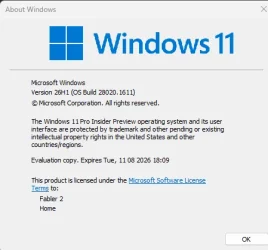
Done:

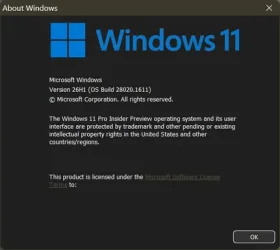
Edition Windows 11 Pro Insider Preview
Version 26H1
Installed on ‎2/‎12/‎2026
Evaluation expires on ‎8/‎11/‎2026 11:09 AM
OS build 28020.1611
Experience Windows Feature Experience Pack 1000.26100.330.0

This one was a full build install. It created Windows.old.
1770941003004.webp
 
Last edited:

My Computer

System One

  • OS
    Windows 11 Pro 25H2
    Computer type
    PC/Desktop
    Manufacturer/Model
    Dell XPS 8930
    CPU
    Intel I9-9900K
    Memory
    64GB
    Graphics Card(s)
    NVIDIA RTX 2060
    Sound Card
    NVIDIA High Definition Audio
    Monitor(s) Displays
    4k Samsung
    Screen Resolution
    3840 x 2160
    Hard Drives
    512GB NVMe, ADATA SU 800, 2TB HDD
Installed ok. OneDrive installed again. :poop::poop::poop:


Snipaste_2026-02-13_00-04-14.webp

Snipaste_2026-02-13_00-03-45.webp
 

My Computers

System One System Two

  • OS
    Win 11 Pro
    Computer type
    Laptop
    Manufacturer/Model
    ASUS Vivobook
    CPU
    AMD Ryzen™ 7 7730U
    Motherboard
    M1605YA
    Memory
    24GB Dual-Channel DDR4 @ 1596MHz (22-22-22-52)
    Graphics Card(s)
    512MB ATI AMD Radeon Graphics (ASUStek Computer Inc)
    Monitor(s) Displays
    Generic PnP Monitor (1920x1200@60Hz) - P1 PLUS (1920x1080@59Hz)
    Screen Resolution
    1920 X 1200
    Hard Drives
    953GB Western Digital WD
    PSU
    45 Watts
    Mouse
    Lenovo Bluetooth.
    Internet Speed
    500 Mbps
    Browser
    Edge
    Antivirus
    Defender
  • Operating System
    Windows 11
    Computer type
    Laptop
    Manufacturer/Model
    ACER NITRO
    CPU
    AMD Ryzen 7 5800H / 3.2 GHz
    Motherboard
    CZ Scala_CAS (FP6)
    Memory
    32 GB DDR4 SDRAM 3200 MHz
    Graphics card(s)
    NVIDIA GeForce RTX 3060 6 GB GDDR6 SDRAM
    Sound Card
    Realtek Audio. NVIDIA High Definition Audio
    Monitor(s) Displays
    15.6" LED backlight 1920 x 1080 (Full HD) 144 Hz
    Screen Resolution
    1920 x 1080 (Full HD)
    Hard Drives
    Samsung 970 Evo Plus 2TB NVMe M.2
    PSU
    180 Watt, 19.5 V
    Mouse
    Lenovo Bluetooth
    Internet Speed
    500 Mbps
    Browser
    Edge
    Antivirus
    Defender
They fixed this detail in the watermark. 👍

1770941796985.webp
 

My Computer

System One

  • OS
    Windows 11 Pro 25H2
    Computer type
    PC/Desktop
    Manufacturer/Model
    Dell XPS 8930
    CPU
    Intel I9-9900K
    Memory
    64GB
    Graphics Card(s)
    NVIDIA RTX 2060
    Sound Card
    NVIDIA High Definition Audio
    Monitor(s) Displays
    4k Samsung
    Screen Resolution
    3840 x 2160
    Hard Drives
    512GB NVMe, ADATA SU 800, 2TB HDD
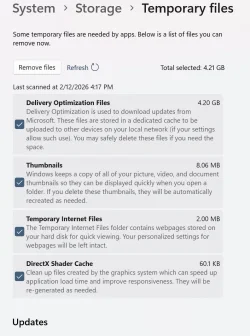
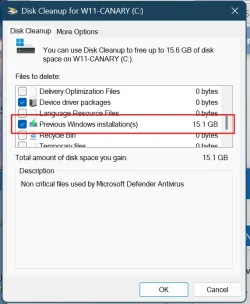
Still no option to get rid of Previous install folder (Windows.old).
Had to use Disk Cleanup again for deleting Previous installation. 🤬🤷‍♂️

1770942015890.webp


1770942150020.webp
 
Last edited:

My Computer

System One

  • OS
    Windows 11 Pro 25H2
    Computer type
    PC/Desktop
    Manufacturer/Model
    Dell XPS 8930
    CPU
    Intel I9-9900K
    Memory
    64GB
    Graphics Card(s)
    NVIDIA RTX 2060
    Sound Card
    NVIDIA High Definition Audio
    Monitor(s) Displays
    4k Samsung
    Screen Resolution
    3840 x 2160
    Hard Drives
    512GB NVMe, ADATA SU 800, 2TB HDD
Crazy update, my machine restarted 6 or 7 times! 🤷‍♂️
 

My Computers

System One System Two

  • OS
    Windows 11 Pro
    Computer type
    PC/Desktop
    Manufacturer/Model
    ASUS ROG Strix
  • Operating System
    Windows 11 Pro
    Computer type
    Laptop
    Manufacturer/Model
    ASUS VivoBook
Yup, and Edge!
It was a full install.
Also has a problem booting WinRE on DELL desktops.
Try Shift + Restart with this build and see what happens. 😵‍💫🤬
 
Last edited:

My Computer

System One

  • OS
    Windows 11 Pro 25H2
    Computer type
    PC/Desktop
    Manufacturer/Model
    Dell XPS 8930
    CPU
    Intel I9-9900K
    Memory
    64GB
    Graphics Card(s)
    NVIDIA RTX 2060
    Sound Card
    NVIDIA High Definition Audio
    Monitor(s) Displays
    4k Samsung
    Screen Resolution
    3840 x 2160
    Hard Drives
    512GB NVMe, ADATA SU 800, 2TB HDD
It didn't touch hardly any of my tweaks..., virtually no Reg tweaks..., just a couple appearance things I had to fix!

0008486.webp
 

My Computers

System One System Two

  • OS
    Windows 11 Pro
    Computer type
    PC/Desktop
    Manufacturer/Model
    ASUS ROG Strix
  • Operating System
    Windows 11 Pro
    Computer type
    Laptop
    Manufacturer/Model
    ASUS VivoBook
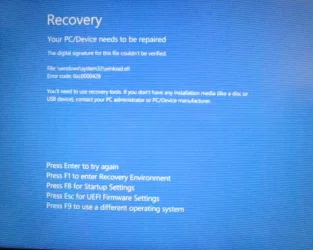
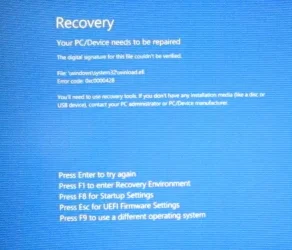
With this build 28020.1611 I get this problem if I try to use WinRE.
I tried on 2 Dell machines with the same result. (Dell XPS 8940 and Dell XPS 8930)
I did Shift + Restart and end up with this Error code 0xc0000428.
Anybody else seeing this problem with Dell PCs?

1770950342913.webp

 
Last edited:

My Computer

System One

  • OS
    Windows 11 Pro 25H2
    Computer type
    PC/Desktop
    Manufacturer/Model
    Dell XPS 8930
    CPU
    Intel I9-9900K
    Memory
    64GB
    Graphics Card(s)
    NVIDIA RTX 2060
    Sound Card
    NVIDIA High Definition Audio
    Monitor(s) Displays
    4k Samsung
    Screen Resolution
    3840 x 2160
    Hard Drives
    512GB NVMe, ADATA SU 800, 2TB HDD
With this build 28020.1611 I get this problem if I try to use WinRE.
I tried on 2 machines with the same result.
I did Shift + Restart and end up with this Error code 0xc0000428.
Anybody else seeing this problem?


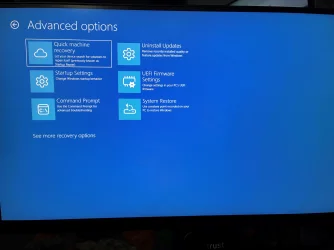
Got to this screen ok then tried to get to safe mode. Safe Mode just a black screen. Opened task manager ok then ran shutdown /s

IMG_0374.webp
 

My Computers

System One System Two

  • OS
    Win 11 Pro
    Computer type
    Laptop
    Manufacturer/Model
    ASUS Vivobook
    CPU
    AMD Ryzen™ 7 7730U
    Motherboard
    M1605YA
    Memory
    24GB Dual-Channel DDR4 @ 1596MHz (22-22-22-52)
    Graphics Card(s)
    512MB ATI AMD Radeon Graphics (ASUStek Computer Inc)
    Monitor(s) Displays
    Generic PnP Monitor (1920x1200@60Hz) - P1 PLUS (1920x1080@59Hz)
    Screen Resolution
    1920 X 1200
    Hard Drives
    953GB Western Digital WD
    PSU
    45 Watts
    Mouse
    Lenovo Bluetooth.
    Internet Speed
    500 Mbps
    Browser
    Edge
    Antivirus
    Defender
  • Operating System
    Windows 11
    Computer type
    Laptop
    Manufacturer/Model
    ACER NITRO
    CPU
    AMD Ryzen 7 5800H / 3.2 GHz
    Motherboard
    CZ Scala_CAS (FP6)
    Memory
    32 GB DDR4 SDRAM 3200 MHz
    Graphics card(s)
    NVIDIA GeForce RTX 3060 6 GB GDDR6 SDRAM
    Sound Card
    Realtek Audio. NVIDIA High Definition Audio
    Monitor(s) Displays
    15.6" LED backlight 1920 x 1080 (Full HD) 144 Hz
    Screen Resolution
    1920 x 1080 (Full HD)
    Hard Drives
    Samsung 970 Evo Plus 2TB NVMe M.2
    PSU
    180 Watt, 19.5 V
    Mouse
    Lenovo Bluetooth
    Internet Speed
    500 Mbps
    Browser
    Edge
    Antivirus
    Defender
Offhand, it might be corrupted BCD info for the Recovery partition. I would try "reagentc /disable", and "/enable" to see if that errors out or not.

In theory, WinRE.wim gets patched at the same time as normal Windows so the two are in sync, in terms of boot file changes and driver support. Sometimes we've seen issues where WinRE doesn't get updated for some technical reason. I've seen this boot error a few times in 24H2/25H2 installs using the new Setup client, because it's actually in SAFE_OS (WinRE mode).

People just start over or just wait for the next build...
 

My Computer

System One

  • OS
    Windows 7
Offhand, it might be corrupted BCD info for the Recovery partition. I would try "reagentc /disable", and "/enable" to see if that errors out or not.

In theory, WinRE.wim gets patched at the same time as normal Windows so the two are in sync, in terms of boot file changes and driver support. Sometimes we've seen issues where WinRE doesn't get updated for some technical reason. I've seen this boot error a few times in 24H2/25H2 installs using the new Setup client, because it's actually in SAFE_OS (WinRE mode).

People just start over or just wait for the next build...
In my case I had the same issue on 2 machines Dell XPS 8930 and Dell XPS 8940. Both are in multiboot with other Builds. The other builds boot fine with WinRE.
I also tried a repair update in place with ISO created from UUP-dump but I ended up with the same issue.
I did not have this problem on 2 other machines. GMKtec M2 and GMKtec K3 which are mini PCs.

So, I restored a backup of Build 28020.1546 and found out that the problem was already in the previous Build too.
I don't know at this point when the problem exactly started, but it is definitely also in previous build 28020.1546 and now the same with 28020.1611. 😵‍💫🤷‍♂️

Same exact problem on Both Dell desktops. XPS 8930 and XPS 8940.
1770976710516.webp


Edit:
Definitely something wrong with the signature.
WinRE boots fine if I disable secure boot in the UEFI BIOS.

Same happens also after a clean install of 28020.1611 on the same Dell Desktops.

Note: there two different winload.efi files, one used by the normal OS boot and the other used by WinRE.
The signature issue is with the one used by WinRE.

I'm surprised that I don't see more users reporting this problem. 😵‍💫🤷‍♂️

 
Last edited:

My Computer

System One

  • OS
    Windows 11 Pro 25H2
    Computer type
    PC/Desktop
    Manufacturer/Model
    Dell XPS 8930
    CPU
    Intel I9-9900K
    Memory
    64GB
    Graphics Card(s)
    NVIDIA RTX 2060
    Sound Card
    NVIDIA High Definition Audio
    Monitor(s) Displays
    4k Samsung
    Screen Resolution
    3840 x 2160
    Hard Drives
    512GB NVMe, ADATA SU 800, 2TB HDD
I'm surprised! This Build seems pretty much glitch free!
 

My Computers

System One System Two

  • OS
    Windows 11 Pro
    Computer type
    PC/Desktop
    Manufacturer/Model
    ASUS ROG Strix
  • Operating System
    Windows 11 Pro
    Computer type
    Laptop
    Manufacturer/Model
    ASUS VivoBook
This feature old - from 26120.4441
cloud-files-share-apps-Canary-2-12.png
 

My Computer

System One

  • OS
    26200.8037
    Computer type
    PC/Desktop
    CPU
    i5-11400F
    Motherboard
    Gigabyte
    Memory
    32GB
    Graphics Card(s)
    Geforce GT-1030
    Keyboard
    Logitech K400
    Mouse
    Logitech M720
    Internet Speed
    600 Mb
    Browser
    Edge

My Computers

System One System Two

  • OS
    Windows 11 Pro for Workstations
    Computer type
    PC/Desktop
    Manufacturer/Model
    Custom self build
    CPU
    Intel i7-8700K 5 GHz
    Motherboard
    ASUS ROG Maximus XI Formula Z390
    Memory
    64 GB (4x16GB) G.SKILL TridentZ RGB DDR4 3600 MHz (F4-3600C18D-32GTZR)
    Graphics Card(s)
    ASUS ROG-STRIX-GTX1080TI-O11G-GAMING (11GB GDDR5X)
    Sound Card
    Integrated Digital Audio (S/PDIF)
    Monitor(s) Displays
    2 x Samsung Odyssey G75 27"
    Screen Resolution
    2560x1440
    Hard Drives
    1TB Samsung 990 PRO M.2,
    4TB Samsung 990 PRO M.2,
    TerraMaster F8 SSD Plus NAS
    PSU
    Seasonic Prime Titanium 850W
    Case
    Thermaltake Core P3 wall mounted
    Cooling
    Corsair Hydro H115i
    Keyboard
    Amazon Basics Wired Full Keyboard MD005
    Mouse
    Logitech MX Master 4
    Internet Speed
    2 Gbps Download and 100 Mbps Upload
    Browser
    Chrome and Edge
    Antivirus
    Microsoft Defender
    Other Info
    Logitech Z625 speaker system,
    Logitech BRIO 4K Pro webcam,
    HP Color LaserJet Pro MFP M477fdn,
    CyberPower CP1500PFCLCD
    Galaxy S23 Plus phone
  • Operating System
    Windows 11 Pro
    Computer type
    Laptop
    Manufacturer/Model
    Surface Laptop 7 Copilot+ PC
    CPU
    Snapdragon X Elite (12 core) 3.42 GHz
    Memory
    16 GB LPDDR5x-7467 MHz
    Monitor(s) Displays
    15" HDR
    Screen Resolution
    2496 x 1664
    Hard Drives
    1 TB SSD
    Internet Speed
    Wi-Fi 7 and Bluetooth 5.4
    Browser
    Chrome and Edge
    Antivirus
    Microsoft Defender
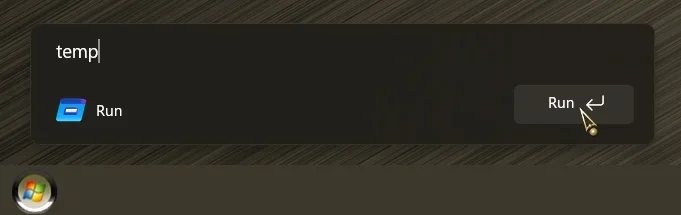
Got the new Run box but, it constantly crashes! 🤷‍♂️

0008497.webp
 

My Computers

System One System Two

  • OS
    Windows 11 Pro
    Computer type
    PC/Desktop
    Manufacturer/Model
    ASUS ROG Strix
  • Operating System
    Windows 11 Pro
    Computer type
    Laptop
    Manufacturer/Model
    ASUS VivoBook

Latest Support Threads

Back
Top Bottom