Insider KB5077221 Windows 11 Insider Canary build 28020.1611 (26H1) - Feb. 12


UPDATE 2/20:

UPDATE 2/18:


 Windows Insider Blog:

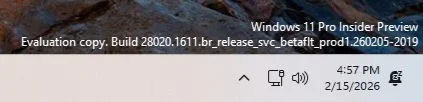
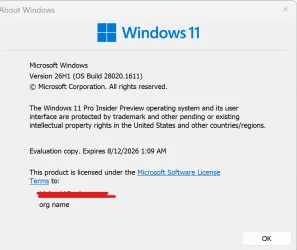
Hello Windows Insiders, today we are releasing Windows 11 Insider Preview Build 28020.1611 to the Canary Channel (the desktop watermark is showing the wrong build number and will be addressed in a near term build). (KB 5077221)


What’s new in Canary Build 28020.1611

Changes and Improvements gradually being rolled out with toggle on*


[Built-in Sysmon]

Previously announced here, Windows now brings Sysmon functionality natively to Windows. Sysmon functionality allows you to capture system events that can help with threat detection, and you can use custom configuration files to filter the events you want to monitor. The captured events are written on the Windows event log, enabling them to be used with security applications and a wide range of use cases.


Built-in Sysmon is disabled by default and must be explicitly enabled.
  1. Go to Settings > System > Optional features > More Windows features > checking Sysmon or in PowerShell or command prompt:
    • Dism /Online /Enable-Feature /FeatureName:Sysmon
  2. To complete the installation, from PowerShell or command prompt run:
    • sysmon -i
Note: If you’ve already installed Sysmon from the website, it must be uninstalled before enabling the built-in Sysmon.

Documentation will be added to Windows soon. The functionality of Sysmon remains unchanged, learn more https://learn.microsoft.com/sysinternals/downloads/sysmon.

[Windows Share]

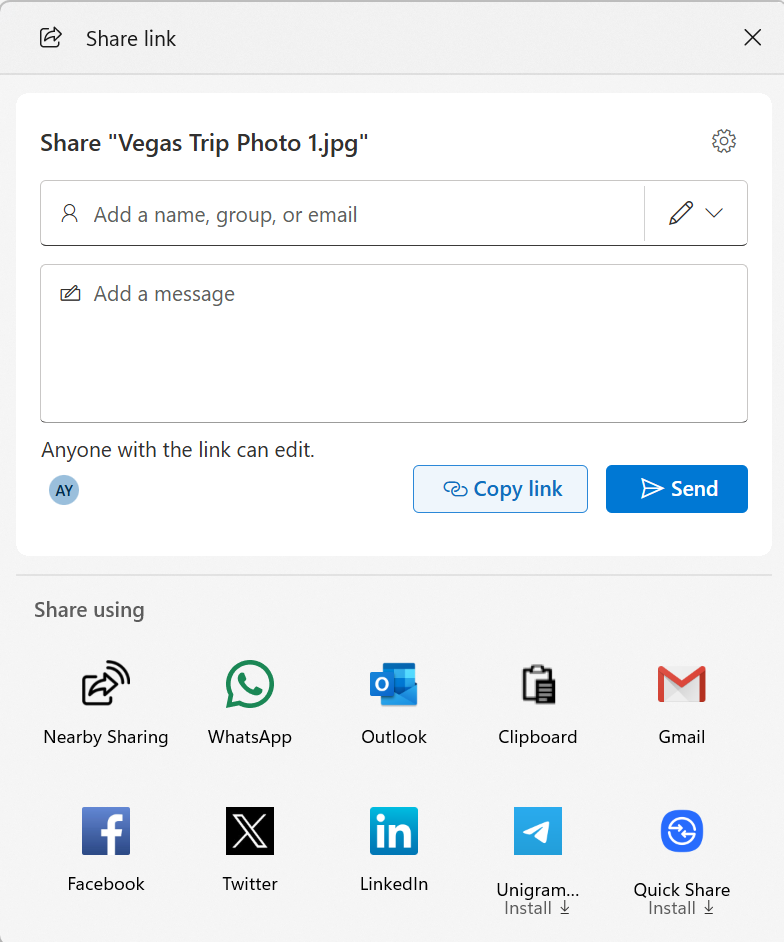
  • When you share a OneDrive cloud file by right-clicking to share on the file – new options for sharing that link through other apps will be provided under “Share using” when the “Copy link” button is clicked. This experience is rolling out to Windows Insiders signed in with their Microsoft accounts not in the EEA.


    Ability to share OneDrive cloud file links via other apps via the Windows share window.
    Ability to share OneDrive cloud file links via other apps via the Windows share window.

[General]

  • Fixed the desktop watermark to show the correct build number.

Reminders for Windows Insiders in the Canary Channel

  • These builds can be unstable and may be released with limited documentation. Join Windows Insider – Get early access to Windows 11 features & updates
  • The builds we release to the Canary Channel represent the latest platform changes early in the development cycle. Features and experiences included in these builds may never get released as we try out different concepts and get feedback. Features may change over time, be removed, or replaced and never get released beyond Windows Insiders. Some of these features and experiences could show up in future Windows releases when they’re ready.
  • Many features in the Canary Channel are rolled out using Control Feature Rollout technology, starting with a subset of Insiders and ramping up over time as we monitor feedback to see how they land before pushing them out to everyone in this channel.
  • The desktop watermark shown at the lower right corner of the desktop is normal for Windows Insider pre-release builds.
  • Some features may show up in the Dev and Beta Channels first before showing up in the Canary Channel.
  • Some features in active development we preview with Windows Insiders may not be fully localized and localization will happen over time as features are finalized. As you see issues with localization in your language, please report those issues to us via Feedback Hub.
  • To get off the Canary Channel, a clean install of Windows 11 will be required. As a reminder – Insiders can’t switch to a channel that is receiving builds with lower build numbers without doing a clean installation of Windows 11 due to technical setup requirements.
  • Check out Flight Hub for a complete look at what build is in which Insider channel.
Thanks,
Windows Insider Program Team

*Functionality will vary by device and market; text actions will be available across markets in select character sets. See aka.ms/copilotpluspcs.


 Source:


Check Windows Updates


UUP Dump:

64-bit ISO download:

ARM64 ISO download:

 
Last edited:
Hello @Imhelpingyoubro, :alien:

If this was via Windows Update, you could try updating to the latest build by upgrading with an ISO instead.
 

My Computers

System One System Two

  • OS
    Windows 11 Pro for Workstations
    Computer type
    PC/Desktop
    Manufacturer/Model
    Custom self build
    CPU
    Intel i7-8700K 5 GHz
    Motherboard
    ASUS ROG Maximus XI Formula Z390
    Memory
    64 GB (4x16GB) G.SKILL TridentZ RGB DDR4 3600 MHz (F4-3600C18D-32GTZR)
    Graphics Card(s)
    ASUS ROG-STRIX-GTX1080TI-O11G-GAMING (11GB GDDR5X)
    Sound Card
    Integrated Digital Audio (S/PDIF)
    Monitor(s) Displays
    2 x Samsung Odyssey G75 27"
    Screen Resolution
    2560x1440
    Hard Drives
    1TB Samsung 990 PRO M.2,
    4TB Samsung 990 PRO M.2,
    TerraMaster F8 SSD Plus NAS
    PSU
    Seasonic Prime Titanium 850W
    Case
    Thermaltake Core P3 wall mounted
    Cooling
    Corsair Hydro H115i
    Keyboard
    Amazon Basics Wired Full Keyboard MD005
    Mouse
    Logitech MX Master 4
    Internet Speed
    2 Gbps Download and 100 Mbps Upload
    Browser
    Chrome and Edge
    Antivirus
    Microsoft Defender
    Other Info
    Logitech Z625 speaker system,
    Logitech BRIO 4K Pro webcam,
    HP Color LaserJet Pro MFP M477fdn,
    CyberPower CP1500PFCLCD
    Galaxy S23 Plus phone
  • Operating System
    Windows 11 Pro
    Computer type
    Laptop
    Manufacturer/Model
    Surface Laptop 7 Copilot+ PC
    CPU
    Snapdragon X Elite (12 core) 3.42 GHz
    Memory
    16 GB LPDDR5x-7467 MHz
    Monitor(s) Displays
    15" HDR
    Screen Resolution
    2496 x 1664
    Hard Drives
    1 TB SSD
    Internet Speed
    Wi-Fi 7 and Bluetooth 5.4
    Browser
    Chrome and Edge
    Antivirus
    Microsoft Defender
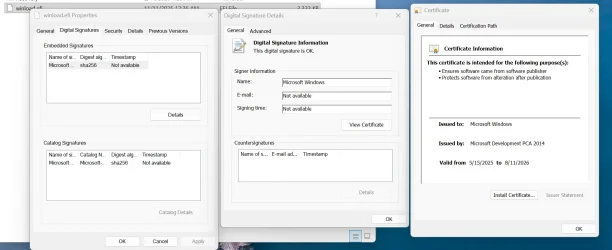
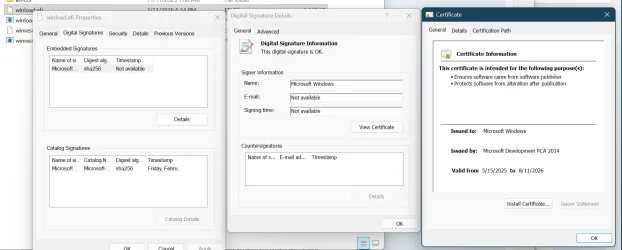
No, I meant in your original screenshot, you selected the Catalog cert (bottom one), instead of the Embedded Signature cert (top one) to view.
Is this what you are looking for?
The top ones show Microsoft Development PCA 2014 on both WinRE and Windows syatem.

1771108478898.webp


1771108796993.webp
 

My Computer

System One

  • OS
    Windows 11 Pro 25H2
    Computer type
    PC/Desktop
    Manufacturer/Model
    Dell XPS 8930
    CPU
    Intel I9-9900K
    Memory
    64GB
    Graphics Card(s)
    NVIDIA RTX 2060
    Sound Card
    NVIDIA High Definition Audio
    Monitor(s) Displays
    4k Samsung
    Screen Resolution
    3840 x 2160
    Hard Drives
    512GB NVMe, ADATA SU 800, 2TB HDD
1771108785674.webp
1771108814482.webp
:unsure: :coffee:
 

My Computer

System One

  • OS
    Windows 11 Canary
    Computer type
    PC/Desktop
    Manufacturer/Model
    MS-7A70
    CPU
    Intel(R) Core(TM) i5-7500 CPU @ 3.40GHz, 3408
    Motherboard
    B250M PRO-VDH (MS-7A70)
    Memory
    16 GB
    Graphics Card(s)
    NVIDIA GeForce GTX 1060 6GB
    Screen Resolution
    1920 x 1080 x 60 Hz
    Hard Drives
    SSD NX-512 2280

My Computer

System One

  • OS
    Windows 11 Canary
    Computer type
    PC/Desktop
    Manufacturer/Model
    MS-7A70
    CPU
    Intel(R) Core(TM) i5-7500 CPU @ 3.40GHz, 3408
    Motherboard
    B250M PRO-VDH (MS-7A70)
    Memory
    16 GB
    Graphics Card(s)
    NVIDIA GeForce GTX 1060 6GB
    Screen Resolution
    1920 x 1080 x 60 Hz
    Hard Drives
    SSD NX-512 2280
Is this what you are looking for?
Yep. I checked and MS Development PCA 2014 isn't on my 25H2 cert store. And you have the "Install Certificate" button which confirms it's not on your cert store. So I'm guessing the wrong files are floating out there.

dead-canary.webp
 

My Computer

System One

  • OS
    Windows 7
Yep. I checked and MS Development PCA 2014 isn't on my 25H2 cert store. And you have the "Install Certificate" button which confirms it's not on your cert store. So I'm guessing the wrong files are floating out there.

View attachment 163331
According to Microsoft, PCA 2014 is common, but not all OEM vendors are updated to handle that.
Looks like only my Dell PCs XPS 8930 and XPS 8940 have the problem with the Microsoft Development PCA 2014 when booting WinRE.
The GMKtec mini M2 and K3 are fine with that same PCA 2014. 😵‍💫🤷‍♂️
 

My Computer

System One

  • OS
    Windows 11 Pro 25H2
    Computer type
    PC/Desktop
    Manufacturer/Model
    Dell XPS 8930
    CPU
    Intel I9-9900K
    Memory
    64GB
    Graphics Card(s)
    NVIDIA RTX 2060
    Sound Card
    NVIDIA High Definition Audio
    Monitor(s) Displays
    4k Samsung
    Screen Resolution
    3840 x 2160
    Hard Drives
    512GB NVMe, ADATA SU 800, 2TB HDD
According to Microsoft, PCA 2014 is common, but not all OEM vendors are updated to handle that.
Looks like only my Dell PCs XPS 8930 and XPS 8940 have the problem with the Microsoft Development PCA 2014 when booting WinRE.
The GMKtec mini M2 and K3 are fine with that same PCA 2014. 😵‍💫🤷‍♂️
Can you run my UEFI check script on one Dell, and one GMKtec? I'm not interesting in onlythe list of DB & DBX certs. I know some older Dells throw in an additional MS cert that newer PC's don't include.
 

My Computer

System One

  • OS
    Windows 7
Can you run my UEFI check script on one Dell, and one GMKtec? I'm not interesting in onlythe list of DB & DBX certs. I know some older Dells throw in an additional MS cert that newer PC's don't include.
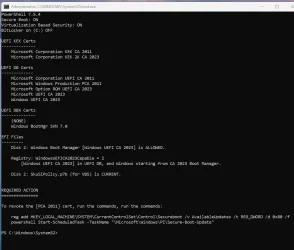
This one is on Dell XPS 8930:
1771112443232.webp

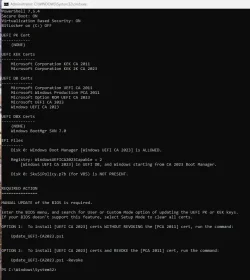
This one is on GMKtec K3:
1771112679863.webp

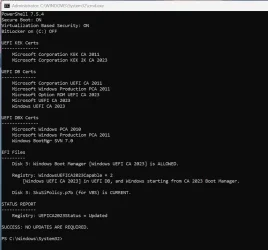
The other Dell XPS 8940:
1771112931565.webp
 

My Computer

System One

  • OS
    Windows 11 Pro 25H2
    Computer type
    PC/Desktop
    Manufacturer/Model
    Dell XPS 8930
    CPU
    Intel I9-9900K
    Memory
    64GB
    Graphics Card(s)
    NVIDIA RTX 2060
    Sound Card
    NVIDIA High Definition Audio
    Monitor(s) Displays
    4k Samsung
    Screen Resolution
    3840 x 2160
    Hard Drives
    512GB NVMe, ADATA SU 800, 2TB HDD
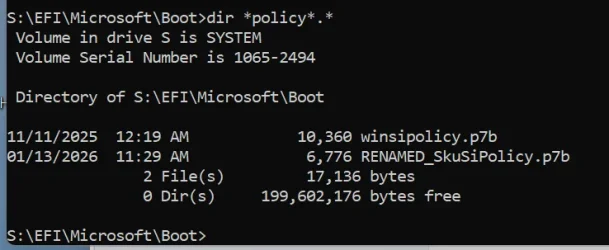
Dell has the SkuSiPolicy.p7b, GMKTec doesn't.
SkuSiPolicy.p7b was an early workaround to boot file security, (before MS promoted the current Secure Boot method).

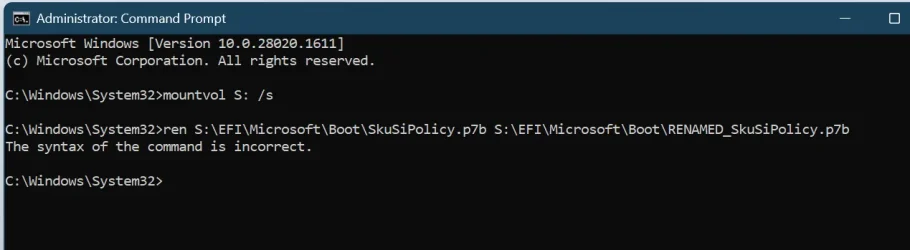
Code:
mountvol S: /s
ren S:\EFI\Microsoft\Boot\SkuSiPolicy.p7b S:\EFI\Microsoft\Boot\RENAMED_SkuSiPolicy.p7b
mountvol S: /d
 

My Computer

System One

  • OS
    Windows 7
Dell has the SkuSiPolicy.p7b, GMKTec doesn't.
SkuSiPolicy.p7b was an early workaround to boot file security, (before MS promoted the current Secure Boot method).

Code:
mountvol S: /s
ren S:\EFI\Microsoft\Boot\SkuSiPolicy.p7b S:\EFI\Microsoft\Boot\RENAMED_SkuSiPolicy.p7b
mountvol S: /d
1771113475292.webp

Is it this name?
1771113719421.webp
 

My Computer

System One

  • OS
    Windows 11 Pro 25H2
    Computer type
    PC/Desktop
    Manufacturer/Model
    Dell XPS 8930
    CPU
    Intel I9-9900K
    Memory
    64GB
    Graphics Card(s)
    NVIDIA RTX 2060
    Sound Card
    NVIDIA High Definition Audio
    Monitor(s) Displays
    4k Samsung
    Screen Resolution
    3840 x 2160
    Hard Drives
    512GB NVMe, ADATA SU 800, 2TB HDD
Now I'm more confused, after noticing the 2nd Dell's output.
1771115515183.webp

Edit:
That made a bigger mess, I had to disable secure boot and restore a backup. Then re-enable secure boot.
Looks like renaming that policy was causing a bigger problem.
 
Last edited:

My Computer

System One

  • OS
    Windows 11 Pro 25H2
    Computer type
    PC/Desktop
    Manufacturer/Model
    Dell XPS 8930
    CPU
    Intel I9-9900K
    Memory
    64GB
    Graphics Card(s)
    NVIDIA RTX 2060
    Sound Card
    NVIDIA High Definition Audio
    Monitor(s) Displays
    4k Samsung
    Screen Resolution
    3840 x 2160
    Hard Drives
    512GB NVMe, ADATA SU 800, 2TB HDD
1771142575410.webp
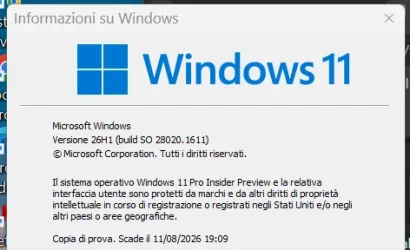
Edizione Windows 11 Pro Insider Anteprima
Versione 26H1
Data installazione: ‎14/‎02/‎2026
Dati di scadenza della valutazione ‎11/‎08/‎2026 20:09
Costruisci il sistema operativo 28020.1611
Feature Pack Pacchetto di esperienze per funzionalità Windows 1000.26100.330.0
 

My Computer

System One

  • OS
    Windows 11 Pro Insider Preview Dev
    Computer type
    PC/Desktop
    Manufacturer/Model
    To be filled by O.E.M.
    CPU
    AMD Ryzen™ 5 5600G with Radeon Graphics 3.90 GHz
    Motherboard
    MSI B450 GAMING PLUS MAX
    Memory
    16,0 GB
    Graphics Card(s)
    NVIDIA GeForce GT 720, NVIDIA compatible
    Sound Card
    NVIDIA High Definition Audio
    Monitor(s) Displays
    BenQ GW2270 Color Profile.D6500
    Screen Resolution
    1920 x 1080
    Hard Drives
    Samsung SSD 850 EVO 250GB + CT1000BX500SSD1 + ST2000DM006-2DM164 + WDC WD5000AAKS-07TMA0 +WDC WD10EARX-00N0YB0
    PSU
    EVGA 600 W2, 80+ WHITE 600W, 3 Year Warranty, Power Supply 100-W2-0600-K2 (EU)
    Case
    RAIJINTEK Agos - mid tower - ATX
    Cooling
    Cooler Master Hyper 212 Evo heatsink + Fans: 2 front+1 back+1 up
    Keyboard
    Logitech Internet 350 Keyboard
    Mouse
    Logitech MX Revolution
    Internet Speed
    Download 159.29 Mbps - Upload 80.14 Mbps
    Browser
    Google Crome Dev
    Antivirus
    Microsoft Windows Security
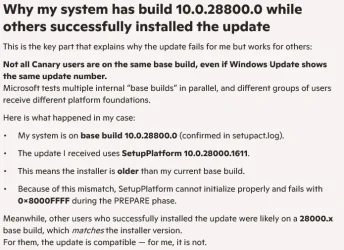
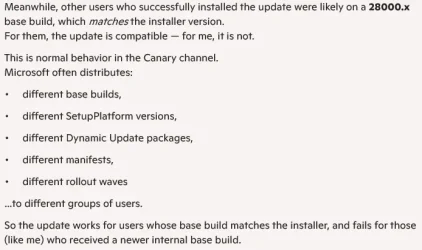
"My system is on base build 10.0.28800.0 (confirmed in setupact.log)"

There is no official 28800 build that I or Google can find. What does your Winver show?

Google said:
AI Overview


Based on the provided search results, there is no widely known current Windows operating system version with the specific build number "28800".
The number 28800 appears in the context of PC hardware and technical settings rather than a OS build version

Google Search
 

My Computers

System One System Two

  • OS
    Windows 11 Home
    Computer type
    Laptop
    Manufacturer/Model
    Acer Aspire 3 A315-23-R9VY
    CPU
    AMD Athlon Silver 3050U
    Memory
    8GB
    Graphics Card(s)
    Radeon Graphics
    Monitor(s) Displays
    laptop screen
    Screen Resolution
    1366x768 native resolution, up to 2560x1440 with Radeon Virtual Super Resolution
    Hard Drives
    1TB Samsung EVO 870 SSD (from April 2026: 250GB EVO 850)
    Internet Speed
    150 Mbps
    Browser
    Edge, Firefox
    Antivirus
    Defender
    Other Info
    fully 'Windows 11 ready' laptop. Windows 10 C: partition migrated from my old unsupported 'main machine' then upgraded to 11. A test migration ran Insider builds for 2 months. When 11 was released on 5th October 2021 it was re-imaged back to 10 and was offered the upgrade in Windows Update on 20th October. Windows Update offered the 22H2 Feature Update on 20th September 2022. It got the 23H2 Feature Update on 4th November 2023 through Windows Update, 24H2 on 3rd October 2024 through Windows Update by setting the Target Release Version for 24H2, and 25H2 on 30th September 2025 through Windows Update by setting the Target Release Version for 25H2.

    UPDATE - 11 April 2026: due to mechanical deterioration this PC has been retired from active duty. The OS with all software and files has been migrated to my System Seven below to carry on as my general purpose 'main machine'.

    My SYSTEM THREE is a Dell Latitude 5410, i7-10610U, 32GB RAM, 512GB NVMe ssd, supported device running Windows 11 Pro.

    My SYSTEM FOUR is a 2-in-1 convertible Lenovo Yoga 11e 20DA, Celeron N2930, 8GB RAM, 256GB ssd. Unsupported device: currently running Win10 Pro, plus Win11 Pro RTM and Insider Dev, Beta, and RP 24H2 as native boot vhdx.

    My SYSTEM FIVE is a Dell Latitude 3190 2-in-1, Pentium Silver N5030, 8GB RAM, 1TB NVMe ssd, supported device running Windows 11 Pro, plus Insider Beta, Dev, and Canary builds (and a few others) as a native boot .vhdx.

    My SYSTEM SIX is a Dell Latitude 5550, Core Ultra 7 165H, 64GB RAM, 1TB NVMe SSD, supported device, Windows 11 Pro 24H2, Hyper-V host machine. Updated to 25H2 on 30th September 2025.

    My SYSTEM SEVEN is a Lenovo Thinkpad T580, Intel Core i7-8650U, 16GB RAM, 512GB NVMe SSD + 2nd 512GB NVMe SSD, a supported device for Windows 11. This is my current general purpose 'main machine'. The installed Windows 11 Home from my System One has been migrated to this machine.
  • Operating System
    Windows 11 Pro
    Computer type
    Laptop
    Manufacturer/Model
    Dell Latitude E4310
    CPU
    Intel® Core™ i5-520M
    Motherboard
    0T6M8G
    Memory
    8GB
    Graphics card(s)
    (integrated graphics) Intel HD Graphics
    Screen Resolution
    1366x768
    Hard Drives
    500GB Crucial MX500 SSD
    Browser
    Firefox, Edge
    Antivirus
    Defender
    Other Info
    unsupported machine: Legacy bios, MBR, TPM 1.2, upgraded from W10 to W11 using W10/W11 hybrid install media workaround. In-place upgrade to 22H2 using ISO and a workaround. Feature Update to 23H2 by manually installing the Enablement Package. In-place upgrade to 24H2 using hybrid 23H2/24H2 install media. Upgraded to 25H2 by Enablement Package. Also running Insider Dev, and Canary builds and Windows 10 as native boot .vhdx.

    My SYSTEM THREE is a Dell Latitude 5410, i7-10610U, 32GB RAM, 512GB NVMe ssd, supported device running Windows 11 Pro.

    My SYSTEM FOUR is a 2-in-1 convertible Lenovo Yoga 11e 20DA, Celeron N2930, 8GB RAM, 256GB ssd. Unsupported device: currently running Win10 Pro, plus Win11 Pro RTM and Insider Dev, Beta, and RP 24H2 as native boot vhdx.

    My SYSTEM FIVE is a Dell Latitude 3190 2-in-1, Pentium Silver N5030, 8GB RAM, 1TB NVMe ssd, supported device running Windows 11 Pro, plus Insider Beta, Dev, and Canary builds (and a few others) as a native boot .vhdx.

    My SYSTEM SIX is a Dell Latitude 5550, Core Ultra 7 165H, 64GB RAM, 1TB NVMe SSD, supported device, Windows 11 Pro 24H2, Hyper-V host machine. Updated to 25H2 on 30th September 2025.

    My SYSTEM SEVEN is a Lenovo Thinkpad T580, Intel Core i7-8650U, 16GB RAM, 512GB NVMe SSD + 2nd 512GB NVMe SSD, a supported device for Windows 11. This is my current general purpose 'main machine'. The installed Windows 11 Home from my System One has been migrated to this machine.
My WU install on a external SSD went smooth,
it took 45 minutes from start of DL (7 items) to restart to desktop.

Win11 b28020.1611_ 1bb1stDesktop.webp
 

My Computers

System One System Two

  • OS
    Windows 11 Pro
    Computer type
    PC/Desktop
    Manufacturer/Model
    Self made in 2023
    CPU
    i7-12900K @ 3.2 GHz
    Motherboard
    ASUS ROG Maximus Z790 APEX
    Memory
    2/16 GB Critical DDR5
    Graphics Card(s)
    GeForce RTX 3060 Ti
    Sound Card
    On board sound
    Monitor(s) Displays
    27 inch LED
    Hard Drives
    1 TB Samsung SSD w/ 3 partitions
    250 GB Samsung SSD for WSE 2016 BU OS
    1 TB Samsung SSD (Storage)
    PSU
    RM850x SHIFT 80 PLUS Gold Fully Modular
    Case
    Fractal Design Define 7 Compact - Mid Tower
    Browser
    EDGE
  • Operating System
    Windows 11 Pro x2
    Computer type
    Laptop
    Manufacturer/Model
    LG gram 15, 15.6" Laptop
    CPU
    Core i5-1135G7
    Motherboard
    LG
    Memory
    16GB M.2 2280 NVMe SSD
    Graphics card(s)
    Integrated - Intel Iris Xe Graphics
    Sound Card
    Onboard sound
    Monitor(s) Displays
    15.6" IPS Display
    Screen Resolution
    Full HD 1920 x 1080
    Hard Drives
    512 GB
    Browser
    EDGE
"My system is on base build 10.0.28800.0 (confirmed in setupact.log)"

There is no official 28800 build that I or Google can find. What does your Winver show?


Google Search
Hello @Imhelpingyoubro, :alien:

If this was via Windows Update, you could try updating to the latest build by upgrading with an ISO instead.
I'll tell you, this update gave me a stomach ache. All methods failed, Rufus and running setup.exe on the working system also did not work, the installation stopped at 68%. I even tried with a minimum amount of connected hardware and the LAN cable disconnected, and in the end, when Gemini - yes, I changed the model because Copilot has some absurd limitations. After reading the error logs, Gemini specifically informed me that I did not have enough space in the EFI system partition, but as soon as I cleared the fonts, other errors appeared and the installation did not even reach 68%. Gemini told me to make registry fixes using CMD based on these errors, but I had had enough. My system was so corrupted that I couldn't even enter the BIOS! I didn't want to wait for the twentieth time for the installation to reach 68% and freeze. Fortunately, the automatic repair started just in time, and I was able to choose to boot from USB when I was mentally prepared for a clean format and had moved all my important files to a second hard drive. Yes, it was the best decision I made. Everything went smoothly, which was good because I hadn't formatted this computer in 4 years! How time flies! Imagine that all the complications that were available in Canary went through my system, so at some point it had to freeze! Oh dear, there was so much junk in there! Now my computer works like a dream, so the conclusion is that it's better to start over than to force something that could make the situation even worse. @fg2001gf11F
View attachment 163351

Edit:
That made a bigger mess, I had to disable secure boot and restore a backup. Then re-enable secure boot.
Looks like renaming that policy was causing a bigger problem.
🙄😮‍💨
Thank you for your help, and best regards to everyone and this wonderful forum. 😇😁
 

My Computer

System One

  • OS
    Windows 11 Canary
    Computer type
    PC/Desktop
    Manufacturer/Model
    MS-7A70
    CPU
    Intel(R) Core(TM) i5-7500 CPU @ 3.40GHz, 3408
    Motherboard
    B250M PRO-VDH (MS-7A70)
    Memory
    16 GB
    Graphics Card(s)
    NVIDIA GeForce GTX 1060 6GB
    Screen Resolution
    1920 x 1080 x 60 Hz
    Hard Drives
    SSD NX-512 2280
Update my PC with wu almost 2 hours:cool: my laptop with UUP damp 50 minute's i try my PC with UUP Damp but delevery service for microsoft streaming not responce Error:mad:


Screenshot 2026-02-16 145219.webp
 

My Computers

System One System Two

  • OS
    Windows 11 Pro Insider OS Build 29599.1000
    Computer type
    PC/Desktop
    Manufacturer/Model
    Build Aswin😂😂👍
    CPU
    i9-9900 8C/16T Coffee Lake
    Motherboard
    MSI-B360 Gaming Pro Carbon-ATX(update bios 2D2(2021) to 2D0 (2022)
    Memory
    (2 x 8 GB) 16 GB DDR-4 @3000 Mhz Patriot Viper
    Graphics Card(s)
    Nvidea RTX-2080 Ti 11 GB asus
    Sound Card
    Speaker(Realtek audio)(standby) and Lg Speaker build in
    Monitor(s) Displays
    Monitors LG TV 43 inch 43NANO75TPA,(4K,60 Hz,WCG,HLG,HDR10+): Hdmi 2.0b x3
    Screen Resolution
    Desktop mode 4096 x 2160/60 Hz Active Signal Mode 4096 x 2160/60 Hz,HDR Enable: Destop Mode 4096x2160/60Hz Active Signal Mode 4096 x2160/60 Hz
    Hard Drives
    1.M2.Nvme SSD Gen 3 x4,1 TB KYO Utimate K350 (OS) with heat sink 2.M2.Nvme SSD gen 3 x 4-512 GB KYO ULTIMATE K350 with heat Sink 3. SSD SATA 500 GB WD 4.SSD SATA120 GB Kingston....5. HDD 1TB Seagate
    PSU
    850 w full modular 80 gold gamemax
    Case
    Aigo DarkFlash phantom ATX(with 8 RGB Fans(4 Front+ 2 Rear (exhaust)+ 2 bottom side) DR 12) Tempered glass -Full Tower.
    Cooling
    AIO gamemax(CPU liquid cooler) L240 RGB-Top side(exhaust)
    Keyboard
    Logitech
    Mouse
    logitech
    Internet Speed
    Cable LAN CAT 6 E(25 meters) ,TP-link switch adapter 5 ports 1000/1000 Mbps Download 141 Mbps Upload 141 Mbps, Intel® I219-V Gigabit LAN controller
    Browser
    edge stable
    Antivirus
    MS defender A/V
    Other Info
    This PC on second floor, GPON ONT (optic network terminal ISP term) on ist floor
    2021
    add 2 fans 120 mm in bottom side😊👍.oct
    2022
    Replace TP link switch adapter 100/100 to 1000/1000 may
    2023 jan
    detected 1 Ram 3200 Mhz Hyper X kingston problem -> replace both with patriot DDR4 3000 Mhz from ex i7-9700😁
    2023 jan
    update bios 2D2(2021) --->> 2D0 (2022)
    2023 March
    Change storage : SSD SATA ------>>>>M2.NVme SSD (OS)
    2023 April
    Change storage for OS Nvme 512GB ---->>> 1TB
    2024
    PSU 650 w 80 plus bronze -------> 850 w full modular 80 gold
    GTX 1060 6 GB galax-------> RTX 2080 Ti Asrock 2 x 8 pin
    update bios from 2D0------>>> 2E0
    change cable Hdmi 2.0b to hdmi 2.1 and resetting Nvidia control panel
    just testing after new processor come will replace with hdmi2.0b .

    26 March 2026 update bios from 2D0(2022) to 2E0 (2024)
  • Operating System
    Windows 11 Pro Insider OS ver 25 H2 26300.8553
    Computer type
    Laptop
    Manufacturer/Model
    Acer Nitro AN515-54
    CPU
    Intel core i5-9300H [email protected] GHz 4C/8T Coffee Lake
    Motherboard
    Manufacturer CFL , Model Octavia_CFS , Bios Version V1.33( 11/17/2020)
    Memory
    DDR4 16 GB 2 x 8 GB, 2666 Mhz Sk Hynix- Jedec 11 : CL : 20-19-19-43-61/1.2 V
    Graphics card(s)
    1. Intel graphic UHD 630 2. Nvidea Geforce GTX 1650 , 4 GB
    Sound Card
    1.Realtek Version 6.0.8929.1 2. NVIDIA Version 4.39.0.0 ( Virtual Audio Device ( Wave Extensible) (WDM)
    Monitor(s) Displays
    15.6"
    Screen Resolution
    1920 x 1080
    Hard Drives
    1.M2.Nvme SSD gen 3 x 4-1TB (OS) XPG SX8200 Pro with Heatsink 2. M2. SATA 1 TB 3. HDD 1 TB
    PSU
    Acer
    Case
    Acer
    Cooling
    Double Cooling Fans
    Keyboard
    1.Acer 2.Votre(wired)
    Mouse
    Optical mouse(FO)
    Internet Speed
    1. Cable Lan Cat 6E (25 meters) 2. Intel Wireless-AC 9560 160 Mhz 3. Realtek Gaming GBe Family cont (RJ45). TP-link switch adapter 1000/1000 Mbps Download : 187 Mbps Upload : 87 Mbps
    Browser
    Edge Stable
    Antivirus
    MS A/V
    Other Info
    This Laptop on second Floor , GPON ONT(optic network terminal ISP term ) on 1st Floor
    2022
    1. Upgraded from Windows 11 Home to Pro------May
    2. Replace TP link switch adapter 100/100 to 1000/1000→→→May
    2023
    3.Repale Storage(OS) from SATA to NVME---->> Feb
    4. ugrade ram 12 GB to 16 GB------>>>>April
    2024
    nvme 512GB replace to 1 TB
    M2 sata 240 GB replace to 1 TB
Update my PC with wu almost 2 hours:cool: my laptop with UUP damp 50 minute's i try my PC with UUP Damp but delevery service for microsoft streaming not responce Error:mad:
UUP-dump. 😂🤷‍♂️
 

My Computer

System One

  • OS
    Windows 11 Pro 25H2
    Computer type
    PC/Desktop
    Manufacturer/Model
    Dell XPS 8930
    CPU
    Intel I9-9900K
    Memory
    64GB
    Graphics Card(s)
    NVIDIA RTX 2060
    Sound Card
    NVIDIA High Definition Audio
    Monitor(s) Displays
    4k Samsung
    Screen Resolution
    3840 x 2160
    Hard Drives
    512GB NVMe, ADATA SU 800, 2TB HDD
UUP-dump. 😂🤷‍♂️
iam also try iso and iam happy when kb... with size 1.0Gbe appear and kb...2.0GBe also so this size enough for my shadow copy for back up but same error with UUP dump(windows straming not respon) when WU finish i try to backup shadow copy error :mad: my laptop back up smooth(y)
 

My Computers

System One System Two

  • OS
    Windows 11 Pro Insider OS Build 29599.1000
    Computer type
    PC/Desktop
    Manufacturer/Model
    Build Aswin😂😂👍
    CPU
    i9-9900 8C/16T Coffee Lake
    Motherboard
    MSI-B360 Gaming Pro Carbon-ATX(update bios 2D2(2021) to 2D0 (2022)
    Memory
    (2 x 8 GB) 16 GB DDR-4 @3000 Mhz Patriot Viper
    Graphics Card(s)
    Nvidea RTX-2080 Ti 11 GB asus
    Sound Card
    Speaker(Realtek audio)(standby) and Lg Speaker build in
    Monitor(s) Displays
    Monitors LG TV 43 inch 43NANO75TPA,(4K,60 Hz,WCG,HLG,HDR10+): Hdmi 2.0b x3
    Screen Resolution
    Desktop mode 4096 x 2160/60 Hz Active Signal Mode 4096 x 2160/60 Hz,HDR Enable: Destop Mode 4096x2160/60Hz Active Signal Mode 4096 x2160/60 Hz
    Hard Drives
    1.M2.Nvme SSD Gen 3 x4,1 TB KYO Utimate K350 (OS) with heat sink 2.M2.Nvme SSD gen 3 x 4-512 GB KYO ULTIMATE K350 with heat Sink 3. SSD SATA 500 GB WD 4.SSD SATA120 GB Kingston....5. HDD 1TB Seagate
    PSU
    850 w full modular 80 gold gamemax
    Case
    Aigo DarkFlash phantom ATX(with 8 RGB Fans(4 Front+ 2 Rear (exhaust)+ 2 bottom side) DR 12) Tempered glass -Full Tower.
    Cooling
    AIO gamemax(CPU liquid cooler) L240 RGB-Top side(exhaust)
    Keyboard
    Logitech
    Mouse
    logitech
    Internet Speed
    Cable LAN CAT 6 E(25 meters) ,TP-link switch adapter 5 ports 1000/1000 Mbps Download 141 Mbps Upload 141 Mbps, Intel® I219-V Gigabit LAN controller
    Browser
    edge stable
    Antivirus
    MS defender A/V
    Other Info
    This PC on second floor, GPON ONT (optic network terminal ISP term) on ist floor
    2021
    add 2 fans 120 mm in bottom side😊👍.oct
    2022
    Replace TP link switch adapter 100/100 to 1000/1000 may
    2023 jan
    detected 1 Ram 3200 Mhz Hyper X kingston problem -> replace both with patriot DDR4 3000 Mhz from ex i7-9700😁
    2023 jan
    update bios 2D2(2021) --->> 2D0 (2022)
    2023 March
    Change storage : SSD SATA ------>>>>M2.NVme SSD (OS)
    2023 April
    Change storage for OS Nvme 512GB ---->>> 1TB
    2024
    PSU 650 w 80 plus bronze -------> 850 w full modular 80 gold
    GTX 1060 6 GB galax-------> RTX 2080 Ti Asrock 2 x 8 pin
    update bios from 2D0------>>> 2E0
    change cable Hdmi 2.0b to hdmi 2.1 and resetting Nvidia control panel
    just testing after new processor come will replace with hdmi2.0b .

    26 March 2026 update bios from 2D0(2022) to 2E0 (2024)
  • Operating System
    Windows 11 Pro Insider OS ver 25 H2 26300.8553
    Computer type
    Laptop
    Manufacturer/Model
    Acer Nitro AN515-54
    CPU
    Intel core i5-9300H [email protected] GHz 4C/8T Coffee Lake
    Motherboard
    Manufacturer CFL , Model Octavia_CFS , Bios Version V1.33( 11/17/2020)
    Memory
    DDR4 16 GB 2 x 8 GB, 2666 Mhz Sk Hynix- Jedec 11 : CL : 20-19-19-43-61/1.2 V
    Graphics card(s)
    1. Intel graphic UHD 630 2. Nvidea Geforce GTX 1650 , 4 GB
    Sound Card
    1.Realtek Version 6.0.8929.1 2. NVIDIA Version 4.39.0.0 ( Virtual Audio Device ( Wave Extensible) (WDM)
    Monitor(s) Displays
    15.6"
    Screen Resolution
    1920 x 1080
    Hard Drives
    1.M2.Nvme SSD gen 3 x 4-1TB (OS) XPG SX8200 Pro with Heatsink 2. M2. SATA 1 TB 3. HDD 1 TB
    PSU
    Acer
    Case
    Acer
    Cooling
    Double Cooling Fans
    Keyboard
    1.Acer 2.Votre(wired)
    Mouse
    Optical mouse(FO)
    Internet Speed
    1. Cable Lan Cat 6E (25 meters) 2. Intel Wireless-AC 9560 160 Mhz 3. Realtek Gaming GBe Family cont (RJ45). TP-link switch adapter 1000/1000 Mbps Download : 187 Mbps Upload : 87 Mbps
    Browser
    Edge Stable
    Antivirus
    MS A/V
    Other Info
    This Laptop on second Floor , GPON ONT(optic network terminal ISP term ) on 1st Floor
    2022
    1. Upgraded from Windows 11 Home to Pro------May
    2. Replace TP link switch adapter 100/100 to 1000/1000→→→May
    2023
    3.Repale Storage(OS) from SATA to NVME---->> Feb
    4. ugrade ram 12 GB to 16 GB------>>>>April
    2024
    nvme 512GB replace to 1 TB
    M2 sata 240 GB replace to 1 TB

My Computer

System One

  • OS
    26200.8037
    Computer type
    PC/Desktop
    CPU
    i5-11400F
    Motherboard
    Gigabyte
    Memory
    32GB
    Graphics Card(s)
    Geforce GT-1030
    Keyboard
    Logitech K400
    Mouse
    Logitech M720
    Internet Speed
    600 Mb
    Browser
    Edge
Back
Top Bottom