Insider KB5077221 Windows 11 Insider Canary build 28020.1611 (26H1) - Feb. 12


UPDATE 2/20:

UPDATE 2/18:


 Windows Insider Blog:

Hello Windows Insiders, today we are releasing Windows 11 Insider Preview Build 28020.1611 to the Canary Channel (the desktop watermark is showing the wrong build number and will be addressed in a near term build). (KB 5077221)


What’s new in Canary Build 28020.1611

Changes and Improvements gradually being rolled out with toggle on*


[Built-in Sysmon]

Previously announced here, Windows now brings Sysmon functionality natively to Windows. Sysmon functionality allows you to capture system events that can help with threat detection, and you can use custom configuration files to filter the events you want to monitor. The captured events are written on the Windows event log, enabling them to be used with security applications and a wide range of use cases.


Built-in Sysmon is disabled by default and must be explicitly enabled.
  1. Go to Settings > System > Optional features > More Windows features > checking Sysmon or in PowerShell or command prompt:
    • Dism /Online /Enable-Feature /FeatureName:Sysmon
  2. To complete the installation, from PowerShell or command prompt run:
    • sysmon -i
Note: If you’ve already installed Sysmon from the website, it must be uninstalled before enabling the built-in Sysmon.

Documentation will be added to Windows soon. The functionality of Sysmon remains unchanged, learn more https://learn.microsoft.com/sysinternals/downloads/sysmon.

[Windows Share]

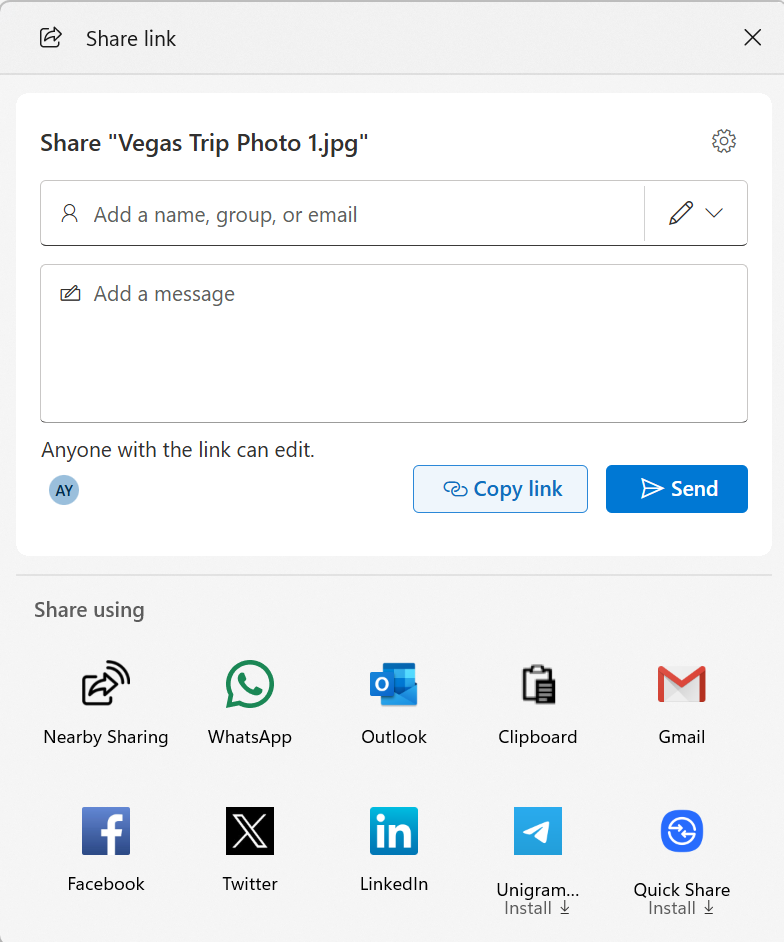
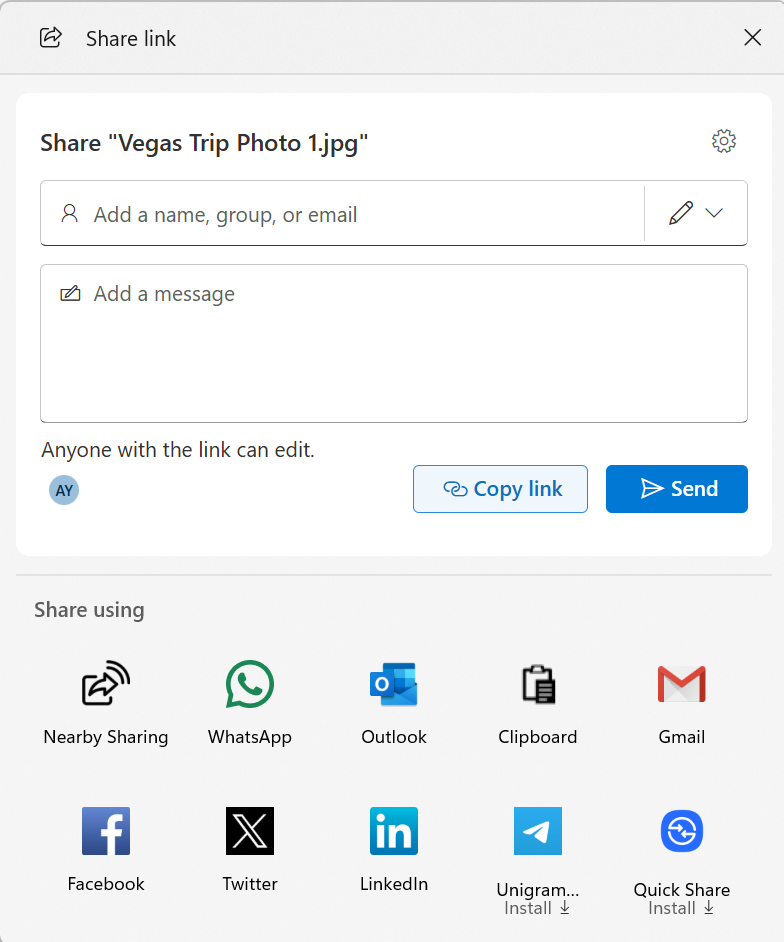
  • When you share a OneDrive cloud file by right-clicking to share on the file – new options for sharing that link through other apps will be provided under “Share using” when the “Copy link” button is clicked. This experience is rolling out to Windows Insiders signed in with their Microsoft accounts not in the EEA.


    Ability to share OneDrive cloud file links via other apps via the Windows share window.
    Ability to share OneDrive cloud file links via other apps via the Windows share window.

[General]

  • Fixed the desktop watermark to show the correct build number.

Reminders for Windows Insiders in the Canary Channel

  • These builds can be unstable and may be released with limited documentation. Join Windows Insider – Get early access to Windows 11 features & updates
  • The builds we release to the Canary Channel represent the latest platform changes early in the development cycle. Features and experiences included in these builds may never get released as we try out different concepts and get feedback. Features may change over time, be removed, or replaced and never get released beyond Windows Insiders. Some of these features and experiences could show up in future Windows releases when they’re ready.
  • Many features in the Canary Channel are rolled out using Control Feature Rollout technology, starting with a subset of Insiders and ramping up over time as we monitor feedback to see how they land before pushing them out to everyone in this channel.
  • The desktop watermark shown at the lower right corner of the desktop is normal for Windows Insider pre-release builds.
  • Some features may show up in the Dev and Beta Channels first before showing up in the Canary Channel.
  • Some features in active development we preview with Windows Insiders may not be fully localized and localization will happen over time as features are finalized. As you see issues with localization in your language, please report those issues to us via Feedback Hub.
  • To get off the Canary Channel, a clean install of Windows 11 will be required. As a reminder – Insiders can’t switch to a channel that is receiving builds with lower build numbers without doing a clean installation of Windows 11 due to technical setup requirements.
  • Check out Flight Hub for a complete look at what build is in which Insider channel.
Thanks,
Windows Insider Program Team

*Functionality will vary by device and market; text actions will be available across markets in select character sets. See aka.ms/copilotpluspcs.


 Source:


Check Windows Updates


UUP Dump:

64-bit ISO download:

ARM64 ISO download:

 
Last edited:

Looks like a newer Canary 28020.1619 build is being tested by MS internally, and may be the one that gets released next. :alien:
 

My Computers

System One System Two

  • OS
    Windows 11 Pro for Workstations
    Computer type
    PC/Desktop
    Manufacturer/Model
    Custom self build
    CPU
    Intel i7-8700K 5 GHz
    Motherboard
    ASUS ROG Maximus XI Formula Z390
    Memory
    64 GB (4x16GB) G.SKILL TridentZ RGB DDR4 3600 MHz (F4-3600C18D-32GTZR)
    Graphics Card(s)
    ASUS ROG-STRIX-GTX1080TI-O11G-GAMING (11GB GDDR5X)
    Sound Card
    Integrated Digital Audio (S/PDIF)
    Monitor(s) Displays
    2 x Samsung Odyssey G75 27"
    Screen Resolution
    2560x1440
    Hard Drives
    1TB Samsung 990 PRO M.2,
    4TB Samsung 990 PRO M.2,
    TerraMaster F8 SSD Plus NAS
    PSU
    Seasonic Prime Titanium 850W
    Case
    Thermaltake Core P3 wall mounted
    Cooling
    Corsair Hydro H115i
    Keyboard
    Amazon Basics Wired Full Keyboard MD005
    Mouse
    Logitech MX Master 4
    Internet Speed
    2 Gbps Download and 100 Mbps Upload
    Browser
    Chrome and Edge
    Antivirus
    Microsoft Defender
    Other Info
    Logitech Z625 speaker system,
    Logitech BRIO 4K Pro webcam,
    HP Color LaserJet Pro MFP M477fdn,
    CyberPower CP1500PFCLCD
    Galaxy S23 Plus phone
  • Operating System
    Windows 11 Pro
    Computer type
    Laptop
    Manufacturer/Model
    Surface Laptop 7 Copilot+ PC
    CPU
    Snapdragon X Elite (12 core) 3.42 GHz
    Memory
    16 GB LPDDR5x-7467 MHz
    Monitor(s) Displays
    15" HDR
    Screen Resolution
    2496 x 1664
    Hard Drives
    1 TB SSD
    Internet Speed
    Wi-Fi 7 and Bluetooth 5.4
    Browser
    Chrome and Edge
    Antivirus
    Microsoft Defender
Looks like a newer Canary 28020.1619 build is being tested by MS internally, and may be the one that gets released next. :alien:
I hope they fix the winload.efi signature problem when booting WinRE. 🤞

1771264578892.webp
 

My Computer

System One

  • OS
    Windows 11 Pro 25H2
    Computer type
    PC/Desktop
    Manufacturer/Model
    Dell XPS 8930
    CPU
    Intel I9-9900K
    Memory
    64GB
    Graphics Card(s)
    NVIDIA RTX 2060
    Sound Card
    NVIDIA High Definition Audio
    Monitor(s) Displays
    4k Samsung
    Screen Resolution
    3840 x 2160
    Hard Drives
    512GB NVMe, ADATA SU 800, 2TB HDD
When did you do clean install ? With which build ?
i never clean instal my PC my laptop yes during i got 2 color dispaly black and white i use rufus and success my PC always available WU
 

My Computers

System One System Two

  • OS
    Windows 11 Pro Insider OS Build 29599.1000
    Computer type
    PC/Desktop
    Manufacturer/Model
    Build Aswin😂😂👍
    CPU
    i9-9900 8C/16T Coffee Lake
    Motherboard
    MSI-B360 Gaming Pro Carbon-ATX(update bios 2D2(2021) to 2D0 (2022)
    Memory
    (2 x 8 GB) 16 GB DDR-4 @3000 Mhz Patriot Viper
    Graphics Card(s)
    Nvidea RTX-2080 Ti 11 GB asus
    Sound Card
    Speaker(Realtek audio)(standby) and Lg Speaker build in
    Monitor(s) Displays
    Monitors LG TV 43 inch 43NANO75TPA,(4K,60 Hz,WCG,HLG,HDR10+): Hdmi 2.0b x3
    Screen Resolution
    Desktop mode 4096 x 2160/60 Hz Active Signal Mode 4096 x 2160/60 Hz,HDR Enable: Destop Mode 4096x2160/60Hz Active Signal Mode 4096 x2160/60 Hz
    Hard Drives
    1.M2.Nvme SSD Gen 3 x4,1 TB KYO Utimate K350 (OS) with heat sink 2.M2.Nvme SSD gen 3 x 4-512 GB KYO ULTIMATE K350 with heat Sink 3. SSD SATA 500 GB WD 4.SSD SATA120 GB Kingston....5. HDD 1TB Seagate
    PSU
    850 w full modular 80 gold gamemax
    Case
    Aigo DarkFlash phantom ATX(with 8 RGB Fans(4 Front+ 2 Rear (exhaust)+ 2 bottom side) DR 12) Tempered glass -Full Tower.
    Cooling
    AIO gamemax(CPU liquid cooler) L240 RGB-Top side(exhaust)
    Keyboard
    Logitech
    Mouse
    logitech
    Internet Speed
    Cable LAN CAT 6 E(25 meters) ,TP-link switch adapter 5 ports 1000/1000 Mbps Download 141 Mbps Upload 141 Mbps, Intel® I219-V Gigabit LAN controller
    Browser
    edge stable
    Antivirus
    MS defender A/V
    Other Info
    This PC on second floor, GPON ONT (optic network terminal ISP term) on ist floor
    2021
    add 2 fans 120 mm in bottom side😊👍.oct
    2022
    Replace TP link switch adapter 100/100 to 1000/1000 may
    2023 jan
    detected 1 Ram 3200 Mhz Hyper X kingston problem -> replace both with patriot DDR4 3000 Mhz from ex i7-9700😁
    2023 jan
    update bios 2D2(2021) --->> 2D0 (2022)
    2023 March
    Change storage : SSD SATA ------>>>>M2.NVme SSD (OS)
    2023 April
    Change storage for OS Nvme 512GB ---->>> 1TB
    2024
    PSU 650 w 80 plus bronze -------> 850 w full modular 80 gold
    GTX 1060 6 GB galax-------> RTX 2080 Ti Asrock 2 x 8 pin
    update bios from 2D0------>>> 2E0
    change cable Hdmi 2.0b to hdmi 2.1 and resetting Nvidia control panel
    just testing after new processor come will replace with hdmi2.0b .

    26 March 2026 update bios from 2D0(2022) to 2E0 (2024)
  • Operating System
    Windows 11 Pro Insider OS ver 25 H2 26300.8553
    Computer type
    Laptop
    Manufacturer/Model
    Acer Nitro AN515-54
    CPU
    Intel core i5-9300H [email protected] GHz 4C/8T Coffee Lake
    Motherboard
    Manufacturer CFL , Model Octavia_CFS , Bios Version V1.33( 11/17/2020)
    Memory
    DDR4 16 GB 2 x 8 GB, 2666 Mhz Sk Hynix- Jedec 11 : CL : 20-19-19-43-61/1.2 V
    Graphics card(s)
    1. Intel graphic UHD 630 2. Nvidea Geforce GTX 1650 , 4 GB
    Sound Card
    1.Realtek Version 6.0.8929.1 2. NVIDIA Version 4.39.0.0 ( Virtual Audio Device ( Wave Extensible) (WDM)
    Monitor(s) Displays
    15.6"
    Screen Resolution
    1920 x 1080
    Hard Drives
    1.M2.Nvme SSD gen 3 x 4-1TB (OS) XPG SX8200 Pro with Heatsink 2. M2. SATA 1 TB 3. HDD 1 TB
    PSU
    Acer
    Case
    Acer
    Cooling
    Double Cooling Fans
    Keyboard
    1.Acer 2.Votre(wired)
    Mouse
    Optical mouse(FO)
    Internet Speed
    1. Cable Lan Cat 6E (25 meters) 2. Intel Wireless-AC 9560 160 Mhz 3. Realtek Gaming GBe Family cont (RJ45). TP-link switch adapter 1000/1000 Mbps Download : 187 Mbps Upload : 87 Mbps
    Browser
    Edge Stable
    Antivirus
    MS A/V
    Other Info
    This Laptop on second Floor , GPON ONT(optic network terminal ISP term ) on 1st Floor
    2022
    1. Upgraded from Windows 11 Home to Pro------May
    2. Replace TP link switch adapter 100/100 to 1000/1000→→→May
    2023
    3.Repale Storage(OS) from SATA to NVME---->> Feb
    4. ugrade ram 12 GB to 16 GB------>>>>April
    2024
    nvme 512GB replace to 1 TB
    M2 sata 240 GB replace to 1 TB
Check the Embedded Signature. At the Windows level, other MS signing certs exist in the Windows cert store (with other dates).
@garlin
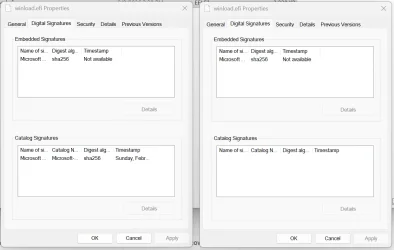
I compared the signature of the WinRE winlod.efi in Build Dev 26300.7760 and the WinRE winload.efi in Build Canary 28020.1611 the difference that pops up is the missing catalog signature in the Canary winload.efi. Both show the embedded signature as Microsoft Development PCA 2014.
The Catalog signature on the left shows Microsoft Windows Production CA 2011, the one on the right is just missing. 😵‍💫🤷‍♂️
The one on the left has no problems on booting WinRE the one on the right fails to verify the signature.

Build Dev 26300.7760, WinRE winload.efi_______________________________ Build Canary 28020.1611. WinRE winload.efi
1771288214426.webp


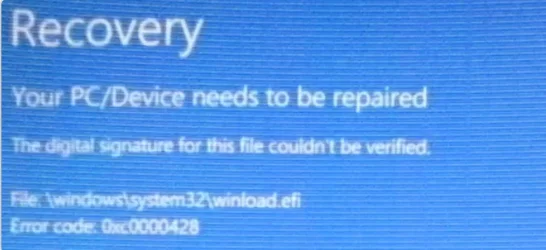
Canary fails to boot WinRE with the error below. Same machine and same hardware.

1771288461695.webp
 
Last edited:

My Computer

System One

  • OS
    Windows 11 Pro 25H2
    Computer type
    PC/Desktop
    Manufacturer/Model
    Dell XPS 8930
    CPU
    Intel I9-9900K
    Memory
    64GB
    Graphics Card(s)
    NVIDIA RTX 2060
    Sound Card
    NVIDIA High Definition Audio
    Monitor(s) Displays
    4k Samsung
    Screen Resolution
    3840 x 2160
    Hard Drives
    512GB NVMe, ADATA SU 800, 2TB HDD
@garlin
I compared the signature of the WinRE winlod.efi in Build Dev 26300.7760 and the WinRE winload.efi in Build Canary 28020.1611 the difference that pops up is the missing catalog signature in the Canary winload.efi. Both show the embedded signature as Microsoft Development PCA 2014.
The Catalog signature on the left shows Microsoft Windows Production CA 2011, the one on the right is just missing. 😵‍💫🤷‍♂️
The one on the left has no problems on booting WinRE the one on the right fails to verify the signature.

Build Dev 26300.7760 Build Canary 28020.1611
View attachment 163528


Canary fails to boot WinRE with the error below. Same machine and same hardware.

View attachment 163529
Would it be possible to copy the windload.efi file from the Dev installation and install it into the Canary?
 

My Computer

System One

  • OS
    Windows 11
Would it be possible to copy the windload.efi file from the Dev installation and install it into the Canary?
No, according to Copilot, the signatures are different from one build to another. That would not work.
Microsoft needs to fix the Catalog signature that is completely missing in the WinRE winload.efi.
Most OEM firmware check the Catalog signature if they cannot validate the embedded signature.
The one missing on Canary WinRE winload.efi is causing the problem on Dell. Because the embedded one is with Microsoft Development PCA 2014.
 
Last edited:

My Computer

System One

  • OS
    Windows 11 Pro 25H2
    Computer type
    PC/Desktop
    Manufacturer/Model
    Dell XPS 8930
    CPU
    Intel I9-9900K
    Memory
    64GB
    Graphics Card(s)
    NVIDIA RTX 2060
    Sound Card
    NVIDIA High Definition Audio
    Monitor(s) Displays
    4k Samsung
    Screen Resolution
    3840 x 2160
    Hard Drives
    512GB NVMe, ADATA SU 800, 2TB HDD
Would it be possible to copy the windload.efi file from the Dev installation and install it into the Canary?
These tests also explain why the normal system boot works on Canary without that problem.
The winload.efi for the normal OS boot has both the embedded "Microsoft Development PCA 2014" and the Catalog Signature "Microsoft Windows Production PCA 2011" which is completely missing in the Canary WinRe winload.efi. 😵‍💫🤷‍♂️
The only way to bypass the error is by disabling Secure Boot, clearly that is not a solution for the problem.
Note that this problem was already happening with previous Canary Build 28020.1546.

 
Last edited:

My Computer

System One

  • OS
    Windows 11 Pro 25H2
    Computer type
    PC/Desktop
    Manufacturer/Model
    Dell XPS 8930
    CPU
    Intel I9-9900K
    Memory
    64GB
    Graphics Card(s)
    NVIDIA RTX 2060
    Sound Card
    NVIDIA High Definition Audio
    Monitor(s) Displays
    4k Samsung
    Screen Resolution
    3840 x 2160
    Hard Drives
    512GB NVMe, ADATA SU 800, 2TB HDD
@garlin,

Further clarification after checking the WinRE winload.efi across different builds.
Copilot suggested the OEM firmware validation chain for the trust behavior.
It helped clearing the picture and why Canary fails the WinRE boot while it passes the normal OS boot.

• 26200.7840
• Embedded signature: Microsoft Windows Production PCA 2011
• Catalog signature: Missing
• Result: WinRE boots
• Reason: Production PCA is trusted directly by OEM firmware.

• 26300.7760
• Embedded signature: Microsoft Development PCA 2014
• Catalog signature: Present
• Result: WinRE boots
• Reason: Catalog signature provides a production‑signed trust path.

• 28020.1611 (problem build)
• Embedded signature: Microsoft Development PCA 2014
• Catalog signature: Missing
• Result: WinRE fails to boot on Dell systems

The correct trust behavior observed across builds is:
• Production PCA 2011 embedded signature → trusted directly → catalog optional
• Development PCA 2014 embedded signature → not trusted → requires catalog signature
• Dev PCA + missing catalog → Secure Boot failure (28020.1611)


Edit:
Checked also WinRE winload.efi on build 28000.1.
That was working because the embedded signature was with "Microsoft Windows Production PCA 2011", and the Catalog signature was missing.
Looks like the OEM needs a "Microsoft Windows Production PCA 2011" embedded or in the Catalog.
Otherwise, it cannot validate the signature and fails booting with Error code 0xc0000428.

A) If the embedded signature is with "Microsoft Development PCA 2014" and the Catalog signature is missing, it fails with Error code 0xc0000428.
B) If the embedded signature is with "Microsoft Development PCA 2014 and the Catalog signature is with "Microsoft Windows Production PCA 2011" then it boots fine. 😉🤷‍♂️
 
Last edited:

My Computer

System One

  • OS
    Windows 11 Pro 25H2
    Computer type
    PC/Desktop
    Manufacturer/Model
    Dell XPS 8930
    CPU
    Intel I9-9900K
    Memory
    64GB
    Graphics Card(s)
    NVIDIA RTX 2060
    Sound Card
    NVIDIA High Definition Audio
    Monitor(s) Displays
    4k Samsung
    Screen Resolution
    3840 x 2160
    Hard Drives
    512GB NVMe, ADATA SU 800, 2TB HDD
Installation completed. Will test later tomorrow.
 

My Computers

System One System Two

  • OS
    windows 10 & 11
    Computer type
    PC/Desktop
    Manufacturer/Model
    iBuyPower (special build)
    CPU
    AMD Ryzen 7X
    Motherboard
    Asus Prime x370 Pro
    Memory
    64Gb
    Graphics Card(s)
    Radeon RX 480 8Gb
    Monitor(s) Displays
    Samsung UHD 27 inch
    Screen Resolution
    UHD
    Hard Drives
    3 Samsung 1 TB SSD each; 1 Samsung PCIe M.2 at 2 TB
  • Operating System
    Windows 11 pro
    Computer type
    PC/Desktop
    Manufacturer/Model
    IBuyPower
    CPU
    AMD 9 5900X
    Motherboard
    Asus x570 ROG Crosshair VIII Dark Hero WI-FI 6E ARGB
    Memory
    32 Gb
    Graphics card(s)
    Nvidia GeForce RTX 3080 Ti 12 GB GDDR6X
    Sound Card
    3D PREMIUM surround sound onboard
    Monitor(s) Displays
    Samsung 32 inch UHD curved monitor
    Screen Resolution
    UHD
    Hard Drives
    Samsung 980 pro 2 tb gen 4 NVMe ssd
    PSU
    850 watt consair RM850X
    Case
    Lian Li LANCOOL ONE tempered glass RGB gaming case
    Cooling
    DEEPCOOL GAMERSTORM RGB 240 mm CASTLE 240EX liquid cooler
    Keyboard
    Ares m.2 gaming keyboard
    Mouse
    Ares m.2 gaming optical mouse
    Internet Speed
    450
    Browser
    Firefox / Edge
    Antivirus
    Windows defender
    Other Info
    With all this gaming rig I am not a gamer!
 

My Computers

System One System Two

  • OS
    Windows 11 Pro for Workstations
    Computer type
    PC/Desktop
    Manufacturer/Model
    Custom self build
    CPU
    Intel i7-8700K 5 GHz
    Motherboard
    ASUS ROG Maximus XI Formula Z390
    Memory
    64 GB (4x16GB) G.SKILL TridentZ RGB DDR4 3600 MHz (F4-3600C18D-32GTZR)
    Graphics Card(s)
    ASUS ROG-STRIX-GTX1080TI-O11G-GAMING (11GB GDDR5X)
    Sound Card
    Integrated Digital Audio (S/PDIF)
    Monitor(s) Displays
    2 x Samsung Odyssey G75 27"
    Screen Resolution
    2560x1440
    Hard Drives
    1TB Samsung 990 PRO M.2,
    4TB Samsung 990 PRO M.2,
    TerraMaster F8 SSD Plus NAS
    PSU
    Seasonic Prime Titanium 850W
    Case
    Thermaltake Core P3 wall mounted
    Cooling
    Corsair Hydro H115i
    Keyboard
    Amazon Basics Wired Full Keyboard MD005
    Mouse
    Logitech MX Master 4
    Internet Speed
    2 Gbps Download and 100 Mbps Upload
    Browser
    Chrome and Edge
    Antivirus
    Microsoft Defender
    Other Info
    Logitech Z625 speaker system,
    Logitech BRIO 4K Pro webcam,
    HP Color LaserJet Pro MFP M477fdn,
    CyberPower CP1500PFCLCD
    Galaxy S23 Plus phone
  • Operating System
    Windows 11 Pro
    Computer type
    Laptop
    Manufacturer/Model
    Surface Laptop 7 Copilot+ PC
    CPU
    Snapdragon X Elite (12 core) 3.42 GHz
    Memory
    16 GB LPDDR5x-7467 MHz
    Monitor(s) Displays
    15" HDR
    Screen Resolution
    2496 x 1664
    Hard Drives
    1 TB SSD
    Internet Speed
    Wi-Fi 7 and Bluetooth 5.4
    Browser
    Chrome and Edge
    Antivirus
    Microsoft Defender
The only thing left from this version on a clean installation is that I can't access the insider program. There is some kind of error that resets the insider program to its initial state after restarting the computer. I will try to download the new Canary version via UUP DUMP and move to a higher development branch. :giggle:
 

My Computer

System One

  • OS
    Windows 11 Canary
    Computer type
    PC/Desktop
    Manufacturer/Model
    MS-7A70
    CPU
    Intel(R) Core(TM) i5-7500 CPU @ 3.40GHz, 3408
    Motherboard
    B250M PRO-VDH (MS-7A70)
    Memory
    16 GB
    Graphics Card(s)
    NVIDIA GeForce GTX 1060 6GB
    Screen Resolution
    1920 x 1080 x 60 Hz
    Hard Drives
    SSD NX-512 2280
 

My Computers

System One System Two

  • OS
    Windows 11 Pro for Workstations
    Computer type
    PC/Desktop
    Manufacturer/Model
    Custom self build
    CPU
    Intel i7-8700K 5 GHz
    Motherboard
    ASUS ROG Maximus XI Formula Z390
    Memory
    64 GB (4x16GB) G.SKILL TridentZ RGB DDR4 3600 MHz (F4-3600C18D-32GTZR)
    Graphics Card(s)
    ASUS ROG-STRIX-GTX1080TI-O11G-GAMING (11GB GDDR5X)
    Sound Card
    Integrated Digital Audio (S/PDIF)
    Monitor(s) Displays
    2 x Samsung Odyssey G75 27"
    Screen Resolution
    2560x1440
    Hard Drives
    1TB Samsung 990 PRO M.2,
    4TB Samsung 990 PRO M.2,
    TerraMaster F8 SSD Plus NAS
    PSU
    Seasonic Prime Titanium 850W
    Case
    Thermaltake Core P3 wall mounted
    Cooling
    Corsair Hydro H115i
    Keyboard
    Amazon Basics Wired Full Keyboard MD005
    Mouse
    Logitech MX Master 4
    Internet Speed
    2 Gbps Download and 100 Mbps Upload
    Browser
    Chrome and Edge
    Antivirus
    Microsoft Defender
    Other Info
    Logitech Z625 speaker system,
    Logitech BRIO 4K Pro webcam,
    HP Color LaserJet Pro MFP M477fdn,
    CyberPower CP1500PFCLCD
    Galaxy S23 Plus phone
  • Operating System
    Windows 11 Pro
    Computer type
    Laptop
    Manufacturer/Model
    Surface Laptop 7 Copilot+ PC
    CPU
    Snapdragon X Elite (12 core) 3.42 GHz
    Memory
    16 GB LPDDR5x-7467 MHz
    Monitor(s) Displays
    15" HDR
    Screen Resolution
    2496 x 1664
    Hard Drives
    1 TB SSD
    Internet Speed
    Wi-Fi 7 and Bluetooth 5.4
    Browser
    Chrome and Edge
    Antivirus
    Microsoft Defender
@garlin,

Further clarification after checking the WinRE winload.efi across different builds.
Copilot suggested the OEM firmware validation chain for the trust behavior.
It helped clearing the picture and why Canary fails the WinRE boot while it passes the normal OS boot.

• 26200.7840
• Embedded signature: Microsoft Windows Production PCA 2011
• Catalog signature: Missing
• Result: WinRE boots
• Reason: Production PCA is trusted directly by OEM firmware.

• 26300.7760
• Embedded signature: Microsoft Development PCA 2014
• Catalog signature: Present
• Result: WinRE boots
• Reason: Catalog signature provides a production‑signed trust path.

• 28020.1611 (problem build)
• Embedded signature: Microsoft Development PCA 2014
• Catalog signature: Missing
• Result: WinRE fails to boot on Dell systems

The correct trust behavior observed across builds is:
• Production PCA 2011 embedded signature → trusted directly → catalog optional
• Development PCA 2014 embedded signature → not trusted → requires catalog signature
• Dev PCA + missing catalog → Secure Boot failure (28020.1611)


Edit:
Checked also WinRE winload.efi on build 28000.1.
That was working because the embedded signature was with "Microsoft Windows Production PCA 2011", and the Catalog signature was missing.
Looks like the OEM needs a "Microsoft Windows Production PCA 2011" embedded or in the Catalog.
Otherwise, it cannot validate the signature and fails booting with Error code 0xc0000428.

A) If the embedded signature is with "Microsoft Development PCA 2014" and the Catalog signature is missing, it fails with Error code 0xc0000428.
B) If the embedded signature is with "Microsoft Development PCA 2014 and the Catalog signature is with "Microsoft Windows Production PCA 2011" then it boots fine. 😉🤷‍♂️

Could it be an improper implementation from UUPDump?

Could it be that setting the following in ConvertConfig.ini solves the WinRE bug?
Code:
LCUwinre     =1
UpdtBootFiles=1

According to the comments in convert-UUP.cmd:
Code:
:: Change to 1 to force updating winre.wim with Cumulative Update regardless if SafeOS update detected
:: ignored and auto disabled for builds 26052 and later
set LCUwinre=0

:: Change to 1 to update ISO boot files bootmgr/memtest/efisys.bin from Cumulative Update
:: this also update new UEFI CA 2023 boot files if detected
set UpdtBootFiles=0

I am currently building a new Dev Build 26300 ISO,
with the following edits:
Code:
ResetBase    =1
LCUwinre     =1
UpdtBootFiles=1
and will test it when I get the time.

Any ideas?

PS: What Academy Award, Nobel Prize, FIFA Award do I get for being the first to be impacted by the WinRE bug?
 

My Computer

System One

  • OS
    Windows 11

Could it be an improper implementation from UUPDump?

Could it be that setting the following in ConvertConfig.ini solves the WinRE bug?
Code:
LCUwinre     =1
UpdtBootFiles=1

According to the comments in convert-UUP.cmd:
Code:
:: Change to 1 to force updating winre.wim with Cumulative Update regardless if SafeOS update detected
:: ignored and auto disabled for builds 26052 and later
set LCUwinre=0

:: Change to 1 to update ISO boot files bootmgr/memtest/efisys.bin from Cumulative Update
:: this also update new UEFI CA 2023 boot files if detected
set UpdtBootFiles=0

I am currently building a new Dev Build 26300 ISO,
with the following edits:
Code:
ResetBase    =1
LCUwinre     =1
UpdtBootFiles=1
and will test it when I get the time.

Any ideas?

PS: What Academy Award, Nobel Prize, FIFA Award do I get for being the first to be impacted by the WinRE bug?
What is the brand and model of your computer?

The WinRE bug shows with Canary 28020.1546-1619, I don't have that problem with Dev Build 26300.7877. 🤷‍♂️

Much worse with 29531.1000, that fails also the main OS boot. 🤬🤷‍♂️

Looks like on some machines the OEM firmware for Secure Boot does not accept the Microsoft Development PCA 2014 certificate without a Microsoft Windows Production PCA 2011 in the embedded signature or the Catalog signature. 😵‍💫🤷‍♂️
 
Last edited:

My Computer

System One

  • OS
    Windows 11 Pro 25H2
    Computer type
    PC/Desktop
    Manufacturer/Model
    Dell XPS 8930
    CPU
    Intel I9-9900K
    Memory
    64GB
    Graphics Card(s)
    NVIDIA RTX 2060
    Sound Card
    NVIDIA High Definition Audio
    Monitor(s) Displays
    4k Samsung
    Screen Resolution
    3840 x 2160
    Hard Drives
    512GB NVMe, ADATA SU 800, 2TB HDD
Well today’s build on February 20, took the canary down the mine shaft. Can’t get it up and flying again! Oh well.
 
Last edited:

My Computers

System One System Two

  • OS
    windows 10 & 11
    Computer type
    PC/Desktop
    Manufacturer/Model
    iBuyPower (special build)
    CPU
    AMD Ryzen 7X
    Motherboard
    Asus Prime x370 Pro
    Memory
    64Gb
    Graphics Card(s)
    Radeon RX 480 8Gb
    Monitor(s) Displays
    Samsung UHD 27 inch
    Screen Resolution
    UHD
    Hard Drives
    3 Samsung 1 TB SSD each; 1 Samsung PCIe M.2 at 2 TB
  • Operating System
    Windows 11 pro
    Computer type
    PC/Desktop
    Manufacturer/Model
    IBuyPower
    CPU
    AMD 9 5900X
    Motherboard
    Asus x570 ROG Crosshair VIII Dark Hero WI-FI 6E ARGB
    Memory
    32 Gb
    Graphics card(s)
    Nvidia GeForce RTX 3080 Ti 12 GB GDDR6X
    Sound Card
    3D PREMIUM surround sound onboard
    Monitor(s) Displays
    Samsung 32 inch UHD curved monitor
    Screen Resolution
    UHD
    Hard Drives
    Samsung 980 pro 2 tb gen 4 NVMe ssd
    PSU
    850 watt consair RM850X
    Case
    Lian Li LANCOOL ONE tempered glass RGB gaming case
    Cooling
    DEEPCOOL GAMERSTORM RGB 240 mm CASTLE 240EX liquid cooler
    Keyboard
    Ares m.2 gaming keyboard
    Mouse
    Ares m.2 gaming optical mouse
    Internet Speed
    450
    Browser
    Firefox / Edge
    Antivirus
    Windows defender
    Other Info
    With all this gaming rig I am not a gamer!
Well today’s build on February 20, took the canary down the mine shaft. Can’t get it up and flying again! Oh well.
Which Build? 28020.1619? or 29531.1000?
 

My Computer

System One

  • OS
    Windows 11 Pro 25H2
    Computer type
    PC/Desktop
    Manufacturer/Model
    Dell XPS 8930
    CPU
    Intel I9-9900K
    Memory
    64GB
    Graphics Card(s)
    NVIDIA RTX 2060
    Sound Card
    NVIDIA High Definition Audio
    Monitor(s) Displays
    4k Samsung
    Screen Resolution
    3840 x 2160
    Hard Drives
    512GB NVMe, ADATA SU 800, 2TB HDD

My Computers

System One System Two

  • OS
    windows 10 & 11
    Computer type
    PC/Desktop
    Manufacturer/Model
    iBuyPower (special build)
    CPU
    AMD Ryzen 7X
    Motherboard
    Asus Prime x370 Pro
    Memory
    64Gb
    Graphics Card(s)
    Radeon RX 480 8Gb
    Monitor(s) Displays
    Samsung UHD 27 inch
    Screen Resolution
    UHD
    Hard Drives
    3 Samsung 1 TB SSD each; 1 Samsung PCIe M.2 at 2 TB
  • Operating System
    Windows 11 pro
    Computer type
    PC/Desktop
    Manufacturer/Model
    IBuyPower
    CPU
    AMD 9 5900X
    Motherboard
    Asus x570 ROG Crosshair VIII Dark Hero WI-FI 6E ARGB
    Memory
    32 Gb
    Graphics card(s)
    Nvidia GeForce RTX 3080 Ti 12 GB GDDR6X
    Sound Card
    3D PREMIUM surround sound onboard
    Monitor(s) Displays
    Samsung 32 inch UHD curved monitor
    Screen Resolution
    UHD
    Hard Drives
    Samsung 980 pro 2 tb gen 4 NVMe ssd
    PSU
    850 watt consair RM850X
    Case
    Lian Li LANCOOL ONE tempered glass RGB gaming case
    Cooling
    DEEPCOOL GAMERSTORM RGB 240 mm CASTLE 240EX liquid cooler
    Keyboard
    Ares m.2 gaming keyboard
    Mouse
    Ares m.2 gaming optical mouse
    Internet Speed
    450
    Browser
    Firefox / Edge
    Antivirus
    Windows defender
    Other Info
    With all this gaming rig I am not a gamer!

My Computer

System One

  • OS
    Windows 11 Pro 25H2
    Computer type
    PC/Desktop
    Manufacturer/Model
    Dell XPS 8930
    CPU
    Intel I9-9900K
    Memory
    64GB
    Graphics Card(s)
    NVIDIA RTX 2060
    Sound Card
    NVIDIA High Definition Audio
    Monitor(s) Displays
    4k Samsung
    Screen Resolution
    3840 x 2160
    Hard Drives
    512GB NVMe, ADATA SU 800, 2TB HDD
Can you describe what problem you are having, any error installing?
When I downloaded and installed, and everything was normal, then restarted and it seemed ok until it started to open the canary partition, it showed automatic repair attempt-then said couldn’t repair and nothing more. Attempt to start again, would not open canary again, attempting automatic repair again and couldn’t repair. So, I could restore with macrium — all other partitions, dev, RP and beta updated without issues.
 

My Computers

System One System Two

  • OS
    windows 10 & 11
    Computer type
    PC/Desktop
    Manufacturer/Model
    iBuyPower (special build)
    CPU
    AMD Ryzen 7X
    Motherboard
    Asus Prime x370 Pro
    Memory
    64Gb
    Graphics Card(s)
    Radeon RX 480 8Gb
    Monitor(s) Displays
    Samsung UHD 27 inch
    Screen Resolution
    UHD
    Hard Drives
    3 Samsung 1 TB SSD each; 1 Samsung PCIe M.2 at 2 TB
  • Operating System
    Windows 11 pro
    Computer type
    PC/Desktop
    Manufacturer/Model
    IBuyPower
    CPU
    AMD 9 5900X
    Motherboard
    Asus x570 ROG Crosshair VIII Dark Hero WI-FI 6E ARGB
    Memory
    32 Gb
    Graphics card(s)
    Nvidia GeForce RTX 3080 Ti 12 GB GDDR6X
    Sound Card
    3D PREMIUM surround sound onboard
    Monitor(s) Displays
    Samsung 32 inch UHD curved monitor
    Screen Resolution
    UHD
    Hard Drives
    Samsung 980 pro 2 tb gen 4 NVMe ssd
    PSU
    850 watt consair RM850X
    Case
    Lian Li LANCOOL ONE tempered glass RGB gaming case
    Cooling
    DEEPCOOL GAMERSTORM RGB 240 mm CASTLE 240EX liquid cooler
    Keyboard
    Ares m.2 gaming keyboard
    Mouse
    Ares m.2 gaming optical mouse
    Internet Speed
    450
    Browser
    Firefox / Edge
    Antivirus
    Windows defender
    Other Info
    With all this gaming rig I am not a gamer!
after rolling machine back to previous version with Macrium, I was able to update (In Progress now) to the latest build. I hope!
 

My Computers

System One System Two

  • OS
    windows 10 & 11
    Computer type
    PC/Desktop
    Manufacturer/Model
    iBuyPower (special build)
    CPU
    AMD Ryzen 7X
    Motherboard
    Asus Prime x370 Pro
    Memory
    64Gb
    Graphics Card(s)
    Radeon RX 480 8Gb
    Monitor(s) Displays
    Samsung UHD 27 inch
    Screen Resolution
    UHD
    Hard Drives
    3 Samsung 1 TB SSD each; 1 Samsung PCIe M.2 at 2 TB
  • Operating System
    Windows 11 pro
    Computer type
    PC/Desktop
    Manufacturer/Model
    IBuyPower
    CPU
    AMD 9 5900X
    Motherboard
    Asus x570 ROG Crosshair VIII Dark Hero WI-FI 6E ARGB
    Memory
    32 Gb
    Graphics card(s)
    Nvidia GeForce RTX 3080 Ti 12 GB GDDR6X
    Sound Card
    3D PREMIUM surround sound onboard
    Monitor(s) Displays
    Samsung 32 inch UHD curved monitor
    Screen Resolution
    UHD
    Hard Drives
    Samsung 980 pro 2 tb gen 4 NVMe ssd
    PSU
    850 watt consair RM850X
    Case
    Lian Li LANCOOL ONE tempered glass RGB gaming case
    Cooling
    DEEPCOOL GAMERSTORM RGB 240 mm CASTLE 240EX liquid cooler
    Keyboard
    Ares m.2 gaming keyboard
    Mouse
    Ares m.2 gaming optical mouse
    Internet Speed
    450
    Browser
    Firefox / Edge
    Antivirus
    Windows defender
    Other Info
    With all this gaming rig I am not a gamer!

Latest Support Threads

Back
Top Bottom