Insider KB5077231 Windows 11 Insider Beta build 26220.7872 (25H2) - Feb. 20


UPDATE 2/27:


 Windows Insider Blog:

Hello Windows Insiders, today we are releasing Windows 11 Insider Preview Build 26220.7872 (KB5077231) to the Beta Channel.

Changes in Beta Channel builds and updates are documented in two buckets: new features, and improvements (including notable fixes) that are being gradually rolled out for Insiders who have turned on the toggle to get the latest updates as they are available (via Settings > Windows Update*) and then new features, and improvements (including notable fixes) rolling out to everyone in the Beta Channel. For more information, see the Reminders section at the bottom of this blog post.


Changes and Improvements gradually being rolled out with toggle on*

[Context Menu]

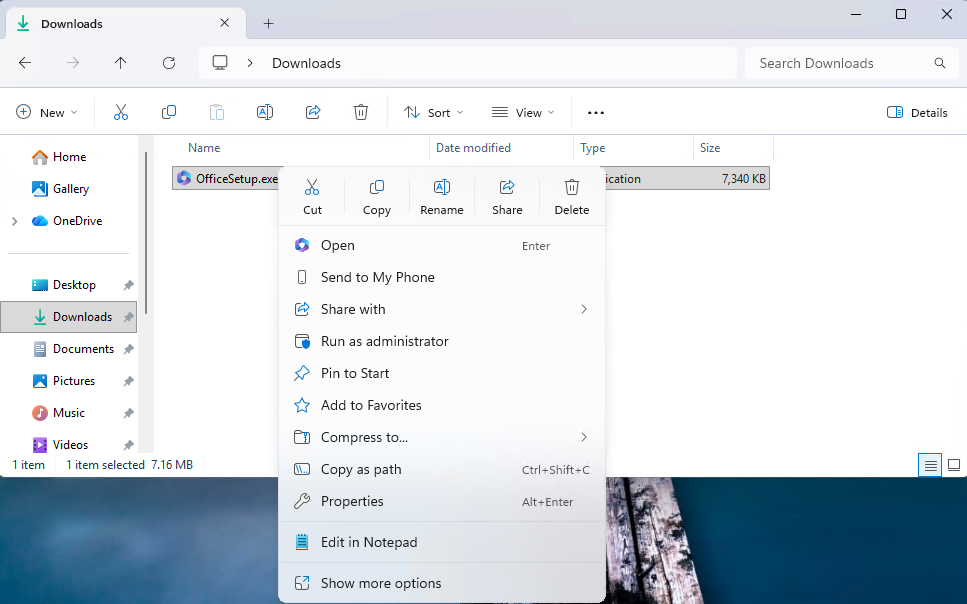
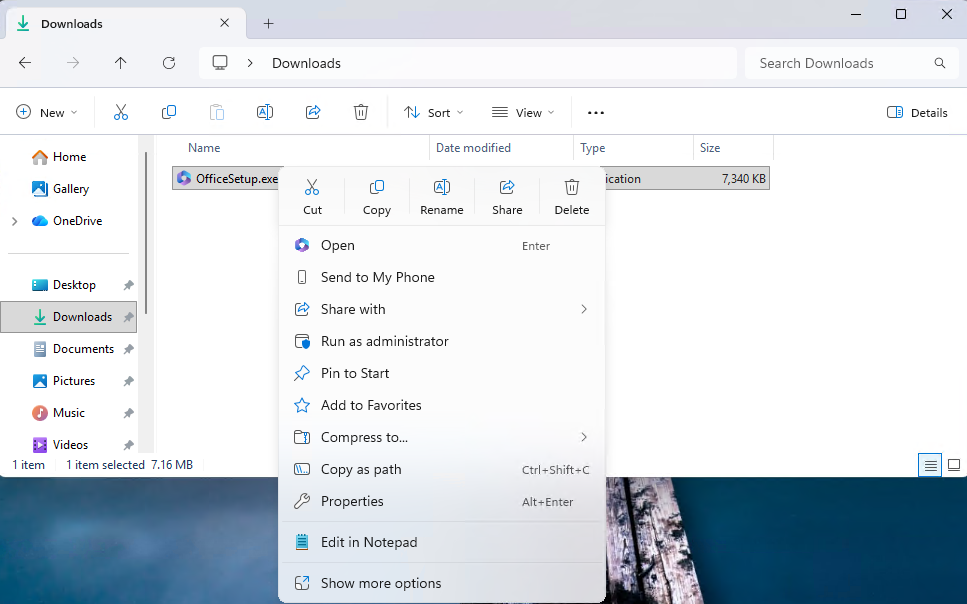
  • When right clicking on a .exe, .bat, or .cmd file, the context menu’s “Open” verb will now match the icon associated with the file’s default app.

    The context menu’s “Open” verb matches the icon in the default app.
    The context menu’s “Open” verb matches the icon in the default app.
  • Feedback: Share your thoughts in Feedback Hub (WIN + F) under File Folders and Online Storage > File Explorer.

[Settings]

  • Device Cards:
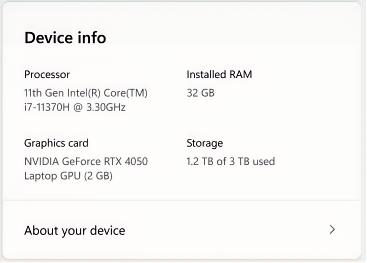
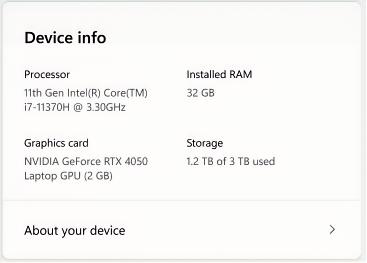
    • Previously released to WIP channels June 2025, the ‘Device info’ Card on the Settings Home page has been refined based on early learnings. This update simplifies key device specifications and improves consistency across the end to end flow from the Home Card to the Settings > System > About page, making information easier to scan and understand. This consumer experience is currently rolling out to Insiders in the United States.
    • A version of the Device info Card intended for enterprise users on IT managed devices continues to be available.

      Device card with simplified device specifications.
      Device card with simplified device specifications.
  • In Settings > System > About, based on early customer feedback, key device hardware details are once again prominently displayed at the top of the page, making it easy to understand your device at a glance. The Device information section now brings together additional system details such as graphics and storage information in a single location, with easy copy/paste support to simplify sharing or support scenarios. Device related frequently asked questions are not currently surfaced as we continue iterating the best way to deliver contextual help across Settings.
  • Feedback: Share your thoughts in Feedback Hub (WIN + F) under the Settings category.

[Taskbar & System Tray]

  • We have improved the animations for mousing over app groups on the taskbar.

Reminders for Windows Insiders in the Beta Channel

  • Updates are based on Windows 11, version 25H2 via an enablement package (Build 26220.7872).
  • Many features are rolled out using Controlled Feature Rollout technology, starting with a subset of Insiders and ramping up over time as we monitor feedback to see how they land before pushing them out to everyone in this channel.
  • For Windows Insiders who want to be the first to get features gradually rolled out to you, you can turn ON the toggle to get the latest updates as they are available via Settings > Windows Update*. Over time, we will increase the rollouts of features to everyone with the toggle turned on. Should you keep this toggle off, new features will gradually be rolled out to your PC over time once they are ready.
  • Features and experiences included in these builds may never get released as we try out different concepts and get feedback. Features may change over time, be removed, or replaced and never get released beyond Windows Insiders. Some of these features and experiences could show up in future Windows releases when they’re ready.
  • Some features in active development we preview with Windows Insiders may not be fully localized and localization will happen over time as features are finalized. As you see issues with localization in your language, please report those issues to us via Feedback Hub.
  • Check out Flight Hub for a complete look at what build is in which Insider channel.
Thanks,
Windows Insider Program Team


 Source:


Check Windows Updates


UUP Dump:

64-bit ISO download:

ARM64 ISO download:

 
Last edited:
Frist! Downloading now.
 

My Computer My Computer

At a glance

Windows 11 25H2Broadwell-e 6850K 4.5ghz @1.36v32GB Corsair LPM 3600 C16EVGA RTX 3080Ti FTW
OS
Windows 11 25H2
Computer type
PC/Desktop
Manufacturer/Model
EVGA home brew
CPU
Broadwell-e 6850K 4.5ghz @1.36v
Motherboard
EVGA X99 FTW K
Memory
32GB Corsair LPM 3600 C16
Graphics Card(s)
EVGA RTX 3080Ti FTW
Sound Card
Asus Centurion true 7.1 headset. (5 speakers in each earpeice)
Monitor(s) Displays
LG C4 55"
Screen Resolution
4K 144hz
Hard Drives
Various models of SSDs ~10TB No HDDs installed.
PSU
be quiet! BN516 Straight Power 12-1000w 80 Plus Platinum
Case
Corsair 780T modified to dual 200mm intake fans
Cooling
Corsair H110i
Keyboard
Corsair K95 Platinum
Mouse
Corsair M65 RGB Elite
Internet Speed
50Mbs
Install went smoothly, hopefully no issues. Again, no explorer flash bang at all when opening new tabs with the + on tab bar.
 

My Computers My Computers

  • At a glance

    Windows 11 25H2Intel Core Ultra 9 275HX (24-Core)64GB DDR5 6400MT/sNVIDIA GeForce RTX 5080 and Intel UHD Graphics
    OS
    Windows 11 25H2
    Computer type
    Laptop
    Manufacturer/Model
    Alienware 18 Area-51
    CPU
    Intel Core Ultra 9 275HX (24-Core)
    Motherboard
    Alienware
    Memory
    64GB DDR5 6400MT/s
    Graphics Card(s)
    NVIDIA GeForce RTX 5080 and Intel UHD Graphics
    Sound Card
    Onboard, Realtek high-performance Audio chips (ALC3329 & ALC1708))
    Monitor(s) Displays
    300HZ 18-inch QHD 500 nit Comfort View+
    Screen Resolution
    2560 x 1600
    Hard Drives
    2TB NVMe M.2 PCIe Gen 5 SSD
    Case
    Magnesium Alloy
    Cooling
    Advanced Cryo-Tech Quad-Fan Cooling system & large vapor chamber
    Keyboard
    Cherry MX ultra low profile mechanical keyboard with per key AlienFX RGB lighting
    Mouse
    Logitech MX Master 4
    Browser
    Vivaldi (main), Firefox, Chrome, Edge
    Antivirus
    MS Defender and Malwarebytes Free
  • At a glance

    Windows 11 25H2Qualcomm Snapdragon X Elite (12 Core) ARM bas...16GB LPDDR5Qualcomm Adreno X1-85
    Operating System
    Windows 11 25H2
    Computer type
    Laptop
    Manufacturer/Model
    Microsoft Surface Laptop 7
    CPU
    Qualcomm Snapdragon X Elite (12 Core) ARM based CPU
    Motherboard
    Microsoft Corp.
    Memory
    16GB LPDDR5
    Graphics card(s)
    Qualcomm Adreno X1-85
    Sound Card
    Omnisonic speakers with Dolby Atmos spatial sound
    Monitor(s) Displays
    120 Hz 13.8-inch 600 nit PixelSense Flow touchscreen
    Screen Resolution
    2304x1536
    Hard Drives
    1TB NVMe Gen 4 SSD
    Case
    Anodized Aluminum
    Cooling
    Traditional active cooling fan system
    Keyboard
    Mechanical QWERTY, backlit when in use
    Mouse
    Logitech MX Master 4 and Surface Arc Mouse
    Browser
    Vivaldi (main), Firefox, Chrome, Edge
    Antivirus
    MS Defender and Malwarebytes Free
Downloading and installing.

1771613110568.webp
1771613383527.webp
Done:

Edition Windows 11 Pro
Version 25H2
Installed on ‎12/‎19/‎2025
OS build 26220.7872
Experience Windows Feature Experience Pack 1000.26100.333.0
 

My Computer My Computer

At a glance

Windows 11 Pro 25H2Intel I9-9900K64GBNVIDIA RTX 2060
OS
Windows 11 Pro 25H2
Computer type
PC/Desktop
Manufacturer/Model
Dell XPS 8930
CPU
Intel I9-9900K
Memory
64GB
Graphics Card(s)
NVIDIA RTX 2060
Sound Card
NVIDIA High Definition Audio
Monitor(s) Displays
4k Samsung
Screen Resolution
3840 x 2160
Hard Drives
512GB NVMe, ADATA SU 800, 2TB HDD
Still have the white flash in Windows Explorer when opening a new tab if it is set to open to 'My PC'. If you set explorer to open on 'Home' then I do not get the flash.
 

My Computer My Computer

At a glance

Windows 11 25H2Broadwell-e 6850K 4.5ghz @1.36v32GB Corsair LPM 3600 C16EVGA RTX 3080Ti FTW
OS
Windows 11 25H2
Computer type
PC/Desktop
Manufacturer/Model
EVGA home brew
CPU
Broadwell-e 6850K 4.5ghz @1.36v
Motherboard
EVGA X99 FTW K
Memory
32GB Corsair LPM 3600 C16
Graphics Card(s)
EVGA RTX 3080Ti FTW
Sound Card
Asus Centurion true 7.1 headset. (5 speakers in each earpeice)
Monitor(s) Displays
LG C4 55"
Screen Resolution
4K 144hz
Hard Drives
Various models of SSDs ~10TB No HDDs installed.
PSU
be quiet! BN516 Straight Power 12-1000w 80 Plus Platinum
Case
Corsair 780T modified to dual 200mm intake fans
Cooling
Corsair H110i
Keyboard
Corsair K95 Platinum
Mouse
Corsair M65 RGB Elite
Internet Speed
50Mbs
Still have the white flash in Windows Explorer when opening a new tab if it is set to open to 'My PC'. If you set explorer to open on 'Home' then I do not get the flash.
Interesting, mine opens to My PC and doesn't even have the slightest hint of a flash.
 

My Computers My Computers

  • At a glance

    Windows 11 25H2Intel Core Ultra 9 275HX (24-Core)64GB DDR5 6400MT/sNVIDIA GeForce RTX 5080 and Intel UHD Graphics
    OS
    Windows 11 25H2
    Computer type
    Laptop
    Manufacturer/Model
    Alienware 18 Area-51
    CPU
    Intel Core Ultra 9 275HX (24-Core)
    Motherboard
    Alienware
    Memory
    64GB DDR5 6400MT/s
    Graphics Card(s)
    NVIDIA GeForce RTX 5080 and Intel UHD Graphics
    Sound Card
    Onboard, Realtek high-performance Audio chips (ALC3329 & ALC1708))
    Monitor(s) Displays
    300HZ 18-inch QHD 500 nit Comfort View+
    Screen Resolution
    2560 x 1600
    Hard Drives
    2TB NVMe M.2 PCIe Gen 5 SSD
    Case
    Magnesium Alloy
    Cooling
    Advanced Cryo-Tech Quad-Fan Cooling system & large vapor chamber
    Keyboard
    Cherry MX ultra low profile mechanical keyboard with per key AlienFX RGB lighting
    Mouse
    Logitech MX Master 4
    Browser
    Vivaldi (main), Firefox, Chrome, Edge
    Antivirus
    MS Defender and Malwarebytes Free
  • At a glance

    Windows 11 25H2Qualcomm Snapdragon X Elite (12 Core) ARM bas...16GB LPDDR5Qualcomm Adreno X1-85
    Operating System
    Windows 11 25H2
    Computer type
    Laptop
    Manufacturer/Model
    Microsoft Surface Laptop 7
    CPU
    Qualcomm Snapdragon X Elite (12 Core) ARM based CPU
    Motherboard
    Microsoft Corp.
    Memory
    16GB LPDDR5
    Graphics card(s)
    Qualcomm Adreno X1-85
    Sound Card
    Omnisonic speakers with Dolby Atmos spatial sound
    Monitor(s) Displays
    120 Hz 13.8-inch 600 nit PixelSense Flow touchscreen
    Screen Resolution
    2304x1536
    Hard Drives
    1TB NVMe Gen 4 SSD
    Case
    Anodized Aluminum
    Cooling
    Traditional active cooling fan system
    Keyboard
    Mechanical QWERTY, backlit when in use
    Mouse
    Logitech MX Master 4 and Surface Arc Mouse
    Browser
    Vivaldi (main), Firefox, Chrome, Edge
    Antivirus
    MS Defender and Malwarebytes Free
Interesting, mine opens to My PC and doesn't even have the slightest hint of a flash.
Still have the white flash in Windows Explorer when opening a new tab if it is set to open to 'My PC'. If you set explorer to open on 'Home' then I do not get the flash.
Correction, after switching back and forth now on "This PC" it flashes again. 🤷🏽‍♂️
 

My Computers My Computers

  • At a glance

    Windows 11 25H2Intel Core Ultra 9 275HX (24-Core)64GB DDR5 6400MT/sNVIDIA GeForce RTX 5080 and Intel UHD Graphics
    OS
    Windows 11 25H2
    Computer type
    Laptop
    Manufacturer/Model
    Alienware 18 Area-51
    CPU
    Intel Core Ultra 9 275HX (24-Core)
    Motherboard
    Alienware
    Memory
    64GB DDR5 6400MT/s
    Graphics Card(s)
    NVIDIA GeForce RTX 5080 and Intel UHD Graphics
    Sound Card
    Onboard, Realtek high-performance Audio chips (ALC3329 & ALC1708))
    Monitor(s) Displays
    300HZ 18-inch QHD 500 nit Comfort View+
    Screen Resolution
    2560 x 1600
    Hard Drives
    2TB NVMe M.2 PCIe Gen 5 SSD
    Case
    Magnesium Alloy
    Cooling
    Advanced Cryo-Tech Quad-Fan Cooling system & large vapor chamber
    Keyboard
    Cherry MX ultra low profile mechanical keyboard with per key AlienFX RGB lighting
    Mouse
    Logitech MX Master 4
    Browser
    Vivaldi (main), Firefox, Chrome, Edge
    Antivirus
    MS Defender and Malwarebytes Free
  • At a glance

    Windows 11 25H2Qualcomm Snapdragon X Elite (12 Core) ARM bas...16GB LPDDR5Qualcomm Adreno X1-85
    Operating System
    Windows 11 25H2
    Computer type
    Laptop
    Manufacturer/Model
    Microsoft Surface Laptop 7
    CPU
    Qualcomm Snapdragon X Elite (12 Core) ARM based CPU
    Motherboard
    Microsoft Corp.
    Memory
    16GB LPDDR5
    Graphics card(s)
    Qualcomm Adreno X1-85
    Sound Card
    Omnisonic speakers with Dolby Atmos spatial sound
    Monitor(s) Displays
    120 Hz 13.8-inch 600 nit PixelSense Flow touchscreen
    Screen Resolution
    2304x1536
    Hard Drives
    1TB NVMe Gen 4 SSD
    Case
    Anodized Aluminum
    Cooling
    Traditional active cooling fan system
    Keyboard
    Mechanical QWERTY, backlit when in use
    Mouse
    Logitech MX Master 4 and Surface Arc Mouse
    Browser
    Vivaldi (main), Firefox, Chrome, Edge
    Antivirus
    MS Defender and Malwarebytes Free
Got it:

2026-02-20 21_05_02-Πληροφορίες_ Windows.webp
 

My Computer My Computer

At a glance

Windows 10Ultra Core Ultra 9 185H32GBIntel Arc
OS
Windows 10
Computer type
Laptop
Manufacturer/Model
Lenovo Yoga 7 Pro
CPU
Ultra Core Ultra 9 185H
Motherboard
Lenovo
Memory
32GB
Graphics Card(s)
Intel Arc
I can still reproduce both cases of flashing. Same on Beta and Dev. 😵‍💫🤷‍♂️

1771614629770.gif

1771614647885.gif
 

My Computer My Computer

At a glance

Windows 11 Pro 25H2Intel I9-9900K64GBNVIDIA RTX 2060
OS
Windows 11 Pro 25H2
Computer type
PC/Desktop
Manufacturer/Model
Dell XPS 8930
CPU
Intel I9-9900K
Memory
64GB
Graphics Card(s)
NVIDIA RTX 2060
Sound Card
NVIDIA High Definition Audio
Monitor(s) Displays
4k Samsung
Screen Resolution
3840 x 2160
Hard Drives
512GB NVMe, ADATA SU 800, 2TB HDD

My Computers My Computers

  • At a glance

    Windows 11 Pro
    OS
    Windows 11 Pro
    Computer type
    PC/Desktop
    Manufacturer/Model
    ASUS ROG Strix
  • At a glance

    Windows 11 Pro
    Operating System
    Windows 11 Pro
    Computer type
    Laptop
    Manufacturer/Model
    ASUS VivoBook
  • ASUS VivoBook 'Lite' ~ Windows 11 Home
I think it's time you moved on to an alternative Explorer shell!
It doesn't bother me much.
I'm just reporting the problems, hoping that Microsoft makes the proper fix. 😂🤷‍♂️
 
Last edited:

My Computer My Computer

At a glance

Windows 11 Pro 25H2Intel I9-9900K64GBNVIDIA RTX 2060
OS
Windows 11 Pro 25H2
Computer type
PC/Desktop
Manufacturer/Model
Dell XPS 8930
CPU
Intel I9-9900K
Memory
64GB
Graphics Card(s)
NVIDIA RTX 2060
Sound Card
NVIDIA High Definition Audio
Monitor(s) Displays
4k Samsung
Screen Resolution
3840 x 2160
Hard Drives
512GB NVMe, ADATA SU 800, 2TB HDD
I think it's time you moved on to an alternative Explorer shell!
Speaking of shells, one should be dropped on Explorer. It's way overdue. :wink:
 

My Computers My Computers

  • At a glance

    Win 11 Pro 25H2 26200.8457 / Linux Mint 22.3Ryzen 7 2700U Pro32GBiGPU Vega 10
    OS
    Win 11 Pro 25H2 26200.8457 / Linux Mint 22.3
    Computer type
    Laptop
    Manufacturer/Model
    Lenovo A485
    CPU
    Ryzen 7 2700U Pro
    Motherboard
    Lenovo (WiFi/BT module upgraded to Intel Wireless-AC-9260)
    Memory
    32GB
    Graphics Card(s)
    iGPU Vega 10
    Sound Card
    Realtek
    Monitor(s) Displays
    14" FHD (built-in) + 14" Lenovo Thinkvision M14t (touch+pen) + 32" Asus PB328
    Screen Resolution
    FHD + FHD + 1440p
    Hard Drives
    Intel 660p m.2 nVME PCIe3.0 x2 512GB
    PSU
    125W(Dock)/65W(Travel Adapter)
    Keyboard
    Thinkpad / Logitech MX Keys
    Mouse
    Logitech MX Master 2S
    Internet Speed
    1/1Gbit
    Browser
    Firefox
    Antivirus
    Windows Defender
    Other Info
    SecureBoot: Enabled
    TPM2.0: Enabled
    AMD-V: Enabled
  • At a glance

    Win 11 Pro 25H2 26200.8521(RP)i7-7700k @4.8GHz32GB 2x16GB 2133MHz CL15EVGA GTX1080Ti FTW 11GB
    Operating System
    Win 11 Pro 25H2 26200.8521(RP)
    Computer type
    PC/Desktop
    Manufacturer/Model
    Custom
    CPU
    i7-7700k @4.8GHz
    Motherboard
    Asus PRIME Z270-A
    Memory
    32GB 2x16GB 2133MHz CL15
    Graphics card(s)
    EVGA GTX1080Ti FTW 11GB
    Sound Card
    Integrated
    Monitor(s) Displays
    32" 10-bit Asus PB328Q
    Screen Resolution
    WQHD 2560x1440
    Hard Drives
    512GB ADATA SX8000NP NVMe PCIe Gen 3 x4
    PSU
    850W
    Case
    Fractal Design Define 7
    Cooling
    Noctua NH-D15 chromax.black
    Keyboard
    Logitech MX Keys
    Mouse
    Logitech MX Master 2S
    Internet Speed
    1/1Gbit
    Browser
    Firefox
    Antivirus
    Windows Defender
    Other Info
    AC WiFi Card
1771618052237.webp
Edition Windows 11 Pro
Version 25H2
Installed on ‎31.‎10.‎2025.
OS build 26220.7872
Experience Windows Feature Experience Pack 1000.26100.333.0
 
Last edited:

My Computer My Computer

At a glance

W11 Pro and Insider DevAMD Ryzen 9 7900x2x16GB Kingston 6000MHz, Cl 32 @ 6200MHz Cl30Gigabyte Rx 6600XT Gaming OC 8G Pro
OS
W11 Pro and Insider Dev
Computer type
PC/Desktop
Manufacturer/Model
Home brewed
CPU
AMD Ryzen 9 7900x
Motherboard
ASROCK b650 PRO RS
Memory
2x16GB Kingston 6000MHz, Cl 32 @ 6200MHz Cl30
Graphics Card(s)
Gigabyte Rx 6600XT Gaming OC 8G Pro
Sound Card
MB, Realtek Ac1220p
Monitor(s) Displays
3 x 27"
Screen Resolution
1080p
Hard Drives
Kingston KC3000. 1TBSamsung 970 evo Plus 500GB, Crucial P1 NVMe 1TB, Lexar NVMe 2 TB, Silicon Power M.2 SATA 500GB
PSU
Seasonic 750W
Case
Custom Raidmax
Cooling
Arctic Liquid Freezer III 360mm
Internet Speed
20/19 mbps
Updating yet another machine on Beta.
1771624846635.webp

Done:

Edition Windows 11 Pro
Version 25H2
Installed on ‎10/‎31/‎2025
OS build 26220.7872
Experience Windows Feature Experience Pack 1000.26100.333.0
 

My Computer My Computer

At a glance

Windows 11 Pro 25H2Intel I9-9900K64GBNVIDIA RTX 2060
OS
Windows 11 Pro 25H2
Computer type
PC/Desktop
Manufacturer/Model
Dell XPS 8930
CPU
Intel I9-9900K
Memory
64GB
Graphics Card(s)
NVIDIA RTX 2060
Sound Card
NVIDIA High Definition Audio
Monitor(s) Displays
4k Samsung
Screen Resolution
3840 x 2160
Hard Drives
512GB NVMe, ADATA SU 800, 2TB HDD
This one showed up in the system tray after this update. 😉

1771631535744.webp


1771631569931.webp

1771639268775.webp
 
Last edited:

My Computer My Computer

At a glance

Windows 11 Pro 25H2Intel I9-9900K64GBNVIDIA RTX 2060
OS
Windows 11 Pro 25H2
Computer type
PC/Desktop
Manufacturer/Model
Dell XPS 8930
CPU
Intel I9-9900K
Memory
64GB
Graphics Card(s)
NVIDIA RTX 2060
Sound Card
NVIDIA High Definition Audio
Monitor(s) Displays
4k Samsung
Screen Resolution
3840 x 2160
Hard Drives
512GB NVMe, ADATA SU 800, 2TB HDD
Getting it now
Screenshot 2026-02-21 023816.webp
 

My Computer My Computer

At a glance

Win 11 Pro Insider Beta (26220.8764), Kali LinuxAMD Ryzen 5 5600H16GB (2x8GB) Dual ChannelNvidia RTX 3050
OS
Win 11 Pro Insider Beta (26220.8764), Kali Linux
Computer type
Laptop
Manufacturer/Model
HP Victus 15
CPU
AMD Ryzen 5 5600H
Memory
16GB (2x8GB) Dual Channel
Graphics Card(s)
Nvidia RTX 3050
Monitor(s) Displays
1080p IPS 144Hz (Laptop Screen) + 3x 1080p 60Hz screens
Screen Resolution
4x 1920x1080 monitors
Hard Drives
M.2 NVMe 512GB Samsung - PCIe 4.0x4 - Main system drive

USB-A and USB-C M.2 NVMe Enclosure with NVMe SSSTC 256GB - NVM Express 1.3 - Ventoy with all install files and all ISO images i use.

USB External SSD Kingston XS100 1TB - USB 3.2 Gen 2 - WindowsToGo (Clone of my existing Sytem), and all games I play.

USB External SSHD Seagate FireCuda 2TB - USB 3.0 - For Macrium system images, data, photos, stays always safe at home
PSU
200W
Cooling
Zalman ZM-NC3 Cooling pad
Keyboard
Dell KM7120W
Mouse
Dell KM7120W
Internet Speed
1Gb/s down / 500Mb/s up
Browser
Chrome
Antivirus
Windows Defender
All Good so far:
Screenshot 2026-02-21 024834.webp
Screenshot 2026-02-21 025403.webp
 

My Computer My Computer

At a glance

Win 11 Pro Insider Beta (26220.8764), Kali LinuxAMD Ryzen 5 5600H16GB (2x8GB) Dual ChannelNvidia RTX 3050
OS
Win 11 Pro Insider Beta (26220.8764), Kali Linux
Computer type
Laptop
Manufacturer/Model
HP Victus 15
CPU
AMD Ryzen 5 5600H
Memory
16GB (2x8GB) Dual Channel
Graphics Card(s)
Nvidia RTX 3050
Monitor(s) Displays
1080p IPS 144Hz (Laptop Screen) + 3x 1080p 60Hz screens
Screen Resolution
4x 1920x1080 monitors
Hard Drives
M.2 NVMe 512GB Samsung - PCIe 4.0x4 - Main system drive

USB-A and USB-C M.2 NVMe Enclosure with NVMe SSSTC 256GB - NVM Express 1.3 - Ventoy with all install files and all ISO images i use.

USB External SSD Kingston XS100 1TB - USB 3.2 Gen 2 - WindowsToGo (Clone of my existing Sytem), and all games I play.

USB External SSHD Seagate FireCuda 2TB - USB 3.0 - For Macrium system images, data, photos, stays always safe at home
PSU
200W
Cooling
Zalman ZM-NC3 Cooling pad
Keyboard
Dell KM7120W
Mouse
Dell KM7120W
Internet Speed
1Gb/s down / 500Mb/s up
Browser
Chrome
Antivirus
Windows Defender
Install went smoothly for a change... but I just realized you can't open Notepad... the process will run but no window is ever displayed anymore... Anyone know where the 'scratchpad' for unsaved notes are located on the drive, if I can extract that stuff I'll finally just bail on that app since it went to poo after all the Login/AI additions anyway... (yes I have Notepad++ but I was being lazy and didn't migrate the scratch over yet)
 

My Computers My Computers

  • At a glance

    Windows 11 Pro βIntel® Core™ i7-1165G732 GB DDR4-3200 SDRAMIntel® Iris® Xᵉ Graphics
    OS
    Windows 11 Pro β
    Computer type
    Laptop
    Manufacturer/Model
    HP Pavilion Laptop 15-eg0070wm
    CPU
    Intel® Core™ i7-1165G7
    Memory
    32 GB DDR4-3200 SDRAM
    Graphics Card(s)
    Intel® Iris® Xᵉ Graphics
    Screen Resolution
    1920x1080
    Hard Drives
    2TB PCIe® NVMe™ M.2 SSD
  • At a glance

    macOS Ventura3.4 GHz Quad-Core Intel Core i540 GB 2400 MHz DDR4Radeon Pro 570 4 GB
    Operating System
    macOS Ventura
    Computer type
    PC/Desktop
    Manufacturer/Model
    Apple iMac 27" 5K (2017)
    CPU
    3.4 GHz Quad-Core Intel Core i5
    Memory
    40 GB 2400 MHz DDR4
    Graphics card(s)
    Radeon Pro 570 4 GB
    Monitor(s) Displays
    27" 5K, 34" UW
    Screen Resolution
    Mon 1: 5120 × 2880 Mon 2: 2560 x 1080
    Hard Drives
    32GB NVME, 1TB SSD
Anyone know where the 'scratchpad' for unsaved notes are located on the drive
%LOCALAPPDATA%\Packages\Microsoft.WindowsNotepad_8wekyb3d8bbwe\LocalState\TabState
They're stored as .bin files.
 

My Computers My Computers

  • At a glance

    Windows 11 Pro
    OS
    Windows 11 Pro
    Computer type
    PC/Desktop
    Manufacturer/Model
    ASUS ROG Strix
  • At a glance

    Windows 11 Pro
    Operating System
    Windows 11 Pro
    Computer type
    Laptop
    Manufacturer/Model
    ASUS VivoBook
  • ASUS VivoBook 'Lite' ~ Windows 11 Home

Latest Support Threads

Back
Top Bottom