Win Update KB5078127 Windows 11 Out-of-band Update build 26100.7628 (24H2) and 26200.7628 (25H2) - Jan. 24


UPDATE 1/29:


 Microsoft Support:

January 24, 2026 - KB5078127 (OS Builds 26200.7628 and 26100.7628) Out-of-band​


Summary

This out-of-band update for Windows 11, version 25H2 and 24H2 (KB5078127) is cumulative. It includes updates from previous security and non-security releases, along with an additional fix. To learn more about differences between security updates, optional non-security preview updates, out-of-band (OOB) updates, and continuous innovation, see Windows monthly updates explained. For information on Windows update terminology, see the different types of Windows software updates.

To view the latest updates about this release, visit the Windows release health dashboard or the update history page for Windows 11, version 25H2 and 24H2.

Improvements

This OOB update includes quality improvements. This update is cumulative and includes security fixes and improvements from the January 13, 2026, security update (KB5074109) and the out-of-band update (KB5077744) from January 17, 2026, in addition to the following:
  • [File System] Fixed: After installing the Windows update released on and after January 13, 2026, some applications became unresponsive or encountered unexpected errors when opening files from or saving files to cloud-based storage, such as OneDrive or Dropbox. In certain Outlook configurations that store PST files on OneDrive, Outlook may hang and fail to reopen unless the process is terminated or the system is restarted. Users may also see missing sent Items or previously downloaded emails being re‑downloaded.
This update is offered through Windows Update for devices running Windows 11 that have already installed KB5074109 or KB5077744. It is also available for manual download from the Microsoft Update Catalog.

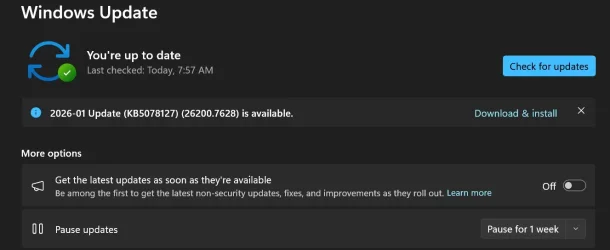
If you have turned on Get the latest updates as soon as they're available in Windows Update settings (Settings > Windows Update), you will automatically receive this update. If the toggle is off on your device, you can install the update manually by going to Settings > Windows Update and selecting Download & install.

Note IT administrators using Microsoft Intune or Windows Autopatch should follow the guidance below for installing the OOB update via Windows Update.

AI Components

This release updates the following AI components:

AI Component​
Version​
Image Search1.2511.1224.0
Content Extraction1.2511.1224.0
Semantic Analysis1.2511.1224.0
Settings Model1.2511.1224.0

Windows 11 servicing stack update (KB5071142)- 26100.7295

This update makes quality improvements to the servicing stack, which is the component that installs Windows updates. Servicing stack updates (SSU) ensure that you have a robust and reliable servicing stack so that your devices can receive and install Microsoft updates. To learn more about SSUs, see Simplifying on-premises deployment of servicing stack updates.

Known issues in this update

1 Password icon might be missing or invisible in the lock screen sign-in options

Symptoms

After installing the August 2025 non-security preview update (KB5064081) or later updates, you might notice that the password icon is not visible in the sign-in options on the lock screen. If you hover over the space where the icon should appear, you’ll see that the password button is still available. Select this placeholder to open the password text box and enter your password. After entering your password, you can sign in normally.

Individuals using Windows Home or Pro editions on personal devices are very unlikely to experience this issue. This issue primarily affects enterprise or managed IT environments.

Workaround

This issue is mitigated using Known Issue Rollback (KIR).

For enterprise-managed devices managed by IT departments that have installed the affected update and encountered this issue, IT administrators can resolve it by installing and configuring the Group policy listed below. The special Group Policy can be found in Computer Configuration > Administrative Templates > <Group Policy name listed below>.
For information on deploying and configuring these special Group Policy, please see How to use Group Policy to deploy a Known Issue Rollback.

Group Policy downloads with Group Policy name:
Important: You will need to install and configure the Group Policy for your version of Windows to resolve this issue. You will also need to restart your device(s) to apply the group policy setting. Note that the Group Policy will temporarily disable the change causing this issue.

We are working on a resolution in a future Windows update and will provide more information when it is available.

How to get this update

Before you install this update

Microsoft now combines the latest servicing stack update (SSU) for your operating system with the latest cumulative update (LCU). For general information about SSUs, see Servicing stack updates and Servicing Stack Updates (SSU): Frequently Asked Questions.

Install this update

To install this update, use one of the following Windows and Microsoft release channels.

Available
Next Step​
Available
This update will be downloaded and installed automatically from Windows Update.
YesBefore you install this update

To get the standalone package(s) for this update, go to the Microsoft Update Catalog website. This KB contains one or more MSU files that require installation in a specific order.

Install this update

Method 1: Install all MSU files together


Download all MSU files for KB5078127 from Microsoft Update Catalog and place them in the same folder (for example, C:/Packages). Use Deployment Image Servicing and Management (DISM.exe) to install the target update. DISM will use the folder specified in PackagePath to discover and install one or more prerequisite MSU files as needed.

Updating Windows PC
To apply this update to a running Windows PC, run the following command from an elevated Command Prompt:

DISM /Online /Add-Package /PackagePath:c:\packages\Windows11.0-KB5078127-x64.msu

Or, run the following command from an elevated Windows PowerShell prompt:

Add-WindowsPackage -Online -PackagePath "c:\packages\Windows11.0-KB5078127-x64.msu"

Or use Windows Update Standalone Installer to install the target update.

Updating Windows Installation media

To apply this update to Windows Installation media, see Update Windows installation media with Dynamic Update.

Note: When downloading other Dynamic Update packages, ensure they match the same month as this KB. If the SafeOS Dynamic Update or Setup Dynamic Update is not available for the same month as this KB, use the most recently published version of each.

To add this update to a mounted image, run the following command from an elevated Command Prompt:

DISM /Image:mountdir /Add-Package /PackagePath:Windows11.0-KB5078127-x64.msu

Or, run the following command from an elevated Windows PowerShell prompt:

Add-WindowsPackage -Path "c:\offline" -PackagePath "Windows11.0-KB5078127-x64.msu" -PreventPending

Method 2: Install each MSU file individually, in order

Download and install each MSU file individually either using DISM or Windows Update Standalone Installer in the following order:
  1. windows11.0-kb5043080-x64_953449672073f8fb99badb4cc6d5d7849b9c83e8.msu
  2. windows11.0-kb5078127-x64_2669c24d8d8227e7992853d32fb4e95873bbe6bf.msu
1 This latest cumulative update includes updates for AI components. Even though the AI component updates are included in the update, the AI components are only applicable to Windows Copilot+ PCs and will not install on Windows PC or Windows Server.

If you want to remove the LCU

To remove the LCU after installing the combined SSU and LCU package, use the DISM/Remove-Package command line option with the LCU package name as the argument. You can find the package name by using this command: DISM /online /get-packages.

Running Windows Update Standalone Installer (wusa.exe) with the /uninstall switch on the combined package will not work because the combined package contains the SSU. You cannot remove the SSU from the system after installation.

File Information

For a list of the files provided in this update, download the file information for cumulative update 5078127.

For a list of the files provided in the servicing stack update, download the file information for the SSU (KB5071142) - version 26100.7295.


 Source:


Check Windows Updates


UUP Dump:

64-bit ISO download:

ARM64 ISO download:

 
Last edited:
I tried to download it from The Dump but it would not complete the extraction .
Ive been down that track as well however it did complete the ISO Windows 11, version 25H2 (26200.7634) from UUP Dump but I ended with the finished output 26100.1742 ISO
Tried it twice same result.
I will just wait until I receive the update through windows update.
 

My Computer

System One

  • OS
    Windows 11 Pro
    Computer type
    PC/Desktop
    Manufacturer/Model
    Custom Build
    CPU
    Intel Core i9 12900KF
    Motherboard
    ASUS ROG Maximus Z690 Hero
    Memory
    Corsair 64GB DDR5 Vengeance C40 5200Mhz
    Graphics Card(s)
    ASUS GeForce RTX 3090 ROG Strix OC 24GB
    Sound Card
    OnBoard
    Monitor(s) Displays
    Acer Predator XB323UGP 32" QHD G-SYNC-C 144Hz 1MS IPS LED
    Screen Resolution
    2560 x 1440
    Hard Drives
    1x Samsung 980 Pro Series Gen4 250GB M.2 NVMe
    1x Samsung 980 Pro Series Gen4 500GB M.2 NVMe
    2x Samsung 980 Pro Series Gen4 2TB M.2 NVMe
    PSU
    Corsair AX1200i 1200W 80PLUS Titanium Modular
    Case
    Corsair 4000D Black Case w/ Tempered Glass Side Panel
    Cooling
    Noctua NH-U12A Chromax Black CPU Cooler, 4x Noctua 120mm Fans
    Keyboard
    Logitech MK545
    Mouse
    Logitech MX Master 3
    Internet Speed
    Fixed Wireless 150mbps/75mbps
    Browser
    Firefox
    Antivirus
    Kaspersky
    Other Info
    Thrustmaster TS-PC RACER
    Fanatec CSL Elite Pedals with the Load Cell Kit
    Yamaha Amp with Bose Speakers
Ive been down that track as well however it did complete the ISO Windows 11, version 25H2 (26200.7634) from UUP Dump but I ended with the finished output 26100.1742 ISO
Tried it twice same result.
I will just wait until I receive the update through windows update.
Same here that is what I meant, it did not fully extract.🤷‍♂️
 

My Computers

System One System Two

  • OS
    Windows11 Pro 26200.8524
    Computer type
    PC/Desktop
    Manufacturer/Model
    Dell Alienware Aurora R16
    CPU
    Intel Core i9 14900F (24 -Core, 68 MB Total Cache)
    Motherboard
    Dell Alienware
    Memory
    32GB DDR5
    Graphics Card(s)
    RTX 4080 Super w/581.95
    Sound Card
    Realtec
    Monitor(s) Displays
    Corsair XENEON 32QHD165
    Screen Resolution
    2560 X 1440
    Hard Drives
    1-2TB Samsung 990 Pro PCIe NVMe M2 SSD
    1-4TB Samsung 990 Pro PCIe NVMe M2 SSD
    PSU
    1000 Watt Platinum Dell
    Case
    Alienware
    Cooling
    Liquid Closed Loop
    Keyboard
    Logitech MK270 Wireless Keyboard
    Mouse
    Logitech MK270 Wireless
    Internet Speed
    100Gb's Down-20 Up
    Browser
    Firefox 151.0.2
    Antivirus
    Defender
    Other Info
    Very Quiet And Fast
    CyberPower UPS CP1500PFCLCD
  • Operating System
    PClinuxOS Mate (2025.7)
    Computer type
    PC/Desktop
    Manufacturer/Model
    Intel
    CPU
    13th Gen Inter(R) Core(TM) i3-1315U
    Motherboard
    Intel
    Memory
    64 GB DDR4 @3200 MHz.
    Graphics card(s)
    Internal
    Sound Card
    None
    Monitor(s) Displays
    Dell 2419HGCF
    Screen Resolution
    1920 X 1080
    Hard Drives
    SAMSUNG 980 PRO SSD 2TB, PCIe 4.0 M.2 2280
    PSU
    Chicony 30 Watt
    Case
    Small
    Keyboard
    Dell
    Mouse
    Razor
    Internet Speed
    1GB
    Browser
    Slimjet
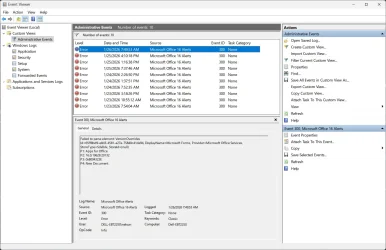
Ever since 26200-7625 was installed on my machine I get these MS Office 16 Alert Errors. I was holding off not installing 26200-7628 because reading the information on it, I was thinking I was okay, as I store my PST file locally and do not use OneDrive at all - but I think 26200.7625 may have caused these errors. So, I guess I will install 26200.7628 as I see it offered to my machine in Windows Update and hope that it will stop these errors. I will get back in a day or two with an update on how it goes.

Screenshot 2026-01-26 084055.webp


Screenshot 2026-01-26 084722.webp
 

My Computers

System One System Two

  • OS
    Windows 11 Pro 25H2 26200.8457
    Computer type
    PC/Desktop
    Manufacturer/Model
    Dell Tower Plus EBT2250, DOB: 06/15/2025
    CPU
    Intel® Core™ Ultra 7 265 1.8GHz to 5.3GHz (Arrow Lake)
    Motherboard
    Dell Inc. 02D3NT A00 (U3E1)
    Memory
    SK Hynix 32GB DDR5 5600 Desktop RAM UDIMM Non-ECC PC5-5600B
    Graphics Card(s)
    Dell NVIDIA® GeForce RTX™ 4060 8GB GDDR6 & (iGPU) Integrated Intel® UHD Graphics
    Sound Card
    Chipset Realtek High-Definition Audio with Dolby Atmos
    Monitor(s) Displays
    Dell Ultra Sharp U2515H 25-Inch Screen LED-Lit
    Screen Resolution
    2560 X 1440
    Hard Drives
    Samsung (NVMe PM9C1a 1024GB) M.2 PCIe NVMe Solid State Drive (OS), with Samsung Piccolo (S4LY022) 6-Core 4 Channel Controller.

    Samsung T7 500GB SSD, USB-C External Drive
    PSU
    Dell 460W
    Case
    Dell Tower Plus EBT 2250
    Cooling
    Fan
    Keyboard
    Dell Wired Keyboard - KB216
    Mouse
    Logitech M510
    Internet Speed
    Intel Killer E3100G 2.5 Gigabit Ethernet Controller
    Browser
    Microsoft Edge
    Antivirus
    Microsoft Windows Security
    Other Info
    The Samsung NVMe PM9C1a 1024GB SSD does not use a Phison NAND controller. Instead, it uses Samsung's in-house developed Piccolo (S4LY022) 6-Core 4 Channel Controller. The PM9C1a utilizes a controller built using Samsung's 5-nanometer process and seventh-generation V-NAND technology. 🤔
  • Operating System
    Windows 11 Pro 25H2 26200.8457
    Computer type
    Laptop
    Manufacturer/Model
    Dell Inspiron 15 7000 (7591) 2-in-1, DOB: 11/30/2019
    CPU
    10th Generation Intel Core i7-10510U Processor (8MB Cache, up to 4.9 GHz) Comet Lake
    Motherboard
    Dell 0NNW5N
    Memory
    16GB DDR4 RAM
    Graphics card(s)
    NVIDIA® GeForce® MX250 with 2GB GDDR5 graphics memory
    Sound Card
    Chipset Realtek ALC3254 🤔🤣
    Monitor(s) Displays
    Dell 15.6-inch UHD Truelife Touch Narrow Border WVA Display with Active Pen support
    Screen Resolution
    3840 x 2160
    Hard Drives
    Intel NVME 512GB SSD with 32GB Intel Optane Memory, M.2 80mm PCIe 3.0 RAID

    SanDisk 256GB Extreme microSDXC UHS-I Memory Card
    PSU
    Dell 4-Cell Battery, 68 Whr (Integrated), 90 Watt AC Adapter
    Case
    Dell Inspiron 15 7000 2-in-1 (7591)
    Cooling
    Standard Dell Case Fan & Havit HV-F2056 USB Powered (3 Fans) Laptop Cooling Pad.
    Keyboard
    Dell
    Mouse
    Logitech Wireless Mouse M650L
    Internet Speed
    Wireless/Wired connectivity (WiFi 6 - 802.11 ax)
    Browser
    Microsoft Edge
    Antivirus
    Microsoft Windows Security
    Other Info
    From Dell: 512GB NVME Solid State Drive accelerated by 32GB Intel Optane Memory are the fastest as compared to NAND SSDs. Intel Optane H10 with SSD offers speedy storage and accelerates opening your programs.

My Computers

System One System Two

  • OS
    Windows 11 Pro
    Computer type
    Laptop
    Manufacturer/Model
    Lenovo Legion 7i 16IRX9
    CPU
    Intel Core i9-14900HX
    Motherboard
    LENOVO LNVNB161216 Chipset HM 770
    Memory
    32 GB
    Graphics Card(s)
    Intel UHD Graphics, NVIDIA RTX 4070 Laptop
    Sound Card
    Realtek in-built
    Screen Resolution
    3200x2000 200% Scale
    Hard Drives
    C: HDD 1 TB SAMSUNG MZVL21T0HCLR-00BL2
    D: HDD 1 TB CRUCIAL CT1000P3PSSD8
    Antivirus
    BitDefender Free
  • Operating System
    Windows 11 Pro
    Computer type
    Laptop
    Manufacturer/Model
    Lenovo ThinkPad X1 3Gen Extreme
    CPU
    I7 10750H
    Motherboard
    Intel MW-490
    Memory
    32 GB
    Graphics card(s)
    Intel UHD - NVIDIA 1650 Ti Max-Q
    Sound Card
    Realtek in-built
    Screen Resolution
    3840x2160 225% Scale
    Hard Drives
    C: WDC PC SN730 SDBQNTY-1T00-1001 (1 TB)
    D: KINGSTON SNV2S2000G (2 TB)
    Antivirus
    BitDefender
Ever since 26200-7625 was installed on my machine I get these MS Office 16 Alert Errors. I was holding off not installing 26200-7628 because reading the information on it, I was thinking I was okay, as I store my PST file locally and do not use OneDrive at all - but I think 26200.7625 may have caused these errors. So, I guess I will install 26200.7628 as I see it offered to my machine in Windows Update and hope that it will stop these errors. I will get back in a day or two with an update on how it goes.

EDIT: I mean 26200-2623 not 26200-2625.
 

My Computers

System One System Two

  • OS
    Windows 11 Pro 25H2 26200.8457
    Computer type
    PC/Desktop
    Manufacturer/Model
    Dell Tower Plus EBT2250, DOB: 06/15/2025
    CPU
    Intel® Core™ Ultra 7 265 1.8GHz to 5.3GHz (Arrow Lake)
    Motherboard
    Dell Inc. 02D3NT A00 (U3E1)
    Memory
    SK Hynix 32GB DDR5 5600 Desktop RAM UDIMM Non-ECC PC5-5600B
    Graphics Card(s)
    Dell NVIDIA® GeForce RTX™ 4060 8GB GDDR6 & (iGPU) Integrated Intel® UHD Graphics
    Sound Card
    Chipset Realtek High-Definition Audio with Dolby Atmos
    Monitor(s) Displays
    Dell Ultra Sharp U2515H 25-Inch Screen LED-Lit
    Screen Resolution
    2560 X 1440
    Hard Drives
    Samsung (NVMe PM9C1a 1024GB) M.2 PCIe NVMe Solid State Drive (OS), with Samsung Piccolo (S4LY022) 6-Core 4 Channel Controller.

    Samsung T7 500GB SSD, USB-C External Drive
    PSU
    Dell 460W
    Case
    Dell Tower Plus EBT 2250
    Cooling
    Fan
    Keyboard
    Dell Wired Keyboard - KB216
    Mouse
    Logitech M510
    Internet Speed
    Intel Killer E3100G 2.5 Gigabit Ethernet Controller
    Browser
    Microsoft Edge
    Antivirus
    Microsoft Windows Security
    Other Info
    The Samsung NVMe PM9C1a 1024GB SSD does not use a Phison NAND controller. Instead, it uses Samsung's in-house developed Piccolo (S4LY022) 6-Core 4 Channel Controller. The PM9C1a utilizes a controller built using Samsung's 5-nanometer process and seventh-generation V-NAND technology. 🤔
  • Operating System
    Windows 11 Pro 25H2 26200.8457
    Computer type
    Laptop
    Manufacturer/Model
    Dell Inspiron 15 7000 (7591) 2-in-1, DOB: 11/30/2019
    CPU
    10th Generation Intel Core i7-10510U Processor (8MB Cache, up to 4.9 GHz) Comet Lake
    Motherboard
    Dell 0NNW5N
    Memory
    16GB DDR4 RAM
    Graphics card(s)
    NVIDIA® GeForce® MX250 with 2GB GDDR5 graphics memory
    Sound Card
    Chipset Realtek ALC3254 🤔🤣
    Monitor(s) Displays
    Dell 15.6-inch UHD Truelife Touch Narrow Border WVA Display with Active Pen support
    Screen Resolution
    3840 x 2160
    Hard Drives
    Intel NVME 512GB SSD with 32GB Intel Optane Memory, M.2 80mm PCIe 3.0 RAID

    SanDisk 256GB Extreme microSDXC UHS-I Memory Card
    PSU
    Dell 4-Cell Battery, 68 Whr (Integrated), 90 Watt AC Adapter
    Case
    Dell Inspiron 15 7000 2-in-1 (7591)
    Cooling
    Standard Dell Case Fan & Havit HV-F2056 USB Powered (3 Fans) Laptop Cooling Pad.
    Keyboard
    Dell
    Mouse
    Logitech Wireless Mouse M650L
    Internet Speed
    Wireless/Wired connectivity (WiFi 6 - 802.11 ax)
    Browser
    Microsoft Edge
    Antivirus
    Microsoft Windows Security
    Other Info
    From Dell: 512GB NVME Solid State Drive accelerated by 32GB Intel Optane Memory are the fastest as compared to NAND SSDs. Intel Optane H10 with SSD offers speedy storage and accelerates opening your programs.
Ever since I stopped manually removing those two packages with DISM, Windows Update has been flawless on all my machines. It's pretty stupid of Microsoft not to specifically mention that issue and/or have them flagged as not removable IMO.

If they really need them to be there, do it properly! :rolleyes:
 

My Computers

System One System Two

  • OS
    Win 11 Pro 25H2, Build 26200.8524
    Computer type
    PC/Desktop
    Manufacturer/Model
    Home Brew
    CPU
    Intel Core i5 14500
    Motherboard
    Gigabyte B760M G P WIFI
    Memory
    64GB DDR4
    Graphics Card(s)
    GeForce RTX 4060
    Sound Card
    Chipset Realtek
    Monitor(s) Displays
    LG 45" Ultragear, Acer 24" 1080p
    Screen Resolution
    5120x1440, 1920x1080
    Hard Drives
    Crucial P310 2TB 2280 PCIe Gen4 3D NAND NVMe M.2 SSD (O/S)
    Silicon Power 2TB US75 NVMe PCIe Gen4 M.2 2280 SSD (backup)
    Crucial BX500 2TB 3D NAND (2nd backup)
    Seagate 4TB Ironwolf, rotating HDD archive files
    External off-line backup Drives: 2 NVMe 4TB drives in external enclosures
    PSU
    Thermaltake Toughpower GF3 750W
    Case
    LIAN LI LANCOOL 216 E-ATX PC Case
    Cooling
    Lots of fans!
    Keyboard
    Microsoft Comfort Curve 2000
    Mouse
    Logitech G305
    Internet Speed
    Verizon FiOS 1GB
    Browser
    Firefox
    Antivirus
    Malware Bytes & Windows Defender Security
  • Operating System
    Win 11 Pro 25H2, Build 26200.8524
    Computer type
    PC/Desktop
    Manufacturer/Model
    Home Brew
    CPU
    Intel Core i5 14400
    Motherboard
    Gigabyte B760M DS3H AX
    Memory
    32GB DDR5
    Graphics card(s)
    Intel 700 Embedded GPU
    Sound Card
    Realtek Embedded
    Monitor(s) Displays
    27" HP 1080p
    Screen Resolution
    1920x1080
    Hard Drives
    Crucial P310 2TB 2280 PCIe Gen4 eD NAND PCIe SSD
    Samsung EVO 990 2TB NVMe Gen4 SSD
    Samsung 2TB SATA SSD
    PSU
    Thermaltake Smart BM3 650W
    Case
    Okinos Micro ATX Case
    Cooling
    Fans
    Keyboard
    Microsoft Comfort Curve 2000
    Mouse
    Logitech G305
    Internet Speed
    Verizon FiOS 1GB
    Browser
    Firefox
    Antivirus
    Malware Bytes & Windows Defender Security
Ever since I stopped manually removing those two packages with DISM, Windows Update has been flawless on all my machines. It's pretty stupid of Microsoft not to specifically mention that issue and/or have them flagged as not removable IMO.

If they really need them to be there, do it properly! :rolleyes:
I removed them when it was first noted and a 'fix' was posted. I have not had any issues with updates and DISM analyze show '0' reclaimable.
I am starting to think and wonder if the issue is with only WinPro users. I am on Windows Home.
 

My Computer

System One

  • OS
    Windows 11 Intel i5 10400 HD630 graphics chip
    Computer type
    PC/Desktop
    Manufacturer/Model
    HP
    CPU
    i5-10400
    Memory
    12 gb
    Graphics Card(s)
    HD630 chipset
    Monitor(s) Displays
    LG 24inch
    Hard Drives
    SSD, external usb drive 1tb for files/backups
    Keyboard
    wireless Logi
    Mouse
    ms 4000 wireless mouse
    Internet Speed
    10meg
    Browser
    Firefox
    Antivirus
    Defender
    Other Info
    Win11 Home 25h2 26200.8524 05/26/2026
I am starting to think and wonder if the issue is with only WinPro users
No as I am on pro.
I do not think it is directly related to these packages as if it was it would affect all that remove them.
 

My Computer

System One

  • OS
    Windows 11 Pro
I gave up tired the update, update fix 1 , update fix 2..not gonna try again just wait until there no option to
install or not and go from there
 

My Computer

System One

  • OS
    windows 11
    Computer type
    PC/Desktop
    Manufacturer/Model
    Antec/Case
    CPU
    Intel i5-10600kf
    Motherboard
    GIGABYTE Z590 UD AC
    Memory
    32gb corsair vengerance pro
    Graphics Card(s)
    AMD RX 6500XT
    Sound Card
    onboard
    Monitor(s) Displays
    40" Hisense
    Hard Drives
    Samsung 850
    Samsung 870
    Seagate 2TB
    PSU
    EVGA GQ 750
I am starting to think and wonder if the issue is with only WinPro users. I am on Windows Home.
Nope not that, I'm on Home and had install errors after removing the two unreclaimable packages from two machines on RP builds.
 

My Computers

System One System Two

  • OS
    Windows 11 25H2
    Computer type
    Laptop
    Manufacturer/Model
    Alienware 18 Area-51
    CPU
    Intel Core Ultra 9 275HX (24-Core)
    Motherboard
    Alienware
    Memory
    64GB DDR5 6400MT/s
    Graphics Card(s)
    NVIDIA GeForce RTX 5080 and Intel UHD Graphics
    Sound Card
    Onboard, Realtek high-performance Audio chips (ALC3329 & ALC1708))
    Monitor(s) Displays
    300HZ 18-inch QHD 500 nit Comfort View+
    Screen Resolution
    2560 x 1600
    Hard Drives
    2TB NVMe M.2 PCIe Gen 5 SSD
    Case
    Magnesium Alloy
    Cooling
    Advanced Cryo-Tech Quad-Fan Cooling system & large vapor chamber
    Keyboard
    Cherry MX ultra low profile mechanical keyboard with per key AlienFX RGB lighting
    Mouse
    Logitech MX Master 4
    Browser
    Vivaldi (main), Firefox, Chrome, Edge
    Antivirus
    MS Defender and Malwarebytes Free
  • Operating System
    Windows 11 25H2
    Computer type
    Laptop
    Manufacturer/Model
    Microsoft Surface Laptop 7
    CPU
    Qualcomm Snapdragon X Elite (12 Core) ARM based CPU
    Motherboard
    Microsoft Corp.
    Memory
    16GB LPDDR5
    Graphics card(s)
    Qualcomm Adreno X1-85
    Sound Card
    Omnisonic speakers with Dolby Atmos spatial sound
    Monitor(s) Displays
    120 Hz 13.8-inch 600 nit PixelSense Flow touchscreen
    Screen Resolution
    2304x1536
    Hard Drives
    1TB NVMe Gen 4 SSD
    Case
    Anodized Aluminum
    Cooling
    Traditional active cooling fan system
    Keyboard
    Mechanical QWERTY, backlit when in use
    Mouse
    Logitech MX Master 4 and Surface Arc Mouse
    Browser
    Vivaldi (main), Firefox, Chrome, Edge
    Antivirus
    MS Defender and Malwarebytes Free
Ive been down that track as well however it did complete the ISO Windows 11, version 25H2 (26200.7634) from UUP Dump but I ended with the finished output 26100.1742 ISO
Tried it twice same result.
I will just wait until I receive the update through windows update.
Same here. 😵‍💫😂🤷‍♂️
 
Last edited:

My Computer

System One

  • OS
    Windows 11 Pro 25H2
    Computer type
    PC/Desktop
    Manufacturer/Model
    Dell XPS 8930
    CPU
    Intel I9-9900K
    Memory
    64GB
    Graphics Card(s)
    NVIDIA RTX 2060
    Sound Card
    NVIDIA High Definition Audio
    Monitor(s) Displays
    4k Samsung
    Screen Resolution
    3840 x 2160
    Hard Drives
    512GB NVMe, ADATA SU 800, 2TB HDD
Thank you!! I am pretty sure that it will fix this issue! Yes I totally agree with you! But there is a drawback regarding this...If I do so, I suspect that my dell will convert to win 11 home (original OS when I bought it) from pro that it is now (win 11 25h2 pro genuine license was installed via clear installation-format by a store technician a week ago so as to avoid so many things-apps preinstalled to my laptop)! I have done such a repair a month ago when there was a problem regarding latest December's update...The result was perfect, except for the fact that my OS was turned back to win 11 home...That's why I am avoiding it!
The reinstall with repair version, should reinstall the same edition you have now, not turning back to the preinstalled one. 🤷‍♂️
 

My Computer

System One

  • OS
    Windows 11 Pro 25H2
    Computer type
    PC/Desktop
    Manufacturer/Model
    Dell XPS 8930
    CPU
    Intel I9-9900K
    Memory
    64GB
    Graphics Card(s)
    NVIDIA RTX 2060
    Sound Card
    NVIDIA High Definition Audio
    Monitor(s) Displays
    4k Samsung
    Screen Resolution
    3840 x 2160
    Hard Drives
    512GB NVMe, ADATA SU 800, 2TB HDD
Im sure about 7628 update has Memory DRAM leak i have problem
 

My Computer

System One

  • OS
    WINDOWS11
    Computer type
    PC/Desktop
    CPU
    i9 10900X 5GHZ uncore 3.2ghz
    Motherboard
    ASUS RAMPAGE VI EXTREME X299
    Memory
    CORSAIR DOMINATOR PLATINUM 3000MHZ QUAD CHANNEL 32GB O.C 3600MHZ
    Graphics Card(s)
    ASUS TUF RTX 3090
    Monitor(s) Displays
    NEMESIS NC27QGH
    Screen Resolution
    2560X1440
    Hard Drives
    SAMSUNG 970 EVO PLUS 500GB-RAID 0 HDD 8TB
    PSU
    THERMALTAKE GRAND TOUCHPOWER 1250W GOLD
    Case
    CM HAF 932 LIMITED EDITION
    Cooling
    BE QUIET PURE LOOP 360MM
    Mouse
    GLORIOUS MODEL O
    Internet Speed
    FIBER 100/10
Installed OK - a surprise after having to repair install to resolve Install errors with KB5074109 and the mentions above of install errors with this one. These updates do seem to take a while to download and install these days though.

Ever since 26200-7625 was installed on my machine I get these MS Office 16 Alert Errors. I was holding off not installing 26200-7628 because reading the information on it, I was thinking I was okay, as I store my PST file locally and do not use OneDrive at all - but I think 26200.7625 may have caused these errors. So, I guess I will install 26200.7628 as I see it offered to my machine in Windows Update and hope that it will stop these errors. I will get back in a day or two with an update on how it goes.
I've been seeing this error for a few days now and it's mentioned on a 365 thread here - but it didn't seem to start after a windows update so maybe after a 365 update - even though it's been reported across a range of recent 365 versions.
 

My Computer

System One

  • OS
    Windows 11
Ever since 26200-7625 was installed on my machine I get these MS Office 16 Alert Errors. I was holding off not installing 26200-7628 because reading the information on it, I was thinking I was okay, as I store my PST file locally and do not use OneDrive at all - but I think 26200.7625 may have caused these errors. So, I guess I will install 26200.7628 as I see it offered to my machine in Windows Update and hope that it will stop these errors. I will get back in a day or two with an update on how it goes.

View attachment 161162


View attachment 161163
The office alerts are not WU related but rather Office related. Those errors come from com errors Like Bing maps and so on. What a waste.
 
Last edited:

My Computer

System One

  • OS
    Windows 11 Education
    Computer type
    PC/Desktop
    CPU
    Intel® Core™ i9-13900K Desktop Processor 16 (8P+8E)
    Motherboard
    Asus TUF Gaming Z790-PLUS WIFI D4
    Memory
    G.Skill Ripjaws V Series 32gb (2x16gb) DDR4 3600mhz
    Graphics Card(s)
    Asus Dual Geforce Rtx™ 3060 TI Edition 8gb Gddr6
    Monitor(s) Displays
    BenQ EW3270U 31.5” 3840x2160 UHD 16:9 HDR LED 4K LG 27UK850-W 27'' 4K UHD IPS LED Monitor with HDR10
    Screen Resolution
    3840x2160
    Hard Drives
    Samsung 990 with heatsink PRO PCIe 4.0 Gen 4 NVMe® SSD 1TB
    WD_BLACK SN850X NVMe M.2 2280 1TB PCI-Express 4.0
    Crucial T500 2TB Gen4
    Samsung 970 Evo M.2 2280 2tb Pcie Gen3. X4
    PSU
    Corsair AXi Series AX860i Digital 860W 80 PLUS PSU
    Case
    Fractal Meshify C ATX Mid Tower Case
    Keyboard
    Logi MX Keys
    Mouse
    Logi M705
    Internet Speed
    400 mbs
    Browser
    Firefox
    Antivirus
    Eset NOD32
    Other Info
    Love fast boots
The office alerts are not WU related but rather Office related. Those errors come from com errors Like Bing maps and so on. What a waste.

Thank you. Did an Office Online Repair in Settings - Apps - Installed Apps - Microsoft 365. Also, before I did that I went into Outlook and deactivated one add-in that had something to do with social media. I will see if that corrects those errors. Thanks. :-)
 

My Computers

System One System Two

  • OS
    Windows 11 Pro 25H2 26200.8457
    Computer type
    PC/Desktop
    Manufacturer/Model
    Dell Tower Plus EBT2250, DOB: 06/15/2025
    CPU
    Intel® Core™ Ultra 7 265 1.8GHz to 5.3GHz (Arrow Lake)
    Motherboard
    Dell Inc. 02D3NT A00 (U3E1)
    Memory
    SK Hynix 32GB DDR5 5600 Desktop RAM UDIMM Non-ECC PC5-5600B
    Graphics Card(s)
    Dell NVIDIA® GeForce RTX™ 4060 8GB GDDR6 & (iGPU) Integrated Intel® UHD Graphics
    Sound Card
    Chipset Realtek High-Definition Audio with Dolby Atmos
    Monitor(s) Displays
    Dell Ultra Sharp U2515H 25-Inch Screen LED-Lit
    Screen Resolution
    2560 X 1440
    Hard Drives
    Samsung (NVMe PM9C1a 1024GB) M.2 PCIe NVMe Solid State Drive (OS), with Samsung Piccolo (S4LY022) 6-Core 4 Channel Controller.

    Samsung T7 500GB SSD, USB-C External Drive
    PSU
    Dell 460W
    Case
    Dell Tower Plus EBT 2250
    Cooling
    Fan
    Keyboard
    Dell Wired Keyboard - KB216
    Mouse
    Logitech M510
    Internet Speed
    Intel Killer E3100G 2.5 Gigabit Ethernet Controller
    Browser
    Microsoft Edge
    Antivirus
    Microsoft Windows Security
    Other Info
    The Samsung NVMe PM9C1a 1024GB SSD does not use a Phison NAND controller. Instead, it uses Samsung's in-house developed Piccolo (S4LY022) 6-Core 4 Channel Controller. The PM9C1a utilizes a controller built using Samsung's 5-nanometer process and seventh-generation V-NAND technology. 🤔
  • Operating System
    Windows 11 Pro 25H2 26200.8457
    Computer type
    Laptop
    Manufacturer/Model
    Dell Inspiron 15 7000 (7591) 2-in-1, DOB: 11/30/2019
    CPU
    10th Generation Intel Core i7-10510U Processor (8MB Cache, up to 4.9 GHz) Comet Lake
    Motherboard
    Dell 0NNW5N
    Memory
    16GB DDR4 RAM
    Graphics card(s)
    NVIDIA® GeForce® MX250 with 2GB GDDR5 graphics memory
    Sound Card
    Chipset Realtek ALC3254 🤔🤣
    Monitor(s) Displays
    Dell 15.6-inch UHD Truelife Touch Narrow Border WVA Display with Active Pen support
    Screen Resolution
    3840 x 2160
    Hard Drives
    Intel NVME 512GB SSD with 32GB Intel Optane Memory, M.2 80mm PCIe 3.0 RAID

    SanDisk 256GB Extreme microSDXC UHS-I Memory Card
    PSU
    Dell 4-Cell Battery, 68 Whr (Integrated), 90 Watt AC Adapter
    Case
    Dell Inspiron 15 7000 2-in-1 (7591)
    Cooling
    Standard Dell Case Fan & Havit HV-F2056 USB Powered (3 Fans) Laptop Cooling Pad.
    Keyboard
    Dell
    Mouse
    Logitech Wireless Mouse M650L
    Internet Speed
    Wireless/Wired connectivity (WiFi 6 - 802.11 ax)
    Browser
    Microsoft Edge
    Antivirus
    Microsoft Windows Security
    Other Info
    From Dell: 512GB NVME Solid State Drive accelerated by 32GB Intel Optane Memory are the fastest as compared to NAND SSDs. Intel Optane H10 with SSD offers speedy storage and accelerates opening your programs.
I FOUND the problem for memory leak is marvell aquantia latest driver
 

My Computer

System One

  • OS
    WINDOWS11
    Computer type
    PC/Desktop
    CPU
    i9 10900X 5GHZ uncore 3.2ghz
    Motherboard
    ASUS RAMPAGE VI EXTREME X299
    Memory
    CORSAIR DOMINATOR PLATINUM 3000MHZ QUAD CHANNEL 32GB O.C 3600MHZ
    Graphics Card(s)
    ASUS TUF RTX 3090
    Monitor(s) Displays
    NEMESIS NC27QGH
    Screen Resolution
    2560X1440
    Hard Drives
    SAMSUNG 970 EVO PLUS 500GB-RAID 0 HDD 8TB
    PSU
    THERMALTAKE GRAND TOUCHPOWER 1250W GOLD
    Case
    CM HAF 932 LIMITED EDITION
    Cooling
    BE QUIET PURE LOOP 360MM
    Mouse
    GLORIOUS MODEL O
    Internet Speed
    FIBER 100/10
Windows Update downloaded this today. It was ready to install, so I did so. So far no real issues that I can discover.
 

My Computers

System One System Two

  • OS
    windows 10 & 11
    Computer type
    PC/Desktop
    Manufacturer/Model
    iBuyPower (special build)
    CPU
    AMD Ryzen 7X
    Motherboard
    Asus Prime x370 Pro
    Memory
    64Gb
    Graphics Card(s)
    Radeon RX 480 8Gb
    Monitor(s) Displays
    Samsung UHD 27 inch
    Screen Resolution
    UHD
    Hard Drives
    3 Samsung 1 TB SSD each; 1 Samsung PCIe M.2 at 2 TB
  • Operating System
    Windows 11 pro
    Computer type
    PC/Desktop
    Manufacturer/Model
    IBuyPower
    CPU
    AMD 9 5900X
    Motherboard
    Asus x570 ROG Crosshair VIII Dark Hero WI-FI 6E ARGB
    Memory
    32 Gb
    Graphics card(s)
    Nvidia GeForce RTX 3080 Ti 12 GB GDDR6X
    Sound Card
    3D PREMIUM surround sound onboard
    Monitor(s) Displays
    Samsung 32 inch UHD curved monitor
    Screen Resolution
    UHD
    Hard Drives
    Samsung 980 pro 2 tb gen 4 NVMe ssd
    PSU
    850 watt consair RM850X
    Case
    Lian Li LANCOOL ONE tempered glass RGB gaming case
    Cooling
    DEEPCOOL GAMERSTORM RGB 240 mm CASTLE 240EX liquid cooler
    Keyboard
    Ares m.2 gaming keyboard
    Mouse
    Ares m.2 gaming optical mouse
    Internet Speed
    450
    Browser
    Firefox / Edge
    Antivirus
    Windows defender
    Other Info
    With all this gaming rig I am not a gamer!
The result was perfect, except for the fact that my OS was turned back to win 11 home...That's why I am avoiding it!
My Laptop came with W11 Home but I upgraded to Pro with a key I bought from a software retailer here in Australia.
I have done a few repair installs the last few months and it has always been the Pro version after.
Your Pro Key should be registered with MS servers or your MS Account if you have one.
 

My Computer

System One

  • OS
    Windows 11 Pro 25H2
    Computer type
    Laptop
    Manufacturer/Model
    HP 15s-fq5xxx
    CPU
    12th Gen Intel(R) Core(TM) i7-1255U (1.70 GHz
    Memory
    16.0 GB
    Graphics Card(s)
    Intel iRIS Xe
    Screen Resolution
    1920 x 1080
    Hard Drives
    Samsung SSD 512 GB
    Mouse
    Logitech Pebble
    Internet Speed
    500/50 Mb/sec
    Browser
    Chrome
    Antivirus
    Defender
No. We got this yesterday. Your're just a litte late.

Neither my desktop nor laptop had the update available on Saturday... and I run Windows Update regularly. Therefore, it showed up, for me, Sunday morning.
 

My Computer

System One

  • OS
    Windows 11 25H2 Pro (RP Build 26200.8524)
    Computer type
    PC/Desktop
    Manufacturer/Model
    Alienware

Latest Support Threads

Back
Top Bottom