Win Update KB5078127 Windows 11 Out-of-band Update build 26100.7628 (24H2) and 26200.7628 (25H2) - Jan. 24


UPDATE 1/29:


 Microsoft Support:

January 24, 2026 - KB5078127 (OS Builds 26200.7628 and 26100.7628) Out-of-band​


Summary

This out-of-band update for Windows 11, version 25H2 and 24H2 (KB5078127) is cumulative. It includes updates from previous security and non-security releases, along with an additional fix. To learn more about differences between security updates, optional non-security preview updates, out-of-band (OOB) updates, and continuous innovation, see Windows monthly updates explained. For information on Windows update terminology, see the different types of Windows software updates.

To view the latest updates about this release, visit the Windows release health dashboard or the update history page for Windows 11, version 25H2 and 24H2.

Improvements

This OOB update includes quality improvements. This update is cumulative and includes security fixes and improvements from the January 13, 2026, security update (KB5074109) and the out-of-band update (KB5077744) from January 17, 2026, in addition to the following:
  • [File System] Fixed: After installing the Windows update released on and after January 13, 2026, some applications became unresponsive or encountered unexpected errors when opening files from or saving files to cloud-based storage, such as OneDrive or Dropbox. In certain Outlook configurations that store PST files on OneDrive, Outlook may hang and fail to reopen unless the process is terminated or the system is restarted. Users may also see missing sent Items or previously downloaded emails being re‑downloaded.
This update is offered through Windows Update for devices running Windows 11 that have already installed KB5074109 or KB5077744. It is also available for manual download from the Microsoft Update Catalog.

If you have turned on Get the latest updates as soon as they're available in Windows Update settings (Settings > Windows Update), you will automatically receive this update. If the toggle is off on your device, you can install the update manually by going to Settings > Windows Update and selecting Download & install.

Note IT administrators using Microsoft Intune or Windows Autopatch should follow the guidance below for installing the OOB update via Windows Update.

AI Components

This release updates the following AI components:

AI Component​
Version​
Image Search1.2511.1224.0
Content Extraction1.2511.1224.0
Semantic Analysis1.2511.1224.0
Settings Model1.2511.1224.0

Windows 11 servicing stack update (KB5071142)- 26100.7295

This update makes quality improvements to the servicing stack, which is the component that installs Windows updates. Servicing stack updates (SSU) ensure that you have a robust and reliable servicing stack so that your devices can receive and install Microsoft updates. To learn more about SSUs, see Simplifying on-premises deployment of servicing stack updates.

Known issues in this update

1 Password icon might be missing or invisible in the lock screen sign-in options

Symptoms

After installing the August 2025 non-security preview update (KB5064081) or later updates, you might notice that the password icon is not visible in the sign-in options on the lock screen. If you hover over the space where the icon should appear, you’ll see that the password button is still available. Select this placeholder to open the password text box and enter your password. After entering your password, you can sign in normally.

Individuals using Windows Home or Pro editions on personal devices are very unlikely to experience this issue. This issue primarily affects enterprise or managed IT environments.

Workaround

This issue is mitigated using Known Issue Rollback (KIR).

For enterprise-managed devices managed by IT departments that have installed the affected update and encountered this issue, IT administrators can resolve it by installing and configuring the Group policy listed below. The special Group Policy can be found in Computer Configuration > Administrative Templates > <Group Policy name listed below>.
For information on deploying and configuring these special Group Policy, please see How to use Group Policy to deploy a Known Issue Rollback.

Group Policy downloads with Group Policy name:
Important: You will need to install and configure the Group Policy for your version of Windows to resolve this issue. You will also need to restart your device(s) to apply the group policy setting. Note that the Group Policy will temporarily disable the change causing this issue.

We are working on a resolution in a future Windows update and will provide more information when it is available.

How to get this update

Before you install this update

Microsoft now combines the latest servicing stack update (SSU) for your operating system with the latest cumulative update (LCU). For general information about SSUs, see Servicing stack updates and Servicing Stack Updates (SSU): Frequently Asked Questions.

Install this update

To install this update, use one of the following Windows and Microsoft release channels.

Available
Next Step​
Available
This update will be downloaded and installed automatically from Windows Update.
YesBefore you install this update

To get the standalone package(s) for this update, go to the Microsoft Update Catalog website. This KB contains one or more MSU files that require installation in a specific order.

Install this update

Method 1: Install all MSU files together


Download all MSU files for KB5078127 from Microsoft Update Catalog and place them in the same folder (for example, C:/Packages). Use Deployment Image Servicing and Management (DISM.exe) to install the target update. DISM will use the folder specified in PackagePath to discover and install one or more prerequisite MSU files as needed.

Updating Windows PC
To apply this update to a running Windows PC, run the following command from an elevated Command Prompt:

DISM /Online /Add-Package /PackagePath:c:\packages\Windows11.0-KB5078127-x64.msu

Or, run the following command from an elevated Windows PowerShell prompt:

Add-WindowsPackage -Online -PackagePath "c:\packages\Windows11.0-KB5078127-x64.msu"

Or use Windows Update Standalone Installer to install the target update.

Updating Windows Installation media

To apply this update to Windows Installation media, see Update Windows installation media with Dynamic Update.

Note: When downloading other Dynamic Update packages, ensure they match the same month as this KB. If the SafeOS Dynamic Update or Setup Dynamic Update is not available for the same month as this KB, use the most recently published version of each.

To add this update to a mounted image, run the following command from an elevated Command Prompt:

DISM /Image:mountdir /Add-Package /PackagePath:Windows11.0-KB5078127-x64.msu

Or, run the following command from an elevated Windows PowerShell prompt:

Add-WindowsPackage -Path "c:\offline" -PackagePath "Windows11.0-KB5078127-x64.msu" -PreventPending

Method 2: Install each MSU file individually, in order

Download and install each MSU file individually either using DISM or Windows Update Standalone Installer in the following order:
  1. windows11.0-kb5043080-x64_953449672073f8fb99badb4cc6d5d7849b9c83e8.msu
  2. windows11.0-kb5078127-x64_2669c24d8d8227e7992853d32fb4e95873bbe6bf.msu
1 This latest cumulative update includes updates for AI components. Even though the AI component updates are included in the update, the AI components are only applicable to Windows Copilot+ PCs and will not install on Windows PC or Windows Server.

If you want to remove the LCU

To remove the LCU after installing the combined SSU and LCU package, use the DISM/Remove-Package command line option with the LCU package name as the argument. You can find the package name by using this command: DISM /online /get-packages.

Running Windows Update Standalone Installer (wusa.exe) with the /uninstall switch on the combined package will not work because the combined package contains the SSU. You cannot remove the SSU from the system after installation.

File Information

For a list of the files provided in this update, download the file information for cumulative update 5078127.

For a list of the files provided in the servicing stack update, download the file information for the SSU (KB5071142) - version 26100.7295.


 Source:


Check Windows Updates


UUP Dump:

64-bit ISO download:

ARM64 ISO download:

 
Last edited:

My Laptop came with W11 Home but I upgraded to Pro with a key I bought from a software retailer here in Australia.
I have done a few repair installs the last few months and it has always been the Pro version after.
Your Pro Key should be registered with MS servers or your MS Account if you have one.
Yes of course!!! Thank you!!!
 

My Computer

System One

  • OS
    win 11 pro 25 h2
    Computer type
    PC/Desktop
May concern is more related to the odd Nvidia issues, which have not been acknowledge as an issue, and therefore probloaly not being investgated
I to suffered from your NVIDIA problems. Which 951.74 driver version are you using? Game or Studio?

I was using Game but clean installed Studio version and black screen and driver crashes are currently not happening. (RTX4060Ti and 26200.7628)
 

My Computers

System One System Two

  • OS
    Windows 11 PRO
    Computer type
    PC/Desktop
    Manufacturer/Model
    Home Built
    CPU
    i9-14900K
    Motherboard
    MSI MPG Z790 CARBON WIFI
    Memory
    64GB - 2 x32B DDR5 6400MHz (OC)
    Graphics Card(s)
    Nvidia RTX 4060Ti
    Hard Drives
    1 x 1TB Samsung 9100 PRO SSD; 1 x 2TB Samsung 860 EVO SSD; 1 x 2TB Samsung 870 EVO SSD; 1x 2TB WD Black SN850X SSD; 1 x 4TB Samsung 870 EVO SSD: 1 x 4TB Crucial CT4000P3PSSD8 SSD
    Internet Speed
    380Mb/s down; 36Mb/s up
    Browser
    Firefox
    Antivirus
    Bitdefender
  • Operating System
    Windows 11 PRO (Dev Channel)
    Computer type
    PC/Desktop
    Manufacturer/Model
    Home Built
    CPU
    i7-9700K
    Motherboard
    MSI Z390 A-PRO
    Memory
    4x 8Gb DDR4 3000Mhz
    Graphics card(s)
    Nvidia GTX1070Ti
    Hard Drives
    1x 500 GB Samsung 970 Evo Plus SSD; 1x 1TB ST1000DX001-1CM162 SSHD
    Internet Speed
    380Mb/s down; 36Mb/s up
    Browser
    Firefox
I was on the Game Ready driver 591.74, I have just downloaded 591.86, let's hope they are better. I have an RTX 4090
 

My Computers

System One System Two

  • OS
    Windows 11 25H2
    Computer type
    PC/Desktop
    Manufacturer/Model
    Custom Built
    CPU
    Intel i9 14900KF
    Motherboard
    ASUS Z790 ProArt Creator WiFi
    Memory
    64GB Corsair Vengeance RGB
    Graphics Card(s)
    MSI 4090 Suprim X
    Sound Card
    Onboard
    Monitor(s) Displays
    1 x Asus 24". 1 x Asus 32"
    Screen Resolution
    1920 x 1080 & 2560 x 1440
    Hard Drives
    Multiple
    PSU
    Corsair 1200HX
    Case
    Corsair 7000D RGB
    Cooling
    Corsair H150I Capellix XT
    Keyboard
    Corsair K70 RGB PRO
    Mouse
    Corsair M55 RGB Pro
    Internet Speed
    1000Mbps
    Browser
    Edge
    Antivirus
    Windows Default
  • Operating System
    Windows 11 25H2
    Computer type
    PC/Desktop
    Manufacturer/Model
    Custom Built
    CPU
    Intel i7 6800K
    Motherboard
    ASUS Z99 Deluxe
    Memory
    32GB DDR4 (Corsair)
    Graphics card(s)
    ASUS GTX 1080ti
    Sound Card
    Onboard
    Monitor(s) Displays
    1x Viewsonic 24" 1x LG 19"
    Screen Resolution
    1920 x 1080 & 1600 x 900
    Hard Drives
    3 x SATA SSD
    PSU
    650W Gigabyte Bronze
    Case
    Coolermaster HAF-X
    Cooling
    Noctua NH-15 Chroma black
    Keyboard
    Generic RGB
    Mouse
    Microsoft Basic
    Internet Speed
    1000Mbps
    Browser
    Edge
    Antivirus
    Windows Default
I was on the Game Ready driver 591.74, I have just downloaded 591.86, let's hope they are better. I have an RTX 4090
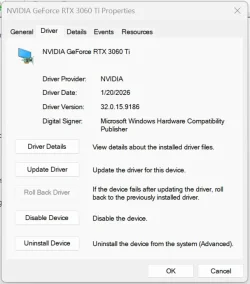
I have 591.86 Game Ready driver on RTX 3060 Ti.
I have not seen a problem here with 591.74 either. 🤷‍♂️
What are the problems you are having?

1769589811246.webp
 

My Computer

System One

  • OS
    Windows 11 Pro 25H2
    Computer type
    PC/Desktop
    Manufacturer/Model
    Dell XPS 8930
    CPU
    Intel I9-9900K
    Memory
    64GB
    Graphics Card(s)
    NVIDIA RTX 2060
    Sound Card
    NVIDIA High Definition Audio
    Monitor(s) Displays
    4k Samsung
    Screen Resolution
    3840 x 2160
    Hard Drives
    512GB NVMe, ADATA SU 800, 2TB HDD

My Computers

System One System Two

  • OS
    Windows 11 25H2
    Computer type
    PC/Desktop
    Manufacturer/Model
    Custom Built
    CPU
    Intel i9 14900KF
    Motherboard
    ASUS Z790 ProArt Creator WiFi
    Memory
    64GB Corsair Vengeance RGB
    Graphics Card(s)
    MSI 4090 Suprim X
    Sound Card
    Onboard
    Monitor(s) Displays
    1 x Asus 24". 1 x Asus 32"
    Screen Resolution
    1920 x 1080 & 2560 x 1440
    Hard Drives
    Multiple
    PSU
    Corsair 1200HX
    Case
    Corsair 7000D RGB
    Cooling
    Corsair H150I Capellix XT
    Keyboard
    Corsair K70 RGB PRO
    Mouse
    Corsair M55 RGB Pro
    Internet Speed
    1000Mbps
    Browser
    Edge
    Antivirus
    Windows Default
  • Operating System
    Windows 11 25H2
    Computer type
    PC/Desktop
    Manufacturer/Model
    Custom Built
    CPU
    Intel i7 6800K
    Motherboard
    ASUS Z99 Deluxe
    Memory
    32GB DDR4 (Corsair)
    Graphics card(s)
    ASUS GTX 1080ti
    Sound Card
    Onboard
    Monitor(s) Displays
    1x Viewsonic 24" 1x LG 19"
    Screen Resolution
    1920 x 1080 & 1600 x 900
    Hard Drives
    3 x SATA SSD
    PSU
    650W Gigabyte Bronze
    Case
    Coolermaster HAF-X
    Cooling
    Noctua NH-15 Chroma black
    Keyboard
    Generic RGB
    Mouse
    Microsoft Basic
    Internet Speed
    1000Mbps
    Browser
    Edge
    Antivirus
    Windows Default
I'm running windows Home and KB5078127 showed up on my windows update. Since I haven't experienced any new issues from Tuesday's update, at least for now, I'm reluctant to install it. However; I'm paying attention!
 

My Computer

System One

  • OS
    Windows 11 25H2 Home
    Computer type
    Laptop
    Manufacturer/Model
    HP ENVY Laptop 17m-ch1xxx
    CPU
    11th Generation Intel Core i7
    Memory
    12GB
    Monitor(s) Displays
    17.3” FHD Display
New thread for that.

Seems like a insider thing which I am not part of

Is there going to be a regular preview update today? yesterdays did not come or is it not gonna happen due to the out-of-band one recently?
 

My Computer

System One

  • OS
    Windows 11
    Computer type
    Laptop
    Manufacturer/Model
    HP
    Memory
    15GB RAM
    Hard Drives
    SSD 1TB
    Browser
    Chrome
Seems like a insider thing which I am not part of

Is there going to be a regular preview update today? yesterdays did not come or is it not gonna happen due to the out-of-band one recently?
26200.7701 is for the Release Preview insider channel. 😂🤷‍♂️
 

My Computer

System One

  • OS
    Windows 11 Pro 25H2
    Computer type
    PC/Desktop
    Manufacturer/Model
    Dell XPS 8930
    CPU
    Intel I9-9900K
    Memory
    64GB
    Graphics Card(s)
    NVIDIA RTX 2060
    Sound Card
    NVIDIA High Definition Audio
    Monitor(s) Displays
    4k Samsung
    Screen Resolution
    3840 x 2160
    Hard Drives
    512GB NVMe, ADATA SU 800, 2TB HDD
Providing Internet conection delayed after this update, around two minutes after restarting PC.
Oof! The dreaded "takes longer to become ready than dial-up" bug.
 

My Computers

System One System Two

  • OS
    Windows 11 Pro x64 24H2
    Computer type
    PC/Desktop
    CPU
    Ryzen 9 5900X
    Motherboard
    ASRock B550 PG Velocita (UEFI-BIOS 3.90)
    Memory
    64 GB G.Skill RipJaws V F4-3200C16D-64GVK
    Graphics Card(s)
    ASRock Steel Legend Arc B580 12 GB
    Monitor(s) Displays
    Alienware AW3423DWF OLED ultrawide
    Hard Drives
    Samsung 990 Pro 1 TB NVMe SSD
    PSU
    eVGA Supernova 750 G3
    Case
    Corsair 275R
    Internet Speed
    VTel FTTH 1 Gb down and 1 Gb up
  • Computer type
    PC/Desktop
    CPU
    Ryzen 7 5800X3D
    Motherboard
    Asus ROG Strix B550-F Gaming (UEFI-BIOS version 3607)
    Memory
    32 GB (2x16 GB G.Skill TridentZ Neo)
    Graphics card(s)
    Sapphire Nitro+ Radeon RX 6750 XT
    Hard Drives
    Samsung 970 Pro 512 GB NVMe SSD
    PSU
    Corsair RM850x
    Case
    Fractal Focus G
random graphics driver crashes
Usually means unstable GPU core overclock, or GPU core failing. Maybe a power issue. I'm sus about the power connector! Shut down and check the power connector for charring on at least one of the pins.

Yes, especially the '4080, '4090, '5080 and '5090 are flagged by me for the power connectors to be checked.

Usually, it just means you need to back off by some MHz with the GPU core overclock.
 

My Computers

System One System Two

  • OS
    Windows 11 Pro x64 24H2
    Computer type
    PC/Desktop
    CPU
    Ryzen 9 5900X
    Motherboard
    ASRock B550 PG Velocita (UEFI-BIOS 3.90)
    Memory
    64 GB G.Skill RipJaws V F4-3200C16D-64GVK
    Graphics Card(s)
    ASRock Steel Legend Arc B580 12 GB
    Monitor(s) Displays
    Alienware AW3423DWF OLED ultrawide
    Hard Drives
    Samsung 990 Pro 1 TB NVMe SSD
    PSU
    eVGA Supernova 750 G3
    Case
    Corsair 275R
    Internet Speed
    VTel FTTH 1 Gb down and 1 Gb up
  • Computer type
    PC/Desktop
    CPU
    Ryzen 7 5800X3D
    Motherboard
    Asus ROG Strix B550-F Gaming (UEFI-BIOS version 3607)
    Memory
    32 GB (2x16 GB G.Skill TridentZ Neo)
    Graphics card(s)
    Sapphire Nitro+ Radeon RX 6750 XT
    Hard Drives
    Samsung 970 Pro 512 GB NVMe SSD
    PSU
    Corsair RM850x
    Case
    Fractal Focus G
I'm running windows Home and KB5078127 showed up on my windows update. Since I haven't experienced any new issues from Tuesday's update, at least for now, I'm reluctant to install it. However; I'm paying attention!
The new OoB, shows up as optional for me, so not installing it, because I don't want to be forced to reinstall Windows 11 like I was back in July, 2025.
 

My Computers

System One System Two

  • OS
    Windows 11 Pro x64 24H2
    Computer type
    PC/Desktop
    CPU
    Ryzen 9 5900X
    Motherboard
    ASRock B550 PG Velocita (UEFI-BIOS 3.90)
    Memory
    64 GB G.Skill RipJaws V F4-3200C16D-64GVK
    Graphics Card(s)
    ASRock Steel Legend Arc B580 12 GB
    Monitor(s) Displays
    Alienware AW3423DWF OLED ultrawide
    Hard Drives
    Samsung 990 Pro 1 TB NVMe SSD
    PSU
    eVGA Supernova 750 G3
    Case
    Corsair 275R
    Internet Speed
    VTel FTTH 1 Gb down and 1 Gb up
  • Computer type
    PC/Desktop
    CPU
    Ryzen 7 5800X3D
    Motherboard
    Asus ROG Strix B550-F Gaming (UEFI-BIOS version 3607)
    Memory
    32 GB (2x16 GB G.Skill TridentZ Neo)
    Graphics card(s)
    Sapphire Nitro+ Radeon RX 6750 XT
    Hard Drives
    Samsung 970 Pro 512 GB NVMe SSD
    PSU
    Corsair RM850x
    Case
    Fractal Focus G
The new OOB, shows up as optional for me, so not installing it, because I don't want to be forced to reinstall Windows 11 like I was back in July, 2025.

My computer was the same as yours, (showed as optional for the last few days) and as you, I felt no need to install it. But I was having some Outlook, (Microsoft 365) errors that I could not stop from logging, (like 6 a day) so I went ahead and installed it a few hours ago just for the heck of it - all went well here, (so far...). No new errors, so far...
 

My Computers

System One System Two

  • OS
    Windows 11 Pro 25H2 26200.8457
    Computer type
    PC/Desktop
    Manufacturer/Model
    Dell Tower Plus EBT2250, DOB: 06/15/2025
    CPU
    Intel® Core™ Ultra 7 265 1.8GHz to 5.3GHz (Arrow Lake)
    Motherboard
    Dell Inc. 02D3NT A00 (U3E1)
    Memory
    SK Hynix 32GB DDR5 5600 Desktop RAM UDIMM Non-ECC PC5-5600B
    Graphics Card(s)
    Dell NVIDIA® GeForce RTX™ 4060 8GB GDDR6 & (iGPU) Integrated Intel® UHD Graphics
    Sound Card
    Chipset Realtek High-Definition Audio with Dolby Atmos
    Monitor(s) Displays
    Dell Ultra Sharp U2515H 25-Inch Screen LED-Lit
    Screen Resolution
    2560 X 1440
    Hard Drives
    Samsung (NVMe PM9C1a 1024GB) M.2 PCIe NVMe Solid State Drive (OS), with Samsung Piccolo (S4LY022) 6-Core 4 Channel Controller.

    Samsung T7 500GB SSD, USB-C External Drive
    PSU
    Dell 460W
    Case
    Dell Tower Plus EBT 2250
    Cooling
    Fan
    Keyboard
    Dell Wired Keyboard - KB216
    Mouse
    Logitech M510
    Internet Speed
    Intel Killer E3100G 2.5 Gigabit Ethernet Controller
    Browser
    Microsoft Edge
    Antivirus
    Microsoft Windows Security
    Other Info
    The Samsung NVMe PM9C1a 1024GB SSD does not use a Phison NAND controller. Instead, it uses Samsung's in-house developed Piccolo (S4LY022) 6-Core 4 Channel Controller. The PM9C1a utilizes a controller built using Samsung's 5-nanometer process and seventh-generation V-NAND technology. 🤔
  • Operating System
    Windows 11 Pro 25H2 26200.8457
    Computer type
    Laptop
    Manufacturer/Model
    Dell Inspiron 15 7000 (7591) 2-in-1, DOB: 11/30/2019
    CPU
    10th Generation Intel Core i7-10510U Processor (8MB Cache, up to 4.9 GHz) Comet Lake
    Motherboard
    Dell 0NNW5N
    Memory
    16GB DDR4 RAM
    Graphics card(s)
    NVIDIA® GeForce® MX250 with 2GB GDDR5 graphics memory
    Sound Card
    Chipset Realtek ALC3254 🤔🤣
    Monitor(s) Displays
    Dell 15.6-inch UHD Truelife Touch Narrow Border WVA Display with Active Pen support
    Screen Resolution
    3840 x 2160
    Hard Drives
    Intel NVME 512GB SSD with 32GB Intel Optane Memory, M.2 80mm PCIe 3.0 RAID

    SanDisk 256GB Extreme microSDXC UHS-I Memory Card
    PSU
    Dell 4-Cell Battery, 68 Whr (Integrated), 90 Watt AC Adapter
    Case
    Dell Inspiron 15 7000 2-in-1 (7591)
    Cooling
    Standard Dell Case Fan & Havit HV-F2056 USB Powered (3 Fans) Laptop Cooling Pad.
    Keyboard
    Dell
    Mouse
    Logitech Wireless Mouse M650L
    Internet Speed
    Wireless/Wired connectivity (WiFi 6 - 802.11 ax)
    Browser
    Microsoft Edge
    Antivirus
    Microsoft Windows Security
    Other Info
    From Dell: 512GB NVME Solid State Drive accelerated by 32GB Intel Optane Memory are the fastest as compared to NAND SSDs. Intel Optane H10 with SSD offers speedy storage and accelerates opening your programs.
Usually means unstable GPU core overclock, or GPU core failing. Maybe a power issue. I'm sus about the power connector! Shut down and check the power connector for charring on at least one of the pins.

Yes, especially the '4080, '4090, '5080 and '5090 are flagged by me for the power connectors to be checked.

Usually, it just means you need to back off by some MHz with the GPU core overclock.
Graphics card is not overclocked other than out the box clocks, checked the connection and the card is firmly seated. I migth take the pc appart again and check though. I am always worried aboutn the bloody power connection on these cards. Gives me sleepless nights.
 

My Computers

System One System Two

  • OS
    Windows 11 25H2
    Computer type
    PC/Desktop
    Manufacturer/Model
    Custom Built
    CPU
    Intel i9 14900KF
    Motherboard
    ASUS Z790 ProArt Creator WiFi
    Memory
    64GB Corsair Vengeance RGB
    Graphics Card(s)
    MSI 4090 Suprim X
    Sound Card
    Onboard
    Monitor(s) Displays
    1 x Asus 24". 1 x Asus 32"
    Screen Resolution
    1920 x 1080 & 2560 x 1440
    Hard Drives
    Multiple
    PSU
    Corsair 1200HX
    Case
    Corsair 7000D RGB
    Cooling
    Corsair H150I Capellix XT
    Keyboard
    Corsair K70 RGB PRO
    Mouse
    Corsair M55 RGB Pro
    Internet Speed
    1000Mbps
    Browser
    Edge
    Antivirus
    Windows Default
  • Operating System
    Windows 11 25H2
    Computer type
    PC/Desktop
    Manufacturer/Model
    Custom Built
    CPU
    Intel i7 6800K
    Motherboard
    ASUS Z99 Deluxe
    Memory
    32GB DDR4 (Corsair)
    Graphics card(s)
    ASUS GTX 1080ti
    Sound Card
    Onboard
    Monitor(s) Displays
    1x Viewsonic 24" 1x LG 19"
    Screen Resolution
    1920 x 1080 & 1600 x 900
    Hard Drives
    3 x SATA SSD
    PSU
    650W Gigabyte Bronze
    Case
    Coolermaster HAF-X
    Cooling
    Noctua NH-15 Chroma black
    Keyboard
    Generic RGB
    Mouse
    Microsoft Basic
    Internet Speed
    1000Mbps
    Browser
    Edge
    Antivirus
    Windows Default
Just updated my system from 23H2 to 25H2 (from ISO), this time the system updated to KB5078127 and all seems stable again. :cool:
First time failed as the system updated to KB5074109 :mad:

/MIke
 

My Computers

System One System Two

  • OS
    Windows 11 Professional (25H2)
    Computer type
    Laptop
    Manufacturer/Model
    HP Envy 17-r107na
    CPU
    Intel Core i7-6700HQ @2.6GHz
    Motherboard
    HP
    Memory
    16GB
    Hard Drives
    C: 2TB - SATA SSD - Fanxiang
    Internet Speed
    1GB (Virgin)
  • Operating System
    Server 2025 Datacenter (24H2)
    Computer type
    PC/Desktop
    Manufacturer/Model
    Homebrew
    CPU
    Intel Core i7-6700K @ 4.0GHz
    Motherboard
    MSI
    Memory
    32GB
    Hard Drives
    C: 2TB NVMe SSD - WD_BLACK SN850X HS 2000GB
    D: 2TB SSHD - ST2000DX001-INS164
    E: 2TB SSHD - ST2000DX001-INS164
    Internet Speed
    1GB (Virgin)
    Antivirus
    Defender
I made clean install of 26200.7462 and it updated automatically to 7623 (After that I updated it to 7628 by WU).
I used with the command : oobe\bypassnro twice and I didn't need to unplug the internet cable (the command install windows without internet and with local account, who didn't know). The internet not disconnected but I don't care because I can make local account.

I didn't get the new Start menu and sending files to top tray features. Maybe tomorrow or maybe not.
 
Last edited:

My Computer

System One

  • OS
    26200.8037
    Computer type
    PC/Desktop
    CPU
    i5-11400F
    Motherboard
    Gigabyte
    Memory
    32GB
    Graphics Card(s)
    Geforce GT-1030
    Keyboard
    Logitech K400
    Mouse
    Logitech M720
    Internet Speed
    600 Mb
    Browser
    Edge
Monthly preview is out
 

My Computer

System One

  • OS
    Windows 11
    Computer type
    Laptop
    Manufacturer/Model
    HP
    Memory
    15GB RAM
    Hard Drives
    SSD 1TB
    Browser
    Chrome

My Computers

System One System Two

  • OS
    Windows 11 Pro for Workstations
    Computer type
    PC/Desktop
    Manufacturer/Model
    Custom self build
    CPU
    Intel i7-8700K 5 GHz
    Motherboard
    ASUS ROG Maximus XI Formula Z390
    Memory
    64 GB (4x16GB) G.SKILL TridentZ RGB DDR4 3600 MHz (F4-3600C18D-32GTZR)
    Graphics Card(s)
    ASUS ROG-STRIX-GTX1080TI-O11G-GAMING (11GB GDDR5X)
    Sound Card
    Integrated Digital Audio (S/PDIF)
    Monitor(s) Displays
    2 x Samsung Odyssey G75 27"
    Screen Resolution
    2560x1440
    Hard Drives
    1TB Samsung 990 PRO M.2,
    4TB Samsung 990 PRO M.2,
    TerraMaster F8 SSD Plus NAS
    PSU
    Seasonic Prime Titanium 850W
    Case
    Thermaltake Core P3 wall mounted
    Cooling
    Corsair Hydro H115i
    Keyboard
    Amazon Basics Wired Full Keyboard MD005
    Mouse
    Logitech MX Master 4
    Internet Speed
    2 Gbps Download and 100 Mbps Upload
    Browser
    Chrome and Edge
    Antivirus
    Microsoft Defender
    Other Info
    Logitech Z625 speaker system,
    Logitech BRIO 4K Pro webcam,
    HP Color LaserJet Pro MFP M477fdn,
    CyberPower CP1500PFCLCD
    Galaxy S23 Plus phone
  • Operating System
    Windows 11 Pro
    Computer type
    Laptop
    Manufacturer/Model
    Surface Laptop 7 Copilot+ PC
    CPU
    Snapdragon X Elite (12 core) 3.42 GHz
    Memory
    16 GB LPDDR5x-7467 MHz
    Monitor(s) Displays
    15" HDR
    Screen Resolution
    2496 x 1664
    Hard Drives
    1 TB SSD
    Internet Speed
    Wi-Fi 7 and Bluetooth 5.4
    Browser
    Chrome and Edge
    Antivirus
    Microsoft Defender
Thank you!! I am pretty sure that it will fix this issue! Yes I totally agree with you! But there is a drawback regarding this...If I do so, I suspect that my dell will convert to win 11 home (original OS when I bought it) from pro that it is now (win 11 25h2 pro genuine license was installed via clear installation-format by a store technician a week ago so as to avoid so many things-apps preinstalled to my laptop)! I have done such a repair a month ago when there was a problem regarding latest December's update...The result was perfect, except for the fact that my OS was turned back to win 11 home...That's why I am avoiding it!

I have the same 0x80073712 error. It was only two weeks ago that I performed a full Dell OS recovery which installed the latest Win 11 25H2 Home, and then I upgraded to Pro.

It seems to be a "very" edge case issue with Dell's OEM recovery installer, as I discovered in the CBS logs why the error is occurring. Here's a summary of my investigation.

KB5078127 failing on Dell OEM installs, possible cause:

I’ve been digging into why KB5078127 fails with 0x80073712 on a fully clean Windows 11 Pro 25H2 install (done via Dell OS Recovery, not an upgrade).

Turns out this isn’t actual corruption.
Dell’s recovery image appears to pre-provision extra language components at the OEM level (in my case nl-NL), even if you never select them during setup, and they don’t show as display languages.

Settings won’t let you remove them.
These language components are marked permanent, so DISM / Windows can’t remove or reinstall them.

With recent 25H2 updates, Windows Update now validates all permanent language components during install. If one of these OEM languages is out of sync with the current OS baseline, the update fails during staging with 0x80073712, even though DISM/SFC say the system is healthy.

DISM reports “repairable”, not corrupted, and removing/re-adding languages doesn’t help. The update fails every time.

I'm not certain if the System > Recovery path would fix it, because if it uses Dell's OEM image the error would likely persist. The only guaranteed fix is an in-place repair using a Microsoft ISO, which should rebuild the provisioning metadata.

I'm personally going to skip KB5078127 and wait for a newer cumulative that supersedes it, since my OS is stable and I'm not experiencing any other issues.
 

My Computer

System One

  • OS
    Windows 11 Pro 25H2
    Computer type
    Laptop
    Manufacturer/Model
    Dell Inspiron 16 Plus 7620
    CPU
    12th Gen Intel(R) Core(TM) i7-12700H
    Motherboard
    Dell Inspiron 16 Plus 7620
    Memory
    40.0 GB
    Graphics Card(s)
    Nvidia GeForce RTX 3050 Laptop GPU
    Hard Drives
    Samsung SSD 980 PRO 2TB
    Keyboard
    Razer BlackWidow V3 Pro
    Mouse
    Razer DeathAdder V2
    Browser
    Microsoft Edge
    Antivirus
    Windows Security
I tested Anno 117 and the FPS drop issues it s gone at least for me. Anyway as I'm in the Preview Channel I was offered with the last Preview build.
 

My Computers

System One System Two

  • OS
    Windows 11 Pro
    Computer type
    Laptop
    Manufacturer/Model
    Lenovo Legion 7i 16IRX9
    CPU
    Intel Core i9-14900HX
    Motherboard
    LENOVO LNVNB161216 Chipset HM 770
    Memory
    32 GB
    Graphics Card(s)
    Intel UHD Graphics, NVIDIA RTX 4070 Laptop
    Sound Card
    Realtek in-built
    Screen Resolution
    3200x2000 200% Scale
    Hard Drives
    C: HDD 1 TB SAMSUNG MZVL21T0HCLR-00BL2
    D: HDD 1 TB CRUCIAL CT1000P3PSSD8
    Antivirus
    BitDefender Free
  • Operating System
    Windows 11 Pro
    Computer type
    Laptop
    Manufacturer/Model
    Lenovo ThinkPad X1 3Gen Extreme
    CPU
    I7 10750H
    Motherboard
    Intel MW-490
    Memory
    32 GB
    Graphics card(s)
    Intel UHD - NVIDIA 1650 Ti Max-Q
    Sound Card
    Realtek in-built
    Screen Resolution
    3840x2160 225% Scale
    Hard Drives
    C: WDC PC SN730 SDBQNTY-1T00-1001 (1 TB)
    D: KINGSTON SNV2S2000G (2 TB)
    Antivirus
    BitDefender
I have the same 0x80073712 error. It was only two weeks ago that I performed a full Dell OS recovery which installed the latest Win 11 25H2 Home, and then I upgraded to Pro.

It seems to be a "very" edge case issue with Dell's OEM recovery installer, as I discovered in the CBS logs why the error is occurring. Here's a summary of my investigation.

KB5078127 failing on Dell OEM installs, possible cause:

I’ve been digging into why KB5078127 fails with 0x80073712 on a fully clean Windows 11 Pro 25H2 install (done via Dell OS Recovery, not an upgrade).

Turns out this isn’t actual corruption.
Dell’s recovery image appears to pre-provision extra language components at the OEM level (in my case nl-NL), even if you never select them during setup, and they don’t show as display languages.

Settings won’t let you remove them.
These language components are marked permanent, so DISM / Windows can’t remove or reinstall them.

With recent 25H2 updates, Windows Update now validates all permanent language components during install. If one of these OEM languages is out of sync with the current OS baseline, the update fails during staging with 0x80073712, even though DISM/SFC say the system is healthy.

DISM reports “repairable”, not corrupted, and removing/re-adding languages doesn’t help. The update fails every time.

I'm not certain if the System > Recovery path would fix it, because if it uses Dell's OEM image the error would likely persist. The only guaranteed fix is an in-place repair using a Microsoft ISO, which should rebuild the provisioning metadata.

I'm personally going to skip KB5078127 and wait for a newer cumulative that supersedes it, since my OS is stable and I'm not experiencing any other issues.
I noticed MS remove KB5078127 from Updates on my PC, I tried the KB5078127 from the download catalog and it installed okay with no issues so far
 

My Computer

System One

  • OS
    windows 11
    Computer type
    PC/Desktop
    Manufacturer/Model
    Antec/Case
    CPU
    Intel i5-10600kf
    Motherboard
    GIGABYTE Z590 UD AC
    Memory
    32gb corsair vengerance pro
    Graphics Card(s)
    AMD RX 6500XT
    Sound Card
    onboard
    Monitor(s) Displays
    40" Hisense
    Hard Drives
    Samsung 850
    Samsung 870
    Seagate 2TB
    PSU
    EVGA GQ 750
Back
Top Bottom