Insider KB5082255 Windows 11 Insider Beta build 26220.7935 (25H2) - March 4


UPDATE 3/6:


 Windows Insider Blog:

[UPDATE 3/4/26]: We are rolling out standalone Update Build 26220.7935 (KB5082255). This update does not include anything new and is designed to test our servicing pipeline for builds in the Beta Channel. A restart will be required.

Hello Windows Insiders, today we are releasing Windows 11 Insider Preview Build 26220.7934 (KB5077242) to the Beta Channel.

Changes in Beta Channel builds and updates are documented in two buckets: new features, and improvements (including notable fixes) that are being gradually rolled out for Insiders who have turned on the toggle to get the latest updates as they are available (via Settings > Windows Update*) and then new features, and improvements (including notable fixes) rolling out to everyone in the Beta Channel. For more information, see the Reminders section at the bottom of this blog post.


New features gradually being rolled out with toggle on*

[Enhanced security and performance for batch files]

We are giving administrators and Application Control for Business policy authors additional controls over the processing of batch files and CMD scripts. Starting with this release, administrators may enable a more secure mode for processing batch files that ensures they do not change during execution by adding a value to the registry key HKEY_LOCAL_MACHINE\Software\Microsoft\Command Processor named LockBatchFilesInUse (DWORD, value 0 or 1). Policy authors may also use the LockBatchFilesWhenInUse application manifest control documented here to enable this mode.

This enhances the performance and security of batch file processing when code integrity is enabled, as signature validation will only required to be performed a single time, instead of per statement executed in the batch file.


Feedback: Share your thoughts in Feedback Hub (WIN + F) under Developer Platform > Command Line.

Changes and Improvements gradually being rolled out with toggle on*

[Shared audio (preview) gets more control]

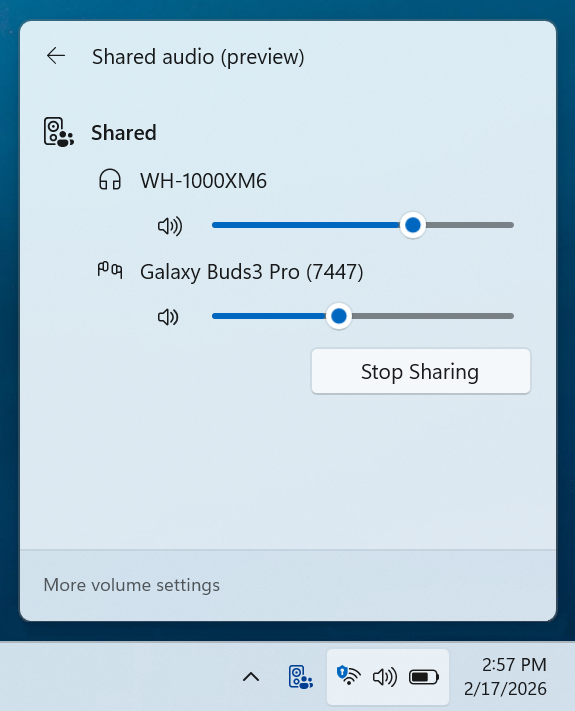
  • Shared audio (preview) was first announced last fall, and allows 2 people to share audio between their two capable Bluetooth LE Audio headphones, speakers, earbuds, or hearing aids. With this update Windows now provides individual sliders for each listener which adjusts their volume without affecting the other. You can continue to adjust volume for both listeners at the same time through the main volume controls available through Quick Settings or on-device and keyboard controls.
  • You’ll also see a new taskbar indicator while you’re sharing, giving a quick reminder that audio is still being shared. Clicking the indicator is a fast path to open sharing settings to change volume or stop sharing.
  • The LE Audio accessory ecosystem also continues to grow. In addition to the accessories announced before, we’re excited to share that the Samsung Galaxy Buds 4 and Buds 4 Pro, Sony WF‑1000XM6, and Xbox Wireless Headset all have support for shared audio!


    Independent sliders for each listener.
    Independent sliders for each listener.
  • Feedback: Share your thoughts in Feedback Hub (WIN + F) under Devices and Drivers > Bluetooth – Audio quality, glitches, choppiness and stuttering.

[Narrator]

  • Narrator users can now use a new command Narrator key + \ to read contents of status bar in Apps such as Microsoft Word, Excel, PowerPoint, etc. For example, in Microsoft Word, users can use this to read count of pages or words in a document. In Microsoft Excel, users can select a few data cells and hear sum or average of the data in the selected cells without having to change your focus.

[Taskbar]

  • We temporarily paused the rollout of the improved animations when your taskbar is set to autohide, and improved reliability of loading taskbar components in safe mode. Thanks, Insiders, for sharing feedback!

[Storage]

  • Improved reliability of removing Windows Update files / windows.old files via Settings > System > Storage.

[Input]

  • Improved reliability of typing when using the ADLaM keyboard.

Paint App update rolling out

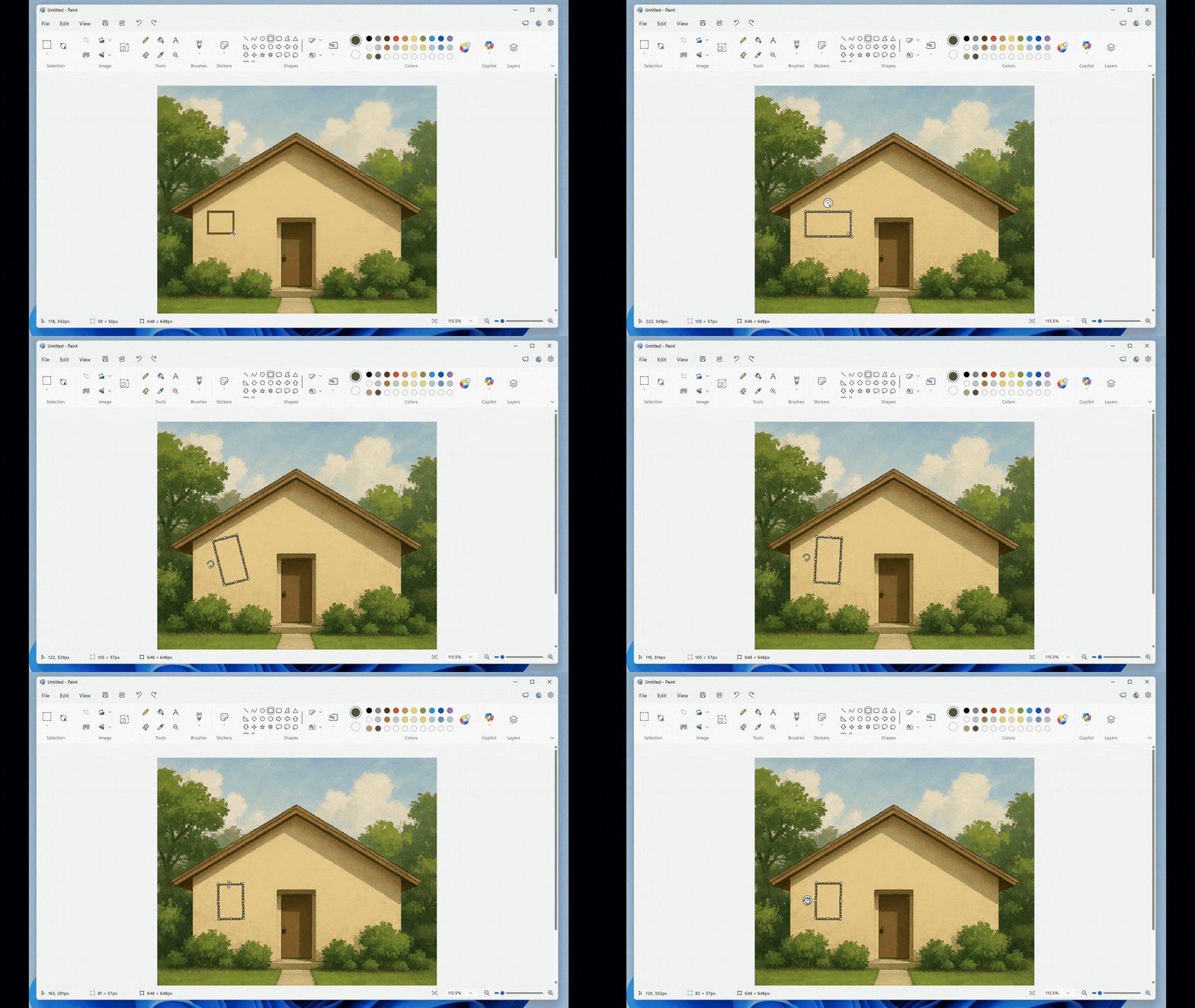
  • With Paint version 11.2601.391.0, we’re excited to introduce freeform rotate, a highly requested feature that gives you more control when editing your artwork. You can now rotate shapes, text, and any active selection to any angle. To get started, open Paint and select a shape, text, or selection. When the object is active, use the rotate handle above it to rotate freely in any direction. For more precise control, you can also choose Custom rotate from the Rotate menu and enter a specific angle. Try using freeform rotate in your artwork to adjust elements exactly the way you want and add more flexibility to your creative workflow.


    Paint App GIF showing freeform rotate.
    Paint App GIF showing freeform rotate.
  • FEEDBACK: Please file feedback in Feedback Hub (WIN + F) under Apps > Paint.

Reminders for Windows Insiders in the Beta Channel

  • Updates are based on Windows 11, version 25H2 via an enablement package (Build 26220.7934).
  • Many features are rolled out using Controlled Feature Rollout technology, starting with a subset of Insiders and ramping up over time as we monitor feedback to see how they land before pushing them out to everyone in this channel.
  • [New] The desktop watermark shown at the lower right corner of the desktop is normal for Windows Insider pre-release builds.
  • For Windows Insiders who want to be the first to get features gradually rolled out to you, you can turn ON the toggle to get the latest updates as they are available via Settings > Windows Update*. Over time, we will increase the rollouts of features to everyone with the toggle turned on. Should you keep this toggle off, new features will gradually be rolled out to your PC over time once they are ready.
  • Features and experiences included in these builds may never get released as we try out different concepts and get feedback. Features may change over time, be removed, or replaced and never get released beyond Windows Insiders. Some of these features and experiences could show up in future Windows releases when they’re ready.
  • Some features in active development we preview with Windows Insiders may not be fully localized and localization will happen over time as features are finalized. As you see issues with localization in your language, please report those issues to us via Feedback Hub.
  • Check out Flight Hub for a complete look at what build is in which Insider channel.
Thanks,
Windows Insider Program Team


 Source:


Check Windows Updates


UUP Dump:

64-bit ISO download:

ARM64 ISO download:

 
Last edited:
Mine took close to an hour and a half, it's huge and requires a lot of patience.
So, I guess it is kind of normal for this one!

Right now it just jump to 91%, fingers crossed 🤞
 

My Computer My Computer

At a glance

Windows 11Intel® Xeon® X5690 3.47GHz Six-CoreG.Skill PC3-12800 1600MHz 24GBNVIDIA GeForce GTX 1050
OS
Windows 11
Computer type
PC/Desktop
Manufacturer/Model
Asus/Custom Build
CPU
Intel® Xeon® X5690 3.47GHz Six-Core
Motherboard
Asus P6T Deluxe v2
Memory
G.Skill PC3-12800 1600MHz 24GB
Graphics Card(s)
NVIDIA GeForce GTX 1050
Sound Card
SoundMAX ADI AD2000B HD Audio
Monitor(s) Displays
Acer T232HL Touch Screen
Screen Resolution
1920 x 1080 @ 60Hz
Hard Drives
6 Crucial MX500 SSD 1TB each.
PSU
Thermaltake Toughpower Gold 850W
Case
Thermaltake Armor VA8000SWA
Cooling
Thermaltake Air Cooling System
Keyboard
Illuminated Multimedia LED Keyboard
Mouse
M16 Dual Mode Illuminated Mouse - Bluetooth / 2.4 GHz Mode
Internet Speed
800 Mbps
Browser
Edge / Opera / Vivaldi / Chrome / Firefox / Brave
Antivirus
Windows Defender Security
1772228052385.webp
 

My Computer My Computer

At a glance

W11 Pro and Insider DevAMD Ryzen 9 7900x2x16GB Kingston 6000MHz, Cl 32 @ 6200MHz Cl30Gigabyte Rx 6600XT Gaming OC 8G Pro
OS
W11 Pro and Insider Dev
Computer type
PC/Desktop
Manufacturer/Model
Home brewed
CPU
AMD Ryzen 9 7900x
Motherboard
ASROCK b650 PRO RS
Memory
2x16GB Kingston 6000MHz, Cl 32 @ 6200MHz Cl30
Graphics Card(s)
Gigabyte Rx 6600XT Gaming OC 8G Pro
Sound Card
MB, Realtek Ac1220p
Monitor(s) Displays
3 x 27"
Screen Resolution
1080p
Hard Drives
Kingston KC3000. 1TBSamsung 970 evo Plus 500GB, Crucial P1 NVMe 1TB, Lexar NVMe 2 TB, Silicon Power M.2 SATA 500GB
PSU
Seasonic 750W
Case
Custom Raidmax
Cooling
Arctic Liquid Freezer III 360mm
Internet Speed
20/19 mbps
I got the watermark too, on all 3 computers i updated to 7934!
Screenshot 2026-02-27 at 4.37.23 PM.webp
 

My Computer My Computer

At a glance

Windows 11Apple M1 Max 10 core/4 CPU assigned to Parall...64GB/24GB assigned to Parallels 17 VMApple 32 core GPU
OS
Windows 11
Computer type
Laptop
Manufacturer/Model
Apple MacBook Pro 16" 2021
CPU
Apple M1 Max 10 core/4 CPU assigned to Parallels 17 VM
Motherboard
Apple Silicon M1 Max
Memory
64GB/24GB assigned to Parallels 17 VM
Graphics Card(s)
Apple 32 core GPU
Sound Card
Apple
Monitor(s) Displays
16.2" Liquid Retina XDR
Screen Resolution
3456-by-2234 native resolution at 254 psi
Hard Drives
4TB SSD
PSU
Apple
Case
Apple
Cooling
Apple
Keyboard
Apple
Mouse
N/A; Apple Trackpad
Internet Speed
1.2Gb/42Gb
Browser
Parallels 17 VM: MS Edge
Antivirus
Parallels 17 VM: MS Defender
Done here :)
 

My Computer My Computer

At a glance

Windows 11 HomeIntel i5-10600kG.Skill 2x16GB F4-3600C18D Ripjaws V 3600MHz ...PNY GeForce RTX 5070 12GB ARGB OC Triple Fan
OS
Windows 11 Home
Computer type
PC/Desktop
CPU
Intel i5-10600k
Motherboard
MSI Z490 G+
Memory
G.Skill 2x16GB F4-3600C18D Ripjaws V 3600MHz CL18 DDR4
Graphics Card(s)
PNY GeForce RTX 5070 12GB ARGB OC Triple Fan
Sound Card
SMSL D6S ES9039Q2M DAC
Monitor(s) Displays
AOC 31.5" Q32V3S/WS 75Hz 4ms Adaptive-Sync 2K-QHD Monitor
Screen Resolution
2560 x 1440
Hard Drives
Samsung 980 M.2 SSD 500GB x 3
PSU
MSI MPG A850GF 80+
Case
Antec DF600 FLUX
Cooling
Mirage 5 Cooler
Keyboard
Logitech G19
Mouse
Logitech G502 Hero
Internet Speed
FTTH 500/50
Browser
Waterfox, Firefox, Edge and Chrome.
Antivirus
Bitdefender Antivirus
Other Info
Q Acoustics M20 Active Speakers
Phew!
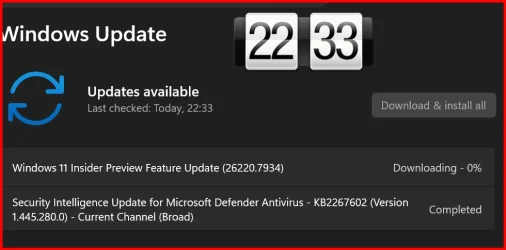
This one was the longest in my life... It equals 3 hours, 06 minutes, and 24 seconds (Including: Download, Install & Reboot).

1772230651251.webp

But, looks like it end-up okay!
 
Last edited:

My Computer My Computer

At a glance

Windows 11Intel® Xeon® X5690 3.47GHz Six-CoreG.Skill PC3-12800 1600MHz 24GBNVIDIA GeForce GTX 1050
OS
Windows 11
Computer type
PC/Desktop
Manufacturer/Model
Asus/Custom Build
CPU
Intel® Xeon® X5690 3.47GHz Six-Core
Motherboard
Asus P6T Deluxe v2
Memory
G.Skill PC3-12800 1600MHz 24GB
Graphics Card(s)
NVIDIA GeForce GTX 1050
Sound Card
SoundMAX ADI AD2000B HD Audio
Monitor(s) Displays
Acer T232HL Touch Screen
Screen Resolution
1920 x 1080 @ 60Hz
Hard Drives
6 Crucial MX500 SSD 1TB each.
PSU
Thermaltake Toughpower Gold 850W
Case
Thermaltake Armor VA8000SWA
Cooling
Thermaltake Air Cooling System
Keyboard
Illuminated Multimedia LED Keyboard
Mouse
M16 Dual Mode Illuminated Mouse - Bluetooth / 2.4 GHz Mode
Internet Speed
800 Mbps
Browser
Edge / Opera / Vivaldi / Chrome / Firefox / Brave
Antivirus
Windows Defender Security
Phew!
This one was the longest in my life... It equals 3 hours, 06 minutes, and 24 seconds (Including: Download,Install & Reboot).

View attachment 164594

But, looks like it end-up okay!
Not the type of WU we want to become a habit that's for sure.
 

My Computers My Computers

  • At a glance

    Windows 11 25H2Intel Core Ultra 9 275HX (24-Core)64GB DDR5 6400MT/sNVIDIA GeForce RTX 5080 and Intel UHD Graphics
    OS
    Windows 11 25H2
    Computer type
    Laptop
    Manufacturer/Model
    Alienware 18 Area-51
    CPU
    Intel Core Ultra 9 275HX (24-Core)
    Motherboard
    Alienware
    Memory
    64GB DDR5 6400MT/s
    Graphics Card(s)
    NVIDIA GeForce RTX 5080 and Intel UHD Graphics
    Sound Card
    Onboard, Realtek high-performance Audio chips (ALC3329 & ALC1708))
    Monitor(s) Displays
    300HZ 18-inch QHD 500 nit Comfort View+
    Screen Resolution
    2560 x 1600
    Hard Drives
    2TB NVMe M.2 PCIe Gen 5 SSD
    Case
    Magnesium Alloy
    Cooling
    Advanced Cryo-Tech Quad-Fan Cooling system & large vapor chamber
    Keyboard
    Cherry MX ultra low profile mechanical keyboard with per key AlienFX RGB lighting
    Mouse
    Logitech MX Master 4
    Browser
    Vivaldi (main), Firefox, Chrome, Edge
    Antivirus
    MS Defender and Malwarebytes Free
  • At a glance

    Windows 11 25H2Qualcomm Snapdragon X Elite (12 Core) ARM bas...16GB LPDDR5Qualcomm Adreno X1-85
    Operating System
    Windows 11 25H2
    Computer type
    Laptop
    Manufacturer/Model
    Microsoft Surface Laptop 7
    CPU
    Qualcomm Snapdragon X Elite (12 Core) ARM based CPU
    Motherboard
    Microsoft Corp.
    Memory
    16GB LPDDR5
    Graphics card(s)
    Qualcomm Adreno X1-85
    Sound Card
    Omnisonic speakers with Dolby Atmos spatial sound
    Monitor(s) Displays
    120 Hz 13.8-inch 600 nit PixelSense Flow touchscreen
    Screen Resolution
    2304x1536
    Hard Drives
    1TB NVMe Gen 4 SSD
    Case
    Anodized Aluminum
    Cooling
    Traditional active cooling fan system
    Keyboard
    Mechanical QWERTY, backlit when in use
    Mouse
    Logitech MX Master 4 and Surface Arc Mouse
    Browser
    Vivaldi (main), Firefox, Chrome, Edge
    Antivirus
    MS Defender and Malwarebytes Free
Updated ok.
 

My Computer My Computer

At a glance

Win 11 Pro 25H2 Beta 26220.8690AMD Ryzen 7 5700UCrucial 64GB DDR4 SDRAM PC4-25600AMD Radeon Vega Graphics 1.80 GHz - Adrenalin...
OS
Win 11 Pro 25H2 Beta 26220.8690
Computer type
PC/Desktop
Manufacturer/Model
Asus MiniPC PN51-E1
CPU
AMD Ryzen 7 5700U
Motherboard
Asus PN51-E1 - Bios Version 0505
Memory
Crucial 64GB DDR4 SDRAM PC4-25600
Graphics Card(s)
AMD Radeon Vega Graphics 1.80 GHz - Adrenalin Edition 23.9.2
Sound Card
USB to Sound Blaster Live (24bit External) to Firestone DAC to Event Studio Monitors
Monitor(s) Displays
Gigabyte 27" 165 hertz
Screen Resolution
2560 x 1440
Hard Drives
Samsung SSD 970 EVO Plus 2TB PCIE NVME
PSU
65 Watt
Case
Asus Mini
Cooling
Air
Keyboard
Logitech K810
Mouse
Logitech MX Master 2S
Internet Speed
Telstra Modem Wifi - NBN 50/18
Browser
Firefox
Antivirus
Microsoft
Other Info
This replaced my Linux Notebook. I've used Windows since V2, tried various Linux distros but Windows continues to win for me.
Not the type of WU we want to become a habit that's for sure.
A pain in the neck updating 3 machines with this 26220.7934.
Two are still installing pretty slowly, one at 99% the other at 40%. 🤞

Edit:
One finally completed, still waiting on the last one which is now at 71%. 🤬

1772238171399.webp
 
Last edited:

My Computer My Computer

At a glance

Windows 11 Pro 25H2Intel I9-9900K64GBNVIDIA RTX 2060
OS
Windows 11 Pro 25H2
Computer type
PC/Desktop
Manufacturer/Model
Dell XPS 8930
CPU
Intel I9-9900K
Memory
64GB
Graphics Card(s)
NVIDIA RTX 2060
Sound Card
NVIDIA High Definition Audio
Monitor(s) Displays
4k Samsung
Screen Resolution
3840 x 2160
Hard Drives
512GB NVMe, ADATA SU 800, 2TB HDD

My Computer My Computer

At a glance

Windows 11Intel® Xeon® X5690 3.47GHz Six-CoreG.Skill PC3-12800 1600MHz 24GBNVIDIA GeForce GTX 1050
OS
Windows 11
Computer type
PC/Desktop
Manufacturer/Model
Asus/Custom Build
CPU
Intel® Xeon® X5690 3.47GHz Six-Core
Motherboard
Asus P6T Deluxe v2
Memory
G.Skill PC3-12800 1600MHz 24GB
Graphics Card(s)
NVIDIA GeForce GTX 1050
Sound Card
SoundMAX ADI AD2000B HD Audio
Monitor(s) Displays
Acer T232HL Touch Screen
Screen Resolution
1920 x 1080 @ 60Hz
Hard Drives
6 Crucial MX500 SSD 1TB each.
PSU
Thermaltake Toughpower Gold 850W
Case
Thermaltake Armor VA8000SWA
Cooling
Thermaltake Air Cooling System
Keyboard
Illuminated Multimedia LED Keyboard
Mouse
M16 Dual Mode Illuminated Mouse - Bluetooth / 2.4 GHz Mode
Internet Speed
800 Mbps
Browser
Edge / Opera / Vivaldi / Chrome / Firefox / Brave
Antivirus
Windows Defender Security
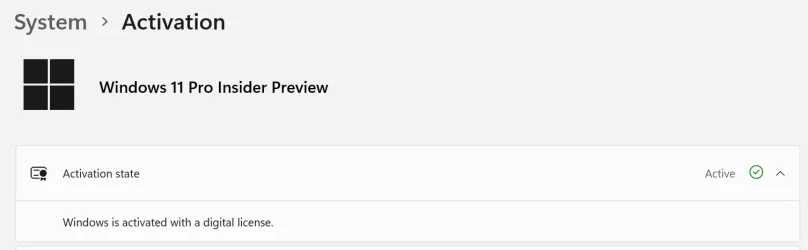
I just finished the installation, and as with the latest builds from the Dev channel, Windows is no longer recognized as being activated.
 

My Computer My Computer

At a glance

Windows 11
OS
Windows 11
I just finished the installation, and as with the latest builds from the Dev channel, Windows is no longer recognized as being activated.

This is what it shows here. 🤷‍♂️

1772237072464.webp
 

My Computer My Computer

At a glance

Windows 11 Pro 25H2Intel I9-9900K64GBNVIDIA RTX 2060
OS
Windows 11 Pro 25H2
Computer type
PC/Desktop
Manufacturer/Model
Dell XPS 8930
CPU
Intel I9-9900K
Memory
64GB
Graphics Card(s)
NVIDIA RTX 2060
Sound Card
NVIDIA High Definition Audio
Monitor(s) Displays
4k Samsung
Screen Resolution
3840 x 2160
Hard Drives
512GB NVMe, ADATA SU 800, 2TB HDD
30 minutes in and I'm 71% done. That is counting download time at ~55Mb/s. Seems typical so far for what is basically a full reinstall.
 

My Computer My Computer

At a glance

Windows 11 25H2Broadwell-e 6850K 4.5ghz @1.36v32GB Corsair LPM 3600 C16EVGA RTX 3080Ti FTW
OS
Windows 11 25H2
Computer type
PC/Desktop
Manufacturer/Model
EVGA home brew
CPU
Broadwell-e 6850K 4.5ghz @1.36v
Motherboard
EVGA X99 FTW K
Memory
32GB Corsair LPM 3600 C16
Graphics Card(s)
EVGA RTX 3080Ti FTW
Sound Card
Asus Centurion true 7.1 headset. (5 speakers in each earpeice)
Monitor(s) Displays
LG C4 55"
Screen Resolution
4K 144hz
Hard Drives
Various models of SSDs ~10TB No HDDs installed.
PSU
be quiet! BN516 Straight Power 12-1000w 80 Plus Platinum
Case
Corsair 780T modified to dual 200mm intake fans
Cooling
Corsair H110i
Keyboard
Corsair K95 Platinum
Mouse
Corsair M65 RGB Elite
Internet Speed
50Mbs
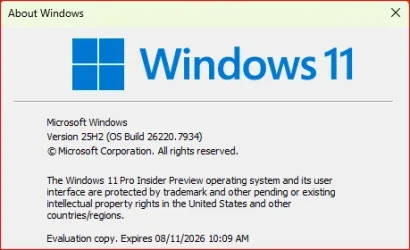
Edition Windows 11 Pro Insider Preview
Version 25H2
Installed on ‎27.‎2.‎2026.
Evaluation expires on ‎11.‎8.‎2026. 20:09
OS build 26220.7934
Experience Windows Feature Experience Pack 1000.26100.333.0

But lost almost all customization including BOOT order (It's secondary in dual BOOT).
Lost all added entries in desktop right click menu.
Had to manually create BOOT entry in default boot disk.
Had to restore from Winaero tweeker for customization
Threw tons of SFC errors that took 2 restarts to fix.
What a mess, didn't happen in long time,
Yup, Windows.old is back but size on disk 37,9 GB doesn't correspond to that of Cleanmgr 25.3GB, Delivery Optimization files 5.2GB
Altogether 32.8GB to clean according to it.
Doesn't seem bad now, will se what happens after cleanup.
 
Last edited:

My Computer My Computer

At a glance

W11 Pro and Insider DevAMD Ryzen 9 7900x2x16GB Kingston 6000MHz, Cl 32 @ 6200MHz Cl30Gigabyte Rx 6600XT Gaming OC 8G Pro
OS
W11 Pro and Insider Dev
Computer type
PC/Desktop
Manufacturer/Model
Home brewed
CPU
AMD Ryzen 9 7900x
Motherboard
ASROCK b650 PRO RS
Memory
2x16GB Kingston 6000MHz, Cl 32 @ 6200MHz Cl30
Graphics Card(s)
Gigabyte Rx 6600XT Gaming OC 8G Pro
Sound Card
MB, Realtek Ac1220p
Monitor(s) Displays
3 x 27"
Screen Resolution
1080p
Hard Drives
Kingston KC3000. 1TBSamsung 970 evo Plus 500GB, Crucial P1 NVMe 1TB, Lexar NVMe 2 TB, Silicon Power M.2 SATA 500GB
PSU
Seasonic 750W
Case
Custom Raidmax
Cooling
Arctic Liquid Freezer III 360mm
Internet Speed
20/19 mbps
30 minutes in and I'm 71% done. That is counting download time at ~55Mb/s. Seems typical so far for what is basically a full reinstall.
The longest install I have seen ever. 🤬
 

My Computer My Computer

At a glance

Windows 11 Pro 25H2Intel I9-9900K64GBNVIDIA RTX 2060
OS
Windows 11 Pro 25H2
Computer type
PC/Desktop
Manufacturer/Model
Dell XPS 8930
CPU
Intel I9-9900K
Memory
64GB
Graphics Card(s)
NVIDIA RTX 2060
Sound Card
NVIDIA High Definition Audio
Monitor(s) Displays
4k Samsung
Screen Resolution
3840 x 2160
Hard Drives
512GB NVMe, ADATA SU 800, 2TB HDD
The longest install I have seen ever. 🤬
96% but who knows how long it will take with the reboots. Crossing my fingers. I did have to run a script to bypass the TPM check.
Edit.. I can see the free space disappearing from the OS drive. :scream:
 

My Computer My Computer

At a glance

Windows 11 25H2Broadwell-e 6850K 4.5ghz @1.36v32GB Corsair LPM 3600 C16EVGA RTX 3080Ti FTW
OS
Windows 11 25H2
Computer type
PC/Desktop
Manufacturer/Model
EVGA home brew
CPU
Broadwell-e 6850K 4.5ghz @1.36v
Motherboard
EVGA X99 FTW K
Memory
32GB Corsair LPM 3600 C16
Graphics Card(s)
EVGA RTX 3080Ti FTW
Sound Card
Asus Centurion true 7.1 headset. (5 speakers in each earpeice)
Monitor(s) Displays
LG C4 55"
Screen Resolution
4K 144hz
Hard Drives
Various models of SSDs ~10TB No HDDs installed.
PSU
be quiet! BN516 Straight Power 12-1000w 80 Plus Platinum
Case
Corsair 780T modified to dual 200mm intake fans
Cooling
Corsair H110i
Keyboard
Corsair K95 Platinum
Mouse
Corsair M65 RGB Elite
Internet Speed
50Mbs

My Computer My Computer

At a glance

W11 Pro and Insider DevAMD Ryzen 9 7900x2x16GB Kingston 6000MHz, Cl 32 @ 6200MHz Cl30Gigabyte Rx 6600XT Gaming OC 8G Pro
OS
W11 Pro and Insider Dev
Computer type
PC/Desktop
Manufacturer/Model
Home brewed
CPU
AMD Ryzen 9 7900x
Motherboard
ASROCK b650 PRO RS
Memory
2x16GB Kingston 6000MHz, Cl 32 @ 6200MHz Cl30
Graphics Card(s)
Gigabyte Rx 6600XT Gaming OC 8G Pro
Sound Card
MB, Realtek Ac1220p
Monitor(s) Displays
3 x 27"
Screen Resolution
1080p
Hard Drives
Kingston KC3000. 1TBSamsung 970 evo Plus 500GB, Crucial P1 NVMe 1TB, Lexar NVMe 2 TB, Silicon Power M.2 SATA 500GB
PSU
Seasonic 750W
Case
Custom Raidmax
Cooling
Arctic Liquid Freezer III 360mm
Internet Speed
20/19 mbps
Here goes the restart.
 

My Computer My Computer

At a glance

Windows 11 25H2Broadwell-e 6850K 4.5ghz @1.36v32GB Corsair LPM 3600 C16EVGA RTX 3080Ti FTW
OS
Windows 11 25H2
Computer type
PC/Desktop
Manufacturer/Model
EVGA home brew
CPU
Broadwell-e 6850K 4.5ghz @1.36v
Motherboard
EVGA X99 FTW K
Memory
32GB Corsair LPM 3600 C16
Graphics Card(s)
EVGA RTX 3080Ti FTW
Sound Card
Asus Centurion true 7.1 headset. (5 speakers in each earpeice)
Monitor(s) Displays
LG C4 55"
Screen Resolution
4K 144hz
Hard Drives
Various models of SSDs ~10TB No HDDs installed.
PSU
be quiet! BN516 Straight Power 12-1000w 80 Plus Platinum
Case
Corsair 780T modified to dual 200mm intake fans
Cooling
Corsair H110i
Keyboard
Corsair K95 Platinum
Mouse
Corsair M65 RGB Elite
Internet Speed
50Mbs
See post above.
Last machine stuck at 99% installing, feels like an eternity without any progress. 😝🤷‍♂️

Edit:
Finally asked for Restart. 🤞
 

My Computer My Computer

At a glance

Windows 11 Pro 25H2Intel I9-9900K64GBNVIDIA RTX 2060
OS
Windows 11 Pro 25H2
Computer type
PC/Desktop
Manufacturer/Model
Dell XPS 8930
CPU
Intel I9-9900K
Memory
64GB
Graphics Card(s)
NVIDIA RTX 2060
Sound Card
NVIDIA High Definition Audio
Monitor(s) Displays
4k Samsung
Screen Resolution
3840 x 2160
Hard Drives
512GB NVMe, ADATA SU 800, 2TB HDD
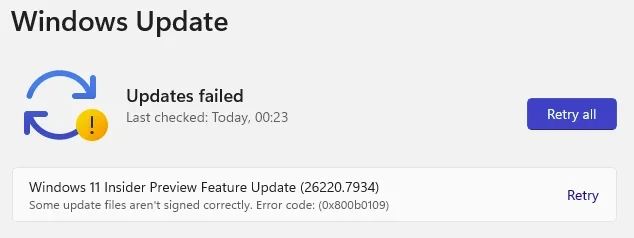
This is a new error I've not seen before, "Some update files aren't signed correctly. Error code: (0x800b0109)"

1772239104528.webp

This on an unsupported device, meanwhile my supported device is 61% installed.
 

My Computers My Computers

  • At a glance

    Windows 11 HomeAMD Athlon Silver 3050U8GBRadeon Graphics
    OS
    Windows 11 Home
    Computer type
    Laptop
    Manufacturer/Model
    Acer Aspire 3 A315-23-R9VY
    CPU
    AMD Athlon Silver 3050U
    Memory
    8GB
    Graphics Card(s)
    Radeon Graphics
    Monitor(s) Displays
    laptop screen
    Screen Resolution
    1366x768 native resolution, up to 2560x1440 with Radeon Virtual Super Resolution
    Hard Drives
    1TB Samsung EVO 870 SSD (from April 2026: 250GB EVO 850)
    Internet Speed
    150 Mbps
    Browser
    Edge, Firefox
    Antivirus
    Defender
    Other Info
    fully 'Windows 11 ready' laptop. Windows 10 C: partition migrated from my old unsupported 'main machine' then upgraded to 11. A test migration ran Insider builds for 2 months. When 11 was released on 5th October 2021 it was re-imaged back to 10 and was offered the upgrade in Windows Update on 20th October. Windows Update offered the 22H2 Feature Update on 20th September 2022. It got the 23H2 Feature Update on 4th November 2023 through Windows Update, 24H2 on 3rd October 2024 through Windows Update by setting the Target Release Version for 24H2, and 25H2 on 30th September 2025 through Windows Update by setting the Target Release Version for 25H2.

    UPDATE - 11 April 2026: due to mechanical deterioration this PC has been retired from active duty. The OS with all software and files has been migrated to my System Seven in 'Other systems' to carry on as my general purpose 'main machine'.
  • At a glance

    Windows 11 ProIntel® Core™ i5-520M8GB(integrated graphics) Intel HD Graphics
    Operating System
    Windows 11 Pro
    Computer type
    Laptop
    Manufacturer/Model
    Dell Latitude E4310
    CPU
    Intel® Core™ i5-520M
    Motherboard
    0T6M8G
    Memory
    8GB
    Graphics card(s)
    (integrated graphics) Intel HD Graphics
    Screen Resolution
    1366x768
    Hard Drives
    500GB Crucial MX500 SSD
    Browser
    Firefox, Edge
    Antivirus
    Defender
    Other Info
    unsupported machine: Legacy bios, MBR, TPM 1.2, upgraded from W10 to W11 using W10/W11 hybrid install media workaround.

    In-place upgrade to 22H2 using ISO and a workaround.
    Feature Update to 23H2 by manually installing the Enablement Package.
    In-place upgrade to 24H2 using hybrid 23H2/24H2 install media.
    Upgraded to 25H2 by Enablement Package.

    Also running Insider Dev, and Canary builds and Windows 10 as native boot .vhdx.
  • My SYSTEM THREE is a Dell Latitude 5410, i7-10610U, 32GB RAM, 512GB NVMe ssd, supported device running Windows 11 Pro.

    My SYSTEM FOUR is a 2-in-1 convertible Lenovo Yoga 11e 20DA, Celeron N2930, 8GB RAM, 256GB ssd. Unsupported device: currently running Win10 Pro, plus Win11 Pro RTM and Insider Dev, Beta, and RP 24H2 as native boot vhdx.

    My SYSTEM FIVE is a Dell Latitude 3190 2-in-1, Pentium Silver N5030, 8GB RAM, 1TB NVMe ssd, supported device running Windows 11 Pro, plus Insider Beta, Dev, and Canary builds (and a few others) as a native boot .vhdx.

    My SYSTEM SIX is a Dell Latitude 5550, Core Ultra 7 165H, 64GB RAM, 1TB NVMe SSD, supported device, Windows 11 Pro 24H2, Hyper-V host machine. Updated to 25H2 on 30th September 2025.

    My SYSTEM SEVEN is a Lenovo Thinkpad T580, Intel Core i7-8650U, 16GB RAM, 512GB NVMe SSD + 2nd 512GB NVMe SSD, a supported device for Windows 11. This is my current general purpose 'main machine'. The installed Windows 11 Home from my System One has been migrated to this machine.
What is this nonsense with the evaluation copy watermark?
 

My Computer My Computer

At a glance

Windows 11 25H2Broadwell-e 6850K 4.5ghz @1.36v32GB Corsair LPM 3600 C16EVGA RTX 3080Ti FTW
OS
Windows 11 25H2
Computer type
PC/Desktop
Manufacturer/Model
EVGA home brew
CPU
Broadwell-e 6850K 4.5ghz @1.36v
Motherboard
EVGA X99 FTW K
Memory
32GB Corsair LPM 3600 C16
Graphics Card(s)
EVGA RTX 3080Ti FTW
Sound Card
Asus Centurion true 7.1 headset. (5 speakers in each earpeice)
Monitor(s) Displays
LG C4 55"
Screen Resolution
4K 144hz
Hard Drives
Various models of SSDs ~10TB No HDDs installed.
PSU
be quiet! BN516 Straight Power 12-1000w 80 Plus Platinum
Case
Corsair 780T modified to dual 200mm intake fans
Cooling
Corsair H110i
Keyboard
Corsair K95 Platinum
Mouse
Corsair M65 RGB Elite
Internet Speed
50Mbs

Latest Support Threads

Back
Top Bottom