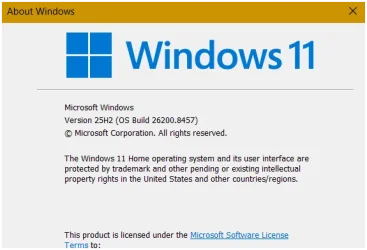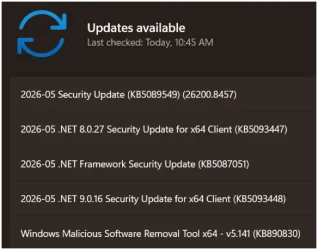
Win Update KB5089549 Windows 11 Cumulative Update build 26100.8457 (24H2) and 26200.8457 (25H2) - May 12


UPDATE 5/26:


 Microsoft Support:

May 12, 2026 - KB5089549 (OS Builds 26200.8457 and 26100.8457)​

This cumulative update for Windows 11, version 25H2 and 24H2 (KB5089549) includes the latest security fixes and improvements, along with non-security updates from last month's optional preview release.

Visit the Windows release health dashboard for the latest status on this release.


Announcements and messages

This section provides key notifications related to this release, including announcements, change logs, and end-of-support notices.

Windows Secure Boot certificate expiration​

Important: Secure Boot certificates used by most Windows devices are set to expire starting in June 2026. This might affect the ability of certain personal and business devices to boot securely if not updated in time. To avoid disruption, we recommend reviewing the guidance and taking action to update certificates in advance. For details and preparation steps, see Windows Secure Boot certificate expiration and CA updates.


Change log​

Change date​
Change description​
May 29, 2026Known issue updated: Added resolution for "May 2026 security update fails to install with error 0x800f0922".
May 15, 2026Know issue added: "May 2026 security update fails to install with error 0x800f0922"
May 13, 2026
  • Added Secure Boot release note: This update adds a new SecureBoot folder under C:\Windows on eligible devices.
  • Added Daylight saving time (DST) update.

Improvements

This update includes new features and quality improvements that were part of the following update:
This update addresses security vulnerabilities documented in the following guide:
The following summary outlines key quality improvements addressed by this update. The bold text within the brackets indicates the item or area of the change.
  • [Secure Boot]
    • With this update, Windows quality updates include additional high confidence device targeting data, increasing coverage of devices eligible to automatically receive new Secure Boot certificates. Devices receive the new certificates only after demonstrating sufficient successful update signals, maintaining a controlled and phased rollout.
    • This update adds a new SecureBoot folder under C:\Windows on eligible devices. The folder contains example scripts intended for organizations with IT professionals who actively manage updates across their device fleet. These scripts can be used to detect Secure Boot certificate update status and automate deployment via a safe rollout mechanism in an Active Directory environment. For more information, see Sample Secure Boot E2E Automation Guide.
  • [Boot manager servicing update]
    • This update improves startup reliability after boot file updates, so devices start normally without entering BitLocker recovery.
    • (Known issue) Fixed: This update addresses an issue where some devices might enter BitLocker Recovery after updating boot files on systems with certain Trusted Platform Module (TPM) validation settings, including invalid PCR7 (Platform Configuration Register 7) configurations. This might occur after installing the April 2026 security update (KB5083769).
  • [Connectivity] This update improves the reliability of Simple Service Discovery Protocol (SSDP) notifications to help prevent the service from becoming unresponsive.
  • [Daylight saving time (DST)] This update supports the 2023 DST change for the Arab Republic of Egypt.
If you've already installed previous updates, your device will download and install only the new updates included in this package.

AI Components​

This release updates the following AI components:

AI Component​
Version​
Image Search1.2604.515.0
Content Extraction1.2604.515.0
Semantic Analysis1.2604.515.0
Settings Model1.2604.515.0

Windows 11 servicing stack update (KB5092762)- 26100.8456

This update makes quality improvements to the servicing stack, which is the component that installs Windows updates. Servicing stack updates (SSU) ensure that you have a robust and reliable servicing stack so that your devices can receive and install Microsoft updates. To learn more about SSUs, see Simplifying on-premises deployment of servicing stack updates.


Known issues in this update

Symptoms

After you install this update (KB5089549), some devices might fail to complete installation with error code 0x800f0922. This issue occurs on devices that have limited free space on the EFI System Partition (ESP), especially if it has 10 MB or less available.

What you might experience on affected devices:
  • The update installs successfully during the initial phases.
  • The installation fails during the restart phase at approximately 35–36% completion.
  • Windows then rolls back the update.
  • You may see the message:
    “Something didn’t go as planned. Undoing changes.”
  • The installation fails with error code 0x800f0922.
As a result of this issue, you might see log entries similar to the following in C:\Windows\Logs\CBS\CBS.log, indicating insufficient free space on the EFI System Partition:
  • SpaceCheck: Insufficient free space
  • ServicingBootFiles failed. Error = 0x70
  • SpaceCheck: <value> used by third-party/OEM files outside of Microsoft boot directories
Workaround

This issue is addressed in KB5089573.

How to get this update

Before you install this update

Microsoft combines the latest servicing stack update (SSU) for your operating system with the latest cumulative update (LCU). For general information about SSUs, see Servicing stack updates.

Install this update

To install this update, use one of the following Windows and Microsoft release channels.

Available​
Next Step​
Included
This update downloads and installs automatically from Windows Update and Microsoft Update.
Included
To install this release from the Microsoft Update Catalog, select the option that matches your device architecture (arm64 or x64), and then follow the instructions.

If you want to remove this update

Before you decide to remove this update, see Understanding the risks: Why you should not uninstall security updates.

To remove the LCU after installing the combined SSU and LCU package, use the DISM/Remove-Package command line option with the LCU package name as the argument. You can find the package name by using this command: DISM /online /get-packages.

Running Windows Update Standalone Installer (wusa.exe) with the /uninstall switch on the combined package will not work because the combined package contains the SSU. You cannot remove the SSU from the system after installation.

File information

For a list of the files provided in this update, download the file information for cumulative update 5089549.

For a list of the files provided in the servicing stack update, download the file information for the SSU (KB5092762) - version 26100.8456.


 Source:


Check Windows Updates


ISO from Microsoft:



UUP Dump:

64-bit ISO download:

ARM64 ISO download:

 
Last edited:

My Computers My Computers

  • At a glance

    Windows11 Pro 26200.8737Intel Core i9 14900F (24 -Core, 68 MB Total C...32GB DDR5RTX 4080 Super w/610.74
    OS
    Windows11 Pro 26200.8737
    Computer type
    PC/Desktop
    Manufacturer/Model
    Dell Alienware Aurora R16
    CPU
    Intel Core i9 14900F (24 -Core, 68 MB Total Cache)
    Motherboard
    Dell Alienware
    Memory
    32GB DDR5
    Graphics Card(s)
    RTX 4080 Super w/610.74
    Sound Card
    Realtec
    Monitor(s) Displays
    Corsair XENEON 32QHD165
    Screen Resolution
    2560 X 1440
    Hard Drives
    1-2TB Samsung 990 Pro PCIe NVMe M2 SSD
    1-4TB Samsung 990 Pro PCIe NVMe M2 SSD
    PSU
    1000 Watt Platinum Dell
    Case
    Alienware
    Cooling
    Liquid Closed Loop
    Keyboard
    Corsair Strafe RGB
    Mouse
    Logitech MK270 Wireless
    Internet Speed
    100Gb's Down-20 Up
    Browser
    Firefox 152.0.5
    Antivirus
    Defender
    Other Info
    Very Quiet And Fast
    CyberPower UPS CP1500PFCLCD
  • At a glance

    PClinuxOS Mate (2025.7)13th Gen Inter(R) Core(TM) i3-1315U64 GB DDR4 @3200 MHz.Internal
    Operating System
    PClinuxOS Mate (2025.7)
    Computer type
    PC/Desktop
    Manufacturer/Model
    Intel
    CPU
    13th Gen Inter(R) Core(TM) i3-1315U
    Motherboard
    Intel
    Memory
    64 GB DDR4 @3200 MHz.
    Graphics card(s)
    Internal
    Sound Card
    None
    Monitor(s) Displays
    Dell 2419HGCF
    Screen Resolution
    1920 X 1080
    Hard Drives
    SAMSUNG 980 PRO SSD 2TB, PCIe 4.0 M.2 2280
    PSU
    Chicony 30 Watt
    Case
    Small
    Keyboard
    Dell
    Mouse
    Razor
    Internet Speed
    1GB
    Browser
    Slimjet
Smooth install with clean DISM/SFC scans.

What’s still broken in 26200.8457​

  • System → Advanced system settings Freezes SettingsHost or silently fails to open.
  • Accounts → Sign‑in options Hangs or crashes Settings.

    This only effects certain machines but is a known issue. Sadly all three of mine are in this group.

Screenshot 2026-05-12 103702.webp
 

My Computers My Computers

  • At a glance

    Windows 11 25H2Intel Core Ultra 9 275HX (24-Core)64GB DDR5 6400MT/sNVIDIA GeForce RTX 5080 and Intel UHD Graphics
    OS
    Windows 11 25H2
    Computer type
    Laptop
    Manufacturer/Model
    Alienware 18 Area-51
    CPU
    Intel Core Ultra 9 275HX (24-Core)
    Motherboard
    Alienware
    Memory
    64GB DDR5 6400MT/s
    Graphics Card(s)
    NVIDIA GeForce RTX 5080 and Intel UHD Graphics
    Sound Card
    Onboard, Realtek high-performance Audio chips (ALC3329 & ALC1708))
    Monitor(s) Displays
    300HZ 18-inch QHD 500 nit Comfort View+
    Screen Resolution
    2560 x 1600
    Hard Drives
    2TB NVMe M.2 PCIe Gen 5 SSD
    Case
    Magnesium Alloy
    Cooling
    Advanced Cryo-Tech Quad-Fan Cooling system & large vapor chamber
    Keyboard
    Cherry MX ultra low profile mechanical keyboard with per key AlienFX RGB lighting
    Mouse
    Logitech MX Master 4
    Browser
    Vivaldi (main), Firefox, Chrome, Edge
    Antivirus
    MS Defender and Malwarebytes Free
  • At a glance

    Windows 11 25H2Qualcomm Snapdragon X Elite (12 Core) ARM bas...16GB LPDDR5Qualcomm Adreno X1-85
    Operating System
    Windows 11 25H2
    Computer type
    Laptop
    Manufacturer/Model
    Microsoft Surface Laptop 7
    CPU
    Qualcomm Snapdragon X Elite (12 Core) ARM based CPU
    Motherboard
    Microsoft Corp.
    Memory
    16GB LPDDR5
    Graphics card(s)
    Qualcomm Adreno X1-85
    Sound Card
    Omnisonic speakers with Dolby Atmos spatial sound
    Monitor(s) Displays
    120 Hz 13.8-inch 600 nit PixelSense Flow touchscreen
    Screen Resolution
    2304x1536
    Hard Drives
    1TB NVMe Gen 4 SSD
    Case
    Anodized Aluminum
    Cooling
    Traditional active cooling fan system
    Keyboard
    Mechanical QWERTY, backlit when in use
    Mouse
    Logitech MX Master 4 and Surface Arc Mouse
    Browser
    Vivaldi (main), Firefox, Chrome, Edge
    Antivirus
    MS Defender and Malwarebytes Free
Done! NO smoke yet....

3 restarts here...
 

My Computer My Computer

At a glance

Windows 11 Intel i5 10400 HD630 graphics chipi5-1040012 gbHD630 chipset
OS
Windows 11 Intel i5 10400 HD630 graphics chip
Computer type
PC/Desktop
Manufacturer/Model
HP
CPU
i5-10400
Memory
12 gb
Graphics Card(s)
HD630 chipset
Monitor(s) Displays
LG 24inch
Hard Drives
SSD, external usb drive 1tb for files/backups
Keyboard
wireless Logi
Mouse
ms 4000 wireless mouse
Internet Speed
10meg
Browser
Firefox
Antivirus
Defender
Other Info
Win11 Home 25h2 26200.8737 06/23/2026
I'm still showing issues when sliding a folder to Quick Access. They don't showup unless I close and open explorer. Same thing for removal from QA. :think:
 

My Computer My Computer

At a glance

Windows 11 EducationIntel® Core™ i9-13900K Desktop Processor 16 (...G.Skill Ripjaws V Series 32gb (2x16gb) DDR4 3...Asus Dual Geforce Rtx™ 3060 TI Edition 8gb Gddr6
OS
Windows 11 Education
Computer type
PC/Desktop
CPU
Intel® Core™ i9-13900K Desktop Processor 16 (8P+8E)
Motherboard
Asus TUF Gaming Z790-PLUS WIFI D4
Memory
G.Skill Ripjaws V Series 32gb (2x16gb) DDR4 3600mhz
Graphics Card(s)
Asus Dual Geforce Rtx™ 3060 TI Edition 8gb Gddr6
Monitor(s) Displays
BenQ EW3270U 31.5” 3840x2160 UHD 16:9 HDR LED 4K LG 27UK850-W 27'' 4K UHD IPS LED Monitor with HDR10
Screen Resolution
3840x2160
Hard Drives
Samsung 990 with heatsink PRO PCIe 4.0 Gen 4 NVMe® SSD 1TB
WD_BLACK SN850X NVMe M.2 2280 1TB PCI-Express 4.0
Crucial T500 2TB Gen4
Samsung 970 Evo M.2 2280 2tb Pcie Gen3. X4
PSU
Corsair AXi Series AX860i Digital 860W 80 PLUS PSU
Case
Fractal Meshify C ATX Mid Tower Case
Keyboard
Logi MX Keys
Mouse
Logi M705
Internet Speed
400 mbs
Browser
Firefox
Antivirus
Eset NOD32
Other Info
Love fast boots
Win 11 done and backed up
Win 10 done and backed up.


My Computers My Computers

  • At a glance

    Win 11 Home ♦♦♦26200.8737 ♦♦♦♦♦♦♦25H2AMD Ryzen 7 3700XG.Skill (F4-3200C14D-16GTZKW)EVGA RTX 2070 (08G-P4-2171-KR)
    OS
    Win 11 Home ♦♦♦26200.8737 ♦♦♦♦♦♦♦25H2
    Computer type
    PC/Desktop
    Manufacturer/Model
    Built by Ghot® [May 2020]
    CPU
    AMD Ryzen 7 3700X
    Motherboard
    Asus Pro WS X570-ACE (BIOS 5302)
    Memory
    G.Skill (F4-3200C14D-16GTZKW)
    Graphics Card(s)
    EVGA RTX 2070 (08G-P4-2171-KR)
    Sound Card
    Realtek ALC1220P / ALC S1220A
    Monitor(s) Displays
    Dell U3011 30"
    Screen Resolution
    2560 x 1600
    Hard Drives
    2x Samsung 860 EVO 500GB,
    WD 4TB Black FZBX - SATA III,
    WD 8TB Black FZBX - SATA III,
    DRW-24B1ST CD/DVD Burner
    PSU
    PC Power & Cooling 750W Quad EPS12V
    Case
    Cooler Master ATCS 840 Tower
    Cooling
    CM Hyper 212 EVO (push/pull)
    Keyboard
    Ducky DK9008 Shine II Blue LED
    Mouse
    Logitech Optical M-100
    Internet Speed
    300/300
    Browser
    Firefox (latest)
    Antivirus
    Bitdefender Total Security
    Other Info
    Speakers: Klipsch Pro Media 2.1
  • At a glance

    Windows XP Pro 32bit w/SP3AMD Athlon 64 X2 5000+ (OC'd @ 3.2Ghz)TWIN2X2048-6400C4DHX (2 x 1GB, DDR2 800)EVGA 256-P2-N758-TR GeForce 8600GT SSC
    Operating System
    Windows XP Pro 32bit w/SP3
    Computer type
    PC/Desktop
    Manufacturer/Model
    Built by Ghot® (not in use)
    CPU
    AMD Athlon 64 X2 5000+ (OC'd @ 3.2Ghz)
    Motherboard
    ASUS M2N32-SLI Deluxe Wireless Edition
    Memory
    TWIN2X2048-6400C4DHX (2 x 1GB, DDR2 800)
    Graphics card(s)
    EVGA 256-P2-N758-TR GeForce 8600GT SSC
    Sound Card
    Onboard
    Monitor(s) Displays
    ViewSonic G90FB Black 19" Professional (CRT)
    Screen Resolution
    up to 2048 x 1536
    Hard Drives
    WD 36GB 10,000rpm Raptor SATA
    Seagate 80GB 7200rpm SATA
    Lite-On LTR-52246S CD/RW
    Lite-On LH-18A1P CD/DVD Burner
    PSU
    PC Power & Cooling Silencer 750 Quad EPS12V
    Case
    Generic Beige case, 80mm fans
    Cooling
    ZALMAN 9500A 92mm CPU Cooler
    Keyboard
    Logitech Classic Keybooard 200
    Mouse
    Logitech Optical M-BT96a
    Internet Speed
    300/300
    Browser
    Firefox 3.x ??
    Antivirus
    Symantec (Norton)
    Other Info
    Still assembled, still runs. Haven't turned it on for 15 years?

Improvements​

This update includes new features and quality improvements that were part of the following update:
  • April 14, 2026—KB5083769 (OS Builds 26200.8246 and 26100.8246)
  • [Secure Boot]
    • New! The status of Secure Boot certificate updates on your device may be displayed in the Windows Security app (Settings > Privacy & security > Windows Security). Learn more about the status alerts via badges and notifications. These enhancements are disabled by default on commercial devices.
    • With this update, Windows quality updates include additional high confidence device targeting data, increasing coverage of devices eligible to automatically receive new Secure Boot certificates. Devices receive the new certificates only after demonstrating sufficient successful update signals, maintaining a controlled and phased rollout.
    • This update addresses an issue where the device might enter BitLocker Recovery after the Secure Boot updates.
  • [Networking] This update improves reliability when Windows uses SMB compression over QUIC. After you install this update, SMB compression requests over QUIC complete more consistently, reducing the likelihood of timeouts and supporting smoother, more dependable performance.
  • [Remote Desktop] This update improves protection against phishing attacks that use Remote Desktop (.rdp) files. When you open an .rdp file, Remote Desktop shows all requested connection settings before it connects, with each setting turned off by default. A one-time security warning also appears the first time you open an .rdp file on a device. For more information, see Understanding security warnings when opening Remote Desktop (RDP) files.
  • [Reset this PC (known issue)] Fixed: This update addresses an issue that might cause device reset to fail when using the “Keep my files” or “Remove everything” options. This might occur after installing the March 2026 (KB5079420) Hotpatch security update.
  • [Vulnerable driver blocklist] This update introduces a security hardening change that adds known vulnerable kernel drivers to the Microsoft vulnerable driver blocklist. Backup applications that rely on blocked drivers might experience failures when attempting to mount or manage disk images.

    These apps relying on blocked drivers might display error messages, including "The backup has failed because Microsoft VSS has timed out during the snapshot creation" or VSS_E_BAD_STATE. Affected users should update to a newer version of their application that uses newer drivers that include the required protections. For more information, see April 2026 Windows security updates introduce protections to known vulnerable kernel drivers
    https://support.microsoft.com/en-us...100-8246-22f90ae5-9f26-40ac-9134-6a586a71163b
  • April 30, 2026—KB5083631 (OS Builds 26200.8328 and 26100.8328) Preview
  • [Secure Boot] With this update, Windows quality updates include additional high confidence device targeting data, increasing coverage of devices eligible to automatically receive new Secure Boot certificates. Devices receive the new certificates only after demonstrating sufficient successful update signals, maintaining a controlled and phased rollout. For more information, see Windows Secure Boot certificate expiration and CA updates.
  • [Authentication (Kerberos)] This update improves Kerberos authentication in Remote Desktop sessions using Remote Credential Guard addressing error 0xc000009a.
  • [Remote Desktop (known issue)] Fixed: This update addresses an issue that affects the Remote Desktop Connection security warning dialog. The dialog could render incorrectly in multi-monitor scenario when the monitors had different scaling set. This might occur after installing the April 2026 (KB5083769) security update. For more information, see Understanding security warnings when opening Remote Desktop (RDP) files.
  • [Windows Security] This update improves event logging related to CVE‑2024‑30098 by including the name of the affected application. This change makes it easier to identify applications that rely on smart card certificates and may need updates following recent security changes. https://support.microsoft.com/en-us...-preview-db6b5d64-ff7e-4fea-8f47-bde66c97d759
This update addresses security vulnerabilities documented in the following guide:
The following summary outlines key quality improvements addressed by this update. The bold text within the brackets indicates the item or area of the change.
  • [Secure Boot] With this update, Windows quality updates include additional high confidence device targeting data, increasing coverage of devices eligible to automatically receive new Secure Boot certificates. Devices receive the new certificates only after demonstrating sufficient successful update signals, maintaining a controlled and phased rollout.
  • [Boot manager servicing update]
    • This update improves startup reliability after boot file updates, so devices start normally without entering BitLocker recovery.
    • (Known issue) Fixed: This update addresses an issue where some devices might enter BitLocker Recovery after updating boot files on systems with certain Trusted Platform Module (TPM) validation settings, including invalid PCR7 (Platform Configuration Register 7) configurations. This might occur after installing the April 2026 security update (KB5083769).
  • [Connectivity] This update improves the reliability of Simple Service Discovery Protocol (SSDP) notifications to help prevent the service from becoming unresponsive.
If you've already installed previous updates, your device will download and install only the new updates included in this package.

How many times does Microsoft needs to keep Improving/Repairing/Updating Secure Boot? Seems like the last several or more updates they are always updating Secure Boot..

I just found out about this update because many of my clients are complaining that the update installed and restarted on their computers. We supposedly blocked all updates from installing in Windows 11 on these computers. All I am heairng is they want to try Linux as they are completely fed up and tired of these Microsoft problems.

I am not sure if there are any new features or supposedly more gradnual rollout never-to-be-seen features.

Microsoft has stated numerous times lately that they are minimizing the number of restarts and automatic restarts during updates. Nothing in any of these updates.

One change I noticed is the old Start menu is back again:

1778610225973.webp

I wonder how long this will take to switch back to the big awful Start menu again.
 

My Computers My Computers

  • At a glance

    Windows 11 ProAMD Ryzen AI 7 350 w/ Radeon 860M 50 TOPS32GB LPDDR5X 7500 MT/sAMD Radeon 860M integrated (shared memory)
    OS
    Windows 11 Pro
    Computer type
    Laptop
    Manufacturer/Model
    Dell 16 Plus DB16255
    CPU
    AMD Ryzen AI 7 350 w/ Radeon 860M 50 TOPS
    Motherboard
    Dell 0PKMHG
    Memory
    32GB LPDDR5X 7500 MT/s
    Graphics Card(s)
    AMD Radeon 860M integrated (shared memory)
    Sound Card
    Stereo speakers (2.5 W x 2 = 5 W total peak)/Realtek SounzReal/Dolby Atmos
    Monitor(s) Displays
    Displays: 16" 1920 x 1200 (Full HD+/WUXGA) 300 nits 60Hz *** Samsung - 27” Odyssey FHD IPS 240Hz G-Sync Gaming Monitor
    Screen Resolution
    1920x1080 @ 60Hz
    Hard Drives
    EG6 KIOXIA 1TB NVME
    Case
    Ice Blue
    Cooling
    "dual-fan" or "enhanced" air-cooling system
    Mouse
    Logitech M650 Wireless/Bluetooth
    Internet Speed
    800/600 Fiber
  • Computer type
    Laptop
Installed on two machines, an Asus desktop and an HP notebook. Both had three restarts. One restart was initiated by me and two restarts, by the Windows Updater itself.
 

My Computers My Computers

  • At a glance

    Windows 11 Pro build 26200.8524Intel i7-4790Teams DDR3-1600 4x4 GBMSI Nvidia GeForce GTX 1050Ti
    OS
    Windows 11 Pro build 26200.8524
    Computer type
    PC/Desktop
    Manufacturer/Model
    Home Built
    CPU
    Intel i7-4790
    Motherboard
    Asus H97 Pro Gamer with add-on TPM1.2 module
    Memory
    Teams DDR3-1600 4x4 GB
    Graphics Card(s)
    MSI Nvidia GeForce GTX 1050Ti
    Sound Card
    Realtek ALC1150
    Monitor(s) Displays
    Dell P2425D
    Screen Resolution
    2560 by 1440 pixels
    Hard Drives
    Corsair NVMe M.2 Core XT 1000 GB (Windows 11 v.25H2); Samsung SATA Evo 870 500 GB (Windows 11 v.25H2);
    PSU
    Corsair HX850
    Case
    Gigabyte Solo 210
    Cooling
    Zalman CNPS7X Tower
    Keyboard
    Microsoft AIO Wireless (includes touchpad)
    Mouse
    HP S1000 Plus Wireless
    Internet Speed
    500 Mb fiber optic
    Browser
    Chrome; MS Edge
    Antivirus
    Windows Defender
  • At a glance

    MacOS 12 MontereyIntel Core i58 GBIntel integrated
    Operating System
    MacOS 12 Monterey
    Computer type
    Laptop
    Manufacturer/Model
    Apple Macbook Air
    CPU
    Intel Core i5
    Memory
    8 GB
    Graphics card(s)
    Intel integrated
    Screen Resolution
    1440 by 900 pixels
    Hard Drives
    128 GB
    Keyboard
    Built-in
    Mouse
    Microsoft Wireless
    Internet Speed
    802.11 ac
    Browser
    Chrome; Safari
    Antivirus
    N/A
Had 3 restarts - SFC clean & DISM clean
 

Attachments

  • Screenshot 2026-05-12 113034.webp
    Screenshot 2026-05-12 113034.webp
    23.4 KB · Views: 1
  • Screenshot 2026-05-12 113115.webp
    Screenshot 2026-05-12 113115.webp
    21.9 KB · Views: 1

My Computer My Computer

At a glance

Windows 11 25H2 (OS Build 26200.8737)Processor: 11th Gen Intel(R) Core(TM) i5-1135...12GBIntel R Iris R XE Graphics family
OS
Windows 11 25H2 (OS Build 26200.8737)
Computer type
Laptop
Manufacturer/Model
Dell
CPU
Processor: 11th Gen Intel(R) Core(TM) i5-1135G7 @ 2.40G
Motherboard
64-bit operating system Dell 0XMF7W
Memory
12GB
Graphics Card(s)
Intel R Iris R XE Graphics family
Sound Card
Cirrus Speakers High Definition Audio
Monitor(s) Displays
Generic PnP monitor
Screen Resolution
1920 x 1080
Hard Drives
NVMe 670p SSDPEKNU512GZ NVMe I NTEL 512GB
Case
cheap
Mouse
Logitech wireless mouse
Internet Speed
16 Mps download
Browser
Google Chrome
Antivirus
Security: Microsoft Defender & Malwarebytes Premium (with browser guard)
Other Info
Dell model: Inspiron 15 3511
Updated one pc.

Edition Windows 11 Pro
Version 25H2
Installed on ‎8/‎29/‎2025
OS build 26200.8457
Experience Windows Feature Experience Pack 1000.26100.304.0


These files keep showing up.

1778610921740.webp


1778610993254.webp
 

My Computer My Computer

At a glance

Windows 11 Pro 25H2Intel I9-9900K64GBNVIDIA RTX 2060
OS
Windows 11 Pro 25H2
Computer type
PC/Desktop
Manufacturer/Model
Dell XPS 8930
CPU
Intel I9-9900K
Memory
64GB
Graphics Card(s)
NVIDIA RTX 2060
Sound Card
NVIDIA High Definition Audio
Monitor(s) Displays
4k Samsung
Screen Resolution
3840 x 2160
Hard Drives
512GB NVMe, ADATA SU 800, 2TB HDD
Update here all seems good. SFC/DISM shows no issues.
 

My Computers My Computers

  • At a glance

    Windows 11 Pro 25H25800X3D64gb DDR4 3600mhzRTX 3080
    OS
    Windows 11 Pro 25H2
    Computer type
    PC/Desktop
    CPU
    5800X3D
    Motherboard
    Asus B550-F Strix
    Memory
    64gb DDR4 3600mhz
    Graphics Card(s)
    RTX 3080
    Screen Resolution
    1440p
    PSU
    Corsair RM850x
    Case
    Corsair 4000D
    Cooling
    Noctua NH-D15
  • At a glance

    Linux Minti5-4670K OC @ 4.2ghz16gb DDR3MSI GTX 1080
    Operating System
    Linux Mint
    Computer type
    PC/Desktop
    CPU
    i5-4670K OC @ 4.2ghz
    Memory
    16gb DDR3
    Graphics card(s)
    MSI GTX 1080
    Monitor(s) Displays
    1920x1080 VA panel
    Screen Resolution
    1920x1080p
    Hard Drives
    1x SSD
    PSU
    Corsair RM750x
    Cooling
    Coolermaster 212 air cooler
    Other Info
    RIP Win 10 the 4670k is old but still strong.
1778611393273.webp

all fine here
 

My Computer My Computer

At a glance

Windows 11 Pro 25H2i7 10700Kddr4 16gbnvidia 1080 8GB
OS
Windows 11 Pro 25H2
Computer type
PC/Desktop
CPU
i7 10700K
Motherboard
MSI Z590 Gaming Carbon Wifi
Memory
ddr4 16gb
Graphics Card(s)
nvidia 1080 8GB
Screen Resolution
1920x1080p
Updating a second PC, long time sitting at 99% downloading, then finally started installing. 🤞🤷‍♂️.

1778611550336.webp
1778611607804.webp

Done:

Edition Windows 11 Pro
Version 25H2
Installed on ‎2/‎14/‎2026
OS build 26200.8457
Experience Windows Feature Experience Pack 1000.26100.304.0

Same BTH. files found repairable with SFC, like on the 1st PC. 🤷‍♂️

Updated 6 machines, 4 on public build and 2 on the R.P. insider channel.
Some found the BTh. files to repair, some did not. I don't know what causes the different behavior. 🤷‍♂️
 
Last edited:

My Computer My Computer

At a glance

Windows 11 Pro 25H2Intel I9-9900K64GBNVIDIA RTX 2060
OS
Windows 11 Pro 25H2
Computer type
PC/Desktop
Manufacturer/Model
Dell XPS 8930
CPU
Intel I9-9900K
Memory
64GB
Graphics Card(s)
NVIDIA RTX 2060
Sound Card
NVIDIA High Definition Audio
Monitor(s) Displays
4k Samsung
Screen Resolution
3840 x 2160
Hard Drives
512GB NVMe, ADATA SU 800, 2TB HDD
Everything has been updated; no errors :)
 

My Computer My Computer

At a glance

Windows 11 25H2 ProAMD Ryzen 5 4600H32 GBNVIDIA GTX 1650
OS
Windows 11 25H2 Pro
Computer type
Laptop
Manufacturer/Model
HP
CPU
AMD Ryzen 5 4600H
Memory
32 GB
Graphics Card(s)
NVIDIA GTX 1650
Sound Card
Realtek Audio
Monitor(s) Displays
AMD Radeon (TM) Graphics
Hard Drives
INTEL SSD
Mouse
Rival 5
All three systems successfully updated, three restarts each. No in integrity violations or store corruption.
All my CA2023 updated boot media still work.

1778612683092.webp
 

My Computers My Computers

  • At a glance

    Win 11 Pro 25H2 26200.8737Intel® Core™ i7-14700KG.SKILL Ripjaws S5 Series 64GB (2 x 32GB) DDR5ASUS GeForce RTX 4070 Super 12GB
    OS
    Win 11 Pro 25H2 26200.8737
    Computer type
    PC/Desktop
    Manufacturer/Model
    Self Built
    CPU
    Intel® Core™ i7-14700K
    Motherboard
    ASUS TUF Z690-PLUS WIFI (BIOS 4505)
    Memory
    G.SKILL Ripjaws S5 Series 64GB (2 x 32GB) DDR5
    Graphics Card(s)
    ASUS GeForce RTX 4070 Super 12GB
    Sound Card
    Sound Blaster AE-5 Plus
    Monitor(s) Displays
    ASUS TUF Gaming 27" 2K HDR Gaming
    Screen Resolution
    2560 x 1440
    Hard Drives
    Samsung 990 Pro 1TB NVMe (Win 11 25H2)
    SK hynix P41 500GB NVMe
    SK hynix P41 2TB NVMe (x3)
    Crucial P3 Plus 4TB
    PSU
    Corsair RM850x Shift
    Case
    Antec Dark Phantom DP502 FLUX
    Cooling
    Corsair Nautilus 360 RS AIO
    Keyboard
    Logitech MK 320
    Mouse
    Razer Basilisk V3
    Internet Speed
    750Mbs
    Browser
    Firefox
    Antivirus
    Winows Security
    Other Info
    MR 8.1 Home
  • At a glance

    Win 11 Pro 25H2 26200.8737Intel Core i5-1140064 GB DDR4MSI GeForce RTX 3060 Ventus 2X 12GB
    Operating System
    Win 11 Pro 25H2 26200.8737
    Computer type
    PC/Desktop
    Manufacturer/Model
    Self Built
    CPU
    Intel Core i5-11400
    Motherboard
    Asus TUF Gaming Z590 Plus WiFi (BIOS 2803)
    Memory
    64 GB DDR4
    Graphics card(s)
    MSI GeForce RTX 3060 Ventus 2X 12GB
    Sound Card
    SoundBlaster Audigy Fx V2
    Monitor(s) Displays
    Samsung F27T350
    Screen Resolution
    1920x1080
    Hard Drives
    Samsung 980 Pro 1TB
    Samsung 970 EVO Plus 2TB
    Samsung 870 EVO 500GB SSD
    PSU
    Corsair HX750
    Case
    Cougar MX330-G Window
    Cooling
    Thermalright Frozen Edge 240 Black AIO
    Internet Speed
    350Mbps
    Browser
    Firefox
    Antivirus
    Windows Security
  • System Three
    Win 11 Pro 25H2 26200.8737
    ASUS PRIME Z370-P II BIOS 3004 7/12/21
    Intel Core i7-8700 CPU @ 3.20GHz
    32GB DDR4 RAM (4x8)
    iGPU Intel UHD Graphics 630
    Mid-Tower Desktop
It's nice MS writing this :
This update includes new features and quality improvements that were part of the following update:

But some of them I already enabled them by CFR except this :
  • New! This update expands the list of archive formats that can be used in File Explorer to include uu, cpio, xar, and NuGet Packages (nupkg).
 

My Computer My Computer

At a glance

26200.8037i5-11400F32GBGeforce GT-1030
OS
26200.8037
Computer type
PC/Desktop
CPU
i5-11400F
Motherboard
Gigabyte
Memory
32GB
Graphics Card(s)
Geforce GT-1030
Keyboard
Logitech K400
Mouse
Logitech M720
Internet Speed
600 Mb
Browser
Edge
Taskbar autohide and Win+P still sometimes breaks for me. It's usually after powering down one display to use another.
 

My Computer My Computer

At a glance

Windows 11
OS
Windows 11
Computer type
PC/Desktop
Manufacturer/Model
ASUS
Still waiting for the features that were gradually rolled out in 26200.8328 on my Wife's PC.
 

My Computers My Computers

  • At a glance

    Windows11 Pro 26200.8737Intel Core i9 14900F (24 -Core, 68 MB Total C...32GB DDR5RTX 4080 Super w/610.74
    OS
    Windows11 Pro 26200.8737
    Computer type
    PC/Desktop
    Manufacturer/Model
    Dell Alienware Aurora R16
    CPU
    Intel Core i9 14900F (24 -Core, 68 MB Total Cache)
    Motherboard
    Dell Alienware
    Memory
    32GB DDR5
    Graphics Card(s)
    RTX 4080 Super w/610.74
    Sound Card
    Realtec
    Monitor(s) Displays
    Corsair XENEON 32QHD165
    Screen Resolution
    2560 X 1440
    Hard Drives
    1-2TB Samsung 990 Pro PCIe NVMe M2 SSD
    1-4TB Samsung 990 Pro PCIe NVMe M2 SSD
    PSU
    1000 Watt Platinum Dell
    Case
    Alienware
    Cooling
    Liquid Closed Loop
    Keyboard
    Corsair Strafe RGB
    Mouse
    Logitech MK270 Wireless
    Internet Speed
    100Gb's Down-20 Up
    Browser
    Firefox 152.0.5
    Antivirus
    Defender
    Other Info
    Very Quiet And Fast
    CyberPower UPS CP1500PFCLCD
  • At a glance

    PClinuxOS Mate (2025.7)13th Gen Inter(R) Core(TM) i3-1315U64 GB DDR4 @3200 MHz.Internal
    Operating System
    PClinuxOS Mate (2025.7)
    Computer type
    PC/Desktop
    Manufacturer/Model
    Intel
    CPU
    13th Gen Inter(R) Core(TM) i3-1315U
    Motherboard
    Intel
    Memory
    64 GB DDR4 @3200 MHz.
    Graphics card(s)
    Internal
    Sound Card
    None
    Monitor(s) Displays
    Dell 2419HGCF
    Screen Resolution
    1920 X 1080
    Hard Drives
    SAMSUNG 980 PRO SSD 2TB, PCIe 4.0 M.2 2280
    PSU
    Chicony 30 Watt
    Case
    Small
    Keyboard
    Dell
    Mouse
    Razor
    Internet Speed
    1GB
    Browser
    Slimjet
It appears that this update has fixed the VSS problem that a limited number of PC's were experiencing running backup programs.
 

My Computer My Computer

At a glance

Windows 11 ProIntel Core Ultra16GBIntel(R) Arc Graphics
OS
Windows 11 Pro
Computer type
Laptop
Manufacturer/Model
ASUS Zenbook 14 OLED
CPU
Intel Core Ultra
Memory
16GB
Graphics Card(s)
Intel(R) Arc Graphics
Sound Card
Realtek High Definition Audio(SST)
Screen Resolution
2880 x 1800
Hard Drives
500 GB NVMe SSD
Internet Speed
1,500Mbps
Browser
Firefox, Edge
Antivirus
Windows Defender
This sure felt like a fast one, at least in places: Even when the overall time would seem to be the same:

It went smoothly: Smooth_May_2026_Patch_Tuesday.webp
 

My Computers My Computers

  • At a glance

    Windows 11 Pro x64 24H2Ryzen 9 5900X64 GB G.Skill RipJaws V F4-3200C16D-64GVKASRock Steel Legend Arc B580 12 GB
    OS
    Windows 11 Pro x64 24H2
    Computer type
    PC/Desktop
    CPU
    Ryzen 9 5900X
    Motherboard
    ASRock B550 PG Velocita (UEFI-BIOS 3.90)
    Memory
    64 GB G.Skill RipJaws V F4-3200C16D-64GVK
    Graphics Card(s)
    ASRock Steel Legend Arc B580 12 GB
    Monitor(s) Displays
    Alienware AW3423DWF OLED ultrawide
    Hard Drives
    Samsung 990 Pro 1 TB NVMe SSD
    PSU
    eVGA Supernova 750 G3
    Case
    Corsair 275R
    Internet Speed
    VTel FTTH 1 Gb down and 1 Gb up
  • At a glance

    Windows 11 Home x64 25H2Ryzen 7 5800X3D32 GB (2x16 GB G.Skill TridentZ Neo)Sapphire Nitro+ Radeon RX 6750 XT
    Operating System
    Windows 11 Home x64 25H2
    Computer type
    PC/Desktop
    CPU
    Ryzen 7 5800X3D
    Motherboard
    Asus ROG Strix B550-F Gaming (UEFI-BIOS version 3636)
    Memory
    32 GB (2x16 GB G.Skill TridentZ Neo)
    Graphics card(s)
    Sapphire Nitro+ Radeon RX 6750 XT
    Hard Drives
    Samsung 970 Pro 512 GB NVMe SSD
    PSU
    Corsair RM850x
    Case
    Fractal Focus G
Updated one pc.

Edition Windows 11 Pro
Version 25H2
Installed on ‎8/‎29/‎2025
OS build 26200.8457
Experience Windows Feature Experience Pack 1000.26100.304.0


These files keep showing up.

View attachment 171305


View attachment 171306
Apparently, this will randomly happen between patch-Tuesdays. The same bug that existed in 22H2, still exists, lol.

I had that problem, before the update, hours ago, lol.
 

My Computers My Computers

  • At a glance

    Windows 11 Pro x64 24H2Ryzen 9 5900X64 GB G.Skill RipJaws V F4-3200C16D-64GVKASRock Steel Legend Arc B580 12 GB
    OS
    Windows 11 Pro x64 24H2
    Computer type
    PC/Desktop
    CPU
    Ryzen 9 5900X
    Motherboard
    ASRock B550 PG Velocita (UEFI-BIOS 3.90)
    Memory
    64 GB G.Skill RipJaws V F4-3200C16D-64GVK
    Graphics Card(s)
    ASRock Steel Legend Arc B580 12 GB
    Monitor(s) Displays
    Alienware AW3423DWF OLED ultrawide
    Hard Drives
    Samsung 990 Pro 1 TB NVMe SSD
    PSU
    eVGA Supernova 750 G3
    Case
    Corsair 275R
    Internet Speed
    VTel FTTH 1 Gb down and 1 Gb up
  • At a glance

    Windows 11 Home x64 25H2Ryzen 7 5800X3D32 GB (2x16 GB G.Skill TridentZ Neo)Sapphire Nitro+ Radeon RX 6750 XT
    Operating System
    Windows 11 Home x64 25H2
    Computer type
    PC/Desktop
    CPU
    Ryzen 7 5800X3D
    Motherboard
    Asus ROG Strix B550-F Gaming (UEFI-BIOS version 3636)
    Memory
    32 GB (2x16 GB G.Skill TridentZ Neo)
    Graphics card(s)
    Sapphire Nitro+ Radeon RX 6750 XT
    Hard Drives
    Samsung 970 Pro 512 GB NVMe SSD
    PSU
    Corsair RM850x
    Case
    Fractal Focus G
Back
Top Bottom