UPDATE 6/12:
 www.elevenforum.com
As a reminder, these release notes apply to those who are in the Experimental channel, formerly known as the Dev Channel. As we begin the transition to the new Windows Insider Program, all new build release notes will be labeled under the new channel names, even though Insiders in the Dev Channel may not yet find themselves having transitioned to Experimental. See the Windows Insider Blog for more details.
 www.elevenforum.com
 www.elevenforum.com
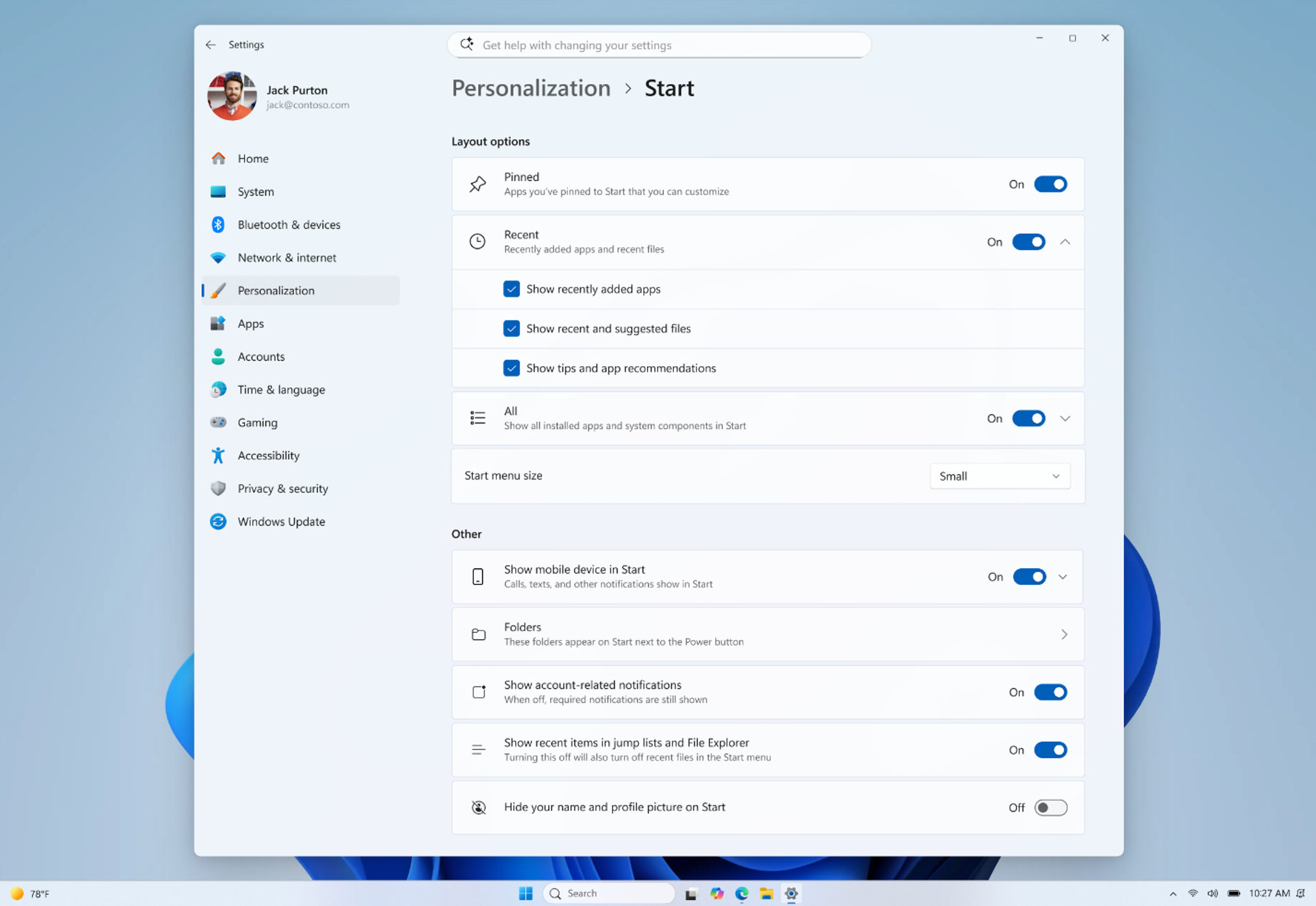
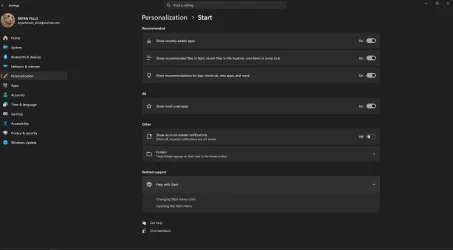
Screenshot showing new start menu customization options.
Feedback: Share your thoughts in Feedback Hub (WIN + F) under Desktop Environment > Start


 blogs.windows.com
Check Windows Updates
ISO from Microsoft:
 www.elevenforum.com
UUP Dump:
64-bit ISO download:

ARM64 ISO download:
 www.elevenforum.com
Windows 11 Insider Experimental (25H2) build 26300.8687 - June 12
Windows Insider Blog: Check Windows Updates UUP Dump: 64-bit ISO download: x ARM64 ISO download: x https://www.elevenforum.com/t/uup-dump-download-windows-insider-iso.344/
www.elevenforum.com
Windows Insider Blog:
As a reminder, these release notes apply to those who are in the Experimental channel, formerly known as the Dev Channel. As we begin the transition to the new Windows Insider Program, all new build release notes will be labeled under the new channel names, even though Insiders in the Dev Channel may not yet find themselves having transitioned to Experimental. See the Windows Insider Blog for more details.
Microsoft improving your Windows Insider experience for Windows 11
Windows Insider Blog: Hello Windows Insiders, Today is the day we’re beginning to move to the new Experimental and Beta channels as announced earlier this month. As a reminder, most Insiders, those who are in the Dev and Beta channels today will transition to the new channels over time as...
www.elevenforum.com
Enable or Disable Get Latest Updates as soon as available in Windows 11
This tutorial will show you how to turn on or off "Get the latest updates as soon as they are available" in Windows 11. Starting with Windows 11 build 22621.1635, Microsoft added a new "Get the latest updates as soon as they are available" toggle under Settings > Windows Update. When you turn...
www.elevenforum.com
Changes and improvements gradually being rolled out
[Start menu]
This update brings a number of improvements for the Start menu as first outlined in the Making Taskbar and Start more personal Insider blog. This includes:- Renamed "Recommended" section to "Recent" in Start and Settings page
- Section-level toggles to independently show or hide Pinned, Recommended, and All.
Add or Remove Pinned Section on Start Menu in Windows 11
This tutorial will show you how to add or remove the Pinned apps section on the Start menu for your account in Windows 11. The Start menu in Windows 11 is comprised of three sections: Pinned, Recent, and All apps. The section at the top of the Start menu is called the Pinned section. This...
www.elevenforum.com
Add or Remove Recommended Section on Start Menu in Windows 11
This tutorial will show you how to add or remove the Recommended (Recent) section from the Start Menu for your account, specific users, or all users in Windows 11. The Start menu in Windows 11 is comprised of three sections: Pinned, Recent, and All apps. The Recommended section on the Start...
www.elevenforum.com
Add or Remove Recently Added apps on Start Menu in Windows 11
This tutorial will show you how to add or remove recently added apps on the Start menu Recommended section for your account or all users in Windows 11. The Start menu in Windows 11 is comprised of three sections: Pinned, All apps, and Recommended. The Start menu contains shortcuts of all your...
www.elevenforum.com
Hide or Show Recent Files on Start Menu in Windows 11
This tutorial will show you how to add (show) or remove (hide) recent files on the Start menu for your account in Windows 11. The Start menu in Windows 11 is comprised of three sections: Pinned, All apps, and Recommended. The Recommended section on the Start menu shows a list of your recently...
www.elevenforum.com

Enable or Disable Recommended Tips, Shortcuts, New Apps, and more on Start Menu in Windows 11
This tutorial will show you how to turn on or off showing recommended tips, shortcuts, new apps, and more on the Start menu for your account in Windows 11. The Start menu is comprised of three sections: Pinned, All apps, and Recommended. You can choose to turn on or off show recommendations...
www.elevenforum.com
Add or Remove All Apps Section on Start Menu in Windows 11
This tutorial will show you how to add or remove the All apps section on the Start menu for your account, specific users, or all users in Windows 11. The Start menu in Windows 11 is comprised of three sections: Pinned, Recent, and All apps. The All apps section on the Start menu shows all your...
www.elevenforum.com
- Choose between a small and large Start menu, in addition to "Automatic (default)" setting option that's already available today
Change Start Menu Size in Windows 11
This tutorial will show you how to change the size of the Start Menu for your account in Windows 11. The Start menu in Windows 11 is comprised of three sections: Pinned, Recent, and All apps. Starting with Windows 11 build 26100.9278 (24H2) and build 26200.9278 (25H2), you can now choose...
www.elevenforum.com
- The option to hide your name and profile picture in Start
Hide or Show Account Name and Profile Picture on Start Menu in Windows 11
This tutorial will show you how to turn on or off hiding your account name and profile picture on the Start menu for your account in Windows 11. The Start menu in Windows 11 is comprised of three sections: Pinned, Recent, and All apps. Starting with Windows 11 build 26100.9278 (24H2) and build...
www.elevenforum.com
- Redesigned Start menu settings page
Screenshot showing new start menu customization options.
Feedback: Share your thoughts in Feedback Hub (WIN + F) under Desktop Environment > Start
[Search]
- Search by Substring: Files with compound names or content (e.g., MeetingNotesApril, ProjectStatusReport) are now easily discoverable by typing “april” or “status”.
[Taskbar]
- Fixed a few small visual polish issues when using the taskbar in alternate positions. Thanks Insiders that have been sharing feedback so far!
- You can now use a touch swipe to invoke the taskbar when using alternate taskbar positions.
Change Taskbar Position on Screen in Windows 11
This tutorial will show you how to change the taskbar position to any edge of the screen for your account in Windows 11. Starting with Windows 11 build 26100.9278 (24H2) and build 26200.9278 (25H2), you can now change the position of taskbar on your screen. You can select the side of the screen...
www.elevenforum.com
Known Issues
[Reset PC]
- [Fixed] Resetting your PC may get stuck when using "Reset this PC." To complete the reset successfully, choose the cloud download option (Cloud PBR) instead of local.
Reset Windows 11 PC
This tutorial will show you how to reset Windows 11 and Remove everything or Keep my files. You can reset Windows 11 when your PC isn’t working well and it’s been a while since you installed an app, driver, or update. Resetting reinstalls Windows 11, but lets you choose whether to keep your...
www.elevenforum.com
Reminders for Windows Insiders in the Experimental channel
- Updates are based on Windows 11, version 25H2 via an enablement package (Build 26300.8553).
- Many features are rolled out using Controlled Feature Rollout technology, starting with a subset of Insiders and ramping up over time as we monitor feedback to see how they land before pushing them out to everyone in this channel.
- For Windows Insiders who want to be the first to try new features, see the available list of features to toggle on at the Feature flags page under Settings > Windows Update > Windows Insider Program.
- The desktop watermark shown at the lower right corner of the desktop is normal for Windows Insider pre-release builds.
- Features and experiences included in these builds may never get released as we try out different concepts and get feedback. Features may change over time, be removed, or replaced and never get released beyond Windows Insiders. Some of these features and experiences could show up in future Windows releases when they're ready.
- Some features in active development we preview with Windows Insiders may not be fully localized and localization will happen over time as features are finalized. As you see issues with localization in your language, please report those issues to us via Feedback Hub.
- Check out Flight Hub for a complete look at what build is in which Insider channel.
Source:
Windows 11 Insider Experimental Preview Build 26300.8553 - Windows Insider Program
Release notes for Windows 11 Insider Experimental Preview Build 26300.8553
learn.microsoft.com
Announcing new builds for 29 May 2026
Hello Windows Insiders, This week we continue to expand the rollout of the new Windows Insider Program changes to devices in channels already announced. New builds this week Today we are releasing new Windows 11 Insider Preview B
blogs.windows.com
Check Windows Updates
ISO from Microsoft:
Download Official Windows 11 ISO file from Microsoft
This tutorial will show you how to download an official Windows Server or Windows 11 64-bit or ARM64 ISO file from Microsoft. Microsoft provides ISO files for Windows Server and Windows 11 to download. You can use these ISO files to clean install or in-place upgrade Windows 11. The Flight Hub...
www.elevenforum.com
UUP Dump:
64-bit ISO download:
Select language for Windows 11 Insider Preview Feature Update (26300.8553) amd64
Select language for Windows 11 Insider Preview Feature Update (26300.8553) amd64 on UUP dump. UUP dump lets you download Unified Update Platform files, like Windows Insider updates, directly from Windows Update.
uupdump.net
ARM64 ISO download:
Select language for Windows 11 Insider Preview Feature Update (26300.8553) arm64
Select language for Windows 11 Insider Preview Feature Update (26300.8553) arm64 on UUP dump. UUP dump lets you download Unified Update Platform files, like Windows Insider updates, directly from Windows Update.
uupdump.net
UUP Dump - Download Windows Insider ISO
UUP Dump is the most practical and easy way to get ISO images of any Insider Windows 10 or Windows 11 version, as soon as Microsoft has released a new build. UUP Dump creates a download configuration file according to your choices, downloads necessary files directly from Microsoft servers, and...
www.elevenforum.com
Last edited:






 I'd like to see size options for the taskbar made available, however. So I'm now in the Experimental/Dev channel, looks like, unless things get unstable.