Insider KB5089569 Windows 11 Insider Experimental (25H2) build 26300.8553 - May 29


 Windows Insider Blog:

As a reminder, these release notes apply to those who are in the Experimental channel, formerly known as the Dev Channel. As we begin the transition to the new Windows Insider Program, all new build release notes will be labeled under the new channel names, even though Insiders in the Dev Channel may not yet find themselves having transitioned to Experimental. See the Windows Insider Blog for more details.


Changes and improvements gradually being rolled out

[Start menu]​

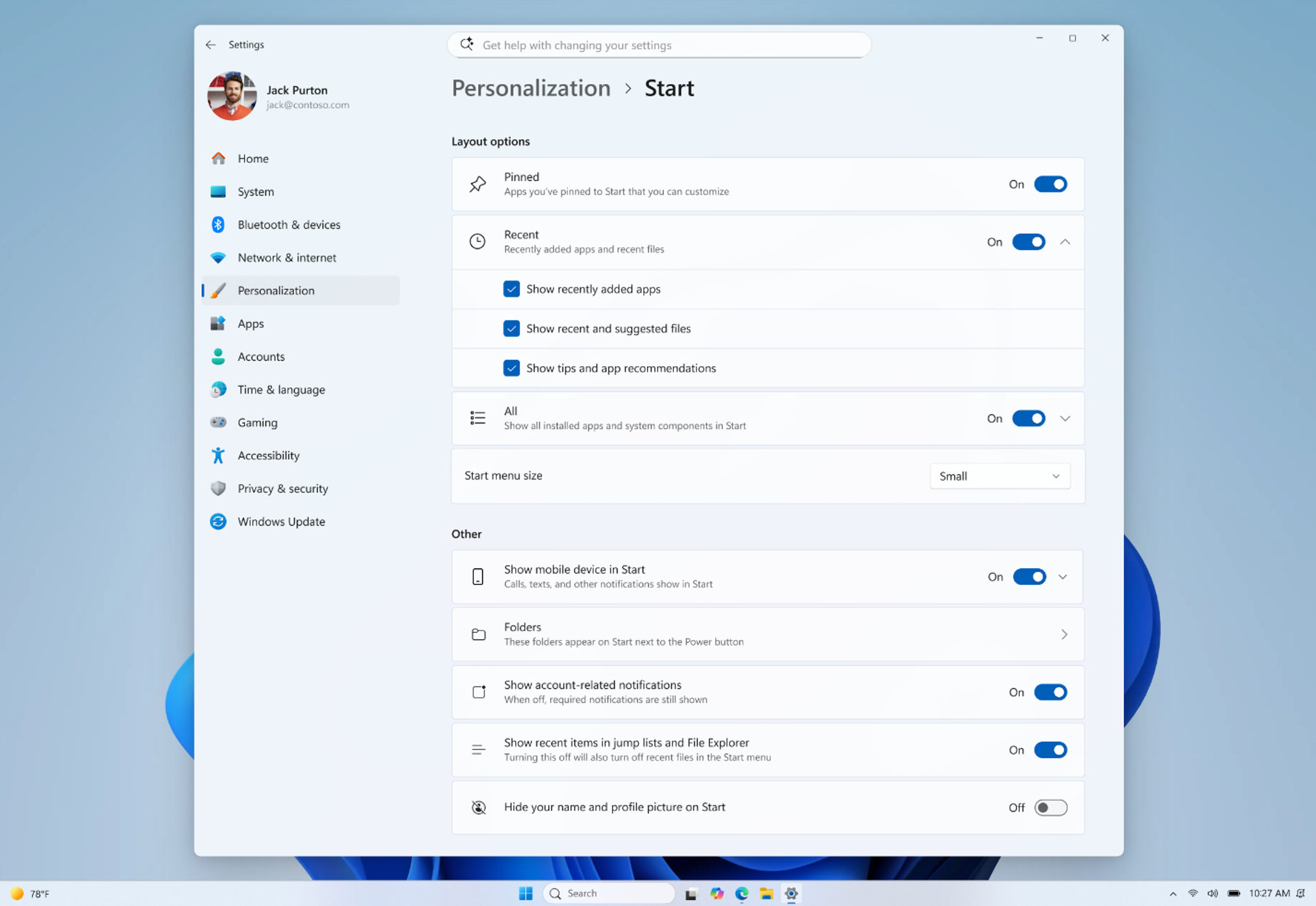
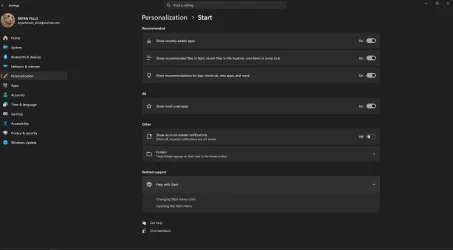
This update brings a number of improvements for the Start menu as first outlined in the Making Taskbar and Start more personal Insider blog. This includes:
  • Renamed "Recommended" section to "Recent" in Start and Settings page
  • Section-level toggles to independently show or hide Pinned, Recommended, and All.

  • Choose between a small and large Start menu, in addition to "Automatic (default)" setting option that's already available today

  • The option to hide your name and profile picture in Start

  • Redesigned Start menu settings page
Screenshot showing new start menu customization options

Screenshot showing new start menu customization options.

Feedback: Share your thoughts in Feedback Hub (WIN + F) under Desktop Environment > Start

[Search]​

  • Search by Substring: Files with compound names or content (e.g., MeetingNotesApril, ProjectStatusReport) are now easily discoverable by typing “april” or “status”.

[Taskbar]​

  • Fixed a few small visual polish issues when using the taskbar in alternate positions. Thanks Insiders that have been sharing feedback so far!
  • You can now use a touch swipe to invoke the taskbar when using alternate taskbar positions.

Known Issues

[Reset PC]​

  • [Fixed] Resetting your PC may get stuck when using "Reset this PC." To complete the reset successfully, choose the cloud download option (Cloud PBR) instead of local.

Reminders for Windows Insiders in the Experimental channel

  • Updates are based on Windows 11, version 25H2 via an enablement package (Build 26300.8553).
  • Many features are rolled out using Controlled Feature Rollout technology, starting with a subset of Insiders and ramping up over time as we monitor feedback to see how they land before pushing them out to everyone in this channel.
  • For Windows Insiders who want to be the first to try new features, see the available list of features to toggle on at the Feature flags page under Settings > Windows Update > Windows Insider Program.
  • The desktop watermark shown at the lower right corner of the desktop is normal for Windows Insider pre-release builds.
  • Features and experiences included in these builds may never get released as we try out different concepts and get feedback. Features may change over time, be removed, or replaced and never get released beyond Windows Insiders. Some of these features and experiences could show up in future Windows releases when they're ready.
  • Some features in active development we preview with Windows Insiders may not be fully localized and localization will happen over time as features are finalized. As you see issues with localization in your language, please report those issues to us via Feedback Hub.
  • Check out Flight Hub for a complete look at what build is in which Insider channel.


 Source:


Check Windows Updates


ISO from Microsoft:



UUP Dump:

64-bit ISO download:

ARM64 ISO download:

 
Last edited:
  • Like
Reactions: OAT
Normally you wouldn't notice this problem because the "White Flash" only appears for a moment.
SaveDia_1.gif

螢幕擷取畫面 2026-06-02 155634.webp

This is a problem that exists in all builds, not just in Beta or Experimental.
 

My Computer

System One

  • OS
    Windows 11, version 25H2 (26200)
    Computer type
    PC/Desktop
    CPU
    AMD Ryzen 9 9950X 16-Core Processor
    Motherboard
    ASRock B650M PG Riptide
    Memory
    DDR5-6000 (CL36) 64.0 GB
    Graphics Card(s)
    NVIDIA GeForce RTX 4090
    PSU
    1200W
    Case
    Phanteks Enthoo Pro 2
    Cooling
    Noctua NH-D12L

My Computer

System One

  • OS
    26200.8037
    Computer type
    PC/Desktop
    CPU
    i5-11400F
    Motherboard
    Gigabyte
    Memory
    32GB
    Graphics Card(s)
    Geforce GT-1030
    Keyboard
    Logitech K400
    Mouse
    Logitech M720
    Internet Speed
    600 Mb
    Browser
    Edge

My Computer

System One

  • OS
    Windows 11, version 25H2 (26200)
    Computer type
    PC/Desktop
    CPU
    AMD Ryzen 9 9950X 16-Core Processor
    Motherboard
    ASRock B650M PG Riptide
    Memory
    DDR5-6000 (CL36) 64.0 GB
    Graphics Card(s)
    NVIDIA GeForce RTX 4090
    PSU
    1200W
    Case
    Phanteks Enthoo Pro 2
    Cooling
    Noctua NH-D12L
zone of the device.
 

My Computer

System One

  • OS
    26200.8037
    Computer type
    PC/Desktop
    CPU
    i5-11400F
    Motherboard
    Gigabyte
    Memory
    32GB
    Graphics Card(s)
    Geforce GT-1030
    Keyboard
    Logitech K400
    Mouse
    Logitech M720
    Internet Speed
    600 Mb
    Browser
    Edge
 

My Computers

System One System Two

  • OS
    Windows 11 Pro for Workstations
    Computer type
    PC/Desktop
    Manufacturer/Model
    Custom self build
    CPU
    Intel i7-8700K 5 GHz
    Motherboard
    ASUS ROG Maximus XI Formula Z390
    Memory
    64 GB (4x16GB) G.SKILL TridentZ RGB DDR4 3600 MHz (F4-3600C18D-32GTZR)
    Graphics Card(s)
    ASUS ROG-STRIX-GTX1080TI-O11G-GAMING (11GB GDDR5X)
    Sound Card
    Integrated Digital Audio (S/PDIF)
    Monitor(s) Displays
    2 x Samsung Odyssey G75 27"
    Screen Resolution
    2560x1440
    Hard Drives
    1TB Samsung 990 PRO M.2,
    4TB Samsung 990 PRO M.2,
    TerraMaster F8 SSD Plus NAS
    PSU
    Seasonic Prime Titanium 850W
    Case
    Thermaltake Core P3 wall mounted
    Cooling
    Corsair Hydro H115i
    Keyboard
    Amazon Basics Wired Full Keyboard MD005
    Mouse
    Logitech MX Master 4
    Internet Speed
    2 Gbps Download and 100 Mbps Upload
    Browser
    Chrome and Edge
    Antivirus
    Microsoft Defender
    Other Info
    Logitech Z625 speaker system,
    Logitech BRIO 4K Pro webcam,
    HP Color LaserJet Pro MFP M477fdn,
    CyberPower CP1500PFCLCD
    Galaxy S23 Plus phone
  • Operating System
    Windows 11 Pro
    Computer type
    Laptop
    Manufacturer/Model
    Surface Laptop 7 Copilot+ PC
    CPU
    Snapdragon X Elite (12 core) 3.42 GHz
    Memory
    16 GB LPDDR5x-7467 MHz
    Monitor(s) Displays
    15" HDR
    Screen Resolution
    2496 x 1664
    Hard Drives
    1 TB SSD
    Internet Speed
    Wi-Fi 7 and Bluetooth 5.4
    Browser
    Chrome and Edge
    Antivirus
    Microsoft Defender
I love the new features compare to the Canary channels with 29XXX Builds <3
 

My Computer

System One

  • OS
    Windows 11 Insider Experimental (26H2) Channel
    Computer type
    PC/Desktop
    Manufacturer/Model
    Made
    CPU
    Intel Core i5-13600K
    Motherboard
    ASUS PRIME B760-PLUS D4
    Memory
    32 Go DDR4
    Graphics Card(s)
    ASUS Dual GeForce RTX 4060 Ti OC Edition 8GB
    Monitor(s) Displays
    ViewSonic 1080p
    Screen Resolution
    1080p
    Hard Drives
    2 NVMe + SSD Intern + 1 HHD Interne + 4 HDD extern
    Keyboard
    Roccat Swamm
    Internet Speed
    Fibre
    Browser
    Microsoft Edge
    Antivirus
    Windows Defender
been on this update since it was realeased . ran everything many times dism, chkdsk , sfc/scannow . and still dont have the new start features listed. under personalization start , i do have the new start menu. i know it can be enabled using vive tool . i just perfer not to. must not be rolled out yet. but its ms what else can i say
 

Attachments

  • Screenshot 2026-06-04 104837.webp
    Screenshot 2026-06-04 104837.webp
    39.1 KB · Views: 1

My Computer

System One

  • OS
    WINDOWS 11 WINDOWS 10
    Computer type
    PC/Desktop
    Manufacturer/Model
    HP H8 1360T
    CPU
    Intel(R) Core(TM) i7 -3770K CPU 3.50 GZ 3501 4 CORE
    Motherboard
    PEGATRON 2AD5
    Memory
    32.0 GB (31.9 GB usable)
    Graphics Card(s)
    AMD RADEON TM R5240 INTELL HD GRAPHICS 4600 TIGER 1+1 USB
    Sound Card
    AMD HD . IDT
    Monitor(s) Displays
    AOC WAL MART SPECIAL . HP 2311 IX IPS LED DELL 1708 FP
    Screen Resolution
    1920 X 1080 1600X900 1280X940
    Hard Drives
    1 FAXING S 100 512GB 1 KINGSTON 120 GB SSD 1 X12 SSD 512 GB
    PSU
    300 WATT HP
    Case
    FULL
    Cooling
    ON BOARD FAN
    Keyboard
    LOGITEC K 520 WIRELESS
    Mouse
    LOGITEC M 510 WIRELESS
    Internet Speed
    55 UP 11.2 DOWN
    Browser
    CHROME EDGE
    Antivirus
    WINDOWS SECUIRTY
    Other Info
    NON SUPPORTED HARDWARE FOR WINDOWS 11
been on this update since it was realeased . ran everything many times dism, chkdsk , sfc/scannow . and still dont have the new start features listed. under personalization start , i do have the new start menu. i know it can be enabled using vive tool . i just perfer not to. must not be rolled out yet. but its ms what else can i say
That is unfortunate as it adds decent options.

start.webp
 

My Computers

System One System Two

  • OS
    All Branches but Release
    Computer type
    Laptop
    Manufacturer/Model
    Acer Nitro ANV15-51
    CPU
    AMD Ryzen 7 7735HS 3200-4500 Mhz 8 cores x 2
    Motherboard
    Sportage_RBH
    Memory
    32 GB DDR5
    Graphics Card(s)
    Radeon Graphic / NVIDIA GeForce RTX 4060 8 GB GDDR6
    Sound Card
    AMD/Realtek(R) Audio
    Monitor(s) Displays
    Integrated Monitor (15.3"vis)
    Screen Resolution
    FHD 1920X1080 16:9 144Hz
    Hard Drives
    KINGSTON OM8SEP4512Q-AA 1TB
    Western Digital 256GB
    PSU
    19V DC 6.32 A 120 W
    Cooling
    Dual Fans
    Mouse
    MS Bluetooth
    Internet Speed
    Fiber 1GB Cox -us & 1GB Orange-fr
    Browser
    Edge Canary- Firefox Nightly-Chrome Dev-Chrome Dev
    Antivirus
    Windows Defender
  • Operating System
    Windows 11 Beta
    Computer type
    Laptop
    Manufacturer/Model
    Asus X751BP
    CPU
    AMD A9-9420
    Memory
    8 GB of DDR4
    Graphics card(s)
    AMD Radeon R5
    Screen Resolution
    1600x900
    Hard Drives
    Seagate 1 TB
i know lol . kinda strange that it has not rolled out yet . been about 2 weeks . heck might not even get it ever lol . no sense in making a new iso file from upp dump and doing a clean install . Might do the same thing lol. if i dont get it after patch tuesday . prob will just do the vive tool thingy lol
 

My Computer

System One

  • OS
    WINDOWS 11 WINDOWS 10
    Computer type
    PC/Desktop
    Manufacturer/Model
    HP H8 1360T
    CPU
    Intel(R) Core(TM) i7 -3770K CPU 3.50 GZ 3501 4 CORE
    Motherboard
    PEGATRON 2AD5
    Memory
    32.0 GB (31.9 GB usable)
    Graphics Card(s)
    AMD RADEON TM R5240 INTELL HD GRAPHICS 4600 TIGER 1+1 USB
    Sound Card
    AMD HD . IDT
    Monitor(s) Displays
    AOC WAL MART SPECIAL . HP 2311 IX IPS LED DELL 1708 FP
    Screen Resolution
    1920 X 1080 1600X900 1280X940
    Hard Drives
    1 FAXING S 100 512GB 1 KINGSTON 120 GB SSD 1 X12 SSD 512 GB
    PSU
    300 WATT HP
    Case
    FULL
    Cooling
    ON BOARD FAN
    Keyboard
    LOGITEC K 520 WIRELESS
    Mouse
    LOGITEC M 510 WIRELESS
    Internet Speed
    55 UP 11.2 DOWN
    Browser
    CHROME EDGE
    Antivirus
    WINDOWS SECUIRTY
    Other Info
    NON SUPPORTED HARDWARE FOR WINDOWS 11
Hi all
No update this week ?
Thx
 

My Computer

System One

  • OS
    Windows 11 Insider Experimental (26H2) Channel
    Computer type
    PC/Desktop
    Manufacturer/Model
    Made
    CPU
    Intel Core i5-13600K
    Motherboard
    ASUS PRIME B760-PLUS D4
    Memory
    32 Go DDR4
    Graphics Card(s)
    ASUS Dual GeForce RTX 4060 Ti OC Edition 8GB
    Monitor(s) Displays
    ViewSonic 1080p
    Screen Resolution
    1080p
    Hard Drives
    2 NVMe + SSD Intern + 1 HHD Interne + 4 HDD extern
    Keyboard
    Roccat Swamm
    Internet Speed
    Fibre
    Browser
    Microsoft Edge
    Antivirus
    Windows Defender

My Computer

System One

  • OS
    Windows 11 Pro 25H2
    Computer type
    PC/Desktop
    Manufacturer/Model
    Dell XPS 8930
    CPU
    Intel I9-9900K
    Memory
    64GB
    Graphics Card(s)
    NVIDIA RTX 2060
    Sound Card
    NVIDIA High Definition Audio
    Monitor(s) Displays
    4k Samsung
    Screen Resolution
    3840 x 2160
    Hard Drives
    512GB NVMe, ADATA SU 800, 2TB HDD

My Computers

System One System Two

  • OS
    windows 10 & 11
    Computer type
    PC/Desktop
    Manufacturer/Model
    iBuyPower (special build)
    CPU
    AMD Ryzen 7X
    Motherboard
    Asus Prime x370 Pro
    Memory
    64Gb
    Graphics Card(s)
    Radeon RX 480 8Gb
    Monitor(s) Displays
    Samsung UHD 27 inch
    Screen Resolution
    UHD
    Hard Drives
    3 Samsung 1 TB SSD each; 1 Samsung PCIe M.2 at 2 TB
  • Operating System
    Windows 11 pro
    Computer type
    PC/Desktop
    Manufacturer/Model
    IBuyPower
    CPU
    AMD 9 5900X
    Motherboard
    Asus x570 ROG Crosshair VIII Dark Hero WI-FI 6E ARGB
    Memory
    32 Gb
    Graphics card(s)
    Nvidia GeForce RTX 3080 Ti 12 GB GDDR6X
    Sound Card
    3D PREMIUM surround sound onboard
    Monitor(s) Displays
    Samsung 32 inch UHD curved monitor
    Screen Resolution
    UHD
    Hard Drives
    Samsung 980 pro 2 tb gen 4 NVMe ssd
    PSU
    850 watt consair RM850X
    Case
    Lian Li LANCOOL ONE tempered glass RGB gaming case
    Cooling
    DEEPCOOL GAMERSTORM RGB 240 mm CASTLE 240EX liquid cooler
    Keyboard
    Ares m.2 gaming keyboard
    Mouse
    Ares m.2 gaming optical mouse
    Internet Speed
    450
    Browser
    Firefox / Edge
    Antivirus
    Windows defender
    Other Info
    With all this gaming rig I am not a gamer!

My Computers

System One System Two

  • OS
    Windows 11 Pro for Workstations
    Computer type
    PC/Desktop
    Manufacturer/Model
    Custom self build
    CPU
    Intel i7-8700K 5 GHz
    Motherboard
    ASUS ROG Maximus XI Formula Z390
    Memory
    64 GB (4x16GB) G.SKILL TridentZ RGB DDR4 3600 MHz (F4-3600C18D-32GTZR)
    Graphics Card(s)
    ASUS ROG-STRIX-GTX1080TI-O11G-GAMING (11GB GDDR5X)
    Sound Card
    Integrated Digital Audio (S/PDIF)
    Monitor(s) Displays
    2 x Samsung Odyssey G75 27"
    Screen Resolution
    2560x1440
    Hard Drives
    1TB Samsung 990 PRO M.2,
    4TB Samsung 990 PRO M.2,
    TerraMaster F8 SSD Plus NAS
    PSU
    Seasonic Prime Titanium 850W
    Case
    Thermaltake Core P3 wall mounted
    Cooling
    Corsair Hydro H115i
    Keyboard
    Amazon Basics Wired Full Keyboard MD005
    Mouse
    Logitech MX Master 4
    Internet Speed
    2 Gbps Download and 100 Mbps Upload
    Browser
    Chrome and Edge
    Antivirus
    Microsoft Defender
    Other Info
    Logitech Z625 speaker system,
    Logitech BRIO 4K Pro webcam,
    HP Color LaserJet Pro MFP M477fdn,
    CyberPower CP1500PFCLCD
    Galaxy S23 Plus phone
  • Operating System
    Windows 11 Pro
    Computer type
    Laptop
    Manufacturer/Model
    Surface Laptop 7 Copilot+ PC
    CPU
    Snapdragon X Elite (12 core) 3.42 GHz
    Memory
    16 GB LPDDR5x-7467 MHz
    Monitor(s) Displays
    15" HDR
    Screen Resolution
    2496 x 1664
    Hard Drives
    1 TB SSD
    Internet Speed
    Wi-Fi 7 and Bluetooth 5.4
    Browser
    Chrome and Edge
    Antivirus
    Microsoft Defender
Well, I had to check out for myself the new positioning options for the Windows taskbar--and they work fine, so far! I uninstalled StartAllBack (you actually have to uninstall the app & its settings or else the normal Windows taskbar will not behave as expected) when I jumped to the 26300.8553 build from 26200 .8524--went straight there using Win Update options--and to my surprise it worked...;) I'd like to see size options for the taskbar made available, however. So I'm now in the Experimental/Dev channel, looks like, unless things get unstable.


Almost forgot--the white flash bug seems gone so far. Another plus!
 

My Computer

System One

  • OS
    Win11 Release Beta channel
    Computer type
    PC/Desktop
    Manufacturer/Model
    a cherry-picked assembly
    CPU
    AMD R7 7800X3D
    Motherboard
    MSI x870 Tomahawk Wi-Fi, 8-layer, 2 oz copper, server PCB
    Memory
    GSkill 2x16GB @ 6400MT/s
    Graphics Card(s)
    XFX 9070 XT SWIFT tri-fan (PCIe5.0)
    Sound Card
    Creative Labs G8 USB External Sound device, Gaming DAC, Sound Card & Earphone AMP.. HIGHLY RECOMMENDED, btw. Totally changed my opinion of external USB sound. I like!...;)
    Monitor(s) Displays
    Philips 43" Momentum DisplayHDR 1000-certified
    Screen Resolution
    3840x2160
    Hard Drives
    *Boot: Samsung 980 Pro 2 TB NVMe (PCIe4x4)
    *Samsung 980 EVO NVMe 500GB (PCIe 4x4)
    *Kingston SNV3S2000G 2TB NVMe (PCIe4x4)
    *Samsung 960 EVO 250GB NVMe(PCIe3x2)
    *8TB Toshiba x300 HDD
    *ST4000DM004 S3 4TB HDD
    PSU
    Gigabyte 850W Gold, Rev 2
    Case
    Lian Li Lancool 217, white, with wood trim, very nice looking--tired of black, 5-fans standard
    Cooling
    Air coutesy Lian Li
    Keyboard
    Cherry MX 2.0S RGB
    Mouse
    Razer Basilisk V3 24k DPI
    Internet Speed
    ~950Mbps down and up!
    Browser
    Firefox x64 DE
    Antivirus
    Defender
    Other Info
    Great New system. Exceeds my expectations by quite a bit, btw. I love the USB G8 SoundBlaster, it's quite an improvement over the G6!
Well, I had to check out for myself the new positioning options for the Windows taskbar--and they work fine, so far! I uninstalled StartAllBack (you actually have to uninstall the app & its settings or else the normal Windows taskbar will not behave as expected) when I jumped to the 26300.8553 build from 26200 .8524--went straight there using Win Update options--and to my surprise it worked...;) I'd like to see size options for the taskbar made available, however. So I'm now in the Experimental/Dev channel, looks like, unless things get unstable.

Almost forgot--the white flash bug seems gone so far. Another plus!
The one problem I have with the vertical taskbar (I'm using it on Beta) is with the icons positioned at the top the name balloon blocks the start button making it hard to click. It's faster to hit the keyboard key then trying to get the mouse on the top of it. Otherwise it works well and it's not blocked if you set icons to center while vertical.
 

My Computers

System One System Two

  • OS
    Windows 11 25H2
    Computer type
    Laptop
    Manufacturer/Model
    Alienware 18 Area-51
    CPU
    Intel Core Ultra 9 275HX (24-Core)
    Motherboard
    Alienware
    Memory
    64GB DDR5 6400MT/s
    Graphics Card(s)
    NVIDIA GeForce RTX 5080 and Intel UHD Graphics
    Sound Card
    Onboard, Realtek high-performance Audio chips (ALC3329 & ALC1708))
    Monitor(s) Displays
    300HZ 18-inch QHD 500 nit Comfort View+
    Screen Resolution
    2560 x 1600
    Hard Drives
    2TB NVMe M.2 PCIe Gen 5 SSD
    Case
    Magnesium Alloy
    Cooling
    Advanced Cryo-Tech Quad-Fan Cooling system & large vapor chamber
    Keyboard
    Cherry MX ultra low profile mechanical keyboard with per key AlienFX RGB lighting
    Mouse
    Logitech MX Master 4
    Browser
    Vivaldi (main), Firefox, Chrome, Edge
    Antivirus
    MS Defender and Malwarebytes Free
  • Operating System
    Windows 11 25H2
    Computer type
    Laptop
    Manufacturer/Model
    Microsoft Surface Laptop 7
    CPU
    Qualcomm Snapdragon X Elite (12 Core) ARM based CPU
    Motherboard
    Microsoft Corp.
    Memory
    16GB LPDDR5
    Graphics card(s)
    Qualcomm Adreno X1-85
    Sound Card
    Omnisonic speakers with Dolby Atmos spatial sound
    Monitor(s) Displays
    120 Hz 13.8-inch 600 nit PixelSense Flow touchscreen
    Screen Resolution
    2304x1536
    Hard Drives
    1TB NVMe Gen 4 SSD
    Case
    Anodized Aluminum
    Cooling
    Traditional active cooling fan system
    Keyboard
    Mechanical QWERTY, backlit when in use
    Mouse
    Logitech MX Master 4 and Surface Arc Mouse
    Browser
    Vivaldi (main), Firefox, Chrome, Edge
    Antivirus
    MS Defender and Malwarebytes Free
The one problem I have with the vertical taskbar (I'm using it on Beta) is with the icons positioned at the top the name balloon blocks the start button making it hard to click. It's faster to hit the keyboard key then trying to get the mouse on the top of it. Otherwise it works well and it's not blocked if you set icons to center while vertical.
Yes, even on Windows of yore when no one imagined Microsoft would remove that option, the vertical taskbar was always a bit awkward--my favorite is the top placement for the taskbar, and it looks like they've finally decided to get smart and offer taskbar placement as an option!
 

My Computer

System One

  • OS
    Win11 Release Beta channel
    Computer type
    PC/Desktop
    Manufacturer/Model
    a cherry-picked assembly
    CPU
    AMD R7 7800X3D
    Motherboard
    MSI x870 Tomahawk Wi-Fi, 8-layer, 2 oz copper, server PCB
    Memory
    GSkill 2x16GB @ 6400MT/s
    Graphics Card(s)
    XFX 9070 XT SWIFT tri-fan (PCIe5.0)
    Sound Card
    Creative Labs G8 USB External Sound device, Gaming DAC, Sound Card & Earphone AMP.. HIGHLY RECOMMENDED, btw. Totally changed my opinion of external USB sound. I like!...;)
    Monitor(s) Displays
    Philips 43" Momentum DisplayHDR 1000-certified
    Screen Resolution
    3840x2160
    Hard Drives
    *Boot: Samsung 980 Pro 2 TB NVMe (PCIe4x4)
    *Samsung 980 EVO NVMe 500GB (PCIe 4x4)
    *Kingston SNV3S2000G 2TB NVMe (PCIe4x4)
    *Samsung 960 EVO 250GB NVMe(PCIe3x2)
    *8TB Toshiba x300 HDD
    *ST4000DM004 S3 4TB HDD
    PSU
    Gigabyte 850W Gold, Rev 2
    Case
    Lian Li Lancool 217, white, with wood trim, very nice looking--tired of black, 5-fans standard
    Cooling
    Air coutesy Lian Li
    Keyboard
    Cherry MX 2.0S RGB
    Mouse
    Razer Basilisk V3 24k DPI
    Internet Speed
    ~950Mbps down and up!
    Browser
    Firefox x64 DE
    Antivirus
    Defender
    Other Info
    Great New system. Exceeds my expectations by quite a bit, btw. I love the USB G8 SoundBlaster, it's quite an improvement over the G6!
Yes, even on Windows of yore when no one imagined Microsoft would remove that option, the vertical taskbar was always a bit awkward--my favorite is the top placement for the taskbar, and it looks like they've finally decided to get smart and offer taskbar placement as an option!
I was surprised that in the past week I've grown to like it on the side as I like the extra vertical space for all my windows now. I didn't expect to take to it but I did.
 

My Computers

System One System Two

  • OS
    Windows 11 25H2
    Computer type
    Laptop
    Manufacturer/Model
    Alienware 18 Area-51
    CPU
    Intel Core Ultra 9 275HX (24-Core)
    Motherboard
    Alienware
    Memory
    64GB DDR5 6400MT/s
    Graphics Card(s)
    NVIDIA GeForce RTX 5080 and Intel UHD Graphics
    Sound Card
    Onboard, Realtek high-performance Audio chips (ALC3329 & ALC1708))
    Monitor(s) Displays
    300HZ 18-inch QHD 500 nit Comfort View+
    Screen Resolution
    2560 x 1600
    Hard Drives
    2TB NVMe M.2 PCIe Gen 5 SSD
    Case
    Magnesium Alloy
    Cooling
    Advanced Cryo-Tech Quad-Fan Cooling system & large vapor chamber
    Keyboard
    Cherry MX ultra low profile mechanical keyboard with per key AlienFX RGB lighting
    Mouse
    Logitech MX Master 4
    Browser
    Vivaldi (main), Firefox, Chrome, Edge
    Antivirus
    MS Defender and Malwarebytes Free
  • Operating System
    Windows 11 25H2
    Computer type
    Laptop
    Manufacturer/Model
    Microsoft Surface Laptop 7
    CPU
    Qualcomm Snapdragon X Elite (12 Core) ARM based CPU
    Motherboard
    Microsoft Corp.
    Memory
    16GB LPDDR5
    Graphics card(s)
    Qualcomm Adreno X1-85
    Sound Card
    Omnisonic speakers with Dolby Atmos spatial sound
    Monitor(s) Displays
    120 Hz 13.8-inch 600 nit PixelSense Flow touchscreen
    Screen Resolution
    2304x1536
    Hard Drives
    1TB NVMe Gen 4 SSD
    Case
    Anodized Aluminum
    Cooling
    Traditional active cooling fan system
    Keyboard
    Mechanical QWERTY, backlit when in use
    Mouse
    Logitech MX Master 4 and Surface Arc Mouse
    Browser
    Vivaldi (main), Firefox, Chrome, Edge
    Antivirus
    MS Defender and Malwarebytes Free
I'll stick to the taskbar at the bottom, with Left alignment. 😉
 

My Computer

System One

  • OS
    Windows 11 Pro 25H2
    Computer type
    PC/Desktop
    Manufacturer/Model
    Dell XPS 8930
    CPU
    Intel I9-9900K
    Memory
    64GB
    Graphics Card(s)
    NVIDIA RTX 2060
    Sound Card
    NVIDIA High Definition Audio
    Monitor(s) Displays
    4k Samsung
    Screen Resolution
    3840 x 2160
    Hard Drives
    512GB NVMe, ADATA SU 800, 2TB HDD

My Computers

System One System Two

  • OS
    Windows 11 Pro for Workstations
    Computer type
    PC/Desktop
    Manufacturer/Model
    Custom self build
    CPU
    Intel i7-8700K 5 GHz
    Motherboard
    ASUS ROG Maximus XI Formula Z390
    Memory
    64 GB (4x16GB) G.SKILL TridentZ RGB DDR4 3600 MHz (F4-3600C18D-32GTZR)
    Graphics Card(s)
    ASUS ROG-STRIX-GTX1080TI-O11G-GAMING (11GB GDDR5X)
    Sound Card
    Integrated Digital Audio (S/PDIF)
    Monitor(s) Displays
    2 x Samsung Odyssey G75 27"
    Screen Resolution
    2560x1440
    Hard Drives
    1TB Samsung 990 PRO M.2,
    4TB Samsung 990 PRO M.2,
    TerraMaster F8 SSD Plus NAS
    PSU
    Seasonic Prime Titanium 850W
    Case
    Thermaltake Core P3 wall mounted
    Cooling
    Corsair Hydro H115i
    Keyboard
    Amazon Basics Wired Full Keyboard MD005
    Mouse
    Logitech MX Master 4
    Internet Speed
    2 Gbps Download and 100 Mbps Upload
    Browser
    Chrome and Edge
    Antivirus
    Microsoft Defender
    Other Info
    Logitech Z625 speaker system,
    Logitech BRIO 4K Pro webcam,
    HP Color LaserJet Pro MFP M477fdn,
    CyberPower CP1500PFCLCD
    Galaxy S23 Plus phone
  • Operating System
    Windows 11 Pro
    Computer type
    Laptop
    Manufacturer/Model
    Surface Laptop 7 Copilot+ PC
    CPU
    Snapdragon X Elite (12 core) 3.42 GHz
    Memory
    16 GB LPDDR5x-7467 MHz
    Monitor(s) Displays
    15" HDR
    Screen Resolution
    2496 x 1664
    Hard Drives
    1 TB SSD
    Internet Speed
    Wi-Fi 7 and Bluetooth 5.4
    Browser
    Chrome and Edge
    Antivirus
    Microsoft Defender
No Experimental or Experimental (Future Platforms today). We are working on restoring regular scheduled flighting for these.
This one is an Experimental. 🤷‍♂️

Experimental (26H1): Build 28120.2242


My Computer

System One

  • OS
    Windows 11 Pro 25H2
    Computer type
    PC/Desktop
    Manufacturer/Model
    Dell XPS 8930
    CPU
    Intel I9-9900K
    Memory
    64GB
    Graphics Card(s)
    NVIDIA RTX 2060
    Sound Card
    NVIDIA High Definition Audio
    Monitor(s) Displays
    4k Samsung
    Screen Resolution
    3840 x 2160
    Hard Drives
    512GB NVMe, ADATA SU 800, 2TB HDD
Back
Top Bottom