UPDATE 6/09:
 www.elevenforum.com
Visit the Windows release health dashboard for the latest status on this release.
 www.elevenforum.com
Gradual rollout
The following summary outlines features from AI-powered Windows 11 PC experiences, along with improvements and fixes. The bold text within the brackets indicates the item or area of the change.
This non-security update includes quality improvements. The following summary outlines key issues addressed by the KB update after you install it. Also, included are available new features. The bold text within the brackets indicates the item or area of the change.
Microsoft combines the latest servicing stack update (SSU) for your operating system with the latest cumulative update (LCU). For general information about SSUs, see Servicing stack updates.
Install this update
To install this update, use one of the following Windows and Microsoft release channels.
If you want to remove this update
Caution: Before you decide to remove this update, see Understanding the risks: Why you should not uninstall security updates.
To remove this update after installing the combined SSU and LCU package, use the DISM/Remove-Package command line option with the LCU package name as the argument. You can find the package name by using this command: DISM /online /get-packages.
Running Windows Update Standalone Installer (wusa.exe) with the /uninstall switch on the combined package will not work because the combined package contains the SSU. You cannot remove the SSU from the system after installation.
File information
For a list of the files provided in this update, download the file information for cumulative update 5089573.
For a list of the files provided in the servicing stack update, download the file information for the SSU (KB5092734) - version 26100.8519.
 support.microsoft.com
Check Windows Updates
UUP Dump:
64-bit ISO download:

ARM64 ISO download:
 www.elevenforum.com
KB5094126 Windows 11 Cumulative Update build 26100.8655 (24H2) and 26200.8655 (25H2) - June 9
UPDATE 6/23: https://www.elevenforum.com/t/kb5095093-windows-11-cumulative-update-preview-build-26100-8737-24h2-and-26200-8737-25h2-june-23.47719/ Microsoft Support: This cumulative update for Windows 11, version 25H2 and 24H2 (KB5094126) includes the latest security fixes and improvements...
www.elevenforum.com
Microsoft Support:
May 26, 2026 - KB5089573 (OS Builds 26200.8524 and 26100.8524) Preview
This cumulative update for Windows 11, version 25H2 and 24H2 (KB5089573), includes production-quality improvements.Visit the Windows release health dashboard for the latest status on this release.
Announcements and messages
This section provides key notifications related to this release, including announcements, change logs, and end-of-support notices.Windows Secure Boot certificate expiration
Important: Secure Boot certificates used by most Windows devices are set to expire starting in June 2026. This might affect the ability of certain personal and business devices to boot securely if not updated in time. To avoid disruption, we recommend reviewing the guidance and taking action to update certificates in advance. For details and preparation steps, see Windows Secure Boot certificate expiration and CA updates.
Updating Microsoft Secure Boot keys before expiration in June 2026
https://support.microsoft.com/en-us/topic/if-you-re-prevented-from-updating-secure-boot-certificates-e01cc486-8721-457f-9bc7-5cb801c1759e UPDATE 4/02: https://support.microsoft.com/en-us/topic/secure-boot-certificate-update-status-in-the-windows-security-app-5ce39986-7dd2-4852-8c21-ef30dd04f046...
www.elevenforum.com
Change log
Change date | Change description |
|---|---|
| May 29, 2026 |
|
| May 28, 2026 | Update: Personalization added (gradual rollout). |
Highlights
This update is available through two release phases: gradual rollout and normal rollout. A gradual rollout delivers an update in phases, so features reach devices over time instead of all at once, meaning availability varies by device. A normal rollout is the broad release to all eligible devices at the same time, usually when it reaches general availability (GA).Gradual rollout
The following summary outlines features from AI-powered Windows 11 PC experiences, along with improvements and fixes. The bold text within the brackets indicates the item or area of the change.
Windows 11 PC experiences
This section highlights some new features and enhancements for Windows 11 PCs, including AI-powered capabilities, continuous innovation, and performance improvements.- [Shared Audio] New! Shared Audio enables two people to listen to the same audio from a single Windows 11 PC at the same time. It uses Bluetooth® LE Audio broadcast technology to make sharing easy. For example, you can watch a movie while traveling or listen to music while studying together. To start sharing audio, open Quick settings from the taskbar, select Shared Audio, choose two supported, paired, and connected devices, and then select Start sharing. To learn more about Shared Audio, see Extending Bluetooth® LE Audio on Windows 11 with Shared Audio.

Use Shared Audio with Two Bluetooth LE Audio Devices in Windows 11
This tutorial will show you how to share and stop sharing output audio with two Bluetooth LE Audio devices on supported Windows 11 Copilot+ PC. Shared audio is an experience built on Bluetooth LE Audio broadcast technology for Copilot+ PCs. Shared audio allows your audio to be shared between...
www.elevenforum.com

Shared Bluetooth LE audio is rolling out for Windows 11 version 25H2 and 26H1
Windows OS Platform Blog: Announcing shared audio for Bluetooth® LE Audio on Windows 11, bringing you closer when watching movies or listening to music with friends and family. I was on a traveling with a friend on a long flight when I asked them if they wanted to watch a movie with me on my...
www.elevenforum.com
- [Magnifier in Windows]
- New! Magnifier now provides clearer and more consistent announcements when working with a screen reader. You’ll hear helpful announcements when you zoom in or out, switch views, turn color inversion on or off, or turn Magnifier on or off. This makes it easy to stay oriented while you work.
- New! Magnifier now supports magnification of permitted protected content.
- This update improves smoothness when moving Magnifier in lens mode.

Change Magnifier View in Windows 11
This tutorial will show you how to change Magnifier view for your account in Windows 11. Magnifier makes part or all of your screen bigger so you can see words and images better. You can change between the docked, full screen, and lens Magnifier views. When you turn on Magnifier, it will use...
www.elevenforum.com
- [Task Manager]
- New! Task Manager now offers improved visibility into NPU usage on PCs with an NPU. New optional NPU and NPU Engine columns are available on the Processes, Users, and Details pages, along with NPU Dedicated Memory and NPU Shared Memory optional columns on the Details page. Neural engines that are part of a GPU now appear on the Performance page, providing a more complete view of AI‑related activity.

See NPU Usage Details in Windows 11
This tutorial will show you how to see NPU usage details in Windows 11. A NPU (Neural Processing Unit), or AI processor, is a specialized accelerator that handles artificial intelligence (AI) and machine learning (ML) tasks right on your PC instead of sending data to be processed in the cloud...
www.elevenforum.com
- A new optional Isolation column on the Processes and Details pages shows which apps are running in an AppContainer. You can add any of the new columns by right‑clicking a column header in Task Manager and selecting them from the menu.

See Which Apps are Running in an AppContainer in Windows 11
This tutorial will show you how to see which apps are running in an AppContainer in Windows 11. Starting with Windows 11 build 26100.8524 (24H2) and build 26200.8524 (25H2), Microsoft is adding a new optional Isolation column to the Processes and Details pages in Task Manager, allowing you to...
www.elevenforum.com

Add or Remove Columns in Task Manager in Windows 11
This tutorial will show you how to add or remove columns for details in Task Manager for your account in Windows 11. Task Manager can be used to view and manage your processes, performance statistics, app history, startup apps, users, process details, and services in Windows 11. Starting with...
www.elevenforum.com
- This update improves CPU speed display on the Performance page of Task Manager for VMs, so it doesn’t show higher than unexpected numbers after resuming from hibernate.
- New! Task Manager now offers improved visibility into NPU usage on PCs with an NPU. New optional NPU and NPU Engine columns are available on the Processes, Users, and Details pages, along with NPU Dedicated Memory and NPU Shared Memory optional columns on the Details page. Neural engines that are part of a GPU now appear on the Performance page, providing a more complete view of AI‑related activity.
- [Camera] New! Windows 11’s Multi-App Camera feature allows multiple applications to access your camera stream at the same time. Basic Camera mode in Windows 11 enables simplified camera functionality, useful for troubleshooting or improving stability when your camera is not working correctly. Enterprise admin can now set Multi-App Camera mode or Basic Camera mode through Group Policy, under Computer Configuration > Administrative Templates > Windows Components > Camera > Configure Camera Options.

Enable or Disable Multiple Apps to Use Camera in Windows 11
This tutorial will show you how to turn on or off allowing multiple apps to use camera at the same time for your account or all users in Windows 11. Starting with build 26100.8524 (24H2), build 26200.8524 (25H2), and build 28000.2340 (26H1), Microsoft added a new Advanced camera options section...
www.elevenforum.com

Enable or Disable Basic Camera Mode in Windows 11
This tutorial will show you how to turn on or off camera basic mode for your account or all users in Windows 11. Starting with build 26100.8524 (24H2), build 26200.8524 (25H2), and build 28000.2340 (26H1), Microsoft added a new Advanced camera options section on the Cameras page in Settings...
www.elevenforum.com
- [Windows Setup] New! You can now choose a custom name for your user folder on the Device Name page during Windows setup. The updated experience makes it easier to select a custom name during setup only. If this step is skipped, Windows uses the default folder name and continues setup as usual. User folder names must follow standard Windows naming requirements.

Clean Install Windows 11
This tutorial will show you step by step on how to clean install Windows 11 at boot on your PC with or without an Internet connection and setup with a local account or Microsoft account. Windows 11 is a client operating system and includes features that users and organizations should know...
www.elevenforum.com
- [General Performance] This update accelerates app launch and core shell experiences such as Start menu, Search, and Action Center.
- [Personalization] This update improves:
- Color selection accuracy when adjusting your accent color to match your wallpaper when the automatic accent color selection is enabled in Personalization settings.
- Wallpaper persistence reliability across restarts and upgrades, including better support for large‑resolution wallpapers and other scenarios to prevent solid color wallpaper fallback.
- [Windows Hello]
- This update optimizes the Windows Biometric service (WinBio) to help improve performance when your device resumes from Modern Standby.
- This update reduces unexpected authentication blocks in Windows Hello Enhanced Sign‑in Security by resolving missing secure enrollment metadata.
- This update improves sign‑in behavior on the lock screen and sign‑in screen. When Windows Hello face or fingerprint is set up and available, it is now the default sign-in method every time you sign in, even if you used a different method previously. If you need to use your Windows PIN instead and use it three times in a row, Windows will stay with PIN until you switch to another sign-in method.
- [Windows Search Box] Windows Search will now find and prioritize files with as few as two characters.
- [Storage]
- The dialog box for creating a Dev Drive now supports specifying the size in gigabytes (GB) instead of only megabytes (MB). This option is also available when resizing volumes in Settings > System > Storage.
- In Settings > System > Storage, you now see a User Account Control (UAC) prompt only when you choose to view temporary files, instead of immediately when opening the page.
- [USB]
- This update improves reliability for displays attached to USB4 docks and hubs. These displays now light up more consistently, particularly when coming out of standby.
- The USB3 stack is updated to have additional resiliency and recovery measures in place against certain unexpected hardware faults and conditions. Users will experience higher reliability with USB devices.
- [Sensors] This update improves resiliency against apps that could keep the sensor hub powered on and drain power, impacting battery life.
- [Human Interface Device (HID)] This update improves battery life related to the HID and Input stack for failed HID devices. Power hygiene is also improved against applications that might initiate HID transfers during standby.
- [Input]The update improves:
- Reliability of the touch keyboard on the sign‑in screen, including when entering or changing a password.
- Reliability of explorer.exe when closing the input switcher.
- Performance when opening or navigating to clipboard history.
- [Fonts] The Times New Roman font family is updated to improve the rendering of combining diacritical marks across Greek and Cyrillic scripts. This update provides more accurate and visually consistent text by addressing mark positioning issues. These changes improve readability, reduce rendering inconsistencies, and better support for global language users working with Greek and Cyrillic content.
- [Task Scheduler] Task Scheduler now saves column width adjustments in task list view across sessions.
- [Desktop icons] This update improves reliability of loading desktop app shortcuts.
- [Microsoft Store]
- This update includes underlying changes that improve download performance and bandwidth usage.
- This update improves error reporting when downloads fail due to Windows Update group policy settings being enabled.
- [Reliability] This update improves Windows reliability on the sign-in and lock screens, in File Explorer, when using touch gestures on touchscreen devices, and when changing themes in Settings.
This non-security update includes quality improvements. The following summary outlines key issues addressed by the KB update after you install it. Also, included are available new features. The bold text within the brackets indicates the item or area of the change.
- [Secure Boot]
- With this update, Windows quality updates include additional high confidence device targeting data, increasing coverage of devices eligible to automatically receive new Secure Boot certificates. Devices receive the new certificates only after demonstrating sufficient successful update signals, maintaining a controlled and phased rollout.
- This update adds the LimitSecureBootRequiredServiceData Group Policy and mobile device management (MDM) setting under Computer Configuration > Administrative Templates > Windows Components > Secure Boot. When enabled, Windows limits the Secure Boot service data it sends by suppressing the event normally sent to Microsoft. This policy is included in the Windows Restricted Traffic Limited Functionality Baseline. For information about the policy, see Manage connections from Windows 10 and Windows 11 operating system components to Microsoft services.
- [Installation & updates (Known issue)] Fixed This update addresses an issue where some devices might fail to complete installation with error code 0x800f0922. This can happen when the EFI System Partition (ESP) has limited free space, especially when 10 MB or less is available. This might occur after installing the May 2026 security update KB5089549.
AI Components
This release updates the following AI components:AI Component | Version |
|---|---|
| Image Search | 1.2605.856.0 |
| Content Extraction | 1.2605.856.0 |
| Semantic Analysis | 1.2605.856.0 |
| Settings Model | 1.2605.856.0 |
Windows 11 servicing stack update (KB5092734)- 26100.8519
This update makes quality improvements to the servicing stack, which is the component that installs Windows updates. Servicing stack updates (SSU) ensure that you have a robust and reliable servicing stack so that your devices can receive and install Microsoft updates. To learn more about SSUs, see Simplifying on-premises deployment of servicing stack updates.Known issues in this update
Microsoft is not currently aware of any issues with this update.How to get this update
Before you install this updateMicrosoft combines the latest servicing stack update (SSU) for your operating system with the latest cumulative update (LCU). For general information about SSUs, see Servicing stack updates.
Install this update
To install this update, use one of the following Windows and Microsoft release channels.
Available | Next Step |
|---|---|

| Open Start > Settings > Windows Update. > Advanced options > Optional updates. In the Optional updates available area, you will find the link to download and install available updates. Check for optional updates |
|
| To install this release from the Microsoft Update Catalog, select the option that matches your device architecture (arm64 or x64), and then follow the instructions. |
If you want to remove this update
Caution: Before you decide to remove this update, see Understanding the risks: Why you should not uninstall security updates.
To remove this update after installing the combined SSU and LCU package, use the DISM/Remove-Package command line option with the LCU package name as the argument. You can find the package name by using this command: DISM /online /get-packages.
Running Windows Update Standalone Installer (wusa.exe) with the /uninstall switch on the combined package will not work because the combined package contains the SSU. You cannot remove the SSU from the system after installation.
File information
For a list of the files provided in this update, download the file information for cumulative update 5089573.
For a list of the files provided in the servicing stack update, download the file information for the SSU (KB5092734) - version 26100.8519.
Source:
May 26, 2026—KB5089573 (OS Builds 26200.8524 and 26100.8524) Preview | Microsoft Support
May 26, 2026—KB5089573 (OS Builds 26200.8524 and 26100.8524) Preview
support.microsoft.com
Check Windows Updates
UUP Dump:
64-bit ISO download:
Select language for Windows 11, version 24H2 (26100.8524) amd64
Select language for Windows 11, version 24H2 (26100.8524) amd64 on UUP dump. UUP dump lets you download Unified Update Platform files, like Windows Insider updates, directly from Windows Update.
uupdump.net
Select language for Windows 11, version 25H2 (26200.8524) amd64
Select language for Windows 11, version 25H2 (26200.8524) amd64 on UUP dump. UUP dump lets you download Unified Update Platform files, like Windows Insider updates, directly from Windows Update.
uupdump.net
ARM64 ISO download:
Select language for Windows 11, version 24H2 (26100.8524) arm64
Select language for Windows 11, version 24H2 (26100.8524) arm64 on UUP dump. UUP dump lets you download Unified Update Platform files, like Windows Insider updates, directly from Windows Update.
uupdump.net
Select language for Windows 11, version 25H2 (26200.8524) arm64
Select language for Windows 11, version 25H2 (26200.8524) arm64 on UUP dump. UUP dump lets you download Unified Update Platform files, like Windows Insider updates, directly from Windows Update.
uupdump.net
UUP Dump - Download Windows Insider ISO
UUP Dump is the most practical and easy way to get ISO images of any Insider Windows 10 or Windows 11 version, as soon as Microsoft has released a new build. UUP Dump creates a download configuration file according to your choices, downloads necessary files directly from Microsoft servers, and...
www.elevenforum.com
Last edited:


 I restored the Macrium 8547 backup, I did the updates again. The first time it didn't detect any errors, and after the restart, the errors appear.


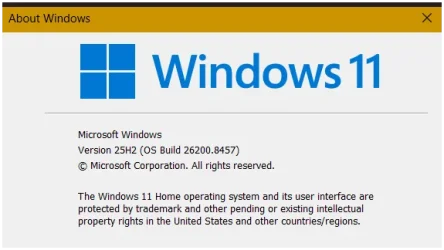
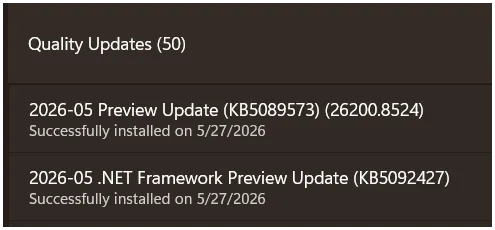
 What to do now?