UPDATE 6/23:
 www.elevenforum.com
This cumulative update for Windows 11, version 25H2 and 24H2 (KB5094126) includes the latest security fixes and improvements, along with non-security updates from last month's optional preview release.
Visit the Windows release health dashboard for the latest status on this release.
Windows Secure Boot certificate expiration
Important: Secure Boot certificates used by most Windows devices are set to expire starting in June 2026. Microsoft has been updating these certificates on consumer and non-managed business devices over the past several months. Devices that haven’t received the newer certificates will continue to start and operate normally, and standard Windows updates will continue to install. Updated certificates will continue to be delivered through Windows Update in the coming months.
 www.elevenforum.com
To stay protected and up to date, we recommend you upgrade to the latest version of Windows 11.
The following summary outlines key quality improvements addressed by this update. The bold text within the brackets indicates the item or area of the change.
Microsoft combines the latest servicing stack update (SSU) for your operating system with the latest cumulative update (LCU). For general information about SSUs, see Servicing stack updates.
Note: The boot.stl file is used during Secure Boot validation and must match the Windows version and architecture of the image you are updating.
To ensure the boot.stl file is included as part of the installation media, do one of the following:
For a list of the files provided in the servicing stack update, download the file information for the SSU (KB5094135) - version 26100.8648.
 support.microsoft.com
Check Windows Updates
UUP Dump:
64-bit ISO download:

ARM64 ISO download:
 www.elevenforum.com
KB5095093 Windows 11 Cumulative Update Preview build 26100.8737 (24H2) and 26200.8737 (25H2) - June 23
UPDATE 7/14: https://www.elevenforum.com/t/kb5101650-windows-11-cumulative-update-build-26100-8875-24h2-and-26200-8875-25h2-july-14.48106/ Microsoft Support: This cumulative update for Windows 11, version 25H2 and 24H2 (KB5095093), includes production-quality improvements. Announcements and...
www.elevenforum.com
Microsoft Support:
This cumulative update for Windows 11, version 25H2 and 24H2 (KB5094126) includes the latest security fixes and improvements, along with non-security updates from last month's optional preview release.
Visit the Windows release health dashboard for the latest status on this release.
Announcements and messages
This section provides key notifications related to this release, including announcements, change logs, and end-of-support notices.Windows Secure Boot certificate expiration
Important: Secure Boot certificates used by most Windows devices are set to expire starting in June 2026. Microsoft has been updating these certificates on consumer and non-managed business devices over the past several months. Devices that haven’t received the newer certificates will continue to start and operate normally, and standard Windows updates will continue to install. Updated certificates will continue to be delivered through Windows Update in the coming months.
Updating Microsoft Secure Boot keys before expiration in June 2026
https://support.microsoft.com/en-us/topic/if-you-re-prevented-from-updating-secure-boot-certificates-e01cc486-8721-457f-9bc7-5cb801c1759e UPDATE 4/02: https://support.microsoft.com/en-us/topic/secure-boot-certificate-update-status-in-the-windows-security-app-5ce39986-7dd2-4852-8c21-ef30dd04f046...
www.elevenforum.com
End of updates
Windows 11, version 24H2 Home and Pro editions will reach end of updates on October 13, 2026. Devices running these editions will no longer receive fixes for known issues, time zone updates, technical support, or monthly security and preview updates containing protections from the latest security threats. Enterprise and Education editions remain supported until October 12, 2027.To stay protected and up to date, we recommend you upgrade to the latest version of Windows 11.
Change log
Change date | Change description |
|---|---|
| July 14, 2026 | Added release note: [DISM (Known issue)] Fixed. This update addresses an issue that could cause the Deployment Image Servicing and Management (DISM) tool to fail with error 0x800f0915 when running the /RestoreHealth command on some Windows 11, version 24H2 devices. As a result, component store repair operations could fail and prevent successful servicing recovery. |
| June 23, 2026 | Known issue update: Added resolution for "Deleting from Recycle Bin displays an internal file name". |
| June 18, 2026 | Known issue added: "Deleting from Recycle Bin displays an internal file name". |
| June 16. 2026 | Known issue added: "Microsoft Office applications might fail to open from certain third-party apps". |
| June 10, 2026 | Update: Folder customization added. |
Improvements
This update includes new features and quality improvements that were part of the following update:- May 12, 2026—KB5089549 (OS Builds 26200.8457 and 26100.8457)
- May 26, 2026—KB5089573 (OS Builds 26200.8524 and 26100.8524)
The following summary outlines key quality improvements addressed by this update. The bold text within the brackets indicates the item or area of the change.
- [Secure Boot] With this update, Windows quality updates include additional high confidence device targeting data, increasing coverage of devices eligible to automatically receive new Secure Boot certificates. Devices receive the new certificates only after demonstrating sufficient successful update signals, maintaining a controlled and phased rollout.
- [Virtualization] Fixed: This update addresses an issue that could result in Stop errors HYPERVISOR_ERROR (0x20001) and KMODE_EXCEPTION_NOT_HANDLED (0x1E) after installing KB5089573 on some devices during system restarts, virtual machine operations, or while running some gaming applications
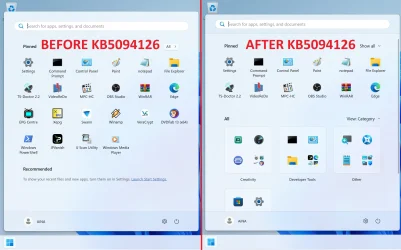
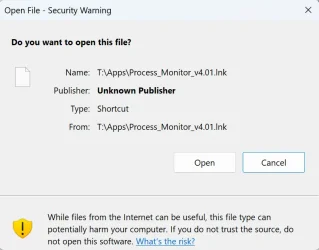
- [Folder customization] This update introduces a security hardening change to how Windows processes desktop.ini files. As a result, some users might notice missing custom folder icons or localized folder names for content from downloaded or remote locations. Note that access to folders is not affected. For more information, see Custom folder icons or localized folder names might not appear after installing the June 2026 Windows security update.
- [DISM (Known issue)] Fixed. This update addresses an issue that could cause the Deployment Image Servicing and Management (DISM) tool to fail with error 0x800f0915 when running the /RestoreHealth command on some Windows 11, version 24H2 devices. As a result, component store repair operations could fail and prevent successful servicing recovery.
AI Components
This release updates the following AI components:AI Component | Version |
|---|---|
| Image Search | 1.2605.856.0 |
| Content Extraction | 1.2605.856.0 |
| Semantic Analysis | 1.2605.856.0 |
| Settings Model | 1.2605.856.0 |
Windows 11 servicing stack update (KB5094135)- 26100.8648
This update makes quality improvements to the servicing stack, which is the component that installs Windows updates. Servicing stack updates (SSU) ensure that you have a robust and reliable servicing stack so that your devices can receive and install Microsoft updates. To learn more about SSUs, see Simplifying on-premises deployment of servicing stack updates.Known issues in this update
Symptoms
Microsoft has received reports of an issue in which certain third-party applications might be unable to launch Microsoft Office applications or open documents after installing the Windows updates released on or after June 9, 2026. This issue affects certain third-party applications that use OLE automation to interact with Microsoft Office applications. In some cases, the Office application or document might fail to open without displaying an error message.
Affected Microsoft Office applications might include Word, Excel, PowerPoint, Access, and other Microsoft Office applications when launched from within the affected third-party application.
Reports indicate that this issue may affect applications such as CCH Engagement, Workpaper Manager, dental software (such as Dentrix and Softdent), and Zotero; other similar applications might also be impacted.
Third-party information disclaimer
The third-party products listed are manufactured by companies that are independent of Microsoft. We make no warranty, implied or otherwise, about the performance or reliability of these products.
Workaround
This issue is resolved in Windows updates released on and after July 14, 2026 such as KB5101650. We recommend you install the latest Windows update for your device as it contains important improvements and issue resolutions, including this one.
Microsoft has received reports of an issue in which certain third-party applications might be unable to launch Microsoft Office applications or open documents after installing the Windows updates released on or after June 9, 2026. This issue affects certain third-party applications that use OLE automation to interact with Microsoft Office applications. In some cases, the Office application or document might fail to open without displaying an error message.
Affected Microsoft Office applications might include Word, Excel, PowerPoint, Access, and other Microsoft Office applications when launched from within the affected third-party application.
Reports indicate that this issue may affect applications such as CCH Engagement, Workpaper Manager, dental software (such as Dentrix and Softdent), and Zotero; other similar applications might also be impacted.
Third-party information disclaimer
The third-party products listed are manufactured by companies that are independent of Microsoft. We make no warranty, implied or otherwise, about the performance or reliability of these products.
Workaround
This issue is resolved in Windows updates released on and after July 14, 2026 such as KB5101650. We recommend you install the latest Windows update for your device as it contains important improvements and issue resolutions, including this one.
Symptoms
After you install Windows updates released on June 9, 2026, the confirmation dialog might display the internal Recycle Bin file name (for example, $Rxxxxx.ext) instead of the original file name when you permanently delete a single item. In Recycle Bin, the item still appears with its original name.
This issue affects only the confirmation dialog. In the Recycle Bin, the item still appears with its original file name. If you restore the item, Windows restores it using the original file name.
Workaround
This issue is addressed in KB5095093.
After you install Windows updates released on June 9, 2026, the confirmation dialog might display the internal Recycle Bin file name (for example, $Rxxxxx.ext) instead of the original file name when you permanently delete a single item. In Recycle Bin, the item still appears with its original name.
This issue affects only the confirmation dialog. In the Recycle Bin, the item still appears with its original file name. If you restore the item, Windows restores it using the original file name.
Workaround
This issue is addressed in KB5095093.
How to get this update
Before you install this updateMicrosoft combines the latest servicing stack update (SSU) for your operating system with the latest cumulative update (LCU). For general information about SSUs, see Servicing stack updates.
Deployment
If you deploy dynamic updates such as this update to an existing Windows image, ensure the boot.stl file is included as part of the installation media. Failure to include the file might prevent devices from successfully starting from the installation media and can result in error code 0xc0430001.Note: The boot.stl file is used during Secure Boot validation and must match the Windows version and architecture of the image you are updating.
To ensure the boot.stl file is included as part of the installation media, do one of the following:
- Use the Update WinPE script to update an existing Windows image. (Recommended)
- Manually copy the boot.stl file from the device Windows\Boot\EFI folder to the corresponding folder on your installation media before deploying the update.
Install this update
To install this update, use one of the following Windows and Microsoft release channels.Available | Next Step |
|---|---|

| This update downloads and installs automatically from Windows Update and Microsoft Update. |
|
| To install this release from the Microsoft Update Catalog, select the option that matches your device architecture (arm64 or x64), and then follow the instructions. |
File information
For a list of the files provided in this update, download the file information for cumulative update 5094126.For a list of the files provided in the servicing stack update, download the file information for the SSU (KB5094135) - version 26100.8648.
Source:
June 9, 2026—KB5094126 (OS Builds 26200.8655 and 26100.8655) | Microsoft Support
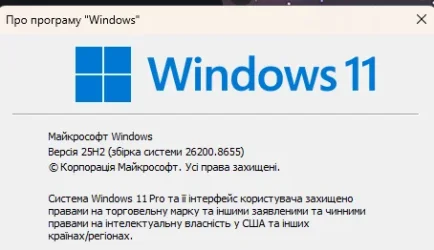
June 9, 2026—KB5094126 (OS Builds 26200.8655 and 26100.8655)
support.microsoft.com
Check Windows Updates
UUP Dump:
64-bit ISO download:
Select language for Windows 11, version 24H2 (26100.8655) amd64
Select language for Windows 11, version 24H2 (26100.8655) amd64 on UUP dump. UUP dump lets you download Unified Update Platform files, like Windows Insider updates, directly from Windows Update.
uupdump.net
Select language for Windows 11, version 25H2 (26200.8655) amd64
Select language for Windows 11, version 25H2 (26200.8655) amd64 on UUP dump. UUP dump lets you download Unified Update Platform files, like Windows Insider updates, directly from Windows Update.
uupdump.net
ARM64 ISO download:
Select language for Windows 11, version 24H2 (26100.8655) arm64
Select language for Windows 11, version 24H2 (26100.8655) arm64 on UUP dump. UUP dump lets you download Unified Update Platform files, like Windows Insider updates, directly from Windows Update.
uupdump.net
Select language for Windows 11, version 25H2 (26200.8655) arm64
Select language for Windows 11, version 25H2 (26200.8655) arm64 on UUP dump. UUP dump lets you download Unified Update Platform files, like Windows Insider updates, directly from Windows Update.
uupdump.net
UUP Dump - Download Windows Insider ISO
UUP Dump is the most practical and easy way to get ISO images of any Insider Windows 10 or Windows 11 version, as soon as Microsoft has released a new build. UUP Dump creates a download configuration file according to your choices, downloads necessary files directly from Microsoft servers, and...
www.elevenforum.com
Last edited: