Microsoft Support:
Changes and improvements gradually being rolled out*
- This update includes a small set of general improvements and fixes that improve the overall experience for Insiders running this build on their PCs.
[Search]
- Search home has been simplified to reduce visual clutter and make it easier to get back to recent searches quickly.
- Search does a better job showing where a result comes from, whether it's an app, setting, file, web result, or Store suggestion, so it's easier to tell what you're looking at and where you'll go before you click.
- A new setting in Settings > Privacy & security > Search lets you choose whether web and Microsoft Store suggestions appear alongside local results.

Enable or Disable Microsoft Store Suggested Search Results in Windows Search on Windows 11
This tutorial will show you how to turn on or off showing Microsoft Store suggested search results in Windows Search for your account in Windows 11 Windows Search lets you search from your taskbar to find what you’re looking for, whether it’s on your device, in the cloud, or on the web. The... www.elevenforum.com
[Pointer Indicator]
- We're introducing the Pointer Indicator accessibility setting. This feature enables Windows users with low vision to easily locate and use their cursor to increase productivity and efficiency when using a Windows device.
- To enable this experience, go to Settings > Accessibility > Mouse pointer and touch, and enable the Pointer indicator setting. You can also search for the setting by name. When the setting is enabled, you can toggle it on or off with the keyboard shortcut, Windows logo key + Ctrl + Shift + X.

Enable or Disable Mouse Pointer Indicator in Windows 11
This tutorial will show you how to enable or disable the mouse pointer crosshair indicator for your account in Windows 11. Starting with Windows 11 build 26100.4202, Microsoft introduced the Pointer Indicator accessibility setting. This feature enables Windows users with low vision to easily...
www.elevenforum.com

Change Color of Mouse Pointer Indicator in Windows 11
This tutorial will show you how to change the mouse pointer crosshair indicator color for your account in Windows 11. Starting with Windows 11 build 26100.4202, Microsoft added a mouse pointer indicator feature that allows low vision users on Windows to now easily locate and use their cursor...
www.elevenforum.com
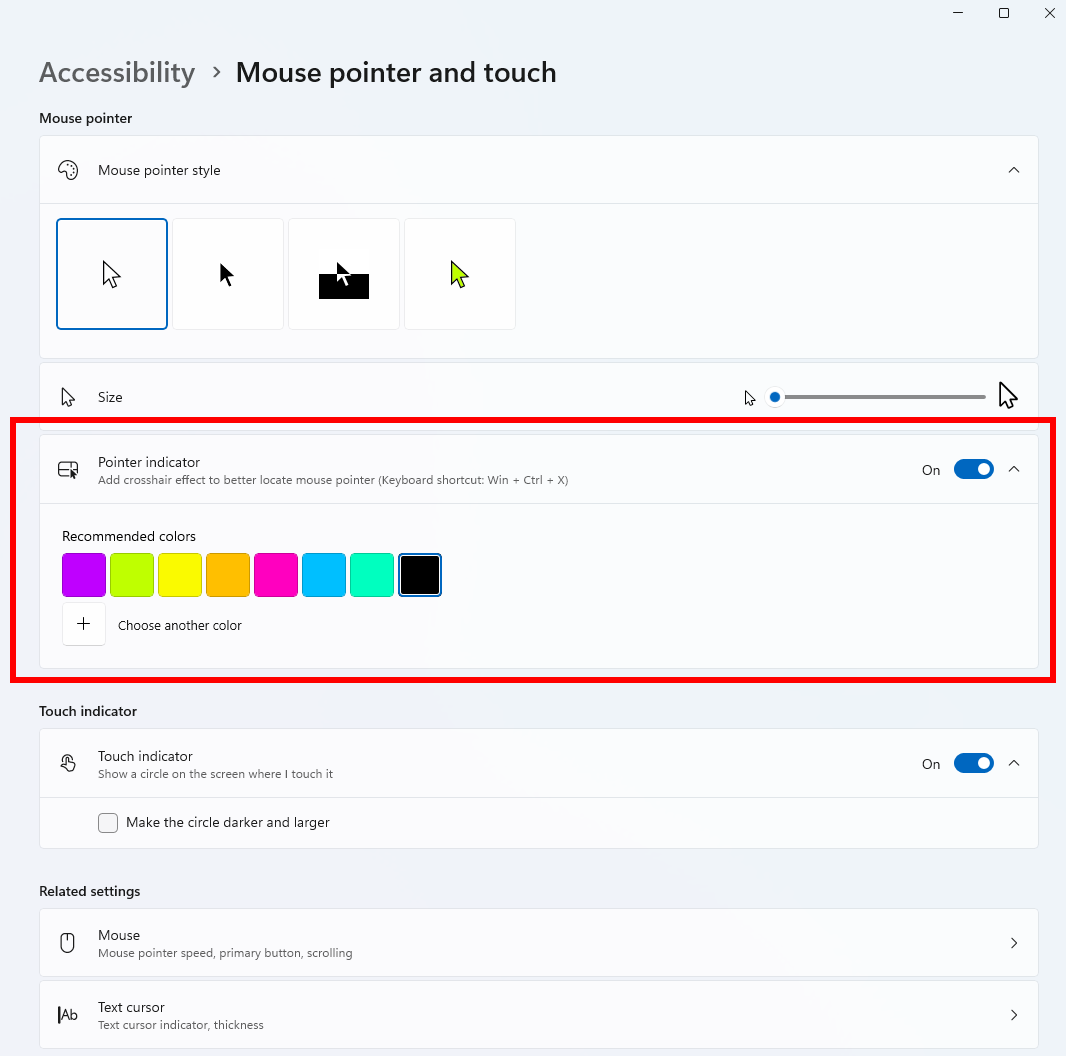
The Pointer indicator and its settings under Mouse pointer and touch.
[Live Captions]
- We're improving Live Captions with a new Include Screen Reader audio setting, which is off by default. With the setting off, Live Captions won't transcribe audio from screen readers such as Narrator, JAWS, and NVDA, keeping captions focused on microphone and system audio.

Enable or Disable Include Screen Reader Audio in Live Captions on Windows 11
This tutorial will show you how to turn on or off including screen reader audio with Live Captions for your account in Windows 11. Live captions helps everyone, including people who are deaf or hard-of-hearing, better understand audio by providing automatic transcription. Captions are...
www.elevenforum.com
[Settings - Privacy & security]
- The improved Privacy & security page in Windows Settings helps you find the Camera, Microphone, and Location privacy controls more easily. It groups similar controls across the page and brings usage information from deeper linked pages onto this page.
[Family Safety]
- Improved family safety messaging when applications are blocked because of age-restricted parental controls.
[Other]
- Fixed an issue with msmpeg2ac3dec.dll which was leading to some apps and games crashing recently.
Reminder for Windows Insiders in the Experimental (26H1) channel
- These builds can be unstable and might be released with limited documentation.
- Many features in the Experimental (26H1) channel are rolled out using Controlled Feature Rollout technology, starting with a subset of Insiders and ramping up over time as we monitor feedback to see how they land before pushing them out to everyone in this channel.
- The desktop watermark shown at the lower right corner of the desktop is normal for Windows Insider pre-release builds.
- Some features in active development we preview with Windows Insiders might not be fully localized, and localization will happen over time as features are finalized. As you see issues with localization in your language, report those issues to us via Feedback Hub.
- Check out Flight Hub for a complete look at what build is in which Insider channel.
Source:

Windows 11 Insider Experimental (26H1) Preview Build 28120.3272 - Windows Insider Program
Release notes for Windows 11 Insider Experimental (26H1) Preview Build 28120.3272
learn.microsoft.com

Announcing new builds for 16 October 2026
Hello Windows Insiders, Today, we’re releasing new Windows 11 Insider Preview builds to the Beta, Experimental, and Release Preview channels. New builds this week Select your channel below to view its release notes: B
 blogs.windows.com
Check Windows Updates
UUP Dump:
64-bit ISO download:

Select language for Windows 11 Insider Preview Feature Update (28120.3272) amd64
Select language for Windows 11 Insider Preview Feature Update (28120.3272) amd64 on UUP dump. UUP dump lets you download Unified Update Platform files, like Windows Insider updates, directly from Windows Update.
uupdump.net
ARM64 ISO download:
Select language for Windows 11 Insider Preview Feature Update (28120.3272) arm64
Select language for Windows 11 Insider Preview Feature Update (28120.3272) arm64 on UUP dump. UUP dump lets you download Unified Update Platform files, like Windows Insider updates, directly from Windows Update.
uupdump.net

UUP Dump - Download Windows Insider ISO
UUP Dump is the most practical and easy way to get ISO images of any Insider Windows 10 or Windows 11 version, as soon as Microsoft has released a new build. UUP Dump creates a download configuration file according to your choices, downloads necessary files directly from Microsoft servers, and...
www.elevenforum.com
Last edited: