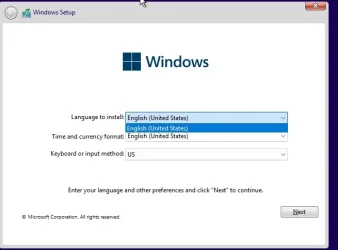
Lang and old setup menu


Rbcc

Well-known member
Local time
3:17 PM
Posts
124
OS
Windows 11 pro
I'm creating a windows 11 setup disk. the languages that I'm putting in goes into the currency part of the menu.
When do I put in the languages in and the old menu to make it work right?
Right now, I have the languages first and registry hacks for old menu.
Jtm
 

My Computer

System One

  • OS
    Windows 11 pro
    Computer type
    Laptop
    Manufacturer/Model
    Asus
    CPU
    I-7 2gigaherz
    Motherboard
    Asus
    Memory
    16Gig
    Screen Resolution
    1024x768
    Hard Drives
    512 SSD
Why the hassle? You can download the official .ISO in any language you want. Even downloading the International version where you can choose the correct language of your choice when installed. (Never downloaded that one)

Yes, there a some (illegal) programs that wil configure a Windows 11 .ISO with to much for words options. What kind of tool are you using? You can also look at NTLite. It has much capability's also. (it's more a developer tool) It's not easy to understand everything but there are tutorial video's out there how to make an .ISO with the right requirement. Look at it's features. Maybe you did or didn't saw this before. NTLite Features

No need to hack things, you can build it just yourself. (You can even integrate updates or programs with it) Take a look. Maybe this is what you want....
 

My Computer

System One

  • OS
    Win 11 Pro "25H2" Build 26200.8524, Zorin OS Pro
    Computer type
    PC/Desktop
    Manufacturer/Model
    Self built
    CPU
    Intel® Core™ i7-12700KF 12th Gen.
    Motherboard
    ASUS Prime Z690-A, BIOS v4505
    Memory
    32GB DDR5 5600-36 Vengeance
    Graphics Card(s)
    PCIe4.0 Asus NVIDIA RTX3060Ti
    Sound Card
    Onboard; Realtek
    Monitor(s) Displays
    34" LG 34UC79G-B Curved 21:9 144Hz
    Screen Resolution
    2560x1080 (No HDR)
    Hard Drives
    250Gb Samsung 870PRO NVMe (Win 11 Pro)
    1Tb Samsung 980PRO NVMe
    1Tb Samsung 970EVO NVMe
    2Tb Samsung 990PRO NVMe with heatsink.
    4Tb WDC WD40EZRZ Blue SATA (Int.)
    4Tb WDC WD40EZRZ Blue SATA (Int.)
    3Tb WDC WD30EFRZ Red SATA (Int.)
    256Gb Samsung 840PRO SSD (RHEL 9,5)
    256Gb Samsung 850PRO SSD (Zorin OS Pro 18)
    PSU
    Coolermaster 850W V2 Gold with internal 12cm exaust fan
    Case
    Be-Quiet Pure Base 600.
    Cooling
    3x Be-Quiet! 12/14cm "Silent Wings 4" casefans, 1x Arctic Freezer i35 CPU towerblock with fan.
    Keyboard
    Steelseries APEX 7 keyboard.
    Mouse
    Logitech G-502 Hero
    Internet Speed
    1Gb
    Browser
    Brave
    Antivirus
    F-Secure
    Other Info
    No Noise system.
    256Gb Kingston Travler USB 3.0 drive.
    64Gb Sandisk USB 3.2 drive. (Ventoy)
    8Gb Philips USB 3.0 drive. (Win. Inst.)
    8Gb Philips USB 3.0 drive. (Rescue disk)
    2Tb WD USB 3.0 Passport drive.
    USB Ext. 500Gb WD SATA drive.
    External USB 3.0 C.A. CD/DVD* burner.
screen1.webp

AS you see there is only 1 language US that is shown , theres 4 more that should be shown in the drop down box. this was done by putting the languages in system32 in boot.wim first.
should I put oldsetup reg hacks in first? .. I am going to try it. I will let you know! please post your answer below?
 

My Computer

System One

  • OS
    Windows 11 pro
    Computer type
    Laptop
    Manufacturer/Model
    Asus
    CPU
    I-7 2gigaherz
    Motherboard
    Asus
    Memory
    16Gig
    Screen Resolution
    1024x768
    Hard Drives
    512 SSD

Latest Support Threads

Back
Top Bottom