
Latest Logitech Logi Options+


 Logi Options+


Date: May 27, 2026
Software Version: 2.4.895597
OS supported: Windows 10, Windows 11

Download: Logi Options+

Release notes: Logi Options+


MX Creative Console & Actions Ring
  • Actions Ring is a customizable on-screen overlay that lets you quickly access and customize app actions, keyboard shortcuts, and adjustments. Previously available only on MX devices, it’s now accessible on all compatible Logi Options+ mice and keyboards.
Bug fixes
  • Dialpad's dial & roller configuration controls are now disabled when the LogiPluginService is not running.
  • Fixed a crash that could occur while the plugin service was shutting down.
  • Fixed a rare crash caused when restarting the plugin service.
  • Other bug fixes and improvements.
New features
  • Actions Ring now offers three display size options: Small, Medium (default), and Large.
  • Discover Smart Actions Templates in the new “Trending” tab focused on popular world events.
What’s fixed
  • Minor webcam improvements.
  • Install and update stability improvements.


 Logitech SetPoint

Important Notice: The SetPoint software is no longer supported or maintained by Logitech. We highly recommend using Logi Options+ for your supported Logitech devices.


Date: January 19, 2023
Software Version: 6.90.66
OS supported: Windows 7, 8, 10, and 11
File Size: 4.6 MB

Download: Logitech SetPoint

Why Update?
  • Removal of Unifying software support
  • Bug fixes & improvements


 Logitech Options

Important Notice: Logitech Options has reached end of support and is no longer maintained. For the best experience with your supported Logitech devices, it is recommend switching to Logi Options+.


Date: January 12, 2026
Software Version: 10.26.14
OS supported: Windows 10, Windows 11
File Size: 245.76 MB

Download: Logitech Options

Why Update?
  • MS Office Certificate Update.
 
Last edited:
I wish you could roll-back with this software!
 

My Computers

System One System Two

  • OS
    Windows 11 Pro
    Computer type
    PC/Desktop
    Manufacturer/Model
    ASUS ROG Strix
  • Operating System
    Windows 11 Pro
    Computer type
    Laptop
    Manufacturer/Model
    ASUS VivoBook
I wish you could roll-back with this software!
Not unless you uninstall it and install a older version, however you would loose all your settings 😢
 

My Computer

System One

  • OS
    Windows 11 Pro
    Computer type
    PC/Desktop
    Manufacturer/Model
    Custom Build
    CPU
    Intel Core i9 12900KF
    Motherboard
    ASUS ROG Maximus Z690 Hero
    Memory
    Corsair 64GB DDR5 Vengeance C40 5200Mhz
    Graphics Card(s)
    ASUS GeForce RTX 3090 ROG Strix OC 24GB
    Sound Card
    OnBoard
    Monitor(s) Displays
    Acer Predator XB323UGP 32" QHD G-SYNC-C 144Hz 1MS IPS LED
    Screen Resolution
    2560 x 1440
    Hard Drives
    1x Samsung 980 Pro Series Gen4 250GB M.2 NVMe
    1x Samsung 980 Pro Series Gen4 500GB M.2 NVMe
    2x Samsung 980 Pro Series Gen4 2TB M.2 NVMe
    PSU
    Corsair AX1200i 1200W 80PLUS Titanium Modular
    Case
    Corsair 4000D Black Case w/ Tempered Glass Side Panel
    Cooling
    Noctua NH-U12A Chromax Black CPU Cooler, 4x Noctua 120mm Fans
    Keyboard
    Logitech MK545
    Mouse
    Logitech MX Master 3
    Internet Speed
    Fixed Wireless 150mbps/75mbps
    Browser
    Firefox
    Antivirus
    Kaspersky
    Other Info
    Thrustmaster TS-PC RACER
    Fanatec CSL Elite Pedals with the Load Cell Kit
    Yamaha Amp with Bose Speakers

My Computers

System One System Two

  • OS
    Windows 11 Pro
    Computer type
    PC/Desktop
    Manufacturer/Model
    ASUS ROG Strix
  • Operating System
    Windows 11 Pro
    Computer type
    Laptop
    Manufacturer/Model
    ASUS VivoBook
Tried that, (Post #659), it installs version 2.0 anyway.
But if you download an older version for example 1.97.791262 from Logitech Website disable the internet before you install a older version and make sure you turn off auto updates before you enable the internet again it then should stay on the older version.
 

My Computer

System One

  • OS
    Windows 11 Pro
    Computer type
    PC/Desktop
    Manufacturer/Model
    Custom Build
    CPU
    Intel Core i9 12900KF
    Motherboard
    ASUS ROG Maximus Z690 Hero
    Memory
    Corsair 64GB DDR5 Vengeance C40 5200Mhz
    Graphics Card(s)
    ASUS GeForce RTX 3090 ROG Strix OC 24GB
    Sound Card
    OnBoard
    Monitor(s) Displays
    Acer Predator XB323UGP 32" QHD G-SYNC-C 144Hz 1MS IPS LED
    Screen Resolution
    2560 x 1440
    Hard Drives
    1x Samsung 980 Pro Series Gen4 250GB M.2 NVMe
    1x Samsung 980 Pro Series Gen4 500GB M.2 NVMe
    2x Samsung 980 Pro Series Gen4 2TB M.2 NVMe
    PSU
    Corsair AX1200i 1200W 80PLUS Titanium Modular
    Case
    Corsair 4000D Black Case w/ Tempered Glass Side Panel
    Cooling
    Noctua NH-U12A Chromax Black CPU Cooler, 4x Noctua 120mm Fans
    Keyboard
    Logitech MK545
    Mouse
    Logitech MX Master 3
    Internet Speed
    Fixed Wireless 150mbps/75mbps
    Browser
    Firefox
    Antivirus
    Kaspersky
    Other Info
    Thrustmaster TS-PC RACER
    Fanatec CSL Elite Pedals with the Load Cell Kit
    Yamaha Amp with Bose Speakers
Up to date everywhere. Gonna keep an eye on the clipboard glitch.

12694.webp
 

My Computers

System One System Two

  • OS
    Windows 11 Pro
    Computer type
    PC/Desktop
    Manufacturer/Model
    ASUS ROG Strix
  • Operating System
    Windows 11 Pro
    Computer type
    Laptop
    Manufacturer/Model
    ASUS VivoBook
Gonna keep an eye on the clipboard glitch.
Are there any reports that the new version of Logitech options plus, version 2.0, is hijacking the Windows clipboard.
Gemini said
There are indeed reports of Logi Options+ (including the new Version 2.0 released in March 2026) interfering with the Windows clipboard and system shortcuts. While "hijacking" is the term often used by frustrated users, the issue typically manifests in three specific ways:

1. The "Print Screen" Hijack
The most common report involves Logitech taking over the Print Screen key. In recent updates (starting around version 1.86 and continuing into 2.0), Logitech changed the default behavior of the "Screen Snip" key to its own proprietary "Screen Capture" tool.

The Symptom: Pressing Print Screen no longer opens the Windows Snipping Tool or third-party apps like Greenshot. Instead, it triggers a Logitech-branded overlay.

The Fix: Open Logi Options+ > Select your Keyboard > Click on the Keys tab > Find the Screen Snip/Print Screen button and change the action back to "Print Screen" instead of "Screen Capture."

2. Clipboard "In Use" Errors (Excel & Illustrator)
Users have reported that the Logi Options+ background process (the "Agent" or "Backend") holds onto the Windows clipboard for too long, causing conflicts with other software.

The Symptom: In Microsoft Excel, you may see the error: "We could not copy the content to the Clipboard, it is in use by another application." Similar issues have been reported in Adobe Illustrator where copy/paste commands simply fail to register.

The Fix: Many users have found relief by disabling the Logi Options+ Excel Add-in (found in Excel under Options > Add-ins > COM Add-ins) or by ending the "Logi Options+ Agent" task in Task Manager.

3. Logitech Flow Interference
If you have Logitech Flow enabled (which allows you to move your mouse between two computers), the software is designed to "hijack" the clipboard to allow for cross-computer copy-pasting.

The Symptom: Unexpected clipboard behavior or delays when copying large amounts of data, even if you are only using one computer at the moment.

The Fix: Disable "Copy and Paste" within the Flow settings if you don't use the feature frequently.

Summary of Version 2.0

Version 2.0 (released March 5, 2026) introduced a refreshed UI and support for Adobe 2026 apps, but early feedback suggests it has not yet fully resolved the "focus-stealing" or clipboard-locking bugs that plagued the 1.x versions. If you are experiencing these issues, a clean reinstall or using the Offline Installer version is the most common community-recommended workaround.

I had to type in all this shi, stuff manually!!! :mad:
 

My Computers

System One System Two

  • OS
    Windows 11 Pro
    Computer type
    PC/Desktop
    Manufacturer/Model
    ASUS ROG Strix
  • Operating System
    Windows 11 Pro
    Computer type
    Laptop
    Manufacturer/Model
    ASUS VivoBook
Gonna keep an eye on the clipboard glitch.
One of these, or, a combination thereof, or, all three of them, seems to be the culprit(s)...,
I have to End Task to get my Clipboard back.
I suspect it's the Agent..., when I lose my Clipboard again, I shall try one at a time...

12738.webp
 

My Computers

System One System Two

  • OS
    Windows 11 Pro
    Computer type
    PC/Desktop
    Manufacturer/Model
    ASUS ROG Strix
  • Operating System
    Windows 11 Pro
    Computer type
    Laptop
    Manufacturer/Model
    ASUS VivoBook
I'm starting to really hate all the Logi tasks running in the background
 

My Computer

System One

  • OS
    Windows 11 Pro
    Computer type
    PC/Desktop
    Manufacturer/Model
    Custom Build
    CPU
    Intel Core i9 12900KF
    Motherboard
    ASUS ROG Maximus Z690 Hero
    Memory
    Corsair 64GB DDR5 Vengeance C40 5200Mhz
    Graphics Card(s)
    ASUS GeForce RTX 3090 ROG Strix OC 24GB
    Sound Card
    OnBoard
    Monitor(s) Displays
    Acer Predator XB323UGP 32" QHD G-SYNC-C 144Hz 1MS IPS LED
    Screen Resolution
    2560 x 1440
    Hard Drives
    1x Samsung 980 Pro Series Gen4 250GB M.2 NVMe
    1x Samsung 980 Pro Series Gen4 500GB M.2 NVMe
    2x Samsung 980 Pro Series Gen4 2TB M.2 NVMe
    PSU
    Corsair AX1200i 1200W 80PLUS Titanium Modular
    Case
    Corsair 4000D Black Case w/ Tempered Glass Side Panel
    Cooling
    Noctua NH-U12A Chromax Black CPU Cooler, 4x Noctua 120mm Fans
    Keyboard
    Logitech MK545
    Mouse
    Logitech MX Master 3
    Internet Speed
    Fixed Wireless 150mbps/75mbps
    Browser
    Firefox
    Antivirus
    Kaspersky
    Other Info
    Thrustmaster TS-PC RACER
    Fanatec CSL Elite Pedals with the Load Cell Kit
    Yamaha Amp with Bose Speakers
I'm starting to really hate all the Logi tasks running in the background
You and me both!!!
I'm this 🤏 close to shopping for peripherals with on-board memory so I can ditch this bloatware!!!
 

My Computers

System One System Two

  • OS
    Windows 11 Pro
    Computer type
    PC/Desktop
    Manufacturer/Model
    ASUS ROG Strix
  • Operating System
    Windows 11 Pro
    Computer type
    Laptop
    Manufacturer/Model
    ASUS VivoBook
I'm this 🤏 close to shopping for peripherals with on-board memory so I can ditch this bloatware!!!
I have a G403 Hero mouse and do not even install G-Hub.

I just use the Logitech OnBoard memory manager which is a single exe file.

Screenshot 2026-03-13 091518.webp
 

My Computer

System One

  • OS
    Windows 11 Pro
... do not even install G-Hub.

I just use the Logitech OnBoard memory manager which is a single exe file.
I was just going to ask about that! (y)
I may try that with a G502X, it's on sale right now!
 

My Computers

System One System Two

  • OS
    Windows 11 Pro
    Computer type
    PC/Desktop
    Manufacturer/Model
    ASUS ROG Strix
  • Operating System
    Windows 11 Pro
    Computer type
    Laptop
    Manufacturer/Model
    ASUS VivoBook
I really wish I could get rid of the Logitech software, because I can do almost everything I want to do in Autohotkey. There is one exception that stops me, remapping the bottom button of my M720 "Triathlon" mouse. I've tried the AHKHID script to no avail. Checking Windows Services today, I saw there's a new one, "LogiTech LampArray Service" of all things. That may be G-HUB, and I disabled it. I posted the following back in August concerning Logi+, but I don't believe anyone responded:

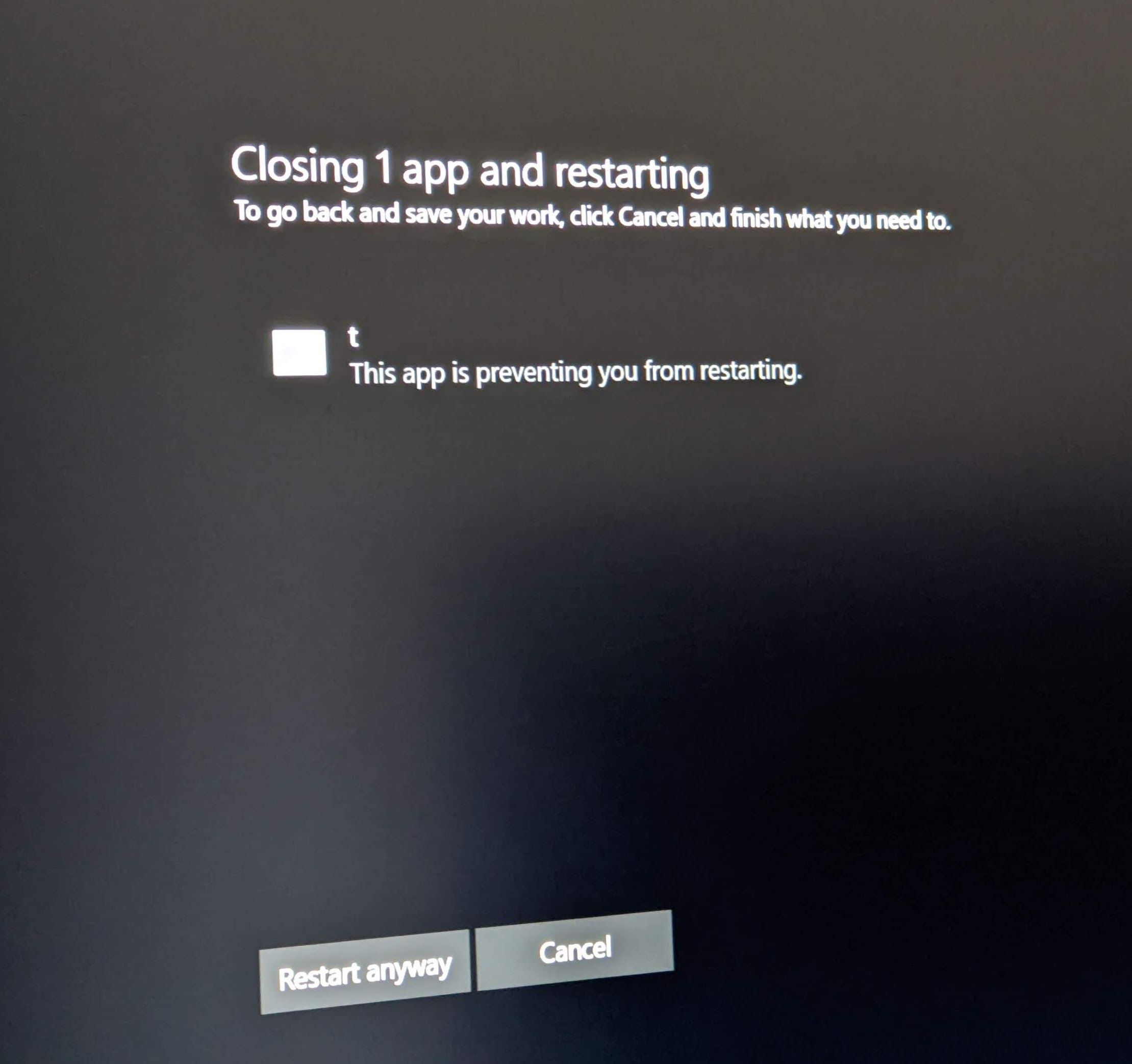
Anyone else experience Logi+ slowing down system shutdown/restart? I found a couple of threads on this which describe my experience, which consists of the Event Log entry recording a 5 second delay, and I sometimes also get a message about a program "t" slowing down shutdown/restart, which I independently determined is logioptionsplus_agent.exe.


Also, I sometimes use Sysinternals Process Monitor to explore various things, and I noticed that logioptionsplus_agent.exe is continuously hitting the disk for what appears to be all running programs. There will be like 200 entries all in a row over 500 msec, and it does it once a second. It's always contributing .1-.4% CPU usage on my Ryzen 9 9900x system. Software like this annoys me and I'd like to get rid of it, but I think certain customizations will go away if I do, like the bottom button on my Marathon Mouse, which I've configured to send F5 to various programs like web browsers. I haven't found a way to map that button in Autohotkey, unfortunately.
 

My Computer

System One

  • OS
    Windows 11
As much as I'd love to give this Logi software the boot, I can't..., I like my MX Master gear too much and, I need Logitech Flow!

As of this writing, I have three issues that are driving me nuts:
• ScreenSnip randomly hijacks the PrintScreen key
• Clipboard goes disabled at any given moment
• Mouse escapes to other machine at random screen edges
 

My Computers

System One System Two

  • OS
    Windows 11 Pro
    Computer type
    PC/Desktop
    Manufacturer/Model
    ASUS ROG Strix
  • Operating System
    Windows 11 Pro
    Computer type
    Laptop
    Manufacturer/Model
    ASUS VivoBook
Have you tried storing all the macro settings in the mouse and then not running the Logitech software? That's how I run with my Logitech G305.
 

My Computers

System One System Two

  • OS
    Win 11 Pro 25H2, Build 26200.8524
    Computer type
    PC/Desktop
    Manufacturer/Model
    Home Brew
    CPU
    Intel Core i5 14500
    Motherboard
    Gigabyte B760M G P WIFI
    Memory
    64GB DDR4
    Graphics Card(s)
    GeForce RTX 4060
    Sound Card
    Chipset Realtek
    Monitor(s) Displays
    LG 45" Ultragear, Acer 24" 1080p
    Screen Resolution
    5120x1440, 1920x1080
    Hard Drives
    Crucial P310 2TB 2280 PCIe Gen4 3D NAND NVMe M.2 SSD (O/S)
    Silicon Power 2TB US75 NVMe PCIe Gen4 M.2 2280 SSD (backup)
    Crucial BX500 2TB 3D NAND (2nd backup)
    Seagate 4TB Ironwolf, rotating HDD archive files
    External off-line backup Drives: 2 NVMe 4TB drives in external enclosures
    PSU
    Thermaltake Toughpower GF3 750W
    Case
    LIAN LI LANCOOL 216 E-ATX PC Case
    Cooling
    Lots of fans!
    Keyboard
    Microsoft Comfort Curve 2000
    Mouse
    Logitech G305
    Internet Speed
    Verizon FiOS 1GB
    Browser
    Firefox
    Antivirus
    Malware Bytes & Windows Defender Security
  • Operating System
    Win 11 Pro 25H2, Build 26200.8524
    Computer type
    PC/Desktop
    Manufacturer/Model
    Home Brew
    CPU
    Intel Core i5 14400
    Motherboard
    Gigabyte B760M DS3H AX
    Memory
    32GB DDR5
    Graphics card(s)
    Intel 700 Embedded GPU
    Sound Card
    Realtek Embedded
    Monitor(s) Displays
    27" HP 1080p
    Screen Resolution
    1920x1080
    Hard Drives
    Crucial P310 2TB 2280 PCIe Gen4 eD NAND PCIe SSD
    Samsung EVO 990 2TB NVMe Gen4 SSD
    Samsung 2TB SATA SSD
    PSU
    Thermaltake Smart BM3 650W
    Case
    Okinos Micro ATX Case
    Cooling
    Fans
    Keyboard
    Microsoft Comfort Curve 2000
    Mouse
    Logitech G305
    Internet Speed
    Verizon FiOS 1GB
    Browser
    Firefox
    Antivirus
    Malware Bytes & Windows Defender Security
Have you tried storing all the macro settings in the mouse and then not running the Logitech software?
Can't..., with the MX Master series, it's exclusively Software-Based Execution.
 

My Computers

System One System Two

  • OS
    Windows 11 Pro
    Computer type
    PC/Desktop
    Manufacturer/Model
    ASUS ROG Strix
  • Operating System
    Windows 11 Pro
    Computer type
    Laptop
    Manufacturer/Model
    ASUS VivoBook
One of these, or, a combination thereof, or, all three of them, seems to be the culprit(s)...,
The Logi Options+ Agent is the culprit! Video coming soon, if I can compile enough footage to capture all these crazy anomalies!
 

My Computers

System One System Two

  • OS
    Windows 11 Pro
    Computer type
    PC/Desktop
    Manufacturer/Model
    ASUS ROG Strix
  • Operating System
    Windows 11 Pro
    Computer type
    Laptop
    Manufacturer/Model
    ASUS VivoBook
Okay..., I haven't a clue how this convoluted mess works, but, the loss of Clipboard is definitely attributed to the Logi Options+ Agent...
(Go Full Screen)


And..., Snip-N-Sketch still highjacking my Print Screen key...

12799.webp

And..., Cursor is escaping at random screen edges... 🤷‍♂️

12758.webp
 

My Computers

System One System Two

  • OS
    Windows 11 Pro
    Computer type
    PC/Desktop
    Manufacturer/Model
    ASUS ROG Strix
  • Operating System
    Windows 11 Pro
    Computer type
    Laptop
    Manufacturer/Model
    ASUS VivoBook
Okay..., I haven't a clue how this convoluted mess works, but, the loss of Clipboard is definitely attributed to the Logi Options+ Agent...
(Go Full Screen)


And..., Snip-N-Sketch still highjacking my Print Screen key...

View attachment 166020

And..., Cursor is escaping at random screen edges... 🤷‍♂️

View attachment 166021
This is starting to become bigger than Ben Hur. I wish I could help 🤷‍♂️
 

My Computer

System One

  • OS
    Windows 11 Pro
    Computer type
    PC/Desktop
    Manufacturer/Model
    Custom Build
    CPU
    Intel Core i9 12900KF
    Motherboard
    ASUS ROG Maximus Z690 Hero
    Memory
    Corsair 64GB DDR5 Vengeance C40 5200Mhz
    Graphics Card(s)
    ASUS GeForce RTX 3090 ROG Strix OC 24GB
    Sound Card
    OnBoard
    Monitor(s) Displays
    Acer Predator XB323UGP 32" QHD G-SYNC-C 144Hz 1MS IPS LED
    Screen Resolution
    2560 x 1440
    Hard Drives
    1x Samsung 980 Pro Series Gen4 250GB M.2 NVMe
    1x Samsung 980 Pro Series Gen4 500GB M.2 NVMe
    2x Samsung 980 Pro Series Gen4 2TB M.2 NVMe
    PSU
    Corsair AX1200i 1200W 80PLUS Titanium Modular
    Case
    Corsair 4000D Black Case w/ Tempered Glass Side Panel
    Cooling
    Noctua NH-U12A Chromax Black CPU Cooler, 4x Noctua 120mm Fans
    Keyboard
    Logitech MK545
    Mouse
    Logitech MX Master 3
    Internet Speed
    Fixed Wireless 150mbps/75mbps
    Browser
    Firefox
    Antivirus
    Kaspersky
    Other Info
    Thrustmaster TS-PC RACER
    Fanatec CSL Elite Pedals with the Load Cell Kit
    Yamaha Amp with Bose Speakers
This is starting to become bigger than Ben Hur. I wish I could help 🤷‍♂️
I also have a reasonable suspicion that it may have something to do with Logitech Flow, somehow, because I have yet to experience Clipboard failure while my Laptop is shut down. I don't have a clue how, but, I'll keep an eye on it.
Hopefully it'll get sorted! They'll be hearing from me at least once a day, that's for sure!!! :cool:


12766.webp
 

My Computers

System One System Two

  • OS
    Windows 11 Pro
    Computer type
    PC/Desktop
    Manufacturer/Model
    ASUS ROG Strix
  • Operating System
    Windows 11 Pro
    Computer type
    Laptop
    Manufacturer/Model
    ASUS VivoBook
FWIW, I found out that a misconfiguration of Dropbox would kill Snag-It screen capture, so it's quite possible for things to interact and affect clipboard operation.
 

My Computers

System One System Two

  • OS
    Win 11 Pro 25H2, Build 26200.8524
    Computer type
    PC/Desktop
    Manufacturer/Model
    Home Brew
    CPU
    Intel Core i5 14500
    Motherboard
    Gigabyte B760M G P WIFI
    Memory
    64GB DDR4
    Graphics Card(s)
    GeForce RTX 4060
    Sound Card
    Chipset Realtek
    Monitor(s) Displays
    LG 45" Ultragear, Acer 24" 1080p
    Screen Resolution
    5120x1440, 1920x1080
    Hard Drives
    Crucial P310 2TB 2280 PCIe Gen4 3D NAND NVMe M.2 SSD (O/S)
    Silicon Power 2TB US75 NVMe PCIe Gen4 M.2 2280 SSD (backup)
    Crucial BX500 2TB 3D NAND (2nd backup)
    Seagate 4TB Ironwolf, rotating HDD archive files
    External off-line backup Drives: 2 NVMe 4TB drives in external enclosures
    PSU
    Thermaltake Toughpower GF3 750W
    Case
    LIAN LI LANCOOL 216 E-ATX PC Case
    Cooling
    Lots of fans!
    Keyboard
    Microsoft Comfort Curve 2000
    Mouse
    Logitech G305
    Internet Speed
    Verizon FiOS 1GB
    Browser
    Firefox
    Antivirus
    Malware Bytes & Windows Defender Security
  • Operating System
    Win 11 Pro 25H2, Build 26200.8524
    Computer type
    PC/Desktop
    Manufacturer/Model
    Home Brew
    CPU
    Intel Core i5 14400
    Motherboard
    Gigabyte B760M DS3H AX
    Memory
    32GB DDR5
    Graphics card(s)
    Intel 700 Embedded GPU
    Sound Card
    Realtek Embedded
    Monitor(s) Displays
    27" HP 1080p
    Screen Resolution
    1920x1080
    Hard Drives
    Crucial P310 2TB 2280 PCIe Gen4 eD NAND PCIe SSD
    Samsung EVO 990 2TB NVMe Gen4 SSD
    Samsung 2TB SATA SSD
    PSU
    Thermaltake Smart BM3 650W
    Case
    Okinos Micro ATX Case
    Cooling
    Fans
    Keyboard
    Microsoft Comfort Curve 2000
    Mouse
    Logitech G305
    Internet Speed
    Verizon FiOS 1GB
    Browser
    Firefox
    Antivirus
    Malware Bytes & Windows Defender Security

Latest Support Threads

Back
Top Bottom




