Latest NVIDIA GeForce Graphics Drivers for Windows 11


Support has ended for Maxwell, Pascal, and Volta-series GeForce GPUs.

Support Plan for Maxwell, Pascal, and Volta-series GeForce GPUs

List of Maxwell, Pascal and Volta Series GeForce GPUs

GeForce 582.28 graphics driver as a security update released 1/29/2026 for Maxwell, Pascal, and Volta-series GeForce GPUs.


 NVIDIA App


Release Date: July 17, 2026

What's new in NVIDIA App 11.0.8

New Updates:

  • ShadowPlay 240 FPS Recording
    • The NVIDIA app now supports 240 FPS ShadowPlay recording, for GeForce RTX 50 and 40 Series GPUs, providing competitive gamers and creators with ultra-smooth, high-resolution source footage. Configure via Alt+Z > Settings > Video Capture
  • Control Panel Updates
    • Added features for users to confine the taskbar to a single display and maximize windows to all displays. Access via System > Displays > Surround
DLSS Override Support Added For :
  • ‘83
  • Active Matter
  • Bus Bound
  • Cthulhu: The Cosmic Abyss
  • Dawn of Defiance
  • Far Far West
  • INDUSTRIA 2
  • MONGIL: STAR DIVE
  • MOUSE: P.I. For Hire
  • NTE (Neverness to Everness)
  • PRAGMATA
  • Samson
  • Screamer
  • Subliminal
  • Sudden Strike 5
  • Twinmotion
  • Windrose
Optimal Settings Support Added For:
  • Cairn
  • Crimson Desert
  • DEATH STRANDING 2: ON THE BEACH
  • Marathon
  • Monster Hunter Stories 3: Twisted Reflection
  • Nioh 3
  • PRAGMATA
  • Quarantine Zone: The Last Check
  • Resident Evil Requiem
  • The Seven Deadly Sins: Origin
  • Windrose
Squashed Bugs:
  • Fixed an issue where Shadowplay recordings fail when game title contains special character
  • Various stability fixes to improve overall app reliability


 NVIDIA GeForce HOTFIX Driver (WHQL)

Version: 610.82
Release Date for Desktops and Notebooks: July 22, 2026


GeForce Hotfix Display Driver version 610.82 is based on our latest Game Ready Driver 610.74

This hotfix addresses the following:
  • [Halo: Campaign Evolved] Stability issues on GeForce RTX 50 series when using 610.xx drivers. [6259837]
  • [Path of Exile 2] Fixed intermittent long pauses that could occur after extended gameplay sessions in DX12 mode [5090018]
Click here to download the GeForce Hotfix display driver version 610.82 for Windows 10 x64 / Windows 11 x64


 NVIDIA GeForce GAME READY Driver (WHQL)


Version: 610.74
Release Date for Desktops and Notebooks: July 07, 2026

Desktop DCH: GEFORCE GAME READY DRIVER 64-bit Windows 10, Windows 11 Download

Notebook DCH: GEFORCE GAME READY DRIVER 64-bit Windows 10, Windows 11 Download

GeForce GRD 610.74 Feedback Thread

NVIDIA GeForce Driver Release Highlights

Game Ready Driver Release Notes (PDF)

Control Panel User's Guide (PDF)

Note: After 20 years of dedicated service, the classic NVIDIA Control Panel is officially retiring for Game Ready and Studio Drivers. For NVIDIA RTX PRO users, the NVIDIA Control Panel will continue to be supported until we have migrated professional features to the NVIDIA app.

Existing installs of the NVIDIA Control Panel will remain on users’ systems, unless they perform a clean installation, and users who still need the NVIDIA Control Panel can continue to download it from the Microsoft Store, but we won’t be adding features, fixes, or other changes.

The NVIDIA app contains all of the modern functionality of the NVIDIA Control Panel available for GeForce RTX GPUs, and much more, while running faster and more efficiently.

Game Ready for DOOM: The Dark Ages | Revelations
This new Game Ready Driver provides the best gaming experience for the latest new games supporting DLSS and RTX technologies including DOOM: The Dark Ages | Revelations and Assassin's Creed Black Flag Resynced.

Fixed Gaming Bugs
> N/A

Fixed General Bugs
> Tencent Meeting: Flickering may be observed when Smooth Motion is enabled globally [6329207]

Open Issues
> Prefer Maximum Performance” Power Management Mode may not be applied correctly [6007998]


 NVIDIA Studio DRIVER (WHQL)

Version: 610.62
Release Date for Desktops and Notebooks: June 16, 2026

Desktop DCH: GEFORCE GAME READY DRIVER 64-bit Windows 10, Windows 11 Download

Notebook DCH: GEFORCE GAME READY DRIVER 64-bit Windows 10, Windows 11 Download

NVIDIA Studio Driver Release Highlights

Studio Driver Release Notes (PDF)

Control Panel User's Guide (PDF)

Note: After 20 years of dedicated service, the classic NVIDIA Control Panel is officially retiring for Game Ready and Studio Drivers. For NVIDIA RTX PRO users, the NVIDIA Control Panel will continue to be supported until we have migrated professional features to the NVIDIA app.

Existing installs of the NVIDIA Control Panel will remain on users’ systems, unless they perform a clean installation, and users who still need the NVIDIA Control Panel can continue to download it from the Microsoft Store, but we won’t be adding features, fixes, or other changes.

The NVIDIA app contains all of the modern functionality of the NVIDIA Control Panel available for GeForce RTX GPUs, and much more, while running faster and more efficiently.

NVIDIA Studio Drivers provide artists, creators, and 3D developers the best performance and reliability when working with creative applications. To achieve the highest level of reliability, Studio Drivers undergo extensive testing against multi-app creator workflows and multiple revisions of the top creative applications from Adobe to Autodesk and beyond.

Applications

The June NVIDIA Studio Driver provides optimal support for the latest new creative applications and updates including NVIDIA Broadcast 2.2, Reallusion Character Creator 5.1, and the latest multi-GPU optimizations for llama.cpp and ComfyUI.

Fixed Application Bugs
> World of Warcraft: Gaming stability improvements [5563205]
> Apex Legends: Occasional visual corruption after extended gameplay [6239327]
> Users may observe DLSS settings being grayed out in certain games after updating to display driver 615.47 [6262805]
> Improved gaming stability in multi-monitor configurations when using V-SYNC with DLSS Frame Generation [6158481]
> Resolved an issue that could cause jittering or ghosting in some DirectX 11 games when Smooth Motion is enabled [5937897]
> Resolved an issue that could cause some games to crash when launched with Smooth Motion enabled [5466398]

Fixed General Bugs
> [Ada] Resolves a frame pacing issue on certain monitors when G-SYNC is enabled [6226972]
> Resolved an issue that prevented the EDID from being read on certain monitors causing them to be identified as "NVIDIA NV-Failsafe” [6005508]
> Resolved an issue where certain monitors would not wake from sleep mode [5806798/5635230]
> General stability improvements when the system fails to create a new allocation [5449920]

Open Issues
> “Prefer Maximum Performance” Power Management Mode may not be applied correctly [6007998]

 
Last edited:
I've long since learned that when selecting drivers for video cards one is best off going directly to the manufacturer of that card to get them. What I'm trying to say is that if you have an NVIDIA card by ASUS don't go to NVIDIA for your drivers. Go to ASUS. IF you have an NVIDIA card by MSI go to MSI for the drivers. Generic drivers only work so much. Proprietary video cards require proprietary drivers. Likewise it is the same with AMD graphics cards. You may have to wait longer to get the correct proprietary drivers but the wait is worth it.
i don't agree... you can do either... use which one works best for you
 

My Computer My Computer

At a glance

Win11i9-1390064 GBNvidia RTX 5070 TI OC
OS
Win11
Computer type
PC/Desktop
Manufacturer/Model
Asus Home built
CPU
i9-13900
Motherboard
ASUS Strix Z790-H
Memory
64 GB
Graphics Card(s)
Nvidia RTX 5070 TI OC
Monitor(s) Displays
Sony 55"
Hard Drives
SSD
PSU
850 watt EVGA
Case
Cooler Master Haf 932
Cooling
CoolerMaster
Keyboard
RedDragon
Mouse
CoolerMaster
Internet Speed
300/300
Antivirus
Defender
Other Info
VR, Virtual Reality
I've long since learned that when selecting drivers for video cards one is best off going directly to the manufacturer of that card to get them. What I'm trying to say is that if you have an NVIDIA card by ASUS don't go to NVIDIA for your drivers.

Like I have said before, most of the time now the drivers are the same and just come from Nvidia.
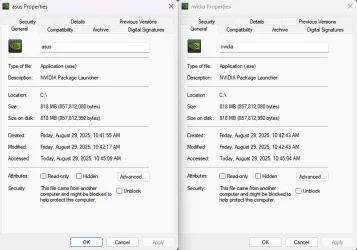
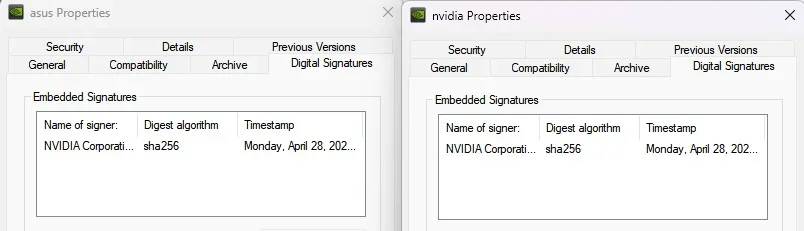
Here is driver 576.28 packages for Asus RTX 4070 downloaded from Asus site then Nvidia site.
You can see the packages are the exact same size.
Even the digital signature of the packages are exactly the same.

Screenshot 2025-08-29 104546.webp


s.webp


Right now Asus is behind for the 4070 as latest driver is 581.15 and I have one game that will not even launch on a driver less than 576.80 version.

dd.webp
 

My Computer My Computer

At a glance

Windows 11 Pro
OS
Windows 11 Pro
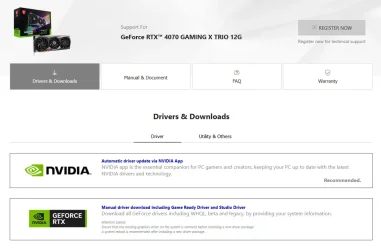
MSI just points you to Nvidia site.

Screenshot 2025-08-29 110851.webp
 

My Computer My Computer

At a glance

Windows 11 Pro
OS
Windows 11 Pro
Yes, the recommendation to use OEM drivers - is most defensively for legal reasons.
Yes and the other thing is all cards out there are all OEM as NVIDIA from what I know and I could be incorrect, the cards are all made and sold by some other brand even for the retail boxed versions. AMD/ATI is different as you can buy it under the AMD/ATI brand or the OEM white boxed version. Even the reference design is made by someone like MSI for NVIDIA and not NVIDIA themselves.
 

My Computer My Computer

At a glance

WindowsXP/7/8/8.1/10/11,Linux,Android,FreeBSD...Intel® Core™ i7-8750H 8th Gen 2.2Ghz up to 4....64GB using 2x32GB CL16 Mushkin redLine modulesIntel UHD 630 & NVIDIA GeForce GTX 1050 Ti wi...
OS
WindowsXP/7/8/8.1/10/11,Linux,Android,FreeBSD Unix
Computer type
Laptop
Manufacturer/Model
Dell XPS 15 9570
CPU
Intel® Core™ i7-8750H 8th Gen 2.2Ghz up to 4.1Ghz
Motherboard
Dell XPS 15 9570
Memory
64GB using 2x32GB CL16 Mushkin redLine modules
Graphics Card(s)
Intel UHD 630 & NVIDIA GeForce GTX 1050 Ti with 4GB DDR5
Sound Card
Realtek ALC3266-CG
Monitor(s) Displays
15.6" 4K Touch UltraHD 3840x2160 made by Sharp
Screen Resolution
3840x2160 4K UltraHD
Hard Drives
Samsung MZ-V9P4T0B/AM 990 PRO 4TB PCIe®4.0 NVMe™ M.2 SSD was Toshiba KXG60ZNV1T02 NVMe 1TB SSD
PSU
Dell XPS 15 9570
Case
Dell XPS 15 9570
Cooling
Stock
Keyboard
Stock
Mouse
SwitftPoint ProPoint
Internet Speed
Comcast/XFinity 1.44Gbps/42.5Mbps
Browser
Microsoft EDGE (Chromium based) & Google Chrome
Antivirus
Windows Defender that came with Windows
For 581.08, I looked at everyone who said they did not have a problem with 581.08 and could the reason be that everyone who responded without issues is using a GeForce RTX GPU? I am using a GeForce GTX 1050Ti and so far, I have gotten GSOD's with 581.08 which is always within a few hours or a day or so and about 6 times so far since it's been installed on a idle system. 576.88 did not have any issues and I did a clean install using expert mode and did another clean install just to make sure and the same problem still happened. I'll install the newer driver(s) and see if the problem still exists. It seems others on the 581.08 thread on Nvidia's forums are also experiencing the BSOD/GSOD issue as well.
 

My Computer My Computer

At a glance

WindowsXP/7/8/8.1/10/11,Linux,Android,FreeBSD...Intel® Core™ i7-8750H 8th Gen 2.2Ghz up to 4....64GB using 2x32GB CL16 Mushkin redLine modulesIntel UHD 630 & NVIDIA GeForce GTX 1050 Ti wi...
OS
WindowsXP/7/8/8.1/10/11,Linux,Android,FreeBSD Unix
Computer type
Laptop
Manufacturer/Model
Dell XPS 15 9570
CPU
Intel® Core™ i7-8750H 8th Gen 2.2Ghz up to 4.1Ghz
Motherboard
Dell XPS 15 9570
Memory
64GB using 2x32GB CL16 Mushkin redLine modules
Graphics Card(s)
Intel UHD 630 & NVIDIA GeForce GTX 1050 Ti with 4GB DDR5
Sound Card
Realtek ALC3266-CG
Monitor(s) Displays
15.6" 4K Touch UltraHD 3840x2160 made by Sharp
Screen Resolution
3840x2160 4K UltraHD
Hard Drives
Samsung MZ-V9P4T0B/AM 990 PRO 4TB PCIe®4.0 NVMe™ M.2 SSD was Toshiba KXG60ZNV1T02 NVMe 1TB SSD
PSU
Dell XPS 15 9570
Case
Dell XPS 15 9570
Cooling
Stock
Keyboard
Stock
Mouse
SwitftPoint ProPoint
Internet Speed
Comcast/XFinity 1.44Gbps/42.5Mbps
Browser
Microsoft EDGE (Chromium based) & Google Chrome
Antivirus
Windows Defender that came with Windows
could the reason be that everyone who responded without issues is using a GeForce RTX GPU? I am using a GeForce GTX 1050Ti

Could be?

My GPU is a GeForce GTX 1660 Super OC 6GB
Since the last update I’ve been hitting it hard with image and video editing for up to 9 hours straight per day. Also a couple of hours gaming if I need to release.
Sorry to say that I haven’t had a single issue.

I’m using the Game driver, I rarely use the studio driver install.
 

My Computers My Computers

  • At a glance

    Windows 11 Pro 25H2 Build 26200.8894Intel(R) Core(TM) i7-4770K CPU @ 3.50GHz32.0 GB of I forget and the box is in storage.Gigabyte nVidia GeForce GTX 1660 Super OC 6GB
    OS
    Windows 11 Pro 25H2 Build 26200.8894
    Computer type
    PC/Desktop
    Manufacturer/Model
    Sin-built 2013
    CPU
    Intel(R) Core(TM) i7-4770K CPU @ 3.50GHz
    Motherboard
    ASUS ROG Maximus VI Formula
    Memory
    32.0 GB of I forget and the box is in storage.
    Graphics Card(s)
    Gigabyte nVidia GeForce GTX 1660 Super OC 6GB
    Sound Card
    ROG SupremeFX Formula 8-Channel High Definition Audio
    Monitor(s) Displays
    5 x LG 25MS500-B - 1 x 24MK430H-B - 1 x Wacom Pro 22" Touch Screen Tablet
    Screen Resolution
    All over the place
    Hard Drives
    Too many to list. OS on Samsung 1TB 870 QVO SATA
    PSU
    Silverstone 1500
    Case
    NZXT Phantom 820 Full-Tower Case
    Cooling
    Noctua NH-D15 Elite Class Dual Tower CPU Cooler / 6 x EziDIY 120mm / 2 x Corsair 140mm somethings / 1 x 140mm Thermaltake something / 2 x 200mm Corsair.
    Keyboard
    Corsair K95 / Logitech diNovo Edge Wireless
    Mouse
    Logitech: G402 / G502 / Mx Masters / Mx Air Cordless
    Internet Speed
    2000/500Mbps
    Browser
    All sorts
    Antivirus
    Kaspersky Premium
    Other Info
    ㅤㅤㅤㅤㅤㅤㅤㅤㅤㅤㅤㅤㅤㅤㅤㅤㅤㅤㅤㅤㅤㅤㅤㅤㅤㅤㅤㅤㅤㅤㅤㅤㅤㅤㅤㅤㅤㅤㅤㅤ⠀⠀⠀⠀⠀⠀⠀⠀⠀⠀
    TP-Link BE9300 WiFi 7 Bluetooth 5.4 (Archer TBE550E)
    TP-Link TX201 V1 2.5GB Lan

    Grandstream HT812 - VoIP
    ASUS DSL-AX82U - Mesh
    ASUS RT-AC68U - Mesh
    ASUS RT-BE88U Router

    Brother MFC-L2880DW Printer

    I’m on a horse.
  • At a glance

    Windows 11 Pro 25H2 Build 26200.8894 (Wifes)13th Generation Intel® Core™ i5-1340P Process...16GB LPDDR5-52001x Intel® Iris® Xe Graphics
    Operating System
    Windows 11 Pro 25H2 Build 26200.8894 (Wifes)
    Computer type
    Laptop
    Manufacturer/Model
    LENOVO Yoga 7 14IRL8 - Type 82YL
    CPU
    13th Generation Intel® Core™ i5-1340P Processor(Core™ i5-1340P)
    Memory
    16GB LPDDR5-5200
    Graphics card(s)
    1x Intel® Iris® Xe Graphics
    Sound Card
    Optimized with Dolby Atmos®
    Screen Resolution
    QHD 2880 x 1800 OLED
    Hard Drives
    M.2 512 GB SSD PCIe
    Mouse
    Logiteck MX Master 3S
    Internet Speed
    2000/500
    Antivirus
    Defender / Malwarebytes
    Other Info
    …still on a horse.


    Wireless Network: Wi-Fi 6E 2x2 AX; Bluetooth® 5.1 or above
    Ports: 1x 1 Novo button; 2 in 1 Audio Combo jack; Micro SD Card Reader; HDMI 1.4b; 2 x USB Type-C (TBT4)
    USB 3.2 Gen 2 DP 1.4a
    PD 3.0); 1 x USB 3.2 Gen1 Type A
    Camera
    1x 1080P FHD IR/RGB Hybrid with Privacy Shutter and Dual Array Microphone
    Graphics
    1x Intel® Iris® Xe Graphics
    Monitor
    14" WUXGA
    Form Factor
    Convertible Notebook
  • Windows 11 Pro 25H2 Build 26200.8894 (Wifes)

    Yoga 7 2-in-1 14IML9 - Type 83DJ

    Processor: Intel® Core™ Ultra 7 155H Processor(Core™ Ultra 7 155H)

    Memory: 32GB LPD5X-7467

    Hard Drive: 1 TB SSD PCIe

    Wireless Network: 1x Wi-Fi 6E 2x2 AX; Bluetooth® 5.1 or above

    Ports: 1 x HDMI 2.1 TMDS; 1 x Novo Button; 1 x Combo Audio Jack
    2 x USB-C (USB 4.0)
    1 x USB-A 3.2 Gen 1

    Camera: 1080P FHD IR Hybrid with Dual Microphone

    Graphics: Intel® Arc™ Graphics

    Monitor: 14" 2.8K

    ...Where's my horse?
Could be?

My GPU is a GeForce GTX 1660 Super OC 6GB
Since the last update I’ve been hitting it hard with image and video editing for up to 9 hours straight per day. Also a couple of hours gaming if I need to release.
Sorry to say that I haven’t had a single issue.

I’m using the Game driver, I rarely use the studio driver install.
Ofcourse I am on a older Beta Windows build too but 576.88 was working fine for close to 2 months 24/7. I am on a notebook, not a desktop so it's not going to be a real GTX as I don't even have a dedicated card, it's just one chip next to the CPU so it has way less things compared to a actual card. I just updated to 581.15 and let's see if it works well or not. I'll update this post if it does B/GSOD.
 

My Computer My Computer

At a glance

WindowsXP/7/8/8.1/10/11,Linux,Android,FreeBSD...Intel® Core™ i7-8750H 8th Gen 2.2Ghz up to 4....64GB using 2x32GB CL16 Mushkin redLine modulesIntel UHD 630 & NVIDIA GeForce GTX 1050 Ti wi...
OS
WindowsXP/7/8/8.1/10/11,Linux,Android,FreeBSD Unix
Computer type
Laptop
Manufacturer/Model
Dell XPS 15 9570
CPU
Intel® Core™ i7-8750H 8th Gen 2.2Ghz up to 4.1Ghz
Motherboard
Dell XPS 15 9570
Memory
64GB using 2x32GB CL16 Mushkin redLine modules
Graphics Card(s)
Intel UHD 630 & NVIDIA GeForce GTX 1050 Ti with 4GB DDR5
Sound Card
Realtek ALC3266-CG
Monitor(s) Displays
15.6" 4K Touch UltraHD 3840x2160 made by Sharp
Screen Resolution
3840x2160 4K UltraHD
Hard Drives
Samsung MZ-V9P4T0B/AM 990 PRO 4TB PCIe®4.0 NVMe™ M.2 SSD was Toshiba KXG60ZNV1T02 NVMe 1TB SSD
PSU
Dell XPS 15 9570
Case
Dell XPS 15 9570
Cooling
Stock
Keyboard
Stock
Mouse
SwitftPoint ProPoint
Internet Speed
Comcast/XFinity 1.44Gbps/42.5Mbps
Browser
Microsoft EDGE (Chromium based) & Google Chrome
Antivirus
Windows Defender that came with Windows
Times change. I still think it is a good practice to get the driver for the card from the people who brand it.
 

My Computer My Computer

At a glance

WIN 11, WIN 10, WIN 8.1, WIN 7 U, WIN 7 PRO, ...Intel i7 6900K and i9-7960X / AMD 3800X (8 core)128 GB CORSAIR DOMINATOR PLATINUM (B DIE)NVIDIA 1070 and RTX 3070
OS
WIN 11, WIN 10, WIN 8.1, WIN 7 U, WIN 7 PRO, WIN 7 HOME (32 Bit), LINUX MINT
Computer type
PC/Desktop
Manufacturer/Model
DIY, ASUS, and DELL
CPU
Intel i7 6900K and i9-7960X / AMD 3800X (8 core)
Motherboard
ASUS X99E-WS USB 3.1 and ASUS X299 SAGE
Memory
128 GB CORSAIR DOMINATOR PLATINUM (B DIE)
Graphics Card(s)
NVIDIA 1070 and RTX 3070
Sound Card
Crystal Sound (onboard)
Monitor(s) Displays
single Samsung 30" 4K and 8" aux monitor
Screen Resolution
4K and something equally attrocious. I'll be working on this.
Hard Drives
A, B, C, D, E, F, G, H, I, J, K, L, M, N, O, P, Q, R, S, T, U, V, W

Ports X, Y, and Z are reserved for USB access and removable drives.

Drive types consist of the following: Various mechanical hard drives bearing the brand names, Seagate, Toshiba, and Western Digital. Various NVMe drives bearing the brand names Kingston, Intel, Silicon Power, Crucial, Western Digital, and Team Group. Various SATA SSDs bearing various different brand names.

RAID arrays included:

LSI RAID 10 (WD Velociraptors) 1115.72 GB
LSI RAID 10 (WD SSDS) 463.80 GB

INTEL RAID 0 (KINGSTON HYPER X) System 447.14 GB
INTEL RAID 1 TOSHIBA ENTERPRIZE class Data 2794.52 GB
INTEL RAID 1 SEAGATE HYBRID 931.51 GB
PSU
SEVERAL. I prefer my Corsair Platinum HX1000i but I also like EVGA power supplies
Case
ThermalTake Level 10 GT (among others)
Cooling
Noctua is my favorite and I use it in my main. I also own various other coolers.
Keyboard
all kinds.
Mouse
all kinds
Internet Speed
360 mbps - 1 gbps (depending)
Browser
FIREFOX
Antivirus
KASPERSKY (no apologies)
Other Info
Gave Dell touch screen with Windows 11 to daughter and got me an OTVOC. Being a PC builder I own many desktop PCs as well. I am a father of five providing PCs, laptops, and tablets for all my family, most of which I have modified, rebuilt, or simply built from scratch. I do not own a cell phone, never have, never will.
Times change. I still think it is a good practice to get the driver for the card from the people who brand it.
My card is PNY brand. The driver download from their site takes you right to Nvidia driver download page lol.
 

My Computers My Computers

  • At a glance

    Windows 11 ProIntel® Core™ i5-14600KG.SKILL Ripjaws S5 Series DDR5 (2x16GB) 6400M...PNY RTX 5060 Ti OC 16GB
    OS
    Windows 11 Pro
    Computer type
    PC/Desktop
    Manufacturer/Model
    Acme Mail Order (meep meep)
    CPU
    Intel® Core™ i5-14600K
    Motherboard
    MSI PRO Z790-A MAX WiFi bios 7E07vMA
    Memory
    G.SKILL Ripjaws S5 Series DDR5 (2x16GB) 6400MT/s CL32
    Graphics Card(s)
    PNY RTX 5060 Ti OC 16GB
    Sound Card
    Onboard Realtek® ALC4080 Codec
    Monitor(s) Displays
    2 x Dell - S3222DGM 32" LED Curved QHD FreeSync Gaming Monitor
    Screen Resolution
    2560x1440
    Hard Drives
    990 PRO PCIe 4.0 NVMe®1TB OS
    970 EVO PCIe 3.0 NVMe® SSD 500GB Games
    860 EVO SATA 2.5" SSD 1TB Storage
    PSU
    RMx Series™ RM850x — 80 PLUS® Gold
    Case
    LIAN LI PC-G70B Black Aluminum Full Tower
    Cooling
    Custom loop Optimus Foundation Block, MCP655-PWM D5 pump, MCR320 QP rad
    Keyboard
    Razer Black Widow Ultimate
    Mouse
    Razer Death Adder Elite
    Internet Speed
    500 down 20 up
    Browser
    Edge / Chrome
    Antivirus
    Microsoft Defender
    Other Info
    Always switching installs testing out the latest and greatest.
  • At a glance

    Windows 11 ProIntel® Core™ i5-11600KG.SKILL Ripjaws V Series 16GB DDR4 3600 (16-1...EVGA GeForce RTX 3060 XC GAMING 12GB
    Operating System
    Windows 11 Pro
    Computer type
    PC/Desktop
    Manufacturer/Model
    Acme Mail Order (meep meep) Wife's PC Edition
    CPU
    Intel® Core™ i5-11600K
    Motherboard
    MSI - Z590 A Pro - bios 7D09v1B1
    Memory
    G.SKILL Ripjaws V Series 16GB DDR4 3600 (16-16-16-36)
    Graphics card(s)
    EVGA GeForce RTX 3060 XC GAMING 12GB
    Sound Card
    Onboard Realtek® ALC897 Codec
    Monitor(s) Displays
    2 x 27'' ACER S271HL
    Screen Resolution
    1920x1080
    Hard Drives
    980 PRO PCIe 4.0 NVMe® SSD 250GB OS
    Samsung 128GB 850 PRO SATA III for Storage
    PSU
    CORSAIR - CX-M Series 650W
    Case
    LIAN LI PC-A16B Black Aluminum ATX Mid Tower
    Cooling
    Thermalright Phantom Spirit 120SE Air Cooler
    Keyboard
    Logitech - K740 Illuminated
    Mouse
    Razer Death Adder Elite
    Internet Speed
    500 down 20 up
    Browser
    Chrome
    Antivirus
    Windows Defender
    Other Info
    Stock clocked, over cooled, and unmolested for a rock solid, whisper quiet, Wifey approved user experience.
My card is PNY brand. The driver download from their site takes you right to Nvidia driver download page lol.
At least in the event that anything goes sideways you can always tell them that you went to them first. 😎
 

My Computer My Computer

At a glance

WIN 11, WIN 10, WIN 8.1, WIN 7 U, WIN 7 PRO, ...Intel i7 6900K and i9-7960X / AMD 3800X (8 core)128 GB CORSAIR DOMINATOR PLATINUM (B DIE)NVIDIA 1070 and RTX 3070
OS
WIN 11, WIN 10, WIN 8.1, WIN 7 U, WIN 7 PRO, WIN 7 HOME (32 Bit), LINUX MINT
Computer type
PC/Desktop
Manufacturer/Model
DIY, ASUS, and DELL
CPU
Intel i7 6900K and i9-7960X / AMD 3800X (8 core)
Motherboard
ASUS X99E-WS USB 3.1 and ASUS X299 SAGE
Memory
128 GB CORSAIR DOMINATOR PLATINUM (B DIE)
Graphics Card(s)
NVIDIA 1070 and RTX 3070
Sound Card
Crystal Sound (onboard)
Monitor(s) Displays
single Samsung 30" 4K and 8" aux monitor
Screen Resolution
4K and something equally attrocious. I'll be working on this.
Hard Drives
A, B, C, D, E, F, G, H, I, J, K, L, M, N, O, P, Q, R, S, T, U, V, W

Ports X, Y, and Z are reserved for USB access and removable drives.

Drive types consist of the following: Various mechanical hard drives bearing the brand names, Seagate, Toshiba, and Western Digital. Various NVMe drives bearing the brand names Kingston, Intel, Silicon Power, Crucial, Western Digital, and Team Group. Various SATA SSDs bearing various different brand names.

RAID arrays included:

LSI RAID 10 (WD Velociraptors) 1115.72 GB
LSI RAID 10 (WD SSDS) 463.80 GB

INTEL RAID 0 (KINGSTON HYPER X) System 447.14 GB
INTEL RAID 1 TOSHIBA ENTERPRIZE class Data 2794.52 GB
INTEL RAID 1 SEAGATE HYBRID 931.51 GB
PSU
SEVERAL. I prefer my Corsair Platinum HX1000i but I also like EVGA power supplies
Case
ThermalTake Level 10 GT (among others)
Cooling
Noctua is my favorite and I use it in my main. I also own various other coolers.
Keyboard
all kinds.
Mouse
all kinds
Internet Speed
360 mbps - 1 gbps (depending)
Browser
FIREFOX
Antivirus
KASPERSKY (no apologies)
Other Info
Gave Dell touch screen with Windows 11 to daughter and got me an OTVOC. Being a PC builder I own many desktop PCs as well. I am a father of five providing PCs, laptops, and tablets for all my family, most of which I have modified, rebuilt, or simply built from scratch. I do not own a cell phone, never have, never will.
Yes and the other thing is all cards out there are all OEM as NVIDIA from what I know and I could be incorrect, the cards are all made and sold by some other brand even for the retail boxed versions. AMD/ATI is different as you can buy it under the AMD/ATI brand or the OEM white boxed version. Even the reference design is made by someone like MSI for NVIDIA and not NVIDIA themselves.

Not all, NVIDIA Founders Edition (FE) - are designed and branded by NVIDIA - tho obviously, manufactured by partners like Foxconn. Even so, for this specific models - you get full Nvidia support (even if managed by a local retailer - this cards fall under Nvidia brand directly - not OEM).
 

My Computer My Computer

At a glance

WinDOS 25H2Intel & AMDSO-DIMM SK Hynix 15.8 GB Dual-Channel DDR4-26...nVidia RTX 2060 6GB Mobile GPU (TU106M)
OS
WinDOS 25H2
Computer type
Laptop
CPU
Intel & AMD
Memory
SO-DIMM SK Hynix 15.8 GB Dual-Channel DDR4-2666 (2 x 8 GB) 1329MHz (19-19-19-43)
Graphics Card(s)
nVidia RTX 2060 6GB Mobile GPU (TU106M)
Sound Card
Onbord Realtek ALC1220
Screen Resolution
1920 x 1080
Hard Drives
1x Samsung PM981 NVMe PCIe M.2 512GB / 1x Seagate Expansion ST1000LM035 1TB
ASUS provide drivers for their desktop graphic cards that are only about a few months old. If you want the most recent graphics driver you can go to the manufacturer driver like Nvidia. However, for really old graphic cards the drivers on the ASUS site might be much older than one from the Nvidia site.

ASUS only provides driver updates for a notebook for about a year after it is released. After that you can either stick with the old drivers or go to to the manufacture for more recent drivers.

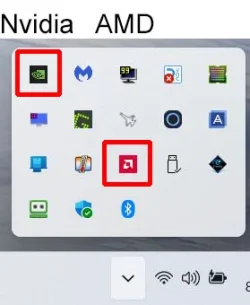
With both Nvidia and AMD it's convenient to have their apps in the system tray. They automatically check for new updates and asks if you want to install them.
Nvidia - Nvidia App | AMD - Adrenalin Edition

Nvidia and AMD apps.webp

ASUS ROG-STRIX-RTX3060TI-O8G-V2-GAMING Desktop graphics card
GPU: Nvidia RTX 3060 Ti
ASUS: 576.28 | 818.07 MB | 2025/05/21
NVIDIA: 581.15 | 895.58 MB | 2025/08/28

ASUS ROG STRIX-GTX1060-6G-GAMING Desktop graphics card
GPU: Nvidia GTX 1060 6GB
ASUS: 576.28 | 818.07 MB | 2025/05/21
NVIDIA: 581.15 | 895.58 MB | 2025/08/28

ASUS ENGTX560 DCII TOP/2DI/1GD5 Desktop graphics card
GPU: Nvidia GTX 560 1GB
nVIDIA Display Driver V306.23 WHQL
ASUS: 306.23 | 236.52 MB | 2012/10/25 Windows 8 64-bit
NVIDIA: 391.35 | 423.05 MB | 2018/03/27 Windows 7/8/8.1 64-bit
NVIDIA: 391.35 | 467.03 MB | 2018/03/27 Windows 10 64-bit

ASUS TUF Gaming A15 (2022) FA507RM Laptop computer
GPU1: AMD Ryzen 7 6800H with Radeon 680M graphics
ASUS: 31.0.12014.6 | 750.16 MB | 2023/02/16
AMD: Adrenalin 25.8.1 (WHQL) | 874 MB | 2025/08/04
--------------------------------------------------
GPU2: Nvidia RTX 3060 Notebook (6GB)
ASUS: 31.0.15.3645 | 925.04 MB | 2023/07/18
NVIDIA: 581.15 | 895.58 MB | 2025/08/28
 

My Computers My Computers

  • At a glance

    Windows 11 Pro 25H2 (26200.6901)AMD Ryzen 7 6800H with Radeon 680M GPU (486MB...Crucial DDR5-4800 (2400MHz) 32GB (2 x 16GB)NVIDIA RTX 3060 Laptop (6GB RAM)
    OS
    Windows 11 Pro 25H2 (26200.6901)
    Computer type
    Laptop
    Manufacturer/Model
    ASUS TUF Gaming A15 (2022)
    CPU
    AMD Ryzen 7 6800H with Radeon 680M GPU (486MB RAM)
    Memory
    Crucial DDR5-4800 (2400MHz) 32GB (2 x 16GB)
    Graphics Card(s)
    NVIDIA RTX 3060 Laptop (6GB RAM)
    Sound Card
    n/a
    Monitor(s) Displays
    15.6-inch
    Screen Resolution
    1920x1080 300Hz
    Hard Drives
    2 x Samsung 990 Evo Plus (2TB M.2 NVME SSD)
    PSU
    n/a
    Mouse
    Wireless Mouse M510
    Internet Speed
    2100Mbps/300Mbps
    Browser
    Firefox
    Antivirus
    Malwarebytes
  • At a glance

    Windows 11 Pro 25H2 (26200.8246)AMD Ryzen 7 5700X3DG.SKILL Flare X 32GB (2x16GB) DDR4ASUS ROG-STRIX-RTX3060TI-08G-V2-GAMING (RTX 3...
    Operating System
    Windows 11 Pro 25H2 (26200.8246)
    Computer type
    PC/Desktop
    Manufacturer/Model
    Custom build
    CPU
    AMD Ryzen 7 5700X3D
    Motherboard
    ASUS ROG Strix B550-F Gaming WiFi II
    Memory
    G.SKILL Flare X 32GB (2x16GB) DDR4
    Graphics card(s)
    ASUS ROG-STRIX-RTX3060TI-08G-V2-GAMING (RTX 3060-Ti, 8GB RAM)
    Monitor(s) Displays
    Samsung G50D IPS 27"
    Screen Resolution
    1440p/180Hz
    Hard Drives
    SAMSUNG 990 EVO Plus (2TB] M.2 NVME SSD
    SAMSUNG 990 EVO Plus (4TB) M.2 NVME SSD
    PSU
    Corsair RM750x (750 watts)
    Case
    Cooler Master MasterCase 5
    Cooling
    Scythe Mugen 6
    Keyboard
    Logitech K520 (MK540 keyboard/mouse combo)
    Mouse
    Logitech M310 (MK540 keyboard/mouse combo)
    Internet Speed
    2100 Mbps down / 300 Mbps up
    Browser
    Firefox, Edge, Chrome
    Antivirus
    Malwarebytes (Premium)
    Other Info
    ASUS Blu-ray Burner BW-16D1HT (SATA) || Western Digital Easystore 20TB USB 3.0 external hard drive used with Acronis True Image 2025 backup software || HP OfficeJet Pro 6975 Printer/Scanner
ASUS provide drivers for their desktop graphic cards that are only about a few months old. If you want the most recent graphics driver you can go to the manufacturer driver like Nvidia. However, for really old graphic cards the drivers on the ASUS site might be much older than one from the Nvidia site.

ASUS only provides driver updates for a notebook for about a year after it is released. After that you can either stick with the old drivers or go to to the manufacture for more recent drivers.

With both Nvidia and AMD it's convenient to have their apps in the system tray. They automatically check for new updates and asks if you want to install them.
Nvidia - Nvidia App | AMD - Adrenalin Edition

View attachment 144000

ASUS ROG-STRIX-RTX3060TI-O8G-V2-GAMING Desktop graphics card


ASUS ROG STRIX-GTX1060-6G-GAMING Desktop graphics card


ASUS ENGTX560 DCII TOP/2DI/1GD5 Desktop graphics card


ASUS TUF Gaming A15 (2022) FA507RM Laptop computer
Perhaps an old dog can learn new tricks after all. I might have to check that out for my daughter's Strix card.
 

My Computer My Computer

At a glance

WIN 11, WIN 10, WIN 8.1, WIN 7 U, WIN 7 PRO, ...Intel i7 6900K and i9-7960X / AMD 3800X (8 core)128 GB CORSAIR DOMINATOR PLATINUM (B DIE)NVIDIA 1070 and RTX 3070
OS
WIN 11, WIN 10, WIN 8.1, WIN 7 U, WIN 7 PRO, WIN 7 HOME (32 Bit), LINUX MINT
Computer type
PC/Desktop
Manufacturer/Model
DIY, ASUS, and DELL
CPU
Intel i7 6900K and i9-7960X / AMD 3800X (8 core)
Motherboard
ASUS X99E-WS USB 3.1 and ASUS X299 SAGE
Memory
128 GB CORSAIR DOMINATOR PLATINUM (B DIE)
Graphics Card(s)
NVIDIA 1070 and RTX 3070
Sound Card
Crystal Sound (onboard)
Monitor(s) Displays
single Samsung 30" 4K and 8" aux monitor
Screen Resolution
4K and something equally attrocious. I'll be working on this.
Hard Drives
A, B, C, D, E, F, G, H, I, J, K, L, M, N, O, P, Q, R, S, T, U, V, W

Ports X, Y, and Z are reserved for USB access and removable drives.

Drive types consist of the following: Various mechanical hard drives bearing the brand names, Seagate, Toshiba, and Western Digital. Various NVMe drives bearing the brand names Kingston, Intel, Silicon Power, Crucial, Western Digital, and Team Group. Various SATA SSDs bearing various different brand names.

RAID arrays included:

LSI RAID 10 (WD Velociraptors) 1115.72 GB
LSI RAID 10 (WD SSDS) 463.80 GB

INTEL RAID 0 (KINGSTON HYPER X) System 447.14 GB
INTEL RAID 1 TOSHIBA ENTERPRIZE class Data 2794.52 GB
INTEL RAID 1 SEAGATE HYBRID 931.51 GB
PSU
SEVERAL. I prefer my Corsair Platinum HX1000i but I also like EVGA power supplies
Case
ThermalTake Level 10 GT (among others)
Cooling
Noctua is my favorite and I use it in my main. I also own various other coolers.
Keyboard
all kinds.
Mouse
all kinds
Internet Speed
360 mbps - 1 gbps (depending)
Browser
FIREFOX
Antivirus
KASPERSKY (no apologies)
Other Info
Gave Dell touch screen with Windows 11 to daughter and got me an OTVOC. Being a PC builder I own many desktop PCs as well. I am a father of five providing PCs, laptops, and tablets for all my family, most of which I have modified, rebuilt, or simply built from scratch. I do not own a cell phone, never have, never will.
Not all, NVIDIA Founders Edition (FE) - are designed and branded by NVIDIA - tho obviously, manufactured by partners like Foxconn. Even so, for this specific models - you get full Nvidia support (even if managed by a local retailer - this cards fall under Nvidia brand directly - not OEM).
That's good to know. Apparently, that was something that came out 7 years ago. I havem't been paying attention to different cards anymore as I haven't had to use a desktop since 2009 and obviously notebooks don't give you a choice of what vendor to buy the GPU from. At least with Founders Edition, one would not have to worry about the vendor like BFG going out of business. FE would actually be 100% OEM as the others are not really OEM but more made by someone else other than NVIDIA and more supported by the system manufacturer like Dell while the FE is actually a NVIDIA branded OEM but sold with the support and warranty from NVIDIA and just a NVIDIA branded Retail product. The other cards are all made by other OEMs, not NVIDIA and sold either as a retail product with the warranty/support or to system manufacturers without the warranty/support, the later case at a way lower price bcause there is no support or warranty included so if anything goes wrong, it's the system manufacturer who assumes the liability for support and warranty. So using Dell as a example, Dell would be liable for the support and warranty even if MSI made the card and has their name on it. The customer cannot go to MSI for support or warranty if problems arise compared to someone buying a MSI branded card in a retail box.
 

My Computer My Computer

At a glance

WindowsXP/7/8/8.1/10/11,Linux,Android,FreeBSD...Intel® Core™ i7-8750H 8th Gen 2.2Ghz up to 4....64GB using 2x32GB CL16 Mushkin redLine modulesIntel UHD 630 & NVIDIA GeForce GTX 1050 Ti wi...
OS
WindowsXP/7/8/8.1/10/11,Linux,Android,FreeBSD Unix
Computer type
Laptop
Manufacturer/Model
Dell XPS 15 9570
CPU
Intel® Core™ i7-8750H 8th Gen 2.2Ghz up to 4.1Ghz
Motherboard
Dell XPS 15 9570
Memory
64GB using 2x32GB CL16 Mushkin redLine modules
Graphics Card(s)
Intel UHD 630 & NVIDIA GeForce GTX 1050 Ti with 4GB DDR5
Sound Card
Realtek ALC3266-CG
Monitor(s) Displays
15.6" 4K Touch UltraHD 3840x2160 made by Sharp
Screen Resolution
3840x2160 4K UltraHD
Hard Drives
Samsung MZ-V9P4T0B/AM 990 PRO 4TB PCIe®4.0 NVMe™ M.2 SSD was Toshiba KXG60ZNV1T02 NVMe 1TB SSD
PSU
Dell XPS 15 9570
Case
Dell XPS 15 9570
Cooling
Stock
Keyboard
Stock
Mouse
SwitftPoint ProPoint
Internet Speed
Comcast/XFinity 1.44Gbps/42.5Mbps
Browser
Microsoft EDGE (Chromium based) & Google Chrome
Antivirus
Windows Defender that came with Windows
My card is PNY brand. The driver download from their site takes you right to Nvidia driver download page lol.

Probably cause it's a "Retail" product. I mean, i take it you bought the card separately - and it came in its personalized PNY retail package. Not in a random bag/box (as it's usually the case with OEM components). In theory, OEM are intended - only for OEM builders - tho sometimes you can also find them in a local IT store (in OEM designated packaging - like a plastic bag or basic box with nothing printed on it).
 

My Computer My Computer

At a glance

WinDOS 25H2Intel & AMDSO-DIMM SK Hynix 15.8 GB Dual-Channel DDR4-26...nVidia RTX 2060 6GB Mobile GPU (TU106M)
OS
WinDOS 25H2
Computer type
Laptop
CPU
Intel & AMD
Memory
SO-DIMM SK Hynix 15.8 GB Dual-Channel DDR4-2666 (2 x 8 GB) 1329MHz (19-19-19-43)
Graphics Card(s)
nVidia RTX 2060 6GB Mobile GPU (TU106M)
Sound Card
Onbord Realtek ALC1220
Screen Resolution
1920 x 1080
Hard Drives
1x Samsung PM981 NVMe PCIe M.2 512GB / 1x Seagate Expansion ST1000LM035 1TB
FE would actually be 100% OEM as the others are not really OEM but more made by someone else other than NVIDIA and more supported by the system manufacturer like Dell while the FE is actually a NVIDIA branded OEM but sold with the support and warranty from NVIDIA and just a NVIDIA branded Retail product.

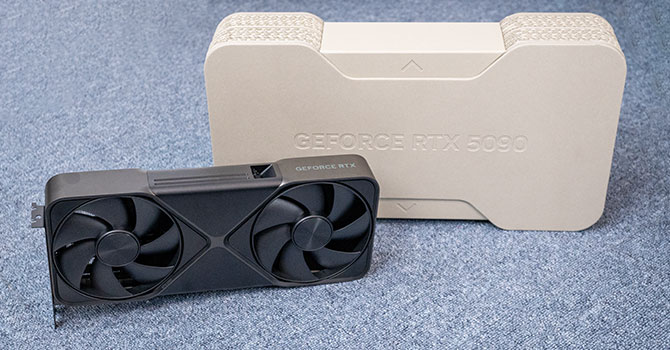
NVIDIA FE come only as retail (it's unlikely to find them in any OEM system). FE cards are often available at launch, sometimes earlier than partner versions, giving them a "premium convenience” edge. They’re also rather rare - due to limited production (deemed as collector editions - by people who are into collecting prime models). Tho, usually go out of stock - really fast, for example: NVIDIA GeForce RTX 5090 Founders Edition

And... they're more of a marketing gimmick. As in: the competition tends to have better cooling (handling slighly more OC - aka - "slightly" better performance at lower temperatures). On the other hand, sometimes - as was the case with RTX 5090 FE - their launch price could be the cheapest (in U.S. was like 2000$). While the competition - was around 2500$+ even 3000$+ Tho, again... they come in limited edition - and disappear rather quickly - more often than not - bought by people who aim to sell them on eBay - while adding 500$ to the original price. Cause of the way they disappear - i also suspect some shady arrangements - similar to events ticket sells mafia - where most of the cards end-up at this people making a profit of reselling them on eBay.
 

My Computer My Computer

At a glance

WinDOS 25H2Intel & AMDSO-DIMM SK Hynix 15.8 GB Dual-Channel DDR4-26...nVidia RTX 2060 6GB Mobile GPU (TU106M)
OS
WinDOS 25H2
Computer type
Laptop
CPU
Intel & AMD
Memory
SO-DIMM SK Hynix 15.8 GB Dual-Channel DDR4-2666 (2 x 8 GB) 1329MHz (19-19-19-43)
Graphics Card(s)
nVidia RTX 2060 6GB Mobile GPU (TU106M)
Sound Card
Onbord Realtek ALC1220
Screen Resolution
1920 x 1080
Hard Drives
1x Samsung PM981 NVMe PCIe M.2 512GB / 1x Seagate Expansion ST1000LM035 1TB
Probably cause it's a "Retail" product. I mean, i take it you bought the card separately - and it came in its personalized PNY retail package. Not in a random bag/box (as it's usually the case with OEM components). In theory, OEM are intended - only for OEM builders - tho sometimes you can also find them in a local IT store (in OEM designated packaging - like a plastic bag or basic box with nothing printed on it).
Yes, those are OEM aka whitebox versions which the vendor as in whoever one buys it from is responsible for warranty and support and the price is also lower for that reason compared to a name brand retail box version. Same case with buying HDD's, there are the retail versions and the OEM versions, the later has no warranty other than from the vendor if it was defective unlike the retail version. At least that was how local computer stores, not big box companies, used to sell things. They had both OEM and Retail branded versions with the former usually having lower specs compared to the retail versions but a lot lower priced.
 
Last edited:

My Computer My Computer

At a glance

WindowsXP/7/8/8.1/10/11,Linux,Android,FreeBSD...Intel® Core™ i7-8750H 8th Gen 2.2Ghz up to 4....64GB using 2x32GB CL16 Mushkin redLine modulesIntel UHD 630 & NVIDIA GeForce GTX 1050 Ti wi...
OS
WindowsXP/7/8/8.1/10/11,Linux,Android,FreeBSD Unix
Computer type
Laptop
Manufacturer/Model
Dell XPS 15 9570
CPU
Intel® Core™ i7-8750H 8th Gen 2.2Ghz up to 4.1Ghz
Motherboard
Dell XPS 15 9570
Memory
64GB using 2x32GB CL16 Mushkin redLine modules
Graphics Card(s)
Intel UHD 630 & NVIDIA GeForce GTX 1050 Ti with 4GB DDR5
Sound Card
Realtek ALC3266-CG
Monitor(s) Displays
15.6" 4K Touch UltraHD 3840x2160 made by Sharp
Screen Resolution
3840x2160 4K UltraHD
Hard Drives
Samsung MZ-V9P4T0B/AM 990 PRO 4TB PCIe®4.0 NVMe™ M.2 SSD was Toshiba KXG60ZNV1T02 NVMe 1TB SSD
PSU
Dell XPS 15 9570
Case
Dell XPS 15 9570
Cooling
Stock
Keyboard
Stock
Mouse
SwitftPoint ProPoint
Internet Speed
Comcast/XFinity 1.44Gbps/42.5Mbps
Browser
Microsoft EDGE (Chromium based) & Google Chrome
Antivirus
Windows Defender that came with Windows
NVIDIA FE come only as retail (it's unlikely to find them in any OEM system). FE cards are often available at launch, sometimes earlier than partner versions, giving them a "premium convenience” edge. They’re also rather rare - due to limited production (deemed as collector editions - by people who are into collecting prime models). Tho, usually go out of stock - really fast, for example: NVIDIA GeForce RTX 5090 Founders Edition

And... they're more of a marketing gimmick. As in: the competition tends to have better cooling (handling slighly more OC - aka - "slightly" better performance at lower temperatures). On the other hand, sometimes - as was the case with RTX 5090 FE - their launch price could be the cheapest (in U.S. was like 2000$). While the competition - was around 2500$+ even 3000$+ Tho, again... they come in limited edition - and disappear rather quickly - more often than not - bought by people who aim to sell them on eBay - while adding 500$ to the original price. Cause of the way they disappear - i also suspect some shady arrangements - similar to events ticket sells mafia - where most of the cards end-up at this people making a profit of reselling them on eBay.
I meant OEM in a different context that it's actually from the OEM meaning NVIDIA not a system builder type of OEM. I thought the only good thing about NVIDIA FE is that it runs at stock speed so unlike the other non-NVIDIA branded Retail boxed products, it will never be sold as overclocked. I guess at least with FE, NVIDIA hopefully stands behind the warranty unlike all these lifetime warranty companies like BFG Technologies for example that basically denies warranty claims. This one from Dell is one expensive OEM prudct at close to $US21,000:

The retail PNY is cheaper:
 
Last edited:

My Computer My Computer

At a glance

WindowsXP/7/8/8.1/10/11,Linux,Android,FreeBSD...Intel® Core™ i7-8750H 8th Gen 2.2Ghz up to 4....64GB using 2x32GB CL16 Mushkin redLine modulesIntel UHD 630 & NVIDIA GeForce GTX 1050 Ti wi...
OS
WindowsXP/7/8/8.1/10/11,Linux,Android,FreeBSD Unix
Computer type
Laptop
Manufacturer/Model
Dell XPS 15 9570
CPU
Intel® Core™ i7-8750H 8th Gen 2.2Ghz up to 4.1Ghz
Motherboard
Dell XPS 15 9570
Memory
64GB using 2x32GB CL16 Mushkin redLine modules
Graphics Card(s)
Intel UHD 630 & NVIDIA GeForce GTX 1050 Ti with 4GB DDR5
Sound Card
Realtek ALC3266-CG
Monitor(s) Displays
15.6" 4K Touch UltraHD 3840x2160 made by Sharp
Screen Resolution
3840x2160 4K UltraHD
Hard Drives
Samsung MZ-V9P4T0B/AM 990 PRO 4TB PCIe®4.0 NVMe™ M.2 SSD was Toshiba KXG60ZNV1T02 NVMe 1TB SSD
PSU
Dell XPS 15 9570
Case
Dell XPS 15 9570
Cooling
Stock
Keyboard
Stock
Mouse
SwitftPoint ProPoint
Internet Speed
Comcast/XFinity 1.44Gbps/42.5Mbps
Browser
Microsoft EDGE (Chromium based) & Google Chrome
Antivirus
Windows Defender that came with Windows
I meant OEM in a different context that it's actually from the OEM meaning NVIDIA not a system builder type of OEM. I thought the only good thing about NVIDIA FE is that it runs at stock speed so unlike the other non-NVIDIA branded Retail boxed products, it will never be sold as overclocked. I guess at least with FE, NVIDIA hopefully stands behind the warranty unlike all these lifetime warranty companies like BFG Technologies for example that basically denies warranty claims. This one from Dell is one expensive OEM product at close to $US21,000:

Yes, Nvidia doesn't have a OEM division - they always used third-party manufacturers for production and assembly (from what i could find online, for the FE cards - they use Foxconn). Unlike Dell or PNY - who have their own OEM manufacturing & assembly lines. RTX 5090 FE also has a Boost-Clock (which is technically OC) - from 2017 (default) to 2407 MHz (OC) - but this OC is part of the reference info - and the lowest OC - which can be seen at the cheapest cards (quite ironic - this being the most expensive cards for the consumer market). But again, as mentioned above - despite the low OC - FE has a really mediocre cooling solution (if not the worst).

cooler-performance-comparison-gpu.png

cooler-performance-comparison-mem.png


Dell is also infamous for having one the worst OEM divisions - for High End Desktops, as in - they offer some of the worst cooling solutions (bare minimum) - for products sold at the highest price. They even bought Alienware and ruined it in same way (premium price - mediocre product). Yet another irony - since Alienware was a brand who aimed to offer both aesthetics and the highest performance (using the top products on the market - at that time). Dell kept the premium price - but what they offered for 5.000$ - was the highest form of disrespect for their clients:


And i expect the same from that Dell NVIDIA® RTX™ A800: what you see in the commercial picture - is exactly what you're gonna get - a 21.000$ product that struggles with thermal throttling - simply because they didn't bother to include a premium cooling solution. Depending on the region you live in - you might also end-up with some of the worst costumer support.

=====

BTW, Drivers Wise - that OEM reference - is mainly relevant to Notebooks and rarely to desktops (some modified PCB - to fit a small case). As can be seen in Nvidia's release highlights:

"Although GeForce Game Ready Drivers and NVIDIA Studio Drivers can be installed on supported notebook GPUs, the original equipment manufacturer (OEM) provides certified drivers for your specific notebook on their website. NVIDIA recommends that you check with your notebook OEM for recommended software updates for your notebook."


My Computer My Computer

At a glance

WinDOS 25H2Intel & AMDSO-DIMM SK Hynix 15.8 GB Dual-Channel DDR4-26...nVidia RTX 2060 6GB Mobile GPU (TU106M)
OS
WinDOS 25H2
Computer type
Laptop
CPU
Intel & AMD
Memory
SO-DIMM SK Hynix 15.8 GB Dual-Channel DDR4-2666 (2 x 8 GB) 1329MHz (19-19-19-43)
Graphics Card(s)
nVidia RTX 2060 6GB Mobile GPU (TU106M)
Sound Card
Onbord Realtek ALC1220
Screen Resolution
1920 x 1080
Hard Drives
1x Samsung PM981 NVMe PCIe M.2 512GB / 1x Seagate Expansion ST1000LM035 1TB
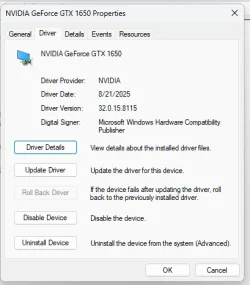
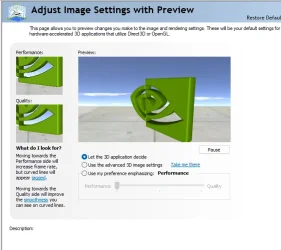
I'm running an i7, 32gb with an Nvidia GTX 1650 4GB with 581.15. I'm attempting to use this on MSFS 2024 and am getting some choppy performance during the opening scenes with this driver versus prior drivers. I'm also running 24H2 Beta Insider. I've little experience with MSFS

Could someone point me in the right direction and / or manage my expectations ? I have set MSFS to all default settings. Prior Nvidia drivers were nowhere near this choppy.
 

Attachments

  • Screenshot 2025-09-04 161933.webp
    Screenshot 2025-09-04 161933.webp
    23.2 KB · Views: 2
  • Screenshot 2025-09-04 162444.webp
    Screenshot 2025-09-04 162444.webp
    38.2 KB · Views: 2

My Computer My Computer

At a glance

windows 11 64i7-12700T32 GBNvidia GeForce 1650 / Intel 770
OS
windows 11 64
Computer type
PC/Desktop
Manufacturer/Model
HP
CPU
i7-12700T
Memory
32 GB
Graphics Card(s)
Nvidia GeForce 1650 / Intel 770
Screen Resolution
1920 / 1080
Hard Drives
Samsung 990 Pro 1TB
Case
All in One
Keyboard
USB
Mouse
USB
Internet Speed
600 MBS
Browser
Chrome
Antivirus
MS
Back
Top Bottom