Latest NVIDIA GeForce Graphics Drivers for Windows 11


Support has ended for Maxwell, Pascal, and Volta-series GeForce GPUs.

Support Plan for Maxwell, Pascal, and Volta-series GeForce GPUs

List of Maxwell, Pascal and Volta Series GeForce GPUs

GeForce 582.28 graphics driver as a security update released 1/29/2026 for Maxwell, Pascal, and Volta-series GeForce GPUs.


 NVIDIA App


Release Date: July 17, 2026

What's new in NVIDIA App 11.0.8

New Updates:

  • ShadowPlay 240 FPS Recording
    • The NVIDIA app now supports 240 FPS ShadowPlay recording, for GeForce RTX 50 and 40 Series GPUs, providing competitive gamers and creators with ultra-smooth, high-resolution source footage. Configure via Alt+Z > Settings > Video Capture
  • Control Panel Updates
    • Added features for users to confine the taskbar to a single display and maximize windows to all displays. Access via System > Displays > Surround
DLSS Override Support Added For :
  • ‘83
  • Active Matter
  • Bus Bound
  • Cthulhu: The Cosmic Abyss
  • Dawn of Defiance
  • Far Far West
  • INDUSTRIA 2
  • MONGIL: STAR DIVE
  • MOUSE: P.I. For Hire
  • NTE (Neverness to Everness)
  • PRAGMATA
  • Samson
  • Screamer
  • Subliminal
  • Sudden Strike 5
  • Twinmotion
  • Windrose
Optimal Settings Support Added For:
  • Cairn
  • Crimson Desert
  • DEATH STRANDING 2: ON THE BEACH
  • Marathon
  • Monster Hunter Stories 3: Twisted Reflection
  • Nioh 3
  • PRAGMATA
  • Quarantine Zone: The Last Check
  • Resident Evil Requiem
  • The Seven Deadly Sins: Origin
  • Windrose
Squashed Bugs:
  • Fixed an issue where Shadowplay recordings fail when game title contains special character
  • Various stability fixes to improve overall app reliability


 NVIDIA GeForce HOTFIX Driver (WHQL)

Version: 610.82
Release Date for Desktops and Notebooks: July 22, 2026


GeForce Hotfix Display Driver version 610.82 is based on our latest Game Ready Driver 610.74

This hotfix addresses the following:
  • [Halo: Campaign Evolved] Stability issues on GeForce RTX 50 series when using 610.xx drivers. [6259837]
  • [Path of Exile 2] Fixed intermittent long pauses that could occur after extended gameplay sessions in DX12 mode [5090018]
Click here to download the GeForce Hotfix display driver version 610.82 for Windows 10 x64 / Windows 11 x64


 NVIDIA GeForce GAME READY Driver (WHQL)


Version: 610.74
Release Date for Desktops and Notebooks: July 07, 2026

Desktop DCH: GEFORCE GAME READY DRIVER 64-bit Windows 10, Windows 11 Download

Notebook DCH: GEFORCE GAME READY DRIVER 64-bit Windows 10, Windows 11 Download

GeForce GRD 610.74 Feedback Thread

NVIDIA GeForce Driver Release Highlights

Game Ready Driver Release Notes (PDF)

Control Panel User's Guide (PDF)

Note: After 20 years of dedicated service, the classic NVIDIA Control Panel is officially retiring for Game Ready and Studio Drivers. For NVIDIA RTX PRO users, the NVIDIA Control Panel will continue to be supported until we have migrated professional features to the NVIDIA app.

Existing installs of the NVIDIA Control Panel will remain on users’ systems, unless they perform a clean installation, and users who still need the NVIDIA Control Panel can continue to download it from the Microsoft Store, but we won’t be adding features, fixes, or other changes.

The NVIDIA app contains all of the modern functionality of the NVIDIA Control Panel available for GeForce RTX GPUs, and much more, while running faster and more efficiently.

Game Ready for DOOM: The Dark Ages | Revelations
This new Game Ready Driver provides the best gaming experience for the latest new games supporting DLSS and RTX technologies including DOOM: The Dark Ages | Revelations and Assassin's Creed Black Flag Resynced.

Fixed Gaming Bugs
> N/A

Fixed General Bugs
> Tencent Meeting: Flickering may be observed when Smooth Motion is enabled globally [6329207]

Open Issues
> Prefer Maximum Performance” Power Management Mode may not be applied correctly [6007998]


 NVIDIA Studio DRIVER (WHQL)

Version: 610.62
Release Date for Desktops and Notebooks: June 16, 2026

Desktop DCH: GEFORCE GAME READY DRIVER 64-bit Windows 10, Windows 11 Download

Notebook DCH: GEFORCE GAME READY DRIVER 64-bit Windows 10, Windows 11 Download

NVIDIA Studio Driver Release Highlights

Studio Driver Release Notes (PDF)

Control Panel User's Guide (PDF)

Note: After 20 years of dedicated service, the classic NVIDIA Control Panel is officially retiring for Game Ready and Studio Drivers. For NVIDIA RTX PRO users, the NVIDIA Control Panel will continue to be supported until we have migrated professional features to the NVIDIA app.

Existing installs of the NVIDIA Control Panel will remain on users’ systems, unless they perform a clean installation, and users who still need the NVIDIA Control Panel can continue to download it from the Microsoft Store, but we won’t be adding features, fixes, or other changes.

The NVIDIA app contains all of the modern functionality of the NVIDIA Control Panel available for GeForce RTX GPUs, and much more, while running faster and more efficiently.

NVIDIA Studio Drivers provide artists, creators, and 3D developers the best performance and reliability when working with creative applications. To achieve the highest level of reliability, Studio Drivers undergo extensive testing against multi-app creator workflows and multiple revisions of the top creative applications from Adobe to Autodesk and beyond.

Applications

The June NVIDIA Studio Driver provides optimal support for the latest new creative applications and updates including NVIDIA Broadcast 2.2, Reallusion Character Creator 5.1, and the latest multi-GPU optimizations for llama.cpp and ComfyUI.

Fixed Application Bugs
> World of Warcraft: Gaming stability improvements [5563205]
> Apex Legends: Occasional visual corruption after extended gameplay [6239327]
> Users may observe DLSS settings being grayed out in certain games after updating to display driver 615.47 [6262805]
> Improved gaming stability in multi-monitor configurations when using V-SYNC with DLSS Frame Generation [6158481]
> Resolved an issue that could cause jittering or ghosting in some DirectX 11 games when Smooth Motion is enabled [5937897]
> Resolved an issue that could cause some games to crash when launched with Smooth Motion enabled [5466398]

Fixed General Bugs
> [Ada] Resolves a frame pacing issue on certain monitors when G-SYNC is enabled [6226972]
> Resolved an issue that prevented the EDID from being read on certain monitors causing them to be identified as "NVIDIA NV-Failsafe” [6005508]
> Resolved an issue where certain monitors would not wake from sleep mode [5806798/5635230]
> General stability improvements when the system fails to create a new allocation [5449920]

Open Issues
> “Prefer Maximum Performance” Power Management Mode may not be applied correctly [6007998]

 
Last edited:
I'm running an i7, 32gb with an Nvidia GTX 1650 4GB with 581.15. I'm attempting to use this on MSFS 2024 and am getting some choppy performance during the opening scenes with this driver versus prior drivers. I'm also running 24H2 Beta Insider. I've little experience with MSFS

Could someone point me in the right direction and / or manage my expectations ? I have set MSFS to all default settings. Prior Nvidia drivers were nowhere near this choppy.
most probably your graphics card is not powerful enough to play the Microsoft Flight Simulator 2024. if that is what your abbreviation is for sure.
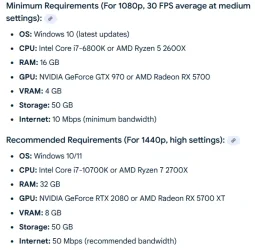
4GB if vRAM is not much..
that being said you mentioned you had it playing better before..?
4GB is the minimum according to a Google Search for this video game.
and 8GB is the recommended amount of vRAM..
1757029109928.webp
 

My Computers My Computers

  • At a glance

    Windows 11 Pro (x64)(v25H2)(26200.8894)AMD Ryzen 9 3900X 12-Core/24-threads64GB, 2x G.Skill 32GB (PC3200)(DDR4-2137)ASUS PRIME GeForce RTX 5070 12GB OC Edition, ...
    OS
    Windows 11 Pro (x64)(v25H2)(26200.8894)
    Computer type
    PC/Desktop
    Manufacturer/Model
    [Self-built](custom-build)(June 2020)
    CPU
    AMD Ryzen 9 3900X 12-Core/24-threads
    Motherboard
    Asus PRIME X570-PRO (BIOS_r5044 [01/04/2026])
    Memory
    64GB, 2x G.Skill 32GB (PC3200)(DDR4-2137)
    Graphics Card(s)
    ASUS PRIME GeForce RTX 5070 12GB OC Edition, GPU by NVIDIA.
    Sound Card
    Realtek® ALC1220A 8-Channel High Definition Audio CODEC
    Monitor(s) Displays
    24" DELL Gaming Monitor - G2422HS - DisplayPort used
    Screen Resolution
    1920x1080p at 165Hz (16:9 Aspect Ratio)
    Hard Drives
    2TB Samsung 980 Pro (NVMe)(SSD)
    4TB Samsung 990 Pro (NVMe)(SSD)
    2TB Samsung 870 EVO (SSD)

    NVMe 2TB
    -- OS(Win11 Pro x64),
    -- programs,
    -- programming(MS Visual Studios 2022 Community Ed.),
    -- music

    NVMe 4TB
    video game installs.

    #3 FILE Server!
    PSU
    Thermaltake TOUGHPOWER DPS G RGB Titanium Certified 1250Watt
    Case
    Corsair Graphite Series 780T Full Tower PC Case
    Cooling
    AMD Wraith cooler (stock) & 3x Corsair case fans
    Keyboard
    Redragon K580 VATA RGB LED Backlit Mechanical Gaming Keyboard (brown switches).
    Mouse
    Redragon M602 RGB Wired USB Gaming mouse
    Internet Speed
    2,100Mbps Download, 300Mbps Upload
    Browser
    Firefox & Google Chrome
    Antivirus
    n/a aka "ABOVE TOP SECRET!" lol ;)
    Other Info
    My System is the ULTIMATE GAMING RIG ^_^
    TP-Link BE9300 Tri-Band Wi-Fi 7 Wireless 2.5Gigabit Router
    Model Archer BE550 (v1.0)
    Arris S34 Cable Modem

    printer/scanner/copier: Brother DCP-7065DN

    Nvidia GFX Drivers: (v610.74)
    Realtek UAD Drivers: (v6.0.10010.1)
    Realtek LAN Drivers:(v1125.30.50.508)(2026-06-21)
    Intel LAN Drivers: (v14.01.24.00)(2025-10-03)
  • At a glance

    Windows 11 Pro x64AMD Ryzen 7 5800H32GB GSkill DDR4 2x 16GB sticksRyzen 7 5800H integrated AMD Radeon Graphics ...
    Operating System
    Windows 11 Pro x64
    Computer type
    Laptop
    Manufacturer/Model
    DELL G15 Ryzen edition, model 5515
    CPU
    AMD Ryzen 7 5800H
    Motherboard
    DELL G15 Ryzen edition
    Memory
    32GB GSkill DDR4 2x 16GB sticks
    Graphics card(s)
    Ryzen 7 5800H integrated AMD Radeon Graphics and Nvidia GeForce 3060 6GB
    Sound Card
    Realtek ALC3254 with Nahimic 3D Audio for Gamers
    Monitor(s) Displays
    built-in
    Screen Resolution
    1920x1080
    Hard Drives
    512GB NVMe SSD, 1TB Samsung 970 EVO NVMe SSD
    PSU
    unknown
    Case
    laptop
    Keyboard
    built-in
    Mouse
    Logitech B100 USB
    Internet Speed
    2,100Mbps download, 300Mbps upload
    Browser
    Firefox & Google Chrome
581.15 installed and in low and no performance temp. about 40 st. C., min 36/37 and max on graphics application only max 52 with 2 monitors. Not tested on game but in log isn't wrong. Q1000 unlock Cuda but still testing (phisical is assets). On first installation one vertical belt in application window about 2 or 3 times, but now is clear. In stress about 68 st. C. with 3 monitor's attached (in core are upper). Win 11 26100.5074. Now Stable. Just only crashed app but maybe is block in systems permission. Regards Peter
 

My Computer My Computer

At a glance

Windows 11 Pro 24H2; Linux Fedora & MandrivaIntel else last AMD & Atmel & ARMAbout 16 GBQ1000
OS
Windows 11 Pro 24H2; Linux Fedora & Mandriva
Computer type
Laptop
Manufacturer/Model
Lenovo P52 & else
CPU
Intel else last AMD & Atmel & ARM
Motherboard
Lastes Gigabyte for AMD Phenom
Memory
About 16 GB
Graphics Card(s)
Q1000
Sound Card
Atmos Surraund
Monitor(s) Displays
... more
Screen Resolution
2K
Hard Drives
Few
Cooling
Everything except grandfather.
Keyboard
About 17x reinstalling Win95 but is nothing with drivers for Igle Printers after school :(
Mouse
This Topic is "For Exclusive" but i have few ;)
Internet Speed
~30 to 150 Mbps
Browser
soon if is necessary
Antivirus
Not have, and not won, past time (Norton, Avast, Microsoft)
Other Info
Start about 2002 on XP and just play on Windows 95 and remember ZX Spectrum
I still have the brightness bug in 581.15 that was introduced in 580.88.
Reverting back to 577.00 fixes the problem, but I don't see that as a long term solution.
 

My Computers My Computers

  • At a glance

    Windows 11 ProIntel Core i9-10900XCorsair 64 GB (4 x 16 GB) CMW64GX4M4C3000C15 ...GIGABYTE GeForce GTX 1660 Super Mini ITX 6 GB OC
    OS
    Windows 11 Pro
    Computer type
    PC/Desktop
    Manufacturer/Model
    Stigg's Build
    CPU
    Intel Core i9-10900X
    Motherboard
    GIGABYTE X299X DESIGNARE 10G
    Memory
    Corsair 64 GB (4 x 16 GB) CMW64GX4M4C3000C15 Vengeance RGB Pro 3000Mhz DDR4
    Graphics Card(s)
    GIGABYTE GeForce GTX 1660 Super Mini ITX 6 GB OC
    Sound Card
    Realtek ALC1220
    Monitor(s) Displays
    Samsung 27" FHD LED FreeSync Gaming Monitor (LS27F350FHEXXY)
    Screen Resolution
    1920 x 1080
    Hard Drives
    Samsung 970 Pro Series 1TB M.2 2280 NVMe SSD
    Western Digital Red Pro WD8003FFBX-68B9AN0 8 TB, 7200 RPM, SATA-III
    Western Digital Red Pro WD8003FFBX-68B9AN0 8 TB, 7200 RPM, SATA-III
    PSU
    Corsair HX1200 1200W 80 Plus Platinum
    Case
    Fractal Design Define 7 Black Solid Case
    Cooling
    Noctua NH-D15 Chromax Black
    Keyboard
    Razer Ornata V2
    Mouse
    Razer DeathAdder Essential
    Internet Speed
    FTTN 100Mbps / 40Mbps
    Browser
    Mozilla Firefox
    Antivirus
    N/A
    Other Info
    Logitech BRIO 4k Ultra HD USB-C Webcam
  • At a glance

    Windows 10 ProCore i7-8750HSK Hynix 32 GB (2 x 16 GB) HMA82GS6CJR8N-VK 1...NVIDIA GeForce GTX 1070
    Operating System
    Windows 10 Pro
    Computer type
    Laptop
    Manufacturer/Model
    ASUS ROG Zephyrus M GM501GS
    CPU
    Core i7-8750H
    Motherboard
    Zephyrus M GM501GS
    Memory
    SK Hynix 32 GB (2 x 16 GB) HMA82GS6CJR8N-VK 16 GB DDR4-2666 DDR4 SDRAM
    Graphics card(s)
    NVIDIA GeForce GTX 1070
    Sound Card
    Realtek ALC294
    Monitor(s) Displays
    AU Optronics B156HAN07.1 [15.6" LCD]
    Screen Resolution
    1920 x 1080
    Hard Drives
    Samsung MZVKW512HMJP-00000 512 GB, PCI-E 3.0 x4
    Samsung SSD 860 QVO 4TB 4 TB, SATA-III
    PSU
    N/A
    Case
    N/A
    Cooling
    N/A
    Keyboard
    PC/AT Enhanced PS2 Keyboard (101/102-Key)
    Mouse
    Razer DeathAdder Essential
    Internet Speed
    FTTN 100Mbps / 40Mbps
    Browser
    Mozilla Firefox
    Antivirus
    N/A
    Other Info
    USB2.0 HD UVC Webcam
GeForce Game Ready Driver 581.29 (WHQL) Wed Sep 10, 2025

Game Ready for Borderlands 4 and Dying Light: The Beast


This new Game Ready Driver provides the best gaming experience for the latest new games supporting DLSS 4 technology including Borderlands 4 and Dying Light: The Beast.

Fixed Gaming Bugs
  • Marvel Rivals: Negative performance impact when using some 581.xx drivers [5444816]
Fixed General Bugs
  • N/A
Applications
The September NVIDIA Studio Driver provides optimal support for the latest new creative applications and updates including support for Microsoft TRELLIS NIM, providing optimized performance on RTX GPUs.

Fixed Application Bugs
  • Cyberpunk 2077: Crash when using Photo Mode to take a screenshot with path tracing enabled [5076545]
  • Marvel Rivals: Negative performance impact when using some 581.xx drivers [5444816]
  • Forza Motorsport: Game crashes if using Smooth Motion while bringing up NVIDIA App overlay statistics [5412757]
  • Gray Zone Warfare: Game stability issues [5371781]
  • ARK: Survival Ascended: Game stability issues [5441616]
  • Marvel's Avengers - The Definitive Edition: Game crashes to desktop on startup [5350712]
Fixed General Bugs
  • Potential memory leak when using NVENC hardware encoding [5442678]
  • Power cycling monitor can result in monitor flickering when NVIDIA App is installed [5434811]
  • NVIDIA App game filter issues after driver update [5429651]
  • Certain monitors may display a random flicker when hot plugged over HDMI [5280259]
GeForce Game Ready Driver
NVIDIA Studio Driver
Notebook
 

My Computer My Computer

At a glance

Windows 11 ProIntel Core i9 12900KFCorsair 64GB DDR5 Vengeance C40 5200MhzASUS GeForce RTX 3090 ROG Strix OC 24GB
OS
Windows 11 Pro
Computer type
PC/Desktop
Manufacturer/Model
Custom Build
CPU
Intel Core i9 12900KF
Motherboard
ASUS ROG Maximus Z690 Hero
Memory
Corsair 64GB DDR5 Vengeance C40 5200Mhz
Graphics Card(s)
ASUS GeForce RTX 3090 ROG Strix OC 24GB
Sound Card
OnBoard
Monitor(s) Displays
Acer Predator XB323UGP 32" QHD G-SYNC-C 144Hz 1MS IPS LED
Screen Resolution
2560 x 1440
Hard Drives
1x Samsung 980 Pro Series Gen4 250GB M.2 NVMe
1x Samsung 980 Pro Series Gen4 500GB M.2 NVMe
2x Samsung 980 Pro Series Gen4 2TB M.2 NVMe
PSU
Corsair AX1200i 1200W 80PLUS Titanium Modular
Case
Corsair 4000D Black Case w/ Tempered Glass Side Panel
Cooling
Noctua NH-U12A Chromax Black CPU Cooler, 4x Noctua 120mm Fans
Keyboard
Logitech MK545
Mouse
Logitech MX Master 3
Internet Speed
Fixed Wireless 150mbps/75mbps
Browser
Firefox
Antivirus
Kaspersky
Other Info
Thrustmaster TS-PC RACER
Fanatec CSL Elite Pedals with the Load Cell Kit
Yamaha Amp with Bose Speakers
On 09/10/2025 NVIDIA Game ready Driver 581.29 installed on Canary Build 27938.1 without hanging on a black screen like previous versions.
I hope this annoying problem is finally fixed. 🤞

1757531031042.webp
 
Last edited:

My Computer My Computer

At a glance

Windows 11 Pro 25H2Intel I9-9900K64GBNVIDIA RTX 2060
OS
Windows 11 Pro 25H2
Computer type
PC/Desktop
Manufacturer/Model
Dell XPS 8930
CPU
Intel I9-9900K
Memory
64GB
Graphics Card(s)
NVIDIA RTX 2060
Sound Card
NVIDIA High Definition Audio
Monitor(s) Displays
4k Samsung
Screen Resolution
3840 x 2160
Hard Drives
512GB NVMe, ADATA SU 800, 2TB HDD
I installed v581.29as soon as Wolfzz posted the release news.
installed fine no issues to report yet.
grabbing it again this time for my Dell gaming laptop.
 

My Computers My Computers

  • At a glance

    Windows 11 Pro (x64)(v25H2)(26200.8894)AMD Ryzen 9 3900X 12-Core/24-threads64GB, 2x G.Skill 32GB (PC3200)(DDR4-2137)ASUS PRIME GeForce RTX 5070 12GB OC Edition, ...
    OS
    Windows 11 Pro (x64)(v25H2)(26200.8894)
    Computer type
    PC/Desktop
    Manufacturer/Model
    [Self-built](custom-build)(June 2020)
    CPU
    AMD Ryzen 9 3900X 12-Core/24-threads
    Motherboard
    Asus PRIME X570-PRO (BIOS_r5044 [01/04/2026])
    Memory
    64GB, 2x G.Skill 32GB (PC3200)(DDR4-2137)
    Graphics Card(s)
    ASUS PRIME GeForce RTX 5070 12GB OC Edition, GPU by NVIDIA.
    Sound Card
    Realtek® ALC1220A 8-Channel High Definition Audio CODEC
    Monitor(s) Displays
    24" DELL Gaming Monitor - G2422HS - DisplayPort used
    Screen Resolution
    1920x1080p at 165Hz (16:9 Aspect Ratio)
    Hard Drives
    2TB Samsung 980 Pro (NVMe)(SSD)
    4TB Samsung 990 Pro (NVMe)(SSD)
    2TB Samsung 870 EVO (SSD)

    NVMe 2TB
    -- OS(Win11 Pro x64),
    -- programs,
    -- programming(MS Visual Studios 2022 Community Ed.),
    -- music

    NVMe 4TB
    video game installs.

    #3 FILE Server!
    PSU
    Thermaltake TOUGHPOWER DPS G RGB Titanium Certified 1250Watt
    Case
    Corsair Graphite Series 780T Full Tower PC Case
    Cooling
    AMD Wraith cooler (stock) & 3x Corsair case fans
    Keyboard
    Redragon K580 VATA RGB LED Backlit Mechanical Gaming Keyboard (brown switches).
    Mouse
    Redragon M602 RGB Wired USB Gaming mouse
    Internet Speed
    2,100Mbps Download, 300Mbps Upload
    Browser
    Firefox & Google Chrome
    Antivirus
    n/a aka "ABOVE TOP SECRET!" lol ;)
    Other Info
    My System is the ULTIMATE GAMING RIG ^_^
    TP-Link BE9300 Tri-Band Wi-Fi 7 Wireless 2.5Gigabit Router
    Model Archer BE550 (v1.0)
    Arris S34 Cable Modem

    printer/scanner/copier: Brother DCP-7065DN

    Nvidia GFX Drivers: (v610.74)
    Realtek UAD Drivers: (v6.0.10010.1)
    Realtek LAN Drivers:(v1125.30.50.508)(2026-06-21)
    Intel LAN Drivers: (v14.01.24.00)(2025-10-03)
  • At a glance

    Windows 11 Pro x64AMD Ryzen 7 5800H32GB GSkill DDR4 2x 16GB sticksRyzen 7 5800H integrated AMD Radeon Graphics ...
    Operating System
    Windows 11 Pro x64
    Computer type
    Laptop
    Manufacturer/Model
    DELL G15 Ryzen edition, model 5515
    CPU
    AMD Ryzen 7 5800H
    Motherboard
    DELL G15 Ryzen edition
    Memory
    32GB GSkill DDR4 2x 16GB sticks
    Graphics card(s)
    Ryzen 7 5800H integrated AMD Radeon Graphics and Nvidia GeForce 3060 6GB
    Sound Card
    Realtek ALC3254 with Nahimic 3D Audio for Gamers
    Monitor(s) Displays
    built-in
    Screen Resolution
    1920x1080
    Hard Drives
    512GB NVMe SSD, 1TB Samsung 970 EVO NVMe SSD
    PSU
    unknown
    Case
    laptop
    Keyboard
    built-in
    Mouse
    Logitech B100 USB
    Internet Speed
    2,100Mbps download, 300Mbps upload
    Browser
    Firefox & Google Chrome
581.15 installed and in low and no performance temp. about 40 st. C., min 36/37 and max on graphics application only max 52 with 2 monitors. Not tested on game but in log isn't wrong. Q1000 unlock Cuda but still testing (phisical is assets). On first installation one vertical belt in application window about 2 or 3 times, but now is clear. In stress about 68 st. C. with 3 monitor's attached (in core are upper). Win 11 26100.5074. Now Stable. Just only crashed app but maybe is block in systems permission. Regards Peter
 

Attachments

  • Zrzut ekranu 2025-08-29 154638.webp
    Zrzut ekranu 2025-08-29 154638.webp
    126 KB · Views: 2
  • Zrzut ekranu 2025-08-29 155342.webp
    Zrzut ekranu 2025-08-29 155342.webp
    98.8 KB · Views: 2

My Computer My Computer

At a glance

Windows 11 Pro 24H2; Linux Fedora & MandrivaIntel else last AMD & Atmel & ARMAbout 16 GBQ1000
OS
Windows 11 Pro 24H2; Linux Fedora & Mandriva
Computer type
Laptop
Manufacturer/Model
Lenovo P52 & else
CPU
Intel else last AMD & Atmel & ARM
Motherboard
Lastes Gigabyte for AMD Phenom
Memory
About 16 GB
Graphics Card(s)
Q1000
Sound Card
Atmos Surraund
Monitor(s) Displays
... more
Screen Resolution
2K
Hard Drives
Few
Cooling
Everything except grandfather.
Keyboard
About 17x reinstalling Win95 but is nothing with drivers for Igle Printers after school :(
Mouse
This Topic is "For Exclusive" but i have few ;)
Internet Speed
~30 to 150 Mbps
Browser
soon if is necessary
Antivirus
Not have, and not won, past time (Norton, Avast, Microsoft)
Other Info
Start about 2002 on XP and just play on Windows 95 and remember ZX Spectrum
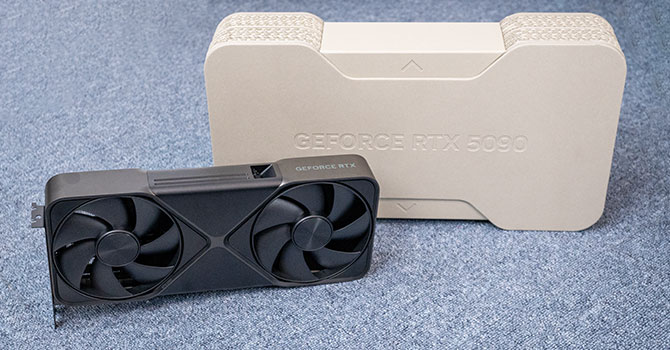
Yes, Nvidia doesn't have a OEM division - they always used third-party manufacturers for production and assembly (from what i could find online, for the FE cards - they use Foxconn). Unlike Dell or PNY - who have their own OEM manufacturing & assembly lines. RTX 5090 FE also has a Boost-Clock (which is technically OC) - from 2017 (default) to 2407 MHz (OC) - but this OC is part of the reference info - and the lowest OC - which can be seen at the cheapest cards (quite ironic - this being the most expensive cards for the consumer market). But again, as mentioned above - despite the low OC - FE has a really mediocre cooling solution (if not the worst).

cooler-performance-comparison-gpu.png

cooler-performance-comparison-mem.png


Dell is also infamous for having one the worst OEM divisions - for High End Desktops, as in - they offer some of the worst cooling solutions (bare minimum) - for products sold at the highest price. They even bought Alienware and ruined it in same way (premium price - mediocre product). Yet another irony - since Alienware was a brand who aimed to offer both aesthetics and the highest performance (using the top products on the market - at that time). Dell kept the premium price - but what they offered for 5.000$ - was the highest form of disrespect for their clients:


And i expect the same from that Dell NVIDIA® RTX™ A800: what you see in the commercial picture - is exactly what you're gonna get - a 21.000$ product that struggles with thermal throttling - simply because they didn't bother to include a premium cooling solution. Depending on the region you live in - you might also end-up with some of the worst costumer support.

=====

BTW, Drivers Wise - that OEM reference - is mainly relevant to Notebooks and rarely to desktops (some modified PCB - to fit a small case). As can be seen in Nvidia's release highlights:

"Although GeForce Game Ready Drivers and NVIDIA Studio Drivers can be installed on supported notebook GPUs, the original equipment manufacturer (OEM) provides certified drivers for your specific notebook on their website. NVIDIA recommends that you check with your notebook OEM for recommended software updates for your notebook."


Interesting, the cooling sounds similar to how AMD/Intel retail box CPU's with the stock heatsink fan as it will not give the best cooling performance compared to the aftermarket. Does anyone make a high-end performance notebook that actually has a 4K OLED Touch display that supports a high maximum ram and at least 2 SSD storage options?

For Dell, I never knew they actually OEM their own cards since I always thought they still buy from MSI or some other brand and just resell them under their own name. XPS (eXtreme Performance System) was Dell's product that competed with Alienware but seems like XPS is also a lower end product than before they bought Alienware.

As for the drivers, you are correct because in the older days which was how we started laptopvideo2go as the NVIDIA drivers did not support notebook's as there was no reference in the .inf's until it was modified which was what my friend's did on laptopvideo2go. But later on, they started having a notebook version of each driver which from what others have said, the notebook and desktop drivers are 100% identical which is why the hotfixes only has one version that works for both.
 

My Computer My Computer

At a glance

WindowsXP/7/8/8.1/10/11,Linux,Android,FreeBSD...Intel® Core™ i7-8750H 8th Gen 2.2Ghz up to 4....64GB using 2x32GB CL16 Mushkin redLine modulesIntel UHD 630 & NVIDIA GeForce GTX 1050 Ti wi...
OS
WindowsXP/7/8/8.1/10/11,Linux,Android,FreeBSD Unix
Computer type
Laptop
Manufacturer/Model
Dell XPS 15 9570
CPU
Intel® Core™ i7-8750H 8th Gen 2.2Ghz up to 4.1Ghz
Motherboard
Dell XPS 15 9570
Memory
64GB using 2x32GB CL16 Mushkin redLine modules
Graphics Card(s)
Intel UHD 630 & NVIDIA GeForce GTX 1050 Ti with 4GB DDR5
Sound Card
Realtek ALC3266-CG
Monitor(s) Displays
15.6" 4K Touch UltraHD 3840x2160 made by Sharp
Screen Resolution
3840x2160 4K UltraHD
Hard Drives
Samsung MZ-V9P4T0B/AM 990 PRO 4TB PCIe®4.0 NVMe™ M.2 SSD was Toshiba KXG60ZNV1T02 NVMe 1TB SSD
PSU
Dell XPS 15 9570
Case
Dell XPS 15 9570
Cooling
Stock
Keyboard
Stock
Mouse
SwitftPoint ProPoint
Internet Speed
Comcast/XFinity 1.44Gbps/42.5Mbps
Browser
Microsoft EDGE (Chromium based) & Google Chrome
Antivirus
Windows Defender that came with Windows
Does anyone make a high-end performance notebook that actually has a 4K OLED Touch display that supports a high maximum ram and at least 2 SSD storage options?

Multiple OEMs offer this option for quite awhile now - usually with their Studio Models (gamers don't care about touch screen). You might find even a Dell XPS with one - tho, i'd keep away from Dell since you pay more for the brand than what the product has to offer. As in... a Dell with OLED 4K Touchscreen - with mid range (if not lower) GPU - even older generation (cleaning their old stock). Or, has a RTX 5080 but IPS screen - but still priced similar (if not higher) with other brands who offer both options at this price. Dell was and still remains - one of the shadiest brands (charging you more for less - if not far less).

OFC, every product has Pros and Cons - but at least with other brands you sort of (high end models are usually overpriced) - get what you pay for (again, sort of - as in - not getting scammed at Dell level). That being said.... ASUS ProArt Studiobook line - usually has such option. For example - here's a review from someone - after trying it 9 months latter (so you get a more realistic opinion on Pros and cons).


HP is yet another brand that's hit or miss (rarely a hit). They have multiple models with 4K OLED Touch Screen - from the HP Spectre x360 line - but most of them have integrated or entry level GPU (like RTX 4050). Which at launch were priced around or above 2K. Also single M.2 slots and max 32 GB Ram (to be fair - for this entry level specs besides the display - 32 GB should suffice). Rather low quality too - as can be seen among the reviews.

Side Note: Starting this year most OEMs - seem to prefer Mini-LED over OLED for their High End laptops.

As for the drivers, you are correct because in the older days which was how we started laptopvideo2go as the NVIDIA drivers did not support notebook's as there was no reference in the .inf's until it was modified which was what my friend's did on laptopvideo2go. But later on, they started having a notebook version of each driver which from what others have said, the notebook and desktop drivers are 100% identical which is why the hotfixes only has one version that works for both.

Well, at least Nvidia drivers were functional - cause around a decade ago ATi/AMD was a mess at developing functional and/or stable laptop drivers. And since OEMs didn't bother to update their drivers - if using OEM drivers - you'd be stuck with only the iGPU being usable on a laptop with dedicated GPU (which was at least $200+ more expensive - than a similar latop with same specs - minus the dedicated GPU). And yes, Nvidia Desktop & Notebook drivers - use the same driver package (meaning - they're both packed together - but install individually depending on detected GPU - as pointed out by the hardware IDs). Would be really bad - if a laptop GPU was identified as a desktop GPU:

Why is RTX 5070 better than RTX 5080 Laptop?​

  • 1355 MHz faster GPU clock speed
    2330 MHz vs 975 MHz
  • 7.8 TFLOPS higher floating-point performance
    30.84 TFLOPS vs 23.04 TFLOPS
  • 56.8 GPixel/s higher pixel rate
    200.8 GPixel/s vs 144 GPixel/s
  • 97.9 GTexels/s higher texture rate
    481.9 GTexels/s vs 384 GTexels/s
  • 2600 MHz higher effective memory clock speed
    28000 MHz vs 25400 MHz
  • 1010 MHz faster GPU turbo speed
    2510 MHz vs 1500 MHz
  • Has an HDMI output

Pretty sure it would fry it faster than it can thermal throttle (probably won't even have the time to trigger it - due to high risk voltage).
 

My Computer My Computer

At a glance

WinDOS 25H2Intel & AMDSO-DIMM SK Hynix 15.8 GB Dual-Channel DDR4-26...nVidia RTX 2060 6GB Mobile GPU (TU106M)
OS
WinDOS 25H2
Computer type
Laptop
CPU
Intel & AMD
Memory
SO-DIMM SK Hynix 15.8 GB Dual-Channel DDR4-2666 (2 x 8 GB) 1329MHz (19-19-19-43)
Graphics Card(s)
nVidia RTX 2060 6GB Mobile GPU (TU106M)
Sound Card
Onbord Realtek ALC1220
Screen Resolution
1920 x 1080
Hard Drives
1x Samsung PM981 NVMe PCIe M.2 512GB / 1x Seagate Expansion ST1000LM035 1TB
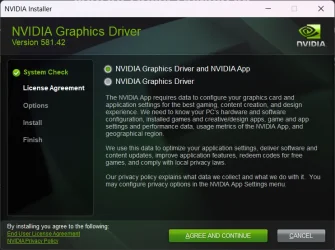
GeForce Game Ready Driver 581.42 (WHQL) Sep 30, 2025

This driver offers the best gaming experience for Battlefield 6 and FBC: Firebreak (DLSS 4 technology).

Fixed Gaming Bugs


Battlefield 2042: Increased GPU Crashing when calling CDXGISwapChain::Present() [5446395]

Forza Horizon 4: light flickering on RTX 50 series [5404555]
Planet Coaster 2: crashes after driver update [5447412]
FPS significantly drops when using Smooth Motion with RivaTuner FPS cap [5476266]
R580 drivers causing stuttering in games using GODOT engine [5466820]

Fixed General Bugs

Adobe After Effects / Premiere Pro: crash on launch when Smooth Motion is enabled globally [5515256]
Adobe Premiere Pro: Some system configurations can freeze during export using hardware encoding [5431822]
When Video Noise Reduction is enabled the chroma is grayscale [5401959]

Open Issues

Counter-Strike 2: Text may appear slightly distorted when in-game resolution is lower than the native resolution of the display [5278913]
Like a Dragon: Infinite Wealth: Light flickering after driver update on some system configurations [5432356]

GeForce Game Ready Driver
Notebook
 
Last edited:

My Computer My Computer

At a glance

Windows 11 ProIntel Core i9 12900KFCorsair 64GB DDR5 Vengeance C40 5200MhzASUS GeForce RTX 3090 ROG Strix OC 24GB
OS
Windows 11 Pro
Computer type
PC/Desktop
Manufacturer/Model
Custom Build
CPU
Intel Core i9 12900KF
Motherboard
ASUS ROG Maximus Z690 Hero
Memory
Corsair 64GB DDR5 Vengeance C40 5200Mhz
Graphics Card(s)
ASUS GeForce RTX 3090 ROG Strix OC 24GB
Sound Card
OnBoard
Monitor(s) Displays
Acer Predator XB323UGP 32" QHD G-SYNC-C 144Hz 1MS IPS LED
Screen Resolution
2560 x 1440
Hard Drives
1x Samsung 980 Pro Series Gen4 250GB M.2 NVMe
1x Samsung 980 Pro Series Gen4 500GB M.2 NVMe
2x Samsung 980 Pro Series Gen4 2TB M.2 NVMe
PSU
Corsair AX1200i 1200W 80PLUS Titanium Modular
Case
Corsair 4000D Black Case w/ Tempered Glass Side Panel
Cooling
Noctua NH-U12A Chromax Black CPU Cooler, 4x Noctua 120mm Fans
Keyboard
Logitech MK545
Mouse
Logitech MX Master 3
Internet Speed
Fixed Wireless 150mbps/75mbps
Browser
Firefox
Antivirus
Kaspersky
Other Info
Thrustmaster TS-PC RACER
Fanatec CSL Elite Pedals with the Load Cell Kit
Yamaha Amp with Bose Speakers
Multiple OEMs offer this option for quite awhile now - usually with their Studio Models (gamers don't care about touch screen). You might find even a Dell XPS with one - tho, i'd keep away from Dell since you pay more for the brand than what the product has to offer. As in... a Dell with OLED 4K Touchscreen - with mid range (if not lower) GPU - even older generation (cleaning their old stock). Or, has a RTX 5080 but IPS screen - but still priced similar (if not higher) with other brands who offer both options at this price. Dell was and still remains - one of the shadiest brands (charging you more for less - if not far less).

OFC, every product has Pros and Cons - but at least with other brands you sort of (high end models are usually overpriced) - get what you pay for (again, sort of - as in - not getting scammed at Dell level). That being said.... ASUS ProArt Studiobook line - usually has such option. For example - here's a review from someone - after trying it 9 months latter (so you get a more realistic opinion on Pros and cons).


HP is yet another brand that's hit or miss (rarely a hit). They have multiple models with 4K OLED Touch Screen - from the HP Spectre x360 line - but most of them have integrated or entry level GPU (like RTX 4050). Which at launch were priced around or above 2K. Also single M.2 slots and max 32 GB Ram (to be fair - for this entry level specs besides the display - 32 GB should suffice). Rather low quality too - as can be seen among the reviews.

Side Note: Starting this year most OEMs - seem to prefer Mini-LED over OLED for their High End laptops.


Well, at least Nvidia drivers were functional - cause around a decade ago ATi/AMD was a mess at developing functional and/or stable laptop drivers. And since OEMs didn't bother to update their drivers - if using OEM drivers - you'd be stuck with only the iGPU being usable on a laptop with dedicated GPU (which was at least $200+ more expensive - than a similar latop with same specs - minus the dedicated GPU). And yes, Nvidia Desktop & Notebook drivers - use the same driver package (meaning - they're both packed together - but install individually depending on detected GPU - as pointed out by the hardware IDs). Would be really bad - if a laptop GPU was identified as a desktop GPU:

Why is RTX 5070 better than RTX 5080 Laptop?​

  • 1355 MHz faster GPU clock speed
    2330 MHz vs 975 MHz
  • 7.8 TFLOPS higher floating-point performance
    30.84 TFLOPS vs 23.04 TFLOPS
  • 56.8 GPixel/s higher pixel rate
    200.8 GPixel/s vs 144 GPixel/s
  • 97.9 GTexels/s higher texture rate
    481.9 GTexels/s vs 384 GTexels/s
  • 2600 MHz higher effective memory clock speed
    28000 MHz vs 25400 MHz
  • 1010 MHz faster GPU turbo speed
    2510 MHz vs 1500 MHz
  • Has an HDMI output

Pretty sure it would fry it faster than it can thermal throttle (probably won't even have the time to trigger it - due to high risk voltage).
Sorry for the late response as I am busy fixing my Dell with software updates in general since the motherboard capacitor burned and killed the motherboard and have had the new motherboard for a few months. I had never actually used the touch screen but just curious who even makes a 4K Touch screen as it seems the newer Dell's have been 3.9K and no longer 4K, the ASUS Studio models are 3.2K and not 4K either so it's a downgrade when I am already on a 4K screen. This ASUS is supposed to be the highest end for specs https://shop.asus.com/us/90nr0m66-m...8_1759227620_650387b35b17d29fc5e861b718412404 but the display is basically 2.5K. Not sure if the Lenovo ThinkPad's P's are supposed to be made better or not. Price is not an issue since I just want the best when it comes to performance as even a $10K machine is literally 20 minutes of income. Mini-LED is a option too, basically I meant high end screen since I am not sure what type of display is the 4K used on the Dell XPS 15 9570 is but I just know it's a touch 4K screen made by Sharp.
 

My Computer My Computer

At a glance

WindowsXP/7/8/8.1/10/11,Linux,Android,FreeBSD...Intel® Core™ i7-8750H 8th Gen 2.2Ghz up to 4....64GB using 2x32GB CL16 Mushkin redLine modulesIntel UHD 630 & NVIDIA GeForce GTX 1050 Ti wi...
OS
WindowsXP/7/8/8.1/10/11,Linux,Android,FreeBSD Unix
Computer type
Laptop
Manufacturer/Model
Dell XPS 15 9570
CPU
Intel® Core™ i7-8750H 8th Gen 2.2Ghz up to 4.1Ghz
Motherboard
Dell XPS 15 9570
Memory
64GB using 2x32GB CL16 Mushkin redLine modules
Graphics Card(s)
Intel UHD 630 & NVIDIA GeForce GTX 1050 Ti with 4GB DDR5
Sound Card
Realtek ALC3266-CG
Monitor(s) Displays
15.6" 4K Touch UltraHD 3840x2160 made by Sharp
Screen Resolution
3840x2160 4K UltraHD
Hard Drives
Samsung MZ-V9P4T0B/AM 990 PRO 4TB PCIe®4.0 NVMe™ M.2 SSD was Toshiba KXG60ZNV1T02 NVMe 1TB SSD
PSU
Dell XPS 15 9570
Case
Dell XPS 15 9570
Cooling
Stock
Keyboard
Stock
Mouse
SwitftPoint ProPoint
Internet Speed
Comcast/XFinity 1.44Gbps/42.5Mbps
Browser
Microsoft EDGE (Chromium based) & Google Chrome
Antivirus
Windows Defender that came with Windows
GeForce Game Ready Driver 581.42 (WHQL) Sep 30, 2025

This driver offers the best gaming experience for Battlefield 6 and FBC: Firebreak (DLSS 4 technology).

Fixed Gaming Bugs


Battlefield 2042: Increased GPU Crashing when calling CDXGISwapChain::Present() [5446395]

Forza Horizon 4: light flickering on RTX 50 series [5404555]
Planet Coaster 2: crashes after driver update [5447412]
FPS significantly drops when using Smooth Motion with RivaTuner FPS cap [5476266]
R580 drivers causing stuttering in games using GODOT engine [5466820]

Fixed General Bugs

Adobe After Effects / Premiere Pro: crash on launch when Smooth Motion is enabled globally [5515256]
Adobe Premiere Pro: Some system configurations can freeze during export using hardware encoding [5431822]
When Video Noise Reduction is enabled the chroma is grayscale [5401959]

Open Issues

Counter-Strike 2: Text may appear slightly distorted when in-game resolution is lower than the native resolution of the display [5278913]
Like a Dragon: Infinite Wealth: Light flickering after driver update on some system configurations [5432356]

LINKS COMING SHORTLY
Try this for the links, I just used their format from the previous drivers for the URL:
Release Notes:
Desktop Drivers
Notebook Drivers
1759231994840.webp
 
Last edited:

My Computer My Computer

At a glance

WindowsXP/7/8/8.1/10/11,Linux,Android,FreeBSD...Intel® Core™ i7-8750H 8th Gen 2.2Ghz up to 4....64GB using 2x32GB CL16 Mushkin redLine modulesIntel UHD 630 & NVIDIA GeForce GTX 1050 Ti wi...
OS
WindowsXP/7/8/8.1/10/11,Linux,Android,FreeBSD Unix
Computer type
Laptop
Manufacturer/Model
Dell XPS 15 9570
CPU
Intel® Core™ i7-8750H 8th Gen 2.2Ghz up to 4.1Ghz
Motherboard
Dell XPS 15 9570
Memory
64GB using 2x32GB CL16 Mushkin redLine modules
Graphics Card(s)
Intel UHD 630 & NVIDIA GeForce GTX 1050 Ti with 4GB DDR5
Sound Card
Realtek ALC3266-CG
Monitor(s) Displays
15.6" 4K Touch UltraHD 3840x2160 made by Sharp
Screen Resolution
3840x2160 4K UltraHD
Hard Drives
Samsung MZ-V9P4T0B/AM 990 PRO 4TB PCIe®4.0 NVMe™ M.2 SSD was Toshiba KXG60ZNV1T02 NVMe 1TB SSD
PSU
Dell XPS 15 9570
Case
Dell XPS 15 9570
Cooling
Stock
Keyboard
Stock
Mouse
SwitftPoint ProPoint
Internet Speed
Comcast/XFinity 1.44Gbps/42.5Mbps
Browser
Microsoft EDGE (Chromium based) & Google Chrome
Antivirus
Windows Defender that came with Windows

My Computer My Computer

At a glance

WindowsXP/7/8/8.1/10/11,Linux,Android,FreeBSD...Intel® Core™ i7-8750H 8th Gen 2.2Ghz up to 4....64GB using 2x32GB CL16 Mushkin redLine modulesIntel UHD 630 & NVIDIA GeForce GTX 1050 Ti wi...
OS
WindowsXP/7/8/8.1/10/11,Linux,Android,FreeBSD Unix
Computer type
Laptop
Manufacturer/Model
Dell XPS 15 9570
CPU
Intel® Core™ i7-8750H 8th Gen 2.2Ghz up to 4.1Ghz
Motherboard
Dell XPS 15 9570
Memory
64GB using 2x32GB CL16 Mushkin redLine modules
Graphics Card(s)
Intel UHD 630 & NVIDIA GeForce GTX 1050 Ti with 4GB DDR5
Sound Card
Realtek ALC3266-CG
Monitor(s) Displays
15.6" 4K Touch UltraHD 3840x2160 made by Sharp
Screen Resolution
3840x2160 4K UltraHD
Hard Drives
Samsung MZ-V9P4T0B/AM 990 PRO 4TB PCIe®4.0 NVMe™ M.2 SSD was Toshiba KXG60ZNV1T02 NVMe 1TB SSD
PSU
Dell XPS 15 9570
Case
Dell XPS 15 9570
Cooling
Stock
Keyboard
Stock
Mouse
SwitftPoint ProPoint
Internet Speed
Comcast/XFinity 1.44Gbps/42.5Mbps
Browser
Microsoft EDGE (Chromium based) & Google Chrome
Antivirus
Windows Defender that came with Windows
Sorry for the late response as I am busy fixing my Dell with software updates in general since the motherboard capacitor burned and killed the motherboard and have had the new motherboard for a few months. I had never actually used the touch screen but just curious who even makes a 4K Touch screen as it seems the newer Dell's have been 3.9K and no longer 4K, the ASUS Studio models are 3.2K and not 4K either so it's a downgrade when I am already on a 4K screen. This ASUS is supposed to be the highest end for specs https://shop.asus.com/us/90nr0m66-m...8_1759227620_650387b35b17d29fc5e861b718412404 but the display is basically 2.5K. Not sure if the Lenovo ThinkPad's P's are supposed to be made better or not. Price is not an issue since I just want the best when it comes to performance as even a $10K machine is literally 20 minutes of income. Mini-LED is a option too, basically I meant high end screen since I am not sure what type of display is the 4K used on the Dell XPS 15 9570 is but I just know it's a touch 4K screen made by Sharp.

That ASUS is more of a Gaming Laptop (lower resolution = higher FPS), their 4K Touch screen beast - would be this model:


Tho, due keep in mind - that there's tons of ASUS models labeled ProArt P16 with lower configuration. There's even couple of models using exactly the same name as the one linked ProArt P16 H7606 - but comes with RTX 4080. The RTX 5090 model was released just recently - with a supposedly enhanced 4K Touch OLED made by ASUS (does get the priase from those reviewing it - so maybe their marketing isn't lying this time around) - and should even come with GorillaGlass Screen Protection (for a scratch free experience). Right now - it doesn't get any better than this, i think.
 

My Computer My Computer

At a glance

WinDOS 25H2Intel & AMDSO-DIMM SK Hynix 15.8 GB Dual-Channel DDR4-26...nVidia RTX 2060 6GB Mobile GPU (TU106M)
OS
WinDOS 25H2
Computer type
Laptop
CPU
Intel & AMD
Memory
SO-DIMM SK Hynix 15.8 GB Dual-Channel DDR4-2666 (2 x 8 GB) 1329MHz (19-19-19-43)
Graphics Card(s)
nVidia RTX 2060 6GB Mobile GPU (TU106M)
Sound Card
Onbord Realtek ALC1220
Screen Resolution
1920 x 1080
Hard Drives
1x Samsung PM981 NVMe PCIe M.2 512GB / 1x Seagate Expansion ST1000LM035 1TB
hmm.. I will report back if they fixed the issue I was having with World of Warcraft retail and Mists of Pandaria - Classic.
I get a white screen on load it does go away.. but is kinda annoying..
I reported it to Nvidia on the bug reporting thread/topic..
we will see.

EDIT:
have to wait 13 more minutes for the maintenance to be done.
Uugh nope it is still not fixed, still shows a white screen for a few seconds.
 
Last edited:

My Computers My Computers

  • At a glance

    Windows 11 Pro (x64)(v25H2)(26200.8894)AMD Ryzen 9 3900X 12-Core/24-threads64GB, 2x G.Skill 32GB (PC3200)(DDR4-2137)ASUS PRIME GeForce RTX 5070 12GB OC Edition, ...
    OS
    Windows 11 Pro (x64)(v25H2)(26200.8894)
    Computer type
    PC/Desktop
    Manufacturer/Model
    [Self-built](custom-build)(June 2020)
    CPU
    AMD Ryzen 9 3900X 12-Core/24-threads
    Motherboard
    Asus PRIME X570-PRO (BIOS_r5044 [01/04/2026])
    Memory
    64GB, 2x G.Skill 32GB (PC3200)(DDR4-2137)
    Graphics Card(s)
    ASUS PRIME GeForce RTX 5070 12GB OC Edition, GPU by NVIDIA.
    Sound Card
    Realtek® ALC1220A 8-Channel High Definition Audio CODEC
    Monitor(s) Displays
    24" DELL Gaming Monitor - G2422HS - DisplayPort used
    Screen Resolution
    1920x1080p at 165Hz (16:9 Aspect Ratio)
    Hard Drives
    2TB Samsung 980 Pro (NVMe)(SSD)
    4TB Samsung 990 Pro (NVMe)(SSD)
    2TB Samsung 870 EVO (SSD)

    NVMe 2TB
    -- OS(Win11 Pro x64),
    -- programs,
    -- programming(MS Visual Studios 2022 Community Ed.),
    -- music

    NVMe 4TB
    video game installs.

    #3 FILE Server!
    PSU
    Thermaltake TOUGHPOWER DPS G RGB Titanium Certified 1250Watt
    Case
    Corsair Graphite Series 780T Full Tower PC Case
    Cooling
    AMD Wraith cooler (stock) & 3x Corsair case fans
    Keyboard
    Redragon K580 VATA RGB LED Backlit Mechanical Gaming Keyboard (brown switches).
    Mouse
    Redragon M602 RGB Wired USB Gaming mouse
    Internet Speed
    2,100Mbps Download, 300Mbps Upload
    Browser
    Firefox & Google Chrome
    Antivirus
    n/a aka "ABOVE TOP SECRET!" lol ;)
    Other Info
    My System is the ULTIMATE GAMING RIG ^_^
    TP-Link BE9300 Tri-Band Wi-Fi 7 Wireless 2.5Gigabit Router
    Model Archer BE550 (v1.0)
    Arris S34 Cable Modem

    printer/scanner/copier: Brother DCP-7065DN

    Nvidia GFX Drivers: (v610.74)
    Realtek UAD Drivers: (v6.0.10010.1)
    Realtek LAN Drivers:(v1125.30.50.508)(2026-06-21)
    Intel LAN Drivers: (v14.01.24.00)(2025-10-03)
  • At a glance

    Windows 11 Pro x64AMD Ryzen 7 5800H32GB GSkill DDR4 2x 16GB sticksRyzen 7 5800H integrated AMD Radeon Graphics ...
    Operating System
    Windows 11 Pro x64
    Computer type
    Laptop
    Manufacturer/Model
    DELL G15 Ryzen edition, model 5515
    CPU
    AMD Ryzen 7 5800H
    Motherboard
    DELL G15 Ryzen edition
    Memory
    32GB GSkill DDR4 2x 16GB sticks
    Graphics card(s)
    Ryzen 7 5800H integrated AMD Radeon Graphics and Nvidia GeForce 3060 6GB
    Sound Card
    Realtek ALC3254 with Nahimic 3D Audio for Gamers
    Monitor(s) Displays
    built-in
    Screen Resolution
    1920x1080
    Hard Drives
    512GB NVMe SSD, 1TB Samsung 970 EVO NVMe SSD
    PSU
    unknown
    Case
    laptop
    Keyboard
    built-in
    Mouse
    Logitech B100 USB
    Internet Speed
    2,100Mbps download, 300Mbps upload
    Browser
    Firefox & Google Chrome
Finally, this driver 581.42 installed also on Canary build 27954.1 without getting stuck on a black screen.
This time, I did not need the remote connection as a workaround. 🤞🤷‍♂️


1759257801848.webp
 

My Computer My Computer

At a glance

Windows 11 Pro 25H2Intel I9-9900K64GBNVIDIA RTX 2060
OS
Windows 11 Pro 25H2
Computer type
PC/Desktop
Manufacturer/Model
Dell XPS 8930
CPU
Intel I9-9900K
Memory
64GB
Graphics Card(s)
NVIDIA RTX 2060
Sound Card
NVIDIA High Definition Audio
Monitor(s) Displays
4k Samsung
Screen Resolution
3840 x 2160
Hard Drives
512GB NVMe, ADATA SU 800, 2TB HDD
GeForce Hotfix Driver 581.47 (Released 9/30/25)
GeForce Hotfix Display Driver version 581.47 is based on our latest Game Ready Driver 581.42.

This Hotfix addresses the following:
  • Games may crash if the installed game directory contains Chinese characters while Smooth Motion is enabled [5537563]
 

My Computer My Computer

At a glance

Windows 11 ProIntel Core i9 12900KFCorsair 64GB DDR5 Vengeance C40 5200MhzASUS GeForce RTX 3090 ROG Strix OC 24GB
OS
Windows 11 Pro
Computer type
PC/Desktop
Manufacturer/Model
Custom Build
CPU
Intel Core i9 12900KF
Motherboard
ASUS ROG Maximus Z690 Hero
Memory
Corsair 64GB DDR5 Vengeance C40 5200Mhz
Graphics Card(s)
ASUS GeForce RTX 3090 ROG Strix OC 24GB
Sound Card
OnBoard
Monitor(s) Displays
Acer Predator XB323UGP 32" QHD G-SYNC-C 144Hz 1MS IPS LED
Screen Resolution
2560 x 1440
Hard Drives
1x Samsung 980 Pro Series Gen4 250GB M.2 NVMe
1x Samsung 980 Pro Series Gen4 500GB M.2 NVMe
2x Samsung 980 Pro Series Gen4 2TB M.2 NVMe
PSU
Corsair AX1200i 1200W 80PLUS Titanium Modular
Case
Corsair 4000D Black Case w/ Tempered Glass Side Panel
Cooling
Noctua NH-U12A Chromax Black CPU Cooler, 4x Noctua 120mm Fans
Keyboard
Logitech MK545
Mouse
Logitech MX Master 3
Internet Speed
Fixed Wireless 150mbps/75mbps
Browser
Firefox
Antivirus
Kaspersky
Other Info
Thrustmaster TS-PC RACER
Fanatec CSL Elite Pedals with the Load Cell Kit
Yamaha Amp with Bose Speakers

My Computers My Computers

  • At a glance

    Windows 11 Pro for WorkstationsIntel i7-8700K 5 GHz64 GB (4x16GB) G.SKILL TridentZ RGB DDR4 3600...ASUS ROG-STRIX-GTX1080TI-O11G-GAMING (11GB GD...
    OS
    Windows 11 Pro for Workstations
    Computer type
    PC/Desktop
    Manufacturer/Model
    Custom self build
    CPU
    Intel i7-8700K 5 GHz
    Motherboard
    ASUS ROG Maximus XI Formula Z390
    Memory
    64 GB (4x16GB) G.SKILL TridentZ RGB DDR4 3600 MHz (F4-3600C18D-32GTZR)
    Graphics Card(s)
    ASUS ROG-STRIX-GTX1080TI-O11G-GAMING (11GB GDDR5X)
    Sound Card
    Integrated Digital Audio (S/PDIF)
    Monitor(s) Displays
    2 x Samsung Odyssey G75 27"
    Screen Resolution
    2560x1440
    Hard Drives
    1TB Samsung 990 PRO M.2,
    4TB Samsung 990 PRO M.2,
    TerraMaster F8 SSD Plus NAS
    PSU
    Seasonic Prime Titanium 850W
    Case
    Thermaltake Core P3 wall mounted
    Cooling
    Corsair Hydro H115i
    Keyboard
    Amazon Basics Wired Full Keyboard MD005
    Mouse
    Logitech MX Master 4
    Internet Speed
    2 Gbps Download and 100 Mbps Upload
    Browser
    Chrome and Edge
    Antivirus
    Microsoft Defender
    Other Info
    Logitech Z625 speaker system,
    Logitech BRIO 4K Pro webcam,
    HP Color LaserJet Pro MFP M477fdn,
    CyberPower CP1500PFCLCD
    Galaxy S23 Plus phone
  • At a glance

    Windows 11 ProSnapdragon X Elite (12 core) 3.42 GHz16 GB LPDDR5x-7467 MHz
    Operating System
    Windows 11 Pro
    Computer type
    Laptop
    Manufacturer/Model
    Surface Laptop 7 Copilot+ PC
    CPU
    Snapdragon X Elite (12 core) 3.42 GHz
    Memory
    16 GB LPDDR5x-7467 MHz
    Monitor(s) Displays
    15" HDR
    Screen Resolution
    2496 x 1664
    Hard Drives
    1 TB SSD
    Internet Speed
    Wi-Fi 7 and Bluetooth 5.4
    Browser
    Chrome and Edge
    Antivirus
    Microsoft Defender
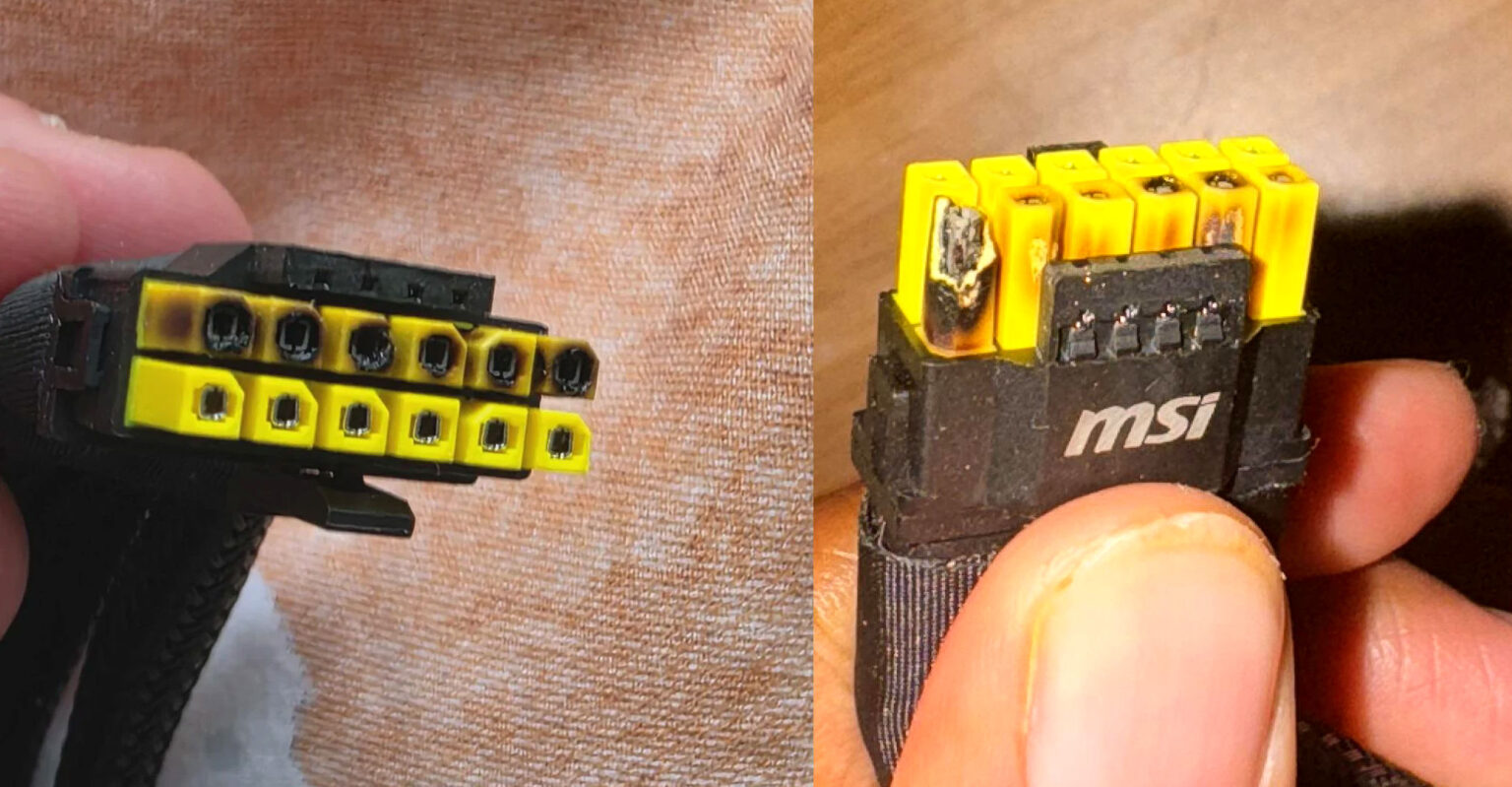
I saw a former Intel and Gigabyte engineer comment on this connector. The connector is overrated in terms of power, he lists 375W as a decent power limit (it's on par with the RTX 5080).
I found his post on Reddit, his username is Affectionate-Memory4:

"(...) The connector itself isn't bad. It is simply rated far too high (I stand by this with the better pins), leaving little safety factor and thus little room for error or imperfection. 600W should be treated as the absolute maximum power, with about 375W as a decent rated power limit(...)"


My Computer My Computer

At a glance

windows 11
OS
windows 11
I'm old enough to remember when people had to build their own power rails to run multiple GPUs. Never had a problem with melted connectors then.
 

My Computer My Computer

At a glance

Windows 11 22H2 Pro (X-lite Micro 11 version)i7 13850HX (20 cores, 28 threads)32GB DDR5Intel UHD/ RTX 1000 ADA
OS
Windows 11 22H2 Pro (X-lite Micro 11 version)
Computer type
Laptop
Manufacturer/Model
Dell/ Precision 7680
CPU
i7 13850HX (20 cores, 28 threads)
Motherboard
Dell
Memory
32GB DDR5
Graphics Card(s)
Intel UHD/ RTX 1000 ADA
Sound Card
Realtek
Monitor(s) Displays
4K UHD Touchscreen
Screen Resolution
3840 x 2400
Hard Drives
Samsung 512GB system drive
WD Blue 1TB game drive
PSU
240W AC adapter, 1800W when docked
Internet Speed
1 gigabit symmetrical
Browser
Firefox, Librewolf
Antivirus
None. Manully configured so nobody except me can change any critical system files. (Don't ask how, it's probably against some rule somewhere)
Back
Top Bottom