I ran in to this minor error in LibreOffice many times, and it is a quick fix. The error does not impact LibreOffice at all.
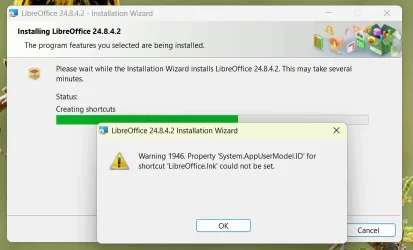
If you downloaded latest LibreOffice (version 24.8.4) and experience this installation error message, click OK to allow the installation to complete:
On several systems I found a partial name shortcut that you need to delete to correct this error:
Reinstall LibreOffice or just create a shortcut to LibreOffice.
If you downloaded latest LibreOffice (version 24.8.4) and experience this installation error message, click OK to allow the installation to complete:
On several systems I found a partial name shortcut that you need to delete to correct this error:
DEL "%AppData%\Microsoft\Internet Explorer\Quick Launch\User Pinned\TaskBar\Libre*.lnk"Reinstall LibreOffice or just create a shortcut to LibreOffice.
My Computers
-
At a glance
Windows 11 ProAMD Ryzen AI 7 350 w/ Radeon 860M 50 TOPS32GB LPDDR5X 7500 MT/sAMD Radeon 860M integrated (shared memory)- OS
- Windows 11 Pro
- Computer type
- Laptop
- Manufacturer/Model
- Dell 16 Plus DB16255
- CPU
- AMD Ryzen AI 7 350 w/ Radeon 860M 50 TOPS
- Motherboard
- Dell 0PKMHG
- Memory
- 32GB LPDDR5X 7500 MT/s
- Graphics Card(s)
- AMD Radeon 860M integrated (shared memory)
- Sound Card
- Stereo speakers (2.5 W x 2 = 5 W total peak)/Realtek SounzReal/Dolby Atmos
- Monitor(s) Displays
- Displays: 16" 1920 x 1200 (Full HD+/WUXGA) 300 nits 60Hz *** Samsung - 27” Odyssey FHD IPS 240Hz G-Sync Gaming Monitor
- Screen Resolution
- 1920x1080 @ 60Hz
- Hard Drives
- EG6 KIOXIA 1TB NVME
- Case
- Ice Blue
- Cooling
- "dual-fan" or "enhanced" air-cooling system
- Mouse
- Logitech M650 Wireless/Bluetooth
- Internet Speed
- 800/600 Fiber
-
- Computer type
- Laptop