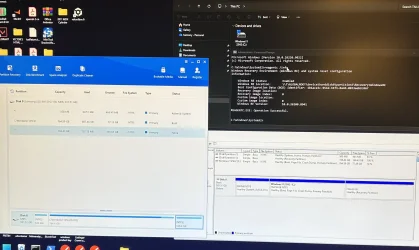
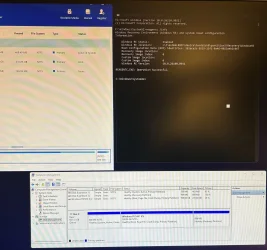
Local Disk (D) is emptied… can I delete it?


If partition #2 was not modified it is hidden in disk management.

The recovery partition is on partition #3 recovery.

Was the reserved partition modified?


These are examples of commands for a new recovery partition 1280 MB (1.25 GB) and a deleted 5th partition (D:): (commands need to be modified pending the diskpar info results)


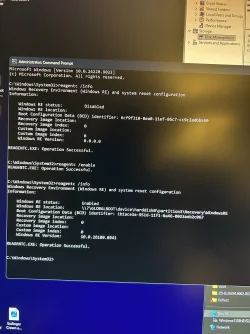
reagentc /info
reagentc /disable
reagentc /info


Code:
diskpart

sel dis 0

det dis

sel par 5

det par

del par override

sel par 4

det par

del par override

sel par 3

det par

extend

shrink minimum=1280

create partition primary

format quick fs=ntfs label="Recovery"

set id=de94bba4-06d1-4d40-a16a-bfd50179d6ac

gpt attributes=0x8000000000000001

lis vol

lis par

exit

reagentc /enable

reagentc /info


Post a share link.
 
Last edited:

My Computer My Computer

At a glance

Windows 10Intel(R) Core(TM) i7-4800MQ CPU @ 2.70GHz16 GB Total: Manufacturer : Samsung MemoryTyp...NVIDIA Quadro K3100M; Intel(R) HD Graphics 4600
OS
Windows 10
Computer type
Laptop
Manufacturer/Model
HP
CPU
Intel(R) Core(TM) i7-4800MQ CPU @ 2.70GHz
Motherboard
Product : 190A Version : KBC Version 94.56
Memory
16 GB Total: Manufacturer : Samsung MemoryType : DDR3 FormFactor : SODIMM Capacity : 8GB Speed : 1600
Graphics Card(s)
NVIDIA Quadro K3100M; Intel(R) HD Graphics 4600
Sound Card
IDT High Definition Audio CODEC; PNP Device ID HDAUDIO\FUNC_01&VEN_111D&DEV_76E0
Hard Drives
Model Hitachi HTS727575A9E364
Antivirus
Microsoft Defender
Other Info
Mobile Workstation
If there is no reserved partition then:


Code:
diskpart

sel dis 0

det dis

sel par 4

det par

del par override

sel par 3

det par

del par override

sel par 2

det par

extend

shrink minimum=1280

create partition primary

format quick fs=ntfs label="Recovery"

set id=de94bba4-06d1-4d40-a16a-bfd50179d6ac

gpt attributes=0x8000000000000001

lis vol

lis par

exit

reagentc /enable

reagentc /info
 

My Computer My Computer

At a glance

Windows 10Intel(R) Core(TM) i7-4800MQ CPU @ 2.70GHz16 GB Total: Manufacturer : Samsung MemoryTyp...NVIDIA Quadro K3100M; Intel(R) HD Graphics 4600
OS
Windows 10
Computer type
Laptop
Manufacturer/Model
HP
CPU
Intel(R) Core(TM) i7-4800MQ CPU @ 2.70GHz
Motherboard
Product : 190A Version : KBC Version 94.56
Memory
16 GB Total: Manufacturer : Samsung MemoryType : DDR3 FormFactor : SODIMM Capacity : 8GB Speed : 1600
Graphics Card(s)
NVIDIA Quadro K3100M; Intel(R) HD Graphics 4600
Sound Card
IDT High Definition Audio CODEC; PNP Device ID HDAUDIO\FUNC_01&VEN_111D&DEV_76E0
Hard Drives
Model Hitachi HTS727575A9E364
Antivirus
Microsoft Defender
Other Info
Mobile Workstation
Apparently your first partition is mislabelled, it should be something like "EFI System Partition" if you have UEFI configured boot, as should be in Windows 11. However, if it works as EFI, terminological difference is unimportant.
 

My Computer My Computer

At a glance

Windows 11 Pro 25H2AMD Rysen 5 4600H32 GB (2 x 16 GB Samsung SO-DIMM DDR4-3200)GeForce GTX 1650 Ti, 4 GB GDDR6
OS
Windows 11 Pro 25H2
Computer type
Laptop
Manufacturer/Model
Lenovo Legion 5-15ARH05
CPU
AMD Rysen 5 4600H
Memory
32 GB (2 x 16 GB Samsung SO-DIMM DDR4-3200)
Graphics Card(s)
GeForce GTX 1650 Ti, 4 GB GDDR6
Screen Resolution
1920x1080
Hard Drives
SSD M.2 512 GB SAMSUNG MZALQ512; SSD M.2 1 TB Seagate FireCuda 530
Mouse
Logitech M650L in Bluetooth mode
Do you have a modified BIOS or unsupported installation?

No reserved partition?

Active system partition?


Please post a share link for post #11 or run:


diskpart
lis dis
lis vol
sel dis 0
det dis
lis par
sel par 1
det par
sel par 2
det par
sel par 3
det par
sel par 4
det par
 

My Computer My Computer

At a glance

Windows 10Intel(R) Core(TM) i7-4800MQ CPU @ 2.70GHz16 GB Total: Manufacturer : Samsung MemoryTyp...NVIDIA Quadro K3100M; Intel(R) HD Graphics 4600
OS
Windows 10
Computer type
Laptop
Manufacturer/Model
HP
CPU
Intel(R) Core(TM) i7-4800MQ CPU @ 2.70GHz
Motherboard
Product : 190A Version : KBC Version 94.56
Memory
16 GB Total: Manufacturer : Samsung MemoryType : DDR3 FormFactor : SODIMM Capacity : 8GB Speed : 1600
Graphics Card(s)
NVIDIA Quadro K3100M; Intel(R) HD Graphics 4600
Sound Card
IDT High Definition Audio CODEC; PNP Device ID HDAUDIO\FUNC_01&VEN_111D&DEV_76E0
Hard Drives
Model Hitachi HTS727575A9E364
Antivirus
Microsoft Defender
Other Info
Mobile Workstation
To delete a recovery partition in Windows and reclaim unallocated space, open an elevated command prompt as administrator, run the diskpart tool, select your target disk and recovery partition numbers, and execute the delete partition override command.

Open Start, search for Command Prompt or PowerShell, right-click, and pick Run as administrator.

Type diskpart and press Enter. Type list disk and press Enter to view available drives. Type select disk X (replace X with your correct disk number) and press Enter.

Type list partition and press Enter to find your recovery partition number. Type select partition Y (replace Y with the recovery partition number) and press Enter.

Type delete partition override and press Enter to bypass protection and remove it.


Once deleted, the partition turns into unallocated space which you can merge into an adjacent drive using Disk Management.

In this video, i will take you through the steps to create a Windows recovery partition in a Windows 10 or Windows 11 PC installed in UEFI mode with GPT partition style.


My Computer My Computer

At a glance

Windows 11AMD Ryzen 7 5700GMicron Technology DDR4-3200 16GBNVIDIA GeForce RTX 3060
OS
Windows 11
Computer type
PC/Desktop
Manufacturer/Model
HP Pavilion
CPU
AMD Ryzen 7 5700G
Motherboard
Erica6
Memory
Micron Technology DDR4-3200 16GB
Graphics Card(s)
NVIDIA GeForce RTX 3060
Sound Card
Realtek ALC671
Monitor(s) Displays
Samsung SyncMaster U28E590
Screen Resolution
3840 x 2160
Hard Drives
SAMSUNG MZVLQ1T0HALB-000H1
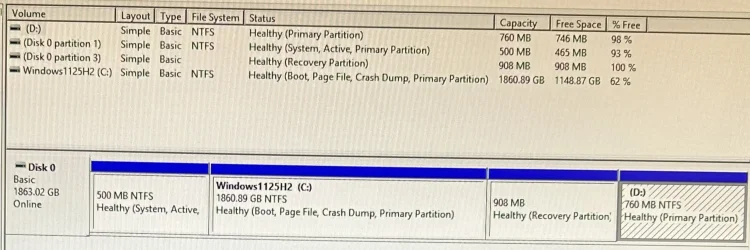
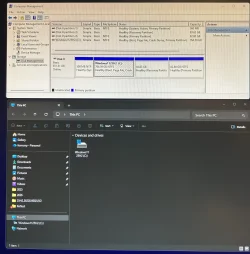
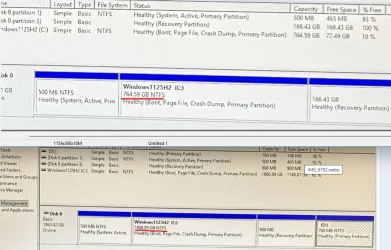
I don’t understand why disk D is showing up and it is emptied. Can I delete this? Disk D is part of Disk 0.

Legacy BIOS/MBR installation (not UEFI/GPT):
- 500 MB NTFS — System, Active, Primary Partition: contains boot-related files.
- C: 1860 GB — the Windows installation.
- 908 MB Recovery Partition
- D: 760 MB NTFS — Healthy (Primary Partition), almost completely empty.

The interesting one is D:. A 760 MB partition at the very end of the disk is much more likely to be a leftover OEM/recovery partition that accidentally has a drive letter than an intentionally created data drive.

Instead of deleting D:, remove its drive letter. That makes it disappear from File Explorer while leaving the partition intact.

In Disk Management:
- Right-click the 760 MB (D:) partition
- Select Change Drive Letter and Paths…
- Click Remove

Edit:

This applies only to MBR disks; GPT disks do not have an active partition.

Windows will not boot if there is no active partition on the primary disk (either the System partition or the Windows partition).

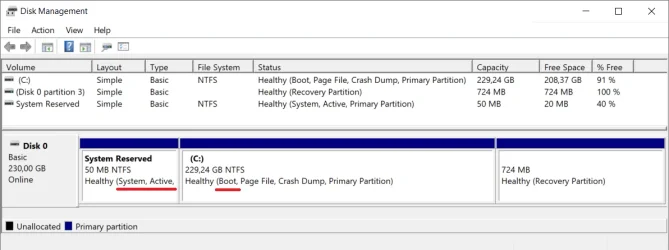
The "System" partition on a Windows computer contains the files necessary to "boot" the system. It is typically the first partition on the first disk, as set in the BIOS settings. The "Boot" partition contains the files for the Windows operating system.

- System partition (System, Active)
- Windows partition (Boot)

Disk Management.webp

Screenshot 2026-08-10 104258.webp
 
Last edited:

My Computers My Computers

  • At a glance

    Windows 11 ProAMD Ryzen 9 9950X3DKingston FURY Beast 64GB (2x32GB) DDR5 6000MT/sASUS TUF Gaming Radeon RX 9070 OC Edition 16G...
    OS
    Windows 11 Pro
    Computer type
    PC/Desktop
    CPU
    AMD Ryzen 9 9950X3D
    Motherboard
    ASRock B650E Taichi Lite
    Memory
    Kingston FURY Beast 64GB (2x32GB) DDR5 6000MT/s
    Graphics Card(s)
    ASUS TUF Gaming Radeon RX 9070 OC Edition 16GB GDDR6
    Hard Drives
    Solidigm P44 Pro 2TB M.2 NVMe SSD
  • At a glance

    Windows 11 HomeIntel Core Ultra 9 275HX64GB (2x 32GB) DDR5-6400NVIDIA GeForce RTX 5080 16GB GDDR7 Laptop GPU
    Operating System
    Windows 11 Home
    Computer type
    Laptop
    Manufacturer/Model
    Lenovo Legion Pro 7i Gen 10 16"
    CPU
    Intel Core Ultra 9 275HX
    Memory
    64GB (2x 32GB) DDR5-6400
    Graphics card(s)
    NVIDIA GeForce RTX 5080 16GB GDDR7 Laptop GPU
    Hard Drives
    2x 1TB M.2 NVMe SSD (SK Hynix)

Latest Support Threads

Back
Top Bottom