Hello,
I am trying to create a bootable USB drive using the Norton Bootable Recovery Tool ISO file so that I can scan my laptop. However, I am unable to successfully boot from it. I have tried multiple programs, including Rufus and Ventoy, but the result is the same — the system does not boot the Norton recovery environment. Secure Boot is disabled, yet it still refuses to boot.
The USB flash drive is brand new and was purchased directly from Corsair’s official website, so it is unlikely that the device itself is faulty. During the ISO writing process, I receive an error message stating “Location is not accessible” or prompting me to insert the USB drive, even though it is already connected.
I also tried writing a Windows ISO file to the same USB drive. It does boot successfully, but the same “Location is not accessible” error still appears during the process. Even though Windows eventually boots, this recurring error message is concerning and frustrating.
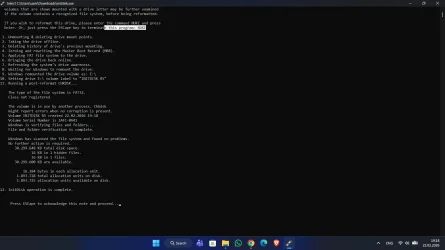
I have attempted formatting the USB drive using command-line tools and tried different configurations, but the issue persists. At this point, I am not sure whether the problem is related to the ISO file, the USB drive, or something else entirely.
Any help or suggestions would be greatly appreciated.

I am trying to create a bootable USB drive using the Norton Bootable Recovery Tool ISO file so that I can scan my laptop. However, I am unable to successfully boot from it. I have tried multiple programs, including Rufus and Ventoy, but the result is the same — the system does not boot the Norton recovery environment. Secure Boot is disabled, yet it still refuses to boot.
The USB flash drive is brand new and was purchased directly from Corsair’s official website, so it is unlikely that the device itself is faulty. During the ISO writing process, I receive an error message stating “Location is not accessible” or prompting me to insert the USB drive, even though it is already connected.
I also tried writing a Windows ISO file to the same USB drive. It does boot successfully, but the same “Location is not accessible” error still appears during the process. Even though Windows eventually boots, this recurring error message is concerning and frustrating.
I have attempted formatting the USB drive using command-line tools and tried different configurations, but the issue persists. At this point, I am not sure whether the problem is related to the ISO file, the USB drive, or something else entirely.
Any help or suggestions would be greatly appreciated.
- Windows Build/Version
- 26200.7628
My Computer
At a glance
Windows 11
- OS
- Windows 11