Solved ASUS TUF GAMING B760M USB WITH RUFUS


Boyaca

Well-known member
Local time
12:56 AM
Posts
6
OS
windows 10
Hello, Everyone!

I have a tuf gaming b760m wifi motherboard, could you explain to me why it is a real hell to make a usb with rufus, and give one failure after another for the secure boot keys? I know there is a strict security conflict between the rufus loader (UEFI:NTFS) and the default ASUS secure boot keys. is there any solution? apart from formatting the USB in fat32, downloading a copy of Windows, using Anyburn, reconfiguring the .iso so that there are 4GB partitions and no error ones, etc.

Why so much trouble?
 
Windows Build/Version
WINDOWS 25H2 26200.8457

My Computer

System One

  • OS
    windows 10
When you build an USB with the latest Rufus, you're now offered a choice of using the newer or older boot files, depending on whether your PC has successfully added the CA 2023 Secure Boot certs.

If you're not sure if that's happened, then temporarily disable Secure Boot and boot the Rufus USB. After you're done installing Windows, then re-enable Secure Boot.
 

My Computer

System One

  • OS
    Windows 7
@Boyaca Also, have you updated to the latest BIOS?


My Computers

System One System Two

  • OS
    Win 11 Pro 25H2 26200.8524
    Computer type
    PC/Desktop
    Manufacturer/Model
    Self Built
    CPU
    Intel® Core™ i7-14700K
    Motherboard
    ASUS TUF Z690-PLUS WIFI BIOS 4505 11/29/25
    Memory
    G.SKILL Ripjaws S5 Series 64GB (2 x 32GB) DDR5
    Graphics Card(s)
    ASUS GeForce RTX 4070 Super 12GB
    Sound Card
    Sound Blaster AE-5 Plus
    Monitor(s) Displays
    ASUS TUF Gaming 27" 2K HDR Gaming
    Screen Resolution
    2560 x 1440
    Hard Drives
    Samsung 990 Pro 1TB NVMe (Win 11 25H2)
    SK hynix P41 500GB NVMe 25H2 DEV/Games
    SK hynix P41 2TB NVMe (x3)
    Crucial P3 Plus 4TB
    PSU
    Corsair RM850x Shift
    Case
    Antec Dark Phantom DP502 FLUX
    Cooling
    Corsair Nautilus 360 RS AIO
    Keyboard
    Logitech MK 320
    Mouse
    Razer Basilisk V3
    Internet Speed
    350Mbs
    Browser
    Firefox
    Antivirus
    Winows Security
    Other Info
    MR 8.1 Home

    System 3 Specs
    Win 11 Pro 25H2 26200.8524
    ASUS PRIME Z370-P II BIOS 3004 7/12/21
    Intel Core i7-8700 CPU @ 3.20GHz
    32GB DDR4 RAM (4x8)
    iGPU Intel UHD Graphics 630
  • Operating System
    Win 11 Pro 25H2 26200.8524
    Computer type
    PC/Desktop
    Manufacturer/Model
    Self Built
    CPU
    Intel Core i7-11700F
    Motherboard
    Asus TUF Gaming Z590 Plus WiFi (BIOS 2803)
    Memory
    64 GB DDR4
    Graphics card(s)
    MSI GeForce RTX 3060 Ventus 2X 12GB
    Sound Card
    SoundBlaster Audigy Fx V2
    Monitor(s) Displays
    Samsung F27T350
    Screen Resolution
    1920x1080
    Hard Drives
    Samsung 980 Pro 1TB
    Samsung 970 EVO Plus 2TB
    Samsung 870 EVO 500GB SSD
    PSU
    Corsair HX750
    Case
    Cougar MX330-G Window
    Cooling
    Thermalright Frozen Edge 240 Black AIO
    Internet Speed
    350Mbps
    Browser
    Firefox
    Antivirus
    Windows Security
Yes, I updated the BIOS to the latest version.
It is very complicated, due to the restrictions imposed by ASUS and the 13th and 14th generation Intel processors.

Gemini says:
The "hell" you are experiencing with your TUF GAMING B760M-PLUS WIFI board and Rufus is due to a strict security conflict between the Rufus bootloader (UEFI:NTFS) and ASUS Secure Boot default keys.
Modern ASUS motherboards with 13th and 14th generation Intel chipsets come from the factory with ultra-restrictive Secure Boot policies. If Rufus formats your USB in NTFS format (required if the Windows ISO has an install.wim file larger than 4 GB), it adds a small intermediate driver so that the BIOS can read that format. ASUS BIOS detects that this driver is not signed by the official Microsoft key and blocks booting immediately due to "security violation"

ASUS crash: When trying to boot, the TUF BIOS detects the UEFI:NTFS code. Since Rufus' digital signature is not included in your ASUS board's factory key database (DB), the system stops booting to protect you from suspected "malicious software."
 
Last edited:

My Computer

System One

  • OS
    windows 10
Depending on how your Secure Boot is configured, 1 of 4 combinations is possible:

Secure BootCA 2011 certsCA 2023 certsBoots
DisabledPresentDoesn't matterAlways boots
EnabledPresentMissingCan only boot CA 2011
EnabledPresentPresentCan boot CA 2011 or CA 2023 (use Rufus option)
EnabledPresent (banned)PresentCan only boot CA 2023 (use Rufus option)

The rules apply to all PC's, regardless of your CPU or motherboard generation. Rufus has to pick a boot file which is CA 2011 or CA 2023. It can't guess for you (because you might be creating the USB for a different PC).

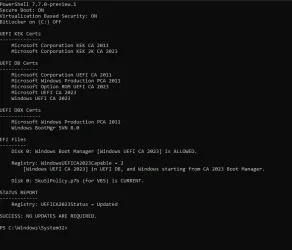
Enter the UEFI menu, and list the Secure Boot keys for UEFI CA 2023. Figure out if you need those boot files.
 

My Computer

System One

  • OS
    Windows 7
Thanks Garlin
This is how it is configured.
 

Attachments

  • Captura de pantalla 2026-05-19 174105.webp
    Captura de pantalla 2026-05-19 174105.webp
    36.9 KB · Views: 1
  • Checking.txt
    Checking.txt
    2.6 KB · Views: 3

My Computer

System One

  • OS
    windows 10
PCA 2011 is revoked, so you must always use the CA 2023 boot files, when creating any bootable USB drive. That's what I suspected.
 

My Computer

System One

  • OS
    Windows 7
Thanks for the help. I’ve completed the checks and everything is now working correctly.

After reviewing my Secure Boot configuration and running the full UEFI certificate report, I confirmed the following:

  • Secure Boot is enabled
  • My firmware contains both CA 2011 and CA 2023 certificates
  • The Microsoft Windows Production PCA 2011 entry is correctly marked as revoked
  • The Windows UEFI CA 2023 and Microsoft UEFI CA 2023 certificates are present and valid
  • DBX is fully updated (v1.6.0 – 2025‑10‑14)
Because PCA 2011 is revoked on my system, I recreated my installation USB using CA 2023 boot files, and the system booted without any issues.

I also reset my Secure Boot keys (Clear PK/KEK/DB → restore to Standard), which ensured the firmware regenerated the correct Microsoft keys. After that, the installation proceeded normally.

Everything is now working as expected.Thanks again for pointing me in the right direction.
 

My Computer

System One

  • OS
    windows 10

Latest Support Threads

Back
Top Bottom