looking for simple List Maker tool or program


larrydonline

Well-known member
Member
VIP
Local time
3:04 PM
Posts
128
OS
Windows 11
After a long time searching and trying different programs I'm beginning to wonder if what I'm looking for even exists. I need a program that I can use to make a list of items. I'd like to be able to make multiple lists and be able to switch between them easily. Every program I've explored so far wants access to your contacts, phone, camera or something else on the computer.

The closest I've found to one that works like I want is Make-A-List, but I've not found a way to make more than one list with it. I've tried Microsoft To Do, Google Keep, SimpleTask, Remember the Milk, and several others. They all want to manage your life while all I want is something to make lists with and nothing more.
 

My Computer My Computer

At a glance

Windows 1112th Gen Intel(R) Core(TM) i9-12900K 3.20 GHz65262 Megabytes Usable Installed MemoryNVIDIA GeForce RTX 3070
OS
Windows 11
Computer type
PC/Desktop
Manufacturer/Model
Dell 8950
CPU
12th Gen Intel(R) Core(TM) i9-12900K 3.20 GHz
Motherboard
0DYKKV A00
Memory
65262 Megabytes Usable Installed Memory
Graphics Card(s)
NVIDIA GeForce RTX 3070
Sound Card
Multimedia Intel(R) Display Audio NVIDIA High Definition Audio NVIDIA Virtual Audio Device (Wave Extensible) (WDM) Realtek(R) Audio WsAudio_Device
Monitor(s) Displays
Dell
Mouse
Logitech
Internet Speed
D/L 120 mbps
Browser
Firefox
Antivirus
Malwarebytes
I know this will sound awfully dull and childlike, but when I need to make a list of anything I just open "Wordpad". I use it so often that I have a shortcut to Wordpad in my Task Bar. It's been my main GO TO Text Editor for decades.

Good luck,
TM :cool:
 

My Computers My Computers

  • At a glance

    Windows 11AMD Ryzen 5 560016 GBSapphire Radeon RX 6500XT (8 GB version)
    OS
    Windows 11
    Computer type
    PC/Desktop
    CPU
    AMD Ryzen 5 5600
    Motherboard
    MSI B550-A Pro
    Memory
    16 GB
    Graphics Card(s)
    Sapphire Radeon RX 6500XT (8 GB version)
    Monitor(s) Displays
    BenQ Mobuiz EX2710Q QHD, Iiyama ProLite X23377HDS
    Hard Drives
    MSI Spatium M461 4TB
  • At a glance

    Windows 11Intel Celeron N4020
    Operating System
    Windows 11
    Computer type
    Laptop
    Manufacturer/Model
    Acer A114
    CPU
    Intel Celeron N4020
They all want to manage your life while all I want is something to make lists with and nothing more.
HI Larry,

I often just use the Notes app on my phone for quick short time lists on the go.
However, for computer related lists, I use OneNote.

There are two versions you should be aware of:
  • OneNote (formerly called “OneNote 2016”), the free desktop app that runs on all supported versions of Microsoft Windows and is part of Office 2019 and Microsoft 365.
  • OneNote for Windows 10, the OneNote app that is pre-installed on all editions of Windows 10.
I use the first one. However, if you don't have Microsoft 365 installed, you can always play around with the 2nd option. However, that one - if I recall correctly - will want you to login with a Microsoft account... which it sounds like you want to avoid and I don't blame you. That's why I'm not logged in to any of my MS programs. I use Outlook for non-MS accounts.

Regarding OneNote for Lists

These lists can be as simple or as complex as you like.
Just a preview if you're not familiar with OneNote.

I have a Section called To-Do.
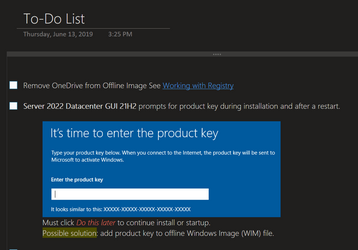
The first Page is the main To-Do List

1692057690078.png

I list them with check boxes to discern separate items in the list and I can check them off when completed. (2nd image)

However, you'll notice a subpage called Completed items (1st image)
Every now and then I'll take the ones checked off and move them to that completed list for historical reference.

1692057544708.png

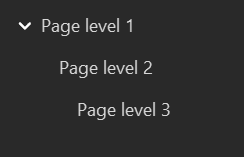
Note: You can have three levels of pages, but only collapse the 1st level.

1692058908124.png

Below that is a Wishlist. These are things I want to look into later on but are not that important and will find their way into the priority list when the time comes. This is so I don't have to start from scratch when I revisit the topic/issue in the future.

All the pages below that are usually things I've already researched and have taken a great deal of notes on, to include links to websites, files, local resources and even YouTube videos.

If any one of those need to be in the To-Do List (priorities) then I will add it in as a simple title and link to that appropriate subpage.

These examples revolve around my Windows Deployment Notebook. I keep my personal lists in a different Notebook named after me.

For example, when I was going to convert our guest room into the kids bedroom, I had a list for everything I wanted to do and even furniture options, bedding, closet design, etc.

Obviously these types of list are not created in one session, so it was very helpful in the long run. These lists I just delete since they are usually not repeatable.

Best of luck to you...
 

My Computer My Computer

At a glance

Windows 10 Pro for Workstations 22H2i732 GB, but not enough
OS
Windows 10 Pro for Workstations 22H2
Computer type
Laptop
Manufacturer/Model
HP EliteBook Studio
CPU
i7
Memory
32 GB, but not enough
Monitor(s) Displays
(3) 32" LG 4K
Screen Resolution
A lot :-)
Hard Drives
2TB NVMe's x2
Cooling
external fans
Keyboard
on my desk
Mouse
trapped
Internet Speed
mediocre
Browser
unbearable
Antivirus
good enough
000955.png
 

My Computers My Computers

  • At a glance

    Windows 11 Pro
    OS
    Windows 11 Pro
    Computer type
    PC/Desktop
    Manufacturer/Model
    ASUS ROG Strix
  • At a glance

    Windows 11 Pro
    Operating System
    Windows 11 Pro
    Computer type
    Laptop
    Manufacturer/Model
    ASUS VivoBook
  • ASUS VivoBook 'Lite' ~ Windows 11 Home
@ZERO269 I agree! I've used Microsoft OneNote for many years. OneNote is my most used app and I use it many times every day. You can use it for as much or as little as you like. Keeping notes using Notepad or WordPad is primitive compared to the capabilities of OneNote. And OneNote is already there for free with Windows 11.

You mentioned that you do a different app on your phone. You don't have to do that if you're using an Android phone. OneNote works transparently across all your devices. I love always having all my notes with me wherever I go.
 

My Computers My Computers

  • At a glance

    Windows 11 ProIntel Series 3 Core Ultra X9 388H64GB LPDDR5x 9600 MT/sIntel Arc graphics B390 Panther Lake
    OS
    Windows 11 Pro
    Computer type
    Laptop
    Manufacturer/Model
    Dell XPS 16 DA16260
    CPU
    Intel Series 3 Core Ultra X9 388H
    Memory
    64GB LPDDR5x 9600 MT/s
    Graphics Card(s)
    Intel Arc graphics B390 Panther Lake
    Monitor(s) Displays
    16" 3.2K Tandem OLED Infinity Edge
    Screen Resolution
    3200 x 2000 16:10 236 PPI
    Hard Drives
    1 Terabyte M.2 PCIe NVMe SSD
    Case
    Black Anodized Aluminum
    Cooling
    Vapor Chamber Cooling
    Mouse
    None
    Internet Speed
    942 Mbps Netgear Mesh + 2 Satellites
    Browser
    Microsoft Edge (Chromium)
    Antivirus
    Windows Security (Defender)
    Other Info
    NPU delivering 67 TOPS
    Microsoft 365 subscription
    Microsoft Office 365
    Microsoft OneDrive 1TB Cloud
    Microsoft Visual Studio
    Microsoft Visual Studio Code
    Microsoft Sysinternals Suite
    Microsoft BitLocker
    Microsoft Copilot
    Dell Support Assist
    Dell Command | Update
    Macrium Reflect X subscription
    1Password Password Manager
    Amazon Kindle for PC
    Lightroom/Photoshop subscription
    Interactive Brokers Trader Workstation
  • At a glance

    Windows 11 ProSnapdragon® X Elite (12 Core) with Hexagon NP...32GB LPDDR5x 8448 MT/sIntegrated Adreno GPU
    Operating System
    Windows 11 Pro
    Computer type
    Laptop
    Manufacturer/Model
    Microsoft Surface Laptop 7
    CPU
    Snapdragon® X Elite (12 Core) with Hexagon NPU delivering 45 TOPS
    Memory
    32GB LPDDR5x 8448 MT/s
    Graphics card(s)
    Integrated Adreno GPU
    Sound Card
    Omnisonic speakers with Dolby Atmos spatial sound
    Monitor(s) Displays
    13.8″ PixelSense Flow touchscreen 120 Hz 600 NIT
    Screen Resolution
    2304 × 1536 (201 PPI), 3:2 aspect ratio
    Hard Drives
    1 TB PCIe NVMe Gen 4 SSD
    Case
    Black Anodized Aluminum
    Cooling
    Vapor Chamber Cooling
    Mouse
    None
    Internet Speed
    942 Mbps Netgear Mesh + 2 Satellites
    Browser
    Microsoft Edge (Chromium)
    Antivirus
    Windows Security (Defender)
    Other Info
    Microsoft 365 subscription (Office)
    Microsoft Office 365
    Microsoft OneDrive 1TB Cloud
    Microsoft Visual Studio 2026
    Microsoft Visual Studio Code
    Interactive Brokers Trader Workstation
    Lightroom/Photoshop subscription
    1Password Password Manager
    Microsoft Sysinternals
    Amazon Kindle for PC
    Microsoft BitLocker
    Microsoft Copilot
You mentioned that you do a different app on your phone. You don't have to do that if you're using an Android phone. OneNote works transparently across all your devices. I love always having all my notes with me wherever I go.
True.. I've used OneNote on my iPad/iPhone, but I don't like my OneNote in the cloud. It's messy as it removes the actual notebook from my computers file system and replaces it with a link to OneDrive.

I have several notebooks and they need only stay on my computer. I've never really had a need to see in my notebooks while away from my laptop. I don't use the Windows version because I don't have full control of where the data is stored.

I have my own cloud. My Synology NAS and use Synology Drive to sync my user files. I can gain secure access to it remotely, and there's an iOS app for my crappy Apple devices. ;-)
 

My Computer My Computer

At a glance

Windows 10 Pro for Workstations 22H2i732 GB, but not enough
OS
Windows 10 Pro for Workstations 22H2
Computer type
Laptop
Manufacturer/Model
HP EliteBook Studio
CPU
i7
Memory
32 GB, but not enough
Monitor(s) Displays
(3) 32" LG 4K
Screen Resolution
A lot :-)
Hard Drives
2TB NVMe's x2
Cooling
external fans
Keyboard
on my desk
Mouse
trapped
Internet Speed
mediocre
Browser
unbearable
Antivirus
good enough
You can use a spreadsheet program like Excel. You can put each list in a separate column. Note there are several programs similar to Excel that are free.
 

My Computers My Computers

  • At a glance

    Windows 11 Pro 25H2 (26200.6901)AMD Ryzen 7 6800H with Radeon 680M GPU (486MB...Crucial DDR5-4800 (2400MHz) 32GB (2 x 16GB)NVIDIA RTX 3060 Laptop (6GB RAM)
    OS
    Windows 11 Pro 25H2 (26200.6901)
    Computer type
    Laptop
    Manufacturer/Model
    ASUS TUF Gaming A15 (2022)
    CPU
    AMD Ryzen 7 6800H with Radeon 680M GPU (486MB RAM)
    Memory
    Crucial DDR5-4800 (2400MHz) 32GB (2 x 16GB)
    Graphics Card(s)
    NVIDIA RTX 3060 Laptop (6GB RAM)
    Sound Card
    n/a
    Monitor(s) Displays
    15.6-inch
    Screen Resolution
    1920x1080 300Hz
    Hard Drives
    2 x Samsung 990 Evo Plus (2TB M.2 NVME SSD)
    PSU
    n/a
    Mouse
    Wireless Mouse M510
    Internet Speed
    2100Mbps/300Mbps
    Browser
    Firefox
    Antivirus
    Malwarebytes
  • At a glance

    Windows 11 Pro 25H2 (26200.8246)AMD Ryzen 7 5700X3DG.SKILL Flare X 32GB (2x16GB) DDR4ASUS ROG-STRIX-RTX3060TI-08G-V2-GAMING (RTX 3...
    Operating System
    Windows 11 Pro 25H2 (26200.8246)
    Computer type
    PC/Desktop
    Manufacturer/Model
    Custom build
    CPU
    AMD Ryzen 7 5700X3D
    Motherboard
    ASUS ROG Strix B550-F Gaming WiFi II
    Memory
    G.SKILL Flare X 32GB (2x16GB) DDR4
    Graphics card(s)
    ASUS ROG-STRIX-RTX3060TI-08G-V2-GAMING (RTX 3060-Ti, 8GB RAM)
    Monitor(s) Displays
    Samsung G50D IPS 27"
    Screen Resolution
    1440p/180Hz
    Hard Drives
    SAMSUNG 990 EVO Plus (2TB] M.2 NVME SSD
    SAMSUNG 990 EVO Plus (4TB) M.2 NVME SSD
    PSU
    Corsair RM750x (750 watts)
    Case
    Cooler Master MasterCase 5
    Cooling
    Scythe Mugen 6
    Keyboard
    Logitech K520 (MK540 keyboard/mouse combo)
    Mouse
    Logitech M310 (MK540 keyboard/mouse combo)
    Internet Speed
    2100 Mbps down / 300 Mbps up
    Browser
    Firefox, Edge, Chrome
    Antivirus
    Malwarebytes (Premium)
    Other Info
    ASUS Blu-ray Burner BW-16D1HT (SATA) || Western Digital Easystore 20TB USB 3.0 external hard drive used with Acronis True Image 2025 backup software || HP OfficeJet Pro 6975 Printer/Scanner
True.. I've used OneNote on my iPad/iPhone, but I don't like my OneNote in the cloud. It's messy as it removes the actual notebook from my computers file system and replaces it with a link to OneDrive.

I have several notebooks and they need only stay on my computer. I've never really had a need to see in my notebooks while away from my laptop. I don't use the Windows version because I don't have full control of where the data is stored.

I have my own cloud. My Synology NAS and use Synology Drive to sync my user files. I can gain secure access to it remotely, and there's an iOS app for my crappy Apple devices. ;-)
I'm a long time Microsoft OneDrive user and OneDrive works flawlessly for me. I've used OneDrive since it was implemented in 2007. I subscribe to Microsoft 365 and have a Terabyte of cloud OneDrive. I keep all my data and photos in my OneDrive folder and my data is mirrored in cloud OneDrive in real-time. I don't believe the Microsoft conspiracy theories.
 

My Computers My Computers

  • At a glance

    Windows 11 ProIntel Series 3 Core Ultra X9 388H64GB LPDDR5x 9600 MT/sIntel Arc graphics B390 Panther Lake
    OS
    Windows 11 Pro
    Computer type
    Laptop
    Manufacturer/Model
    Dell XPS 16 DA16260
    CPU
    Intel Series 3 Core Ultra X9 388H
    Memory
    64GB LPDDR5x 9600 MT/s
    Graphics Card(s)
    Intel Arc graphics B390 Panther Lake
    Monitor(s) Displays
    16" 3.2K Tandem OLED Infinity Edge
    Screen Resolution
    3200 x 2000 16:10 236 PPI
    Hard Drives
    1 Terabyte M.2 PCIe NVMe SSD
    Case
    Black Anodized Aluminum
    Cooling
    Vapor Chamber Cooling
    Mouse
    None
    Internet Speed
    942 Mbps Netgear Mesh + 2 Satellites
    Browser
    Microsoft Edge (Chromium)
    Antivirus
    Windows Security (Defender)
    Other Info
    NPU delivering 67 TOPS
    Microsoft 365 subscription
    Microsoft Office 365
    Microsoft OneDrive 1TB Cloud
    Microsoft Visual Studio
    Microsoft Visual Studio Code
    Microsoft Sysinternals Suite
    Microsoft BitLocker
    Microsoft Copilot
    Dell Support Assist
    Dell Command | Update
    Macrium Reflect X subscription
    1Password Password Manager
    Amazon Kindle for PC
    Lightroom/Photoshop subscription
    Interactive Brokers Trader Workstation
  • At a glance

    Windows 11 ProSnapdragon® X Elite (12 Core) with Hexagon NP...32GB LPDDR5x 8448 MT/sIntegrated Adreno GPU
    Operating System
    Windows 11 Pro
    Computer type
    Laptop
    Manufacturer/Model
    Microsoft Surface Laptop 7
    CPU
    Snapdragon® X Elite (12 Core) with Hexagon NPU delivering 45 TOPS
    Memory
    32GB LPDDR5x 8448 MT/s
    Graphics card(s)
    Integrated Adreno GPU
    Sound Card
    Omnisonic speakers with Dolby Atmos spatial sound
    Monitor(s) Displays
    13.8″ PixelSense Flow touchscreen 120 Hz 600 NIT
    Screen Resolution
    2304 × 1536 (201 PPI), 3:2 aspect ratio
    Hard Drives
    1 TB PCIe NVMe Gen 4 SSD
    Case
    Black Anodized Aluminum
    Cooling
    Vapor Chamber Cooling
    Mouse
    None
    Internet Speed
    942 Mbps Netgear Mesh + 2 Satellites
    Browser
    Microsoft Edge (Chromium)
    Antivirus
    Windows Security (Defender)
    Other Info
    Microsoft 365 subscription (Office)
    Microsoft Office 365
    Microsoft OneDrive 1TB Cloud
    Microsoft Visual Studio 2026
    Microsoft Visual Studio Code
    Interactive Brokers Trader Workstation
    Lightroom/Photoshop subscription
    1Password Password Manager
    Microsoft Sysinternals
    Amazon Kindle for PC
    Microsoft BitLocker
    Microsoft Copilot
True.. I've used OneNote on my iPad/iPhone, but I don't like my OneNote in the cloud. It's messy as it removes the actual notebook from my computers file system and replaces it with a link to OneDrive.
Yes, that's the way OneDrive works if you use the default "Files On Demand". If you turn "Files On Demand" OFF then all your data is kept in your local OneDrive folder and is also mirrored in real-time in cloud OneDrive. It isn't "messy" and works flawlessly. I've used OneDrive this way for years.
 

My Computers My Computers

  • At a glance

    Windows 11 ProIntel Series 3 Core Ultra X9 388H64GB LPDDR5x 9600 MT/sIntel Arc graphics B390 Panther Lake
    OS
    Windows 11 Pro
    Computer type
    Laptop
    Manufacturer/Model
    Dell XPS 16 DA16260
    CPU
    Intel Series 3 Core Ultra X9 388H
    Memory
    64GB LPDDR5x 9600 MT/s
    Graphics Card(s)
    Intel Arc graphics B390 Panther Lake
    Monitor(s) Displays
    16" 3.2K Tandem OLED Infinity Edge
    Screen Resolution
    3200 x 2000 16:10 236 PPI
    Hard Drives
    1 Terabyte M.2 PCIe NVMe SSD
    Case
    Black Anodized Aluminum
    Cooling
    Vapor Chamber Cooling
    Mouse
    None
    Internet Speed
    942 Mbps Netgear Mesh + 2 Satellites
    Browser
    Microsoft Edge (Chromium)
    Antivirus
    Windows Security (Defender)
    Other Info
    NPU delivering 67 TOPS
    Microsoft 365 subscription
    Microsoft Office 365
    Microsoft OneDrive 1TB Cloud
    Microsoft Visual Studio
    Microsoft Visual Studio Code
    Microsoft Sysinternals Suite
    Microsoft BitLocker
    Microsoft Copilot
    Dell Support Assist
    Dell Command | Update
    Macrium Reflect X subscription
    1Password Password Manager
    Amazon Kindle for PC
    Lightroom/Photoshop subscription
    Interactive Brokers Trader Workstation
  • At a glance

    Windows 11 ProSnapdragon® X Elite (12 Core) with Hexagon NP...32GB LPDDR5x 8448 MT/sIntegrated Adreno GPU
    Operating System
    Windows 11 Pro
    Computer type
    Laptop
    Manufacturer/Model
    Microsoft Surface Laptop 7
    CPU
    Snapdragon® X Elite (12 Core) with Hexagon NPU delivering 45 TOPS
    Memory
    32GB LPDDR5x 8448 MT/s
    Graphics card(s)
    Integrated Adreno GPU
    Sound Card
    Omnisonic speakers with Dolby Atmos spatial sound
    Monitor(s) Displays
    13.8″ PixelSense Flow touchscreen 120 Hz 600 NIT
    Screen Resolution
    2304 × 1536 (201 PPI), 3:2 aspect ratio
    Hard Drives
    1 TB PCIe NVMe Gen 4 SSD
    Case
    Black Anodized Aluminum
    Cooling
    Vapor Chamber Cooling
    Mouse
    None
    Internet Speed
    942 Mbps Netgear Mesh + 2 Satellites
    Browser
    Microsoft Edge (Chromium)
    Antivirus
    Windows Security (Defender)
    Other Info
    Microsoft 365 subscription (Office)
    Microsoft Office 365
    Microsoft OneDrive 1TB Cloud
    Microsoft Visual Studio 2026
    Microsoft Visual Studio Code
    Interactive Brokers Trader Workstation
    Lightroom/Photoshop subscription
    1Password Password Manager
    Microsoft Sysinternals
    Amazon Kindle for PC
    Microsoft BitLocker
    Microsoft Copilot
Thanks for the replies. I tried Wordpad For Android but I can't figure out how to make lists with it. I'll give Onenote a try. I had to download and install it. It insists on being linked to my Google account. I don't see a way to avoid that. After installing OneNote I don't think the UI is very friendly. I entered some items in a list but don't see a way to save what I entered. Unless there's a tutorial on using OneNote I don't think it's going to work for me.

I just realized I hadn't made it clear that I need the list maker on my Samsung Note20 Pro 5G cell phone. I can use Wordpad and Edit Pad Pro for list making on my PC. So in reality I probably asked for help in the wrong forum. I'll look for an Android specific group or help site. I still appreciate the feedback I got here.
 

My Computer My Computer

At a glance

Windows 1112th Gen Intel(R) Core(TM) i9-12900K 3.20 GHz65262 Megabytes Usable Installed MemoryNVIDIA GeForce RTX 3070
OS
Windows 11
Computer type
PC/Desktop
Manufacturer/Model
Dell 8950
CPU
12th Gen Intel(R) Core(TM) i9-12900K 3.20 GHz
Motherboard
0DYKKV A00
Memory
65262 Megabytes Usable Installed Memory
Graphics Card(s)
NVIDIA GeForce RTX 3070
Sound Card
Multimedia Intel(R) Display Audio NVIDIA High Definition Audio NVIDIA Virtual Audio Device (Wave Extensible) (WDM) Realtek(R) Audio WsAudio_Device
Monitor(s) Displays
Dell
Mouse
Logitech
Internet Speed
D/L 120 mbps
Browser
Firefox
Antivirus
Malwarebytes
Microsoft Excel for Android is free. Just download it from the Googe Play Store onto your phone.
 

My Computers My Computers

  • At a glance

    Windows 11 Pro 25H2 (26200.6901)AMD Ryzen 7 6800H with Radeon 680M GPU (486MB...Crucial DDR5-4800 (2400MHz) 32GB (2 x 16GB)NVIDIA RTX 3060 Laptop (6GB RAM)
    OS
    Windows 11 Pro 25H2 (26200.6901)
    Computer type
    Laptop
    Manufacturer/Model
    ASUS TUF Gaming A15 (2022)
    CPU
    AMD Ryzen 7 6800H with Radeon 680M GPU (486MB RAM)
    Memory
    Crucial DDR5-4800 (2400MHz) 32GB (2 x 16GB)
    Graphics Card(s)
    NVIDIA RTX 3060 Laptop (6GB RAM)
    Sound Card
    n/a
    Monitor(s) Displays
    15.6-inch
    Screen Resolution
    1920x1080 300Hz
    Hard Drives
    2 x Samsung 990 Evo Plus (2TB M.2 NVME SSD)
    PSU
    n/a
    Mouse
    Wireless Mouse M510
    Internet Speed
    2100Mbps/300Mbps
    Browser
    Firefox
    Antivirus
    Malwarebytes
  • At a glance

    Windows 11 Pro 25H2 (26200.8246)AMD Ryzen 7 5700X3DG.SKILL Flare X 32GB (2x16GB) DDR4ASUS ROG-STRIX-RTX3060TI-08G-V2-GAMING (RTX 3...
    Operating System
    Windows 11 Pro 25H2 (26200.8246)
    Computer type
    PC/Desktop
    Manufacturer/Model
    Custom build
    CPU
    AMD Ryzen 7 5700X3D
    Motherboard
    ASUS ROG Strix B550-F Gaming WiFi II
    Memory
    G.SKILL Flare X 32GB (2x16GB) DDR4
    Graphics card(s)
    ASUS ROG-STRIX-RTX3060TI-08G-V2-GAMING (RTX 3060-Ti, 8GB RAM)
    Monitor(s) Displays
    Samsung G50D IPS 27"
    Screen Resolution
    1440p/180Hz
    Hard Drives
    SAMSUNG 990 EVO Plus (2TB] M.2 NVME SSD
    SAMSUNG 990 EVO Plus (4TB) M.2 NVME SSD
    PSU
    Corsair RM750x (750 watts)
    Case
    Cooler Master MasterCase 5
    Cooling
    Scythe Mugen 6
    Keyboard
    Logitech K520 (MK540 keyboard/mouse combo)
    Mouse
    Logitech M310 (MK540 keyboard/mouse combo)
    Internet Speed
    2100 Mbps down / 300 Mbps up
    Browser
    Firefox, Edge, Chrome
    Antivirus
    Malwarebytes (Premium)
    Other Info
    ASUS Blu-ray Burner BW-16D1HT (SATA) || Western Digital Easystore 20TB USB 3.0 external hard drive used with Acronis True Image 2025 backup software || HP OfficeJet Pro 6975 Printer/Scanner
You can use a spreadsheet program like Excel. You can put each list in a separate column. Note there are several programs similar to Excel that are free.
That’s what I use, I have a sheet for each letter of he alphabet
 

My Computers My Computers

  • At a glance

    Windows 11 Pro 25H2 Build 26200.8655Intel(R) Core(TM) i7-4770K CPU @ 3.50GHz32.0 GB of I forget and the box is in storage.Gigabyte nVidia GeForce GTX 1660 Super OC 6GB
    OS
    Windows 11 Pro 25H2 Build 26200.8655
    Computer type
    PC/Desktop
    Manufacturer/Model
    Sin-built 2013
    CPU
    Intel(R) Core(TM) i7-4770K CPU @ 3.50GHz
    Motherboard
    ASUS ROG Maximus VI Formula
    Memory
    32.0 GB of I forget and the box is in storage.
    Graphics Card(s)
    Gigabyte nVidia GeForce GTX 1660 Super OC 6GB
    Sound Card
    ROG SupremeFX Formula 8-Channel High Definition Audio
    Monitor(s) Displays
    5 x LG 25MS500-B - 1 x 24MK430H-B - 1 x Wacom Pro 22" Touch Screen Tablet
    Screen Resolution
    All over the place
    Hard Drives
    Too many to list.
    OS on Samsung 1TB 870 QVO SATA
    PSU
    Silverstone 1500
    Case
    NZXT Phantom 820 Full-Tower Case
    Cooling
    Noctua NH-D15 Elite Class Dual Tower CPU Cooler / 6 x EziDIY 120mm / 2 x Corsair 140mm somethings / 1 x 140mm Thermaltake something / 2 x 200mm Corsair.
    Keyboard
    Corsair K95 / Logitech diNovo Edge Wireless
    Mouse
    Logitech: G402 / G502 / Mx Masters / Mx Air Cordless
    Internet Speed
    2000/500Mbps
    Browser
    All sorts
    Antivirus
    Kaspersky Premium
    Other Info
    ㅤㅤㅤㅤㅤㅤㅤㅤㅤㅤㅤㅤㅤㅤㅤㅤㅤㅤㅤㅤㅤㅤㅤㅤㅤㅤㅤㅤㅤㅤㅤㅤㅤㅤㅤㅤㅤㅤㅤㅤ⠀⠀⠀⠀⠀⠀⠀⠀⠀⠀
    TP-Link BE9300 WiFi 7 Bluetooth 5.4 (Archer TBE550E)
    TP-Link TX201 V1 2.5GB Lan

    Grandstream HT812 - VoIP
    ASUS DSL-AX82U - Mesh
    ASUS RT-AC68U - Mesh
    ASUS RT-BE88U Router

    Brother MFC-L2880DW Printer

    I’m on a horse.
  • At a glance

    Windows 11 Pro 25H2 Build 26200.8655 (Wifes)Intel Core 12th Gen i5-1240P Processor (1.7 -...16GB LPDDR5 RAMIntel Iris Xe Graphics Processor
    Operating System
    Windows 11 Pro 25H2 Build 26200.8655 (Wifes)
    Computer type
    Laptop
    Manufacturer/Model
    LENOVO Yoga 7 14IRL8 - 7i EVO OLED 14" Touchscreen i5 12 Core 16GB/512GB
    CPU
    Intel Core 12th Gen i5-1240P Processor (1.7 - 4.4GHz)
    Memory
    16GB LPDDR5 RAM
    Graphics card(s)
    Intel Iris Xe Graphics Processor
    Sound Card
    Optimized with Dolby Atmos®
    Screen Resolution
    QHD 2880 x 1800 OLED
    Hard Drives
    M.2 512GB
    Antivirus
    Defender / Malwarebytes
    Other Info
    …still on a horse.
  • Yoga 7 2-in-1 14IML9 - Type 83DJ (Wifes)

    Processor: Intel® Core™ Ultra 7 155H Processor(Core™ Ultra 7 155H)
    Memory: 32GB LPD5X-7467
    Hard Drive: 1 TB SSD PCIe
    Wireless Network: 1x Wi-Fi 6E 2x2 AX; Bluetooth® 5.1 or above
    Ports: 1 x HDMI 2.1 TMDS; 1 x Novo Button; 1 x Combo Audio Jack
    2 x USB-C (USB 4.0)
    1 x USB-A 3.2 Gen 1
    Camera: 1080P FHD IR Hybrid with Dual Microphone and Privacy Shutter
    Graphics: Intel® Arc™ Graphics
    Monitor: 14" 2.8K
I tried Wordpad For Android but I can't figure out how to make lists with it.
I just realized I hadn't made it clear that I need the list maker on my Samsung Note20 Pro 5G cell phone
Just use any text editor or spreadsheet program on your phone.
I tend to use Simple text editor in my Android for simple text editing.

Or have some paper & a pencil in your back pocket.

Denis
 

My Computer My Computer

At a glance

Windows 11 Home x64 Version 25H2 Build 26200....
OS
Windows 11 Home x64 Version 25H2 Build 26200.8037
Freebie Libre Calc spreadsheet program in Libre Office (freeware)
 

My Computers My Computers

  • At a glance

    Windows 11 2xH2 (latest update ... forever anal)Intel i5-124008GBNVIDIA GeForce GT730
    OS
    Windows 11 2xH2 (latest update ... forever anal)
    Computer type
    PC/Desktop
    Manufacturer/Model
    HP Slim S01
    CPU
    Intel i5-12400
    Memory
    8GB
    Graphics Card(s)
    NVIDIA GeForce GT730
    Sound Card
    OOBE
    Monitor(s) Displays
    Acer 32"
    Screen Resolution
    1920x1080
    Hard Drives
    512GB KIOXIA NVMe
    1TB SATA SSD
    PSU
    OOBE
    Case
    OOBE
    Cooling
    OOBE
    Keyboard
    BT
    Mouse
    BT
    Browser
    Brave FFox Chrome Opera
    Antivirus
    KIS
  • At a glance

    Windows 11 Pro 2xH2 (latest update ... 4ever ...i7-1165G7 @ 2.80GHzIntel Iris Xe Graphics
    Operating System
    Windows 11 Pro 2xH2 (latest update ... 4ever anal)
    Computer type
    Laptop
    Manufacturer/Model
    HP Pavillion 15
    CPU
    i7-1165G7 @ 2.80GHz
    Graphics card(s)
    Intel Iris Xe Graphics
    Hard Drives
    Samsung NVMe 512GB
    + numerous/multiple SSD Type C USB enclosures
    Internet Speed
    NBN FTTN 50
    Browser
    Brave
    Antivirus
    KIS

My Computers My Computers

  • At a glance

    Windows 11 Pro
    OS
    Windows 11 Pro
    Computer type
    PC/Desktop
    Manufacturer/Model
    ASUS ROG Strix
  • At a glance

    Windows 11 Pro
    Operating System
    Windows 11 Pro
    Computer type
    Laptop
    Manufacturer/Model
    ASUS VivoBook
  • ASUS VivoBook 'Lite' ~ Windows 11 Home
That's it! Try3. Simple Text Editor is just what I've been looking for. I don't know why it never came up from all the ways I tried to search for simple text editors.

I think search results are designed to show the most popular items and there are too many of them to examine. Thank you for solving my problem. I was getting frustrated never finding a simple tool.
 

My Computer My Computer

At a glance

Windows 1112th Gen Intel(R) Core(TM) i9-12900K 3.20 GHz65262 Megabytes Usable Installed MemoryNVIDIA GeForce RTX 3070
OS
Windows 11
Computer type
PC/Desktop
Manufacturer/Model
Dell 8950
CPU
12th Gen Intel(R) Core(TM) i9-12900K 3.20 GHz
Motherboard
0DYKKV A00
Memory
65262 Megabytes Usable Installed Memory
Graphics Card(s)
NVIDIA GeForce RTX 3070
Sound Card
Multimedia Intel(R) Display Audio NVIDIA High Definition Audio NVIDIA Virtual Audio Device (Wave Extensible) (WDM) Realtek(R) Audio WsAudio_Device
Monitor(s) Displays
Dell
Mouse
Logitech
Internet Speed
D/L 120 mbps
Browser
Firefox
Antivirus
Malwarebytes
Back
Top Bottom