Looking for step-by-step instructions to network 2 HP laptops with Windows 11


@gfr92y It looks like, in post 8, you're using a PIN to log on. Is that still the case? You can't use a PIN (or any Windows Hello method) to authenticate to another computer. You have to setup a password at least once.


My Computer My Computer

At a glance

Windows 11 Pro 25H212th Gen Core i7-1260P64 GB Micron PC4-25600Intel Iris Xe Graphics
OS
Windows 11 Pro 25H2
Computer type
PC/Desktop
Manufacturer/Model
Intel NUC12WSHi7
CPU
12th Gen Core i7-1260P
Motherboard
NUC12WSBi7
Memory
64 GB Micron PC4-25600
Graphics Card(s)
Intel Iris Xe Graphics
Sound Card
on-board Realtek HD Audio
Monitor(s) Displays
Dell U3219Q
Screen Resolution
3840 x 2160
Hard Drives
Samsung SSD 990 PRO 1TB
Crucial MX500 2 TB
Keyboard
CODE 104-Key mechanical with Cherry MX Clears
Antivirus
Microsoft Defender
  1. You haven’t listed your Wifes laptop and OS build. Yes it’s 11 Home but what build? Press Win key + S type “winver” press enter.
  2. You haven’t given any indication of what you have tried and where it went wrong.
  3. You can’t really expect people to compact a (now somewhat) complicated process into 4 steps. At least not unless you advise us on (2) and we can see an obvious place it fell over for you. It actually could be simple (hopefully 🙏 ) if we know that.


The settings described in the instructions contained in the tutorial above were already properly set.

At this point, nothing has changed and no progress has been made.
 

My Computer My Computer

At a glance

Windows 11 Home 24H2Intel 12th Gen Core i7-1255U (2.60 GH)16 BGIntel(R) Iris(R) Xe Graphics
OS
Windows 11 Home 24H2
Computer type
Laptop
Manufacturer/Model
HP ENVY x360 2-in-1 Laptop 15-ew0xxx
CPU
Intel 12th Gen Core i7-1255U (2.60 GH)
Motherboard
HP 8A29 22.48
Memory
16 BG
Graphics Card(s)
Intel(R) Iris(R) Xe Graphics
Monitor(s) Displays
HP 27es & 15.3 Integrated Monitor
Hard Drives
SK hynix BC711 HFM512GD3JX013N (512.11 GB; NVMe) and 2 WD 4TB External
@gfr92y It looks like, in post 8, you're using a PIN to log on. Is that still the case? You can't use a PIN (or any Windows Hello method) to authenticate to another computer. You have to setup a password at least once.


Oh crap!

I am going to read the tutorial you posted.
 

My Computer My Computer

At a glance

Windows 11 Home 24H2Intel 12th Gen Core i7-1255U (2.60 GH)16 BGIntel(R) Iris(R) Xe Graphics
OS
Windows 11 Home 24H2
Computer type
Laptop
Manufacturer/Model
HP ENVY x360 2-in-1 Laptop 15-ew0xxx
CPU
Intel 12th Gen Core i7-1255U (2.60 GH)
Motherboard
HP 8A29 22.48
Memory
16 BG
Graphics Card(s)
Intel(R) Iris(R) Xe Graphics
Monitor(s) Displays
HP 27es & 15.3 Integrated Monitor
Hard Drives
SK hynix BC711 HFM512GD3JX013N (512.11 GB; NVMe) and 2 WD 4TB External
@gfr92y It looks like, in post 8, you're using a PIN to log on. Is that still the case? You can't use a PIN (or any Windows Hello method) to authenticate to another computer. You have to setup a password at least once.


What do I do if my wife and I have a user account on both computers and we have both been using Hello methods to sign in to our accounts for so long we forget the original passwords?
 

My Computer My Computer

At a glance

Windows 11 Home 24H2Intel 12th Gen Core i7-1255U (2.60 GH)16 BGIntel(R) Iris(R) Xe Graphics
OS
Windows 11 Home 24H2
Computer type
Laptop
Manufacturer/Model
HP ENVY x360 2-in-1 Laptop 15-ew0xxx
CPU
Intel 12th Gen Core i7-1255U (2.60 GH)
Motherboard
HP 8A29 22.48
Memory
16 BG
Graphics Card(s)
Intel(R) Iris(R) Xe Graphics
Monitor(s) Displays
HP 27es & 15.3 Integrated Monitor
Hard Drives
SK hynix BC711 HFM512GD3JX013N (512.11 GB; NVMe) and 2 WD 4TB External

My Computer My Computer

At a glance

Windows 11 Pro 25H212th Gen Core i7-1260P64 GB Micron PC4-25600Intel Iris Xe Graphics
OS
Windows 11 Pro 25H2
Computer type
PC/Desktop
Manufacturer/Model
Intel NUC12WSHi7
CPU
12th Gen Core i7-1260P
Motherboard
NUC12WSBi7
Memory
64 GB Micron PC4-25600
Graphics Card(s)
Intel Iris Xe Graphics
Sound Card
on-board Realtek HD Audio
Monitor(s) Displays
Dell U3219Q
Screen Resolution
3840 x 2160
Hard Drives
Samsung SSD 990 PRO 1TB
Crucial MX500 2 TB
Keyboard
CODE 104-Key mechanical with Cherry MX Clears
Antivirus
Microsoft Defender
What do I do if my wife and I have a user account on both computers and we have both been using Hello methods to sign in to our accounts for so long we forget the original passwords?
just as an add on to all the good advice above.
you can set your password then when you set your pin make it the same as the password

if you use characters and numbers in your password when the pin set up window opens there is a box that allows you to use characters and numbers, tick that box. then set the pin the same as your password.

that way both are the same and its very unlikely that you will forget them
i have that set up that way on my wife's Windows 11 25H2 computer.

best of luck Steve ..
 

My Computers My Computers

  • At a glance

    Debian 13 KDE .. Windows 11 HomeRyzen 7 5825u64GB DDR4 3200Ryzen 7 5825u
    OS
    Debian 13 KDE .. Windows 11 Home
    Computer type
    PC/Desktop
    Manufacturer/Model
    HP 24" AiO
    CPU
    Ryzen 7 5825u
    Motherboard
    HP
    Memory
    64GB DDR4 3200
    Graphics Card(s)
    Ryzen 7 5825u
    Sound Card
    RealTek
    Monitor(s) Displays
    24" HP AiO
    Screen Resolution
    1920 x 1080 @60 Hz
    Hard Drives
    1TB WD Blue SN580 M2 SSD Partitioned.
    2x 1TB USB HDD External Backup/Storage.
    PSU
    90W external power brick
    Case
    24" All in One
    Cooling
    Default Air Cooling
    Keyboard
    HP WiFi UK extended
    Mouse
    HP WiFi 3 Button
    Internet Speed
    1GB full fibre
    Browser
    Edge & Firefox
    Antivirus
    AVG Internet Security/Windows Defender
    Other Info
    Mainly Open Source Software
  • At a glance

    Ubuntu 22.04.5 LTSi5 7200u16GB DDR4Intel
    Operating System
    Ubuntu 22.04.5 LTS
    Computer type
    Laptop
    Manufacturer/Model
    Dell 13" Latitude 2017
    CPU
    i5 7200u
    Motherboard
    Dell
    Memory
    16GB DDR4
    Graphics card(s)
    Intel
    Sound Card
    Intel
    Monitor(s) Displays
    13" Dell Laptop
    Hard Drives
    250GB Crucial 2.5" SSD
    Mouse
    Generic WiFi 3 button
    Internet Speed
    WiFi only
    Browser
    Firefox
    Antivirus
    ClamAV TK
    Other Info
    Mainly Open Source Software

My Computer My Computer

At a glance

Windows 11 Home 24H2Intel 12th Gen Core i7-1255U (2.60 GH)16 BGIntel(R) Iris(R) Xe Graphics
OS
Windows 11 Home 24H2
Computer type
Laptop
Manufacturer/Model
HP ENVY x360 2-in-1 Laptop 15-ew0xxx
CPU
Intel 12th Gen Core i7-1255U (2.60 GH)
Motherboard
HP 8A29 22.48
Memory
16 BG
Graphics Card(s)
Intel(R) Iris(R) Xe Graphics
Monitor(s) Displays
HP 27es & 15.3 Integrated Monitor
Hard Drives
SK hynix BC711 HFM512GD3JX013N (512.11 GB; NVMe) and 2 WD 4TB External
@pseymour @XxXxX @antspants

Everything worked last night!

Today...

I can access my laptop from my wife's user account on my wife's computer and I can access her laptop from her user's account on my computer.

However, I cannot access my laptop from my user account on my wife's computer and I cannot access her laptop from my user's account on my computer.

I am lost, again!

Thanks!

gfr92y
 

My Computer My Computer

At a glance

Windows 11 Home 24H2Intel 12th Gen Core i7-1255U (2.60 GH)16 BGIntel(R) Iris(R) Xe Graphics
OS
Windows 11 Home 24H2
Computer type
Laptop
Manufacturer/Model
HP ENVY x360 2-in-1 Laptop 15-ew0xxx
CPU
Intel 12th Gen Core i7-1255U (2.60 GH)
Motherboard
HP 8A29 22.48
Memory
16 BG
Graphics Card(s)
Intel(R) Iris(R) Xe Graphics
Monitor(s) Displays
HP 27es & 15.3 Integrated Monitor
Hard Drives
SK hynix BC711 HFM512GD3JX013N (512.11 GB; NVMe) and 2 WD 4TB External
All kinds of networking issues are a result of Microsoft tightening security for Windows 11 24h2 and above. You might try this.

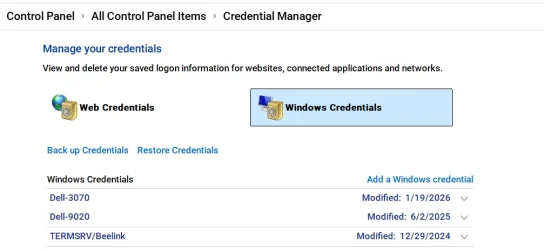
Create a Windows credential for an account & password on all computers on your network you are sharing files between. It must be a password, not a pin. While you can still use a pin to login to the device, you must restart the device and log into it using a password at least once for this to work.
Even if you are using the same MS account on both devices, a credential should be created.

In other words, Each computer should have a credential for each of the account on other computers it is sharing files or printers to/from.
You would have to do this under each user account on each computer for each user account on all the other computers.


To create a credential:
Go to Control Panel>Credentials> Windows Credentials>add a windows credential
In the "Internet or network address" box, type the name of the computer on the network that you want to access.
In the User name and Password boxes, type the user name and password that you use for that computer, and then click OK.

For example, here's mine. I have only one user account on 3 computers. They all use the same MS account. If I had 2 user accounts on each computer I was sharing files between, I would have double the amount of credentials than what I have. (3 computers X 2 accounts = 6 credentials)

 

Attachments

  • Screenshot 2026-07-04 014108.webp
    Screenshot 2026-07-04 014108.webp
    34.3 KB · Views: 1

My Computers My Computers

  • At a glance

    Windows 11 Pro 25H2 26200.8655i9-10900 10 core 20 threads32 gbnone-Intel UHD Graphics 630
    OS
    Windows 11 Pro 25H2 26200.8655
    Computer type
    PC/Desktop
    Manufacturer/Model
    Dell Optiplex 7080
    CPU
    i9-10900 10 core 20 threads
    Motherboard
    DELL 0J37VM
    Memory
    32 gb
    Graphics Card(s)
    none-Intel UHD Graphics 630
    Sound Card
    Integrated Realtek
    Monitor(s) Displays
    Benq 27
    Screen Resolution
    2560x1440
    Hard Drives
    2x1tb Solidigm m.2 nvme /External drives 512gb Samsung m.2 sata+2tb Kingston m2.nvme
    PSU
    500w
    Case
    MT
    Cooling
    Dell Premium
    Keyboard
    Logitech wired
    Mouse
    Logitech wireless
    Internet Speed
    so slow I'm too embarrassed to tell
    Browser
    #1 Edge #2 Firefox
    Antivirus
    Defender+MWB Premium
  • At a glance

    Windows 11 Pro 24H2 26200.8457AMD Ryzen 7 6800U32 gbintegrated
    Operating System
    Windows 11 Pro 24H2 26200.8457
    Computer type
    PC/Desktop
    Manufacturer/Model
    Beelink Mini PC SER5
    CPU
    AMD Ryzen 7 6800U
    Memory
    32 gb
    Graphics card(s)
    integrated
    Sound Card
    integrated
    Monitor(s) Displays
    Benq 27
    Screen Resolution
    2560x1440
    Hard Drives
    1TB Crucial nvme
    Keyboard
    Logitech wired
    Mouse
    Logitech wireless
    Internet Speed
    still too embarrassed to tell
    Browser
    Firefox
    Antivirus
    Defender
    Other Info
    System 3 is non compliant Dell 9020 i7-4770/24gb ram Win11 PRO 26200.8457
Back
Top Bottom