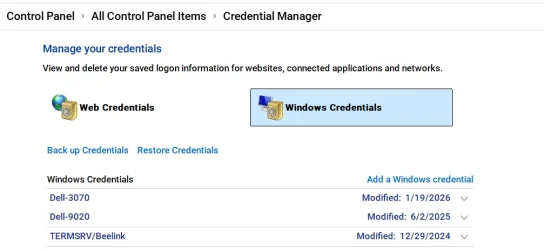
All kinds of networking issues are a result of Microsoft tightening security for Windows 11 24h2 and above. You might try this.
Create a Windows credential for an account & password on all computers on your network you are sharing files between. It must be a password, not a pin. While you can still use a pin to login to the device, you must restart the device and log into it using a password at least once for this to work.
Even if you are using the same MS account on both devices, a credential should be created.
In other words, Each computer should have a credential for each of the account on other computers it is sharing files or printers to/from.
You would have to do this under each user account on each computer for each user account on all the other computers.
To create a credential:
Go to Control Panel>Credentials> Windows Credentials>add a windows credential
In the "Internet or network address" box, type the name of the computer on the network that you want to access.
In the User name and Password boxes, type the user name and password that you use for that computer, and then click OK.
For example, here's mine. I have only one user account on 3 computers. They all use the same MS account. If I had 2 user accounts on each computer I was sharing files between, I would have double the amount of credentials than what I have. (3 computers X 2 accounts = 6 credentials)


 www.elevenforum.com
 ) if we know that.