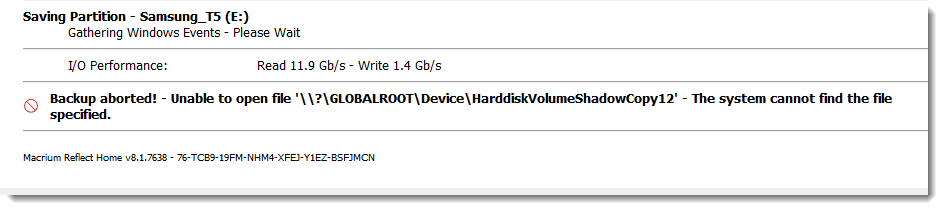
When a Macrium full backup runs, it fails with the following error:
Incremental and Differential backups run with no problem.
I reran the Full backup manually several times. One time it failed with a different error.
However the problem is always with the same removable USB SSD (Samsung_T5).
A user in this Dell forum thread was able to resolve the problem by "activating Bitlocker but leaving it turned off."
So I went to Control Panel -> System and Security -> BitLocker Drive Encryption:
Is Bitlocker "activated?" If I turn on BitLocker for the removable drive, won't BitLocker encrypt the drive? I really don't want to deal with passwords. What should I be doing here?
Windows Build/Version
Windows 11 Pro. Version 22H2 (OS Build 22621.2134)
My Computer
At a glance
Windows 1112th Gen Intel® Core™ i7- 1270032 GB, 2 x 16 GB, DDR5, 4400 MHzNvidia RTX A2000, 6GB, 4mDP to DP adapter (Pr...
OS
Windows 11
Computer type
PC/Desktop
Manufacturer/Model
Dell Precision 3660 Tower Workstation
CPU
12th Gen Intel® Core™ i7- 12700
Motherboard
yes
Memory
32 GB, 2 x 16 GB, DDR5, 4400 MHz
Graphics Card(s)
Nvidia RTX A2000, 6GB, 4mDP to DP adapter (Precision 3660T)
Monitor(s) Displays
BenQ SW2700PT
Screen Resolution
2560x1440
Hard Drives
Two 1TB PCIe NVME™ Class 40 M.2 SSD drives in RAID 1 configuration
PSU
500W (80 Plus Platinum) PSU, RPL and ADL Compatible
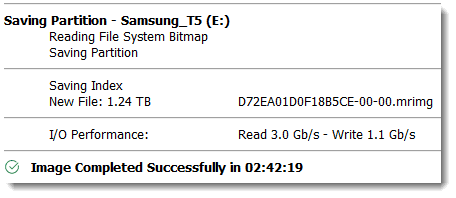
I should have mentioned that one full backup did succeed. It was right after I migrated from Windows 10 PC to my current Windows 11 PC in early July. After three failed attempts, the last one succeeded:
But since then, no full backup succeeded. My notes do not show that I did anything special that one time- I just kept rerunning the Full backup until it succeeded. That's not a good long-term solution.
My Computer
At a glance
Windows 1112th Gen Intel® Core™ i7- 1270032 GB, 2 x 16 GB, DDR5, 4400 MHzNvidia RTX A2000, 6GB, 4mDP to DP adapter (Pr...
OS
Windows 11
Computer type
PC/Desktop
Manufacturer/Model
Dell Precision 3660 Tower Workstation
CPU
12th Gen Intel® Core™ i7- 12700
Motherboard
yes
Memory
32 GB, 2 x 16 GB, DDR5, 4400 MHz
Graphics Card(s)
Nvidia RTX A2000, 6GB, 4mDP to DP adapter (Precision 3660T)
Monitor(s) Displays
BenQ SW2700PT
Screen Resolution
2560x1440
Hard Drives
Two 1TB PCIe NVME™ Class 40 M.2 SSD drives in RAID 1 configuration
PSU
500W (80 Plus Platinum) PSU, RPL and ADL Compatible
Samsung 980 Pro 1TB
Samsung 970 EVO Plus 2TB
Samsung 870 EVO 500GB SSD
PSU
Corsair HX750
Case
Cougar MX330-G Window
Cooling
Thermalright Frozen Edge 240 Black AIO
Internet Speed
350Mbps
Browser
Firefox
Antivirus
Windows Security
System Three
Win 11 Pro 25H2 26200.8894
ASUS PRIME Z370-P II BIOS 3004 7/12/21
Intel Core i7-8700 CPU @ 3.20GHz
32GB DDR4 RAM (4x8)
iGPU Intel UHD Graphics 630
Mid-Tower Desktop
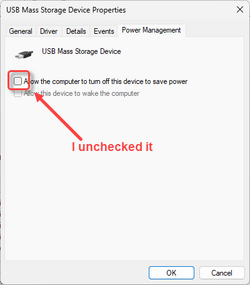
I may have discovered a (partial?) solution. At least it produces a different result. The Samsung_T5 USB SSD may go to sleep when it's not being used, and if so, maybe Macrium doesn't give it enough time to wake up. I unchecked "Allow the computer to turn off this device to save power."
Then I manually ran another Full backup. This time I did not get the "Volume Bitmap is Null" error, which usually occurres about 20 minutes into the backup. The backup ran for more than four hours. But since I could see no sign of progress, I killed the Macrium tasks.
After rebooting I ran another Full backup. This one ended after the usual 20 minutes, but with a different error message
Is this shadow copy a file that is supposed to be on the Samsung_T5?
My Computer
At a glance
Windows 1112th Gen Intel® Core™ i7- 1270032 GB, 2 x 16 GB, DDR5, 4400 MHzNvidia RTX A2000, 6GB, 4mDP to DP adapter (Pr...
OS
Windows 11
Computer type
PC/Desktop
Manufacturer/Model
Dell Precision 3660 Tower Workstation
CPU
12th Gen Intel® Core™ i7- 12700
Motherboard
yes
Memory
32 GB, 2 x 16 GB, DDR5, 4400 MHz
Graphics Card(s)
Nvidia RTX A2000, 6GB, 4mDP to DP adapter (Precision 3660T)
Monitor(s) Displays
BenQ SW2700PT
Screen Resolution
2560x1440
Hard Drives
Two 1TB PCIe NVME™ Class 40 M.2 SSD drives in RAID 1 configuration
PSU
500W (80 Plus Platinum) PSU, RPL and ADL Compatible
Another Full backup ran to completion today. I ran it manually immediately after a Differential backup ran. I'm not saying that had anyting to do with it, but it is interesting.
I submitted a ticket to Macrium support and will let you know what I find out.
My Computer
At a glance
Windows 1112th Gen Intel® Core™ i7- 1270032 GB, 2 x 16 GB, DDR5, 4400 MHzNvidia RTX A2000, 6GB, 4mDP to DP adapter (Pr...
OS
Windows 11
Computer type
PC/Desktop
Manufacturer/Model
Dell Precision 3660 Tower Workstation
CPU
12th Gen Intel® Core™ i7- 12700
Motherboard
yes
Memory
32 GB, 2 x 16 GB, DDR5, 4400 MHz
Graphics Card(s)
Nvidia RTX A2000, 6GB, 4mDP to DP adapter (Precision 3660T)
Monitor(s) Displays
BenQ SW2700PT
Screen Resolution
2560x1440
Hard Drives
Two 1TB PCIe NVME™ Class 40 M.2 SSD drives in RAID 1 configuration
PSU
500W (80 Plus Platinum) PSU, RPL and ADL Compatible